

Description
Order List Enhancer adds the order insights you actually need to the WooCommerce admin – right where you manage orders, without opening each one.
Spot returning customers and accidental duplicates.
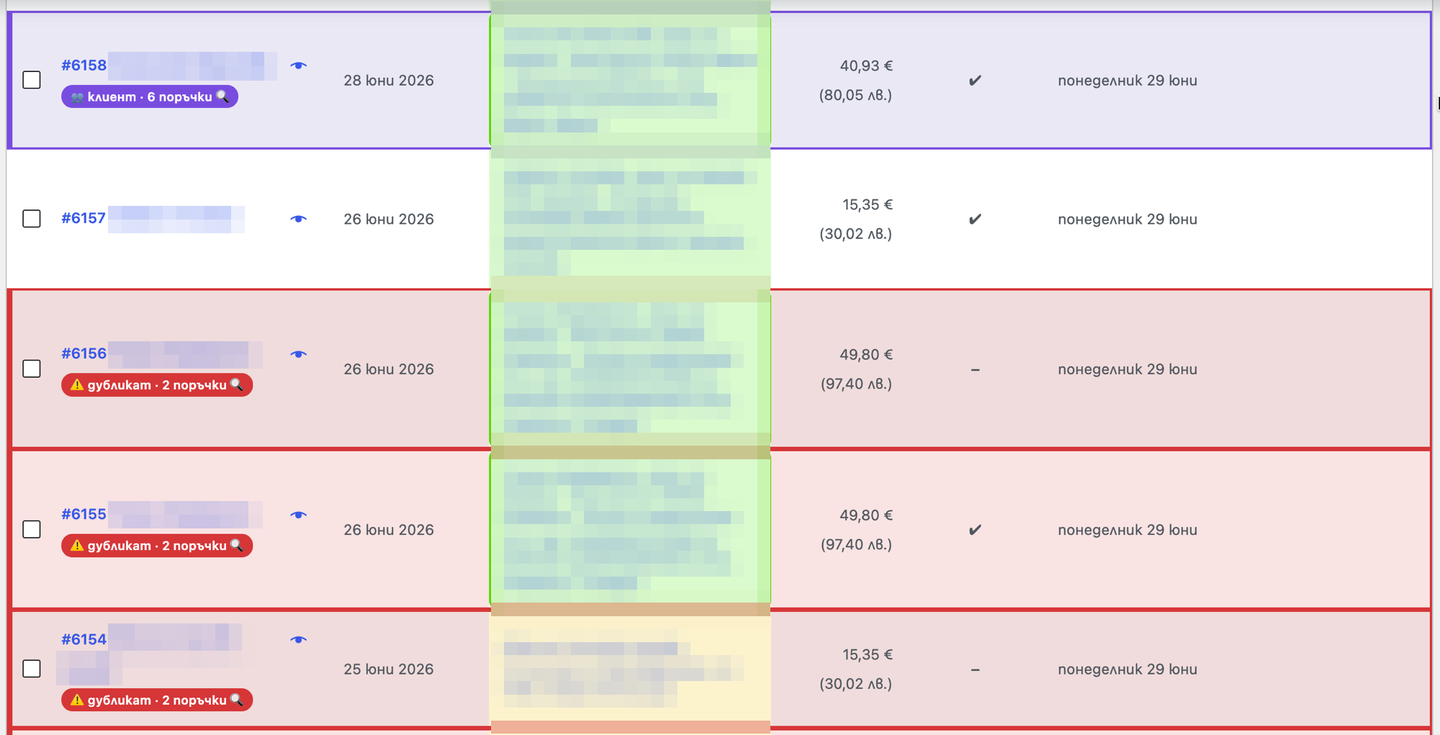
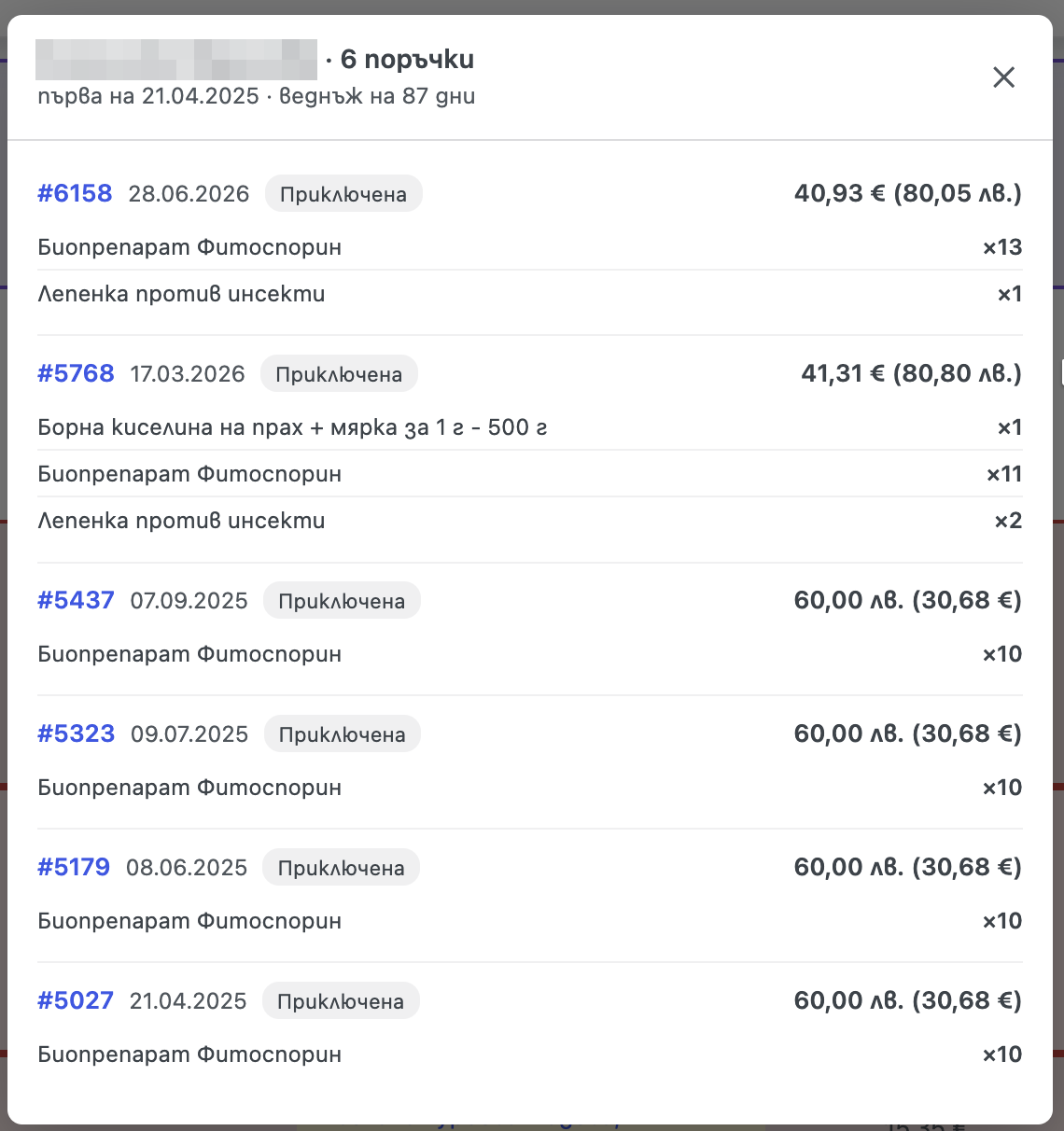
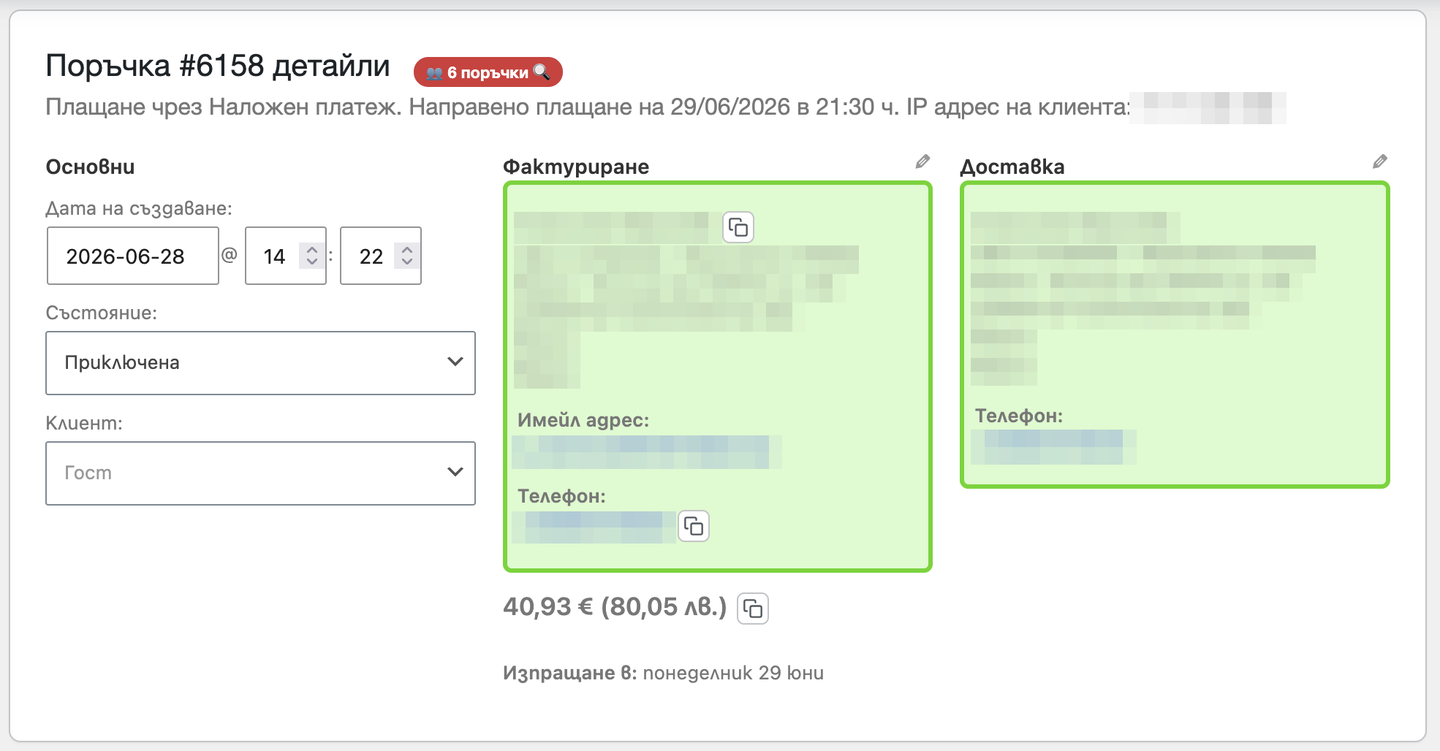
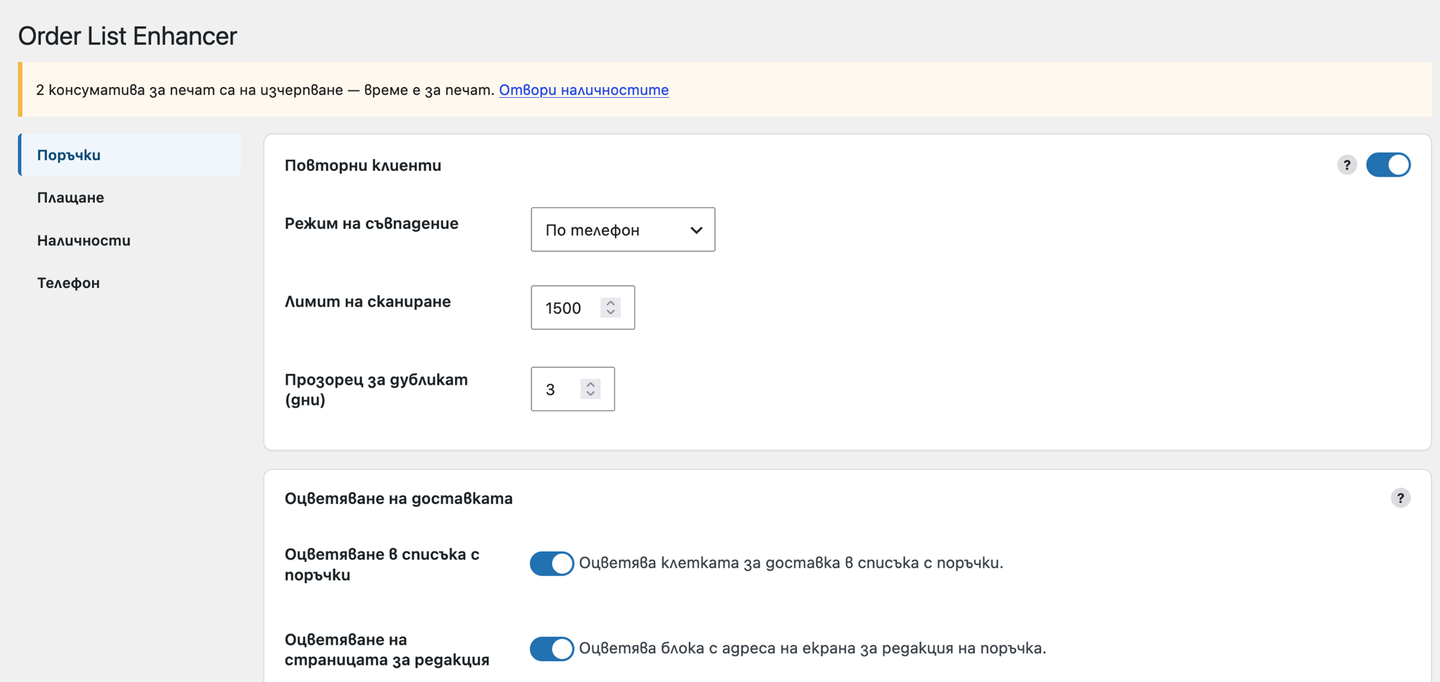
As you browse the orders list, orders that belong to the same customer (matched by phone, by name, or by both) are outlined in a shared color and marked with a badge. Matching looks across every order status, so a repeat customer is recognised even if their previous order is still processing or was never completed. Click the badge – on the list or from inside an order – to open a popup with that customer’s history: each order links to itself and shows its date, items, total and status, plus a quick summary (first order date and how often they buy). Orders placed within a few days of each other, or several still in processing, are flagged in red as likely duplicates, so you can catch double orders before you ship them.
Color your delivery column.
Define simple “keyword color” rules (for example your couriers, or pickup vs. delivery to address) and the “Ship to” cell in the list – and the address block on the order screen – is colored automatically, so you can scan deliveries at a glance.
Work faster inside an order.
Show the order total next to the billing address, copy the customer’s name, phone or total to the clipboard with one click, and tidy phone numbers for display (leading 00 +, add the country code when it is missing) – all without ever changing what is stored in the database.
Convert order “extras” into real products.
If you sell add-ons through Product Add-Ons or Checkout Add-Ons, map each extra to a product and Order List Enhancer turns it into a real line item the moment the order is created – priced at exactly what the customer paid (the order total never changes), counted in stock, with an admin-only note showing which extra it came from (never printed on invoices). No more moving an order to an editable status and rebuilding it by hand. Off by default.
Pick a default bulk action.
Choose which entry is pre-selected in the orders-list bulk-actions menu; the list of choices fills itself from your own orders screen.
Flag high-value orders.
Set order-total thresholds, each with its own color. When an order’s total reaches a threshold, its row in the list – and its address panel on the order screen – gets a colored ring, so big orders stand out at a glance. The ring is independent of the shipping color (both show at once), and when several thresholds apply the highest one wins. Off by default.
Validate phone numbers at checkout.
Turn on checkout phone validation and customers get instant, clear feedback on whether their Bulgarian number is valid – and why – as they type, backed by server-side enforcement you can set to warn (let the order through but flag it) or block (stop it until fixed). Orders with an unusable number are flagged on the order screen and with a badge in the list, so you catch them before you ship. Off by default.
Open many orders without crashing your shop.
Tick the orders you want to review and click “Open selected” – each one opens in its own tab, one every few seconds (you set the interval), so only a single order ever loads at a time. A Stop button and a live “3 / 12” counter keep you in control. Handy when opening many orders at once would overwhelm the server. (Your browser must allow pop-ups for the admin site.)
Stop accidental double orders at checkout.
Optionally guard the checkout against a customer placing the same order twice: if an identical recent order (same phone and cart) is detected within a short window, the plugin either asks the customer to confirm in a popup or blocks the duplicate outright – your choice. Off by default.
Explain the delivery date at checkout.
If your checkout has a delivery-date field, show a clear, highlighted note above it (for example, that the date is when the order ships, not when it arrives), plus an optional “we’re away until…” vacation banner that hides itself once the date passes. Fully editable text. Off by default.
Never run out of stickers or printed instructions.
Track the printed consumables you pack with each order: give every product a sticker stock and group products under shared “instruction sheets.” As orders come in, stock is drawn down automatically – and restored if an order is cancelled or refunded – with per-type low thresholds that warn you on a dedicated stock page, an admin banner, an orders-list badge and an email when it is time to print more. Off by default.
See order comments without opening the order.
Optionally show the customer’s checkout note and the most recent internal admin note right under the order number in the orders list, so special instructions are never missed. Long notes truncate to a couple of lines – hover or click to read the rest. Off by default.
Built to fit in.
Every feature has its own on/off switch on a tabbed settings page that saves instantly, with no page reload, a color picker for every color, and a Settings link right on the Plugins screen. Everything runs in the admin only, for users who can edit orders – no external services and no tracking. Compatible with WooCommerce HPOS (High-Performance Order Storage) and sequential order numbers, and fully translatable (English and Bulgarian included).
Screenshots
Installation
- Upload the plugin to
/wp-content/plugins/ordelist/or install it via the Plugins screen. - Activate it.
- Configure it under WooCommerce Order List Enhancer.
FAQ
-
Does it work with HPOS?
-
Yes. It declares compatibility with custom order tables and queries them directly; it also falls back to the legacy orders screen.
-
Does duplicate detection only look at the current status tab?
-
No. It scans recent orders across all statuses (except trash and drafts), so returning customers are detected even when an earlier order is unfinished.
-
Does it send data anywhere?
-
No. It only reads orders in your admin and renders the UI locally.
Reviews
There are no reviews for this plugin.
Contributors & Developers
“Ordelist – Order List Enhancer for WooCommerce” is open source software. The following people have contributed to this plugin.
Contributors
Translate “Ordelist – Order List Enhancer for WooCommerce” into your language.
Interested in development?
Browse the code, check out the SVN repository, or subscribe to the development log by RSS.
Changelog
1.0.69
- Extras conversion: a converted add-on now carries a proportional slice of the source line’s tax (keeping the order’s total tax attribution correct), and its stock is tagged so WooCommerce restocks it if the order is cancelled or refunded.
1.0.68
- Duplicate-order guard no longer blocks a customer’s own retry after a failed or abandoned payment, and its checkout message no longer reveals another order’s number. Print consumables: a sticker attached to a variable product’s parent is now counted for its variations. Warranty batches: stock restored on cancellation now reverses exactly what was consumed.
1.0.67
- Purchase planning: each year keeps a fixed chart color regardless of the product or how many years it has, so the legend looks the same on every load.
1.0.66
- All product-search fields across the plugin (planning page, warranty batches, print consumables, extras mapping) sort their results alphabetically via a shared module.
1.0.65
- Settings save: documented for static analysis that the field-reading helpers run only after the nonce check, clearing the remaining Plugin Check warnings.
1.0.64
- Purchase planning: the product search sorts its results alphabetically on the client (browsers reorder numeric JSON keys, so a server-side sort never reached the screen) and leaves out bundle products.
1.0.63
- Purchase planning: the product search lists results alphabetically and leaves out bundle products, whose components are planned individually.
1.0.62
- Purchase planning: a “Sold in the period” row sits next to the period forecast so plan and reality can be compared, and the hand-tuned coefficient and margin can be saved per product and reference year – picking that year loads them back exactly as saved.
1.0.61
- Purchase planning: the recommendation now answers whether the stock lasts to the end of the year – each batch only covers demand that arrives before its expiry date, so stock that expires too early triggers a purchase even when the total quantity looks sufficient.
1.0.60
- Purchase planning: expired batches show as a separate red row instead of disappearing, and when no batches are tracked the sellable stock falls back to the WooCommerce inventory so the recommendation accounts for what is already on the shelf.
1.0.59
- Purchase planning: the panel shows two stable forecasts side by side, for the whole selected period and to the end of the year, both computed only from reference-year sales so plan and reality can be compared.
1.0.58
- Purchase planning: the recommendation now covers only the remaining days of the period (nothing is ordered for days already past); presets are month, half-year and year-to-date; the date picker has proper styling; the product search field is wider; switching products hides the previous product’s numbers while loading.
1.0.57
- Security hardening for the WordPress.org review: every POST field is sanitized at the moment it is read, and all generated HTML is passed through wp_kses with explicit allowlists when echoed.
1.0.56
- All plugin date fields now use a dd/mm/yyyy date picker. Purchase planning: the month/quarter/half-year presets count back from the chosen end date (default today), and periods longer than a year are compared by their first 365 days, with a note.
1.0.55
- Purchase planning: new per-variation table with sold amounts (pieces and kg) for the selected slice, current sellable stock, and a quick stock-entry form (amount plus optional best-before date) that stores warranty batches; the loading spinner is now a small indicator next to the product picker.
1.0.54
- Purchase planning: weights of deleted variations are recovered from order history and, when the weight field is empty, from the amount in the product name; the chart and tables stay hidden until a product is picked, with a spinner while data loads.
1.0.53
- Text domain renamed to
ordelistto match the plugin slug assigned on WordPress.org; translation files renamed accordingly. No functional changes.
1.0.52
- Purchase planning: multiple weightless variations collapse into one expandable note, and the per-year totals table hides years with no sales in the selected period.
1.0.51
- Purchase planning: the current-year curve now continues past today as a dashed projection (reference-year pace × coefficient), and the chart’s X axis marks the start of each month instead of arbitrary dates.
1.0.50
- Print consumables: attach printable files (PDF/JPG/PNG from the Media Library) to any sticker or instruction sheet – open them in one click from the stock page; low-stock emails now include direct links to the files that need printing.
1.0.49
- All internal identifiers (options, database tables, meta keys, AJAX actions, script handles, classes, constants) renamed from the 3-character
ole_prefix toordelist_, per the WordPress.org guideline requiring prefixes of at least 4 characters. No functional changes.
1.0.48
- Renamed to “Ordelist – Order List Enhancer for WooCommerce” per the WordPress.org plugin-naming policy (generic names must be prefixed with a unique term). No functional changes.
1.0.47
- Plugin Check: consumables DB layer now passes table names through
%iprepared placeholders (requires WordPress 6.2+, which WooCommerce 8 already needs); direct-query use on the plugin’s own tables is documented in place. Addedbin/build-zip.shso release zips never include dev files.
1.0.46
- Improved: every numeric setting now states its allowed range, default and clamping behavior right in its help text (scan limit, duplicate windows, open-interval, low-stock thresholds), and the rule/mapping tables explain which rows are silently removed on save.
1.0.45
- New: each copy button on the order edit screen (name, phone, total) now has its own on/off switch instead of one shared toggle.
- Fix: saving settings no longer fails after the settings tab has been open for over a day – the expired security token is refreshed and the save retried automatically; a clear “session expired” message shows if that is not possible.
- Fix: the shipping-coloring and total-threshold rule tables no longer overflow the settings card on narrow screens.
- Improved: the delivery-date notice and vacation-banner text fields now show the actual default texts instead of being blank, so what customers see at checkout is explicit.
- i18n: checkout duplicate-guard messages are now English in the source (translated output unchanged); translation template and Bulgarian catalog refreshed to 100% coverage.
1.0.44
- New: show the order comment (customer note + last admin note) right in the orders list, under the order number, with a per-feature toggle. Click a note to expand it.
1.0.43
- Print consumables: the sticker “Add” button stays disabled until you pick a product/variation.
1.0.42
- Print consumables: table headers are centered.
1.0.41
- Print consumables: sticker action buttons stay on one line; the low-stock admin banner no longer shows on the consumables page itself (it already lists everything).
1.0.40
- Print consumables: stickers can now be deleted too (delete button, matching instruction sheets); unified the two tables’ actions column and field widths.
1.0.39
- Print consumables: the low/negative highlight now updates instantly after you change stock (no reload needed), and the green “saved” flash no longer fights the highlight color.
1.0.38
- Print consumables: fixed low/negative stock highlighting on the stickers table and added it to instruction sheets; the low-stock email now also fires when you set/add a consumable below its threshold on the stock page (not only from orders).
1.0.37
- Print consumables page: the top table is now “Stickers” only (with an inline “add a product/variation” row to set sticker stock right there); instruction sheets are managed only in their own section – no more duplication.
1.0.36
- Print consumables: the “Add” button for a new instruction sheet stays disabled until you enter a name, so an empty sheet can’t be submitted.
1.0.35
- Print consumables: adding/saving an instruction sheet updates the page in place (no slow full reload); the stock table stays in sync.
1.0.34
- “Open selected one-by-one”: default interval is now 7 seconds (was 20).
1.0.33
- Settings page redesigned: 4 tabbed categories, feature cards with on/off switches, tightened copy.
1.0.32
- New: Print consumables – track sticker + instruction-sheet stock, auto-decrement at order placement with restore, per-type low thresholds, stock page, admin banner, order-list badge and email.
1.0.31
- New: checkout duplicate-order guard – detect an identical recent order (same phone + cart) within a short window and either ask the customer to confirm or block the duplicate. Off by default.
1.0.30
- Delivery-date notice: place the note directly below the delivery-date field and hide the third-party field note for a cleaner checkout.
1.0.29
- New: checkout delivery-date notice – a highlighted, editable note above the delivery-date field (e.g. ship-date vs. arrival), plus an optional auto-expiring vacation banner. Off by default.
1.0.28
- New: “Open selected one-by-one” button on the orders list – opens each checkbox-selected order’s edit page in its own tab, one every N seconds (editable, default 20), with a Stop button and a progress counter, so the server never loads more than one order at a time. Needs pop-ups allowed for the site. On by default.
1.0.24
- New: optional order-total coloring – set value thresholds, each with a color; an order whose total reaches a threshold gets a colored ring on its list row and its order-screen address panel (highest threshold wins). Drawn on top of the shipping color, so both stay visible. Off by default.
1.0.19
- Extras products: a quantity extra such as “2 бр …” now converts to a product line with quantity N (price unchanged), so the picked quantity is correct.
1.0.18
- Checkout phone validation: the phone field now shows the standard WooCommerce red “invalid” state (green when valid), the message is clearly styled, and all validation messages are translated to Bulgarian.
1.0.17
- New: optional checkout phone-number validation (Bulgarian numbers). Live ✓/✗ feedback under the phone field as the customer types, plus server-side enforcement – choose “warn” (allow the order, flag it) or “block” (stop it until fixed). Invalid numbers are flagged on the order page and with a badge in the orders list. Off by default.
1.0.16
- New: convert add-on “extras” (Product Add-Ons & Checkout Add-Ons) into real product line items at order creation, priced at what the customer paid – net-zero (order total unchanged), idempotent, with admin-only provenance under each converted line that never reaches the invoice. Off by default; map each extra to a product in Settings.
- New: “default bulk action” setting that pre-selects an action in the orders-list bulk menu, self-populated from your orders screen.
- Details popup: the “first order · frequency” summary now wraps to its own line, and the loading spinner is centered.
1.0.13
- Customer popup also opens from inside an order (badge in the order title).
- Visual color picker for all color fields; centered rule-table headers.
- Match mode (phone / name / name + phone); configurable duplicate window and total decimal separator.
- Display-only phone normalization; copy-to-clipboard buttons for name, phone and total.
- Settings link on the Plugins screen; passes Plugin Check with no errors/warnings.
1.0.8
- Repeat-customer popup is now also available from inside an order (edit screen).
- Configurable match mode (phone / name / name + phone), duplicate window, and total decimal separator.
- Copy-to-clipboard buttons for name, phone and total; display-only phone normalization.
- Details modal loads on demand (AJAX) with a loading animation; duplicate flag is evaluated per order.
- WordPress.org readiness: translators comments, headers, i18n loading and packaging cleanups.
1.0.0
- Initial release: repeat-customer highlighting (all statuses) with a details modal; configurable shipping coloring in the list and on the order edit screen; order total on the edit screen; per-feature toggles on an AJAX-saving settings page; i18n (English + Bulgarian); HPOS support.