

Description
Onsite Spam Guard blocks spam on the forms your visitors actually use — WordPress comments, WooCommerce product reviews, and Jetpack contact form blocks — without sending anything to a third-party service, requiring an API key, or putting a CAPTCHA in front of your users.
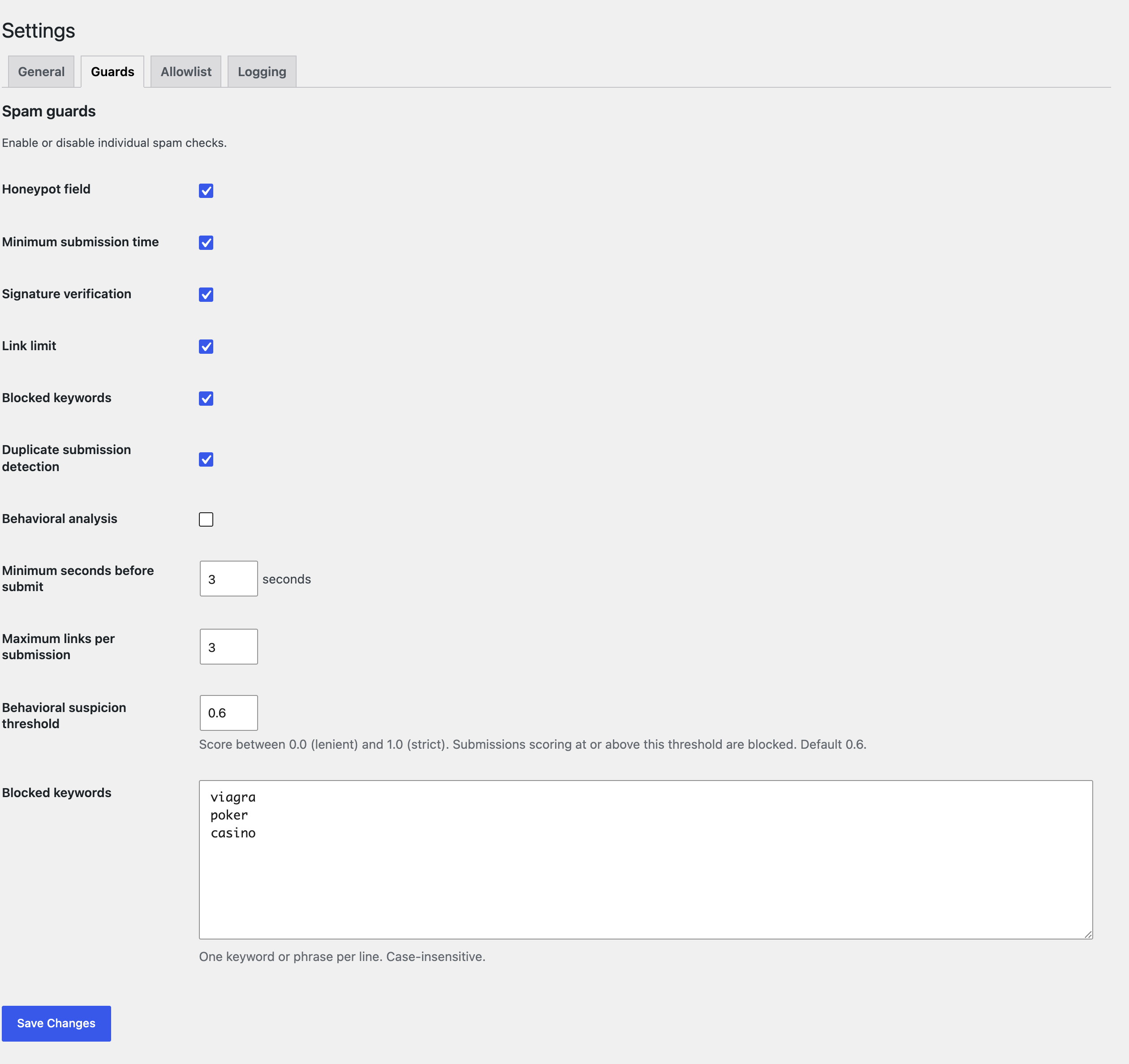
Protection is built from a pipeline of independent guards. Each guard is a small, focused check (a hidden honeypot field, a submit-speed gate, a keyword filter, and so on). Guards run in priority order, and the first one to fail blocks the submission. Every guard can be toggled and tuned from a single settings page, and every block can be logged for review.
Spam guards
- Honeypot — a hidden field that bots fill in but humans never see.
- Duplicate detection — rejects identical submissions sent within a short window.
- Time gate — rejects submissions completed faster than a human could plausibly type.
- Signature — requires a server-signed token proving the form was served by this site, deterring automated cross-site posting.
- Link limit — flags submissions that contain too many URLs.
- Keyword block — rejects submissions matching a configurable blocklist of words or phrases.
- Behavioral analysis (optional) — scores mouse movement, clicks, and time on page to spot bot-like interaction.
Why you might choose it
- No external services. Nothing leaves your site. No accounts, no API keys, no per-submission fees.
- No CAPTCHA. Protection is invisible to legitimate visitors.
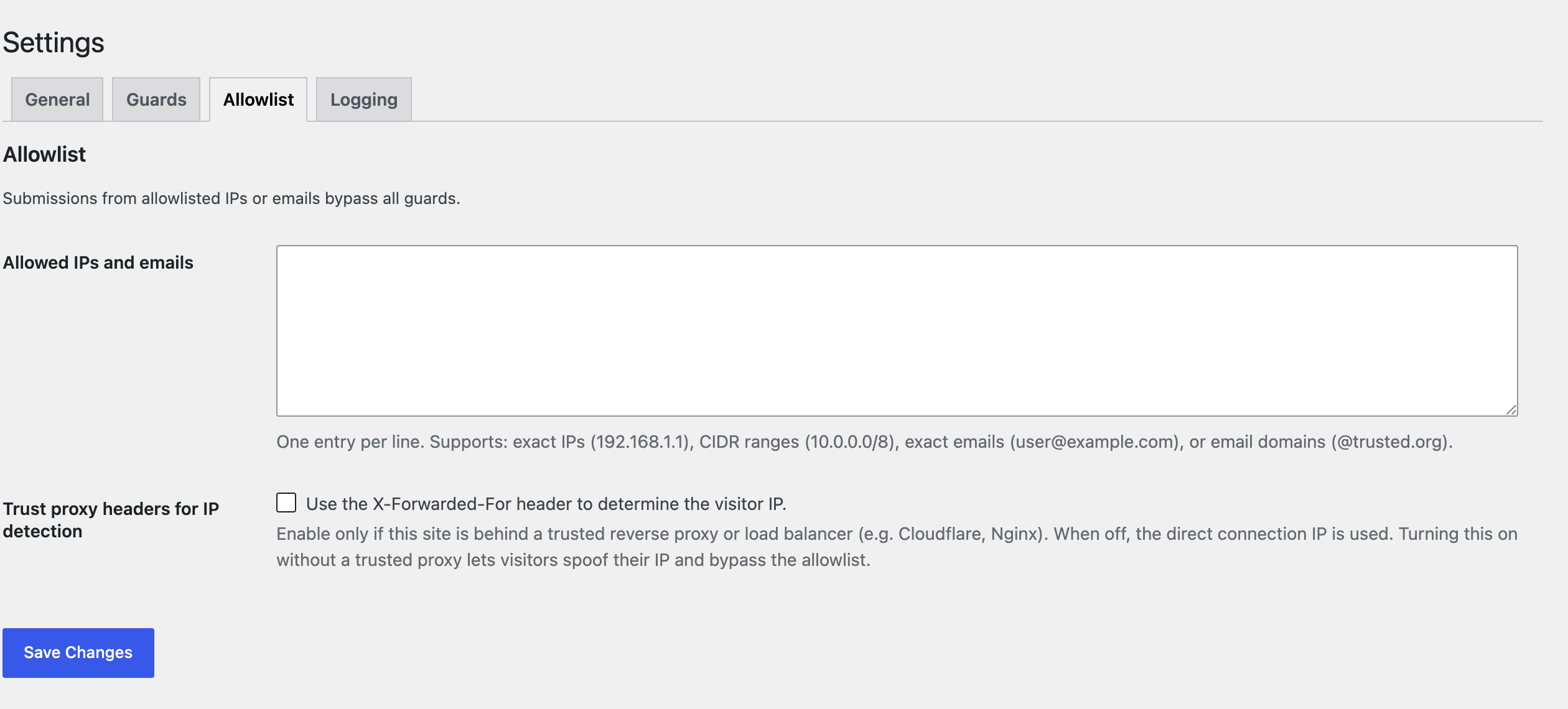
- Allowlist. Trusted IPs, CIDR ranges, email addresses, and email domains bypass every guard.
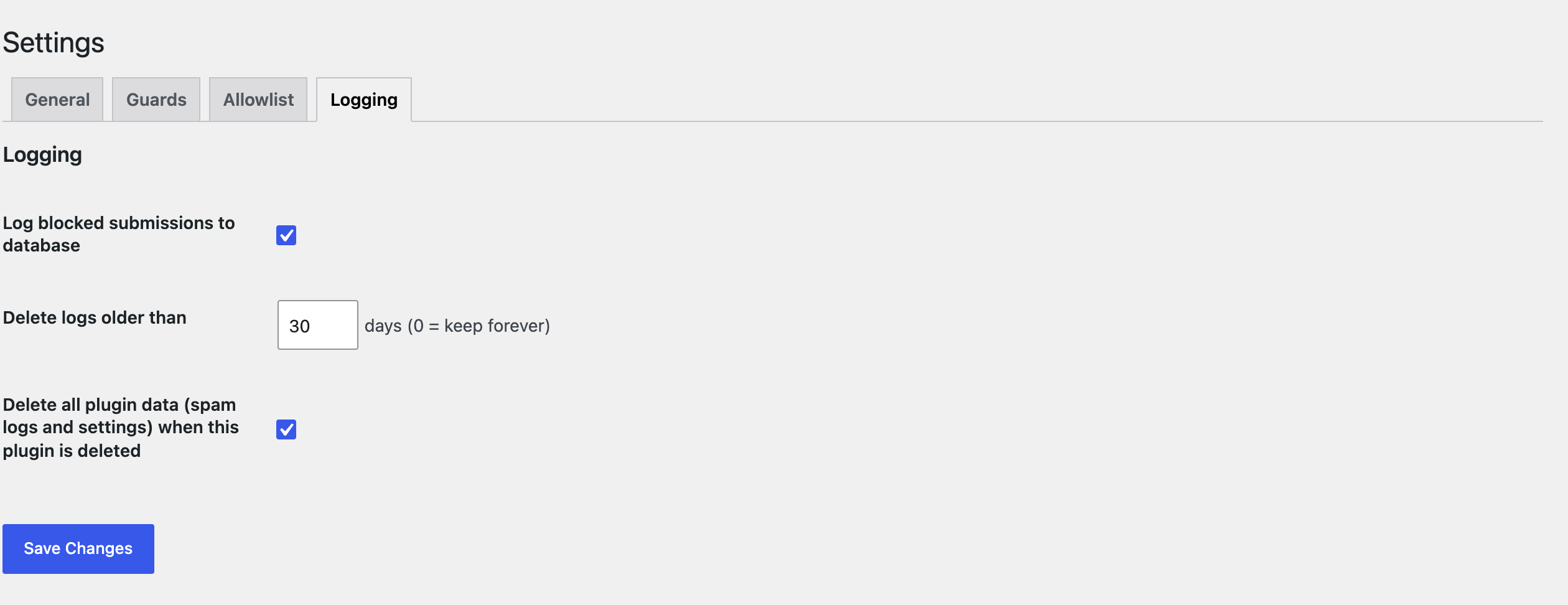
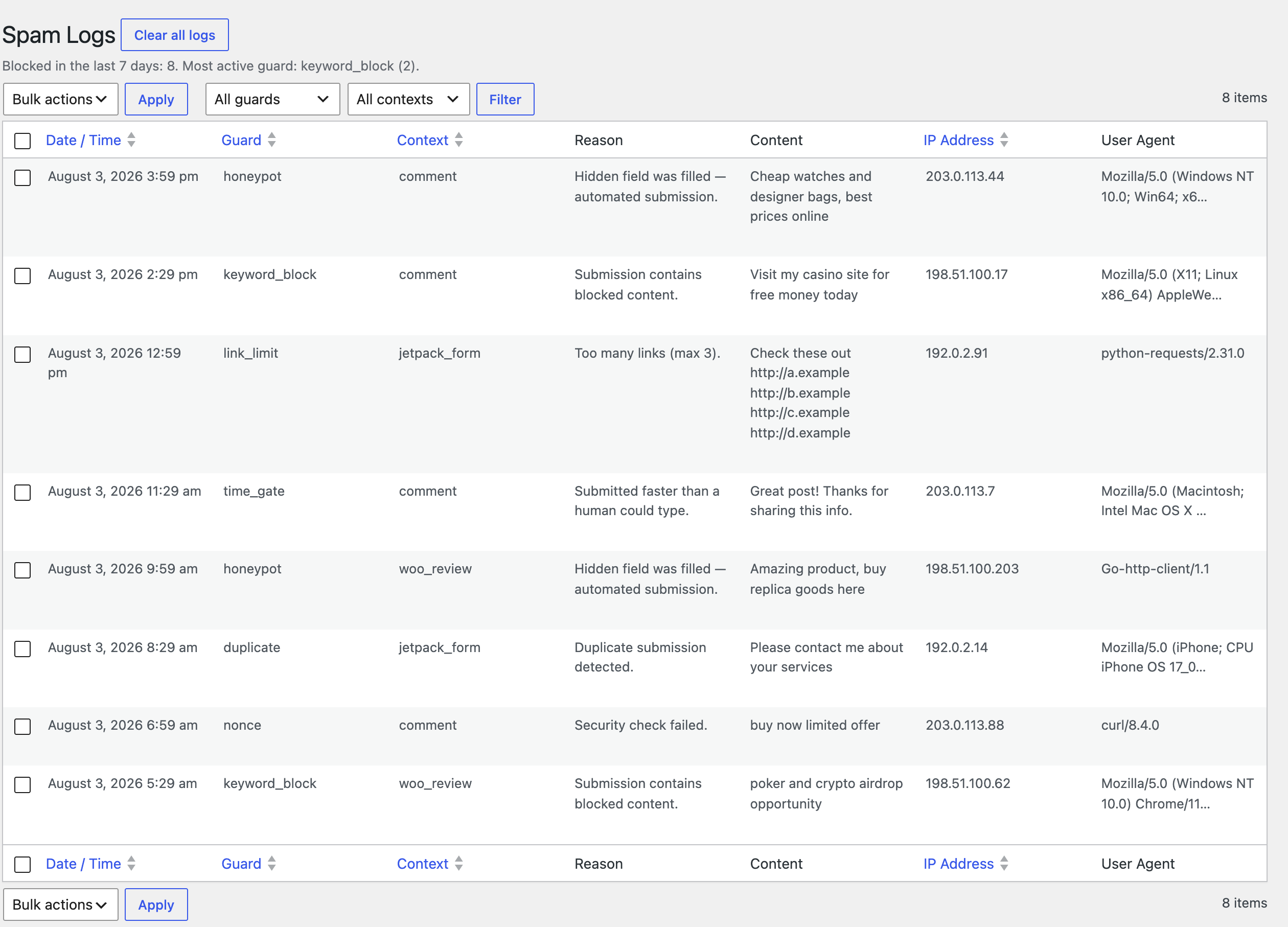
- Logging with retention. Blocked submissions are recorded in a dedicated table with a paginated admin viewer, and old entries are pruned automatically on a schedule you control.
- Privacy-aware. The plugin registers suggested privacy-policy text describing exactly what it records.
- Modern, dependency-free code. PHP 8.2+, vanilla front-end JavaScript (no jQuery), and no runtime third-party libraries.
Works with
- WordPress comments (always).
- WooCommerce product reviews (when WooCommerce is active).
- Jetpack contact form blocks (when Jetpack is active).
Screenshots
Installation
- Upload the
onsite-spam-guardfolder to/wp-content/plugins/, or install it through Plugins Add New. - Activate the plugin through the Plugins menu in WordPress.
- Go to Spam Guard Settings to choose which form types to protect and to enable or tune individual guards.
- Review anything that gets blocked under Spam Guard Spam Logs.
No further configuration is required — sensible defaults are applied on activation.
FAQ
-
Does this send my data to any external service?
-
No. Every check runs on your own server. Nothing about a submission is sent anywhere outside your site.
-
Will legitimate visitors see a CAPTCHA or extra step?
-
No. All protection is invisible. The honeypot field is hidden, and the timing and behavioral checks happen in the background.
-
What does it store, and for how long?
-
When a submission is blocked (and logging is enabled), the plugin records the guard that blocked it, the form context, the reason, a short excerpt of the content, the visitor IP address, and the browser user-agent. Entries older than the retention window (default 30 days, configurable; set to 0 to keep them indefinitely) are pruned automatically. The plugin also registers suggested privacy-policy text you can add to your site’s policy.
-
I’m behind Cloudflare or a load balancer and the wrong IP is logged.
-
By default the plugin uses the direct connection IP, because forwarded headers can be spoofed to bypass the allowlist. If your site sits behind a trusted reverse proxy, enable Trust proxy headers for IP detection under Spam Guard Settings Allowlist.
-
A legitimate submission was blocked. What do I do?
-
By default a blocked comment or review is placed in the spam queue (Comments Spam) rather than being rejected outright, so you can restore a false positive with one click — nothing is lost. Open Spam Guard Spam Logs to see which guard blocked it and why, then loosen that guard on the settings page — for example, raise the link limit, lower the behavioral threshold, or add the sender to the allowlist. If you would rather reject blocked comments with an error message, enable that option under Spam Guard Settings General.
-
Does it replace WordPress’s built-in comment moderation?
-
No — it complements it. Onsite Spam Guard’s guards run before WordPress’s own comment checks, and those built-ins still run underneath: the duplicate-comment check, the comment flood throttle, the Disallowed Comment Keys blocklist, and the “hold a comment with this many links” setting (all under Settings Discussion). Its Keyword, Link limit, and Duplicate guards overlap those, so you can rely on either or both. What it adds on top is the honeypot, timing, signature, and behavioral checks core has no equivalent for, one settings screen with logging, and protection for WooCommerce reviews and Jetpack contact forms — not just comments.
-
Does it work with caching plugins?
-
Yes. The timing and authenticity checks use a token whose signature does not expire (unlike a WordPress nonce, which would go stale on a cached page and block legitimate visitors), so full-page caching does not produce false positives.
-
Does removing the plugin clean up after itself?
-
By default, yes — deleting the plugin (not just deactivating it) drops its database table, removes all of its options, clears its scheduled task, and purges its transients, on every site of a multisite network. If you would rather keep your settings and logs (for example, before reinstalling), turn off Delete all plugin data when this plugin is deleted under Spam Guard Settings Logging first.
Reviews
There are no reviews for this plugin.
Contributors & Developers
“Onsite Spam Guard” is open source software. The following people have contributed to this plugin.
Contributors
Translate “Onsite Spam Guard” into your language.
Interested in development?
Browse the code, check out the SVN repository, or subscribe to the development log by RSS.
Changelog
1.1.2
- Renamed to Onsite Spam Guard. The previous name was too generic and overlapped existing plugins in the directory. Your settings and logs are unaffected by the rename.
- Security hardening: the spam-log bulk-delete action now checks the current user’s capability directly, in addition to verifying the nonce.
1.1.1
- Fixed: Jetpack contact form submissions could be wrongly flagged. The plugin inspected everything Jetpack passes its spam filter, which includes site and server metadata — the site address, the referrer, the page permalink, and request headers. Those count as links and text, so a legitimate submission containing no links of its own could still exceed the link limit, and keywords could match against the browser’s user-agent string. Only what the visitor actually submitted is inspected now.
- Fixed: the sender’s name and email were not read from Jetpack submissions, so the keyword guard never checked them and duplicate detection was less accurate.
1.1.0
- Settings are now organized into tabs (General, Guards, Allowlist, Logging) to reduce scrolling.
- New setting to control whether all plugin data is removed when the plugin is deleted (on by default).
- Uninstall now removes the plugin’s table, options, transients, and scheduled task on every site of a multisite network, not just the main site.
1.0.1
- simple_spam_shield_check() accepts the hidden honeypot/token/behavioral fields explicitly, so REST/AJAX endpoints (JSON body, empty $_POST) can pass them from the request.
- The time-gate and signature guards skip rather than block when no token is supplied for a custom context, so content-only integrations are not falsely rejected. Built-in comment and review forms still require the token.
1.0.0
- Initial release.
- Guard pipeline: honeypot, duplicate detection, time gate, signature, link limit, keyword block, and optional behavioral analysis.
- Integrations for WordPress comments, WooCommerce product reviews, and Jetpack contact form blocks.
- Allowlist supporting IPs, CIDR ranges, email addresses, and email domains, with an optional trusted-proxy mode for IP detection.
- Blocked comments and reviews are routed to the spam queue by default (recoverable), with an option to reject them outright instead.
- Database-backed logging with a paginated admin viewer and a configurable auto-purge retention window.
- Public integration API (simple_spam_shield_check / simple_spam_shield_protect_selector / simple_spam_shield_field_markup) so other plugins can protect their own forms.
- Suggested privacy-policy content and a clean uninstall routine.
- Developed by Jerome Wincek, with engineering assistance from Anthropic’s Claude.