
Description
Most WordPress sites run 20–40 plugins. That means 20–40 things that slow your site, conflict with each other, and need updating every week.
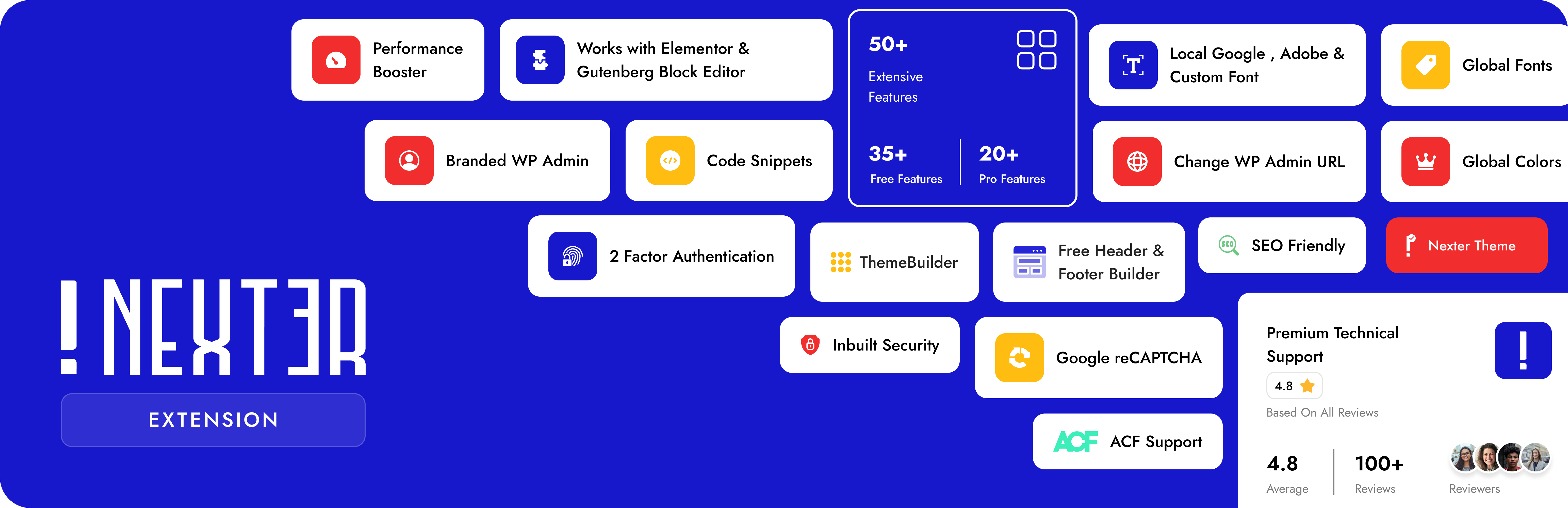
Nexter Extension fixes that. One plugin. 50+ features. Every module is toggle on/off — nothing loads unless you need it. Pure Vanilla JS, zero jQuery.
It’s the one WordPress plugin that handles your SEO, security, performance, email delivery, theme design, code management, and admin cleanup — all in one place, completely free to start.
👉 Website | All Features | Nexter SEO | Free vs Pro | Pricing | Docs | Roadmap | Support | Premium Support | AI Chat
🔍 Nexter SEO — Built-In WordPress SEO, Schema & AI Search
Handle your on-page SEO, schema, XML sitemaps, redirects, and AI search from one plugin. Nexter SEO is a complete, lightweight WordPress SEO toolkit built into Nexter Extension — drop your standalone SEO plugin, with no extra page weight and no plugin conflicts. 100% free.
- SEO Site Audit — Scan your site for on-page and technical issues, with a 0-100 health score and a prioritized list of top fixes.
- Meta Title & Description Templates — Set site-wide title and meta description templates with dynamic variables and a live Google search preview.
- Social / Open Graph — Control how your pages look when shared, with a default share image and Facebook and X (Twitter) cards.
- Schema Builder — Add 18 structured-data types (Article, Product, FAQ Page, How-To, Local Business, Event, Recipe, Video, and more) with dynamic variables and display conditions. No code.
- XML Sitemaps — Generate XML sitemaps, plus optional image, video, news, and HTML sitemaps, with exclude lists.
- Robots & Robots.txt Editor — Set per-type index, follow, and archive rules and edit your virtual robots.txt right from the dashboard.
- Instant Indexing (IndexNow) — Push new and updated URLs to search engines that support IndexNow instantly, automatically or in bulk.
- LLMs.txt for AI Search — Generate an LLMs.txt file so AI engines like ChatGPT, Perplexity, and Google AI can find and cite your content.
- Site Verification — Verify your site with Google, Bing, Pinterest, and Facebook in one place.
- Redirects & 404 Monitor — Create 301, 302, and other redirects with flexible matching, and log broken URLs to fix.
- Image SEO — Add automatic alt text from the filename or title (no AI needed) and redirect attachment pages to their parent post.
- Import / Export — Move your entire SEO configuration between sites with a single JSON file.
🏗️ Theme Builder — Free for Elementor & Gutenberg
Build custom headers, footers, 404 pages, single post templates, and archive pages using Elementor widgets or Gutenberg blocks — completely free, no premium page builder needed.
Works with Astra, Hello Elementor, GeneratePress, Kadence, Blocksy, OceanWP, Neve, and Bricks Builder.
- Header Builder — Design sticky, transparent, or conditional headers with full page builder control. No coding.
- Footer Builder — Build any footer layout — multi-column, widgets, blocks — no template limits.
- Breadcrumbs Bar — SEO-structured breadcrumb navigation with full design control.
- 404 Page Builder — Custom-designed 404 pages that keep visitors on your site instead of bouncing.
- Single Post & Archive Templates — Unique layouts per post type, category, tag, or custom post type.
- Display Conditions — Show/hide templates by page, user role, device, login status, and 50+ more conditions (Pro).
💻 Code Snippets — PHP, CSS, JS & HTML Manager
Add custom PHP, CSS, JavaScript, and HTML to WordPress without touching functions.php or creating a child theme. All snippets run as static files — zero extra database queries, faster than other WordPress code snippets plugins.
- PHP, HTML, CSS & JS Snippets — Manage all four code types with live syntax validation. Auto crash-protection stops bad code from breaking your site.
- File-Based Execution — Snippets compile to static files, not database queries — a speed advantage over traditional code manager plugins.
- 22+ Conditional Load Rules — Load code only on specific pages, post types, user roles, devices, WooCommerce pages, EDD, or MemberPress.
- Scheduling (Pro) — Set start/end dates for any snippet. Perfect for seasonal banners and timed scripts.
- Smart Placement (Pro) — Inject code before/after specific HTML elements, after X words, at a content percentage, or via shortcode.
- Import / Export & Tagging — Move snippets between sites in one click. Tag and annotate your whole snippet library.
🖼️ Image Optimizer — WebP, AVIF & Bulk Compress
A fully built-in wordpress image optimizer — convert, compress, and bulk-optimize images without any API key, external account, or monthly subscription. Everything runs on your own server.
- WebP Conversion — Auto-convert JPG/PNG uploads to WebP. Up to 35% smaller files, zero quality loss.
- AVIF Support — Next-gen format, up to 50% smaller than JPEG. Built-in AVIF conversion at no extra cost.
- Bulk Image Compression — Compress your entire media library in one go. No image-by-image processing.
- Auto Resize on Upload — Automatically shrink oversized images on upload and delete the original to save disk space.
- No API Key. No Account. No Monthly Fee. — Enable the module, and it just works.
⚡ WordPress Performance & Page Speed Optimization
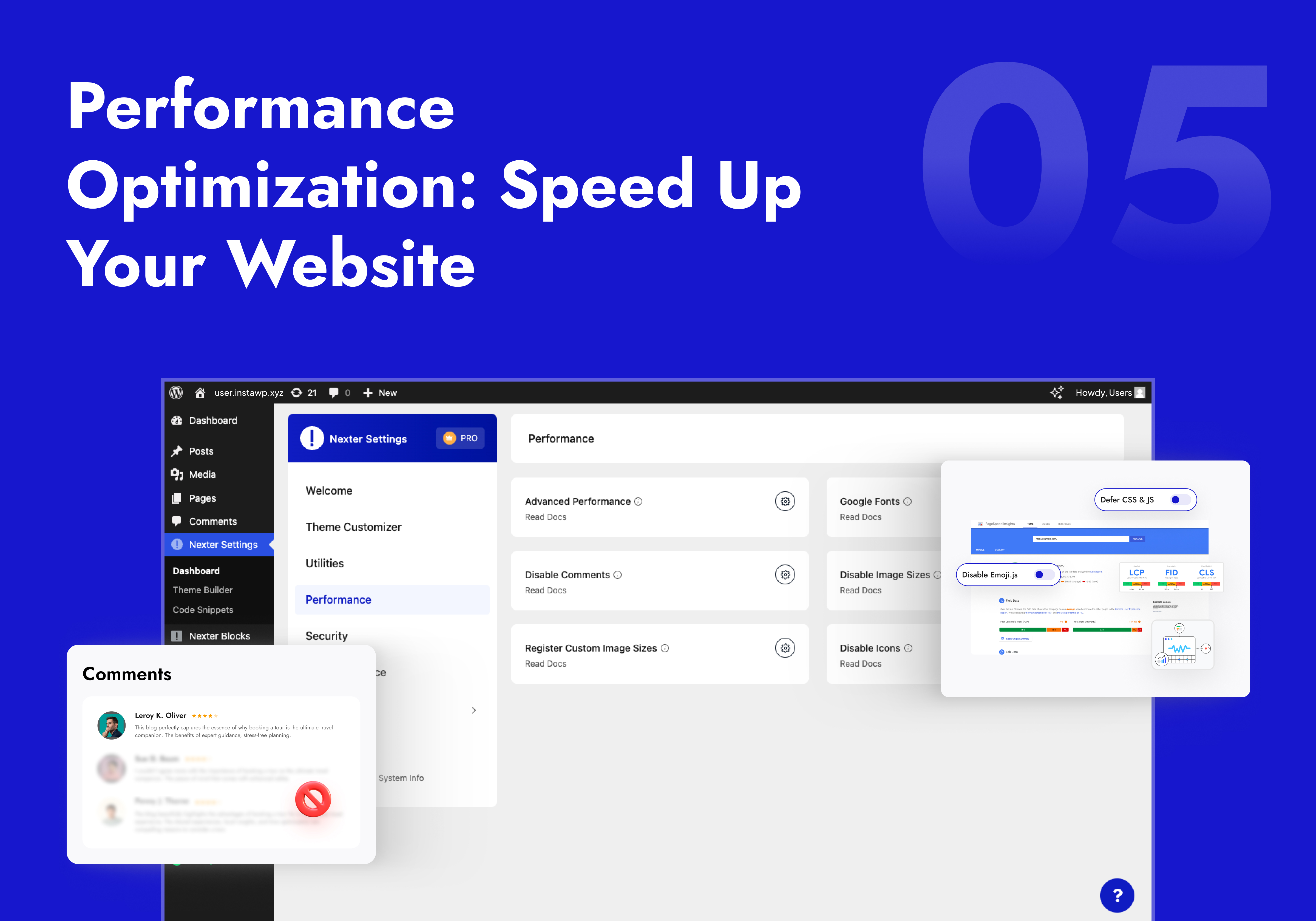
Granular WordPress speed optimization toggles — disable only what your site doesn’t need. No all-or-nothing switches that break things.
- Disable Bloat Scripts — Individual toggles for Emoji scripts, Embeds, Dashicons, Pingbacks, Feed Links, Shortlink tag, and more — each one separate.
- Defer CSS & JS — Defer non-critical stylesheets and scripts to improve First Contentful Paint and page load scores.
- Self-Host Google Fonts — Host Google Fonts on your own server. Eliminates the external Google request and makes your site GDPR-compliant.
- Heartbeat Control — Throttle or disable the WordPress Heartbeat API — a common cause of high CPU on shared hosting.
- Revision Control — Cap post revisions to prevent database bloat on content-heavy sites.
- Disable Comments — Turn off WordPress comments site-wide or per post type. Removes all comment scripts from page output.
- Disable Unused Image Sizes & Elementor Icons — Stop generating thumbnails and loading Font Awesome on pages that don’t use them.
🔒 WordPress Security Plugin — Hardening, Login Protection & More
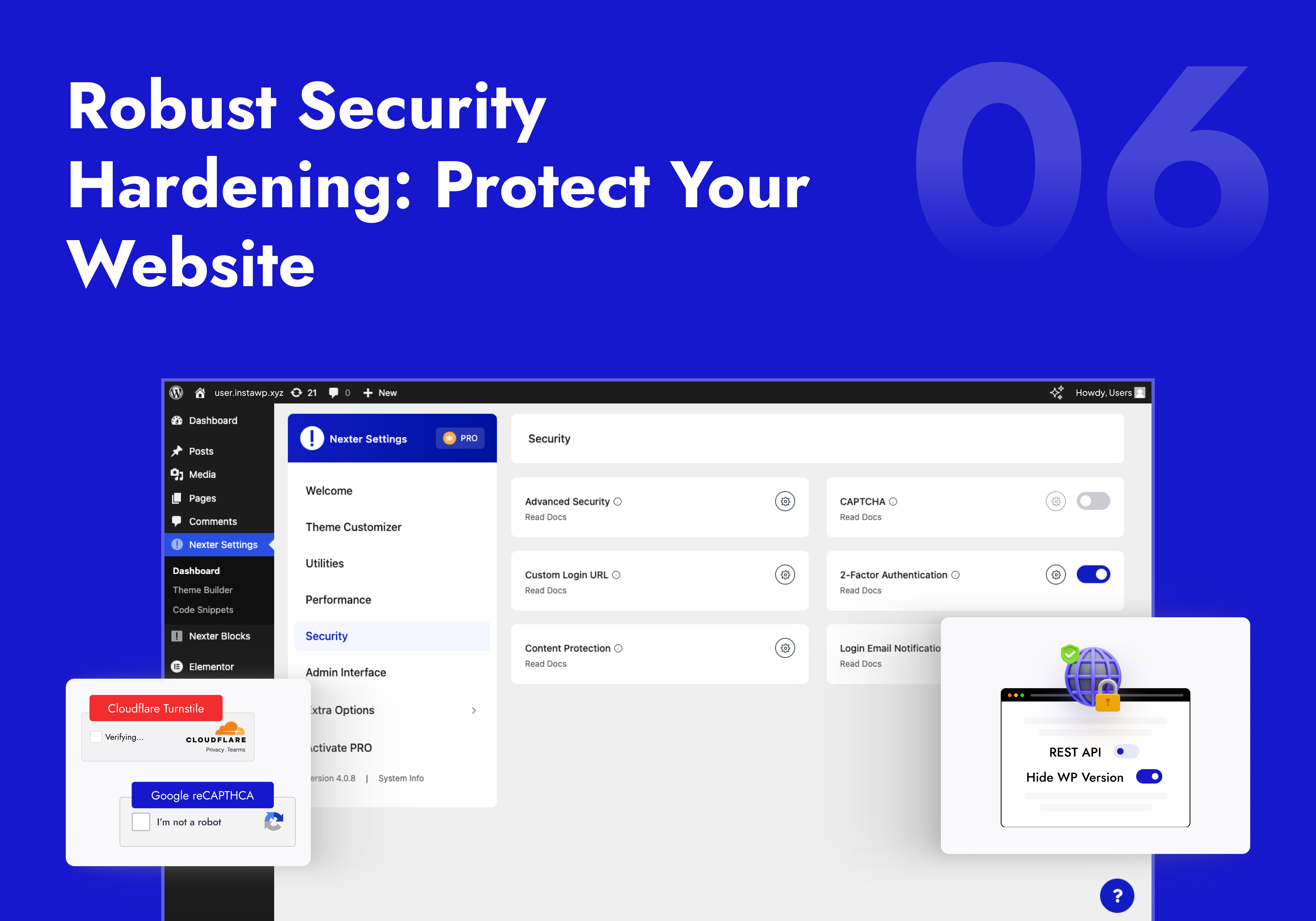
A layered WordPress security plugin with individual on/off toggles. Covers the most-used hardening and login protection features without adding a heavy security daemon to every page load.
- Security Hardening — Disable XML-RPC, hide WP version, remove REST API head links, block file editor, add XSS headers, and more — each as a separate toggle.
- Limit Login Attempts (Freemium) — Block brute-force attacks by locking out IPs after failed logins. No separate brute force protection plugin needed.
- CAPTCHA Spam Protection — Add Google reCAPTCHA v2/v3 or Cloudflare Turnstile to login, registration, comments, password reset, and WooCommerce checkout.
- Two-Factor Authentication (2FA) (Pro) — Email-based two-step verification with role-based enforcement. Replaces standalone two factor authentication plugins.
- Change WP Admin Login URL — Move your login page from the default wp-login.php to a custom URL. Stops automated bot scanning cold.
- Login Email Notifications (Pro) — Get alerted by email on every login with role-based filters and custom email content.
- Content Protection (Pro) — Disable right-click, text selection, image drag, copy-paste, and developer console access.
- SVG Upload — Let trusted roles upload SVG files with automatic sanitization. Clean icon uploads, no malicious payload risk.
- Last Login & Registration Tracking — See the last login date and registration date of every user right in the Users table.
📧 WordPress SMTP Email
Fix WordPress emails going to spam in minutes. The built-in WordPress smtp plugin routes your contact forms, order notifications, and password resets through a real mail provider — so they actually arrive.
- Gmail SMTP — Connect Google Workspace or Gmail via OAuth or App Password.
- Mailgun, SendGrid & Custom SMTP — Works with any provider: Brevo, Amazon SES, Postmark, Mailchimp Mandrill, or your host’s SMTP.
- Test Email Tool — Send a test email from inside the settings panel to confirm delivery before you go live.
🔧 WordPress Utilities — Replace a Dozen Single-Use Plugins
- Custom Font Uploads — Upload TTF, WOFF, WOFF2 and variable fonts. Apply in any page builder without a separate WordPress custom fonts plugin.
- Adobe Fonts Integration — Connect your Adobe Creative Cloud via Project ID and load any Typekit font in WordPress.
- Redirect 404 (Freemium) — Auto-redirect all broken 404 pages to your homepage (Free) or any custom URL (Pro).
- Post & Page Duplication — Clone any post or page with full layout and metadata preserved. No separate post duplicator plugin needed.
- Bulk Text & URL Replacement — Find and replace any string across your entire database in one click. Essential after domain migrations.
- Thumbnail Regeneration — Regenerate all image thumbnails after changing image sizes. No extra plugin.
- Rollback Manager — Downgrade any plugin to a previous version instantly if a new update causes conflicts.
- Admin Role Switcher — Switch between any WordPress user role without logging out. Perfect for testing permissions.
- Disable Gutenberg — Restore Classic Editor on specific post types without an extra plugin.
- WP Debug Mode — Toggle WP_DEBUG on/off from your dashboard. No wp-config.php editing.
- Content Post Order — Drag-and-drop reorder posts and pages. No code, no custom fields.
- Public Preview for Drafts (Pro) — Share a preview link for any unpublished post without requiring a login.
- Replace Media (Pro) — Swap any file without changing its URL or breaking existing links.
- Taxonomy Term Order (Pro) — Drag-and-drop reorder categories, tags, and custom taxonomies on the frontend.
🎨 WordPress Admin Customization & Dashboard Cleanup
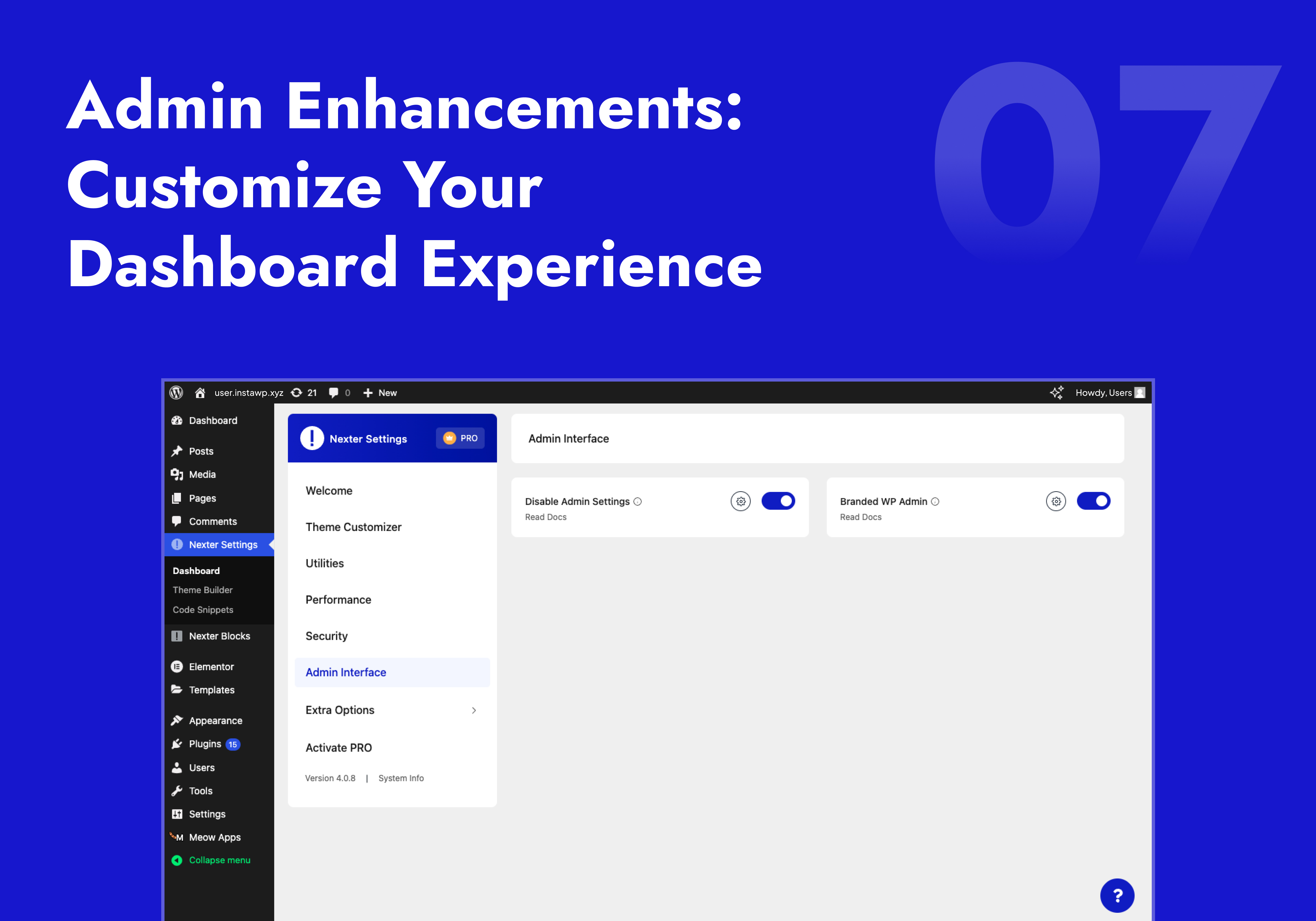
- Branded Admin Interface / White Label WordPress (Pro) — Replace the WordPress login page with your agency logo and colors. Full white-label WordPress admin for client sites.
- Admin Menu Organizer (Pro) — Reorder, rename, or hide sidebar menu items per user role. Show clients only what they need.
- Elementor Ad-Free — Hide all Elementor upgrade banners, AI popups, and upsell buttons from the editor. Clean workspace, focused editing.
- Clean Admin Bar — Remove any item from the WordPress toolbar: WP logo, site name, comments counter, Howdy greeting, plugin nodes, and more — each as a separate toggle.
- Disable Admin Notices & Dashboard Widgets — Hide update nags, plugin notices, At a Glance, Quick Draft, WooCommerce setup panel, and the WordPress Events feed — individually.
- Wider Admin Menu — Expand the sidebar so long menu labels display fully without truncation.
- Display Active Plugins First (Pro) — Pin active plugins to the top of the plugins list for faster access.
- User Profile Clean (Pro) — Remove unnecessary fields from user profiles for a cleaner client-facing backend.
🔁 Import / Export Settings
Export your full WordPress Customizer configuration and all Nexter Extension settings to a file — then import on any site instantly. Zero re-configuration for agencies managing multiple client sites.
⚡ Upgrade to Nexter Extension Pro
🏆 Our Other WordPress Products
- The Plus Addons for Elementor — 120+ Elementor widgets. Pairs perfectly with Nexter Extension’s free Theme Builder.
- Nexter Blocks — 90+ Gutenberg blocks. Zero jQuery. Built for speed.
- NexterWP Theme — Lightest, fastest starter theme for Elementor and Gutenberg. No jQuery.
- UiChemy – Figma to WordPress — Convert Figma designs into live Elementor pages with a free Figma plugin.
- WDesignKit — 1000+ WordPress templates, widget builder, block converter, and cloud storage.
External services
Nexter Extension may connect to external services below only when the related feature is enabled:
-
api.posimyth.com — usage analytics. Off by default; submitting the deactivation feedback form also sends it, plus your admin email if you tick the contact box. Terms · Privacy · what’s shared
-
store.posimyth.com — Pro licence, template library, newsletter opt-in. Terms · Privacy
-
api.wdesignkit.com, etemplates.wdesignkit.com — templates and preview images. Terms · Privacy
-
api.indexnow.org — sends a post URL when you save it, to notify search engines. Terms
-
api.openai.com — AI content, using your own API key. Terms · Privacy
-
generativelanguage.googleapis.com — AI content, using your own API key. Terms · Privacy
-
fonts.googleapis.com, fonts.gstatic.com, google.com/recaptcha, accounts.google.com, oauth2.googleapis.com — self-hosted fonts, CAPTCHA, SMTP OAuth. Terms · Privacy
-
typekit.com, use.typekit.net — Adobe Fonts, using your own project ID. Terms · Privacy
-
challenges.cloudflare.com — Turnstile CAPTCHA, using your own site key. Terms · Privacy
-
api.wordpress.org, themes.svn.wordpress.org — Rollback Manager lookups and downloads. Privacy
Screenshots

Installation
- Go to Plugins Add New in your WordPress dashboard
- Search for Nexter Extension and click Install Now
- Activate the plugin
- Go to Nexter Extensions and toggle on the features you need
FAQ
-
Does Nexter Extension work with all WordPress themes?
-
Yes. Fully compatible with Astra, Kadence, Blocksy, GeneratePress, OceanWP, Neve, Hello Elementor, Bricks, and all standard WordPress themes. The Theme Builder works with Elementor, Gutenberg, and Bricks Builder. Code Snippets work with every theme regardless of editor.
-
Does Nexter Extension include SEO? Do I still need Yoast or Rank Math?
-
Nexter Extension now includes Nexter SEO, a complete built-in SEO toolkit: site audit, meta title and description templates, an 18-type schema builder, XML sitemaps, a robots.txt editor, redirects, a 404 monitor, image SEO, and site verification. For most sites it replaces a standalone SEO plugin like Yoast or Rank Math, with no extra page weight. It is 100% free. Explore Nexter SEO
-
Does Nexter SEO work for AI search (ChatGPT, Perplexity, Google AI)?
-
Yes. Nexter SEO generates an LLMs.txt file and JSON-LD schema so AI search engines like ChatGPT, Perplexity, and Google AI can discover and cite your content. It also supports Instant Indexing (IndexNow) to push new and updated URLs to supported search engines the moment you publish.
-
Does the Image Optimizer need an API key?
-
No API key. No external account. No per-image fees. The Image Optimizer (added in v4.6.0) compresses images locally on your server. WebP conversion is free. AVIF conversion is available in Pro. Bulk optimization runs across your entire media library in one click.
-
What security features are included?
-
Security hardening (disable XML-RPC, hide WP version, XSS protection, iFrame security, secure cookies), 2FA (Pro), Google reCAPTCHA & Cloudflare Turnstile CAPTCHA, Limit Login Attempts, custom admin login URL, SVG upload sanitization, and content protection. See all security features
-
Does the SMTP work with Gmail?
-
Yes. Supports Gmail SMTP, Mailgun, SendGrid, and any custom SMTP server with SSL/TLS. Includes a built-in test email tool to confirm your connection is working.
-
Are Code Snippets stored in the database?
-
No. All snippets run as file-based code — not database queries. This means no database lookup on every page load, faster execution, and cleaner performance as your site scales.
-
Does it support GDPR for Google Fonts?
-
Yes. The Self-Host Google Fonts feature downloads fonts to your own server and serves them locally — eliminating all HTTP requests to Google’s CDN. This is the correct technical solution for GDPR compliance in the EU.
-
Can I white-label this for client sites?
-
Yes. Branded Admin Interface (Pro) lets you add your logo and brand colors to the WP login page. Admin Menu Organizer (Pro) lets you reorder, rename, and hide menu items for clean client dashboards. Combined with Elementor Ad-Free, clients see only what you want them to see.
-
Does the Theme Builder work with Elementor and Gutenberg?
-
Yes — both at the same time on the same site. Assign Elementor-built headers to one section and Gutenberg-built footers to another. Display rules let you control exactly which template loads where. Fully compatible with Elementor 4.0 template CSS (since v4.5.3).
-
Will enabling all modules slow my site?
-
No. Each module is individually toggleable. Disabled modules load zero CSS and zero JavaScript on the frontend. The entire plugin runs on Vanilla JS with no jQuery dependency. Only what you enable is loaded.
-
Why is this plugin separate from the Nexter Theme?
-
To comply with WordPress.org theme submission guidelines, which require features like register_post_type() to be delivered via plugins rather than themes. More on WordPress plugin guidelines
-
How do I report a security vulnerability?
-
Via the Patchstack Vulnerability Disclosure Program: Report a vulnerability
-
Is there a Pro version?
-
Yes. Compare Free vs Pro | See Pricing
-
Where can I request new features?
Reviews


Contributors & Developers
“Nexter Extension – Security, Performance, Code Snippets & Site Toolkit” is open source software. The following people have contributed to this plugin.
Contributors


“Nexter Extension – Security, Performance, Code Snippets & Site Toolkit” has been translated into 3 locales. Thank you to the translators for their contributions.
Interested in development?
Browse the code, check out the SVN repository, or subscribe to the development log by RSS.
Changelog
View Complete Changelog at roadmap.nexterwp.com
V4.7.10
23 September 2026
– Added : Nexter SEO : the Yoast import now brings across your Organization name and logo into Nexter’s Organization schema, so your site identity in search results survives the migration. Anything you had already set there is kept.
– Added : Nexter SEO : Rank Math’s custom robots.txt rules are now imported, so paths you blocked from crawlers stay blocked after the migration. Your own robots.txt is never replaced.
– Added : Nexter SEO : WooCommerce URL bases can now be removed — separate toggles under Advanced shorten /product/, /product-category/ and /product-tag/ URLs, the old URLs are redirected, and a product or term whose slug is already used by a page or post keeps its original URL instead of taking one that is in use.
– Added : Nexter SEO : the Rank Math and AIOSEO import previews now list the source plugin’s 404 log as “will be skipped” instead of dropping it with no notice.
– Added : Nexter SEO : an Advanced setting to strip the /category/ base from category URLs (e.g. /category/news/ /news/).
– Added : Nexter SEO : an admin notice offering one-click migration when Yoast, Rank Math, SureRank or All in One SEO is detected active alongside Nexter SEO.
– Added : Nexter SEO : Import from Yoast SEO, Rank Math, SureRank and All in One SEO — a new “Migrate From Other SEO Plugins” tab detects your existing SEO data, previews exactly what would change, then imports it in resumable batches. Anything you already set in Nexter SEO is kept rather than replaced, and the other plugin’s own data is never deleted.
– Added : Nexter SEO : Per-page schema type is now carried across during the import, and redirects keep their matching mode including regex.
– Added : Nexter SEO : Redirections now support a Regex match type, with $1 backreferences in the destination.
– Compatibility : Nexter SEO : All in One SEO (Lite and Pro) import reads its own database tables, respects per-post “use default” robots and Twitter-mirrors-Facebook settings, and brings across Pro term SEO and redirects — case- and slash-insensitive ones keep matching the same way.
– Compatibility : Nexter SEO : Rank Math PRO — when a post carries several schemas the one marked primary is imported, and schema templates, Local SEO locations and redirect categories are listed in the preview rather than silently dropped.
– Compatibility : Nexter SEO : SureRank Business redirects are now imported, with “Contains” and “Ends With” rules kept matching exactly as they do in SureRank.
– Improved : SMTP Email : the “SMTP Password” field now shows a tooltip explaining that, for providers like Brevo, SendGrid and Mailgun, this value is an API key rather than an account password.
– Improved : Nexter SEO : the migration preview now warns before you start if the redirects being imported contain a loop, and tells you how many are over the redirect-rule limit. The preview works this out by running the same import in a no-write mode, so it and the import can never disagree.
– Improved : Nexter SEO : importing categories and tags from Yoast is dramatically faster on large sites, and no longer slows down the further it gets. Picking the next batch used to check every term one at a time, and then still had to read back every term already imported, so a big catalogue crawled towards the end. Each batch now asks only about the terms it is about to take.
– Improved : Nexter SEO : the migration preview now names each setting in plain language instead of showing the raw database key, with the key kept underneath for developers.
– Improved : Nexter SEO : the migration preview now recommends a backup and states plainly that the import writes to your database and cannot be undone from that screen.
– Improved : Nexter SEO : the migration preview now warns about every value it would leave alone, not just titles and descriptions. Canonical URLs, social fields, schema type and your robots settings are all counted, with robots listed separately so a page you deliberately kept out of search is easy to spot.
– Improved : Nexter SEO : the migration preview now tells you when the other plugin has per-author SEO settings, which Nexter has no field for and does not import. Previously those were lost with nothing said.
– Improved : Nexter SEO : the migration preview now says when settings will be flattened rather than changing them silently — the per-post-type and per-taxonomy templates that become one site-wide pair, the per-language settings on a Polylang or WPML site, and Yoast’s Organization name and logo.
– Improved : Nexter SEO : the “already running” message now says how long the lock has left and points to Reset markers, instead of only suggesting a page reload.
– Improved : Nexter SEO : each llms.txt number setting now explains what it does, including a warning on Freshness Window that any value above 0 leaves older content out.
– Improved : Nexter SEO : The import shows the current step, retries a batch that hits a temporary error, lists anything that did not finish, and checks the imported values afterwards.
– Improved : Nexter SEO : Importing another plugin’s per-type noindex choices adds to the ones you already set instead of replacing them, and the preview shows the combined result.
– Improved : Translations : the translation template now points at the real source files instead of the compiled bundles, so translators can see where each string actually lives and the file no longer changes on every build.
– Fixed : SMTP Email : Custom SMTP no longer forces the From address to the SMTP username on providers like Brevo, SendGrid and Mailgun, where the username is an API-key-style value rather than a sendable address. The configured “From Email” is now used as long as it is set; the username is only used as the From address for Yandex, which requires the match, or as a last-resort fallback when no From Email was configured.
– Fixed : Nexter SEO : social cards on category and tag pages now use the archive title and description templates, the same ones the page’s own title uses. They were using the post templates, so the card and the page disagreed on any site that had customised the two differently.
– Fixed : Nexter SEO : an “@” followed by a word is no longer deleted from titles and descriptions. Any @word was being treated as a template variable and then removed, so “Follow @posimyth for updates” rendered as “Follow for updates” and email addresses lost their domain. Only real variable names are expanded now, and never inside an email address.
– Fixed : Code Snippets : a snippet created or updated through the AI assistant can no longer be saved to a placement that never runs. A placement name the runtime did not recognise was stored as given, so the snippet saved cleanly and then did nothing; unrecognised names now fall back to the same default the dashboard uses, and spelling variants like “front_end” or “site-header” are understood.
– Fixed : dismissing an admin notice with the “x” now sticks. Four notices — the Nexter SEO suggestion, “Nexter Blocks installed”, and both Image Optimization notices — wrote their security token into the page in a way browsers read incorrectly, so the dismissal was rejected and the notice returned on every single admin page load.
– Fixed : Nexter SEO : a SureRank site that never changed its author or date archive setting no longer has those archives switched back on by the import. SureRank ships them off and Nexter ships them on, and only an explicitly saved value was being read.
– Fixed : Nexter SEO : importing from All in One SEO no longer redirects author or date archives away when they were only meant to be hidden from search engines. “Show in search results: off” now becomes a noindex, as it does in AIOSEO.
– Fixed : Nexter SEO : the Yoast import now reads social profiles from where Yoast has stored them since version 20, instead of only the older per-network fields. Profiles added recently were being dropped and ones removed years ago brought back.
– Fixed : Nexter SEO : the Yoast import now brings across the home page’s social card. The title, description and image were read from the place Yoast kept them before version 14, so on any current Yoast site the home page card came over empty.
– Fixed : Nexter SEO : the imported Organization name and logo now land on a site that has no Organization schema row. The import wrote into an existing row only, so on those sites it quietly did nothing even though the preview said the identity would be brought across. The row is now created from the shipped default when there isn’t one, and a name or logo you had already typed is still never replaced.
– Fixed : translators’ notes now reach the translation files correctly. Some notes sat too far from the text they described and were dropped during extraction, and a few phrases used in more than one place carried conflicting notes, so only one of them survived. Affected the theme builder display conditions, the SMTP PHP version notice, Image Optimization messages, the SEO schema fields and the template importer’s invalid post type error.
– Fixed : Nexter SEO : the Pro white label now applies to the migration screen as well. Every message on it — the preview notes, the progress counts and the check afterwards — said “Nexter SEO” no matter what you had rebranded the plugin to, while the rest of the SEO screens used your own name.
– Fixed : Nexter SEO : the migration preview now tells you when a Yoast or Rank Math site has its own title and description templates for other post types and taxonomies. Nexter keeps one pair for posts and one for archives, so those templates are not brought across — the preview names each affected type instead of leaving you to discover it. All in One SEO already listed this.
– Fixed : Nexter SEO : a Yoast redirect whose response code Nexter cannot serve is now skipped and listed in the preview, instead of being quietly turned into a 301.
– Fixed : Regenerate Thumbnails : regeneration no longer stops with a fatal error. It called WordPress’s metadata filter with one argument missing, which crashed any correctly written plugin listening on it — including Nexter’s own SVG Upload — and took the whole batch down with it, for JPEG, PNG and WebP alike.
– Fixed : Image Optimization : thumbnails no longer 404 or show blank in the Media Library when an image’s full size was optimised but its thumbnails were not. Each size is now resolved on its own: the optimised copy when there is one, otherwise the normal WordPress thumbnail. Image URLs that another plugin or a CDN has already changed are left alone.
– Fixed : Nexter SEO : “Reset markers” now also removes the values the import itself wrote, so re-running an import picks up anything that changed in the other plugin. Values you set yourself are kept. Previously the reset cleared only the markers, and the re-run found Nexter’s fields already filled and changed nothing.
– Fixed : Nexter SEO : an import that is cut short no longer treats its own half-written values as yours when it resumes. It now records what it wrote, so it corrects its own work and still never overwrites a value you set.
– Fixed : Nexter SEO : two imports of the same source can no longer start at once and import the same batch twice. The lock now uses a database-level guarantee instead of one that could be defeated by a stale cache, which was most likely on sites with a persistent object cache.
– Fixed : Nexter SEO : the migration preview no longer shows a server error page when one row in the other plugin’s data cannot be read. It now explains what happened and lets you continue, the same way the import itself already did.
– Fixed : Nexter SEO : starting an import on a site with no data from the chosen plugin now reports that clearly, instead of reporting a finished import that did nothing.
– Fixed : Nexter SEO : imported Regex redirects now match. A pattern anchored at the start, such as ^old-path/(.*)$, never matched the incoming request, so every one of them silently fell through to a 404.
– Fixed : Nexter SEO : redirects now work on a subdirectory Multisite subsite. The subsite’s own path segment was part of every request, which no imported rule accounted for.
– Fixed : Nexter SEO : importing redirects now respects the 2,000-rule limit and reports how many rules were left out, instead of writing an unbounded list that the front end then walks on every request. The imported rules are also checked for redirect loops.
– Fixed : Security : Nexter SEO : data read from another SEO plugin’s own database tables and options can no longer create PHP objects while it is being imported.
– Fixed : Nexter SEO : schema values in Hindi, Japanese, Arabic and other non-Latin scripts are now stored as readable text instead of escaped codes, so a site migration’s search-replace and database searches find them.
– Fixed : activating any plugin through an older WP-CLI (before 2.12) no longer aborts the command while Nexter Extension is active. The plugin did activate, but the script stopped with a fatal type error and anything queued after it never ran.
– Fixed : Nexter SEO : the SureRank import now reads SureRank’s grouped settings, so page title, meta description, canonical URL, the Facebook and X fields and the schema type all come across. Previously only the robots flags did.
– Fixed : Nexter SEO : text holding a literal percent sign, such as “Save 50%-70% today”, is no longer partly deleted when it is imported from Rank Math or SureRank.
– Fixed : Nexter SEO : canonical URLs and social image URLs with percent-encoded characters, such as /caf%C3%A9/, are now imported exactly as they are instead of being corrupted.
– Fixed : Nexter SEO : Rank Math sites that kept author or date archives switched on no longer lose them to the import. Rank Math stores “enabled” as the word “off”, which was being read as “disabled”.
– Fixed : Nexter SEO : a Rank Math date-archive noindex is now imported only when Rank Math was actually applying it, instead of every time its prefilled default was present.
– Fixed : Nexter SEO : Nexter now steps aside when SureRank is also active, so a page no longer renders two canonical tags and two conflicting og:title values.
– Fixed : Nexter SEO : the Yoast import reads the Pinterest verification code from the option Yoast actually stores it in, so the Pinterest domain claim survives the migration.
– Fixed : Nexter SEO : the Yoast import no longer counts a noindexed category or tag twice in its “fields written” total.
– Fixed : Nexter SEO : the post-import check now reports a failure when it could not read anything, covers categories and tags as well as posts, includes the robots settings, and compares the imported values rather than only checking that something is there.
– Fixed : Nexter SEO : the llms.txt Freshness Window now keeps content that was recently updated, not only recently published, so evergreen pages and maintained posts are no longer dropped from the file.
– Fixed : Nexter SEO : the “Settings that change” import preview no longer overflows the page when an “After import” value is a long JSON blob; it is now truncated with an ellipsis and the full value on hover, same as long text values.
– Fixed : Nexter SEO : title, description, canonical URL and social text copied in from Yoast, Rank Math, AIOSEO and SureRank are now sanitized at write time instead of relying only on output-side escaping.
– Fixed : Nexter SEO : No Index / No Follow / No Archive and “Exclude from Sitemap” now save for post types like Complianz’s that aren’t marked “public” but still have live front-end URLs.
– Fixed : Nexter SEO : the post editor’s Social tab now previews the featured image when no image override is set, instead of always previewing the default social image.
– Fixed : Nexter SEO : removed the Advanced “Noindex Attachments” toggle, which never actually noindexed anything. Attachment pages are now noindexed by default through Robots Instructions, the setting that does work — turn it back on there if you’d rather have them indexed.
– Fixed : Nexter SEO : Rank Math redirects that match part of a URL now keep matching after import, and a Regex redirect no longer loses backslashes such as \d.
– Fixed : Security : Updated the bundled Guzzle (7.15.5), PSR-7 (2.13.1) and svg-sanitize (0.22.0) libraries to versions without known advisories, including CVE-2026-69246 and CVE-2025-55166.
– Fixed : Replace URL : a search and replace on a table whose primary key spans more than one column could overwrite rows that did not match the search at all. Each row is now updated by its full primary key, so only the row the change was found in is touched.
– Fixed : Replace URL : a blank or non-numeric “Limit” value no longer leaves the search and replace running until the request times out, and rows are now read in a fixed order so a large table cannot have some of its rows skipped.
– Fixed : Translations : the SEO import progress messages and the thumbnail regeneration counters now carry translator notes explaining what each number refers to, so a translated copy cannot describe the wrong thing.
– Fixed : Blocks : the Free / Freemium / Pro badge on the Blocks screen now translates. It was built from a value read at runtime, which the translation system cannot collect, so the badge stayed in English in every language.
– Fixed : Nexter SEO : a plugin you have already imported from is no longer a dead end on the migration screen. It said everything had been imported and greyed the button out, while the only control that clears the markers sat on the screen you reach after running an import — so there was no way to run it again, which is what people hit after deleting and reinstalling. Each already-imported source now offers “Import it again” on the spot.
– Fixed : Nexter SEO : deleting the plugin now also clears the migration’s run state and any leftover import lock, so a reinstall does not begin with a stale lock or a half-finished run on record. Imported values and settings are left untouched.
V4.7.9
07 September 2026
– Improvement : Nexter SEO : The image ALT warning now names every image it flagged, including slider and images that carry no plain src attribute.
– Fixed : Code Snippets : snippets added through the AI assistant now run. They were saved with a placement name the runtime did not recognise, so PHP, CSS, JavaScript and HTML snippets were all stored correctly but never executed.
– Fixed : Code Snippets : a PHP snippet created by the AI assistant now runs everywhere by default, the same as one added from the dashboard.
– Fixed : SEO : the SEO screens are now fully translated. Roughly half their strings sit in separate bundle files that WordPress was never told to load a translation file for, so those stayed English in every language.
– Fixed : Theme Builder : blocks and panels that use WordPress’s built-in code editor now load on Theme Builder screens. The builder was unregistering WordPress’s CodeMirror handle, which silently dropped every script that depended on it.
– Fixed : Image Optimization : single and bulk optimisation no longer fail with a server error on large media libraries. Each image converted its original and every thumbnail size in one request; that work is now split into small batches.
– Fixed : Image Optimization : the bulk screen now shows the real counts in its progress line instead of the raw “%1$d of %2$d images optimised” text, and the message under it is translatable.
– Fixed : Nexter SEO : the Orphan Pages check now reads the links in the served homepage, so pages linked only from a page-builder or theme-coded header are no longer reported as orphaned.
– Fixed : Code Snippets : importing a snippet that already exists is now blocked instead of silently creating a second copy. Two copies of a snippet that declares a PHP function crashed every page including the login screen.
– Fixed : Code Snippets : the two bundled snippets that declare a PHP function or constant are now wrapped in function_exists() / defined() guards, so a duplicate can no longer be fatal. Sites that already had the unguarded copies are repaired automatically on update.
V4.7.8
20 August 2026
– Compatibility : WordPress 7.1 : the Abilities API lifecycle filters are now supported, so AI agents get faster repeat reads, clearer errors when a record does not exist, and switches that accept plain “on” or “yes” values. No effect before WordPress 7.1.
– Fixed : Code Snippets : enabling, editing or adding a snippet now takes effect on the next page load. The cached snippet list was only refreshed by the dashboard, so changes made any other way appeared to do nothing until the cache expired.
– Fixed : Code Snippets : a fatal error on every admin page when the stored snippet settings held a single value instead of a list; the one-time file migration could not finish, so it retried and failed again on each request, locking the dashboard out.
V4.7.7
19 August 2026
– Improvement : Security : SMTP passwords and Google OAuth tokens are now encrypted in the database. Credentials saved by earlier versions keep working and convert on the next save.
– Improvement : Regenerate Thumbnails : The popup now shows a progress bar, live counts, a Stop button and a list of images it could not process.
– Improvement : Regenerate Thumbnails : Images are processed in batches, WebP and AVIF are included, and an unreadable file can no longer wipe an attachment’s stored image data.
– Improvement : Nexter SEO : The image ALT warning now names the files it flagged instead of only giving a count.
– Improvement : Nexter SEO : The audit’s ALT check is labelled “homepage as rendered”, so it is clear why its count can differ from the single-page SEO panel.
– Fixed : Nexter SEO : Author and date archives are no longer disabled by default. Sites that deliberately turned them off keep their setting.
– Fixed : Nexter SEO : The Orphan Pages check now counts navigation, header and footer links, so pages linked from the menu are no longer reported as orphaned.
– Fixed : Nexter SEO : The per-page image ALT check no longer counts slider, lazy-loaded, decorative or tracking images.
– Fixed : SEO Redirects : “Exactly Match In Any Order” matched any query string at all; it now matches only when the same parameters are present, in any order.
– Fixed : SEO Redirects : “Ignore And Pass Parameters To Target” never passed them on; the visitor’s query string now reaches the destination.
– Fixed : Custom Login URL : With the “404 page” behaviour, wp-login.php still opened the real login form and the register link gave the hidden login address away.
– Fixed : Custom Login URL : Visiting wp-admin while logged out sent the browser to a nonsense address; it now answers with a proper 404 at the same URL.
– Fixed : Custom Login URL : wp-signup.php answered with a server error instead of a not-found page when the site is not a network.
– Fixed : Regenerate Thumbnails : The feature now works on its own; it only loaded when Custom Image Sizes or Disable Image Sizes was switched on.
– Fixed : Regenerate Thumbnails : The button now reports real progress and a finished state instead of sitting on “Regenerating…” forever.
– Fixed : Disable Image Sizes : Turning a size off now actually stops the file being created; Thumbnail, Medium, Medium Large and Large were still generated.
– Fixed : Custom Fonts : TTF, OTF, WOFF and WOFF2 files now upload; the very first upload was always rejected before the extension had been saved.
– Fixed : Wider Admin Menu : The menu width now saves; it was discarded on every save and the menu stayed at its default.
– Fixed : Template Import : The bundled WordPress importer could be requested directly outside WordPress, and a crafted export file could overwrite internal values while importing menus.
– Fixed : Security : View Admin Role could change another account’s roles from an unauthenticated request, and the role-granting permission check was disabled.
– Fixed : Security : Plugin and theme installs fetched their details over an unencrypted connection and installed whatever download address came back.
– Fixed : Security : The login attempt limiter trusted forwarded-for headers a visitor can set, so the limit could be evaded or used to lock someone else out.
– Fixed : Security : A template import request could name any internal method to run; only export and import are accepted now.
– Fixed : Security : The builder’s post search could be called by any logged-in user and returned every matching post of every type.
– Fixed : Security : Several builder condition endpoints and the licence activation endpoints could be called without the right permission.
– Fixed : Security : Dismissing an admin notice can no longer be triggered from another site on an administrator’s behalf.
– Fixed : Security : the unused PHPMailer example script is no longer shipped, ten files could be requested outside WordPress, and every plugin folder now carries an index.php stub so no directory can be browsed.
V4.7.6
13 August 2026
– Fixed : SEO Redirects : one broken rule no longer stops every new redirect from saving; a rule aimed at its own URL is skipped when other rules are checked for loops
– Fixed : Rollback : picking a version in the dropdown now works; every rollback was being sent to the version already installed and refused with “Try selecting another version.”
– Fixed : Security : license activation now verifies the SSL certificate, so the licence key is no longer sent over a connection that could be intercepted
– Fixed : Code Snippets : a shortcode attribute can no longer overwrite the snippet’s own code, or other internal values, before the snippet runs
– Fixed : Multisite : Super Admins can now manage code snippets and Theme Builder templates on network sites without also being given the administrator role there
– Fixed : i18n : the SEO audit and image optimiser cron labels no longer load translations before WordPress is ready, which logged a “translation loading was triggered too early” warning whenever another plugin scheduled a task during start-up
– Fixed : i18n : the SMTP PHP-version notice is now translatable; the version numbers were being inserted into the message before it was handed to the translation function, so the string never reached the translation files at all
V4.7.5
07 August 2026
– Improvement : Performance : feature-usage scans read content in bounded, ordered batches so nothing is double-counted or skipped, and the consent notice’s styles load once per page
– Fixed : Rollback : the rollback link showed the literal text “NEXTER_EXT_VER” instead of the version number
– Fixed : Performance : the analytics payload is assembled after the page has been sent, and the user count is cached for a day instead of counting the whole user table each time
– Fixed : Performance : on servers that cannot flush the response early (mod_php, LiteSpeed, php-cgi) the analytics request no longer holds the page for up to 15 seconds
– Improvement : Performance : dashboard assets and settings no longer load on every admin screen – around 1.5 MB of scripts, the media library and the colour picker were loading on unrelated pages
– Fixed : Compliance : readme now discloses IndexNow, OpenAI, Google Gemini, WDesignKit and the newsletter signup, which were contacted but not listed
– Fixed : i18n : the deactivation feedback form’s strings were missing their text domain, so they were never translated
– Fixed : SEO Redirects : a rejected redirect now says why – a rule pointing at itself, a loop, an over-long chain, the rule limit or a missing URL – instead of only “Could not save redirect.”
V4.7.4
04 August 2026
– Added : Security : Custom Login URL now has a “Redirect to Custom URL” behaviour, so old wp-login.php / wp-admin requests can go to your own front-end login page; accepts a slug or an on-site URL and refuses off-site targets and redirect loops
– Improvement : Nexter SEO : “Fix Now” now opens the setting that actually controls each issue, and issues fixed in the content or permalink (alt text, subheadings, readability, slug) tell you what to change instead of opening an unrelated panel
– Improvement : Nexter SEO : Readability now lists the specific over-long sentences with their word count, flags passive voice, counts oversized paragraphs and reports the share of long words, instead of showing only a score
– Fixed : Nexter SEO : pages using sliders (Smart Slider …