

Description
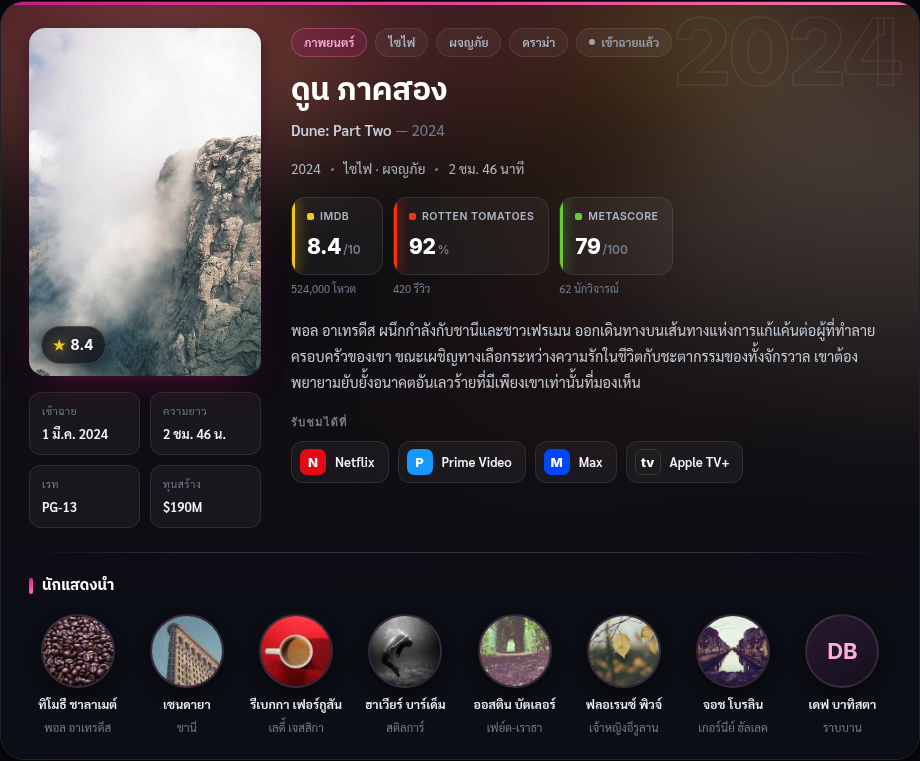
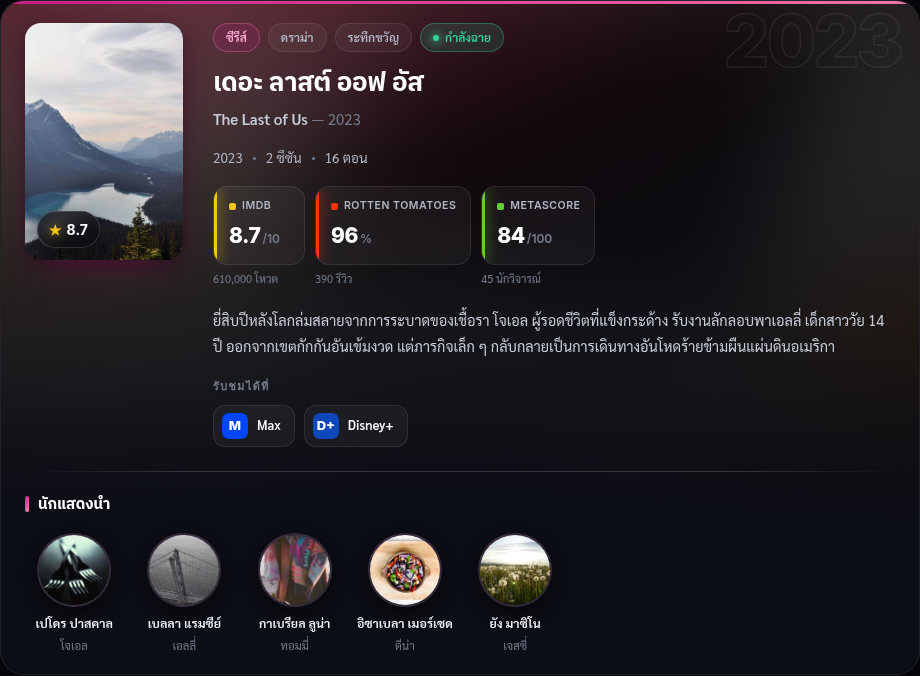
MovieDB Widget connects your WordPress site to a self-hosted MovieDB (Nanitalk) instance and renders a rich information widget for movies and TV series directly inside your posts.
Features:
- Search movies and TV series from the post editor sidebar.
- Insert a widget as the post’s main title, or drop multiple
[moviedb_widget]shortcodes for list-style articles. - Auto-insert the widget after a chosen paragraph, after the content, or shortcode-only.
- Per-country watch-provider data (configurable default country).
- Server-side caching via the WordPress Transient API (12-hour TTL).
- Optional outbound webhook that notifies your MovieDB instance when a linked article is published, unpublished, or trashed (signed with HMAC-SHA256).
The plugin works out of the box against the default MovieDB instance (https://moviedb.nanitalk.com). Advanced users can point it at their own self-hosted MovieDB instance under the settings page.
External services
This plugin connects to a third-party / self-hosted MovieDB instance that you configure under Settings MovieDB Widget. Nothing is sent until you enter a Base URL.
It connects to the configured MovieDB instance (e.g. https://moviedb.nanitalk.com) to:
- Search titles — when you type in the editor search box, the search term is sent to
GET {base_url}/api/search. - Fetch widget data — when rendering a widget, the title ID, country code and variant are sent to
GET {base_url}/api/widgets/title/{id}. - Report article links (webhook) — when a post linked to a title is published, unpublished, or trashed, the site name, post ID, post URL, title ID and status are sent to
POST {base_url}/api/integrations/wordpress/article-link, signed with a shared HMAC-SHA256 secret.
Widget responses may include image URLs served from https://image.tmdb.org and https://images.justwatch.com, which are loaded by the visitor’s browser.
Because the MovieDB instance is configured by the site owner, the data sent and any applicable terms or privacy policy depend on that deployment. The reference instance is available at https://moviedb.nanitalk.com
Screenshots
Installation
- Install the plugin via Plugins Add New, or upload the ZIP via Plugins Add New Upload Plugin.
- Activate the plugin through the Plugins menu in WordPress.
- That’s it — the plugin works out of the box against the default MovieDB instance (https://moviedb.nanitalk.com). Optionally visit Settings MovieDB Widget to point it at a different MovieDB instance or set a default country.
FAQ
-
Do I need to configure anything?
-
No. After activation the plugin works immediately using the default MovieDB instance. You only need the settings page if you run your own MovieDB instance and want to point the plugin at it.
-
Can I use my own MovieDB backend?
-
Yes. Enter your own MovieDB Base URL (and, if you use the article-link webhook, an Integration Secret matching your instance) under Settings MovieDB Widget.
-
How do I add a widget to a post?
-
Use the “MovieDB Widget” box in the post sidebar to search and link a title, or insert the
[moviedb_widget id="123"]shortcode manually. -
Is the integration secret stored safely?
-
The secret is stored as a WordPress option and is only used server-side to sign outbound webhooks with HMAC-SHA256. It is never printed back into the settings form.
Reviews
There are no reviews for this plugin.
Contributors & Developers
“Nanitalk MovieDB Widget” is open source software. The following people have contributed to this plugin.
Contributors
Translate “Nanitalk MovieDB Widget” into your language.
Interested in development?
Browse the code, check out the SVN repository, or subscribe to the development log by RSS.
Changelog
1.2.1
- Initial public release.