

Description
Send WhatsApp messages directly from your WordPress store — no Meta API, no per-message fees, no complicated setup.
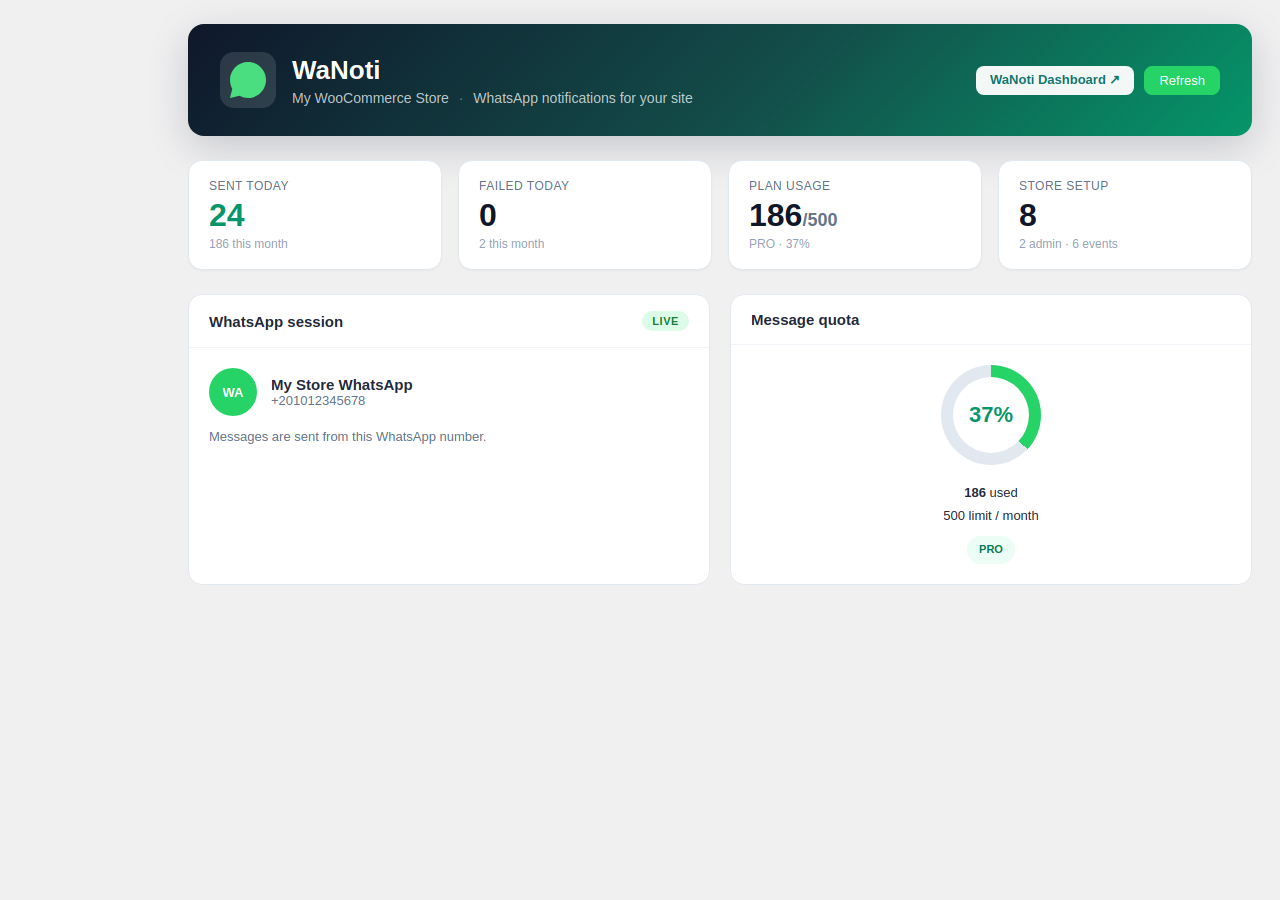
WaNoti connects your WordPress site to WhatsApp using your own number. Scan a QR code once, and your store sends messages automatically.
Why merchants love it
- ✅ No Meta/WhatsApp Business API required — connect any regular WhatsApp number
- ✅ No per-message fees — flat monthly plan, send unlimited messages
- ✅ Arabic & English — full RTL support and bilingual message templates
- ✅ WooCommerce + any site — order alerts work with WooCommerce; OTP and chat widget work everywhere
What it does
WooCommerce Order Notifications
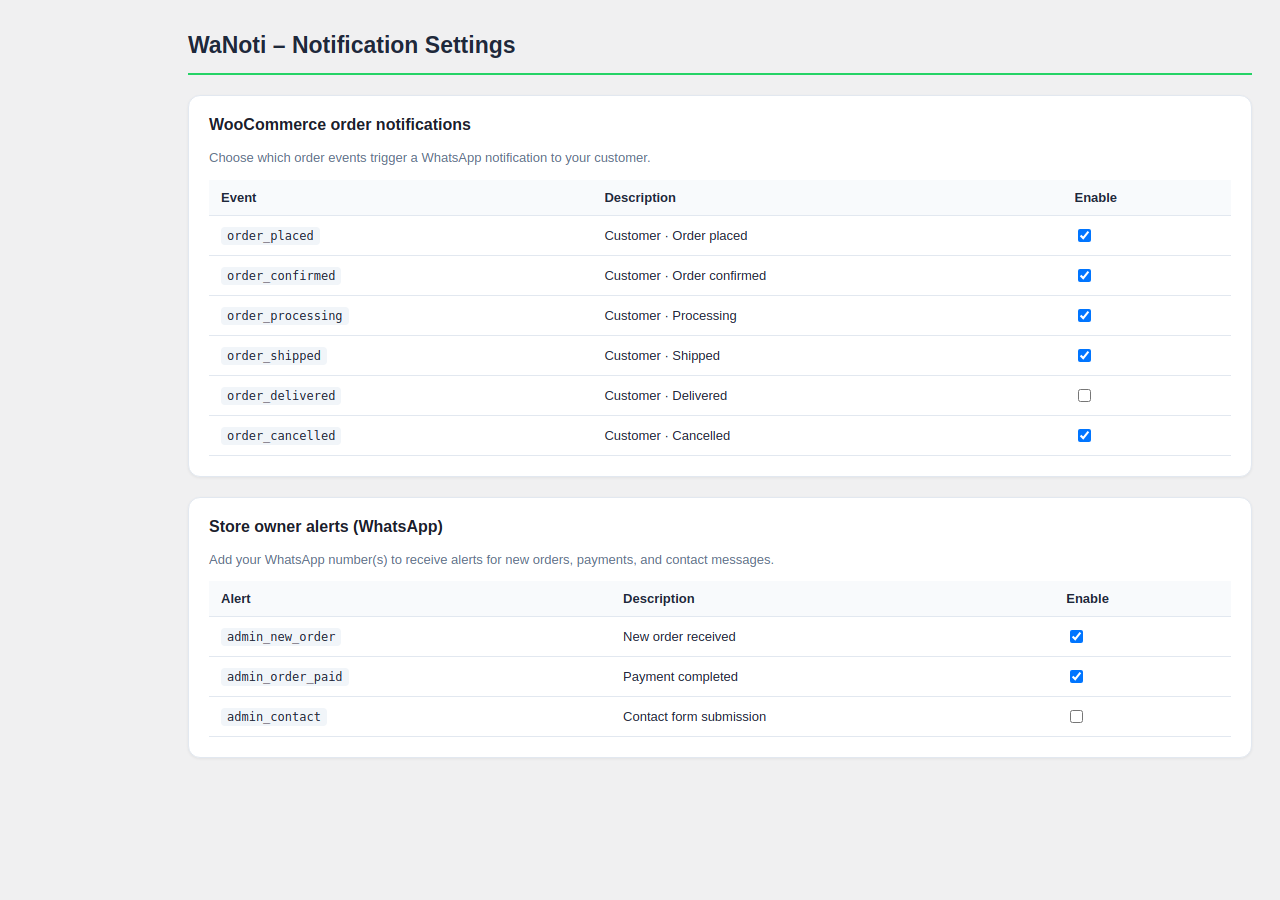
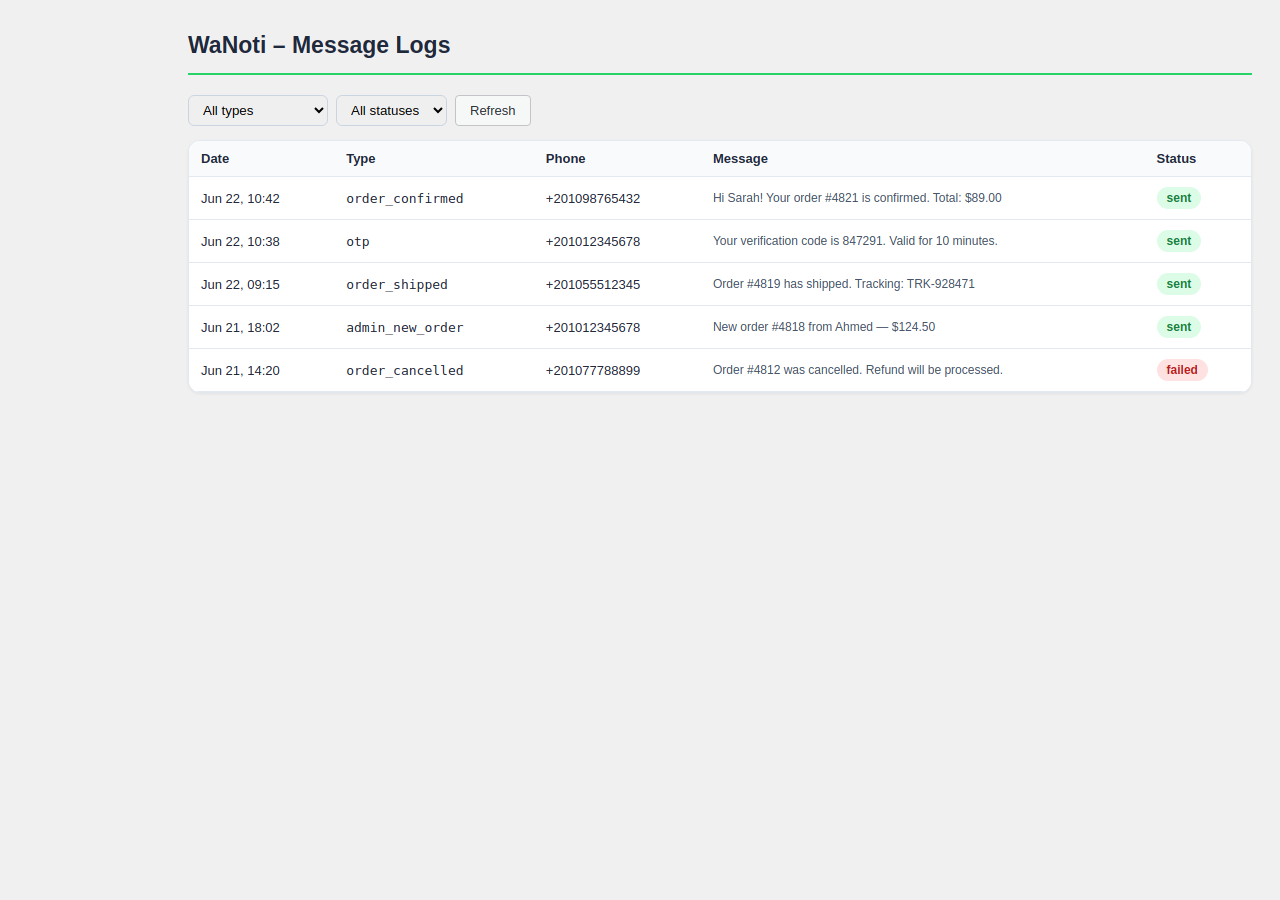
Automatically send WhatsApp messages to customers when their order is placed, confirmed, shipped, delivered, cancelled, or refunded. Fully customizable message templates with order details, items, totals, and tracking numbers.
WhatsApp OTP Verification
Replace SMS verification with instant WhatsApp OTP codes at checkout and login. Reduce fraud and improve conversion — customers already have WhatsApp open.
Abandoned Cart Recovery
Automatically message customers who added products to their cart but didn’t complete the purchase. Send a reminder after 1 hour and another after 24 hours with a direct cart recovery link.
Back in Stock Alerts
Let customers subscribe via WhatsApp when a product is out of stock. Automatically notify them the moment it’s available again — no email needed.
Review Request Automation
Two days after an order is marked delivered, send a WhatsApp message asking for a review. Include a direct link to your Google, Facebook, or WooCommerce reviews page.
WhatsApp Chat Widget
Add a floating WhatsApp button to your store so customers can message you in one tap. Works on all pages, customizable position, message, and greeting.
Contact Form Alerts
Get an instant WhatsApp notification on your phone when a customer submits a Contact Form 7 or WPForms form — never miss a lead.
Store Owner Admin Alerts
Receive WhatsApp alerts on new orders, payments, and form submissions directly on your phone. No need to refresh your inbox.
How it works
- Create a free account at wanoti.net
- Connect your WhatsApp number by scanning a QR code (one minute)
- Enter your API key in WaNoti Settings
- Enable the notifications you want — done
No Meta developer account. No WhatsApp Business API approval. No technical setup.
External service required
This plugin sends messages via the WaNoti messaging service. You must:
- Create a free account at wanoti.net
- Connect your WhatsApp number in the WaNoti dashboard (QR scan)
- Copy your API key into WaNoti Settings in WordPress
Without an API key the plugin only shows setup screens and does not transmit any data.
What data is sent to WaNoti
When configured, the plugin may send the following to wanoti.net servers:
- Your site URL, WordPress version, and plugin version (hourly heartbeat)
- API key (stored in your database, sent as
X-Api-Keyheader) - Order notifications: order ID, status, customer name, phone, email, totals, and line items
- Admin alert phone numbers and message content from your templates
- OTP verification phone numbers when checkout/login OTP is enabled
- Contact form fields (name, phone, email, message) when admin contact notifications are enabled
- Abandoned cart: customer name and phone when a cart is flagged for recovery
See WaNoti Privacy Policy and Terms of Service. The plugin adds suggested privacy policy text under Settings Privacy.
WhatsApp trademark
WhatsApp is a trademark of WhatsApp LLC. This plugin is not affiliated with or endorsed by WhatsApp or Meta Platforms.
Screenshots
Installation
- Upload the plugin folder to
/wp-content/plugins/mk4web-notifier/or install directly from the WordPress.org plugin directory. - Activate the plugin through the Plugins screen.
- Sign up free at wanoti.net/register, connect your WhatsApp number, and copy your API key.
- In WordPress go to WaNoti Settings, paste your API key, and save.
- Configure which events you want under WaNoti Notifications.
- For order alerts, install and activate WooCommerce (free).
FAQ
-
Do I need a WhatsApp Business account or Meta developer approval?
-
No. WaNoti works with a regular WhatsApp account — personal or business. You connect it by scanning a QR code. No Meta API application, no approval process, no waiting.
-
Do I need WooCommerce?
-
WooCommerce is optional. Order notifications and checkout OTP require WooCommerce. The chat widget, admin alerts, OTP shortcodes, abandoned cart, back-in-stock, and contact-form alerts work on any WordPress site.
-
Do I need a paid plan?
-
A free trial is available with 100 messages. Paid plans (Pro, Max) increase the message limit and unlock features like custom messages and advanced analytics. Billing is handled on wanoti.net — nothing to pay inside WordPress.
-
Is there a per-message fee?
-
No. WaNoti charges a flat monthly subscription, not per message. You can send as many messages as your plan limit allows.
-
Does this work for Arabic stores?
-
Yes. The plugin includes Arabic message templates with RTL support. The dashboard and templates editor supports both Arabic and English.
-
How does abandoned cart recovery work?
-
When a logged-in customer adds items to their cart but doesn’t complete checkout, the plugin schedules a WhatsApp reminder. You choose the delay (default: 1 hour) and the message. The message includes a direct link to recover the cart.
-
How does back in stock work?
-
A “Notify me on WhatsApp” button appears on out-of-stock product pages. When the customer enters their phone and clicks notify, they are added to a subscriber list. When you update the stock quantity, all subscribers are notified automatically.
-
Can I customize the message templates?
-
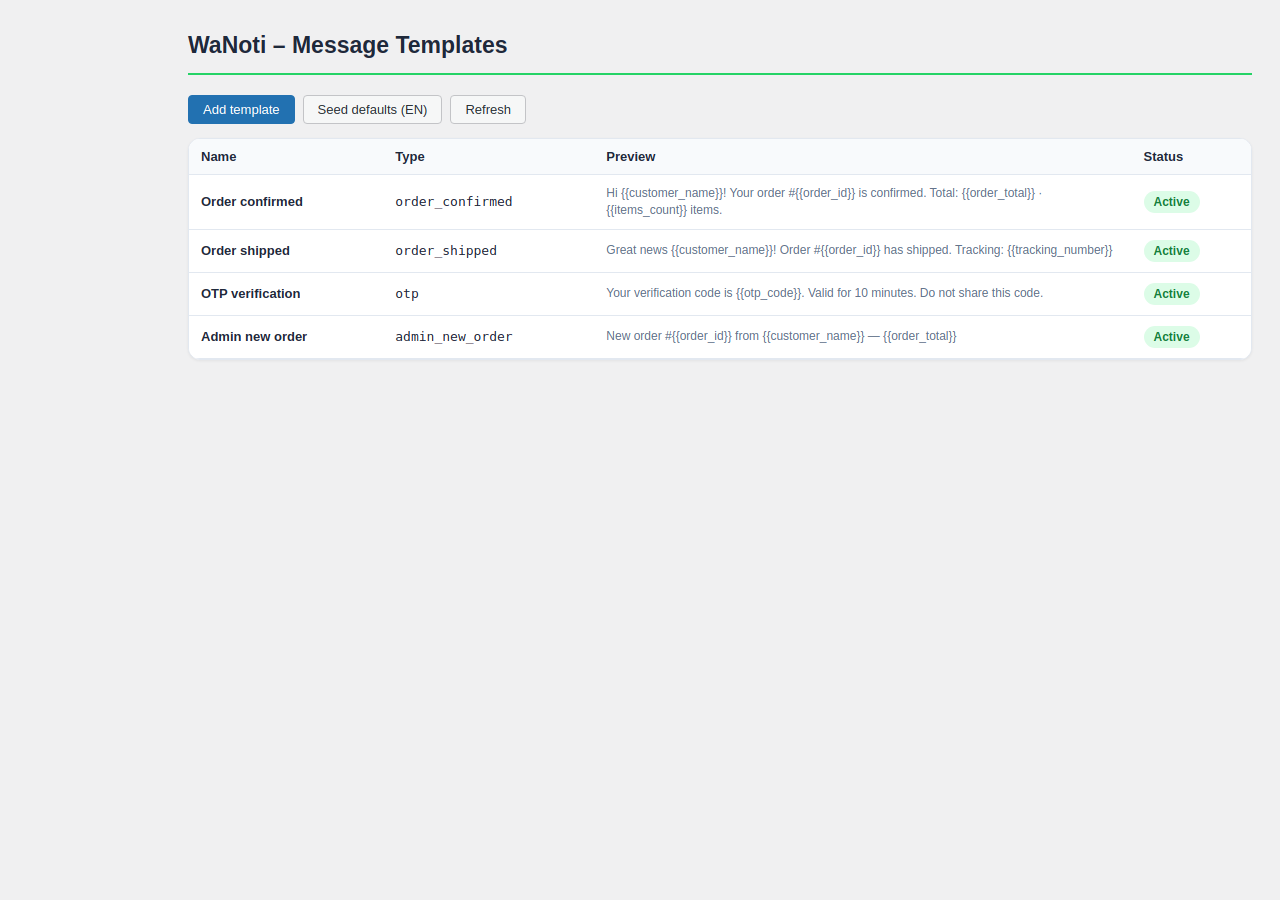
Yes. Templates are edited in your WaNoti dashboard with a live preview. Supported variables:
{{customer_name}},{{order_id}},{{order_total}},{{items_list}},{{tracking_number}},{{store_name}}, and more. -
Where are messages sent from?
-
From the WhatsApp number you connect in your WaNoti dashboard. The plugin calls the WaNoti API; delivery goes through your linked WhatsApp session.
-
Does the plugin phone home?
-
Yes. With an API key saved, an hourly heartbeat sends your site URL and plugin version to wanoti.net to register your install and check connection status. No heartbeat runs without an API key. You can stop all communication by removing your API key or uninstalling the plugin.
-
How do I remove all data?
-
Uninstall the plugin. The uninstall routine removes all plugin options, scheduled events, and stored phone numbers from your database.
Reviews
There are no reviews for this plugin.
Contributors & Developers
“mk4web Notifier for WooCommerce” is open source software. The following people have contributed to this plugin.
Contributors
Translate “mk4web Notifier for WooCommerce” into your language.
Interested in development?
Browse the code, check out the SVN repository, or subscribe to the development log by RSS.
Changelog
1.2.1
- Fix chat widget rendering as a giant icon on Avada and other themes (dedicated CSS file, SVG size constraints)
1.2.0
- Add WhatsApp Chat Widget — floating button with customizable position, greeting, and visibility settings
- Add Abandoned Cart recovery notifications with configurable delays
- Add Back in Stock WhatsApp alerts — customers subscribe on product page, notified when stock returns
- Add Review Request automation — auto-send a review link 2 days after order delivered
- Improve readme.txt with full feature descriptions and FAQ for WordPress.org discoverability
1.1.2
- Remove plan-based gate from Message Logs page
- Replace raw style echo with wp_add_inline_style() for admin menu icon
- Remove customTemplates/analytics plan flags from JS localization
1.1.1
- Fix setup screen 404 when visiting /wp-admin/wanoti-setup
- Fix oversized admin sidebar icon
1.1.0
- WordPress.org release preparation: readme, privacy policy, uninstall cleanup, security hardening
- Renamed user-facing copy; WooCommerce optional, not required