
Description
Medivot for WordPress adds a live chat widget, appointment booking buttons and lead capture forms to your site without code. Every chat, booking and form submission lands in one place: your Medivot CRM.
Medivot is a marketing and sales platform with a CRM, live chat, appointment booking, email campaigns and webinars. This plugin connects your WordPress site to your Medivot workspace so the people who visit your site can chat with you, book time with you and send you their details.
What you can add
- Live chat widget. Paste your widget key, tick one box, and the Medivot chat bubble shows on every page. Conversations arrive in your Medivot inbox.
- Booking buttons. The “Medivot Booking Button” block and the
[medivot_booking]shortcode link visitors to your Medivot booking page: your booking profile with every public event type, or one event type. - Lead capture forms. The “Medivot Form” block and the
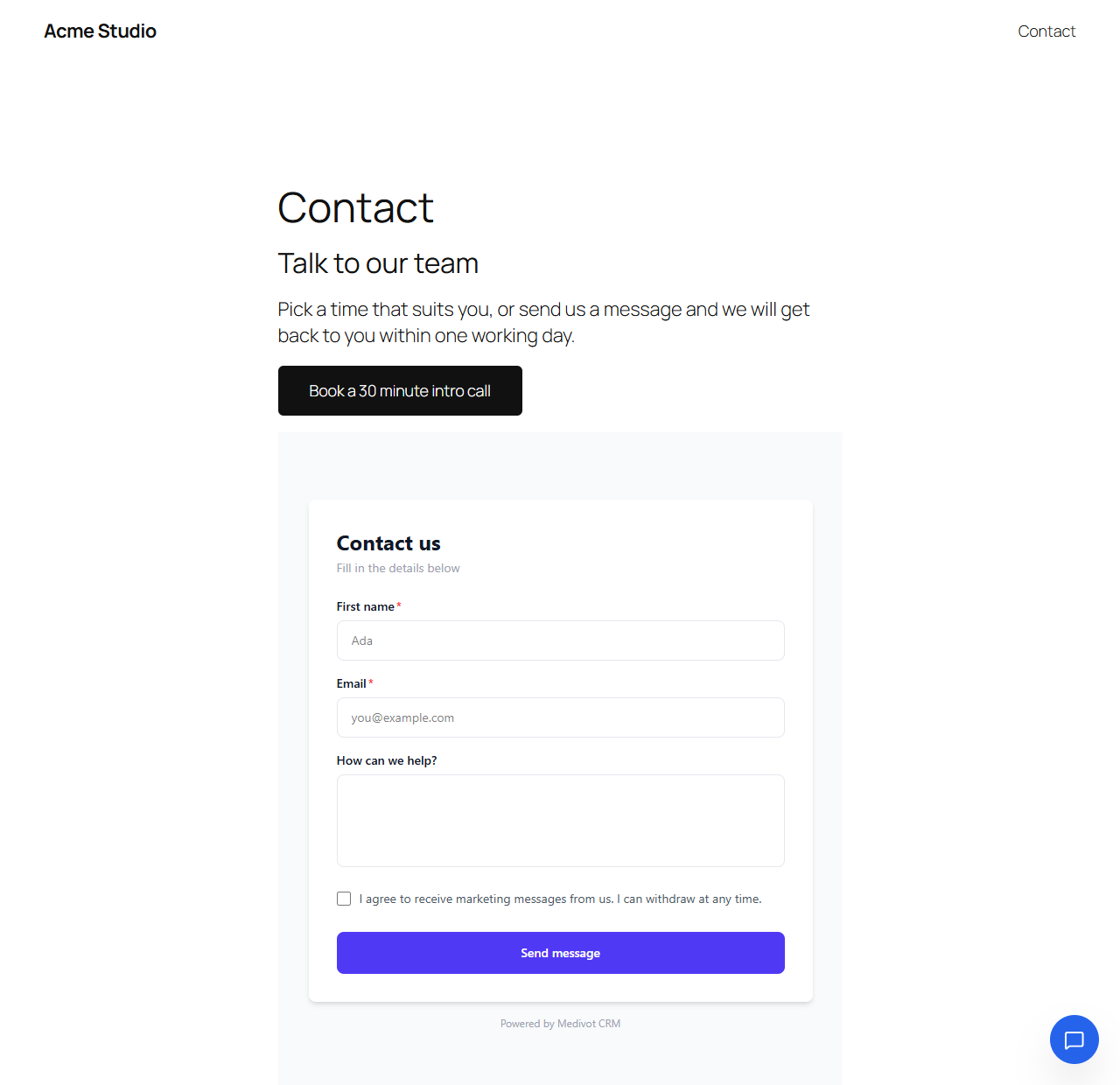
[medivot_form]shortcode embed any Medivot webform. Submissions go straight into your Medivot CRM. UTM parameters on the page are passed on to the form, so you can see which campaign brought each lead.
What happens in Medivot
- Live chat. Reply from a shared inbox with canned replies, departments and business hours. AI replies can answer common questions from your knowledge base, and an offline form collects messages when nobody is online. Visitors who leave a name or email are added to your CRM as leads.
- Appointment booking. Event types with buffers, minimum notice, daily limits, custom questions and optional approval. Booking pages show times in the visitor’s own time zone, sync with Google Calendar and Outlook, and send confirmation and reminder emails. Each booking creates or updates a CRM contact.
- Contact forms to CRM. Each form submission creates a CRM record with web form as the source, with optional email alerts to your team and an automatic reply to the sender. No export, no separate form-to-CRM connector.
Who it is for
Small businesses, agencies, consultants, clinics, salons, coaches and schools that run their website on WordPress and want enquiries to turn into customers. Medivot is built in Lagos and billed in naira, and it works for WordPress sites in Nigeria, across Africa and anywhere else.
The plugin itself stores only its settings in WordPress. Chats, bookings and leads are kept in your Medivot workspace.
Shortcodes
[medivot_booking] links to your booking profile.

[medivot_booking event="intro-call" text="Book a call"] links to one event type.
Booking attributes:
event: event type slug, or a full booking link. Leave it out to link to your booking profile.text: button text. Default “Book a meeting”.style:button(default) orlink.align:left,centerorright.new_tab:yes(default) orno.-
workspace: booking page handle, if it differs from the one in Settings > Medivot.[medivot_form form=”contact-us”] embeds a webform.
Form attributes:
form: the form’s slug, its ID or its public link.slug,idandurlwork too.height: height in pixels. Default 650.title: accessible name for screen readers. Default “Contact form”.fallback:yes(default) shows an “Open the form in a new tab” link under the form;nohides it.
For developers
- Filter
medivot_show_chat_widget(bool) to hide the chat widget on chosen pages. - Filter
medivot_app_url(string), or theMEDIVOT_APP_URLconstant, to point the plugin at another Medivot address.
External services
This plugin connects to Medivot (https://medivot.com), a third-party service, to provide its features. You need a Medivot account. The plugin only contacts Medivot for the features you use:
- Live chat widget. When you switch the widget on, every page of your site loads
https://medivot.com/chat-widget.jswith your widget key, and the visitor’s browser talks to Medivot to show the widget and send and receive chat messages. Medivot receives the visitor’s IP address, browser details, the page they are on and anything they type into the chat. - Forms. On pages where you place a form, the visitor’s browser loads it from
https://medivot.com/forms/...in an iframe. Medivot receives the visitor’s IP address, browser details, the UTM parameters of the page and whatever they submit. - Booking buttons. These are plain links to your booking page on medivot.com. Nothing is sent to Medivot until a visitor clicks one.
- API connection (optional). When you save an API key or press “Check connection”, your server sends the key to
https://medivot.com/api/v1/meto confirm it and read your workspace name and booking page handle. While you edit a booking button block, your server askshttps://medivot.com/api/v1/calendar/event-typesfor your event types. No visitor data is sent in these requests.
Medivot terms of service: https://medivot.com/terms
Medivot privacy policy: https://medivot.com/privacy
Screenshots
Blocks
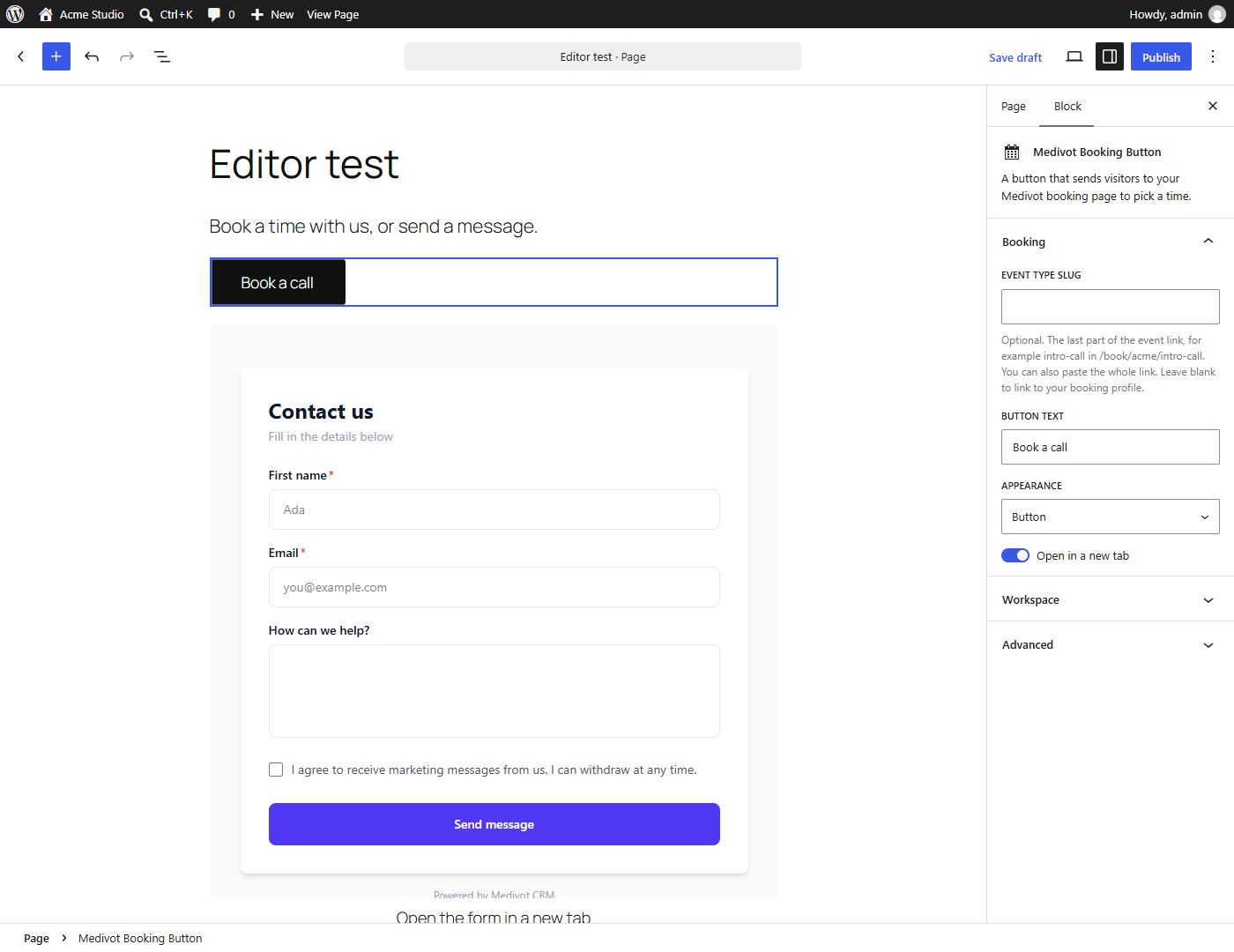
This plugin provides 2 blocks.
- Medivot Form Embed a Medivot webform. Submissions go straight into your Medivot CRM.
- Medivot Booking Button A button that sends visitors to your Medivot booking page to pick a time.
Installation
- Install and activate the plugin from Plugins > Add New, or upload the
medivotfolder to/wp-content/plugins/. - Go to Settings > Medivot.
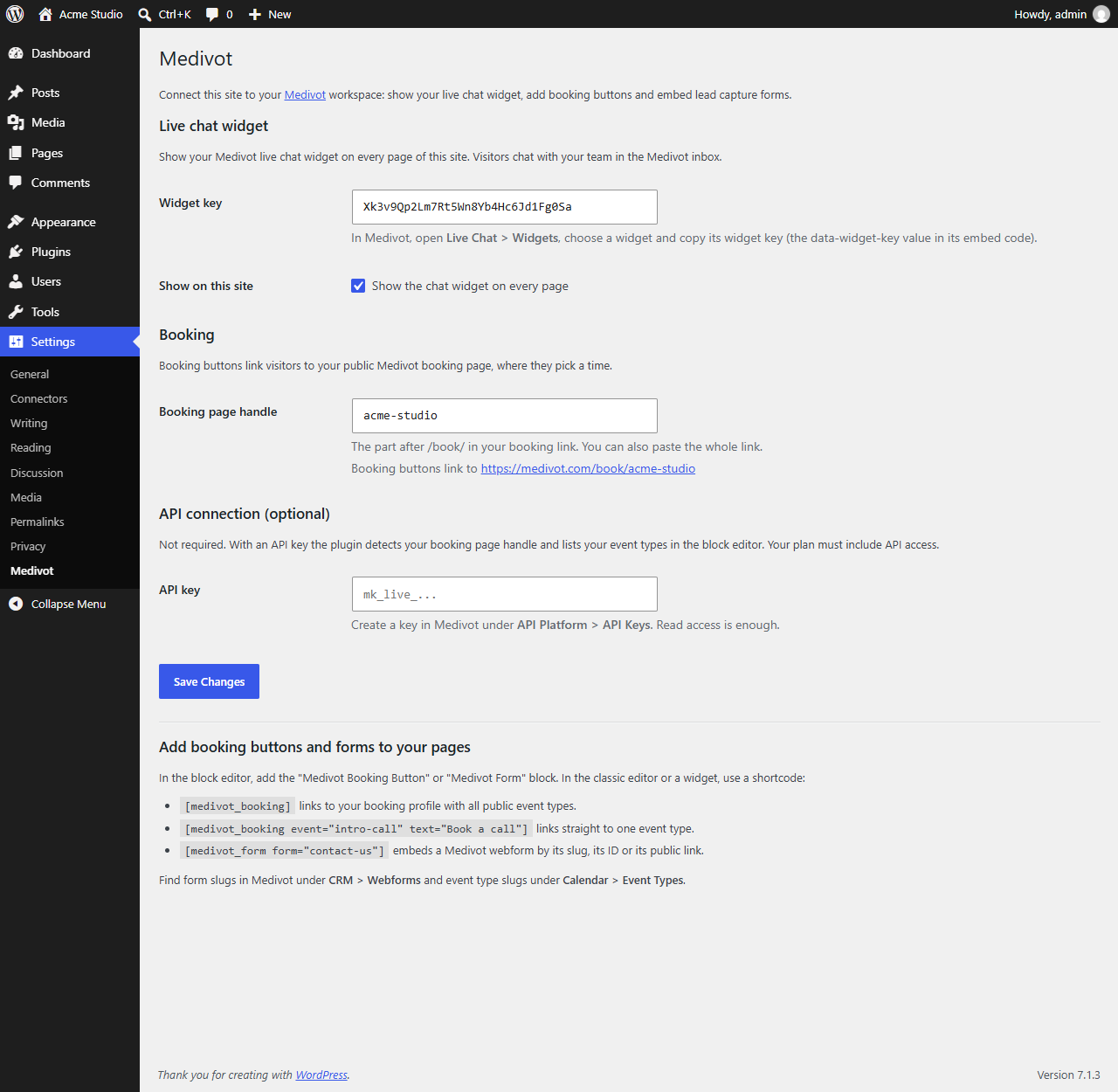
- For live chat: in Medivot, open Live Chat > Widgets, copy your widget key, paste it into “Widget key”, tick “Show the chat widget on every page” and save.
- For booking buttons: enter your booking page handle (the part after /book/ in your Medivot booking link), or paste the whole link, and save.
- Add the “Medivot Booking Button” or “Medivot Form” block to a page, or use the shortcodes.
FAQ
-
Do I need a Medivot account?
-
Yes. The plugin connects WordPress to your Medivot workspace. You can sign up at https://medivot.com/signup.
-
Is the plugin free?
-
Yes, the plugin is free. Live chat, booking and forms run on your Medivot account, which starts with a free trial and then follows your Medivot plan. See https://medivot.com/pricing.
-
Is this a live chat plugin, a booking plugin or a CRM plugin?
-
All three, through one connection. The plugin adds the chat widget, booking buttons and forms to WordPress, and the conversations, bookings and leads they collect are stored in your Medivot CRM, not in the WordPress database.
-
Can my WordPress contact form send leads to a CRM?
-
Yes, when the form is a Medivot webform. Build it in Medivot under CRM > Webforms and embed it with the “Medivot Form” block or the
[medivot_form]shortcode. Each submission creates a CRM record, with the page’s UTM parameters attached. -
Where do I find my widget key?
-
In Medivot, open Live Chat > Widgets and choose a widget. The widget key is the
data-widget-keyvalue in its embed code. -
What is my booking page handle?
-
Your public booking link looks like
https://medivot.com/book/your-handle. The handle is the part after/book/. You can paste the whole link into the setting and the plugin keeps only the handle. If you save an API key, the plugin detects the handle for you. -
Do I need an API key?
-
No. The chat widget, booking buttons and forms all work without one. With an API key the plugin fills in your booking page handle and lists your event types in the block editor. Your Medivot plan must include API access.
-
Where do I find a form’s slug?
-
In Medivot, open CRM > Webforms. Each form’s public link ends in its slug, for example
https://medivot.com/forms/contact-us. You can paste that link into the block or the shortcode. -
The chat widget does not show
-
Check that the widget key is filled in, the “Show the chat widget on every page” box is ticked, and the widget is active in Medivot. If you use a plugin that delays or combines JavaScript, exclude
medivot.com/chat-widget.jsfrom it. -
Can I hide the chat widget on some pages?
-
Yes, with the
medivot_show_chat_widgetfilter. For example, to hide it on the checkout page:add_filter( 'medivot_show_chat_widget', function ( $show ) { return $show && ! is_page( 'checkout' ); } ); -
Does it work with page caching?
-
Yes. The widget, buttons and forms are plain HTML and scripts, so cached pages work as normal. Clear the cache after you switch the chat widget on, so cached pages pick up the chat script.
-
Will the chat widget slow down my site?
-
The chat script loads asynchronously in the footer, so your page renders first. Booking buttons are plain links, and forms load only on the pages where you place them.
-
Does it work with Elementor and other page builders?
-
Yes. The chat widget is added to every page whatever built it. For booking buttons and forms, use the shortcodes in any page builder that has a shortcode element, such as the Elementor shortcode widget.
-
Where can I read a step-by-step guide?
-
See https://medivot.com/blog/add-live-chat-to-wordpress for live chat, https://medivot.com/blog/add-appointment-booking-to-wordpress for booking buttons, and https://medivot.com/integrations/wordpress for an overview.
Reviews
There are no reviews for this plugin.
Contributors & Developers
“Medivot: Live Chat, Booking, Lead Forms & CRM” is open source software. The following people have contributed to this plugin.
Contributors
Translate “Medivot: Live Chat, Booking, Lead Forms & CRM” into your language.
Interested in development?
Browse the code, check out the SVN repository, or subscribe to the development log by RSS.
Changelog
1.0.2
- Connecting to Medivot and loading event types in the block editor now wait up to 20 seconds instead of 10, so a slow connection no longer shows a timeout error.
1.0.1
- New plugin name: Medivot: Live Chat, Booking, Lead Forms & CRM. No functional changes.
1.0.0
- First release: live chat widget, booking button block and shortcode, form block and shortcode.