

Description
market-it! Easy Withdrawal for WooCommerce gives your store a clear, customer-facing process for withdrawal requests.
Instead of relying on informal email threads, customers can find their order, review the details, and submit a documented request. The store receives an order note, request metadata on the order, and email notifications — so you can follow up with returns and refunds according to your own policies and legal obligations.
The plugin helps you run a structured request workflow. It does not automatically issue refunds, cancel orders, or guarantee that your store meets every legal requirement in every jurisdiction.
Requires WooCommerce (WooCommerce 8.0 or later; tested up to 10.7). Compatible with WooCommerce High-Performance Order Storage (HPOS) and classic as well as block themes.
Key features
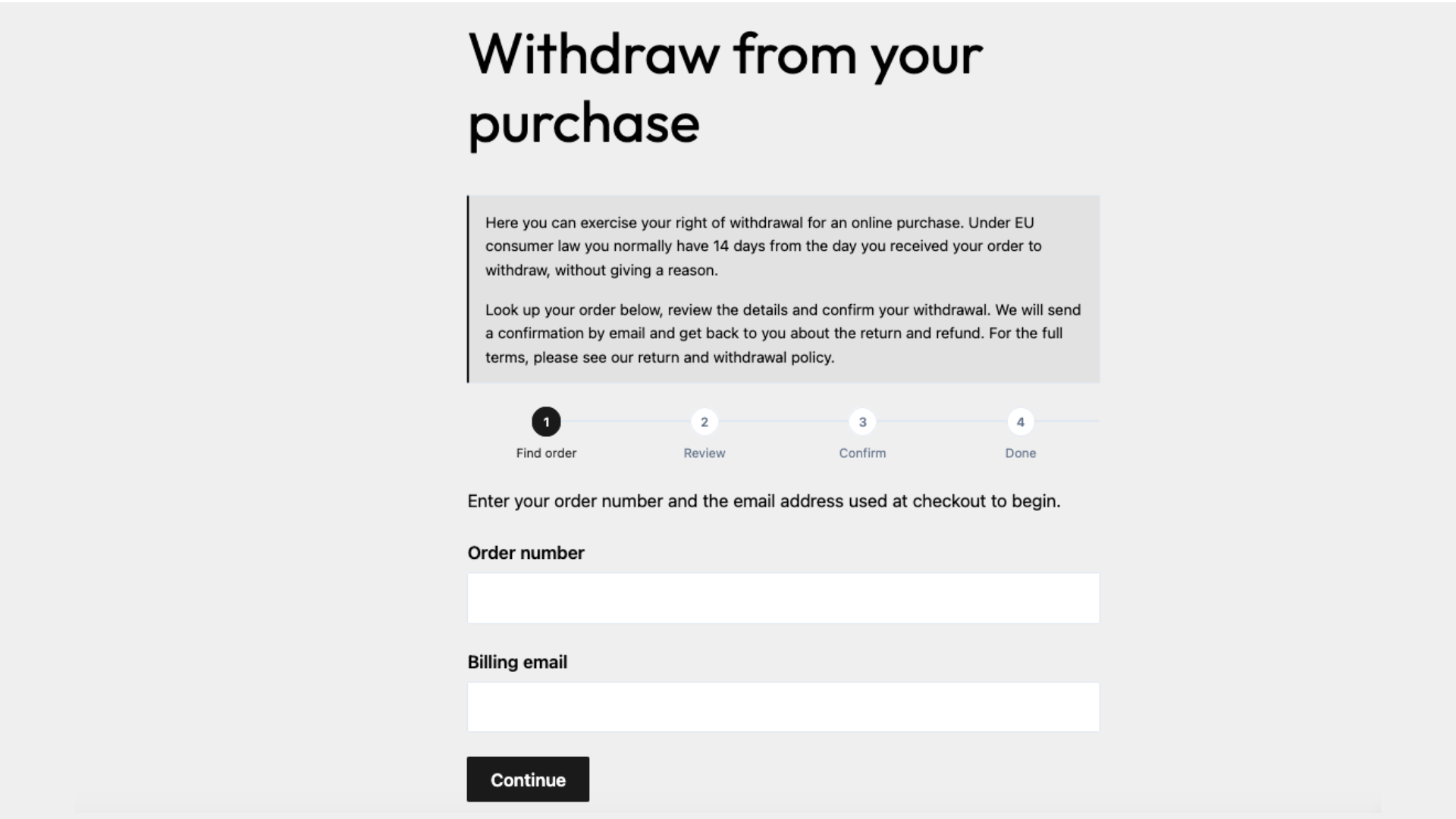
- Four-step customer withdrawal form via shortcode
- Order lookup by order number and billing email (works for guest and account orders)
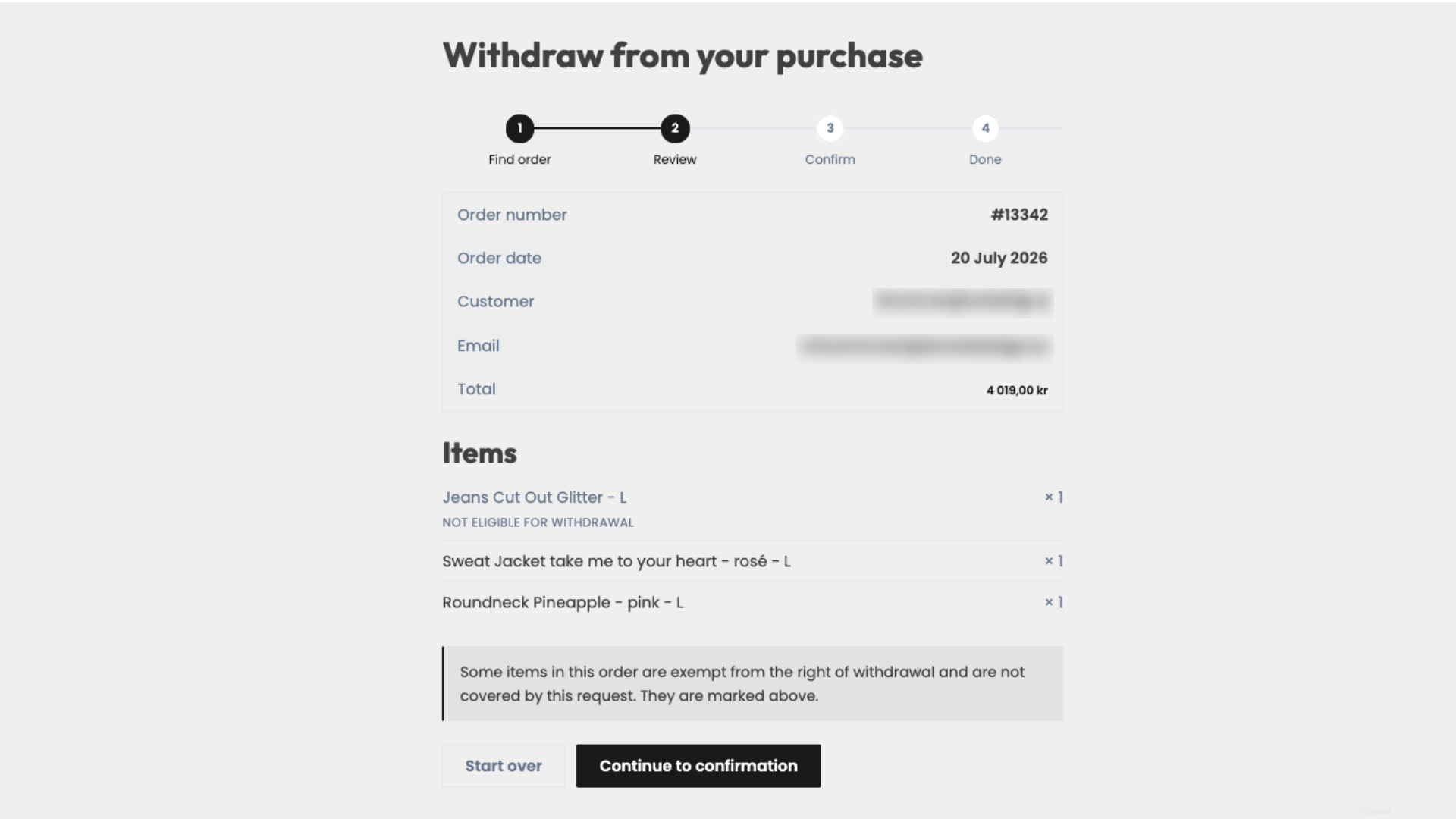
- Review step with order, customer and line-item details
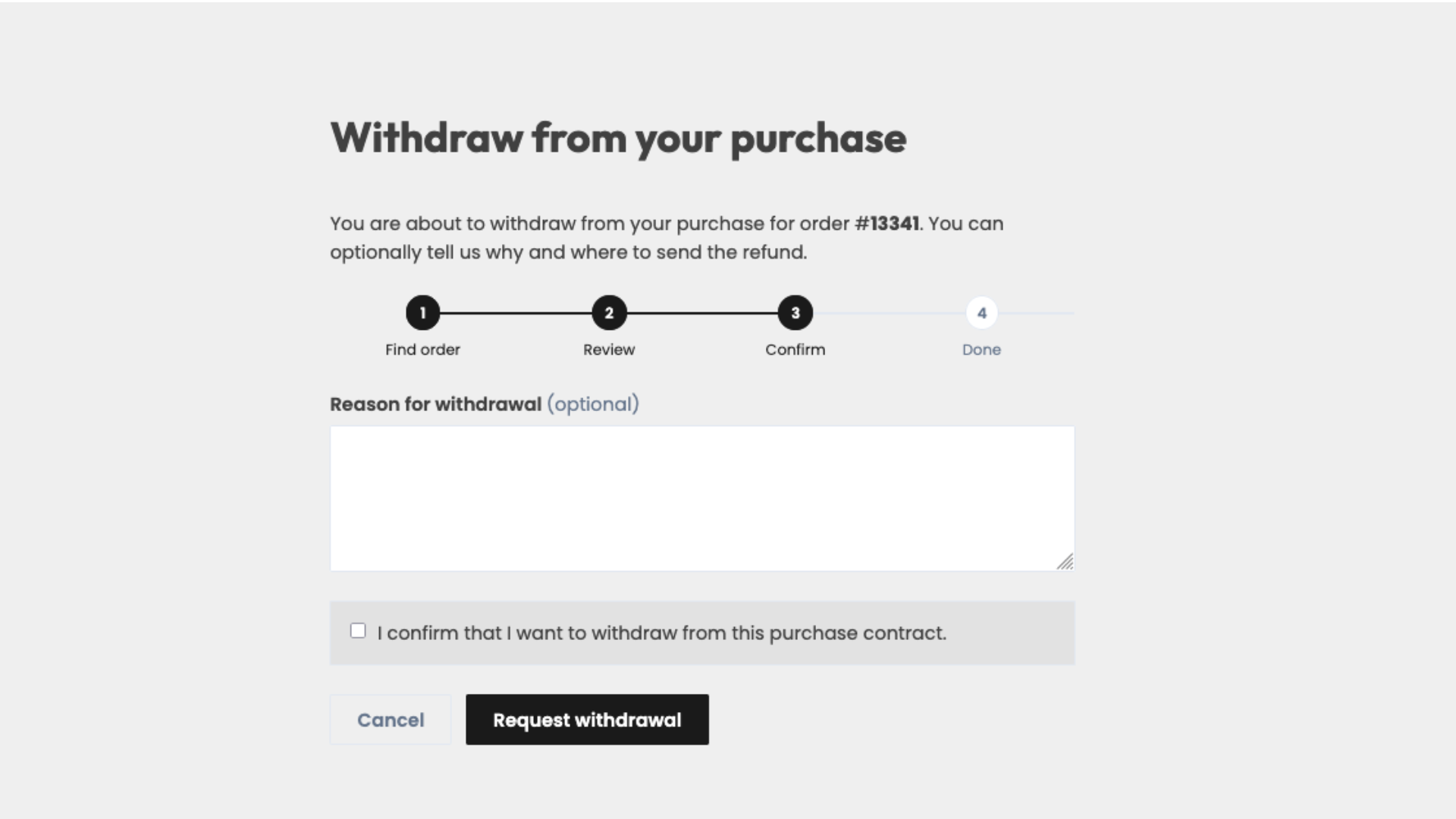
- Confirmation step with required checkbox and optional reason field
- Configurable refund-account field (hidden, optional or required)
- Customer confirmation email and merchant notification email
- Order note and request metadata stored on the order
- Optional dedicated Withdrawal requested order status
- Configurable eligible order statuses (defaults: Processing and Completed)
- Configurable withdrawal period in days (default: 14)
- Optional hard deadline enforcement (off by default)
- Optional delivery date on the order (used when enforcing the deadline)
- Product and product-category exclusions for non-withdrawable items
- Clear handling of mixed orders (withdrawable and excluded items)
- Optional introduction / legal note at the top of the form
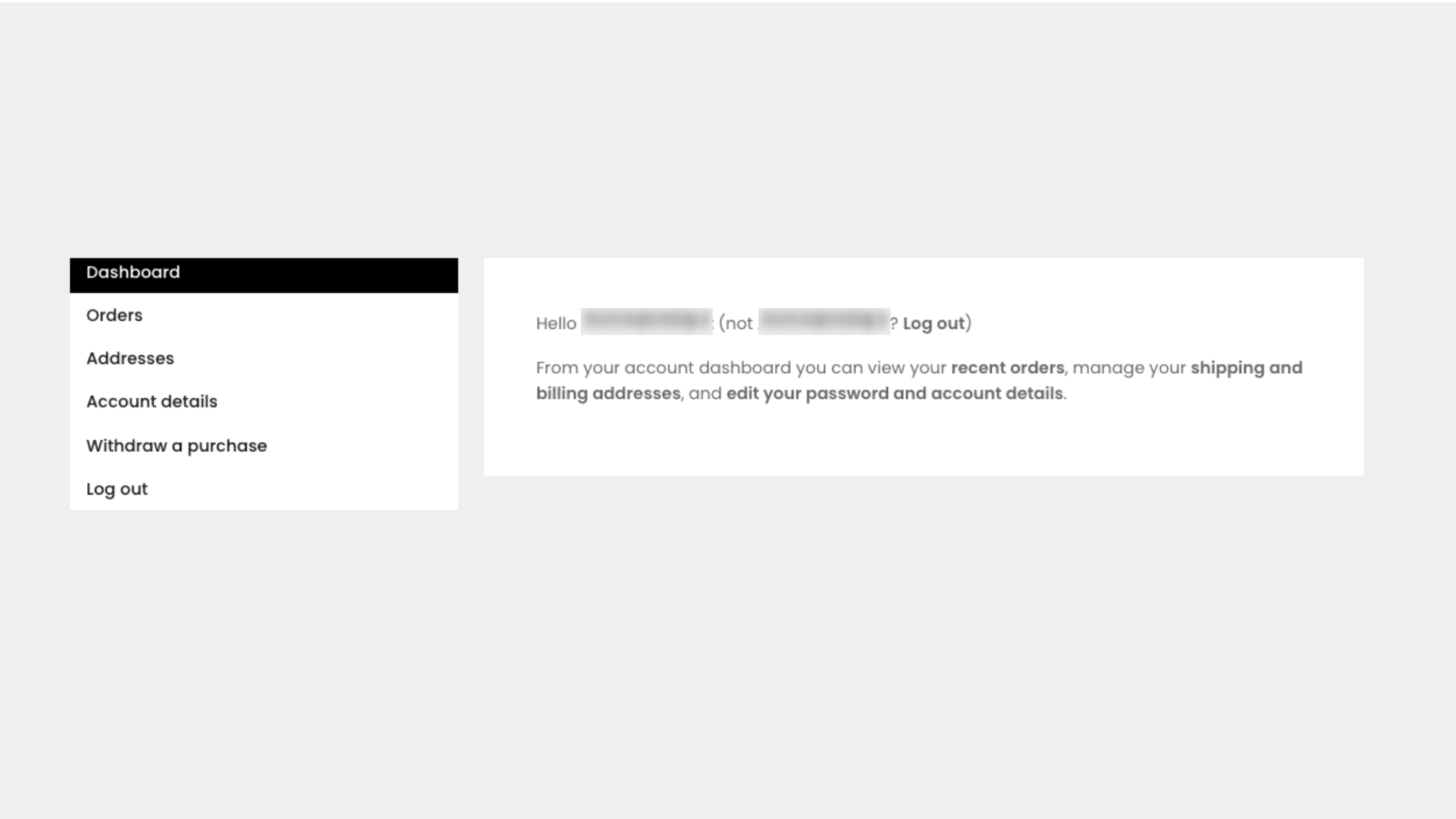
- Selectable withdrawal page and optional My Account menu link
- Accent colour and corner-radius appearance settings
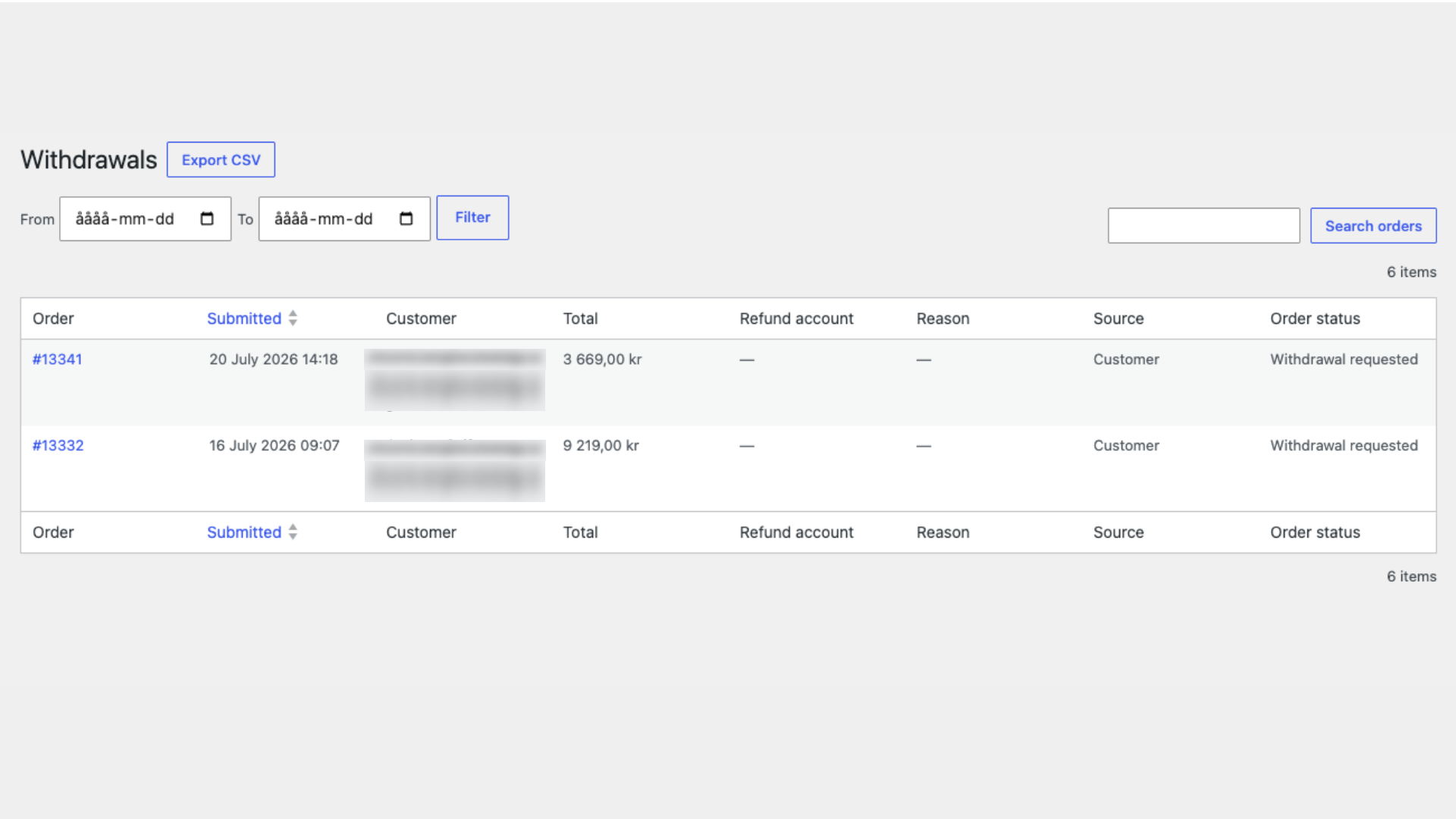
- Admin Withdrawals list with search, filters and CSV export
- Theme template overrides and developer actions / filters
- Front-end assets load reliably with block themes, page builders and widgets
How the withdrawal flow works
Place the shortcode on a page. Customers then complete four steps:
- Find order — enter the order number and the billing email used at checkout.
- Review — confirm order, customer and product details.
- Confirm — tick the confirmation checkbox and optionally add a reason (and a refund account if you enable that field).
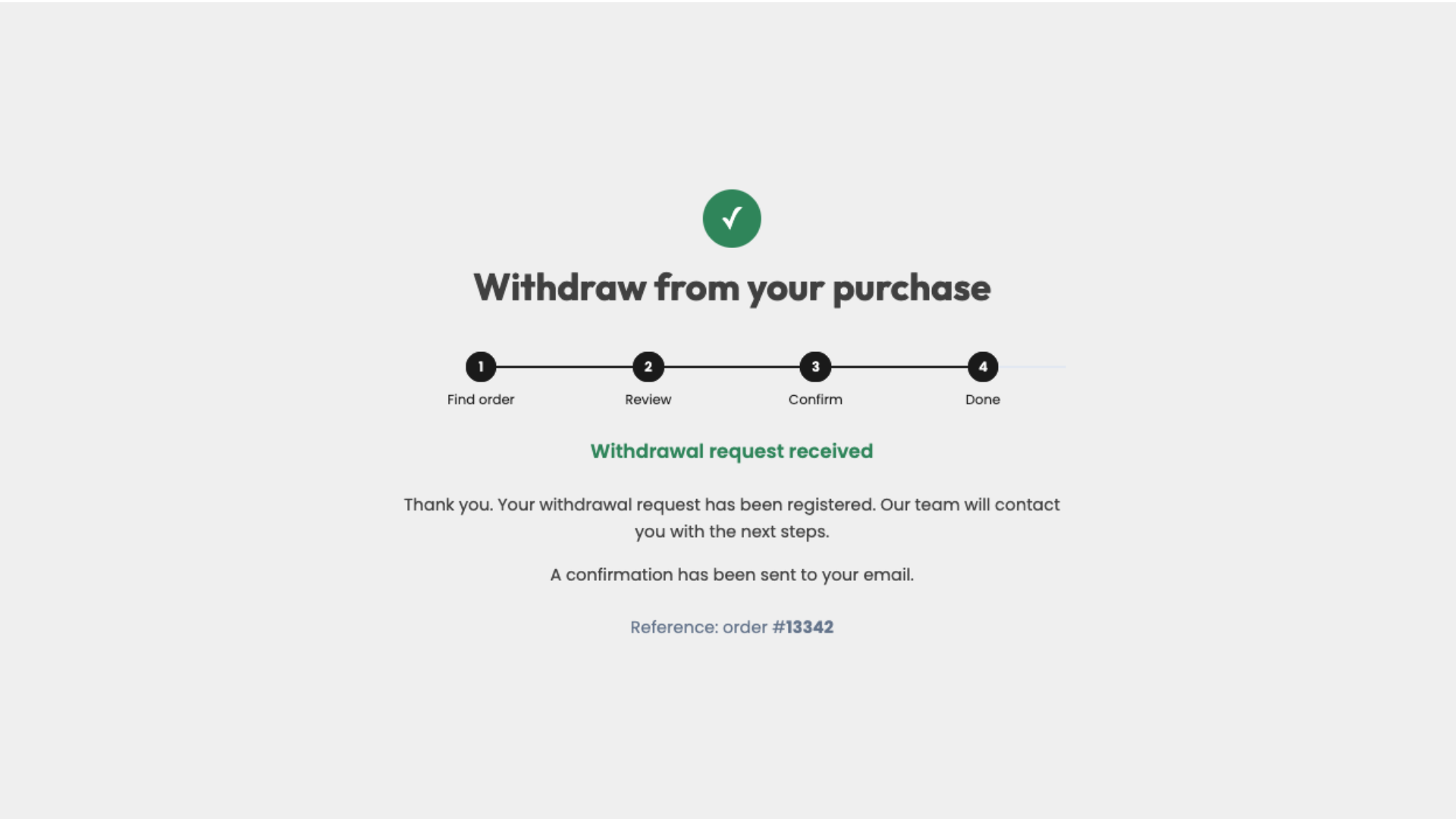
- Done — see a confirmation screen; customer and merchant emails are sent.
Lookup attempts are rate-limited to reduce guessing of order details.
Order and request handling
When a request is submitted, the plugin:
- adds an order note (including reason, refund account and excluded items when present),
- stores request metadata on the order (timestamp, source, reason, refund account, previous status, and request IP when available),
- optionally moves the order to the Withdrawal requested status,
- emails the customer a confirmation and notifies the store.
The plugin does not create WooCommerce refunds or reverse payments automatically. Processing the return and refund remains a merchant task.
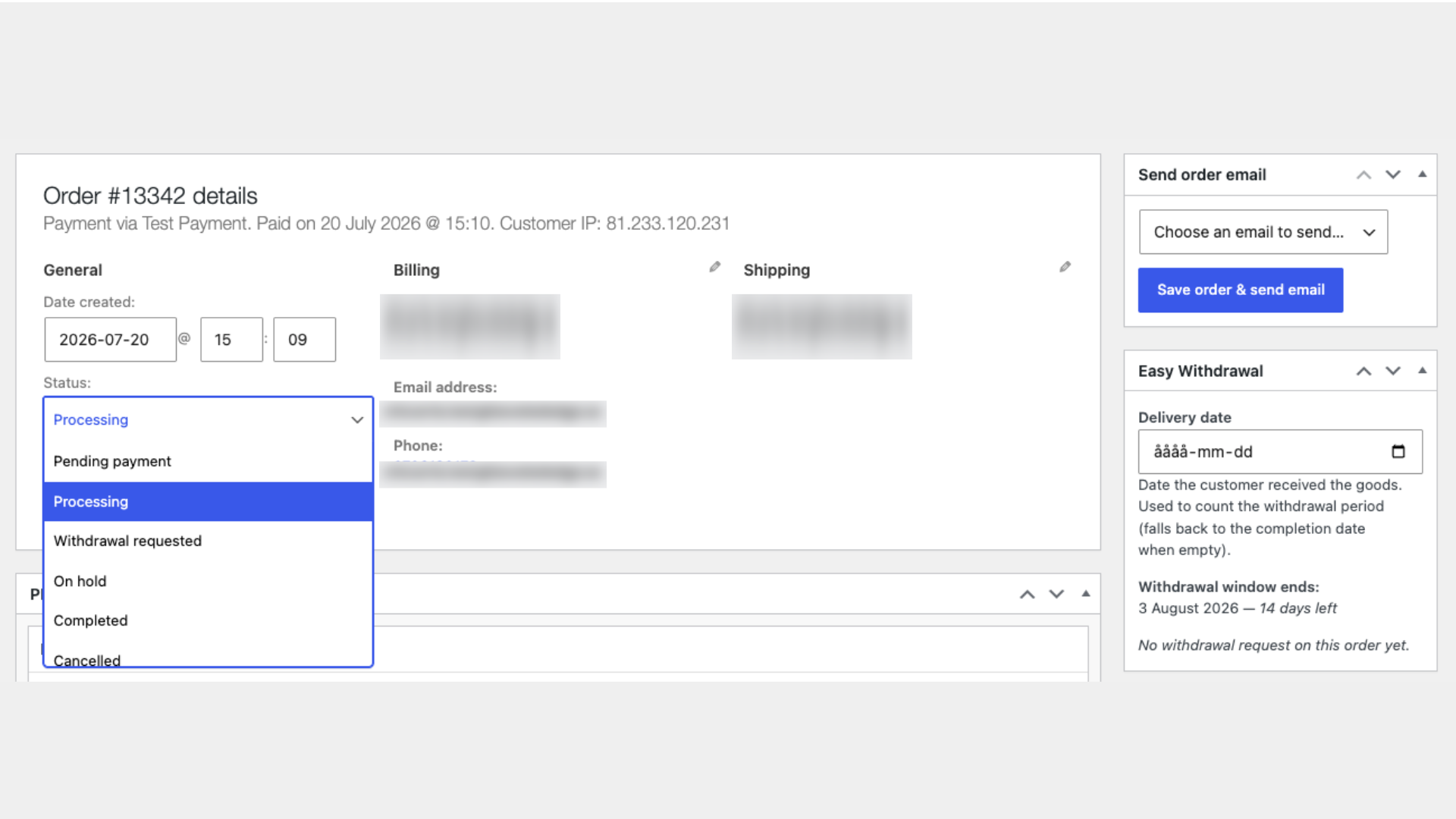
You can optionally record a Delivery date on the order edit screen. When deadline enforcement is enabled, that date is preferred as the start of the withdrawal period; otherwise the plugin uses the order completed date, then the created date.
Shortcode
[miewc_withdrawal_request_form]
Optional attributes:
title— heading shown on the form (default: “Withdraw from your purchase”).heading_level— heading level for the form title,1–6(default1). If your theme or page builder already outputs the page title as a heading, useheading_level="2".
Example:
[miewc_withdrawal_request_form heading_level="2"]
Settings
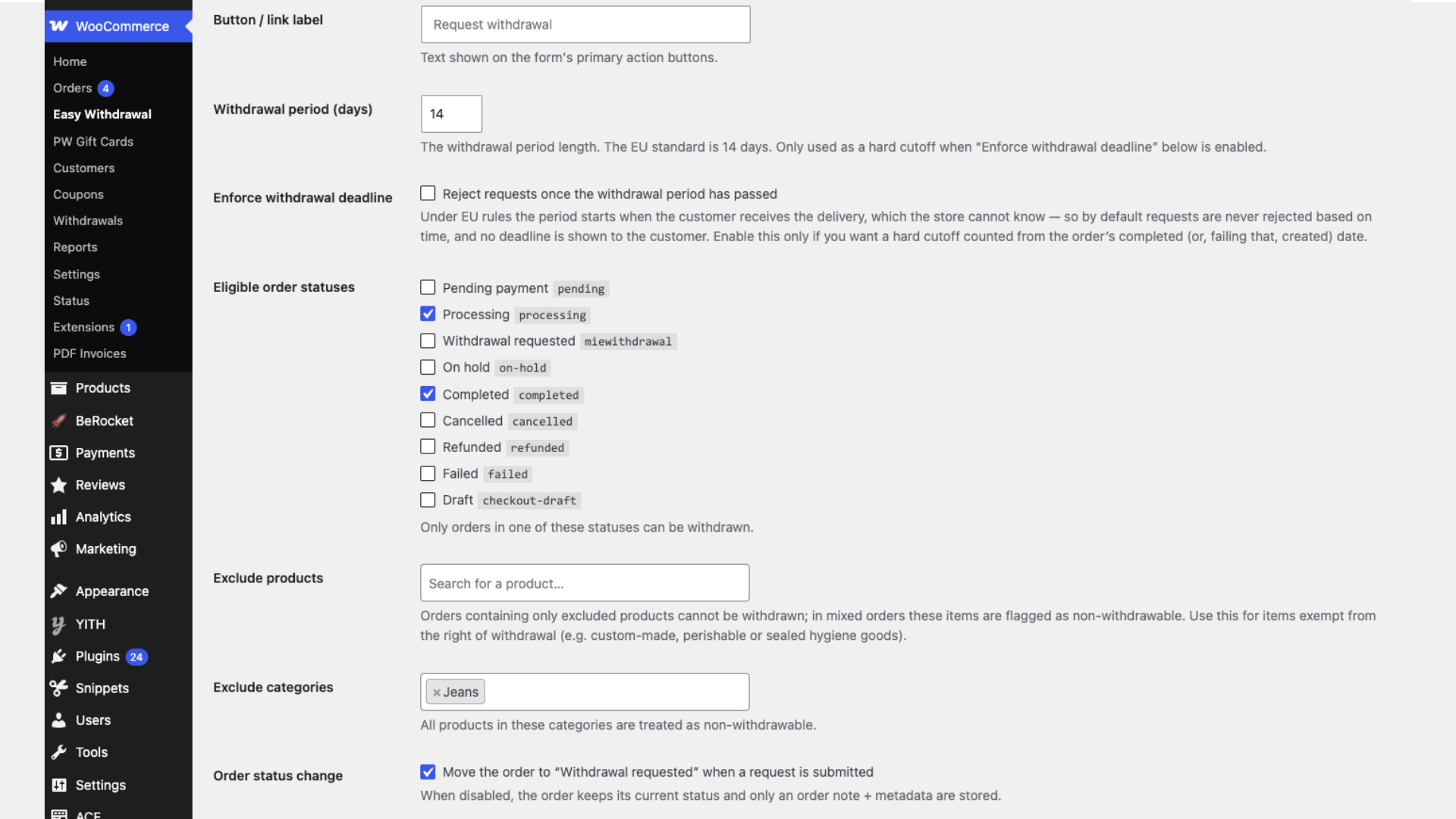
Configure the plugin under WooCommerce Easy Withdrawal:
- Button / link label
- Withdrawal period (days)
- Enforce withdrawal deadline (optional hard cutoff)
- Eligible order statuses
- Exclude products and product categories
- Change order status on submission
- Refund account field — Hidden / Optional / Required (hidden by default)
- Withdrawal page
- Optional My Account menu link and label
- Merchant notification email (comma-separated list; defaults to the site admin email)
- Email sender name and address
- Introduction / legal note
- Confirmation text
- Overridable customer-facing strings (lookup intro, confirmation checkbox, completion heading)
- Accent colour and corner radius
Email subjects and headings are managed under WooCommerce Settings Emails.
Submitted requests are listed under WooCommerce Withdrawals, with CSV export.
Product and category exclusions
You can exclude specific products and/or product categories from withdrawal (for example items you treat as non-withdrawable under your store policy).
- Orders that contain only excluded items are not eligible for a request.
- In mixed orders, excluded items are marked on the Review step, listed on the order note, and shown in the confirmation emails.
Emails and notifications
Two WooCommerce emails are registered:
- Withdrawal request — customer confirmation
- Withdrawal request — merchant notification
They can be enabled, disabled and customised under WooCommerce Settings Emails. Sender name and address can also be set on the Easy Withdrawal settings screen.
Styling and template overrides
Front-end markup is scoped to a .miewc wrapper. Colours, radius and related values use CSS custom properties (--miewc-*). You can adjust accent colour and corner radius in the settings, or override variables in your theme stylesheet.
Templates can be overridden by copying them into:
yourtheme/market-it-easy-withdrawal-for-woocommerce/
Developer features
Useful public extension points include:
Actions:
miewc_review_fields— extra fields on the review stepmiewc_confirm_fields— extra fields on the confirm stepmiewc_email_after_summary/miewc_email_after_summary_plain— extra content after the email summarymiewc_request_registered— fires after a request is storedmiewc_send_customer_email/miewc_send_merchant_email— email dispatch hooks
Filters:
miewc_prefill_order— return aWC_Orderto skip lookup and start at Review (caller must authorise access)miewc_is_order_eligible/miewc_has_request/miewc_is_product_withdrawablemiewc_collect_request_data/miewc_validate_request_data/miewc_review_errormiewc_request_meta/miewc_order_note/miewc_post_request_statusmiewc_list_columns/miewc_list_column_value/miewc_export_headers/miewc_export_rowmiewc_admin_tabs— extra tabs on the Easy Withdrawal settings screen
Helpers related to exclusions: miewc_order_withdrawable_items(), miewc_order_excluded_items().
Privacy
The plugin processes WooCommerce order and customer information when a customer looks up an order or submits a withdrawal request.
Depending on the plugin settings and information entered by the customer, stored request data may include:
- Order number and related order details already held by WooCommerce
- Customer name and billing email (from the order; billing email is also used for lookup)
- Withdrawal reason
- Refund-account information (when that field is enabled)
- Request timestamp and, when available, the visitor IP address
- Excluded order items (when product or category exclusions apply), recorded in the order note and confirmation emails
Request information is stored as WooCommerce order metadata and order notes. Relevant information is also included in the customer and merchant notification emails.
While the customer completes the multi-step form, a short-lived server-side session stores the verified order ID and billing email so the flow can continue securely between steps.
Order lookup attempts are temporarily rate-limited using the visitor’s IP address to reduce unauthorised guessing of order information.
The plugin does not send request data to market-it! or another external service. Emails are sent through the site’s normal WordPress / WooCommerce mail handling to the customer and the configured merchant recipients. The merchant is responsible for determining an appropriate retention period and for describing this processing in the store’s privacy information.
Legal disclaimer
market-it! Easy Withdrawal is a software tool designed to help WooCommerce merchants implement a structured withdrawal-request process.
It is provided for informational and operational purposes only and does not constitute legal advice. Merchants remain responsible for ensuring that their website, business processes, terms and conditions, and customer communications comply with all applicable laws and regulations in their jurisdiction.
Legal requirements may vary between countries and may change over time. Seek advice from a qualified legal professional where needed.
market-it! does not guarantee legal compliance and accepts no responsibility for how the plugin is configured, implemented, or used.
Screenshots
Installation
- Install the plugin from the WordPress plugin directory, or upload the plugin folder to
/wp-content/plugins/. - Activate market-it! Easy Withdrawal for WooCommerce (WooCommerce must already be active).
- Go to WooCommerce Easy Withdrawal and configure the withdrawal flow, exclusions, emails and appearance.
- Create a page for the form (or choose an existing page) and set it as the Withdrawal page.
- Add the shortcode
[miewc_withdrawal_request_form]to that page if it is not already present. - Optionally enable the My Account menu link so logged-in customers can open the withdrawal page from their account.
- Review the two emails under WooCommerce Settings Emails.
FAQ
-
Does the plugin automatically issue refunds?
-
No. It records a withdrawal request (order note, metadata and emails). Refunds and payment reversals are handled by you in WooCommerce or your payment process.
-
Does it cancel or change the order automatically?
-
By default it can move the order to a dedicated Withdrawal requested status. You can turn that off under WooCommerce Easy Withdrawal. It does not cancel the order or create refunds on its own.
-
How does the customer locate an order?
-
They enter the order number and the billing email from checkout. No customer login is required, so guest orders are supported when those details match.
-
Can the withdrawal period be enforced?
-
Yes. Set the period in days and optionally enable Enforce withdrawal deadline. Enforcement is off by default because the statutory period often depends on delivery, which the store may not know automatically.
-
How is the deadline calculated when enforcement is on?
-
The plugin uses the order’s optional Delivery date if set; otherwise the completed date; otherwise the created date. The period length from settings is then added.
-
Can products or categories be excluded?
-
Yes. Configure excluded products and product categories under WooCommerce Easy Withdrawal. Orders with only excluded items cannot submit a request. Mixed orders show excluded items as not eligible for withdrawal.
-
Yes. Choose Hidden, Optional or Required. Hidden is the default.
-
Can I change the form heading level?
-
Yes. Use the shortcode attribute
heading_level(1–6). Default is 1. -
Can the form appear in My Account?
-
You can add a menu link that points to your withdrawal page. The free plugin does not add a per-order action that skips the lookup step.
-
Can I customise the look of the form?
-
Yes. Adjust accent colour and corner radius in settings, or override CSS custom properties and templates in your theme.
-
Where are email subjects and headings configured?
-
Under WooCommerce Settings Emails, for the two Easy Withdrawal emails. Sender name and address can also be set on the Easy Withdrawal settings screen.
-
Is this plugin legal advice?
-
No. It is a software tool for collecting and documenting withdrawal requests. You remain responsible for your legal obligations.
-
Does it support block themes and page builders?
-
Yes. Assets are enqueued when the shortcode renders, including setups where the shortcode is not only in classic post content.
-
Where can I review submitted requests?
-
Under WooCommerce Withdrawals. You can also open the order to see the note, metadata and optional delivery date field.
Reviews
There are no reviews for this plugin.
Contributors & Developers
“market-it! Easy Withdrawal for WooCommerce” is open source software. The following people have contributed to this plugin.
Contributors
Translate “market-it! Easy Withdrawal for WooCommerce” into your language.
Interested in development?
Browse the code, check out the SVN repository, or subscribe to the development log by RSS.
Changelog
1.3.5
- WordPress.org review: renamed all plugin identifiers from the
wbs_ewprefix to the uniquemiewcprefix (functions, classes, constants, options, hooks, order meta, and CSS). Shortcode is now[miewc_withdrawal_request_form].
1.3.4
- Align plugin directory and main file name with the WordPress.org slug (
market-it-easy-withdrawal-for-woocommerce) so Plugin Check text-domain validation passes.
1.3.3
- WordPress.org compliance: removed Custom CSS setting; updated text domain to
market-it-easy-withdrawal-for-woocommerce; fixed URL escaping in plain-text emails.
1.3.2
- Rebranded under market-it! (plugin slug
market-it-easy-withdrawal, WordPress.org issuermarket-it). Internal hooks and CSS class prefix unchanged.
1.3.1
- Fixed the progress bar so the connecting line starts correctly from step 1: lines now run forward from each completed step (
::after) instead of backward from the next step (::before), so step 1 participates like every other step.
1.3.0
- New: exclude specific products and/or product categories from the right of withdrawal (for items exempt under EU CRD Art. 16 — custom-made, perishable, sealed hygiene goods, digital content, etc.). Configure them under WooCommerce Easy Withdrawal Withdrawal flow.
- Orders containing only excluded items are not eligible; in mixed orders the excluded items are clearly marked as non-withdrawable on the Review step, listed on the order note, and shown in the customer and merchant confirmation emails.
- Developer: new helpers/filters
miewc_is_product_withdrawable,miewc_order_withdrawable_items(),miewc_order_excluded_items()so extensions can honour the same exclusions.
1.2.1
- Fixed a critical error when saving an order (e.g. changing the status of a withdrawal order): the delivery-date save handler called save() inside
woocommerce_update_order, causing infinite recursion. It now guards against re-entry and only saves when the delivery date actually changes. - Fixed the progress bar so the connecting line is filled consistently up to the current step (the segment leading into the active step is no longer left grey). Bumped the asset version so the corrected stylesheet is picked up.
1.2.0
- Front-end assets now load reliably wherever the shortcode is rendered (block themes, page builders and widgets), fixing the unstyled form / duplicated step numbers some setups saw.
- Admin accent-colour / corner-radius settings now apply correctly, and the form keeps a consistent width with evenly spaced progress steps across all steps.
- Email summary tables now use consistent flat borders (no more beveled 3D edges) with spacing below the table.
- The default confirmation copy no longer states that a confirmation email has been sent (which read oddly inside the confirmation email itself); the success screen shows that line separately instead.
- New setting: an optional Introduction / legal note shown at the top of the form to explain the page’s purpose (with a sensible default and basic HTML so you can link to your full policy).
- New setting: Refund account field (Hidden / Optional / Required, hidden by default). Refunds normally return to the original payment method per EU rules, so the field is no longer shown unless you enable it.
- New: select your Withdrawal page and optionally add a link to it in the customer’s My Account menu, so logged-in customers can reach the form from their account.
- The statutory withdrawal period runs from delivery, which the store cannot know, so requests are no longer auto-rejected based on time by default (and no deadline is shown to the customer). A new Enforce withdrawal deadline setting re-enables a hard cutoff, counted from the order’s completed/created date, for merchants who want it.
- Developer: new
miewc_prefill_orderfilter — return aWC_Orderto start the flow at the Review step, skipping the lookup. The caller is responsible for authorising access. - Reordered each step to Title intro progress steps form, and added more spacing for a less cramped layout.
- The form now keeps a single persistent title across all steps (the progress bar shows the step), giving a stable page heading; the completion affirmation is shown as a success message.
- The form title is now an H1 by default; add
heading_level="2"to the shortcode if your theme/builder already provides the page H1. Paragraph copy now uses the theme’s body text colour instead of a muted grey.
1.1.0
- Added a developer API of actions and filters so add-ons can extend the flow without editing core files:
miewc_confirm_fields,miewc_email_after_summary,miewc_email_after_summary_plain,miewc_collect_request_data,miewc_request_meta,miewc_post_request_status,miewc_order_note,miewc_has_request,miewc_list_columns,miewc_list_column_value,miewc_export_headers,miewc_export_row. - No changes to the default behaviour of the withdrawal flow.
1.0.0
- Initial release.