

Description
Migrator & Backup helps administrators export a WordPress site’s database and wp-content, import ZIP or .wpress packages, create local backups, and schedule backups with WordPress cron.
Features
- Export the site database and
wp-contentinto a ZIP package. - Import standard ZIP packages and
.wpressbackups. - Perform serialized-safe URL replacement during migration.
- Create local backups and download them from the WordPress admin.
- Run scheduled backups with WordPress cron.
- Use WP-CLI commands for export, import, cleanup, and diagnostics.
- Optionally store backups in Wasabi cloud storage.
- Review post-import guidance for missing plugins, theme checks, and relogin steps.
Developed and maintained by IDEIWEB, a web development studio.
External services
Wasabi cloud storage
This plugin can connect to Wasabi so you can upload backups to your own Wasabi bucket and download them later.
When cloud storage is enabled, the plugin sends the backup file, the configured bucket and region, and the Wasabi credentials you entered in the plugin settings to Wasabi’s API endpoints over HTTPS.
Wasabi Terms of Service: https://wasabi.com/legal/terms-of-use/
Wasabi Privacy Policy: https://wasabi.com/legal/privacy-policy/
This WordPress.org package does not require any external service by default. If Wasabi is left disabled, the plugin works locally and does not connect to Wasabi.
Screenshots


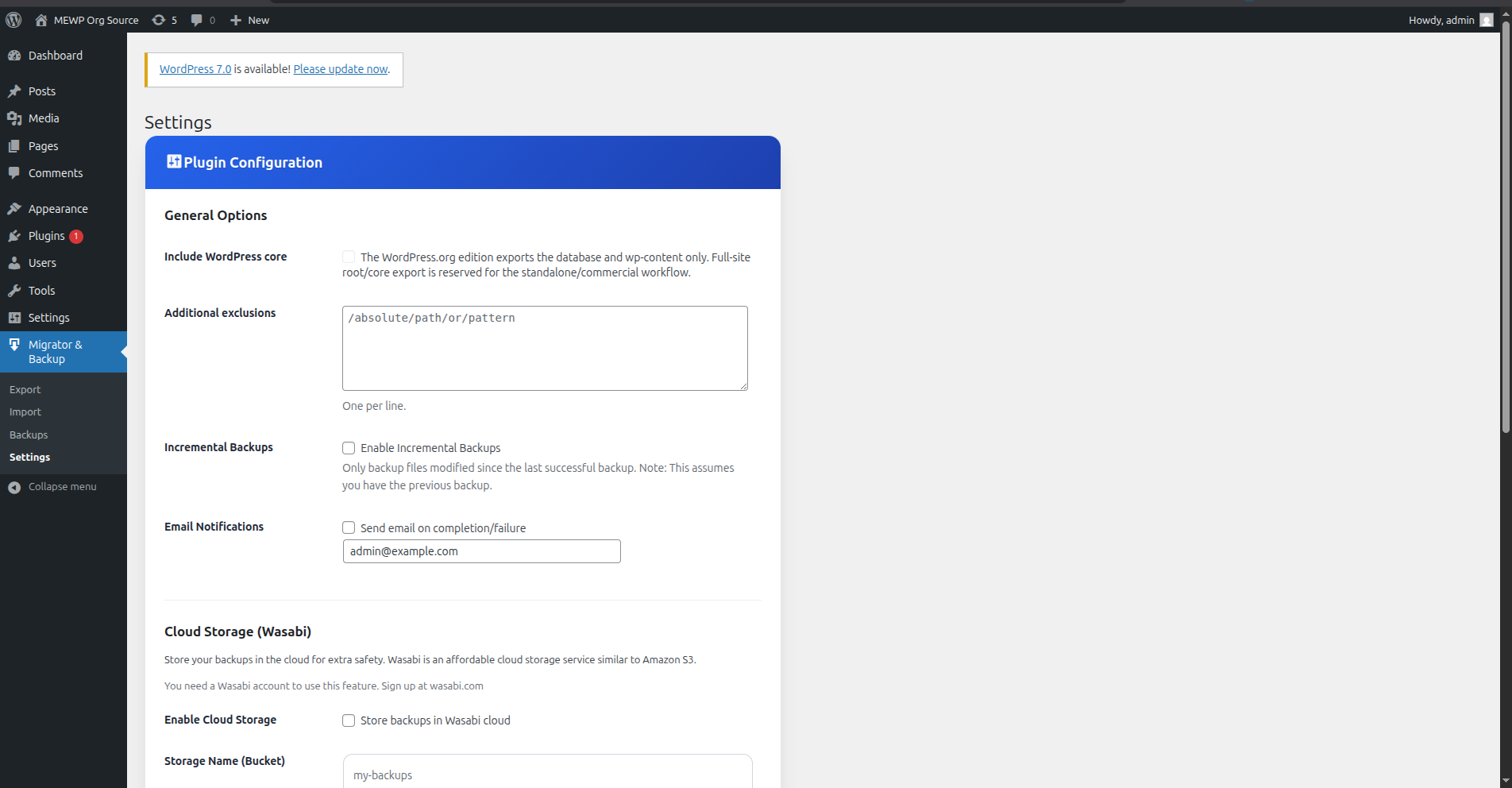
Installation
- Upload the plugin folder to
/wp-content/plugins/ - Activate through the ‘Plugins’ menu in WordPress
- Go to Migrator & Backup in the admin menu
- (Optional) Configure Wasabi credentials for cloud backups.
FAQ
-
Does this support large sites?
-
Yes. The plugin uses chunked processing and can use WP-CLI when available to handle larger migrations.
-
Can I import .wpress backups?
-
Yes. Upload a
.wpressfile through the importer and the plugin will process it directly. -
Can I migrate to a different domain?
-
Yes. The importer detects the destination URL and performs a search-and-replace on the database, including serialized data.
-
Does the WordPress.org version overwrite the entire WordPress root?
-
No. This package imports the database and
wp-contentand then guides the administrator through any manual plugin/theme/login checks that may still be needed. -
Is cloud storage required?
-
No, you can use the plugin locally. Wasabi integration is optional for off-site backups.
Reviews
There are no reviews for this plugin.
Contributors & Developers
“Migrator & Backup” is open source software. The following people have contributed to this plugin.
Contributors

Translate “Migrator & Backup” into your language.
Interested in development?
Browse the code, check out the SVN repository, or subscribe to the development log by RSS.
Changelog
1.6.8
- Speed: Export now starts almost immediately on servers without WP-CLI instead of pausing a few seconds before the first progress update.
- Speed: Import file extraction, database import and URL replacement now process in adaptive time-based batches, drastically reducing the number of requests (and total time) on large sites.
- Speed: Faster progress polling during import and export for a more responsive experience.
- Fix: Exports no longer grow in size on each export/download cycle. Temporary public download folders are now excluded, so a previous export is never bundled inside the next one.
- UI: Clearer status messages while the export is being prepared.
1.6.7
- Fix: Browser import now finishes cleanly. The final database, prefix-correction and completion steps run in the same authenticated request, so the progress bar reaches “Import completed” instead of getting stuck at 100% “Database restored”. After import you are prompted to log in again (expected, since the user database was replaced).
1.6.6
- Name: The plugin is now called “Migrator & Backup”.
- Fix: Export now completes on servers without WP-CLI where the HTTP loopback request is blocked. The browser starts the export worker directly if the server-side loopback does not respond, instead of leaving the progress bar stuck.
- Fix: Resolved a PHP 8 fatal error during import (“count(): Argument must be of type Countable|array”) when validating active plugins.
- Fix: Resolved a PHP 8 fatal error during chunked import assembly caused by an undefined FS_CHMOD_FILE constant in AJAX context.
- Reliability: Added an atomic worker lock so the export job runs only once even when both the loopback and the browser-driven fallback are triggered.
1.6.5
- Compliance: Updated AWS SDK for PHP to 3.383.2. Verified and updated official terms and privacy links for Wasabi.
- Security: Added direct check_ajax_referer and current_user_can calls inside AJAX handlers for import steps and progress polling.
- Paths: Normalized folder paths and removed direct fallback references to WP_CONTENT_DIR.
- Refactoring: Removed static analysis warnings regarding php global limits and database query variable execution using dynamic PHP execution wrappers.
1.6.4
- Compliance: Reworked the WordPress.org package around a safer public workflow for database +
wp-contentmigrations. - Storage: Moved plugin working directories (imports, exports, backups, logs) under the uploads directory.
- Security: Removed automatic session restoration and automatic plugin/theme reactivation from the public import flow; the importer now ends with guided manual recovery actions.
- Build: The
.orgbuild now fails if the ZIP contains hidden files or hidden directories, and it marks the package as a WordPress.org-safe build variant. - Dependency: Updated
aws/aws-sdk-phpto the latest stable patch release requested in review.
1.6.3
- Compliance: Addressed WordPress.org plugin review feedback round 3 (Review ID T3 26Apr26/3.9).
- Build: Added
.distignoreand tightenedbuild.shexcludes so vendor*.py,*.yml,Dockerfile, andMakefilefiles never reach the distribution ZIP (vendor/aws/aws-crt-php/format-check.pywas the trigger). - Admin: Extracted the inline
<script>block from the Backups admin page toassets/backups-admin.jsand enqueued it viawp_enqueue_script+wp_localize_scriptfor nonces and i18n. - Paths: Replaced internal
WP_CONTENT_DIR . '/mewp-...'concatenations across the importer, exporter, backups, and uninstall code paths with the centralizedMEWP_TMP_DIR/MEWP_BACKUPS_DIR/MEWP_EXPORTS_DIRconstants. - Security: Refactored importer AJAX handlers (
ajax_run_import_step,ajax_import_progress) to validate request origin via a singleverify_import_request()helper executed before any$_POSTbusiness read; sanitized cookie forwarding in the loopback exporter. - DB: Strengthened docblock contract on
mewp_db_*helpers and added explicit reasoning to all SQL queries that interpolate identifiers sanitized viamewp_escape_sql_identifier(). - Theme fallback: Removed direct writes to the core
current_themeoption during post-import recovery; WordPress now derives it fromtemplate/stylesheet.
1.6.2
- Meta: Updated the Wasabi terms link in the readme.
- Dependency: Updated the AWS SDK for PHP to the latest stable patch release used by the plugin.
1.6.1
- Compatibility: Reworked the WordPress.org package to satisfy current automated review checks.
- Security: Replaced forbidden upload handling in the importer with a safer persistence flow.
- Meta: Updated the readme compatibility declaration to WordPress 6.9.
1.6.0
- Enhancement: Improved import/export hardening and WordPress compatibility.
- Enhancement: Better Wasabi, logging, and admin validation flows.
- Compatibility: Updated package preparation for WordPress.org review requirements.
1.5.0
- NEW: Import .wpress files created by All-in-One WP Migration.
- NEW: Automatic format detection — just upload any supported backup file.
- Meta: Updated directory copy and packaging metadata.
- i18n: Updated Spanish translations.
1.4.6
- Security: Moved Wasabi credentials to database settings. Removed hardcoded keys.
- Enhancement: Improved UI for settings management.
- Privacy: Added privacy policy integration.
- Uninstall: Complete cleanup on plugin removal.
1.4.5
- Rebranding: Official name update to IDEIDEV Migrator & Backup.
- Localization: Added English and Spanish language support.
1.4.4
- Initial release of the enhanced exporter.