

Description
Harbor Privacy Guard for WooCommerce enforces visitor privacy choices on the server. Instead of setting a client-side consent flag for tracking scripts to read, it detects the visitor’s consent state in PHP and dequeues known tracking script handles before WordPress renders the page, so scripts that were declined never load.
GPC Browser Signal Detection
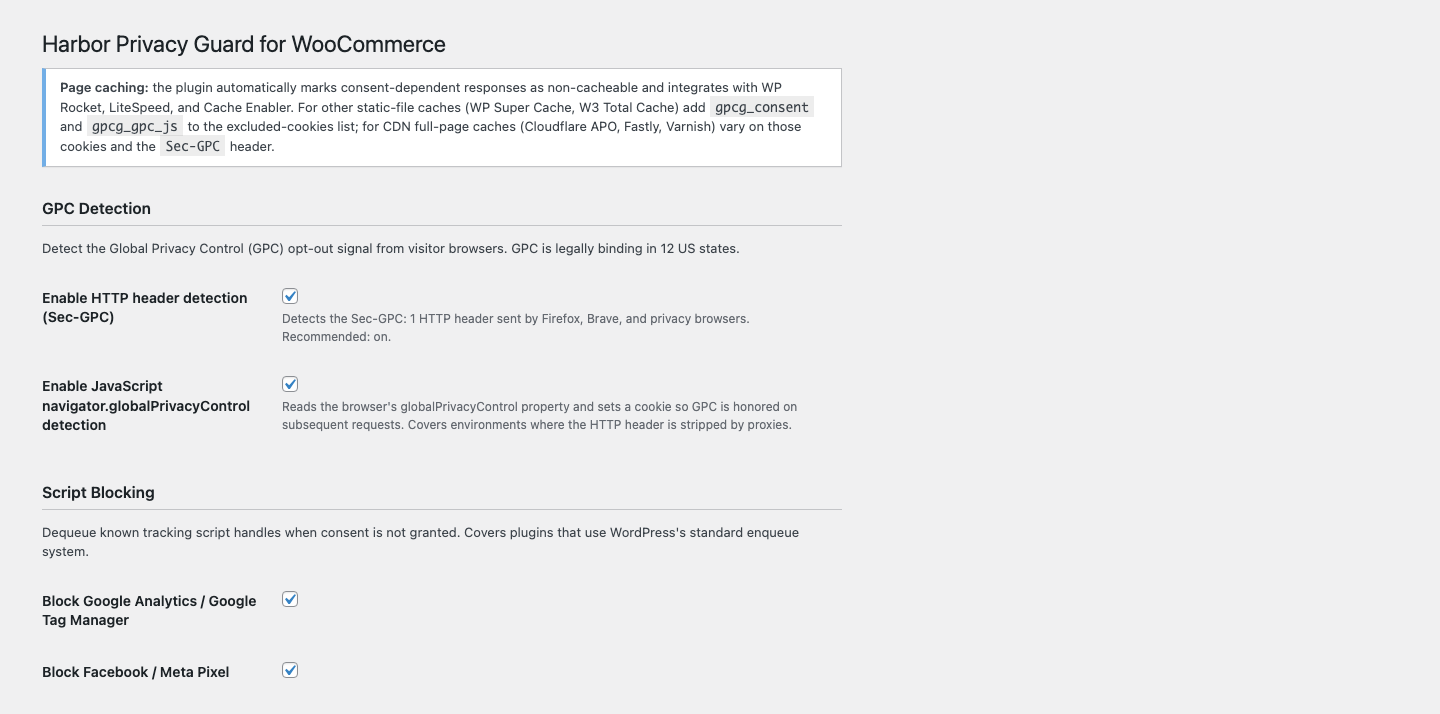
GPC (Global Privacy Control) is a browser-level opt-out signal that is legally binding in 12 US states. When a user enables it — through their browser settings or a privacy extension — their browser sends Sec-GPC: 1 on every HTTP request. This plugin detects that header server-side, requiring no user interaction with a banner. A small JavaScript snippet also reads navigator.globalPrivacyControl and sets a first-party cookie (gpcg_gpc_js) so GPC is honored even when the header is absent (some proxies strip it).
Google Consent Mode v2
The plugin emits gtag('consent','default',{...}) before GTM loads, at wp_head priority 1 — the integration point Google’s Consent Mode v2 documentation requires. Google’s GA4 behavioral modeling needs this consent signal to be present even for visitors who deny tracking; the plugin supplies it so modeling continues to work for users who have denied or not yet responded.
California CPRA Opt-Out Audit Trail
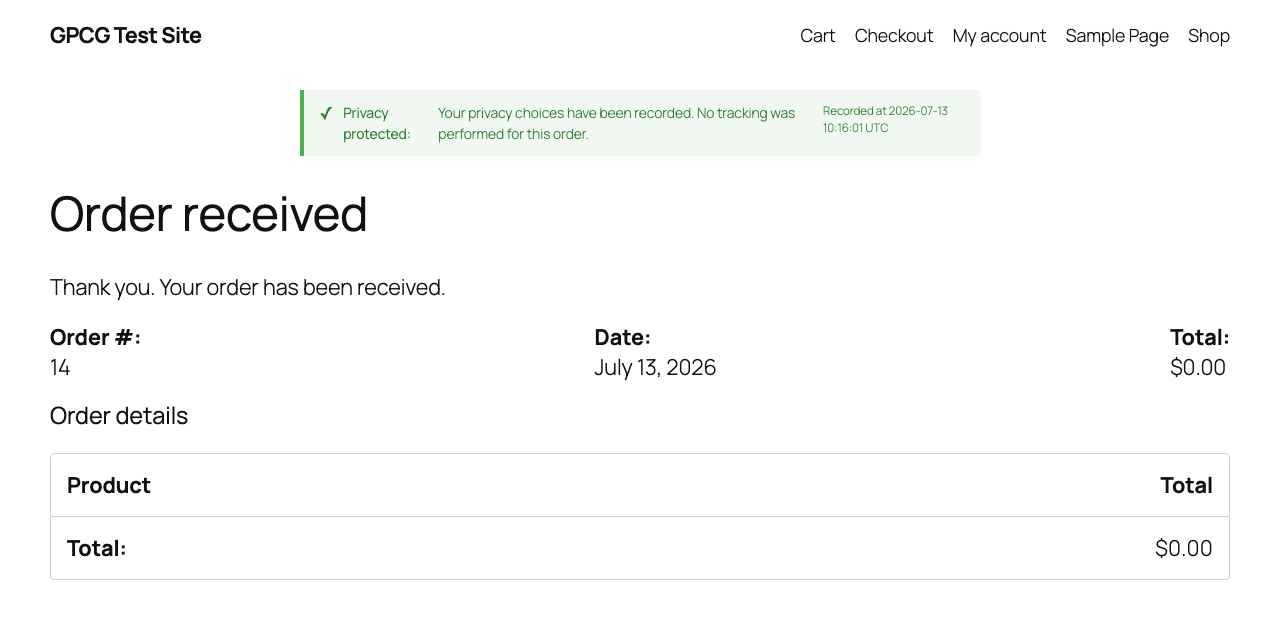
California’s CPRA regulations (effective January 2026) require stores to log opt-out signals with a timestamped record. This plugin stores consent decisions in a dedicated database table ({prefix}gpcg_opt_out_log) rather than wp_options. Opt-outs are recorded where they happen — when a visitor declines (or accepts) the banner, when an automatic GPC signal is detected (deduplicated to once per visitor per day), and at WooCommerce checkout — so the trail covers non-purchasers, not only completed orders. Each row records the hashed IP address (SHA-256 with a dedicated, stored plugin salt kept separate from WordPress auth keys so it survives key rotation — the raw IP is never written to disk), the consent state (granted / denied / gpc), the signal source (banner / gpc_header / gpc_js / default), the WooCommerce order ID, the page URL, and a UTC timestamp. A confirmation notice is displayed on the WooCommerce thank-you page to satisfy the California requirement that users receive visible confirmation of their opt-out.
Minimal Performance Impact
On the fast path — consent granted, no GPC signal — there is no output buffering and no HTML rewriting; the expensive work never runs. To keep per-visitor consent state correct, responses that depend on a consent cookie or GPC signal are automatically excluded from full-page caches (and the consent cookies are registered with WP Rocket and LiteSpeed Cache); first-visit pages remain cacheable. Output buffering for script stripping is a Pro feature and is never activated for consented users.
Free vs Pro
Feature
Free
Pro
GPC header detection (Sec-GPC)
✓
✓
GPC JavaScript detection
✓
✓
Block WooCommerce Google Analytics integration
✓
✓
Block Facebook / Meta Pixel
✓
✓
Block TikTok Pixel
—
✓
Block Bing / Microsoft UET
—
✓
Google Consent Mode v2 dataLayer defaults
✓
✓
Consent banner (accept / decline)
✓
✓
Opt-out confirmation on WooCommerce thank-you page
✓
✓
Audit log of banner, GPC, and checkout consent events (hashed IP, order ID, state, source)
✓
✓
Output-buffer script stripping (catches inline + third-party injected scripts)
—
✓
Custom domain blocklist
—
✓
CSV compliance export
—
✓
Multi-state consent UI (California vs Virginia vs Colorado)
—
✓
How It Works
- On every request, PHP checks the
Sec-GPCheader and thegpcg_gpc_jscookie (set by a tiny JS snippet that readsnavigator.globalPrivacyControl). - If GPC or no consent: known tracking script handles are dequeued;
gtag('consent','default',{ad_storage:'denied',...})fires before GTM atwp_headpriority 1. - Consent decisions are logged to a dedicated audit table (SHA-256 hashed IP, UTC timestamp) when the visitor uses the banner, when GPC is detected (once per visitor per day), and at WooCommerce checkout completion.
Privacy
This plugin stores consent decisions in the database table {prefix}gpcg_opt_out_log. Visitor IP addresses are hashed with SHA-256 and a site-specific salt before storage — raw IPs are never written to disk. The hashed IP, consent state (granted/denied/gpc), signal source (banner/gpc_header/gpc_js/default), WooCommerce order ID (when applicable), and page URL are retained until the plugin is uninstalled or the site administrator exports and purges the table. This plugin transmits nothing to external servers; the bundled Freemius SDK is opt-in only, used solely for Pro license activation if you choose to enter a license key.
Screenshots
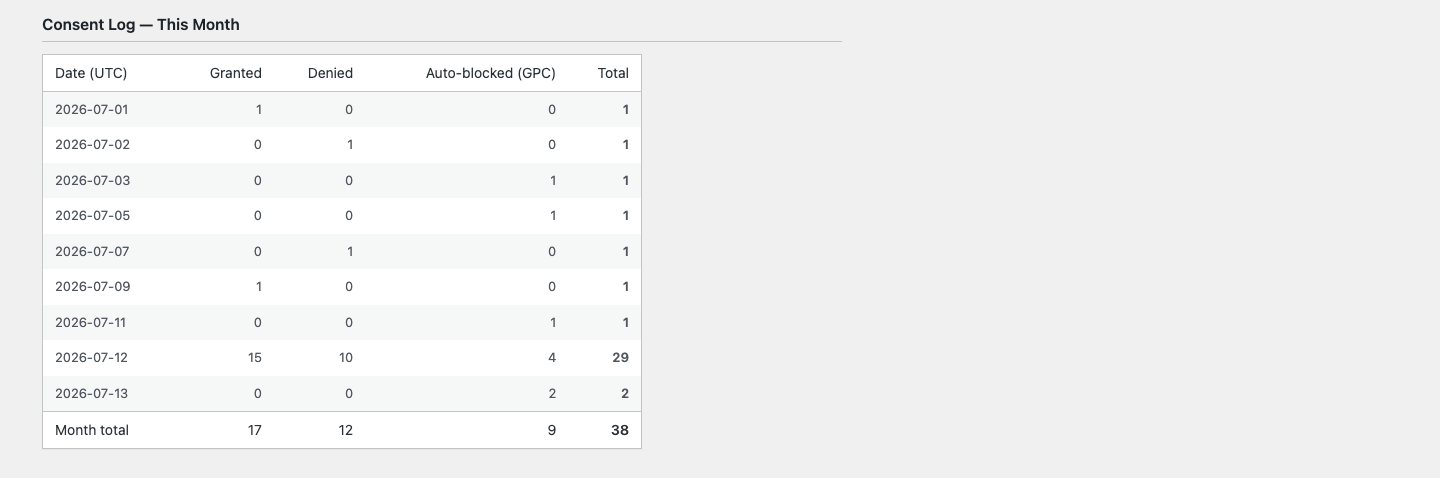
Installation
- In your WordPress admin, go to Plugins > Add New.
- Search for “Harbor Privacy Guard for WooCommerce” or click Upload Plugin and select the downloaded
.zipfile. - Click Install Now, then Activate.
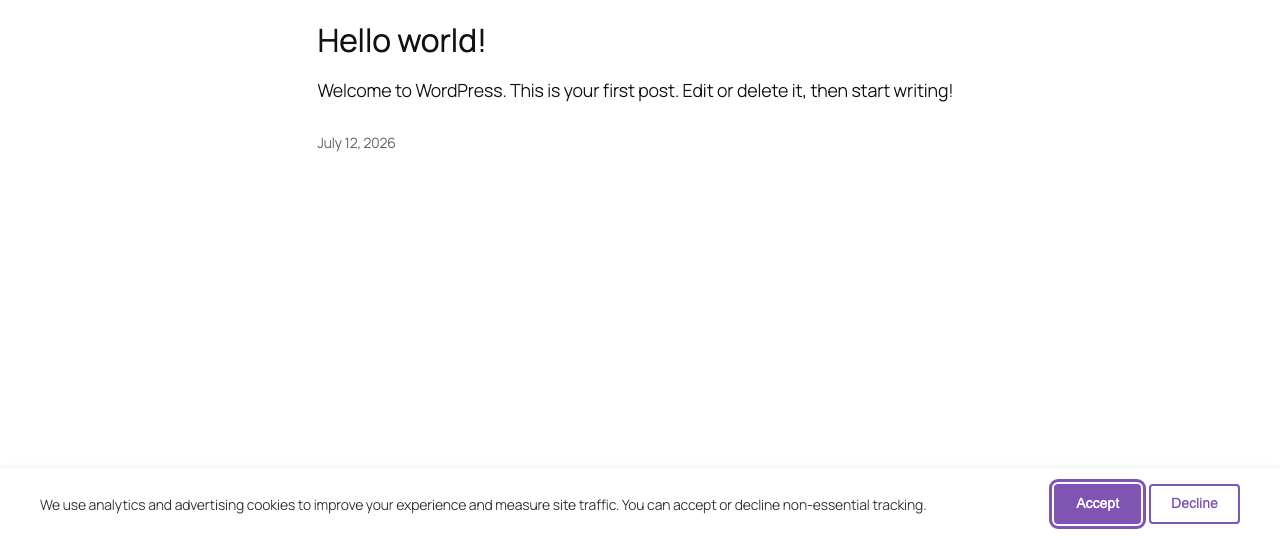
- Navigate to WooCommerce > GPC Compliance to review the default configuration. Script blocking is enabled for Google Analytics and Facebook / Meta Pixel out of the box.
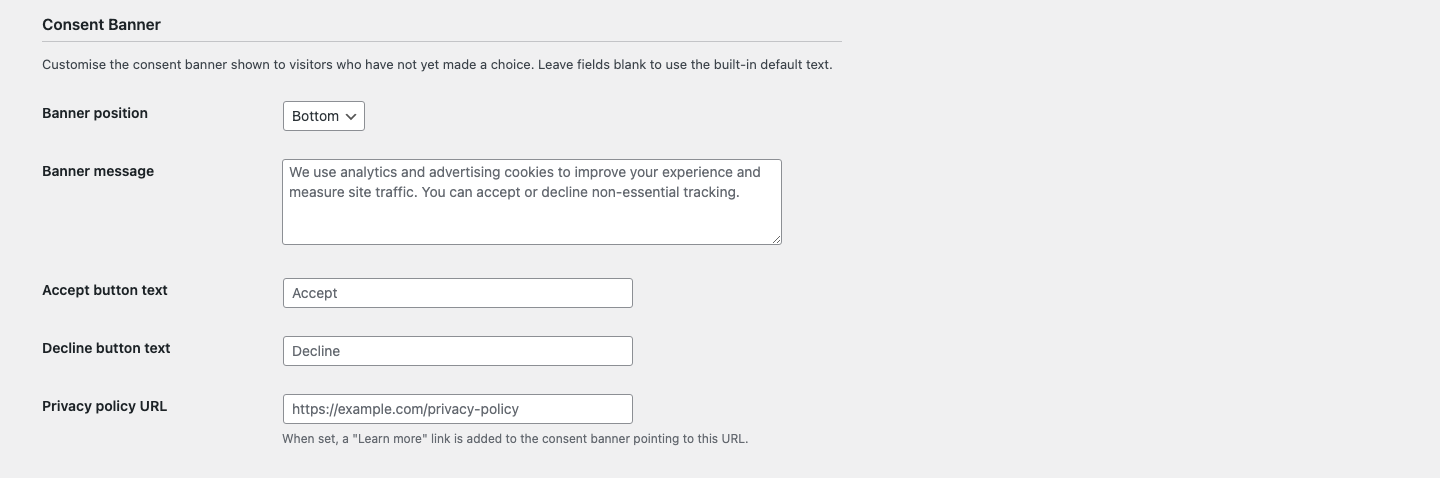
- Optionally customize the consent banner message and positioning, then save. The plugin is active immediately — no additional setup is required.
FAQ
-
It can, but it also works alongside one. If you already run another consent-management plugin, consider disabling its visitor-facing banner so your store does not show two banners; its other features (cookie scanning, privacy-policy pages) can remain active alongside this plugin.
-
What is the Global Privacy Control (GPC)?
-
GPC is a browser-level opt-out signal (like Do Not Track, but legally binding in 12 US states). When a user enables it in their browser or privacy extension, their browser sends
Sec-GPC: 1on every HTTP request. This plugin detects that header server-side and blocks tracking without requiring the user to interact with a banner. -
Will this break my WooCommerce store?
-
No. The plugin only dequeues scripts that are enqueued through WordPress’s script system. It does not modify orders, prices, or checkout logic. If you use a tracking script that is injected outside of
wp_enqueue_scripts(for example, hardcoded into a theme), the free tier will not block it — that case is handled by the Pro output-buffer feature. -
Does this work with Google Tag Manager?
-
Yes, for Consent Mode v2 purposes. The plugin emits
gtag('consent','default',...)before GTM loads so GTM respects the consent state and suppresses or permits its tags accordingly. Note: the free tier does not prevent the GTM container script itself from loading — it only controls what GTM does once loaded. If you need to block the GTM script entirely when consent is denied, enable the Pro output-buffer mode. -
How do I view the audit log?
-
The consent log is stored in the
{prefix}gpcg_opt_out_logdatabase table. A monthly summary is shown at the bottom of the WooCommerce > GPC Compliance settings page. Pro users can download a full date-ranged CSV from that same page. -
Is the audit log GDPR-compliant?
-
IPs are hashed with SHA-256 and a site-specific salt before storage. The raw IP is never stored. Hashed IPs cannot be reversed to identify individuals, which means the log does not constitute personal data under most interpretations of GDPR. You should still mention the log in your privacy policy and confirm with your legal counsel whether your specific jurisdiction requires additional disclosures.
-
What happens when a user has already set GPC and visits a new page?
-
The server detects
Sec-GPC: 1on every request independently. No cookie or session is required for GPC to be honored — the header is checked fresh on each page load. The JavaScript fallback cookie (gpcg_gpc_js) is also checked on each request but is only a fallback for environments where the HTTP header is stripped. -
Does this work with page builders (Elementor, Divi, Bricks)?
-
Yes for script blocking. The plugin dequeues scripts by WordPress handle name, which works regardless of which page builder renders the page. The Consent Mode v2 defaults are emitted via
wp_headat priority 1, which fires before any page builder output. If your page builder injects tracking scripts by hardcoding them into a template (outside ofwp_enqueue_scripts), those scripts will not be blocked by the free tier — use the Pro output-buffer mode in that case. -
What data does uninstalling the plugin delete?
-
Deleting the plugin via Plugins > Delete removes all plugin options and all plugin transients from
wp_optionson every site of the network. The consent audit log table ({prefix}gpcg_opt_out_log) is also dropped. This is irreversible — export a CSV before uninstalling if you need to retain the log for compliance purposes. -
Will blocking tracking hurt my conversion rate?
-
The plugin only blocks tracking for visitors who have actively opted out (declined the banner or enabled GPC) or who have not yet interacted with the banner. Visitors who accept cookies are unaffected. For opted-out visitors, GA4’s consent mode modeling can still estimate conversions from anonymized signals — which requires the
gtag('consent','default',...)call this plugin provides. -
How does multi-state consent work?
-
Version 1.1 introduces automatic jurisdiction detection using CDN headers (Cloudflare, CloudFront, Vercel). When Jurisdiction-aware mode is enabled in the advanced settings, visitors from opt-out US states (Virginia, Texas, Utah, and others) are allowed tracking by default unless they actively decline — matching the legal standard for those states. Visitors from strict opt-in states (California, Colorado, Connecticut, Oregon) and the EU/EEA always require an explicit consent grant. Conservative mode (the default) requires opt-in everywhere regardless of jurisdiction.
-
Does this work with page caching (WP Rocket, LiteSpeed, Cloudflare)?
-
Yes. Because script blocking is a per-visitor decision, the plugin automatically marks any response that depends on a consent cookie or GPC signal as non-cacheable (via the
DONOTCACHEPAGEconstant and no-cache headers), registers thegpcg_consent/gpcg_gpc_jscookies with WP Rocket and LiteSpeed Cache, and bypasses Cache Enabler for those requests. In the default Conservative mode this is fully safe: the only cacheable page (a first visit with no cookie and no GPC) renders with tracking already stripped, so a cached copy can never leak tracking to anyone.Two configuration notes for maximum safety:
- Static-file caches that serve a stored page before WordPress loads (Cache Enabler, WP Super Cache, W3 Total Cache) decide whether to serve from cache based on their own excluded-cookies list. Add
gpcg_consentandgpcg_gpc_jsto that list so a visitor who already made a choice is always served a fresh page. WP Rocket and LiteSpeed are handled automatically. - CDN-level full-page caches (Cloudflare APO, Fastly, Varnish) sit in front of WordPress and do not see
DONOTCACHEPAGE; configure them to vary on thegpcg_consent/gpcg_gpc_jscookies and theSec-GPCrequest header.
When Jurisdiction-aware mode (Pro) is enabled, the plugin disables full-page caching entirely, because the rendered consent state depends on the visitor’s geo — which page caches do not vary on.
- Static-file caches that serve a stored page before WordPress loads (Cache Enabler, WP Super Cache, W3 Total Cache) decide whether to serve from cache based on their own excluded-cookies list. Add
-
Do I need a Freemius account for the free version?
-
No. The free tier works entirely without a Freemius account. Freemius is only used for the Pro license key activation and upgrade flow.
-
Does this plugin send any data to external services?
-
The plugin itself sends nothing off-site: consent decisions and the audit log stay in your WordPress database. The bundled Freemius SDK powers optional Pro licensing and is strictly opt-in: on first activation it shows a consent screen, and no data is transmitted unless you explicitly opt in. If you choose Skip, the plugin remains fully functional and nothing is ever sent. Details: freemius.com/privacy (Freemius privacy policy).
Reviews
There are no reviews for this plugin.
Contributors & Developers
“Harbor Privacy Guard for WooCommerce” is open source software. The following people have contributed to this plugin.
Contributors
Translate “Harbor Privacy Guard for WooCommerce” into your language.
Interested in development?
Browse the code, check out the SVN repository, or subscribe to the development log by RSS.
Changelog
1.5.1
- Renamed to Harbor Privacy Guard for WooCommerce per WordPress.org plugin-review naming guidance
- Documented the opt-in Freemius licensing service in the readme
- Removed an external URL from a code comment flagged by automated review
1.5.0
- Pro functionality now ships as a separate premium-only module; the WordPress.org build contains only free features with no locked functionality
- All code prefixes renamed from wgc_ to gpcg_ for uniqueness: the consent cookies are now
gpcg_consentandgpcg_gpc_js, the audit table is{prefix}gpcg_opt_out_log, and cache-exclusion lists should be updated accordingly - Removed the Plugin URI header and tightened plugin metadata for the WordPress.org directory
1.4.0
- Renamed to GPC Guard for WooCommerce (final WordPress.org identity); text domain is now harbor-privacy-guard-for-woocommerce
- Freemius SDK is now bundled as a Composer dependency under vendor/ and licensing activates out of the box; Pro features unlock with a license key on the same codebase
- Uninstall cleanup moved to the Freemius after_uninstall hook (uninstall.php removed) and now clears the pruning cron on every site of a multisite network
- Consent banner and settings dialog now restore each background element’s prior inert state on close instead of force-clearing it, protecting other plugins’ modals and drawers
- Cloudflare visitor headers (CF-Connecting-IP, True-Client-IP, CF-IPCountry) are only trusted when the request verifiably came through a Cloudflare edge IP; other CDNs can register ranges via the gpcg_trusted_cdn_ip_ranges filter
- The banner’s Global Privacy Control auto-suppression now honors the GPC JavaScript detection setting
- Audit rows with no explicit visitor signal now record signal_source “default” instead of claiming a banner interaction
1.3.0
- Audit-log retention: a configurable retention window (default 730 days, 0 = keep forever) with automatic daily pruning bounds table growth and supports GDPR storage-limitation
- Output-buffer script stripping (Pro) now also removes inline tracking script blocks that reference a blocked domain, not just external src scripts
- Rate limiting and audit IP hashing now resolve the real client IP behind CDNs (Cloudflare/Akamai headers by default; X-Forwarded-For behind the gpcg_trust_forwarded_ip filter), so proxied visitors get distinct buckets and hashes
- Schema self-repair on upgrade verifies the visitor_state column and order_id index exist and adds them if a prior dbDelta silently skipped them
- Freemius licensing now initializes early and independently of WooCommerce, and the SDK only loads when credentials are configured (leaner free tier)
- Fix: the thank-you opt-out notice no longer renders twice on WooCommerce block-based order-confirmation pages
1.2.0
- Audit trail now records banner accept/decline decisions and automatic GPC opt-outs (deduplicated once per visitor per day), not only checkout events — so the log covers non-purchasers
- IP hashing now uses a dedicated, stored plugin salt instead of the WordPress auth salt, so hashes remain stable and joinable when auth keys are rotated
- Page-cache safety: consent-dependent responses are automatically marked non-cacheable (DONOTCACHEPAGE + no-cache headers) and the consent cookies are registered with WP Rocket and LiteSpeed Cache; prevents cached pages leaking tracking scripts to opted-out visitors
- TikTok Pixel blocking, Bing/Microsoft UET blocking, and Multi-state jurisdiction UI moved to the Pro tier
- Plugin renamed to “GPC & Consent Mode Compliance for WooCommerce” for WordPress.org trademark-policy compliance (slug and settings unchanged)
- Security: CSV compliance export now neutralizes spreadsheet formula/DDE injection in exported cells
- Hardening: Sec-GPC header and GPC cookie reads now pass through wp_unslash/sanitize; added index.php directory-listing guards
- Fix: readme “Tested up to” and package version aligned to a single source of truth
1.1.0
- Multi-state jurisdiction detection via CDN headers (Cloudflare, CloudFront, Vercel)
- Jurisdiction-aware consent mode: opt-out US states (VA, TX, UT, etc.) allow tracking by default; strict states (CA, CO, CT, OR) and EU always require opt-in
- Visitor state (US-CA format) recorded in audit log for per-state compliance reporting
- Settings menu renamed to “Privacy & Consent” for clarity
- Jurisdiction settings section added to admin settings page
- Fix: dedup transient no longer set when audit log insert fails (prevents silent data loss)
- Fix: banner fetch error now throws on non-2xx responses (prevents infinite re-show loop)
- Fix: Store API checkout logs empty page URL (correct — AJAX context has no thank-you URL)
- Fix: multisite uninstall now cleans up all subsites
- Fix: CSS
:focusrules updated to:focus-visible(keyboard-only focus indicators) - Fix: dark mode reject button contrast improved for WCAG AA compliance
- Fix: reduced-motion media query added for banner transitions
- Fix:
aria-hiddenadded to thank-you notice checkmark icon - Fix: monthly compliance summary cached with 5-minute TTL (was uncached, causing unbounded DB scans)
- Fix: soft nonce check on REST consent-update endpoint (logged-in users protected from CSRF)
1.0.0
- Initial release
- GPC header and JavaScript detection
- Google Consent Mode v2 dataLayer integration
- WooCommerce script blocking (Google Analytics, Facebook Pixel, TikTok, Bing)
- Block-checkout (Store API) audit logging for HPOS compatibility
- Consent banner (accept / decline) with WCAG 2.1 focus trap
- Opt-out confirmation on WooCommerce thank-you page
- Audit log table with SHA-256 hashed IPs and order IDs
- Monthly consent summary on admin settings page
- CSV compliance export (Pro)