

Description
gRDV Messages brings operational email conversations into WordPress. It is built for organizations that want to manage authorized business mailboxes, keep incoming and outgoing messages connected as conversations and send consistently branded email from the WordPress admin or mobile web app.
Connect one or more mailboxes, select the IMAP folders needed for daily work, send through the configured SMTP accounts and manage conversations across all authorized mailboxes.
IMAP sync requires the PHP IMAP extension on the server. Password and attachment encryption require the PHP OpenSSL extension. Sending uses WordPress mail handling with the SMTP account configured in the plugin.
What you can do
- Connect and manage multiple mailboxes with individual IMAP and SMTP settings.
- Assign WordPress users to authorized mailboxes for mobile access.
- Synchronize selected folders and perform supported move or delete operations on the configured IMAP server.
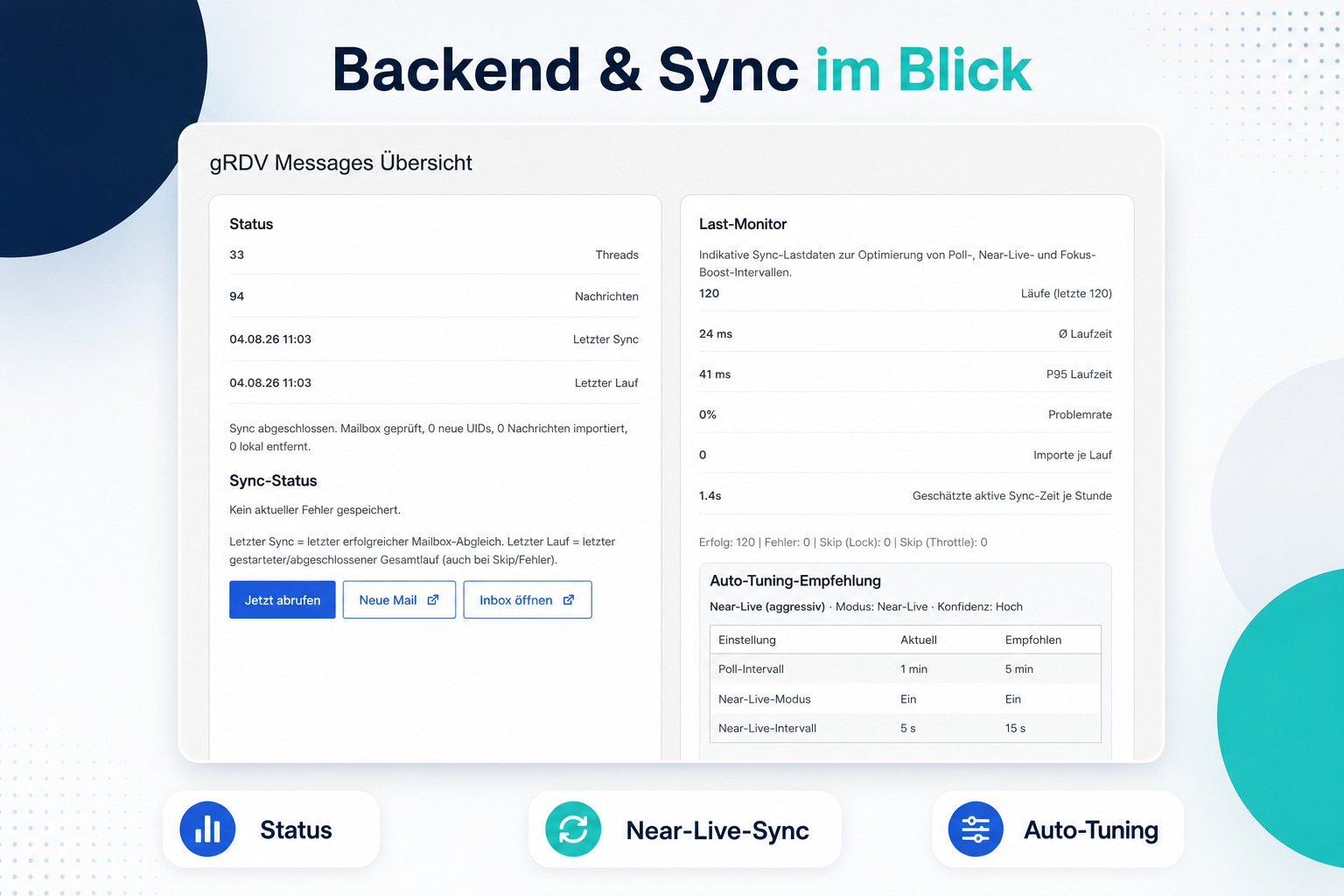
- Keep the open mobile web app current through near-live, focus-boost and temporary burst synchronization.
- Use near-live, focus-boost and burst synchronization while the web app is open.
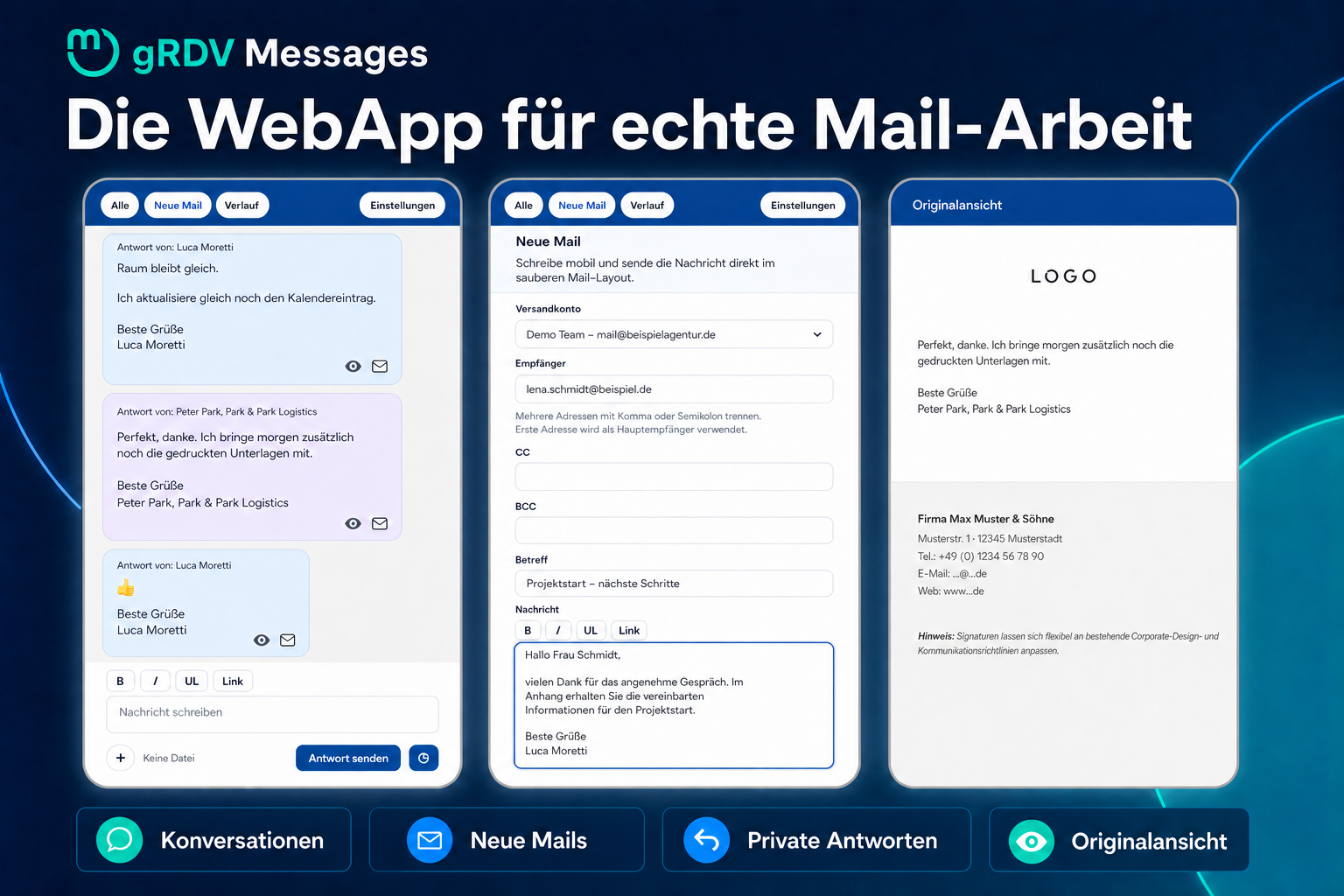
- Send new messages and replies through the selected SMTP account.
- Keep incoming and outgoing messages grouped as conversations.
- Use one HTML reply template, a signature and brand styling.
- Use a separate follow-up signature for later replies in a conversation.
- Upload, receive and send attachments.
- Store attachments locally with authenticated encryption and random physical filenames.
- Filter conversations by mailbox and folder.
- Move messages between supported IMAP folders, move them to Trash or delete them permanently.
- Use a mobile web app for the inbox, conversations, new messages and replies.
- Keep account passwords encrypted with the WordPress authentication salts.
- Export or erase email-related local records through the WordPress privacy tools.
- Optionally delete local message copies and encrypted attachments after a configurable period.
Optional Pro add-on
gRDV Messages is fully functional on its own. The separately available gRDV Messages Pro add-on requires the free plugin and adds optional advanced features.
Pro features include:
- Web Push notifications and synchronized app-icon badges.
- Scheduled sending.
- Multiple template profiles with individual templates and signatures.
- Additional WebApp designs and an extended mobile rich-text composer.
- Delivery and failure status signals.
- Optional consent-based opening tracking.
- Optional IMAP IDLE operation.
- Configuration export and import.
Learn more about gRDV Messages Pro.
Privacy
gRDV Messages stores email content and mailbox data in your WordPress installation. Depending on how you use the plugin, this can include sender and recipient addresses, subject lines, message bodies, headers, timestamps and attachments.
The plugin connects to the IMAP and SMTP servers configured by the site administrator. It does not create an account with gR Digital Ventures, does not send email content to gR Digital Ventures and does not contact a service operated by gR Digital Ventures.
gRDV Messages does not create separate records of visitor request IP addresses or browser user-agent strings. Email headers stored as part of a message can still contain routing information added by the participating mail servers.
The site operator selects the mailboxes and folders to synchronize and is responsible for having a lawful basis, granting access only to authorized users, defining an appropriate retention period, handling data-subject requests and configuring backups consistently with those obligations. The plugin registers exporters and erasers with the WordPress privacy tools. Optional time-based cleanup deletes local message copies and their local encrypted attachments in bounded batches; it does not delete the authoritative copy on the IMAP server or copies in backups. The IMAP provider’s retention must therefore be aligned to prevent old messages from being synchronized again. Disabling folder synchronization starts deletion of local data that is no longer referenced by any enabled folder. WordPress Cron or the documented external cron URL should run reliably until cleanup has completed.
External services
gRDV Messages connects to the IMAP and SMTP servers configured by the site administrator. These connections are required to retrieve and send email. Depending on the mail provider, the transferred data can include mailbox credentials, sender and recipient addresses, headers, message content and attachments. The applicable terms and privacy policy are those of the mail provider selected by the site administrator.
The optional external cron URL is an endpoint on the same WordPress installation. Calling it does not contact gR Digital Ventures or another service operated by the plugin author.
Screenshots
Installation
- Upload the plugin folder to
/wp-content/plugins/or install the plugin through the WordPress plugin screen. - Activate
gRDV Messages. - Open
gRDV Messages > Mailboxen. - Enter the IMAP and SMTP settings for each mailbox that you are authorized to use.
- Send a test message and start syncing conversations.
FAQ
-
Does gRDV Messages replace my email provider?
-
No. gRDV Messages connects to the mailbox and mail servers configured by the site administrator. Your existing email provider remains responsible for storing and delivering mail.
-
Can I use any sender address?
-
You can connect mailboxes from domains other than the WordPress installation domain. Each sender address must belong to a mailbox that you are authorized to use and for which you provide valid IMAP and SMTP credentials. gRDV Messages does not provide or authorize sender identities on your behalf.
-
Can I manage more than one mailbox?
-
Yes. You can configure multiple authorized mailboxes with separate IMAP, SMTP, sender, Reply-To, folder and user-assignment settings.
-
Does gRDV Messages restyle every email sent by WordPress?
-
No. The template and signature apply to messages composed and sent through gRDV Messages and to explicitly supported integrations. The plugin does not automatically replace email templates from WordPress core, WooCommerce, form plugins or unrelated third-party plugins.
-
Which external services does the plugin connect to?
-
The plugin connects only to the IMAP and SMTP servers entered by the site administrator. It does not connect to gR Digital Ventures servers or any other vendor-operated service.
-
How does the external cron URL work?
-
The plugin can generate a private local sync URL for server-side cron jobs. Calling this URL triggers the IMAP sync inside your own WordPress installation. The request stays on your site and uses a token generated by the plugin; no email content, mailbox data or token is sent to gR Digital Ventures.
-
Where are messages stored?
-
Synced messages, outgoing messages, conversation metadata and attachment metadata are stored in your WordPress database. Attachment files are stored locally below
wp-content/uploads/grdv-messages/. The files use authenticated encryption and random physical filenames and are only decrypted in memory for authorized downloads and sending. Original filenames and MIME types remain in the database. No Apache, Nginx or IIS configuration is required.The encryption key is generated independently when the first attachment is stored and saved as a non-autoloaded WordPress option. Include both the WordPress database and the uploads directory in backups; attachments cannot be decrypted if the database copy containing this key is lost.
When synchronization is disabled for a folder, locally imported messages that are assigned only to disabled folders are deleted in resumable background batches. Their locally stored attachment files and metadata are deleted as well. Empty conversations and contacts that are no longer referenced by another conversation are removed. A message remains stored if it is also assigned to a folder that is still enabled for synchronization. Copies in WordPress, database, hosting or external backups are controlled by the site operator and are outside the plugin’s active storage.
-
Are mailbox passwords stored securely?
-
Mailbox passwords are encrypted with authenticated AES-256-GCM encryption before they are saved. The encryption key is derived from the WordPress authentication salts available on the site. Site administrators should still protect database, configuration and file-system access carefully.
Reviews
There are no reviews for this plugin.
Contributors & Developers
“gRDV Messages” is open source software. The following people have contributed to this plugin.
Contributors
“gRDV Messages” has been translated into 1 locale. Thank you to the translators for their contributions.
Translate “gRDV Messages” into your language.
Interested in development?
Browse the code, check out the SVN repository, or subscribe to the development log by RSS.
Changelog
2.0.12
- Change all translatable source strings to US English for compatibility with WordPress.org language packs.
- Add separate German translations for informal and formal address.
- Update British English translations and localize previously hard-coded WebApp fallback labels.
The complete release history is included in changelog.txt.