

Description
GlocalSaino Layer Map Viewer turns any KML file (the format exported by QGIS, Google Earth, and most GIS software) into an interactive map you can embed in any page or post with a shortcode.
Built from the ground up for large KML files (tens of thousands of objects): instead of making the browser download and process the entire file, the plugin analyzes it in the background on upload and builds an index; the viewer then requests objects from the server page by page, without freezing the tab even on low-end mobile devices.
Every feature below is included, unlimited, in the free plugin — there is no map cap and nothing is locked behind a license.
Key features
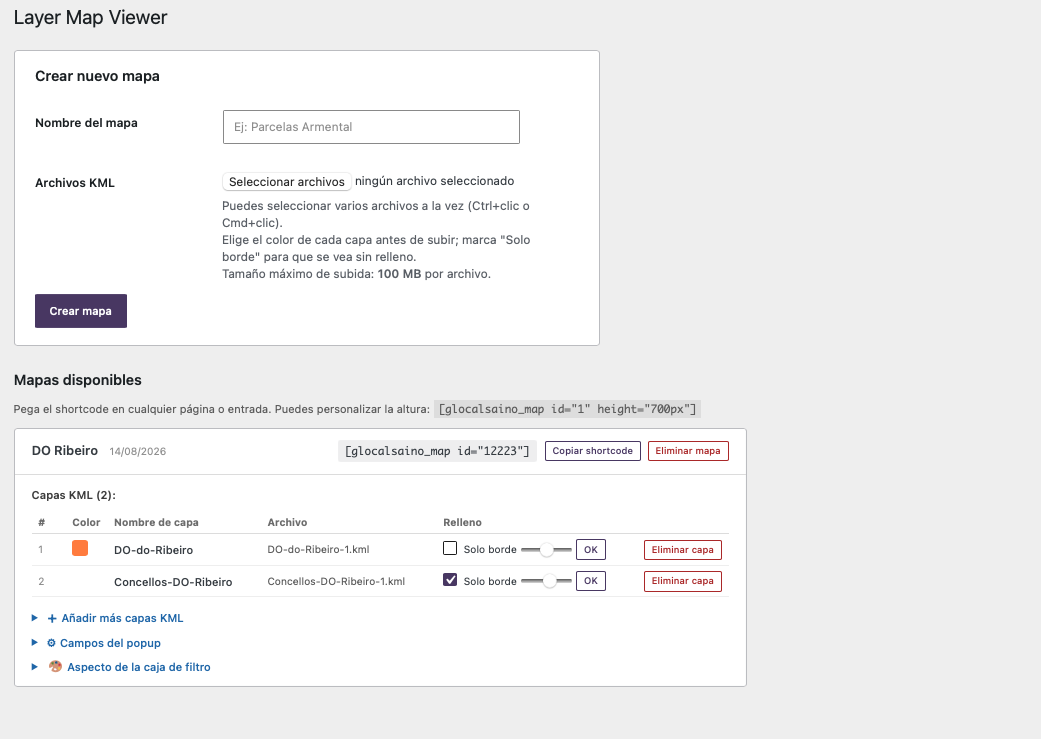
- Create as many maps as you want, each with one or several KML layers.
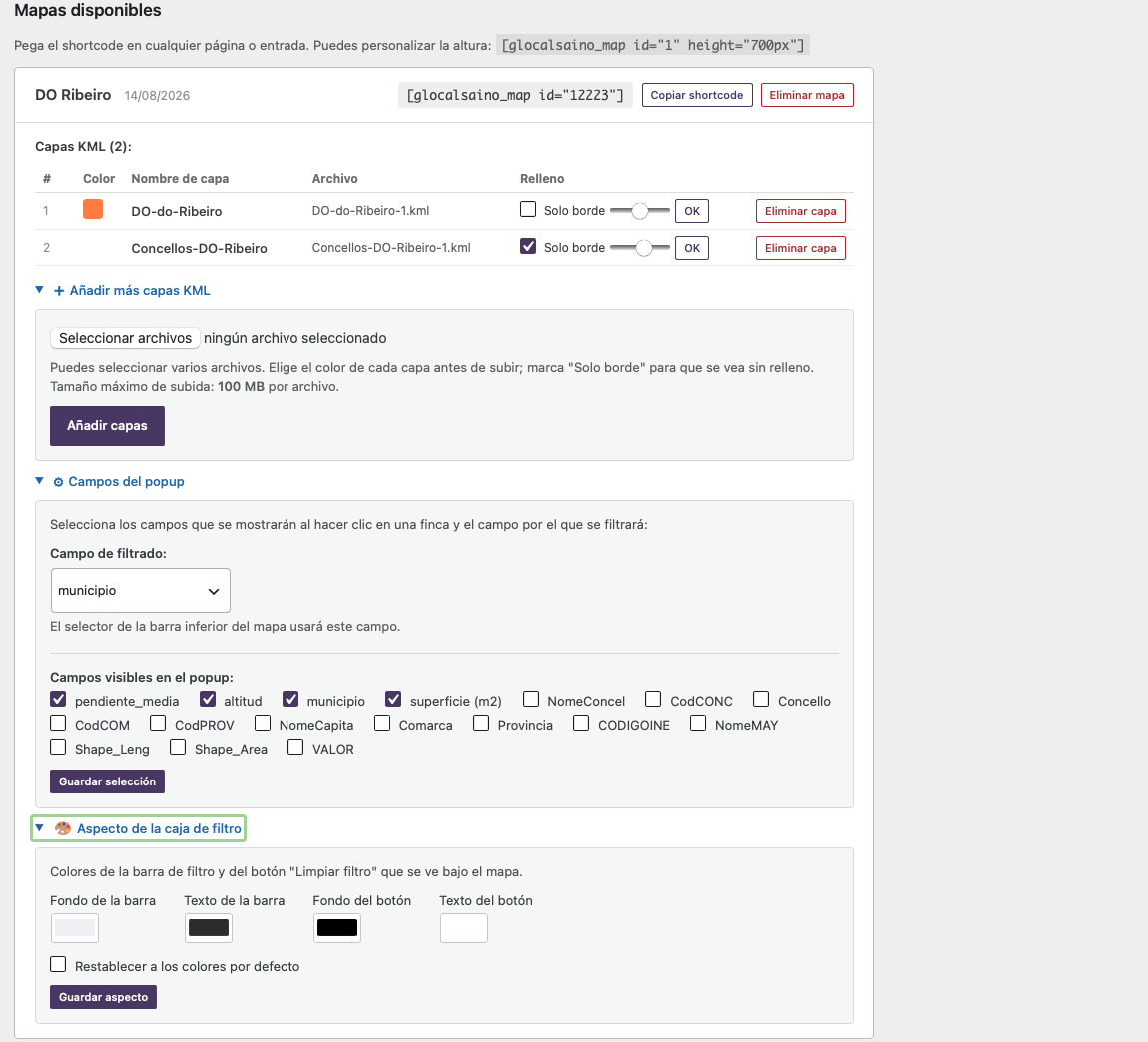
- Add more KML layers to a map that already exists, without recreating it.
- Each layer is drawn in its own color, chosen at upload time.
- Adjustable fill opacity per layer, from fully transparent (outline only) to fully opaque.
- Choose which KML field is used for filtering and which fields show in the popup.
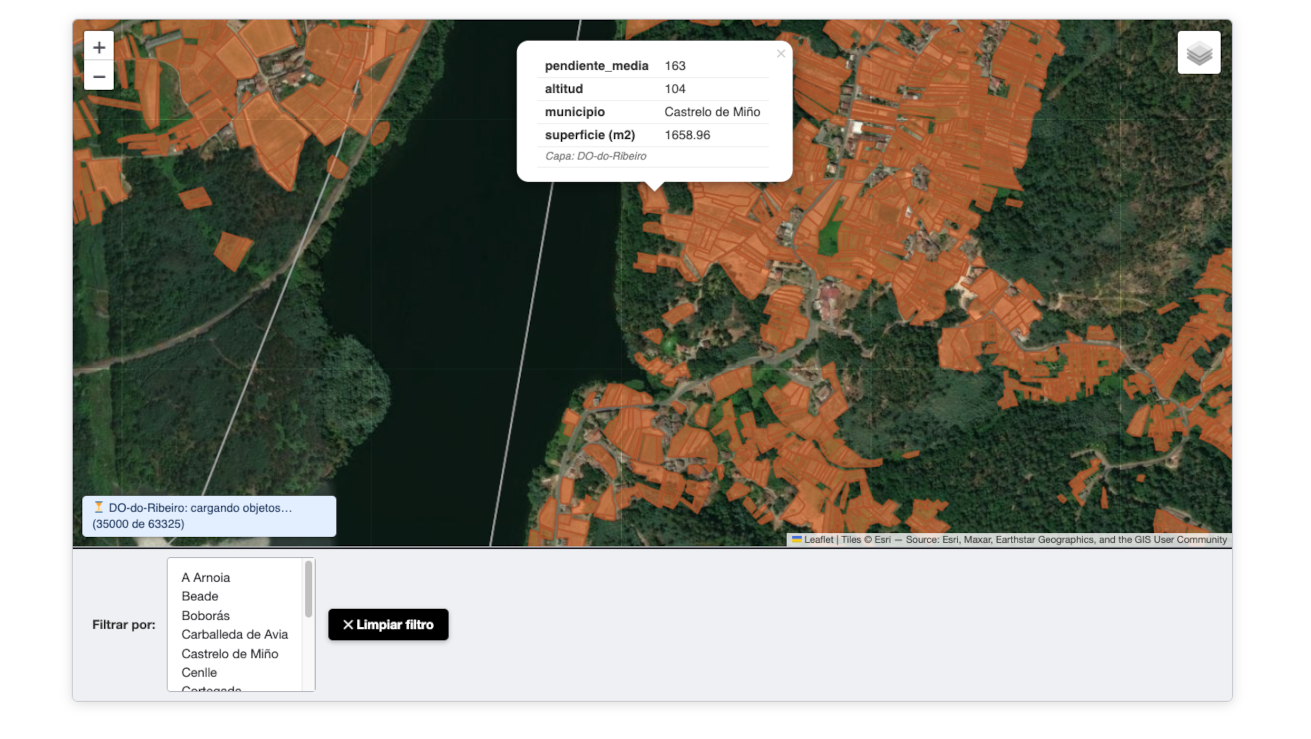
- Interactive filter by that field (for example, a parcel code or a municipality), with the dropdown already computed server-side.
- Customize the colors of the filter bar and the “Clear filter” button.
- Popup with the object’s data on click.
- OpenStreetMap and satellite base layers.
- Background analysis and index building (WP-Cron): uploading a KML with thousands of objects never blocks the admin panel.
- Paginated loading in the browser: objects appear progressively without hanging the tab, and once loaded they don’t disappear when zooming.
External services
This plugin uses Esri’s World Imagery service to provide the optional “satellite” base map layer.
- What it is and what it’s used for: a tile service that supplies satellite/aerial imagery tiles, so visitors can switch the map between a standard OpenStreetMap view and a satellite view.
- What data is sent and when: whenever a visitor views a map with the satellite layer selected, their browser requests map tiles directly from Esri’s servers for the visible area (standard web-map tile requests: approximate viewport coordinates and zoom level, plus the visitor’s own IP address as part of any HTTP request). No personal data is collected or sent by the plugin itself.
- Provider: Esri (“World Imagery” service,
server.arcgisonline.com). Terms of Use — Privacy Policy.
Screenshots
Installation
- Upload the plugin folder to
/wp-content/plugins/or install it from the admin panel (Plugins Add New). - Activate it from the “Plugins” menu.
- Go to the new “Mapas KML” menu in the admin panel and create your first map by uploading one or more
.kmlfiles. - Copy the shortcode shown (for example
[glocalsaino_map id="1"]) and paste it into any page or post.
FAQ
-
Does it support KMZ files?
-
Not yet, only
.kmlfor now (KMZ is a KML compressed inside a ZIP; you’d need to decompress it first). -
How many objects can a KML file handle?
-
It has been tested with layers of more than 60,000 objects. The file is analyzed in the background on upload, and the viewer loads objects page by page, so the file size never blocks the admin panel or the visitor’s browser.
-
Why don’t objects appear right after uploading the file?
-
The KML is analyzed in the background (WP-Cron) so the upload itself isn’t blocked. While that finishes, the map shows a general view and a “Processing layers in the background” badge; if it takes longer than expected, the “Analyze now” button forces the analysis immediately.
-
Which field is used for the filter if I don’t configure one?
-
None by default: the filter bar only appears once you choose a field under “Campos del popup” (Popup Fields) in the admin panel for that map.
-
How many maps can I create?
-
As many as you want — there is no limit.
Reviews
There are no reviews for this plugin.
Contributors & Developers
“GlocalSaino Layer Map Viewer” is open source software. The following people have contributed to this plugin.
Contributors

Translate “GlocalSaino Layer Map Viewer” into your language.
Interested in development?
Browse the code, check out the SVN repository, or subscribe to the development log by RSS.
Changelog
5.0.3
- Renamed the admin menu from “Mapas” to “Layer Map Viewer”.
5.0.2
- Fixed
InputNotSanitizedwarnings on$_FILES['kml_files']that came back after adding the opacity parameter: with 4 arguments, Freemius’s packaging tool now wraps thekml_map_upload_files()call across multiple lines, which again separated thephpcs:ignorecomment from the actual flagged line. Fixed by extracting the$_FILESaccess into its own single-line variable, immune to argument-count-driven line wrapping. - Renamed the admin menu from “Mapas KML” to “Mapas”, since upcoming add-ons will support layer formats beyond KML.
5.0.1
- Removed
wp_org_gatekeeperfrom the Freemius config: it only mattered for generating a stripped-down free package from a premium source, which no longer applies now that there’s no premium code at all. Sethas_addonsback tofalseuntil a real add-on product exists to link.
5.0.0
- Renamed the plugin to “GlocalSaino Layer Map Viewer” (previously “KML-Map”).
- The plugin is now 100% free with no limits: removed the 3-map cap and unlocked “add more layers”, “popup fields” and “filter bar appearance” for everyone, in compliance with WordPress.org’s guideline against locking built-in functionality behind a license. Paid add-ons (more layer formats, more base maps) will be offered separately in the future, not bundled with this plugin.
- New feature: adjustable fill opacity per layer.
- Moved the inline admin
<script>block to a properly enqueued script file (assets/js/admin-page.js), scoped only to this plugin’s own admin page. - Added disclosure of the Esri World Imagery external service to this readme.
- Renamed internal identifiers (shortcode, post type, REST namespace, admin menu, script/style handles) to avoid collisions with other plugins.
4.5.1
- Fixed a bug where the “add more layers” / “popup fields” / “filter bar appearance” upsell notices always showed as locked in the free package, even for users with an active trial or paid license.
4.5.0
- Moved the Freemius SDK to
vendor/freemius/wordpress-sdk/, loaded viavendor/autoload.php, per WordPress.org’s guidance.
4.4.0 and earlier
- See the plugin’s GitHub repository for the full history prior to the WordPress.org submission.