

Description
Folderly is a powerful and intuitive WordPress plugin designed to help you manage your documents, attachments, and posts within virtual folders. Whether you run a content-heavy blog, an online store, or a document repository, Folderly simplifies your file management process, making it easy to organize, locate, and manage your content efficiently.
Key Features:
Virtual Folders
Organize your documents, media files, and posts into customizable virtual folders without changing their original URLs or locations.
Google Drive-Style Folder Browser
Navigate your library with a familiar breadcrumb trail and a folder grid that appears right above your media or post list. Click a folder card to drill in, or jump to any ancestor with one click on the breadcrumb — no more hunting through a long sidebar tree.
Drag-and-Drop Interface
Effortlessly drag and drop attachments and posts into folders — including directly onto folder cards in the new grid — making file organization quick and intuitive.
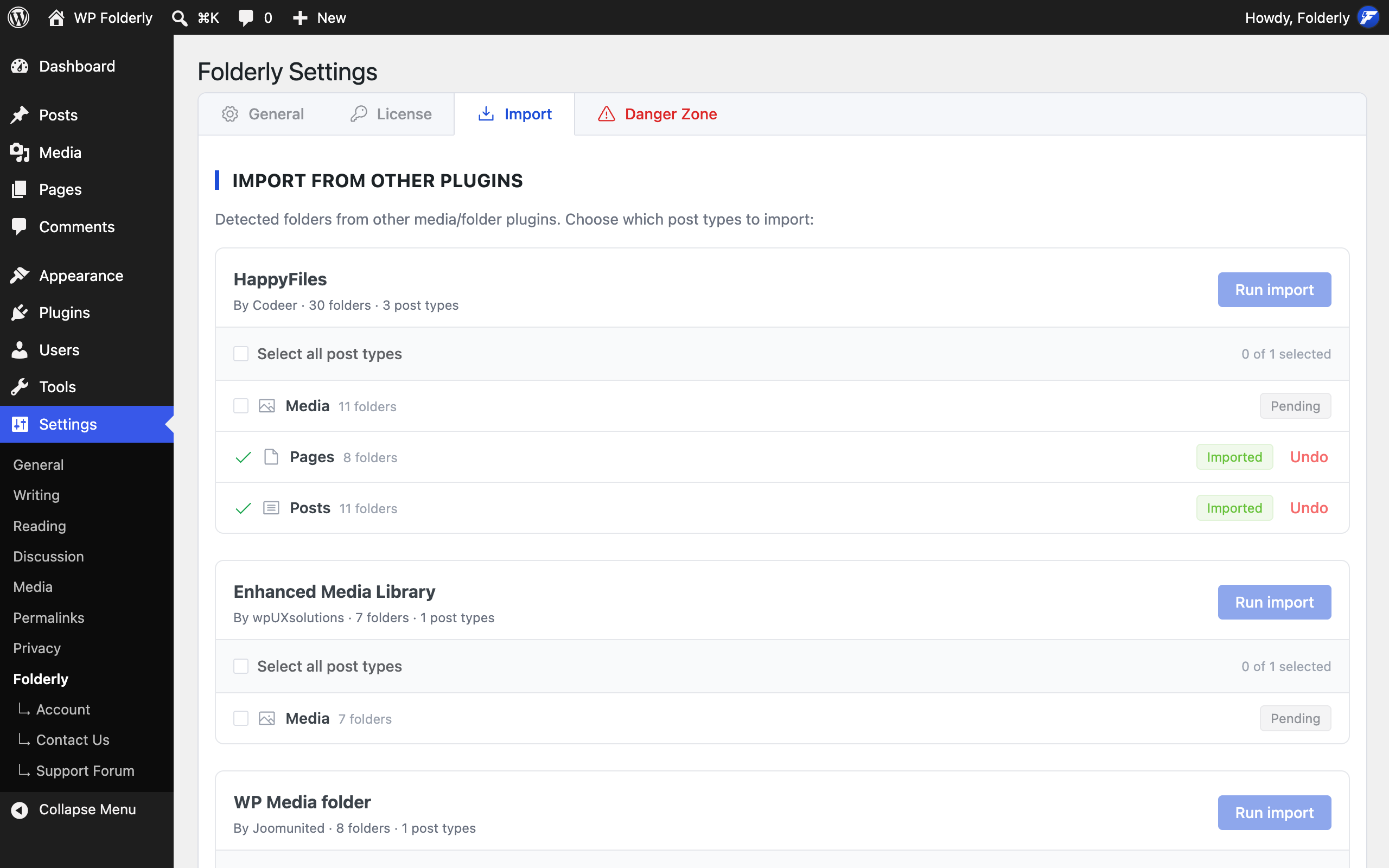
Import from Other Folder Plugins
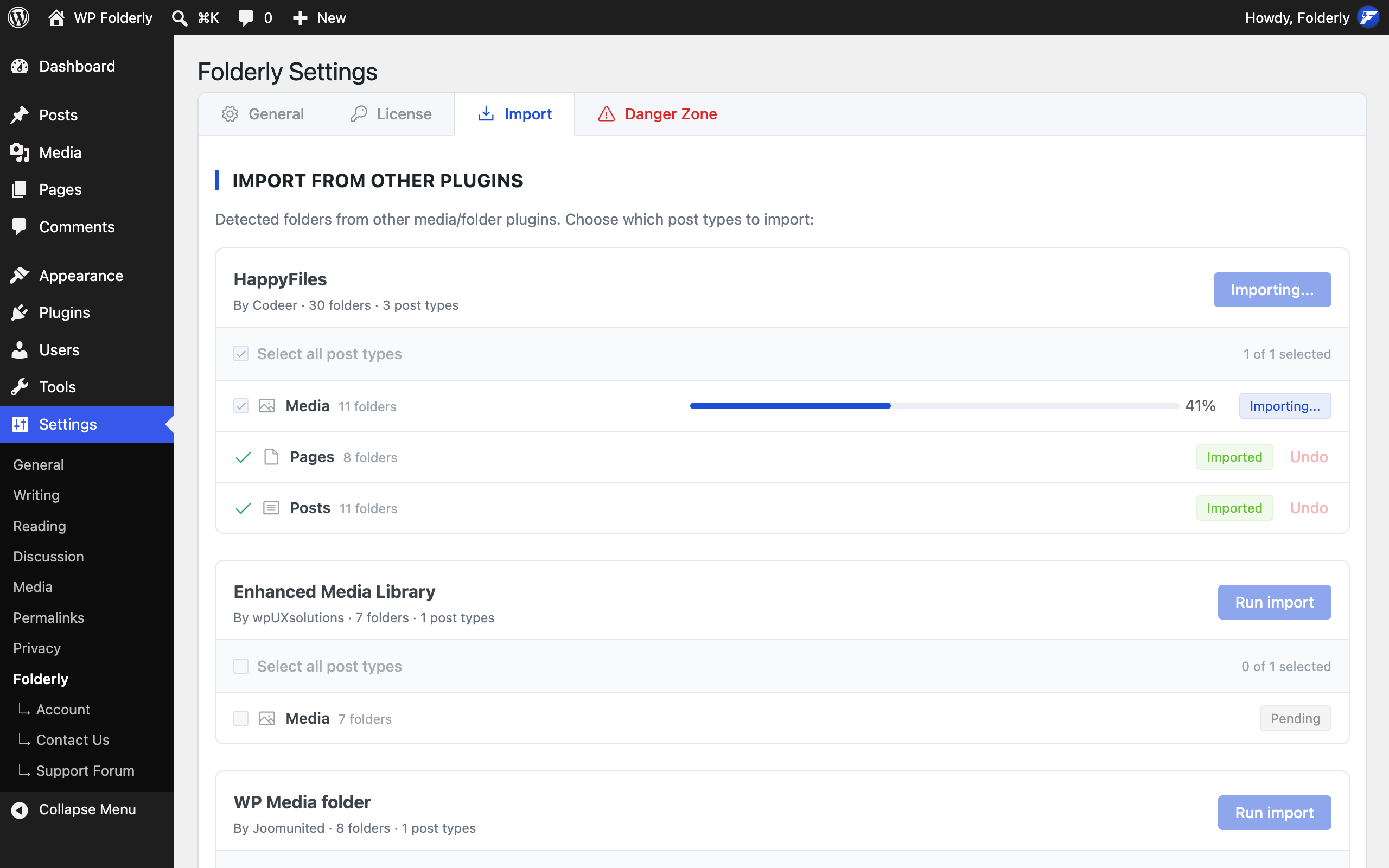
Switching to Folderly? Bring your existing folders — for media, posts and pages alike — from twelve popular plugins, including FileBird, Real Media Library, HappyFiles, WP Media Folder and Enhanced Media Library. Imports run in your browser in small batches with a live progress bar, can be safely re-run, and can be undone per post type without touching the folders you made yourself.
Customizable Display
Toggle the breadcrumb and folder grid independently from the Folderly settings page to match the way you work.
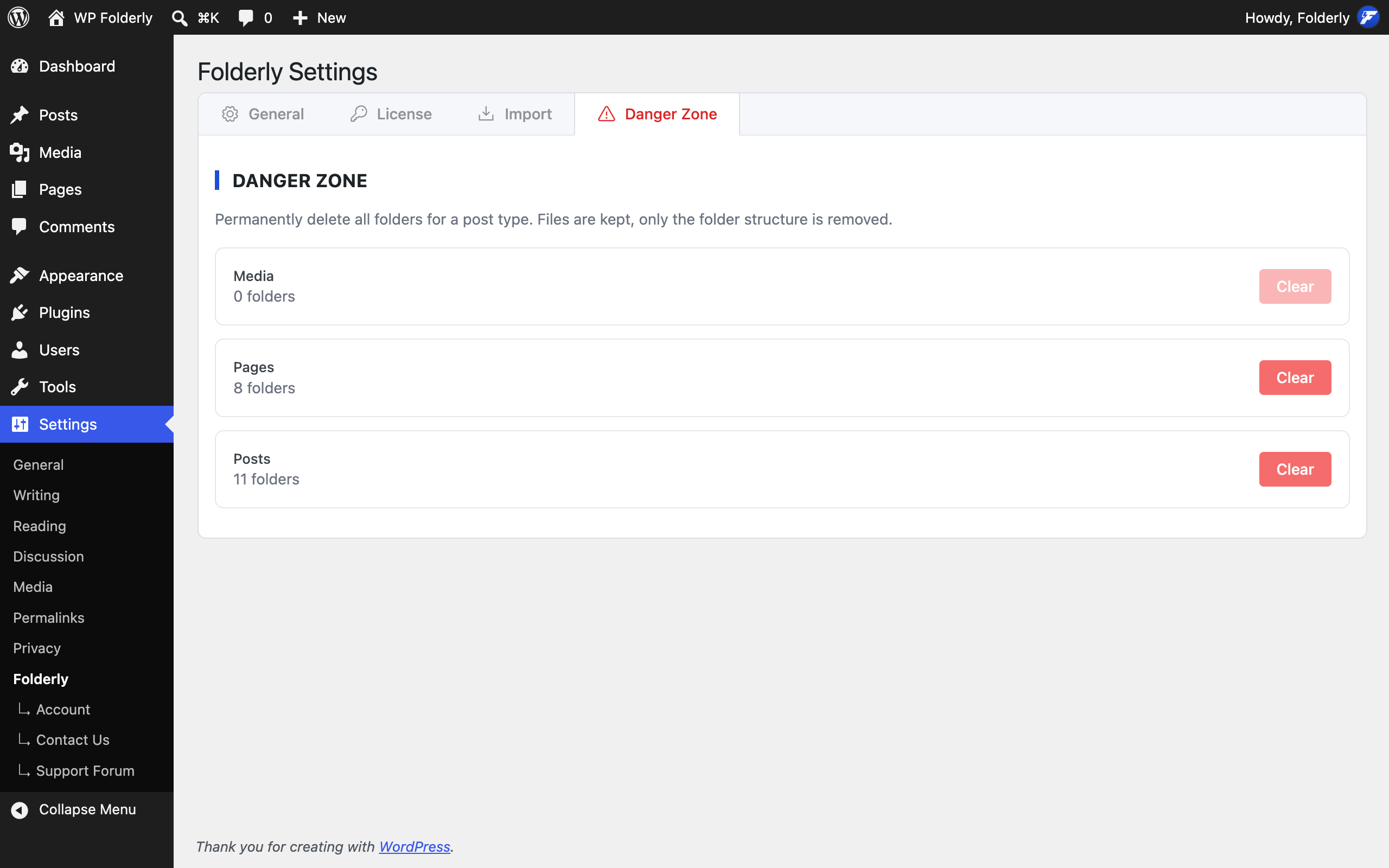
Danger Zone
Need a clean slate? Clear every folder for a post type from Settings Folderly Danger Zone, guarded by a type-to-confirm prompt. Your files and posts stay exactly where they are — only the folders go.
Search and Filter
Advanced search and filtering options help you find the documents you need in seconds.
User Permissions
Control who can access and manage folders with robust user permission settings.
Seamless Integration
Integrates smoothly with your WordPress media library and post editor, keeping your workflow uninterrupted.
Lightweight and Fast
Designed with performance in mind, Folderly ensures your site remains fast and responsive even with extensive file collections.
Why Choose Folderly?
- Folderly is perfect for bloggers, content creators, educators, and businesses looking to keep their WordPress sites organized. With Folderly, you can create a clutter-free environment, making document management more efficient and less time-consuming.
- Streamline file and content management.
- Boost your productivity while working on multiple platforms.
- Enjoy a hassle free experience across diverse WordPress environments.
COMPATIBILITY
Folderly seamlessly integrates with the most popular page builders and themes worldwide, ensuring smooth compatibility and a superior user experience. Whether you’re building stunning websites or managing complex content structures, Folderly adapts to your needs with support for:
✅ Elementor
✅ Beaver Builder
✅ Brizy Builder
✅ Divi Builder
✅ Thrive Architect
✅ Fusion Builder (Avada)
✅ Oxygen Builder
✅ Tatsu Builder
✅ Bricks Builder
✅ BeTheme
✅ Breakdance Builder
✅ Zion Builder
Screenshots


Installation
- Go to your WordPress backend
- Navigate to “Plugins” > “Add New”
- Search for “Folderly”
- Install and activate the plugin
- Go to “Media” in the left sidebar and enjoy the advanced media management with folders
FAQ
-
What is Folderly and how does it work?
-
Folderly is a WordPress plugin designed to help you organize your media files, posts, and other content into virtual folders. It provides a drag-and-drop interface for easy file management without changing your original file paths or URLs.
-
Will Folderly affect my existing media files or URLs?
-
No, Folderly does not alter your existing file paths or URLs. It creates virtual folders that help you organize your files while keeping their original locations intact.
-
Can I import my existing folders from other plugins?
-
Yes. Go to Settings Folderly Import, and Folderly lists every supported plugin it finds data for, with a row per post type (media, posts, pages, or any other type you have enabled folders for). Tick the post types you want and run the import. It supports HappyFiles, Enhanced Media Library, WP Media Folder, Folders (Premio), Wicked Folders, Media Library Assistant, Media Library Organizer, Media Library Folders, Real Media Library, FileBird, Folderify and iFolders — and the source plugin does not need to be active.
Imports are safe to run again: folders already imported are recognised and skipped, and every item keeps the first folder it was filed in. If you change your mind, each post type has an Undo that removes only the folders that import created.
-
Is Folderly compatible with other plugins and themes?
-
Yes, Folderly is designed to work seamlessly with most WordPress plugins and themes. However, if you encounter any compatibility issues, please reach out to our support team for assistance.
-
Is there a limit to how many folders I can create?
-
In the Pro version of Folderly, you can create and manage unlimited folders, including nested structures, to organize your content as extensively as you need.
Reviews


Contributors & Developers
“Folderly” is open source software. The following people have contributed to this plugin.
Contributors
Translate “Folderly” into your language.
Interested in development?
Browse the code, check out the SVN repository, or subscribe to the development log by RSS.
Changelog
0.7.0
- New: Import folders for posts, pages and any other folder-enabled post type — not just media. Settings Folderly Import lists one row per post type for every source plugin it detects, and you choose which to bring over.
- New: Three more source plugins — Media Library Organizer, Folderify and iFolders — bringing the total to twelve alongside HappyFiles, Enhanced Media Library, WP Media Folder, Folders (Premio), Wicked Folders, Media Library Assistant, Media Library Folders, Real Media Library and FileBird.
- New: Undo an import per post type. Only the folders that import created are removed and their items unfiled; folders you made yourself are never touched.
- Improvement: Imports now run in your browser in small batches with a live progress bar, so very large libraries no longer run into server time limits.
- Improvement: Re-running an import is safe — folders already imported are recognised and skipped, and every item keeps the first folder it was filed in.
- Improvement: Two source folders with the same name under the same parent now import as two separate folders instead of being merged into one.
- Improvement: The import summary distinguishes items that could not be filed from unreadable rows in the source plugin’s own data, so each count means what it says.
- Fix: Folders (Premio) and Wicked Folders imports now read the correct taxonomy for each post type.
- Fix: WP Media Folder’s hidden root container is no longer imported as a stray folder.
- Fix: FileBird collections and Real Media Library collections and galleries are no longer imported as folders, and no longer inflate the import totals.
- New: Danger Zone tab in Settings Folderly — clear every folder for a post type in one place, with a type-to-confirm safeguard and a progress bar. Your media and posts are untouched; only the folders are removed.
- Fix: Clearing all folders on very large sites no longer times out part-way through. It now runs in small batches until done.
- Fix: After updating the plugin, your browser no longer mixes old and new Folderly scripts, which could cause JavaScript errors in the admin until you cleared its cache.
0.6.1
- Fix: Expanded folders and sidebar width are now remembered separately for each folder-enabled post type, so navigating between the Media library and Posts no longer overwrites the other’s tree state.
- Fix: Folder search in the sidebar is now case-insensitive, so typing “invoice” matches “Invoices” without retyping.
- Fix: The sidebar now only remembers UI state (expanded folders, sidebar width) instead of caching the entire folder tree, keeping browser storage lean.
0.6.0
- New: Google Drive-style folder browser — a breadcrumb trail and a child-folder grid appear above the Media Library (grid and list view) and post-type lists, giving you one-click navigation from any folder to any ancestor or child.
- New: Drag and drop attachments directly onto folder cards in the new grid to assign them — no more digging through the sidebar tree.
- New: Display settings — toggle the folder breadcrumb and folder grid independently from Settings Folderly to keep the interface focused.
- Improvement: Renaming a folder from the sidebar context menu now updates the breadcrumb and folder grid instantly, without a page reload.
0.5.2
- Improvement: Streamlined the folder management interface for faster loading and a smaller asset footprint.
- Improvement: Smoother folder list updates after creating, renaming, deleting, or reordering folders.
- Fix: Folder selection inside the post and page editor now correctly targets media attachments, so the folder filter behaves as expected when inserting media.
0.5.1
- New: Organize media, posts, and pages into virtual folders directly from the WordPress admin.
- Improvement: Refined post-type settings screen for choosing which content types use folders.
- Improvement: Clearer feedback when creating folders and during drag-and-drop operations.
0.4
- Support post type folders
0.3
- Refactor the codebase
0.2
- Supports page builders and themes
- Elementor
- Beaver Builder
- Brizy Builder
- Divi Builder
- Thrive Architect
- Fusion Builder (Avada)
- Oxygen Builder
- Tatsu Builder
- Bricks Builder
- BeTheme
- Breakdance Builder
- Zion Builder
0.1.1
- Initial Commit.