

Description
FlickShow Viewer is a stunning, luxury-styled center-focus video slider. The video in the center position plays automatically and pauses when scrolled away. Everything is customizable directly from the WordPress admin — no coding required.
Features:
- ✅ YouTube, Vimeo, and direct MP4 / WebM support
- ✅ Center video auto-plays, pauses when scrolled away
- ✅ Default Muted / Unmuted — controllable from Settings
- ✅ Typography controls — font family, size, color for heading and sub-heading
- ✅ Responsive font sizes — separate controls for Desktop, Tablet, and Mobile
- ✅ Color controls — accent color, background color, text colors
- ✅ Slider dimensions — slide width, height, active scale, gap, border radius
- ✅ Playback settings — autoplay on/off, loop on/off, show/hide player controls
- ✅ Glitch-free CSS scale transitions (zero layout reflow)
- ✅ Gold-accent luxury design with animated corner decorations
- ✅ YouTube auto-thumbnail detection
- ✅ Keyboard navigation ( )
- ✅ Touch / swipe support for mobile
- ✅ Accessible — ARIA labels, focus-visible styles, live regions
- ✅ Multiple sliders on same page supported
- ✅ Simple shortcode:
[flickshow_viewer] - ✅ Clean uninstall — removes all data on delete
Usage:
- Go to Settings FlickShow Viewer and add your video URLs.
- Customize fonts, colors, and playback settings.
- Paste
[flickshow_viewer]into any page or post.
Supported video URL formats:
https://www.youtube.com/watch?v=XXXXXXXXXXXhttps://youtu.be/XXXXXXXXXXXhttps://www.youtube.com/shorts/XXXXXXXXXXXhttps://vimeo.com/123456789https://example.com/video.mp4
Screenshots

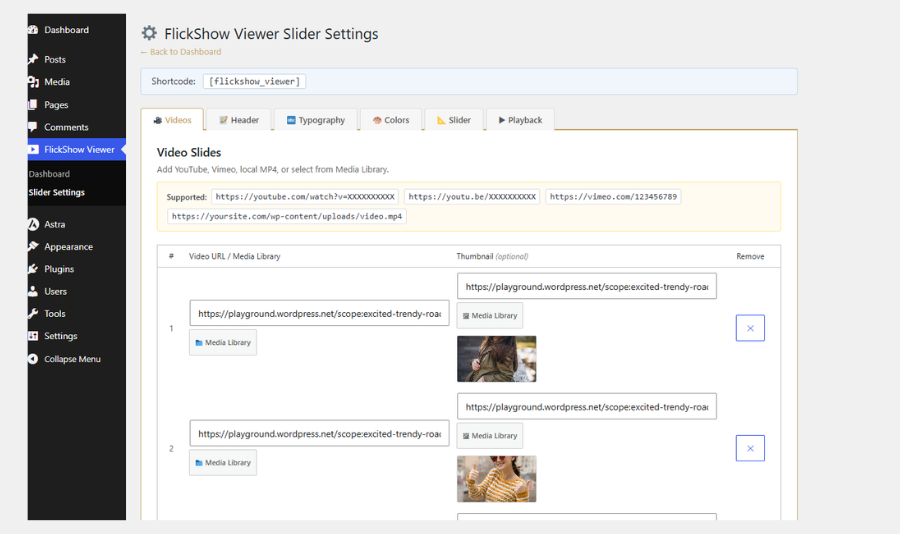
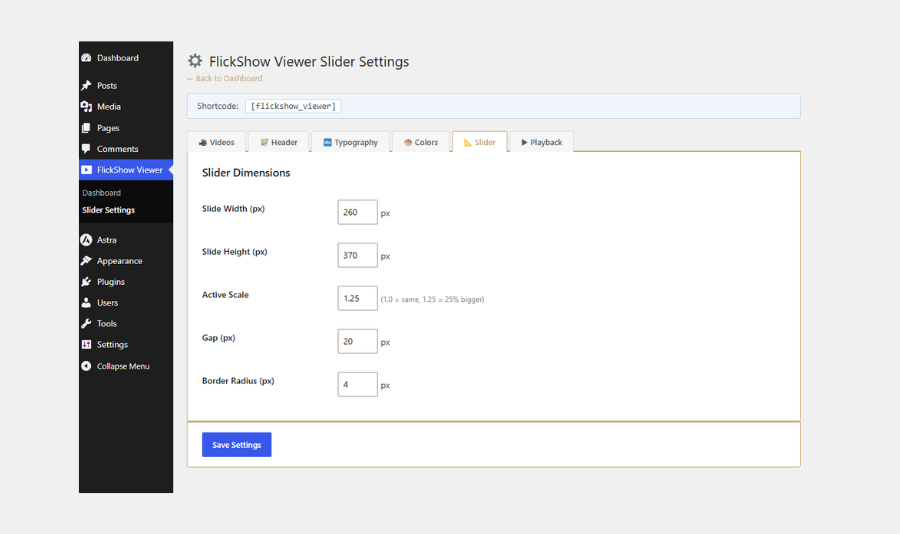
Installation
- Upload the
flickshow-viewerfolder to/wp-content/plugins/. - Activate via the Plugins menu in WordPress.
- Go to Settings FlickShow Viewer to configure.
- Add
[flickshow_viewer]to any page or post.
Or install directly from the plugin directory:
- Go to Plugins Add New.
- Search for FlickShow Viewer.
- Click Install Now, then Activate.
FAQ
-
Does it support YouTube?
-
Yes. Paste any YouTube URL (youtube.com/watch, youtu.be, or Shorts). The plugin automatically extracts the video ID, generates a thumbnail, and handles autoplay via the YouTube iframe API.
-
Why does YouTube start muted before unmuting?
-
Browsers block unmuted autoplay by security policy. FlickShow Viewer works around this: it starts muted (which browsers allow), then unmutes after ~800ms — so sound plays automatically. You can also enable “Default Muted” in Settings to keep videos muted.
-
Can I control whether videos start muted?
-
Yes. Go to Settings FlickShow Viewer Playback and toggle “Default Muted” on or off.
-
Can I change the font?
-
Yes. Go to Settings FlickShow Viewer Typography to choose font family, size, and color for both the heading and sub-heading. Sizes can be set separately for Desktop, Tablet, and Mobile.
-
Can I change colors?
-
Yes. The Colors tab in Settings controls the accent color, accent light color, and background color.
-
Can I use MP4 files from my server?
-
Yes. Paste the direct
.mp4file URL in the Video URL field. -
Does it work on mobile?
-
Yes. Touch swipe is supported and font sizes have separate mobile controls.
-
Can I place multiple sliders on one page?
-
Yes, each
[flickshow_viewer]shortcode instance runs independently. -
Does the plugin load on every page?
-
No. Assets are only loaded on pages that contain the
[flickshow_viewer]shortcode.
Reviews

Contributors & Developers
“FlickShow Viewer” is open source software. The following people have contributed to this plugin.
Contributors
Translate “FlickShow Viewer” into your language.
Interested in development?
Browse the code, check out the SVN repository, or subscribe to the development log by RSS.
Changelog
1.0.0
- Initial release.
- YouTube, Vimeo, and MP4 support.
- Full typography controls (font family, size per device, color).
- Full color customization.
- Slider dimension controls.
- Playback settings (mute, autoplay, loop, controls).
- Glitch-free CSS scale transitions.
- Keyboard and touch navigation.
- Accessible ARIA markup.
- Clean uninstall.