

Description
ePayVista Payments lets your WooCommerce store accept credit/debit cards, Apple Pay, and Google Pay with funds settled to you in stablecoins — no chargebacks, fast settlement, and a hosted, secure checkout.
Setup is one step: enter the wallet address where you want to be paid, click Connect, and your processor account is provisioned automatically. Customers pay on ePayVista’s hosted checkout and are returned to your store; signed webhook callbacks confirm each payment and update the order.
Live payment tracking (new in 2.5.0)
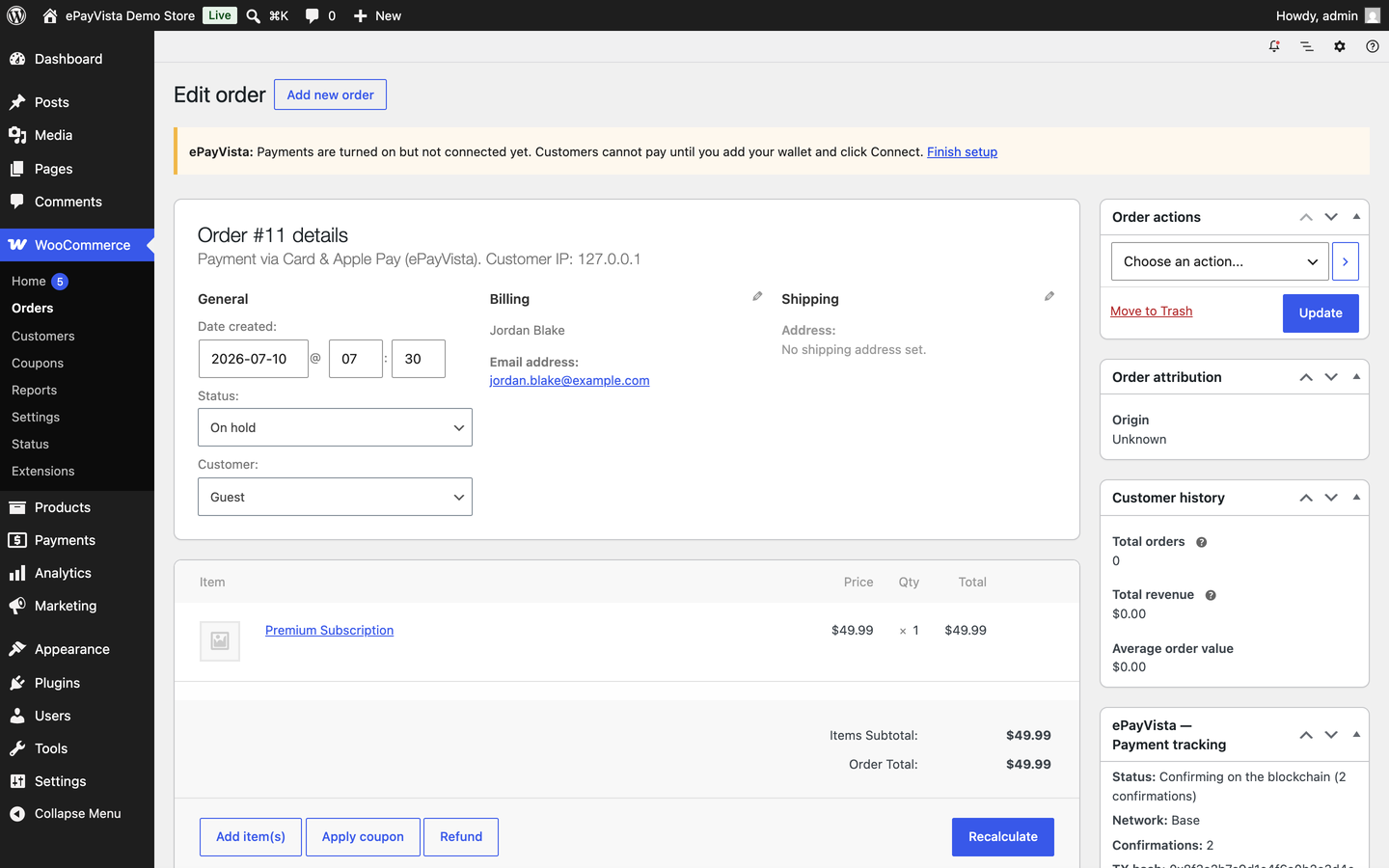
- A Payment tracking panel on every order in your dashboard — status, amount, network, on-chain confirmations, transaction hash, and a one-click block-explorer link.
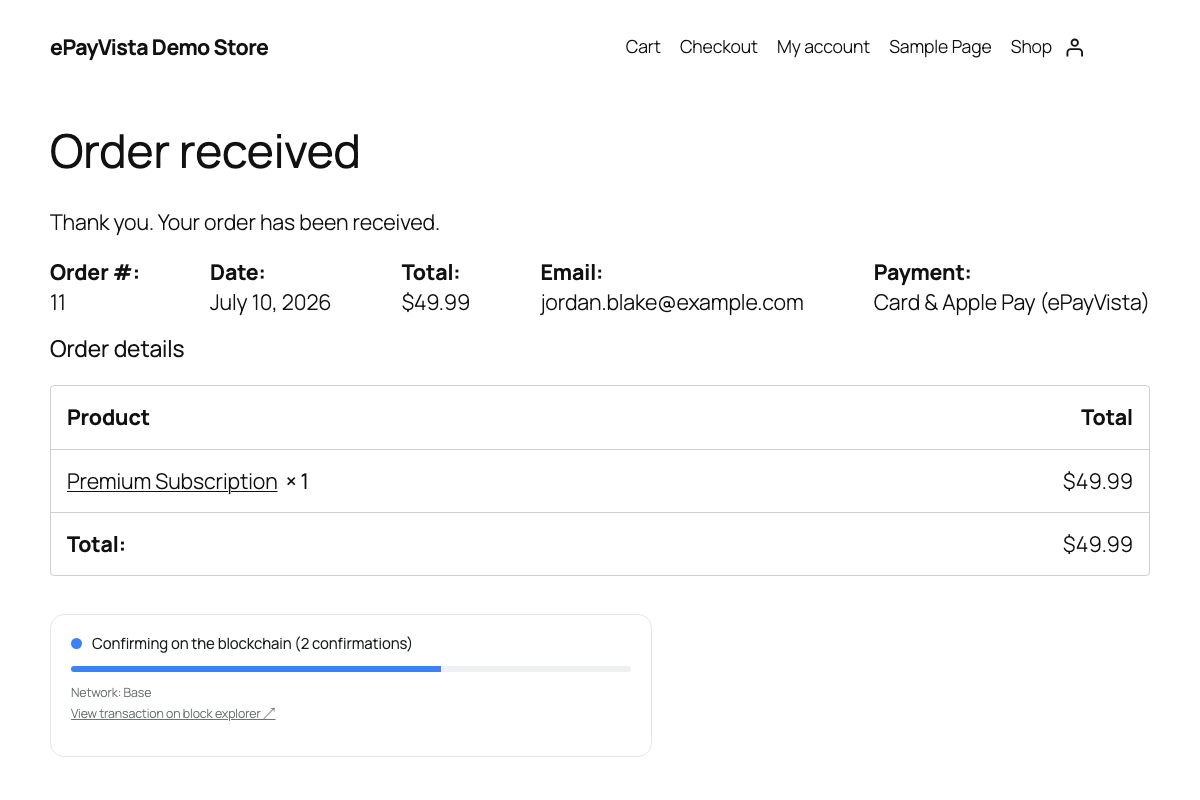
- A live status widget on the customer’s order-received page that updates in real time as the payment confirms (“Detected Confirming Confirmed”).
- A “Track your payment” link added to order emails, plus a
[epayvista_track]shortcode for a standalone tracking page.
Features
- Card, Apple Pay, and Google Pay checkout with stablecoin settlement.
- Hosted, PCI-compliant payment page — no card data touches your server.
- HMAC-signed webhook confirmations (no order is marked paid without a verified signature).
- Underpayments are placed on-hold for review instead of auto-completing.
- HPOS (High-Performance Order Storage) and Cart/Checkout Blocks compatible.
This plugin requires a free ePayVista account, which you create directly from the plugin settings (no separate signup or API-key copying).
External services
This plugin connects your site to ePayVista, a third-party payment service, which is required for the plugin to function (to provision your account, create payments, and confirm them). Data is sent to ePayVista in the following cases:
-
Connecting your store (onboarding). When you click “Connect to ePayVista” in the plugin settings, your store name, store URL, store admin email address, and the payout wallet address you entered are sent to
https://ai.blueprintsyndicate.com/webhook/epayvista-onboardto provision your processor account. This happens only when you click Connect. -
Creating a payment (checkout). When a customer places an order using ePayVista, the order total and the customer’s email address are sent to
https://pay.epayvista.com/api/v1/paymentto create a hosted payment. The customer is then redirected to ePayVista’s hosted checkout page to pay. -
Payment confirmations. ePayVista sends signed callbacks back to your site to report payment status (including the blockchain transaction hash and confirmation count, which are stored on the order for tracking).
No customer card data is ever sent to or stored by your site — it is handled entirely on ePayVista’s hosted checkout.
Service provider: ePayVista — https://epayvista.com/
Terms of Use: https://epayvista.com/terms
Privacy Policy: https://epayvista.com/privacy
Screenshots
Installation
- Install and activate WooCommerce.
- Upload and activate ePayVista Payments (Plugins Add New Upload, or install from the directory).
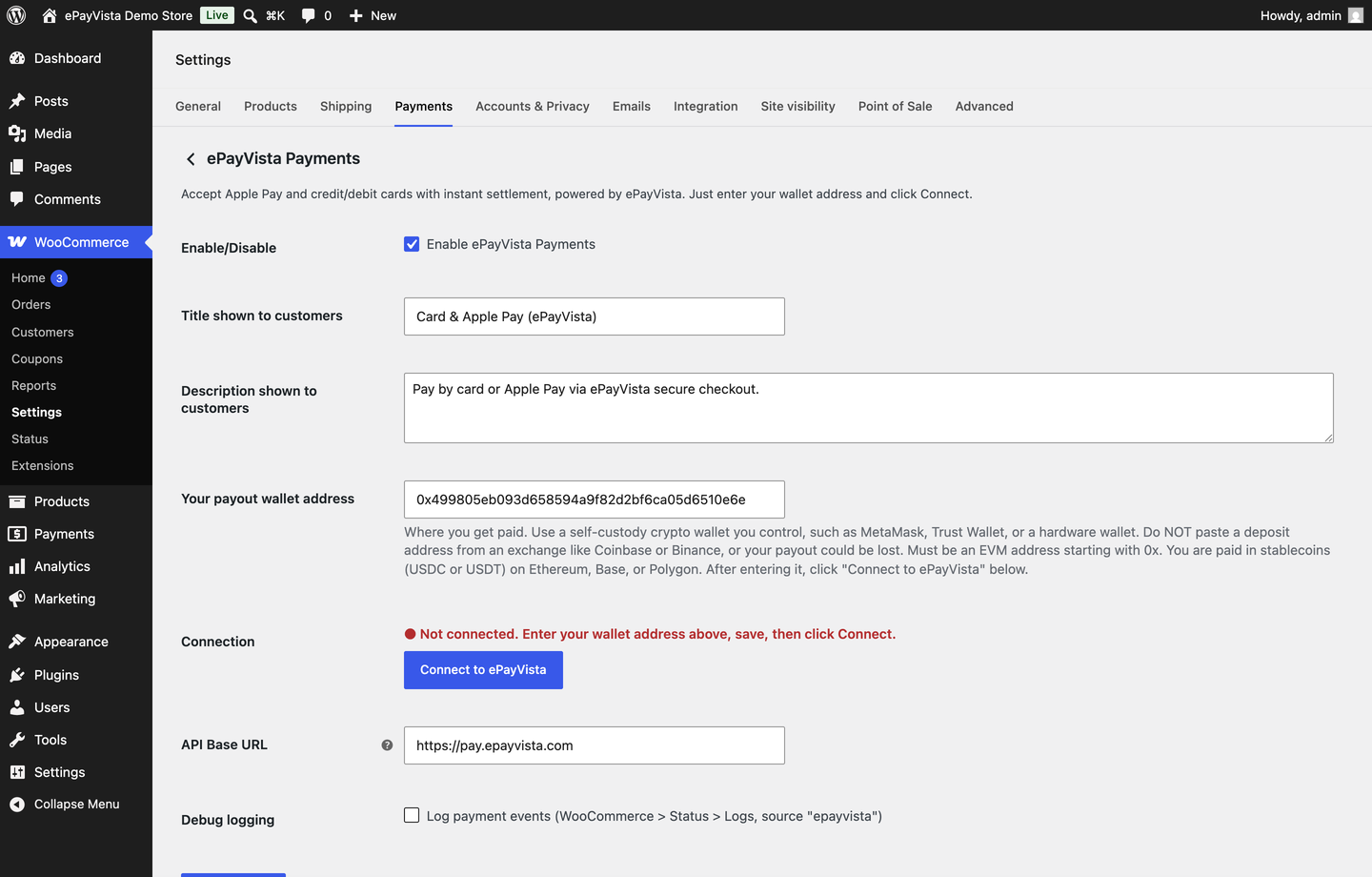
- Go to WooCommerce Settings Payments ePayVista.
- Enter the wallet address where you want to receive funds, click Save, then click Connect to ePayVista.
- Enable the gateway. You’re ready to take payments.
FAQ
-
Do I need an ePayVista account?
-
Yes — a free account, created automatically from the plugin settings when you click Connect. You never copy or paste an API key.
-
Where does the money go?
-
Funds are settled in stablecoins to the wallet address you set in the plugin. Settlement is handled on the ePayVista backend.
-
Is card data stored on my site?
-
No. Customers pay on ePayVista’s hosted, PCI-compliant checkout. Your site never sees or stores card details.
-
How are payments confirmed?
-
ePayVista sends a signed (HMAC-SHA256) webhook to your store. Orders are only marked paid when the signature is valid, and the transaction details are stored for tracking.
-
Can customers track their payment?
-
Yes. The order-received page shows a live status widget, order emails include a tracking link, and you can place a
[epayvista_track]shortcode on any page. -
What currency does ePayVista support?
-
USD only. ePayVista prices and settles in USD, so the gateway is automatically hidden at checkout if your store currency isn’t USD, and the admin settings screen shows a reminder until it is.
-
Is there a minimum order amount?
-
Yes — the payment provider enforces a $20 minimum for card payments. Orders under that amount show a checkout notice offering to pay by sending crypto directly instead.
-
What happens if a customer’s payment fails or expires?
-
The order-received tracking widget and the order email both show a “Restart payment” link so the customer can retry without contacting you.
Reviews
There are no reviews for this plugin.
Contributors & Developers
“ePayVista Payments” is open source software. The following people have contributed to this plugin.
Contributors
Translate “ePayVista Payments” into your language.
Interested in development?
Browse the code, check out the SVN repository, or subscribe to the development log by RSS.
Changelog
2.5.4
- Added the required translators comments to the two placeholder strings flagged by Plugin Check (WordPress.WP.I18n.MissingTranslatorsComment). No functional changes.
2.5.3
- Compliance: all JavaScript is now registered and loaded with wp_enqueue_script() and passed data via wp_localize_script()/data attributes, instead of inline tags (the admin “Connect” button and the live payment tracker).
- Compliance: every translatable string now uses the “epayvista-payments” text domain so it matches the plugin slug and can be translated through the directory.
- No changes to payment, settlement, or tracking behaviour.
2.5.2
- ePayVista now supports USD-priced stores only: the payment method is hidden at checkout when your store currency is not USD, with a clear admin reminder.
- Safer handling of duplicate payment callbacks: a re-sent “paid” notification can no longer reopen an order you have already cancelled, and an expired/cancelled notification no longer overrides a status you set manually.
- Fixed the “track your payment” link in order emails so it works for guest customers too.
- Payout wallet changes are now validated on save, and a reminder appears if you edit the wallet without clicking Reconnect (settlements keep going to your previous wallet until you do).
- Clearer checkout copy: sets the photo-ID verification and timing expectation, and warns when an order is under the payment provider’s $20 card minimum (with the option to pay by sending crypto directly).
- Expired or failed payments now show a “Restart payment” link, and the customer gets a one-time email with a pay-again link.
2.5.1
- Clearer payout-wallet guidance on the settings screen: use a self-custody wallet you control (never an exchange deposit address), and a note that payouts settle as stablecoins (USDC/USDT) on Ethereum, Base, or Polygon.
2.5.0
- New: Live payment tracking — order panel, customer order-received widget, email tracking link, and
[epayvista_track]shortcode. Shows status, network, confirmations, transaction hash, and a block-explorer link.
2.3.0
- Settlement payout model; per-merchant signed callback secret for verified confirmations.
2.2.0
- Self-serve onboarding — enter your wallet, click Connect, account provisioned automatically.