

Description
Emporiqa is an AI chatbot for WooCommerce with no monthly fee and no API key to paste. You pay $0.25 when it talks to a shopper, and nothing in the months it doesn’t. The model cost is inside that rate, so no second bill arrives. You start with $25 of signup credit, about 100 conversations, and no card is required.
It sells and it answers support questions, in 65+ languages, from your own synced catalog.
Open the live demo store and ask for a product it does not sell: it says so instead of inventing one. That demo sells electronics; the behavior is the same on any catalog.
What it does
- Recommends by meaning, not keyword: “waterproof winter boots under 80, size 9” returns only what matches all four conditions
- Answers “too expensive” with alternatives you already sell, and asks which size or colour rather than guessing
- Visual search: finds the closest thing you stock from a photo a shopper uploads
- Voice mode, if you switch it on: the shopper taps the microphone, speaks, and hears the answer read aloud while the product cards stay on screen
- Adds the item to the WooCommerce cart, with your own stock and variation checks
- Answers shipping, returns and policy questions from your synced pages, and looks up an order from a number and email (a shopper signed in to your store gives only the number)
- Shows a signed-in customer the price WooCommerce calculates for them, role and wholesale prices included, greets them by first name, and passes their name and email to your team instead of asking
- Ready-made rules under Settings > Rules in Emporiqa also pass returns, cancellations, order changes, quotes and invoice requests to your team
- Lets anyone on your team take over a live conversation, reading it from the first message with your saved replies to hand
- Alerts your team in Slack, Microsoft Teams, Discord, Google Chat or email; outside your business hours it takes an email or phone number
- Reports which chats ended in a purchase, with the revenue attributed to chat
Answers and wording you control
Write your own answers as pages in the Emporiqa dashboard, up to 25 per store and 10 languages each, and a sync from your shop never touches them.
Under Settings and How the chat writes, pick one of four tones, Standard, Friendly, Professional or Concise, and leave short wording notes, in general and per situation. That changes wording only: stock, prices and orders come from your store, and “never say something is out of stock” is ignored on purpose.
Under Settings and Widget appearance, add up to four starter questions per language, shown as buttons under the welcome message until the conversation starts, and put your store’s own picture in the chat header and next to the chat’s answers. Team members can answer under their own name and photo.
The chat tells shoppers it is an AI
The default greeting tells the shopper they are talking to your store’s AI assistant, in every language the chat speaks, which is the disclosure the EU AI Act asks for. If you rewrite the greeting, keep that disclosure in it: one that drops it is refused when you save, and the Emporiqa terms (section 8.6) treat removing it, including through custom CSS or code, as a breach.
Built for WooCommerce
Simple, variable, grouped and external products. HPOS. WPML and Polylang. Multi-currency via WOOCS, WPML Multi-Currency, WooCommerce Payments and Aelia.
Price, stock and status changes reach Emporiqa as you make them; a few edits need one Sync All afterwards, which the documentation covers. The same chatbot also runs on Drupal Commerce, Magento, PrestaShop, Shopware and Sylius.
Privacy and security notes
The signed-in shopper’s token is fetched from admin-ajax.php?action=emporiqa_customer_token. It is read-only and returns only the current session’s own identity token. It cannot be nonce-protected, because the page that would carry the nonce is full-page cached; cross-site use is blocked instead by a required custom header (which forces a CORS preflight) and a Sec-Fetch-Site / Origin check, and the answer is never cached.
Third-Party Service
This plugin requires an Emporiqa account and sends data there. Your catalog and synced pages go to https://emporiqa.com/webhooks/sync/, signed with HMAC-SHA256; the widget script loads from https://emporiqa.com/chat/embed/; connecting uses a PKCE handshake via https://emporiqa.com/connect/start. What a shopper types, and any photo uploaded for visual search, is processed by Emporiqa’s AI provider and never trains AI models. If you switch on voice mode, a shopper’s spoken message goes to that provider to be turned into text and the reply is read aloud by an AI voice; Emporiqa does not keep the recording. Sync requests carry the plugin version (X-Emporiqa-Plugin-Version). If you add the Order status rule, Emporiqa calls this site’s /wp-json/emporiqa/v1/actions/order-status with a signed request to look up the order a shopper asks about; once the shopper has proved the order is theirs, the answer carries that order’s status, tracking, items, totals, payment and shipping method, and the names and addresses on it (never the email). When a shopper is signed in to your store, the chat sends Emporiqa their WordPress user ID (signed, never their name or email), so Order status can find their own orders without an email, /wp-json/emporiqa/v1/actions/customer-prices can answer with the prices your shop gives that customer, and /wp-json/emporiqa/v1/actions/customer-info can answer with that customer’s account name and email and their 10 newest orders (number, date, status, total; never addresses, phone or anyone else’s orders). Emporiqa also calls /wp-json/emporiqa/v1/actions/verify to check the address is yours. Each of these answers only a request signed with your store’s connection secret (HMAC-SHA256, within 5 minutes), checked by the route’s permission callback; the one unsigned call is the connect check, answered only during a connection you started in the last 2 minutes. Terms of Service, Privacy Policy.
Screenshots


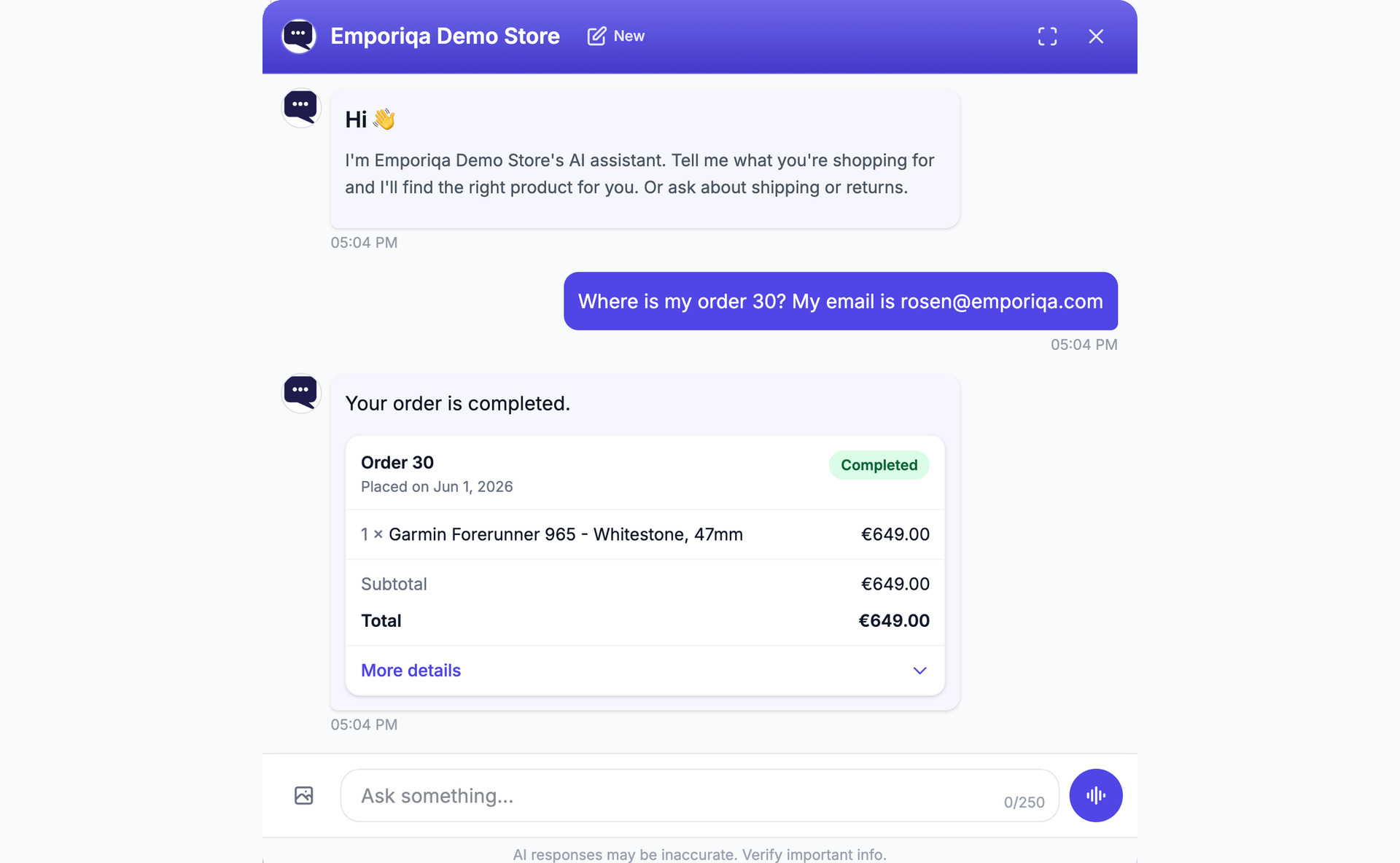
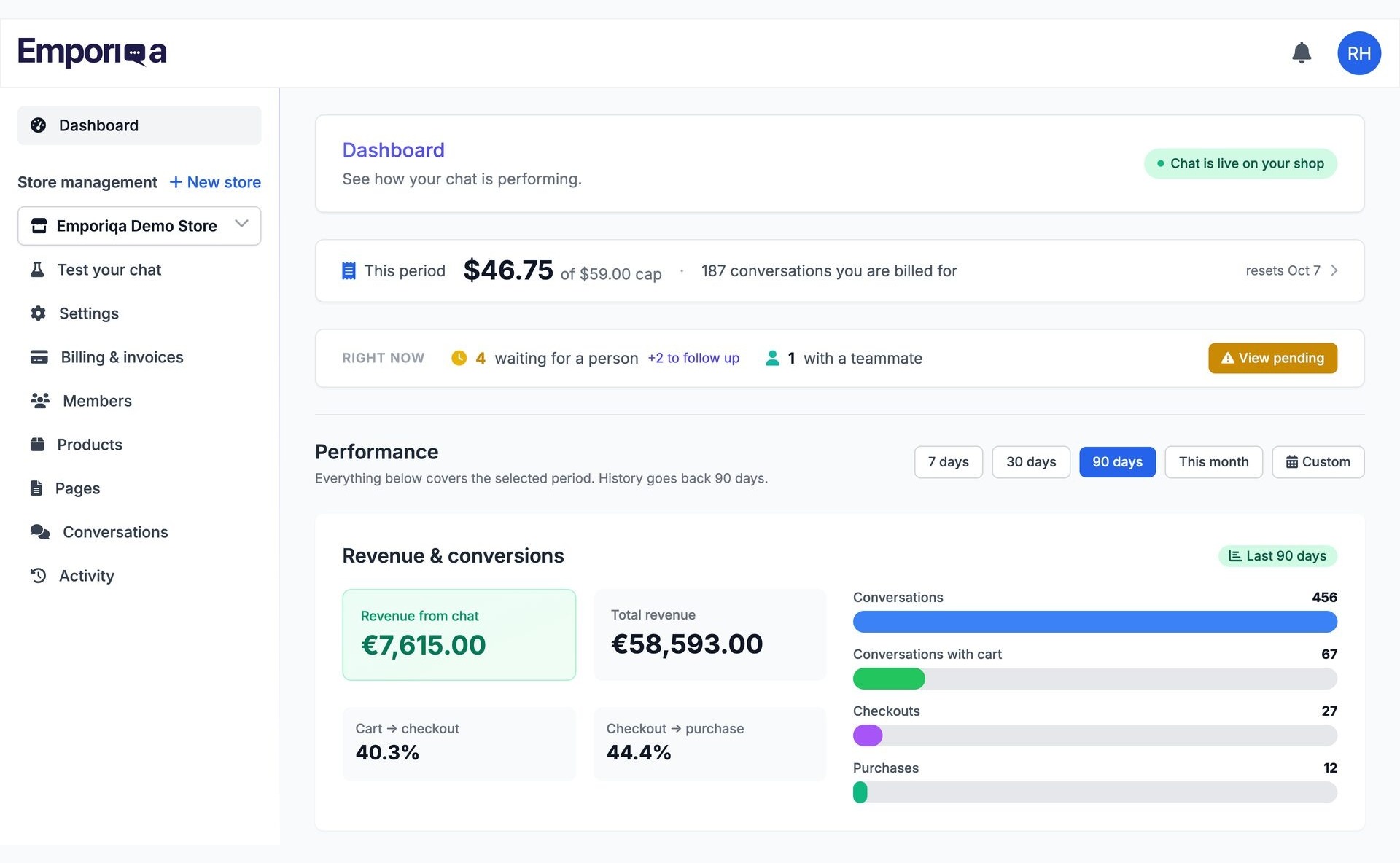
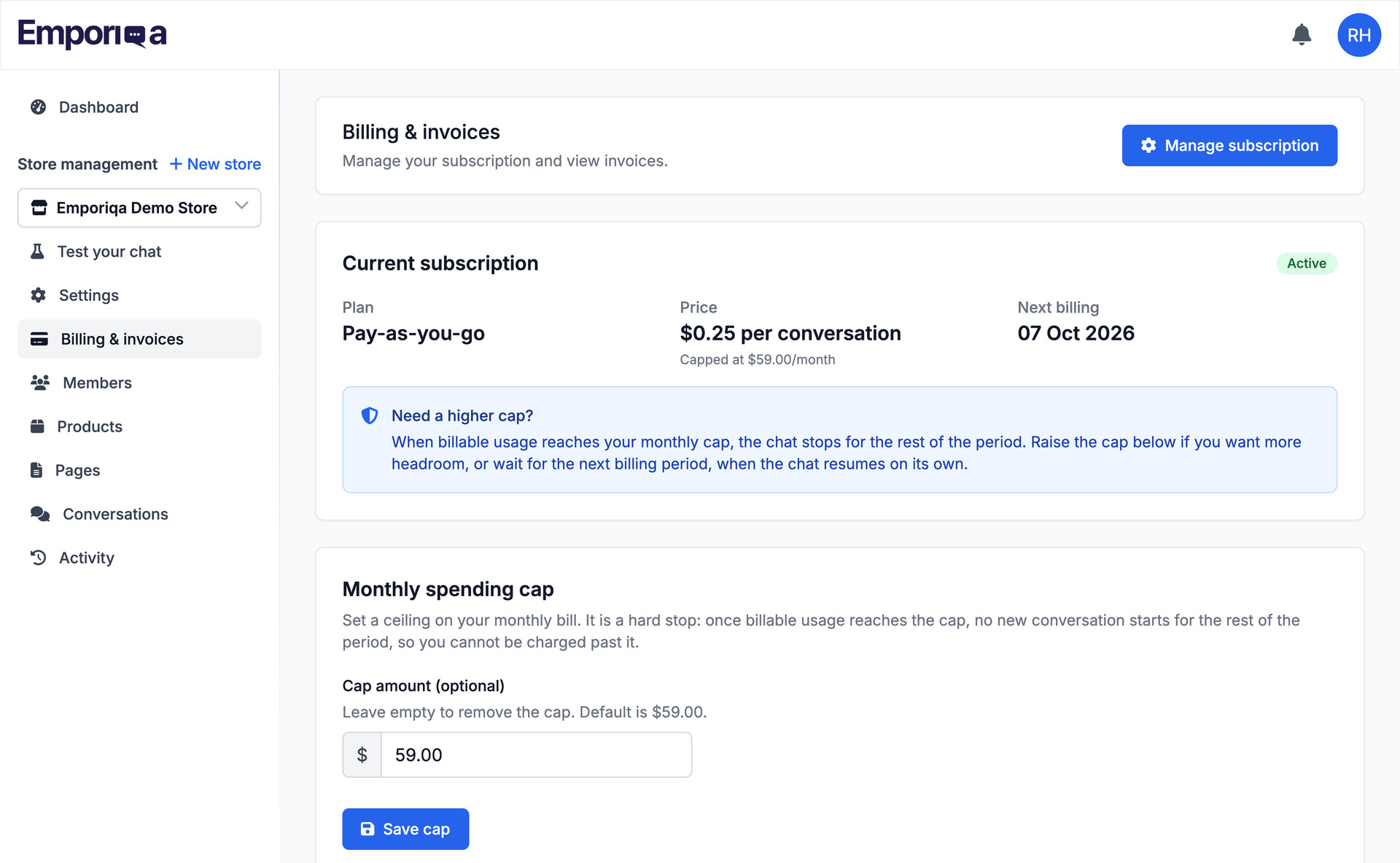

Installation
- Plugins > Add New, search for “Emporiqa”, then Install Now and Activate.
- Settings > Emporiqa, click Connect to Emporiqa, sign in or create a free account and pick the store. You land back connected.
- On the Sync tab, click Send my catalog. The widget appears once that first sync finishes.
On plain HTTP, or to paste credentials yourself, expand I’d rather paste credentials manually and use the Store ID and Connection Secret from Settings > Integration > Integration overview.
Full guide: emporiqa.com/docs/woocommerce/
FAQ
-
Is this AI chatbot free?
-
The plugin is free and you connect without a card. The service is pay-as-you-go: $25 of signup credit, about 100 conversations, then $0.25 per conversation. There is no monthly plan and no free trial. You can set a monthly spending limit, a ceiling on a month’s charges, and raise, lower or remove it yourself. A month with 40 conversations costs $10. Team members are included with no per-seat fee, and a conversation is billed once, when the shopper first writes. Voice mode is optional and off by default: a conversation where the shopper speaks costs $0.15 more, charged once, and counts toward the same limit. Prices exclude VAT. Full pricing.
-
Do I need an OpenAI API key or my own AI account?
-
No. You do not open an account with an AI provider, paste a key, or manage tokens. The model cost is inside the per-conversation price.
-
What happens when the $25 credit runs out?
-
You get an email before it is exhausted. If no card is on file by then the widget pauses: your store keeps working, but the chat doesn’t answer until you add one. Spending stops at the cap.
-
What will it cost at my traffic level?
-
Cost follows traffic, not revenue: multiply the conversations you expect by $0.25. The share of visitors who open a chat varies by store, so you find your own figure in the first weeks. As an illustration, if 3 in 100 visitors opened the chat, 40,000 monthly visitors would come to roughly 1,200 conversations, about $300.
-
What happens when the chatbot can’t answer, or gets something wrong?
-
Ask for something you don’t stock and it says so, instead of inventing a product. Prices, stock, variations and policy pages come from what your site syncs. When it can’t answer with confidence it says so and offers to bring in a person. Every conversation is readable in the dashboard, and low-rated ones are flagged.
-
How is this different from a live chat plugin?
-
Live chat routes a shopper to a person, so it answers when someone is at the keyboard. This one answers on its own from your catalog and your pages, recommends and compares products, and your team can still take over any conversation.
-
Which languages does it speak?
-
65+, and it answers in the language the shopper writes in. On multilingual stores it detects Polylang and WPML and syncs every configured language.
-
Will it work with my theme, and will it slow my site down?
-
It works with any theme: the widget is a script layered over your storefront, not built into it. The script loads asynchronously in the footer, and the chat downloads only when a shopper opens the bubble. It sits outside your checkout, so if Emporiqa is unreachable your storefront keeps working.
-
What do you do with my data, and my customers’ data?
-
Emporiqa is an EU company under GDPR, and shopper conversations are not used to train AI models. Your catalog stays in WooCommerce. There is no SOC 2 or ISO 27001 certification and no service level agreement on pay-as-you-go, where Rosen Hristov answers support email himself.
-
Can I add my own order details to Order status?
-
Yes. The
emporiqa_order_status_datafilter runs after the plugin has filled the answer, so you can change any value or put your own fields underextra(up to 30 keys, text up to 500 characters):add_filter( 'emporiqa_order_status_data', function ( $data, $order ) { $data['extra']['pickup_point'] = $order->get_meta( '_pickup_point_name' ); return $data; }, 10, 2 ); -
Can I change what the chat learns about a signed-in customer?
-
Yes. The
emporiqa_customer_info_datafilter runs after the plugin has filled the customer’s name, email and newest orders, so you can remove a value or add your own fields underextra:add_filter( 'emporiqa_customer_info_data', function ( $data, $user ) { unset( $data['customer']['email'] ); $data['extra']['loyalty_points'] = (int) get_user_meta( $user->ID, 'loyalty_points', true ); return $data; }, 10, 2 ); -
How do I turn the chatbot off, and what happens to my data?
-
Deactivate the plugin and the widget disappears from your storefront immediately, with no contract to cancel. Your synced products stay on the Emporiqa side until you delete the store there. Chat history is deleted after 90 days on a rolling basis, and there is no conversation export yet, so save any transcripts first.
Reviews
There are no reviews for this plugin.
Contributors & Developers
“AI Chatbot & Live Chat for WooCommerce: Emporiqa” is open source software. The following people have contributed to this plugin.
Contributors
Translate “AI Chatbot & Live Chat for WooCommerce: Emporiqa” into your language.
Interested in development?
Browse the code, check out the SVN repository, or subscribe to the development log by RSS.
Changelog
1.2.3
- Fix: password-protected pages and products are no longer synced, so the chat cannot repeat what only visitors with the password can see. One already in Emporiqa is removed when it is saved or at the next Sync All, and a password-protected translation is left out of the page or product it translates.
- Fix: page content is read as a signed-out visitor when it is synced. Shortcodes and blocks that show more to signed-in users (members-only sections, a greeting with your name) no longer send that to the chat when an admin runs Sync All.
- Fix: the limits on how often Emporiqa can look up orders, prices and customer info now hold when several lookups arrive at the same moment.
- Changed: Order status answers kept for Emporiqa’s retries are deleted at the next lookup Emporiqa makes after their 10 minutes are over, instead of staying in the database until WordPress’s daily cleanup.
- Changed: the Emporiqa server URL under Advanced must start with https://. Any other address is refused and the previous one is kept.
1.2.2
- Fix: on a store where Polylang translates product types (the type then carries a language, such as simple-en), those products were never included in Sync All, and a Sync All removed one from the chat after a save had sent it. They are synced now, and the Sync tab counts them.
- Fix: a product created only in a second language, with no product in your default language it translates, is no longer sent to Emporiqa labelled as your default language; it is sent once it is linked to a default-language product. One sent by an earlier version is removed the next time it is saved.
- Fix: products whose Catalog visibility is Hidden are no longer synced, and one already in Emporiqa is removed when it is saved or at the next Sync All. “Shop only” and “Search results only” products stay synced, since shoppers can still find them in your store.
- New: the Sync tab says when the last automatic change could not be sent to Emporiqa, with the time and the reason, until a change goes through again or a Sync All completes. Before, this was only in the PHP error log with debugging on.
- Fix: Test Connection previews a product in your default language; it could preview a translation under the default language’s code.
- New: the customer info action (
actions/customer-info). Emporiqa can ask this site for a signed-in shopper’s account name and email and their 10 newest orders (number, date, status, total), so the chat can answer “where is my order?” without asking for the number. Only that customer’s own orders, never a checkout draft; theemporiqa_customer_info_datafilter lets you remove fields or add your own. - Changed: only your WordPress Pages are synced as pages. The “Pages and posts to include” setting is gone: blog posts and other content types are no longer sent, and ones sent before are removed at the next Sync All.
- Changed: a product of a type you left out with the
emporiqa_product_typesfilter is removed from Emporiqa when it is saved, not only at the next Sync All, and gets no stock updates.
Older entries are in changelog.txt, shipped with the plugin.