
Description
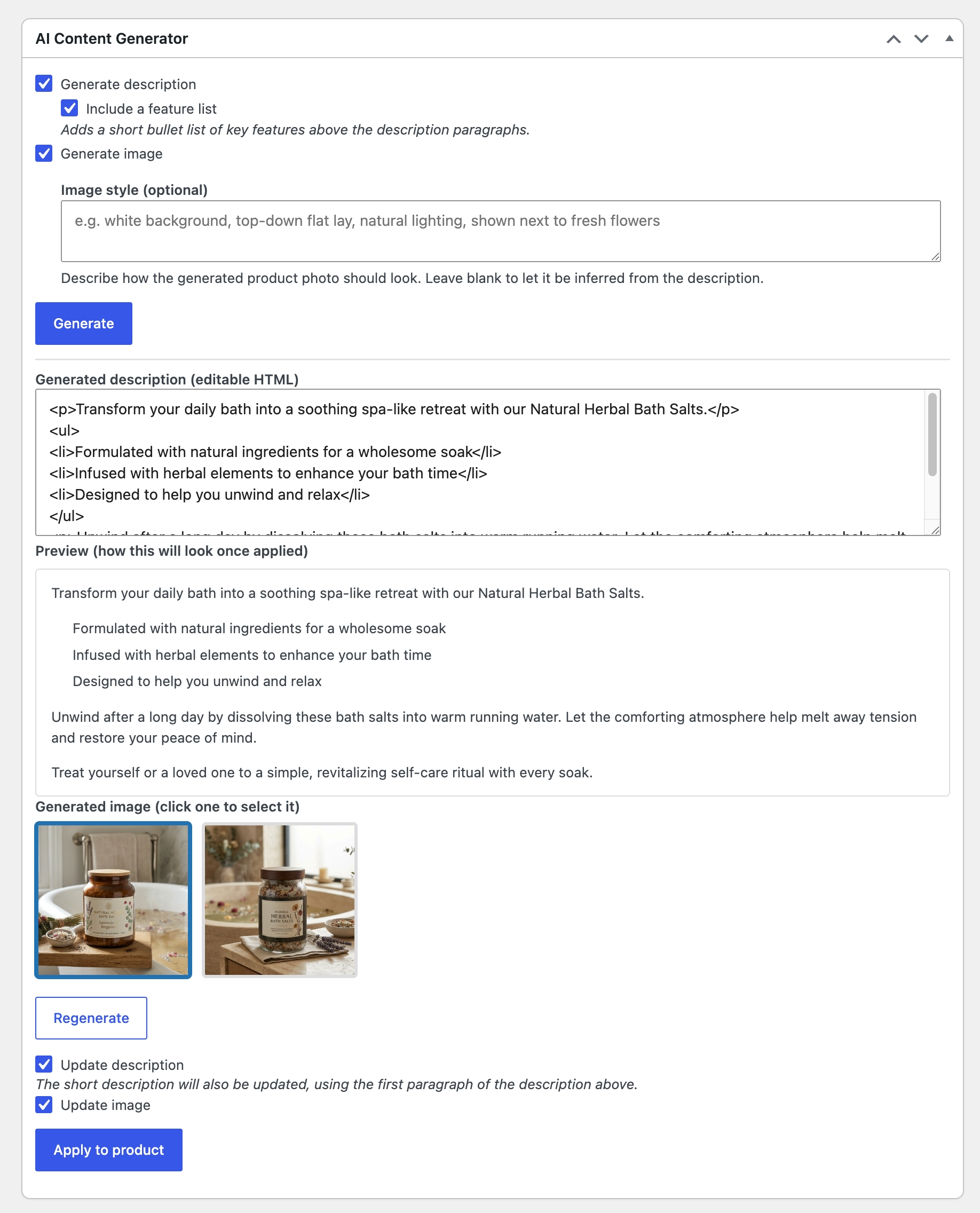
DigitalCraft Content Generator for WooCommerce adds an “AI Content Generator” box to the WooCommerce product edit screen. From the product’s existing description, it uses an AI provider of your choice (OpenAI, Google Gemini, or Anthropic Claude for text; OpenAI or Google Gemini for images) to write a full product description and generate a matching product photo. You choose whether to apply the new description, the new image, or both — nothing is written to the product until you click Apply.
Features
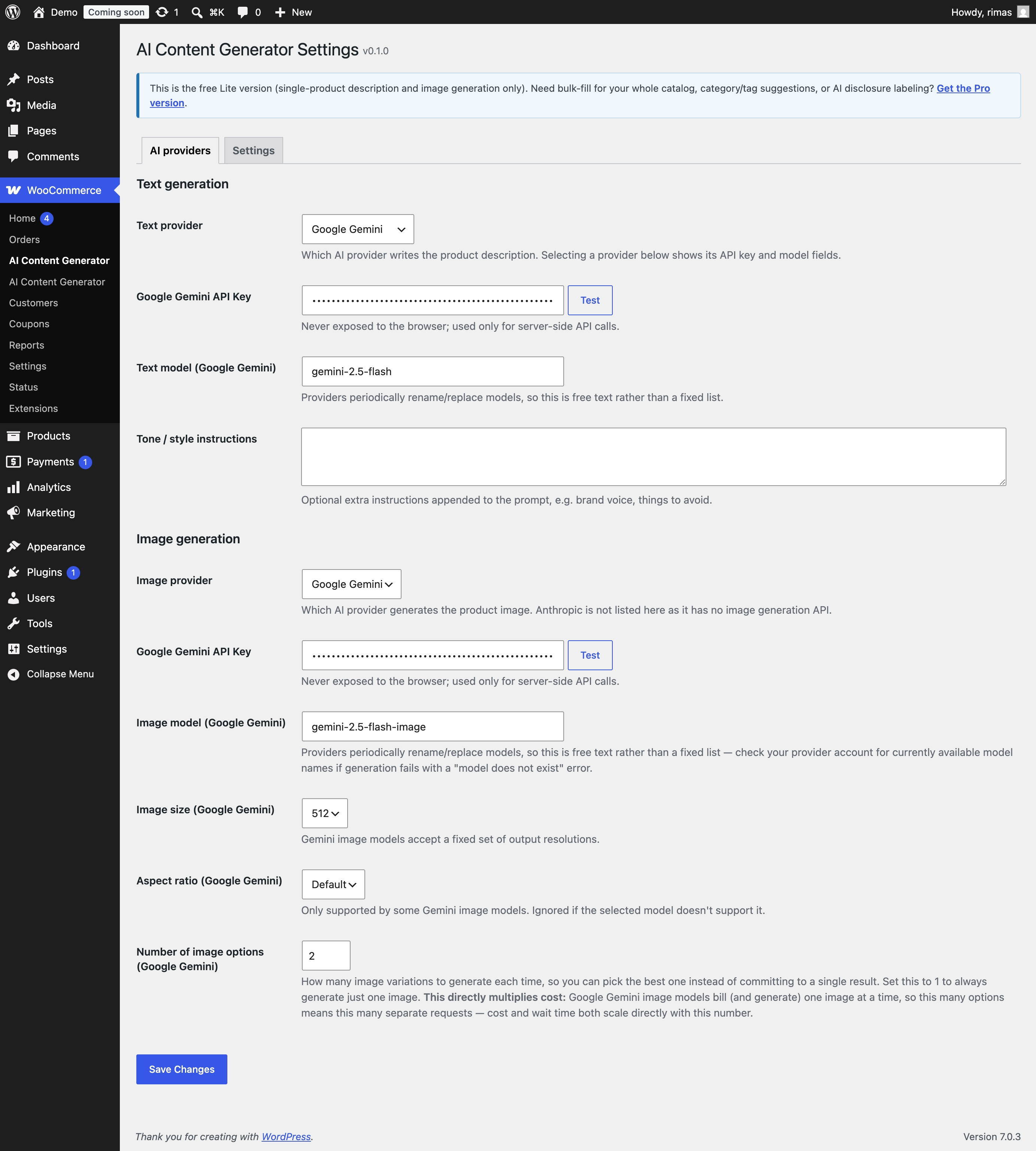
- Full choice of AI provider: OpenAI, Google Gemini, or Anthropic Claude for text; OpenAI or Google Gemini for images.
- Generates a complete product description from the product’s existing text (or from just the product name, if there’s nothing yet), with an optional short feature-list of key selling points.
- Generates a matching product photo, with an optional style description (e.g. “white background, top-down flat lay, natural lighting”).
- Multiple image candidates per generation (configurable per provider) — pick the one you like from a lightbox preview instead of committing to a single result.
- One-click “also generate an image?” follow-up after a description-only run.
- Review everything before it touches the product: the generated description is editable, and you separately choose whether to apply the description, the image, or both.
- Bring your own API key — you pay your AI provider directly; this plugin doesn’t add any markup or middleman billing.
- Fully translatable — every string is ready for community translation via translate.wordpress.org.
This Lite version handles one product at a time. For bulk-filling an entire catalog in the background, AI-suggested categories & tags, an “AI-generated” disclosure note/watermark, and usage statistics, see the Pro version below.
Requirements
- WordPress with WooCommerce active.
- An API key for at least one supported AI provider (OpenAI, Google Gemini, or Anthropic Claude), with access to a chat model, and — if you want image generation — an image model from a provider that supports it (OpenAI or Google Gemini). Each provider requires its own paid account; this plugin does not provide any AI service itself.
Upgrade to Pro
The full AI Description Image Generator adds:
- Bulk-fill your entire catalog — select hundreds of products, run one action, and only genuinely missing content gets filled in (existing descriptions/images are never overwritten). Runs in the background with a live progress toast, cancel/retry controls, and a cost estimate shown before anything runs.
- AI-suggested categories & tags, reviewable as checkable chips before applying.
- AI content disclosure — an optional frontend note and an “AI-GENERATED” image label for transparency with shoppers.
- Reference-photo upload — attach a real photo of the product so the AI matches its actual appearance in the generated image.
- Usage statistics — track requests, tokens, and images generated per provider.
External services
This plugin connects your site directly to the AI provider(s) you configure, to generate content on your behalf.
What is sent, and when: when you click “Generate” on a product, the plugin sends that product’s name and existing description text to the AI provider(s) currently selected in Settings, and requests a generated description and/or image in return. This only happens when you click Generate — never automatically or in the background.
Which services:
- OpenAI — used for text and/or image generation if selected as a provider. Terms of use.
- Google Gemini — used for text and/or image generation if selected as a provider. Terms of service.
- Anthropic Claude — used for text generation if selected as a provider. Terms of service.
Each provider is billed directly by that provider using the API key you supply; this plugin does not proxy, store, or resell access to any of them. API keys are only ever used in server-side requests — never sent to the browser or exposed in page source.
Screenshots
Installation
- In wp-admin, go to Plugins > Add New Plugin and search for “DigitalCraft Content Generator for WooCommerce”, or upload the zip via Plugins > Add New Plugin > Upload Plugin.
- Click Activate.
- Go to WooCommerce > AI Content Generator to add your API key(s) and choose your providers.
- Open any product and use the AI Content Generator box to generate a description and/or image.
FAQ
-
Do I need an API key?
-
Yes. This plugin doesn’t include any AI service of its own — you supply your own API key for whichever provider(s) you choose (OpenAI, Google Gemini, and/or Anthropic Claude), and that provider bills you directly according to their own pricing.
-
Does this overwrite my existing product content?
-
No. Nothing is written to a product until you review the result and explicitly check “Update description” and/or “Update image”, then click “Apply to product”.
-
Can I generate content for many products at once?
-
The Lite version handles one product at a time. Bulk-filling an entire catalog in the background is available in the Pro version.
-
Is my API key stored securely?
-
It’s stored in the WordPress database (or, if you prefer, defined as a constant in
wp-config.php, which takes precedence). It’s only ever used in server-side requests to the AI provider — never exposed to the browser or logged in plaintext.
Reviews
There are no reviews for this plugin.
Contributors & Developers
“DigitalCraft Content Generator for WooCommerce” is open source software. The following people have contributed to this plugin.
Contributors
Translate “DigitalCraft Content Generator for WooCommerce” into your language.
Interested in development?
Browse the code, check out the SVN repository, or subscribe to the development log by RSS.
Changelog
0.1.3
- Changed: plugin renamed to DigitalCraft Content Generator for WooCommerce (was AI Description Image Generator Lite).
- Fixed: settings and user-guide screens now enqueue their CSS/JS via
wp_enqueue_style()/wp_enqueue_script()instead of inline<style>/<script>tags. - Fixed: removed an unused
wp-admin/includes/media.phprequire (no function from it was actually called). - Removed: bundled
.po/.mo/.pottranslation files — translations are now delivered entirely through translate.wordpress.org.
0.1.2
- Changed: default Google image model is now
gemini-3.1-flash-image(wasgemini-2.5-flash-image). As a side effect, the default Image size (1K) now actually takes effect — Gemini’s imageSize/aspectRatio options are only honored by 3.x+ models, so they were previously silently ignored against the old default.
0.1.1
- Fixed: Plugin Check warnings — removed the redundant
load_plugin_textdomain()call (WordPress.org loads hosted plugins’ translations automatically), and annotated a handful of false-positive nonce/sanitization/discouraged-function warnings that PHPCS can’t resolve across method calls (nonce verification happens in a sharedverify_request()helper; the base64 image payload is validated downstream via strict decode + image-type checks rather than a text sanitizer).
0.1.0
- Initial release.