

Description
DS Mobile Menu adds a beautiful, fully customizable bottom navigation bar to any WordPress website. Inspired by native mobile apps, it transforms the browsing experience on smartphones and tablets with smooth animations, six premium layout presets, and deep WooCommerce integration.
Why DS Mobile Menu?
Most mobile menus just style the hamburger. DS Mobile Menu replaces it with a native-app-style bottom navigation bar that visitors actually love to use.
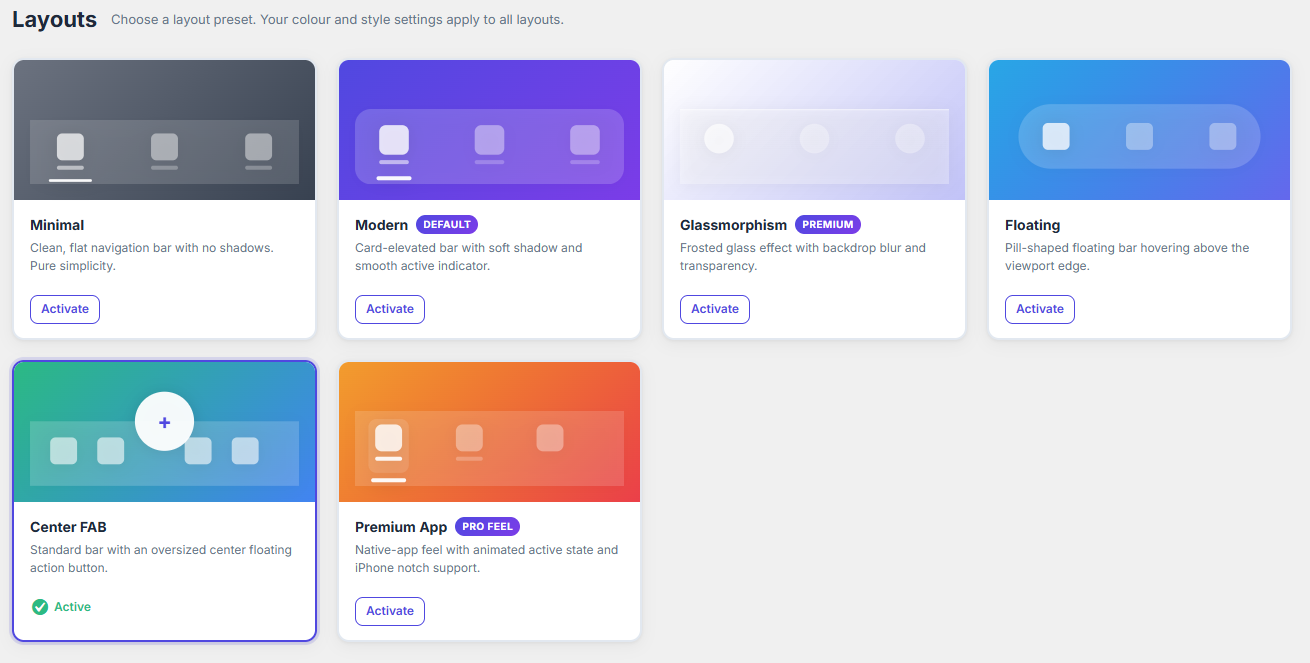
6 Premium Layout Presets
- Minimal — Clean, flat bar. Pure simplicity, zero distraction.
- Modern — Card-elevated bar with a smooth active indicator line.
- Glassmorphism — Frosted glass with backdrop blur and transparency.
- Floating — Pill-shaped bar that hovers above the viewport edge.
- Center FAB — Standard bar with an oversized center action button.
- Premium App — Native-app feel with animated active state and notch support.
Unlimited Menu Builder
Build any navigation you need:
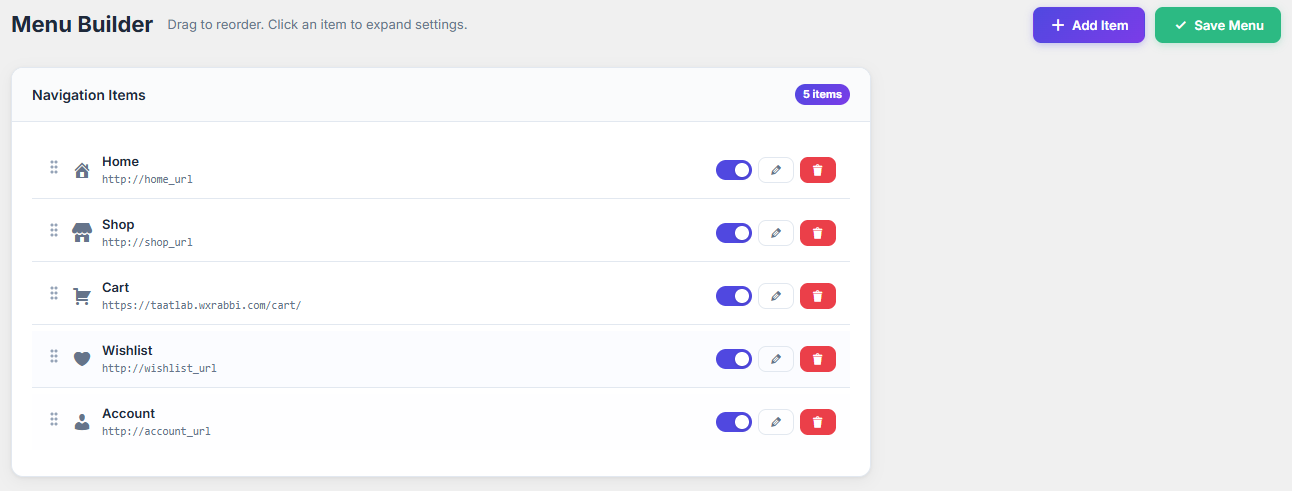
* Unlimited menu items with drag-and-drop sorting
* Custom icons (Dashicons, Font Awesome optional, or inline SVG)
* Custom URLs, Page links, Post links, Category links, External links
* Phone & Email links
* Custom badges, tooltips, and labels
* Hide labels, control icon size, font size, padding, border radius
* Per-item animations (bounce, pulse, shake, scale)
Deep WooCommerce Integration
Automatically detects WooCommerce and supports:
* Home, Shop, Categories, Wishlist, Cart, Checkout, My Account
* Live cart badge counter via WC fragments (no page reload)
* Badge auto-hides when cart is empty
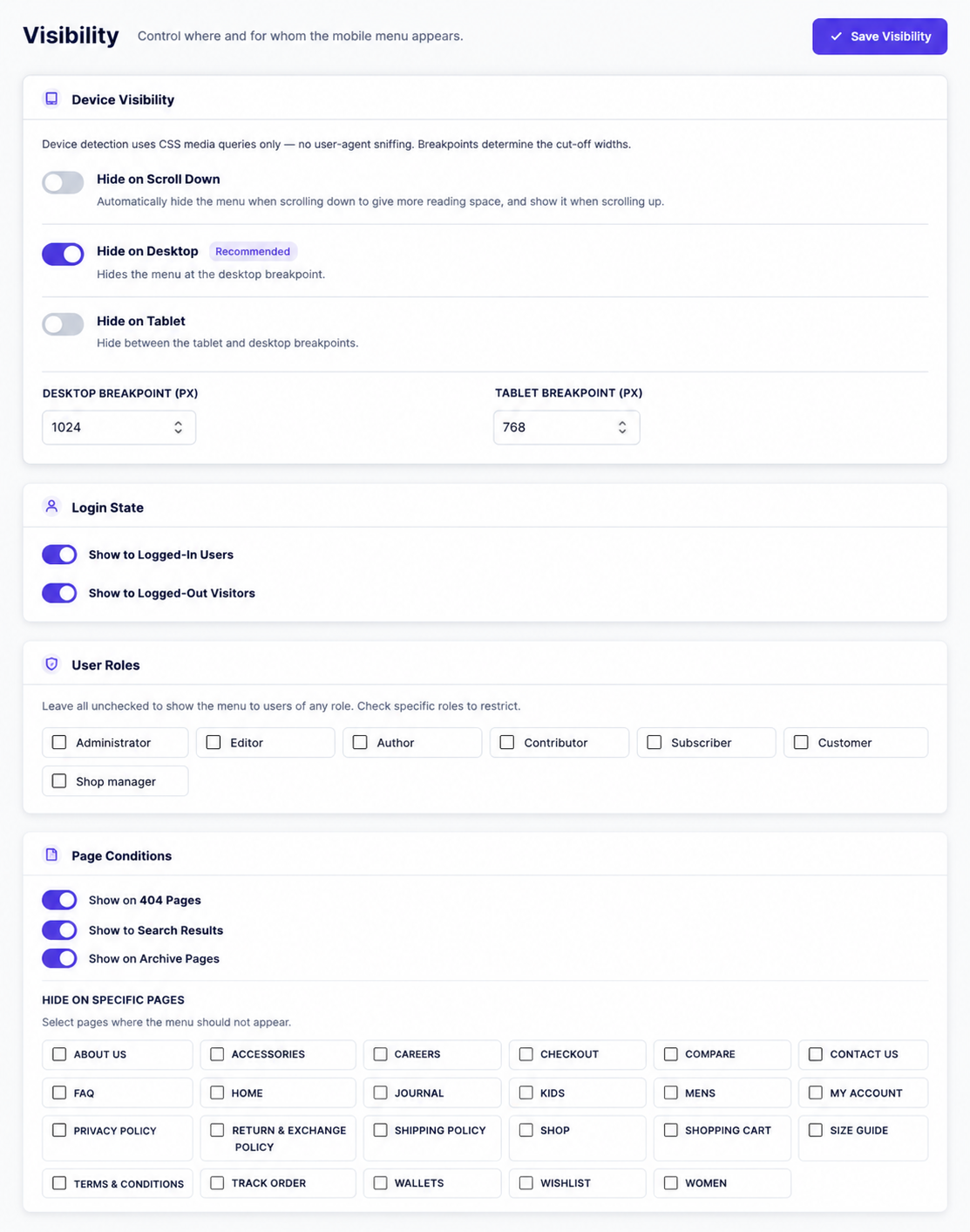
Full Visibility Controls
Show or hide the menu based on:
* Device (desktop, tablet, mobile — CSS breakpoints, no UA sniffing)
* Login state (logged in / logged out)
* User roles
* Specific pages
* 404, Search, Archive pages
* WooCommerce pages
Professional Customizer
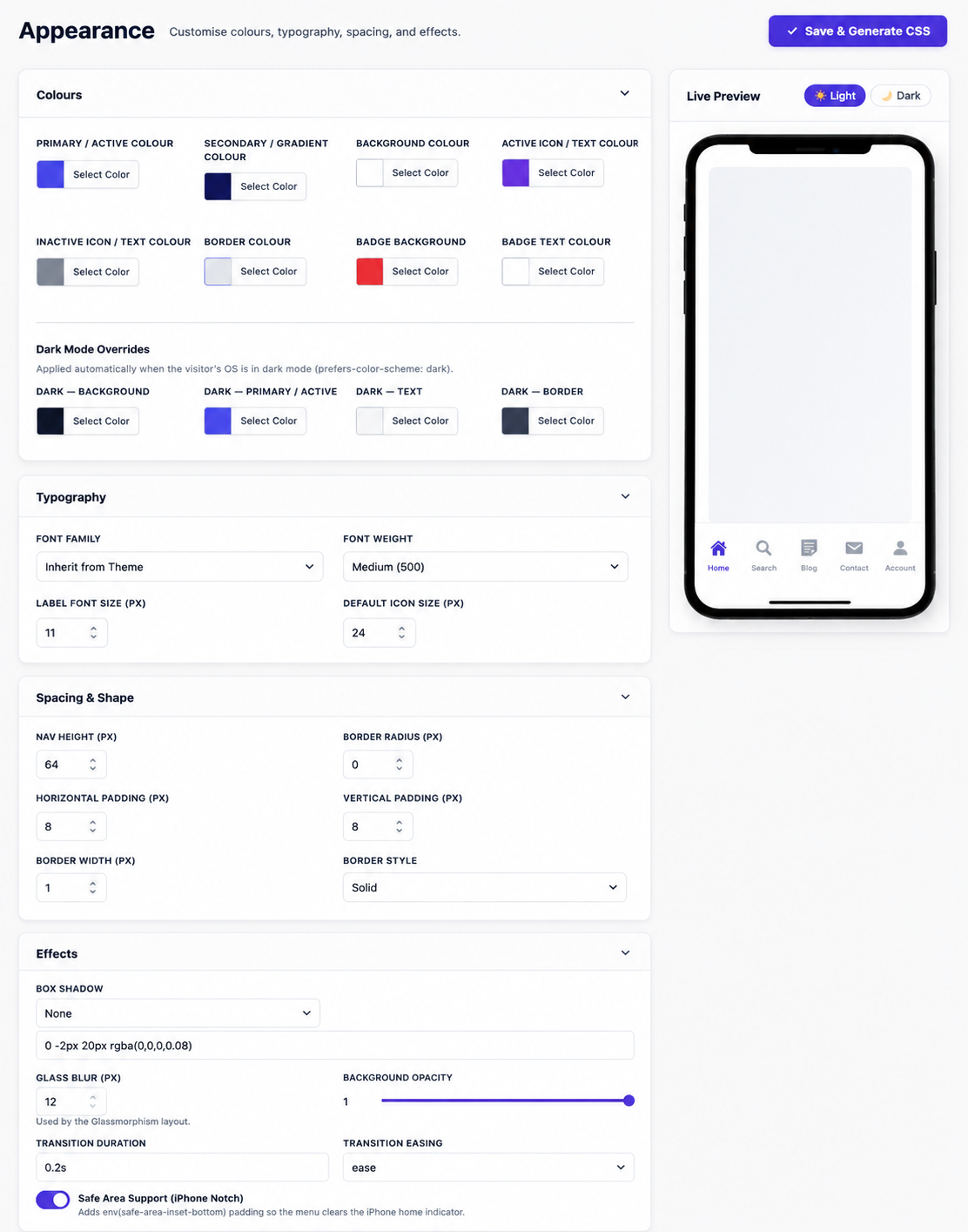
- Unlimited colors with live preview
- Typography (font family, size, weight)
- Glass effect with blur control
- Gradients, borders, shadows
- Safe area support (iPhone notch / home indicator)
- Dark mode (respects
prefers-color-scheme) - Transition duration and easing
Performance First
- No jQuery dependency on front-end — pure vanilla JS
- Deferred script loading
- Conditional asset loading — CSS/JS only on pages where the menu renders
- Generated CSS written to a static file — served as a static asset, not generated on each request
- No render-blocking resources
- Core Web Vitals friendly
Accessibility (WCAG AA)
- Full keyboard navigation
- ARIA labels and
aria-current="page"on active items - Screen reader friendly with sr-only labels
- Visible focus states
- Contrast compliant
Security
- Nonce verification on all AJAX requests
- Capability checks (
manage_options) on all admin actions - Full input sanitization and output escaping
- No direct database writes from raw user input
- Proper Settings API usage
Import / Export
Backup and transfer all settings between sites with one click. Useful for staging-to-production deployments.
RTL Support
Full right-to-left layout support for Arabic, Hebrew, and other RTL languages.
Translation Ready
100% internationalized. All strings use proper text domains and escaping translation functions. Includes a .pot template.
Screenshots
Installation
- Upload the
devstack-mobile-menufolder to/wp-content/plugins/. - Activate the plugin through the Plugins screen in WordPress.
- Go to DS Mobile Menu > Menu Builder to add your navigation items.
- Go to DS Mobile Menu > Layouts to choose your preferred style.
- Go to DS Mobile Menu > Appearance to customize colors and typography.
- Visit your site on mobile to see the navigation bar in action.
FAQ
-
Does it work with any WordPress theme?
-
Yes. DS Mobile Menu works with any WordPress theme — classic themes, block themes, Elementor, Bricks, Breakdance, Divi, Avada, and more.
-
Does it require WooCommerce?
-
No. DS Mobile Menu works on any WordPress site. WooCommerce integration (cart badge, shop links) is automatically enabled when WooCommerce is detected.
-
Will it slow down my site?
-
No. DS Mobile Menu is built performance-first. It uses no jQuery on the front-end, loads deferred scripts, and only enqueues assets on pages where the menu renders. Generated CSS is served as a static file.
-
Can I use my own SVG icons?
-
Yes. In the Menu Builder, select “Custom SVG” as the icon type and paste your SVG markup. It is sanitized with
wp_ksesfor security. -
Go to DS Mobile Menu > Visibility. The “Hide on Desktop” option is enabled by default at a 1024px breakpoint. You can adjust the breakpoint value.
-
Can I export my settings and import them on another site?
-
Yes. Go to DS Mobile Menu > Import & Export to download a JSON backup of all settings and import it on any other installation.
-
Is Font Awesome included?
-
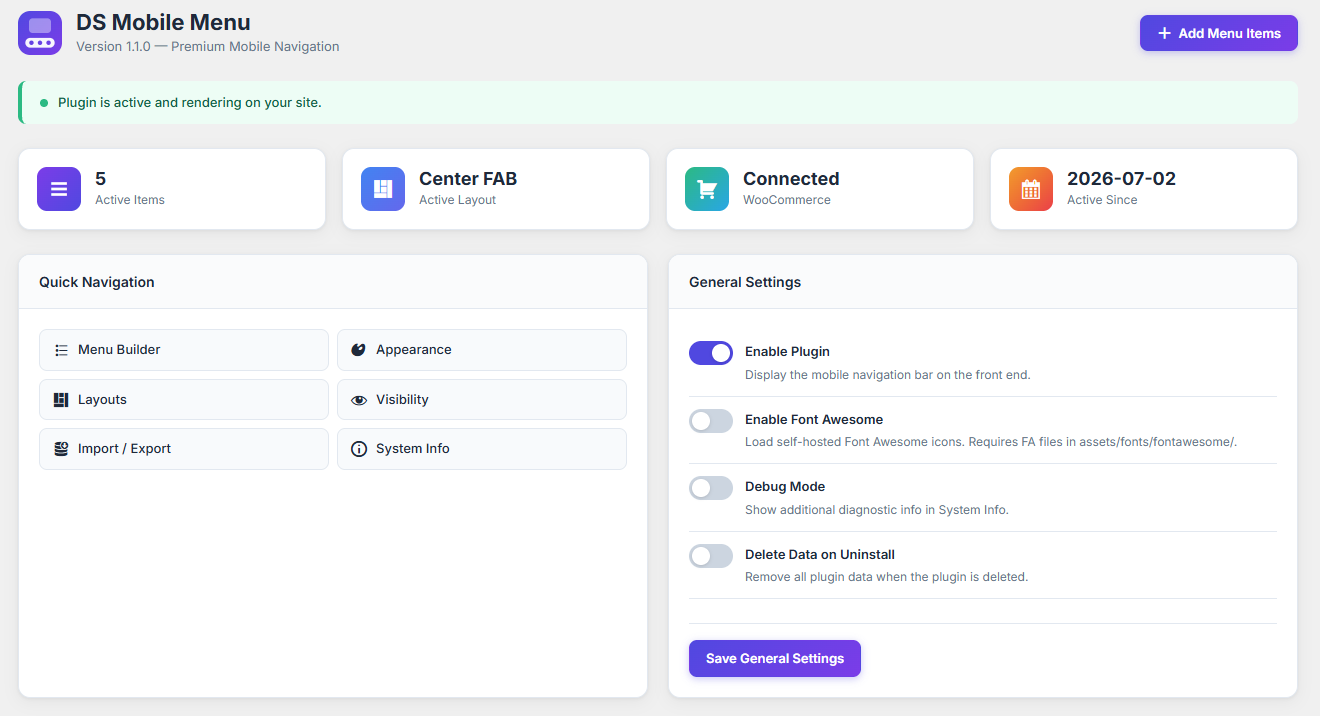
Font Awesome is optional and self-hosted. Enable it in DS Mobile Menu > Dashboard > General Settings if you want FA icons. By default the plugin uses Dashicons (bundled in WordPress core) and inline SVG.
Reviews
There are no reviews for this plugin.
Contributors & Developers
“DS Mobile Menu – Customizable Bottom Navigation Bar” is open source software. The following people have contributed to this plugin.
Contributors

Translate “DS Mobile Menu – Customizable Bottom Navigation Bar” into your language.
Interested in development?
Browse the code, check out the SVN repository, or subscribe to the development log by RSS.
Changelog
1.1.0
- Enhance: Automatically hide the navigation bar when the virtual keyboard is open on mobile devices to prevent overlapping input fields.
- Fix: Resolved an issue where the center-fab layout button misaligned on iOS devices due to safe-area-inset scaling.
- Fix: Set maximum z-index to prevent the navigation bar from being overlapped by checkout fields in some themes.
- Security: Implemented strict sanitization and validation across all AJAX handlers and options processing.
1.0.0
- Initial release.
- Six premium layout presets: Minimal, Modern, Glassmorphism, Floating, Center FAB, Premium App.
- Unlimited menu builder with drag-and-drop sorting.
- WooCommerce integration with live cart badge.
- Full visibility controls.
- Appearance customizer with dark mode support.
- Import/Export settings.
- RTL support.
- WCAG AA accessibility.