

Description
Demfilz Payment Forms for Stripe lets you collect payments anywhere on your site with a single shortcode. Visitors fill in a clean, modern form and are taken to Stripe’s secure hosted checkout to enter their card details — no card data ever touches your server.
The form collects these standard fields:
- Name
- Phone
- Reference Number
- Message
- Amount
Features
- Drop-in shortcode:
[dpfs_payment_form] - Secure Stripe Checkout (hosted) — PCI-friendly, with Apple Pay / Google Pay support
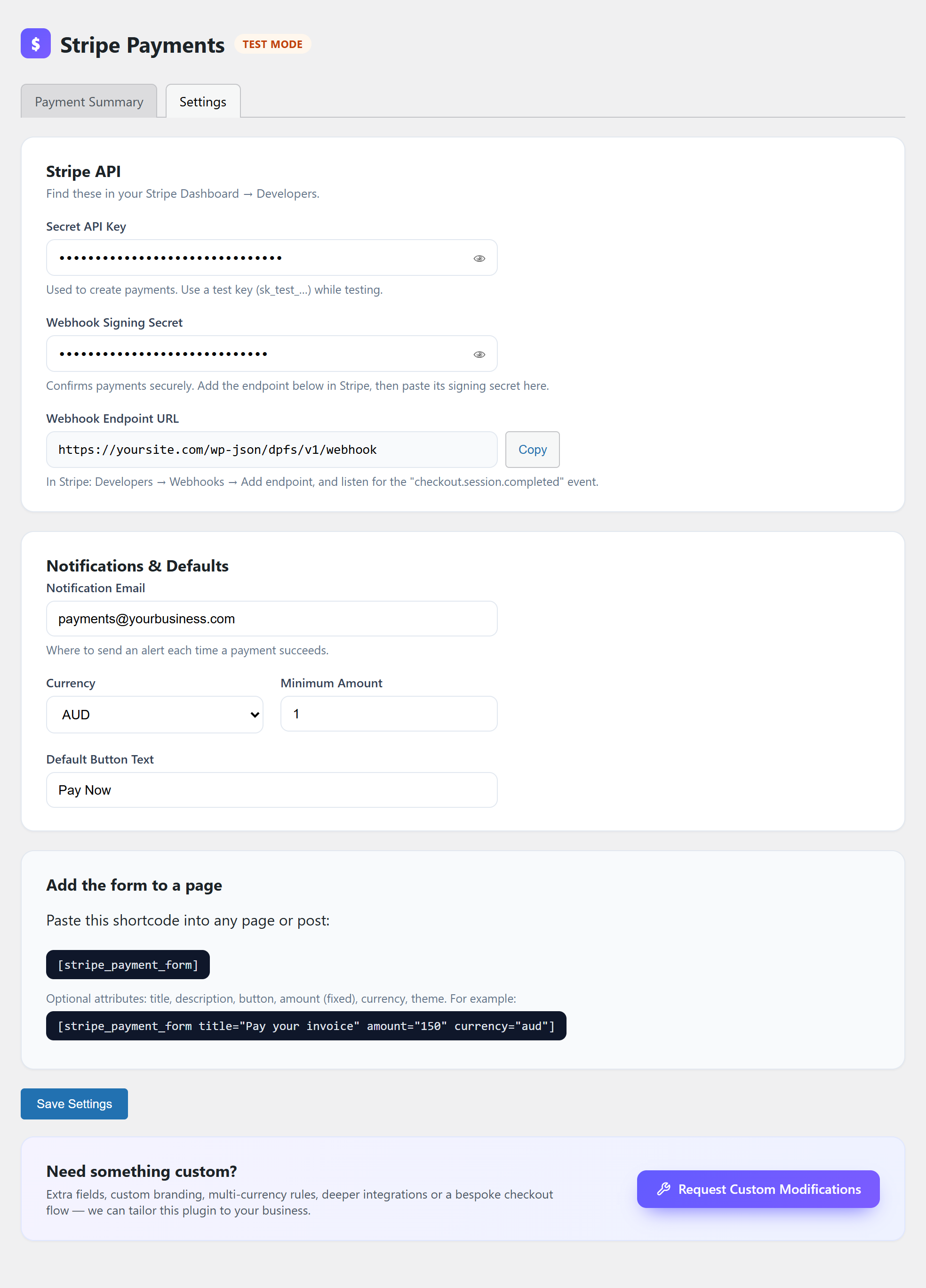
- Admin settings: Secret API key, Webhook signing secret, notification email, currency, minimum amount, button text
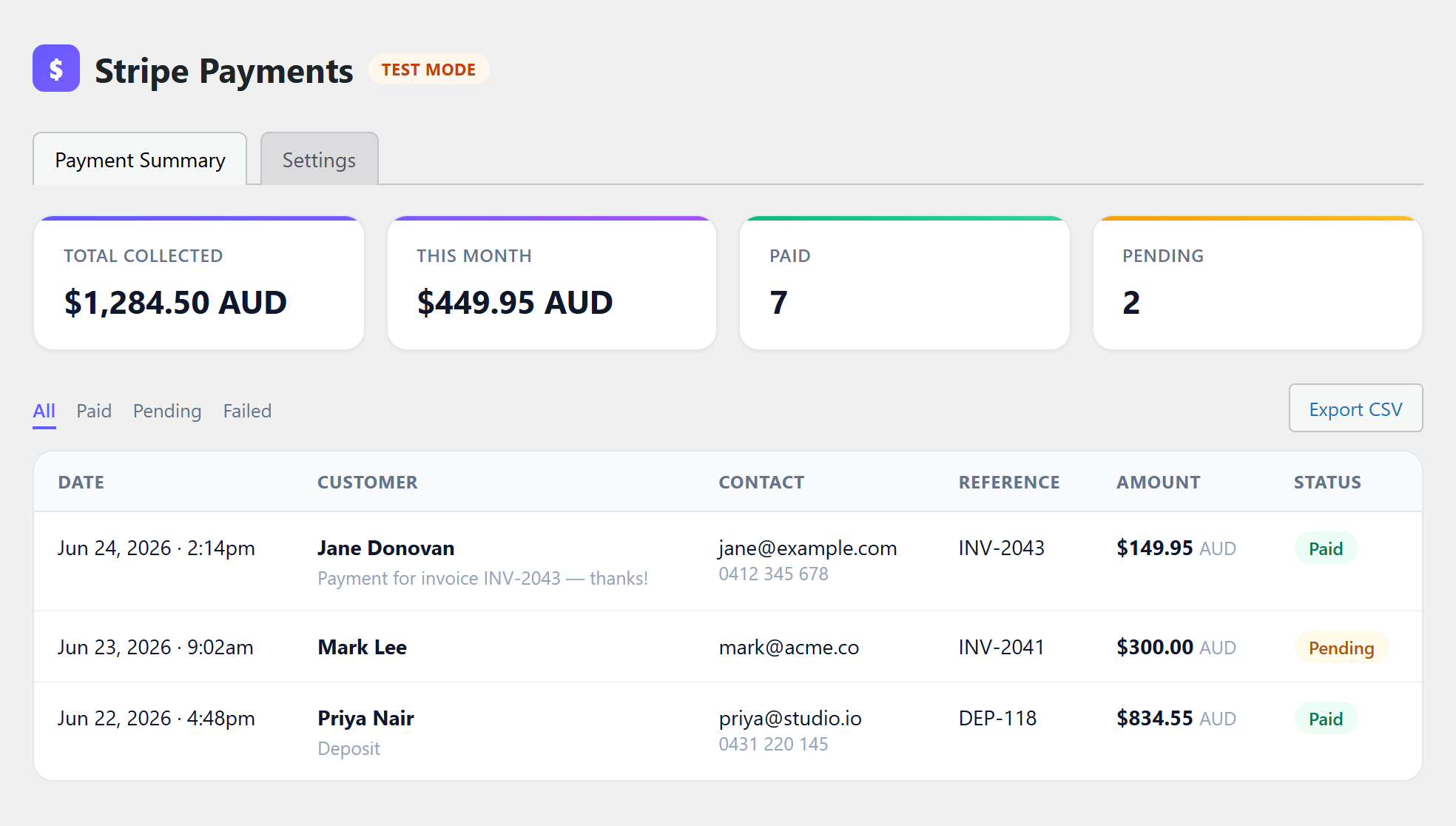
- Payment Summary dashboard: total collected, this-month figures, paid/pending counts, a full payment list and CSV export
- Webhook-confirmed payments, with an on-page success fallback
- Email notification to your chosen address on every successful payment
- Modern, responsive, accessible design with an optional dark theme
- Self-hosted font and assets — no third-party CDN requests from the front end
This plugin is not affiliated with or endorsed by Stripe. “Stripe” is a trademark of Stripe, Inc., used here only to describe compatibility.
External services
This plugin connects to the Stripe payment platform to process payments. Stripe is a third-party service; using this plugin requires a Stripe account and agreement to Stripe’s terms.
What is sent and when: When a visitor submits the payment form, the plugin creates a Stripe Checkout Session by sending the entered amount, currency, name, email, phone, reference number and message to Stripe’s API (https://api.stripe.com). The visitor is then redirected to Stripe’s hosted checkout page to enter and submit their card details. When the visitor returns, and via a webhook from Stripe, the plugin asks Stripe for the payment status to record the result. Card numbers are entered on Stripe’s pages and are never sent to or stored on your site.
- Stripe Terms of Service: https://stripe.com/legal
- Stripe Privacy Policy: https://stripe.com/privacy
The plugin only contacts Stripe when an administrator has entered a Stripe API key and a visitor submits the form (or returns from checkout). No data is sent to any other external service.
Screenshots


Installation
- Upload the
demfilz-payment-forms-for-stripefolder to/wp-content/plugins/, or install the zip via Plugins Add New Upload Plugin. - Activate the plugin.
- Go to Stripe Payments Settings and enter your Stripe Secret API Key (use a test key,
sk_test_…, while testing). - In your Stripe Dashboard, go to Developers Webhooks Add endpoint, paste the Webhook Endpoint URL shown on the settings page, subscribe to the
checkout.session.completedevent, then copy the endpoint’s Signing secret into the Webhook Signing Secret field. - Set a Notification Email and your Currency.
- Add the shortcode
[dpfs_payment_form]to any page or post.
FAQ
-
Which shortcode attributes are available?
-
title— heading shown above the form (default “Make a Payment”)description— optional sub-text under the titlebutton— button label (default from settings, e.g. “Pay Now”)amount— a fixed amount; when set, the amount field is lockedcurrency— three-letter code (default from settings, e.g.aud)amount_label— accessible label for the amount field (default “Amount”)theme—light(default),dark, orauto(follow the visitor’s system setting)
Example:
[dpfs_payment_form title="Pay your invoice" amount="150" currency="aud"] -
Do I need the Stripe PHP SDK?
-
No. The plugin talks to the Stripe API directly over HTTPS, so there is nothing extra to install.
-
Is the webhook required?
-
It is strongly recommended — it is how payments are confirmed reliably. As a fallback, the success page also confirms the payment when the visitor returns from Stripe.
-
Where is card data handled?
-
Entirely on Stripe’s hosted checkout page. Your site never sees or stores card numbers.
-
Which currencies are supported?
-
Any currency your Stripe account supports. A selection of common currencies is available in the settings, and zero-decimal currencies (such as JPY) are handled correctly.
Reviews
There are no reviews for this plugin.
Contributors & Developers
“Demfilz Payment Forms for Stripe” is open source software. The following people have contributed to this plugin.
Contributors
Translate “Demfilz Payment Forms for Stripe” into your language.
Interested in development?
Browse the code, check out the SVN repository, or subscribe to the development log by RSS.
Changelog
1.0.0
- Initial release.