

Description
CustomerEagle is an AI-powered customer support platform: a chat widget for your visitors, a unified agent inbox, an AI assistant trained on your own knowledge base, and a help center — all in one place.
This plugin adds the CustomerEagle chat widget to your WordPress site without touching your theme:
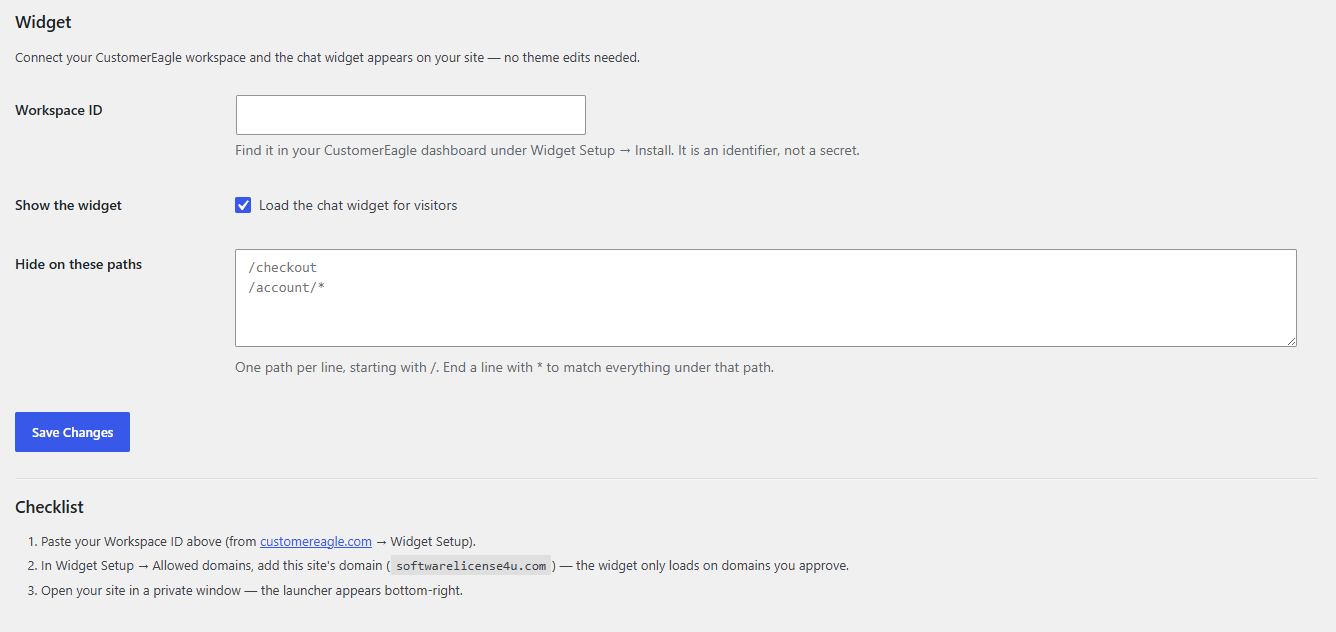
- One-minute setup — paste your Workspace ID and you’re live.
- AI answers, human handoff — the widget answers from your knowledge base and hands off to your team when needed.
- Help-center search built in — visitors find articles without leaving the page.
- Page rules — hide the widget on specific paths (checkout, account pages, …).
- No performance tax — one deferred script tag, loaded only on pages where the widget should appear. Nothing loads in your admin area.
You need a CustomerEagle account to use this plugin — plans (including a free plan) are available at customereagle.com.
Developer filters
custeagle_should_display— final say over whether the widget loads on a request.custeagle_api_base— override the widget endpoint (https only; for staging setups).
External services
This plugin embeds the CustomerEagle chat widget, a third-party service operated by CustomerEagle. When the widget is enabled, every visitor’s browser loads the widget script from api.customereagle.com and connects to the same domain for chat.
- What is sent: the Workspace ID configured in the plugin, the visiting page’s domain (used to verify the widget is allowed to run there), and — only when a visitor uses the chat — the messages and any contact details they choose to type. The plugin itself sends no data server-side and stores nothing about your visitors in WordPress.
- When: on every public page view where the widget is enabled (script load), and during chat use.
- Service: CustomerEagle — Privacy Policy · Terms of Service
If you are subject to GDPR or similar regulations, mention CustomerEagle in your site’s privacy policy.
Screenshots
Installation
- Install and activate the plugin (Plugins Add New search “CustomerEagle”).
- Go to Settings CustomerEagle.
- Paste your Workspace ID — you’ll find it in your CustomerEagle dashboard under Widget Setup Install.
- In the CustomerEagle dashboard, add your site’s domain under Widget Setup Allowed domains (the widget only runs on domains you approve).
- Visit your site — the launcher appears in the bottom-right corner.
FAQ
-
Where do I find my Workspace ID?
-
Log in at customereagle.com, open Widget Setup Install. The Workspace ID is shown in the install snippet. It identifies your workspace and is not a secret.
-
The widget doesn’t appear — why?
-
The three usual causes, in order: the Workspace ID is missing or mistyped; your site’s domain isn’t on the widget’s Allowed domains list in the CustomerEagle dashboard; or a caching plugin is serving an old copy of the page — clear your site cache after saving settings.
-
Can I hide the widget on some pages?
-
Yes — Settings CustomerEagle “Hide on these paths”. One path per line, e.g.
/checkout, or/account/*to match everything under/account/. -
Does this plugin slow my site down?
-
No. It adds a single deferred script tag on eligible pages; the widget loads after your content and only where you enabled it.
-
Does the plugin work without a CustomerEagle account?
-
No — the widget is part of the CustomerEagle service. You can start on the free plan at customereagle.com.
-
Is it multisite compatible?
-
Yes. Each site configures its own Workspace ID under its own Settings CustomerEagle.
Reviews
There are no reviews for this plugin.
Contributors & Developers
“CustomerEagle Chat Widget” is open source software. The following people have contributed to this plugin.
Contributors
Translate “CustomerEagle Chat Widget” into your language.
Interested in development?
Browse the code, check out the SVN repository, or subscribe to the development log by RSS.
Changelog
1.0.0
- Initial release: widget embed, enable toggle, per-path exclusions, multisite-aware uninstall cleanup.