
Description
Your checkout is the one page on your store that anyone on the internet can submit to, over and over, for free. That is why card-testing bots live there. They arrive with a list of stolen card numbers, push a cheap product through your checkout a few hundred times an hour, and use your gateway as a free validity checker. You are left with the fallout: a wall of failed orders, a pile of authorisation fees, a plummeting success rate, and eventually an unhappy email from your payment processor.
Most stores reach for a captcha plugin and assume the problem is solved. Then they switch their checkout page to the WooCommerce Checkout block — and any captcha plugin that only hooks the classic form silently stops working. The block checkout does not submit a form. It posts JSON to the WooCommerce Store API, and a plugin that only hooks woocommerce_checkout_process never sees that request at all. Worse, that route stays open even on stores whose visible checkout page still uses the classic shortcode. A bot does not need your checkout page. It only needs the route.
Checkout Bouncer is built around that gap. It follows one simple idea, end to end:
Detect every way an order can enter this store protect the ones that can carry a token block the ones that cannot.
Detect
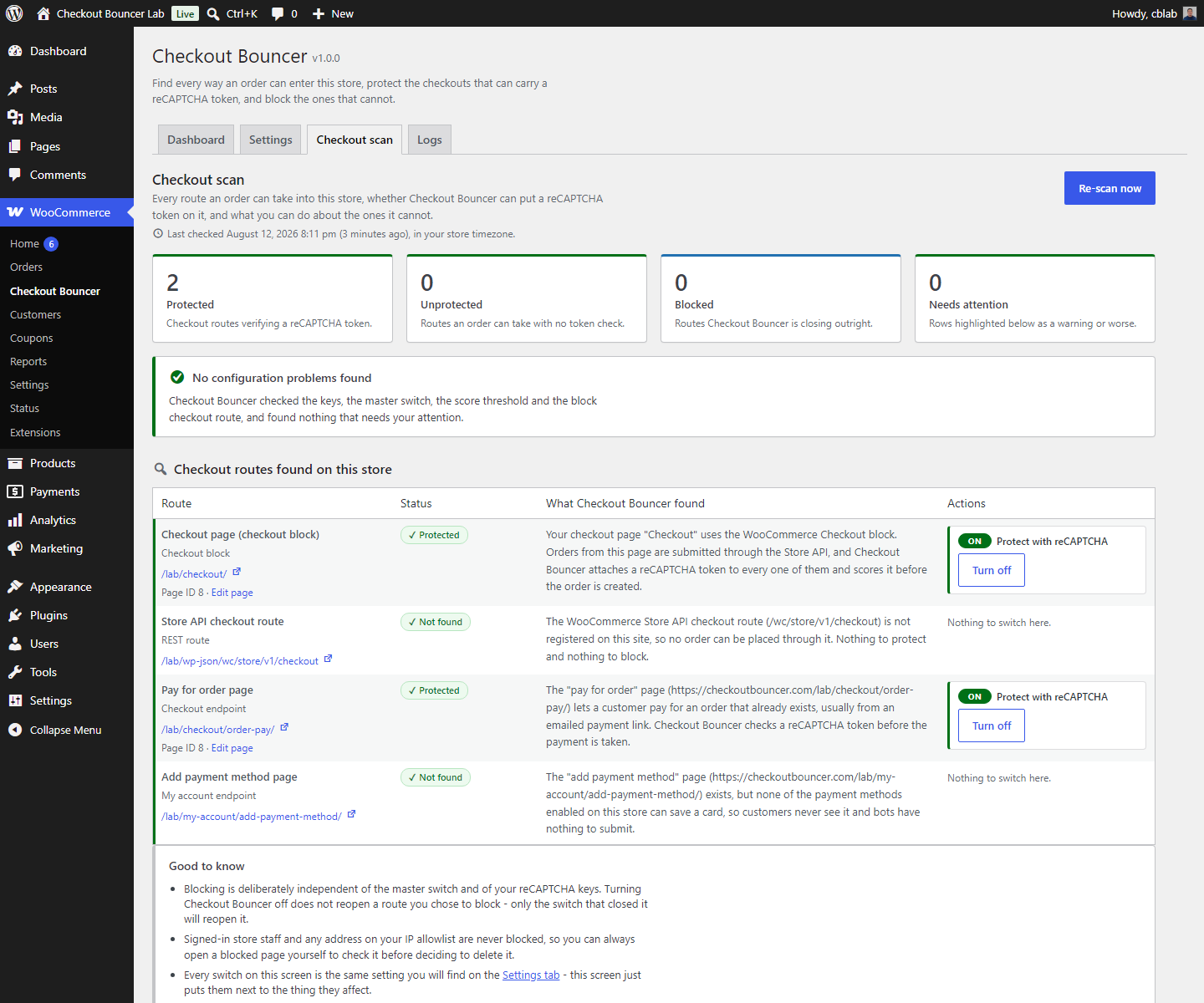
Checkout Bouncer ships a real checkout scanner, not a settings page with a checkbox. It opens your store, works out how your checkout is actually built, and writes you a plain-English report:
- Reads the checkout page WooCommerce is configured to use, and tells you if it is missing, unpublished or trashed.
- Works out which renderer that page uses — the WooCommerce Checkout block, the classic
[woocommerce_checkout]shortcode, or a page builder. Elementor, Divi, WPBakery, Beaver Builder, Bricks and Oxygen are detected by name, and Checkout Bouncer looks inside the builder’s own saved layout for the checkout element. - Hunts down rogue duplicate checkout pages — the theme-demo import, the staging copy, the “checkout-2” a page builder left behind. Every one of them is a second address where an order can be started, and most store owners have no idea they exist. A page only counts as a duplicate when it really renders a checkout: the WooCommerce Checkout block, the
[woocommerce_checkout]shortcode itself, or a page builder layout holding the checkout element. A knowledge-base page that merely writes about the shortcode is not flagged. Duplicate detection needs a checkout page configured in WooCommerce to compare against, so it is paused — and nothing is listed or blocked as a duplicate — while that setting is empty. - Checks whether the Store API checkout route is registered, and whether anything is guarding it.
- Resolves your pay-for-order and add-payment-method endpoints, which are the two surfaces bots love precisely because everyone forgets them.
- Runs configuration health checks and shouts about the dangerous combinations — no keys saved, master switch off, a block checkout that is neither verified nor blocked, a score threshold of 0 that rejects nothing, a threshold so high it will turn away real customers, or no WooCommerce checkout page configured at all, which is the state that pauses duplicate detection.
Every finding comes with a one-click action, and every action explains what it will break before you switch it on.
Protect
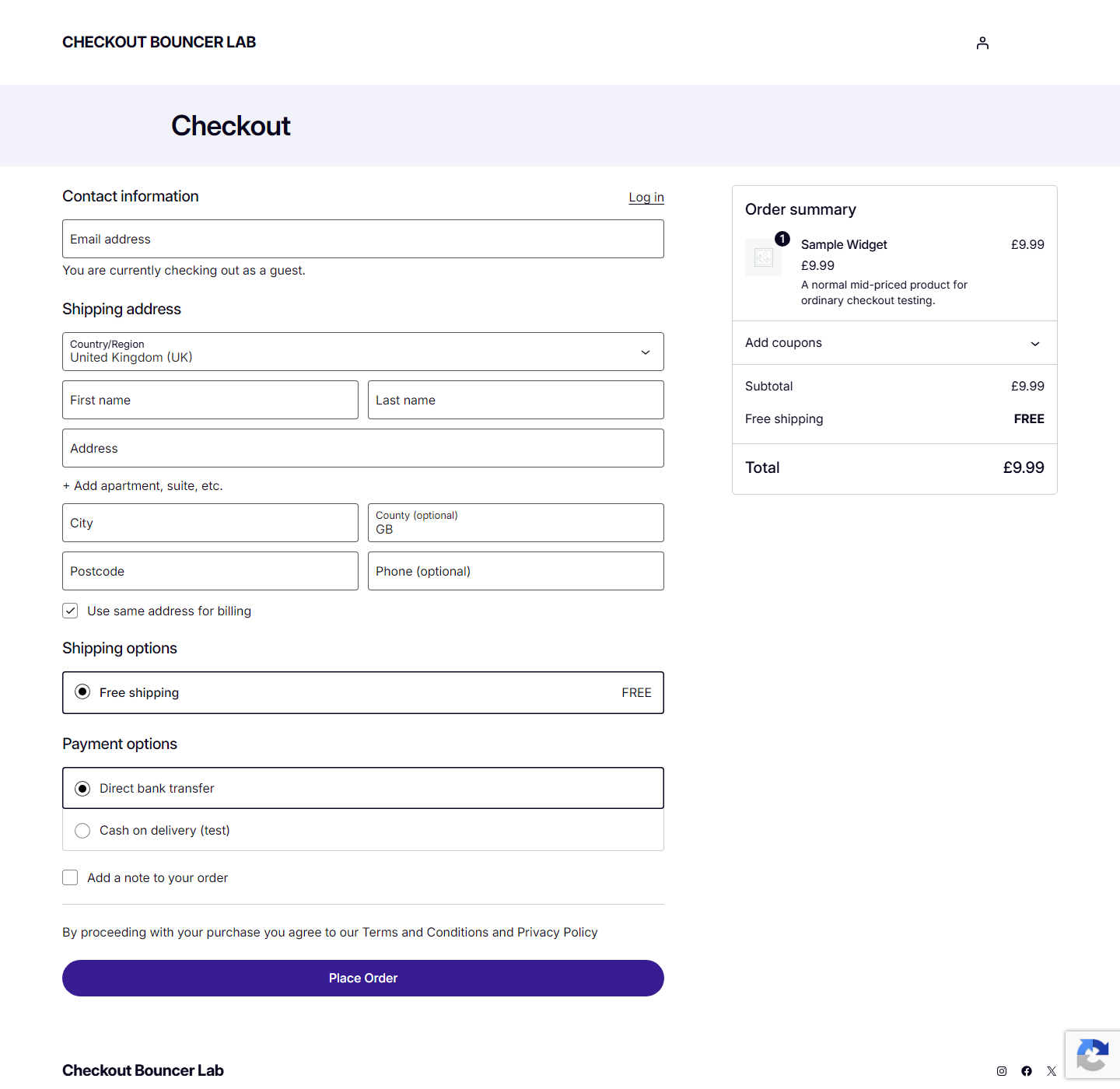
Where a token can be attached, Checkout Bouncer attaches one and scores it with reCAPTCHA v3 — the invisible kind. There is no checkbox, no traffic-light puzzle, and nothing for a genuine customer to do.
- Classic checkout. A hidden token field is added to the order review, refreshed while the customer types and re-minted every time WooCommerce refreshes the review by AJAX. If the token is missing or older than 90 seconds when Place Order is pressed, the submit is held for a moment, a fresh token is minted and the form goes on its way by itself, so a customer who left the tab open is not rejected for a stale token. The score is checked during checkout validation, which runs before WooCommerce creates the order, so a rejected bot normally leaves no order row behind at all. If a gateway or a checkout replacement skips that validation hook, Checkout Bouncer verifies again the moment the order is created and stops it there — before any gateway is engaged, with the order marked failed and annotated.
- Block checkout (Store API). The token rides along as registered Store API extension data and is verified on the checkout request itself. Several widely-installed captcha plugins still do not check this route — WooCommerce patched a number of the larger ones in December 2024, but not all of them, and a plugin that only hooks the classic form still sees nothing here.
- Pay for order. The emailed payment link is verified before the gateway is called. This is the page bots use to retry stolen cards against an order they already created.
- Add payment method. Optional, off by default. Stops a signed-in bot saving cards against your gateway without buying anything.
Verification happens before any gateway is asked for money, on every surface.
Block
Some surfaces cannot carry a token — an old WooCommerce that cannot register Store API extension data, or a duplicate page nobody maintains. For those, Checkout Bouncer closes the door instead:
- Block the Store API checkout route with a 404 or 403 of your choosing.
- Block duplicate checkout pages found by the scanner, with the same status code. Enforcement reads the tiny list the scanner saved, so it keeps working after a settings save, a page edit or a cache clear — and it never blocks your configured checkout page, or anything at all while WooCommerce has no checkout page set.
- Store staff and allowlisted IP addresses are always let through, so you can still inspect a blocked page yourself.
And a second, different kind of protection
reCAPTCHA answers “is this a browser?”. It cannot answer “is this browser behaving like a card tester?”, because each individual request looks perfectly human. So Checkout Bouncer also ships a gateway-agnostic order-rate throttle with three rules, all keyed on a salted hash of the client IP:
- too many orders in an hour;
- too many failed payments in fifteen minutes — the classic card-testing signature;
- too many distinct billing email addresses in an hour — one card, many identities.
It covers the classic checkout, the block checkout’s Store API and pay-for-order alike, with no gateway-specific code anywhere. Each surface is enforced on the hook WooCommerce actually lets a rejection travel through — woocommerce_checkout_order_processed for the classic form, woocommerce_store_api_checkout_update_order_from_request for the Store API, and woocommerce_before_pay_action for pay-for-order, the page bots use to retry stolen cards. That last one matters: paying for an order that already exists never creates one, so a throttle hung on order creation alone would never see it.
Some deliberate details:
- Only a real placement is counted. Opening the block checkout creates a draft order behind the scenes; that is a page view, not an order, and it never touches your limits.
- An attempt that was blocked is not counted either, so a rolling window always drains and a shared office or mobile-carrier address recovers by itself.
- A throttled block-checkout placement is refused with HTTP 429 and the draft is left alone, and a throttled pay-for-order attempt returns the customer to the payment page with a notice and the order still payable. Only the classic checkout leaves a failed order behind, because WooCommerce has already created the row by the time any hook can stop it.
There is a monitor mode that records every trip without blocking anything, so you can tune the limits against your real traffic before you arm them. The throttle works even before you have finished setting up your reCAPTCHA keys.
Everything else you would expect
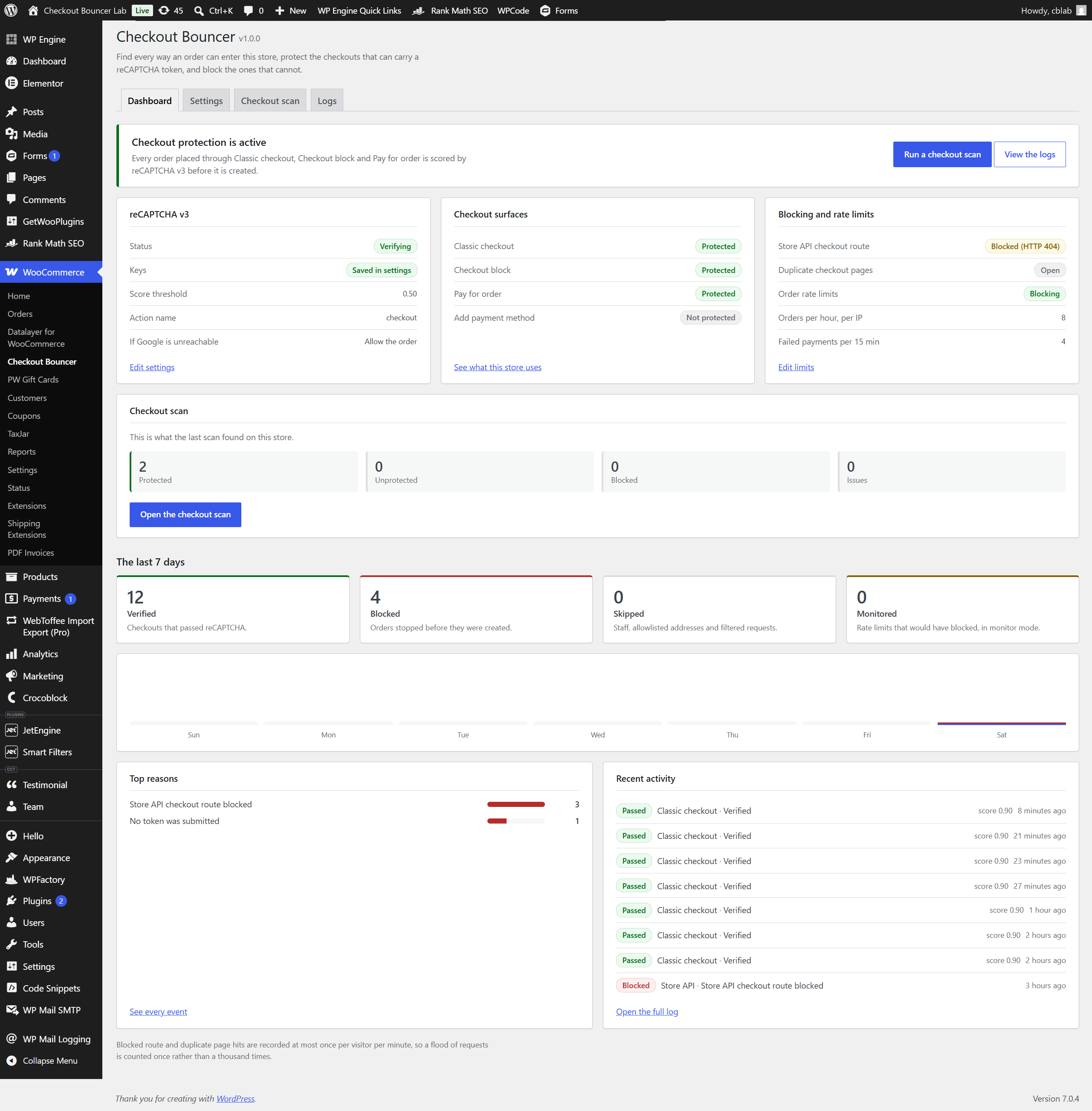
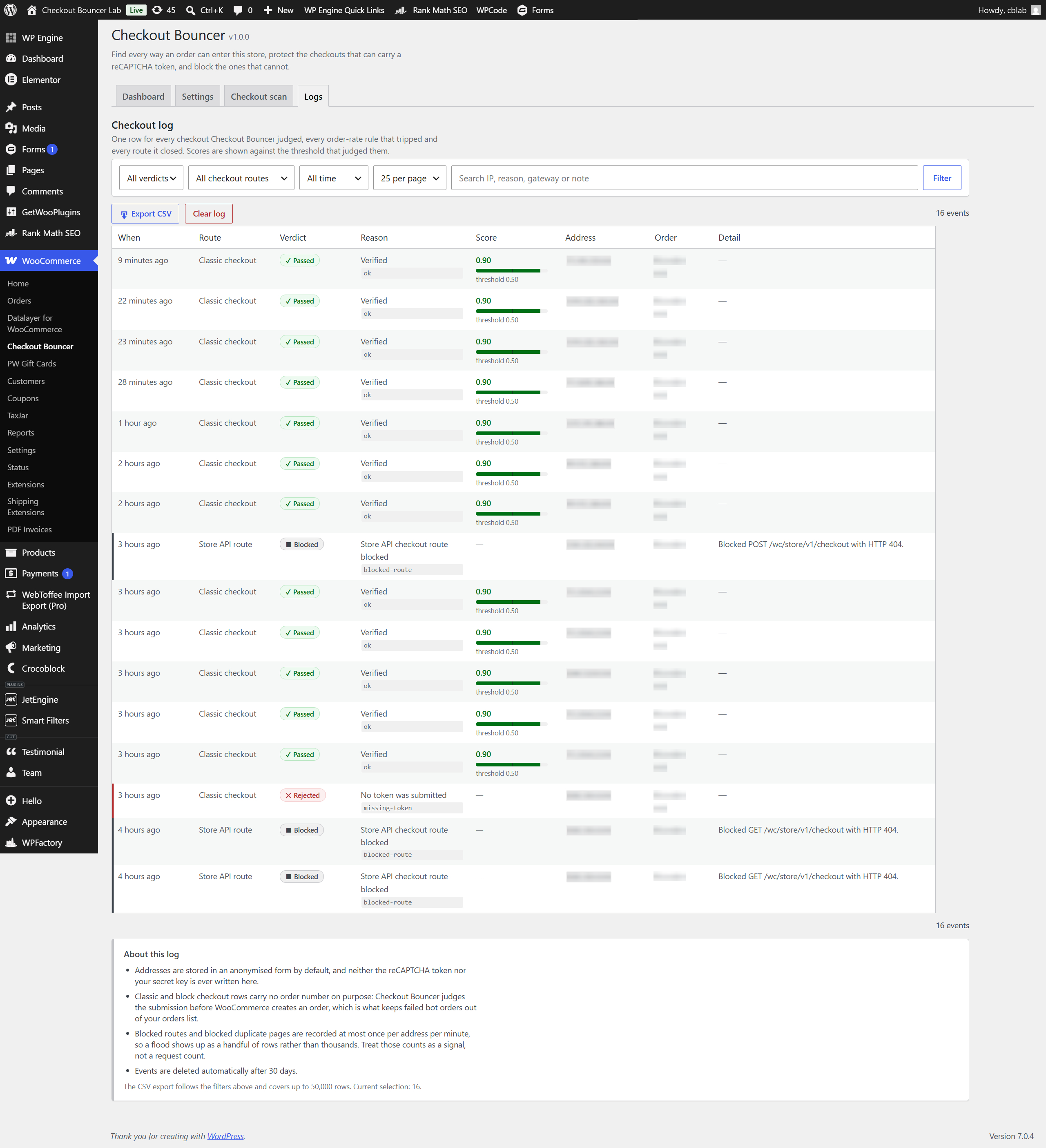
- Events dashboard. Seven-day tiles by verdict, the top block reasons, and a paginated log of every pass, fail, skip and block — filterable by verdict, surface, reason, date range and free text, with a CSV export that downloads exactly the selection on screen.
- Per-gateway targeting. Verify all payment methods, only a chosen list, or everything except a chosen list. No gateway id is hardcoded anywhere in this plugin.
- Staff and IP bypass. Roles you choose skip verification, plus an IP allowlist that accepts IPv4, IPv6 and CIDR ranges for your office or warehouse.
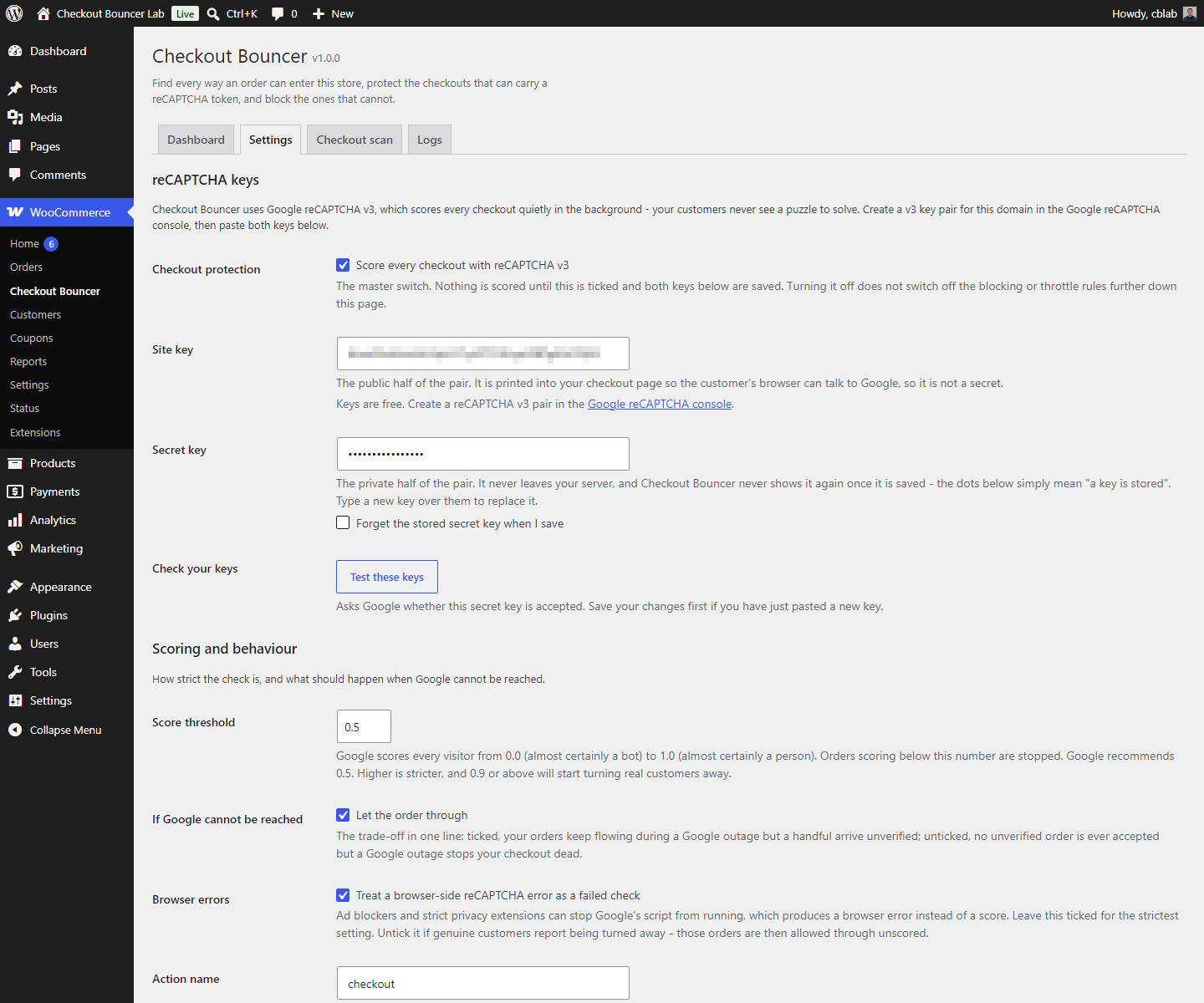
- Fail open or fail closed. Decide for yourself whether an order goes through when Google cannot be reached.
- HPOS and block compatible. Compatibility with High-Performance Order Storage and with Cart & Checkout Blocks is formally declared, so WooCommerce never flags Checkout Bouncer as incompatible.
- Keys in
wp-config.php. DefineCHECKOUT_BOUNCER_SITE_KEYandCHECKOUT_BOUNCER_SECRET_KEYto keep them out of the database entirely; the settings fields then render read-only. - Privacy-first logging. IP addresses are anonymised before they are stored, billing addresses are only ever kept as salted digests, and a daily job purges anything older than your retention window.
- Invisible to real customers. No challenge, no puzzle, no extra click, no layout shift.
- Built for a store, not a client. No hardcoded IP addresses, no hardcoded gateway, no assumptions about your theme or your checkout type.
- Translation-ready, multisite-aware, no bundled frameworks, no CDN assets, no build step, no tracking, and no phone-home of any kind.
Scope
Checkout Bouncer protects the WooCommerce checkout, and only the checkout, using reCAPTCHA v3 only. It deliberately does not touch your login form, registration, comments or contact forms, and it does not offer reCAPTCHA v2, hCaptcha or Turnstile. Doing one job completely beats doing six jobs partially.
Third-Party Services and Privacy
Checkout Bouncer relies on one external service: Google reCAPTCHA v3. This is inherent to the plugin’s purpose — reCAPTCHA is the thing doing the scoring — and it cannot be switched off while the plugin is verifying checkouts. Please read this section before installing, and reflect it in your own privacy policy.
What is loaded in your customer’s browser
Checkout Bouncer enqueues Google’s reCAPTCHA v3 API script from https://www.google.com/recaptcha/api.js. Loading that script means Google receives your visitor’s IP address and standard request headers, and reCAPTCHA collects device, browser and interaction signals in order to produce a risk score. Google may set cookies in your visitor’s browser.
By default this happens on every front-end page of your shop, not only the checkout. That is deliberate: reCAPTCHA v3 scores a visitor on how they behaved across the whole site, and Google recommends running it in the background of pages rather than only on the form you are protecting, because a single data point produces unreliable scores. If you would rather limit Google’s reach, set the loading scope to “Checkout screens only” and the script is enqueued on checkout, pay-for-order and add-payment-method views alone — at the cost of less accurate scoring. Please check which setting fits your privacy policy, and, if you serve visitors in the EU or another consent regime, your cookie-consent flow.
What is sent from your server
When an order is submitted, Checkout Bouncer sends a single server-to-server POST request to Google’s verification endpoint:
https://www.google.com/recaptcha/api/siteverify
That request contains your secret key, the reCAPTCHA token minted in the visitor’s browser, and the visitor’s IP address (as remoteip, which is how Google’s API is designed to be called). Google replies with a success flag, a score between 0.00 and 1.00, the hostname and action the token was minted for, and any error codes. No order contents, no customer name, no email address and no payment details are ever sent to Google by Checkout Bouncer.
Your secret key is only ever used server-side. It is never printed into a page, never written to a log, and never returned to the browser — the settings screen shows a fixed mask instead of the stored value, and error messages are scrubbed of it before display.
- Google Privacy Policy: https://policies.google.com/privacy
- Google Terms of Service: https://policies.google.com/terms
- reCAPTCHA overview: https://developers.google.com/recaptcha
Sites in regions where www.google.com is unreachable can point the browser script at Google’s www.recaptcha.net mirror using the checkout_bouncer_api_script_url filter.
What Checkout Bouncer stores on your own site
- An events table (
{prefix}checkout_bouncer_events) holding one row per verification, throttle trip or block: timestamp, surface, verdict, reason, score, an anonymised IP address, the order id where one exists, the payment gateway id and a short note. IPv4 addresses are stored with the final octet zeroed and IPv6 addresses with the last 80 bits zeroed. Rows older than your retention window (30 days by default) are deleted by a daily scheduled job, and you can clear the table at any time. - Throttle counters in transients, named using a site-salted, non-reversible hash of the IP address — a raw address is never written into a transient name. Billing email addresses are stored only as salted digests, never in plaintext, because the rule only needs to know whether two addresses differ.
- Order notes recording what Checkout Bouncer decided about each order, its score and the threshold in force.
- Optional lines in the standard WooCommerce logger, which never contain the token, the secret key or a full email address.
Uninstalling the plugin removes all of it: the settings, the transients, the scheduled job and the events table.
No other external requests
Google’s api.js and siteverify are the only outbound requests this plugin makes. There is no analytics, no licence check, no usage tracking, no remote font and no CDN asset of any kind.
Screenshots
Installation
Requirements
- WordPress 6.2 or newer
- WooCommerce 7.0 or newer
- PHP 7.4 or newer
Install
- Upload the
checkout-bouncerfolder to/wp-content/plugins/, or install the ZIP through Plugins Add New Upload Plugin. - Activate Checkout Bouncer through the Plugins screen.
- Go to WooCommerce Checkout Bouncer.
Get your reCAPTCHA keys
- Open the Google reCAPTCHA admin console at https://www.google.com/recaptcha/admin.
- Register a new site and choose reCAPTCHA v3 — not v2, and not reCAPTCHA Enterprise.
- Add your store’s domain. Add
localhosttoo if you are testing locally. - Copy the site key and the secret key. They are two different values; pasting the same one into both fields is the single most common setup mistake.
- Paste them into WooCommerce Checkout Bouncer Settings, save, and press Test these keys. Checkout Bouncer asks Google to validate the secret without needing a real browser token and tells you exactly what Google said.
Prefer to keep keys out of the database? Define them in wp-config.php instead and the fields become read-only:
define( 'CHECKOUT_BOUNCER_SITE_KEY', '…' );
define( 'CHECKOUT_BOUNCER_SECRET_KEY', '…' );
Then run the scanner
Open the Checkout scan tab and press Re-scan now. It takes a second and tells you exactly how your checkout is built, which surfaces are protected, which are not, and what to do about each one. Work down the list until nothing is highlighted. Then place a test order yourself and confirm a pass row appears on the Logs tab.
If your store is behind Cloudflare, a load balancer or any other reverse proxy, read the proxy answer in the FAQ before you arm the rate limits or fill in the IP allowlist — one filter has to be set or Checkout Bouncer only ever sees your proxy’s address.
FAQ
-
Which checkout types are supported?
-
All of them.
- The classic
[woocommerce_checkout]shortcode checkout. - The WooCommerce Checkout block, verified through the Store API — a surface several widely-installed captcha plugins still miss.
- The pay for order page, used by emailed payment links.
- The add payment method page, where signed-in customers save a card (optional, off by default).
A checkout page built with Elementor, Divi, WPBakery, Beaver Builder, Bricks or Oxygen is recognised too — the scanner looks inside the builder’s own saved layout to find the checkout element and reports which builder it found.
- The classic
-
Does it work with the block checkout?
-
Yes, and this is the reason Checkout Bouncer exists. The block checkout does not submit an HTML form; it posts JSON to the WooCommerce Store API. Checkout Bouncer registers proper Store API extension data so the reCAPTCHA token travels with the order, then verifies it on the checkout request. A failed check is turned into a clean error in the block UI, and no charge is attempted.
If your WooCommerce is too old to register Store API extension data, Checkout Bouncer cannot attach a token — so it tells you plainly and offers to block the route instead, which is the honest answer rather than a checkbox that does nothing.
-
Can it block the Store API?
-
Yes. If your customers check out through the classic form, the Store API checkout route is an open door you are not using, and Checkout Bouncer can return a 404 or a 403 for every request to it. Store staff and allowlisted IP addresses are always let through.
Be careful with this one: blocking the route disables the block checkout, the WooCommerce mobile app and any headless front end. The scanner spells that out before you switch it on, and if you block the route while your own checkout page uses the block, Checkout Bouncer raises a critical warning with a one-click undo.
-
What happens if Google is down or unreachable?
-
You decide, with the fail open setting.
- Fail open (default). If Google cannot be reached, times out, or answers with something unreadable, the order is allowed through and the event is logged as a soft failure. Your store keeps taking money during a Google outage.
- Fail closed. The order is rejected instead. Safer, but a Google outage becomes your outage.
Genuine “our end” problems — a malformed request, a bad secret key — are always treated as soft failures rather than punishing the shopper for your configuration.
-
Why do I have to keep the reCAPTCHA badge, or show the attribution text?
-
Google’s terms require that visitors are told reCAPTCHA is in use. You can satisfy that in one of two ways, and Checkout Bouncer supports both:
- Leave the floating reCAPTCHA badge visible (the default). Nothing else needed.
- Switch on Hide badge, and Checkout Bouncer automatically prints the required sentence near your place-order button: “This site is protected by reCAPTCHA and the Google Privacy Policy and Terms of Service apply.” — with both links, wired in five different places so a theme that drops the WooCommerce hooks cannot make it disappear.
Hiding the badge without that sentence breaks Google’s terms. Checkout Bouncer will not let that happen, and you do not need to add the sentence yourself — if you do, you will end up with two.
-
What score threshold should I use?
-
Start at 0.5, which is Google’s own recommendation and the Checkout Bouncer default, and leave it there for a week while you watch the Logs tab.
- Scores run from 0.00 (almost certainly a bot) to 1.00 (almost certainly a human).
- 0 verifies nothing — every visitor passes. Tokens are still checked and scores are still recorded, so it is a legitimate way to gather data before arming the plugin, but it rejects nobody. The scanner will warn you it is on.
- 0.9 and above will reject real customers. Genuine shoppers on phones, on VPNs, or behind a corporate network routinely score below that. The scanner warns about this too.
Raise it slowly, one notch at a time, and watch your
low-scorerows for orders that look human. -
Will it block real customers?
-
That is the failure mode to watch, and Checkout Bouncer is built to make it visible rather than silent. Every decision is logged with its score and the threshold in force, every order gets a note explaining what happened, and the scanner actively warns you when your threshold is set high enough to cause trouble. If in doubt, set fail open, keep the threshold at 0.5, and read the logs for a week.
-
Does it work with caching, or behind Cloudflare?
-
Yes, with two things worth knowing.
Caching. reCAPTCHA v3 tokens are minted in the browser and expire after 120 seconds, so a cached checkout page is not a correctness problem — the token is generated fresh on page load and refreshed on a timer (100 seconds by default). The one real failure case is a page cache so aggressive that it serves a checkout page whose scripts were never enqueued, and the default Script loading scope of every page already covers it: Google’s API script loads on every front-end page, which survives any cache configuration. If you narrow the scope to checkout screens only and you run an aggressive cache or CDN, switch it back.
Cloudflare and other proxies. Out of the box Checkout Bouncer takes the client address from
REMOTE_ADDR— the address your web server actually saw on the socket — and from nothing else. It does not trustX-Forwarded-For,X-Real-IPorCF-Connecting-IP, and it does not ask WooCommerce’s geolocation helper either, because those headers are set by whoever sends the request: trusting one would let any visitor walk onto your IP allowlist, hand themselves a fresh throttle bucket on every request, and spend a real customer’s quota by sending that customer’s address.If your site sits behind Cloudflare, a CDN, a load balancer or any reverse proxy, you have to opt in — and until you do,
REMOTE_ADDRis the proxy, not the shopper. In that state your IP allowlist entries can never match, every shopper shares one throttle bucket behind the proxy’s address (so the rate limits become far more aggressive than you intended), and the address on the Logs tab is your proxy’s. Opt in with one filter, naming the single header your proxy is guaranteed to overwrite on every request:add_filter( 'checkout_bouncer_trusted_proxy_header', function () { return 'HTTP_CF_CONNECTING_IP'; } );Set it only when visitors cannot reach your origin server directly — if they can, that header is spoofable again and you are back to the hole above. Checkout Bouncer reads that one header, validates the address it finds, and falls back to
REMOTE_ADDRwhen it holds nothing usable.That filter is the only thing that changes how an address is resolved: Checkout Bouncer does not read your WooCommerce or Cloudflare proxy configuration, so on a proxied site without it the address Checkout Bouncer uses can differ from the one WooCommerce records on the order. The quickest check is the Settings tab, which prints “You are viewing this page from …” using the address Checkout Bouncer itself sees — if that is not your own address, you need the filter.
-
Will it slow my site down?
-
No, in any way a customer would notice.
Google’s script is loaded in the footer and only on the pages that need it, so it never blocks rendering. Server-side, exactly one HTTP request is made to Google per checkout attempt, and only for a surface you have switched on. A token is never verified twice in one request — v3 tokens are single-use at Google, so the result is memoised. The scanner is the only expensive piece of work in the plugin, and it runs at most once every twelve hours, only in the admin or on cron, never on a front-end page load. Duplicate-page blocking reads a single autoloaded option, not a database query.
-
Does it store personal data?
-
As little as it can, and nothing in plaintext that it does not need.
IP addresses are anonymised before they are stored — the last octet of an IPv4 address and the last 80 bits of an IPv6 address are zeroed. Throttle counters use a site-salted, non-reversible hash of the IP, so a raw address never appears even in a transient name. Billing email addresses are stored only as salted digests. Log lines never contain the reCAPTCHA token, the secret key or a full email address. Your retention window is configurable and enforced by a daily job, and uninstalling the plugin drops the events table outright.
Please still disclose Google reCAPTCHA in your own privacy policy — see the Third-Party Services section above.
-
How do I stop Checkout Bouncer checking my own office?
-
Two ways, and you can use both:
- Roles. Staff bypass is on by default for administrators and shop managers, and you can choose which roles count as staff.
- IP allowlist. Paste your office or warehouse addresses, one per line, into the allowlist. IPv4, IPv6 and CIDR ranges are all accepted —
203.0.113.7,203.0.113.0/24and2001:db8::/32are all valid. Invalid lines are dropped when you save, so a typo can never widen your allowlist by accident.
Allowlisted addresses and staff are also exempt from the throttle and from route blocking, so you can always reach a blocked page to inspect it.
One caveat if you are behind a proxy: the allowlist is matched against the address Checkout Bouncer sees, which is
REMOTE_ADDRuntil you set thecheckout_bouncer_trusted_proxy_headerfilter described above. On a proxied site without that filter your office address never appears, so an allowlist entry for it will simply never match. Check the address printed on the Settings tab before you rely on the allowlist. -
How do I test that it is actually working?
-
- Place a real test order in a normal browser window. A
passrow appears on the Logs tab within seconds, with the score Google gave you, and the order gets a note recording the same thing. - Open the same order and check the note reads as expected — surface, score, threshold and reason are all there.
- To see a rejection without needing a bot, temporarily raise the score threshold to 0.9, place another test order, and watch it fail with
low-score. Put the threshold back to 0.5 afterwards. - Press Test keys on the Settings tab at any time. Checkout Bouncer validates your secret against Google without needing a browser token and reports exactly what Google said.
- Place a real test order in a normal browser window. A
-
My logs are full of “missing-token” — what does that mean?
-
It means the browser never produced a token. In practice that is one of four things:
- A bot that does not run JavaScript. This is Checkout Bouncer working exactly as intended, and it is by far the most common cause.
- An ad-blocker or privacy extension stopping Google’s script from loading. Checkout Bouncer gives up quietly after about ten seconds rather than throwing errors in the console, so the customer sees a checkout error rather than a broken page. If you serve a lot of privacy-conscious traffic, turn strict browser error off so a blocked script is treated as a soft failure instead.
- An aggressive page cache serving a checkout page whose scripts were never enqueued — the default sitewide loading scope already covers this, so check it has not been narrowed to checkout-only.
- A JavaScript error from another plugin or theme halting the page before Checkout Bouncer’s script runs. Check your browser console on the checkout page.
-
What is the difference between reCAPTCHA and the order rate limits?
-
They catch different attacks, which is why the plugin ships both.
reCAPTCHA scores a single request: is there a real browser and a plausible human behind this submission? The rate limits look at a pattern over time — how many orders, how many failed payments and how many different billing email addresses have come from one address inside a window you choose (the defaults are 8 orders an hour, 4 failed payments in fifteen minutes and 6 distinct billing emails an hour). A patient attacker driving a real browser can pass reCAPTCHA every single time and still be obviously card-testing the moment you look at the shape of the traffic.
The limits are applied on the classic checkout, the block checkout and pay-for-order, and they are keyed on the address Checkout Bouncer resolves — so read the proxy answer above first if your site is behind Cloudflare or a load balancer, because otherwise every shopper counts against a single bucket.
Run the throttle in monitor mode first. It records every trip without blocking anything, so you can see what your real traffic looks like before you arm it.
-
Does it work with my payment gateway?
-
Yes — any of them. Checkout Bouncer contains no gateway-specific code at all. It hooks WooCommerce’s own checkout, validation and order hooks, so Stripe, PayPal, Square, Authorize.Net, NMI, a bank plugin or an offline method all behave the same way.
You can also target verification per gateway: verify all payment methods, only a chosen list, or everything except a chosen list. That is useful when one gateway runs its own risk engine and you would rather not double up, or when a manual “bank transfer” method genuinely does not need scoring.
-
Does it support HPOS and modern WooCommerce?
-
Yes. Checkout Bouncer formally declares compatibility with High-Performance Order Storage (custom order tables) and with Cart & Checkout Blocks, so WooCommerce never lists it as incompatible. It works identically on legacy post-based order storage and on HPOS.
-
What about reCAPTCHA v2, hCaptcha or Turnstile?
-
Not supported, on purpose. Checkout Bouncer is a reCAPTCHA v3 plugin. v3 is invisible and scores every request, which is what a checkout needs; a v2 checkbox on a checkout costs you real conversions to catch bots that a score would have caught anyway. Supporting four captcha providers badly is not a feature.
-
Does it protect my login or registration form?
-
No, also on purpose. Checkout Bouncer protects the WooCommerce checkout and nothing else. Its whole design — the scanner, the surface model, the order-rate rules, the order notes — is built around orders. If you need login protection, use a plugin built for that job.
-
Does it work on multisite?
-
Yes. Activation, the events table, the scheduled purge and uninstall are all network-aware, and a site created while the plugin is network-active is set up automatically. Each site keeps its own settings, its own keys and its own event log.
Reviews
There are no reviews for this plugin.
Contributors & Developers
“Checkout Bouncer” is open source software. The following people have contributed to this plugin.
Contributors
Translate “Checkout Bouncer” into your language.
Interested in development?
Browse the code, check out the SVN repository, or subscribe to the development log by RSS.
Changelog
1.0.0
Release date: 12 August 2026
Initial release.
- reCAPTCHA v3 verification on the classic checkout, the WooCommerce Checkout block via the Store API, the pay-for-order page and the add-payment-method page.
- Checkout scanner: detects the configured checkout page and its renderer (checkout block, classic shortcode, or Elementor / Divi / WPBakery / Beaver Builder / Bricks / Oxygen), finds rogue duplicate checkout pages, resolves the Store API route and the order-pay and add-payment-method endpoints, and runs configuration health checks — each with one-click protect and block actions.
- Blocking: return 404 or 403 for the Store API checkout route and for scanner-flagged duplicate checkout pages, with staff and allowlisted addresses always let through.
- Gateway-agnostic order-rate throttle on the classic checkout, the Store API and pay-for-order: orders per hour, failed payments per fifteen minutes, and distinct billing emails per hour, with a monitor mode that records without blocking.
- Client addresses are resolved from
REMOTE_ADDRonly; a forwarded header such asCF-Connecting-IPis read solely when thecheckout_bouncer_trusted_proxy_headerfilter opts in, so an allowlist entry cannot be reached with a spoofed header. - Events dashboard with seven-day statistics, top block reasons, a filterable log and CSV export.
- Per-gateway targeting, staff-role bypass, and an IPv4 / IPv6 / CIDR allowlist.
- Fail-open handling for Google outages, configurable score threshold, and a “Test keys” button that validates your secret without needing a browser token.
- Badge attribution handled automatically when the reCAPTCHA badge is hidden.
- Privacy-first logging: anonymised IP addresses, hashed throttle buckets, salted email digests and a daily retention purge.
- HPOS and Cart & Checkout Blocks compatibility declared; multisite-aware activation and uninstall; full translation support.