

Description
Agentic selling for WooCommerce
Sell to customers who shop with AI.
CAIDEL represents your store to your customers and the AI agents they shop with, helping them find, choose, and buy your products, and brings the customer data back to you.
CAIDEL in one minute
Every feature in five minutes
1. Found
Your customers increasingly ask ChatGPT and other AI assistants to research and compare products for them. CAIDEL gives those assistants a direct line to your shop, so they work from your live prices, stock, reviews and policies instead of guessing from your web pages:
- An MCP server and an API that let agents search your catalogue, read any product by ID or SKU, and ask for advice.
- Easy for agents to find. CAIDEL points AI agents to that direct line from your own site. Shoppers never see it, and your pages look the same.
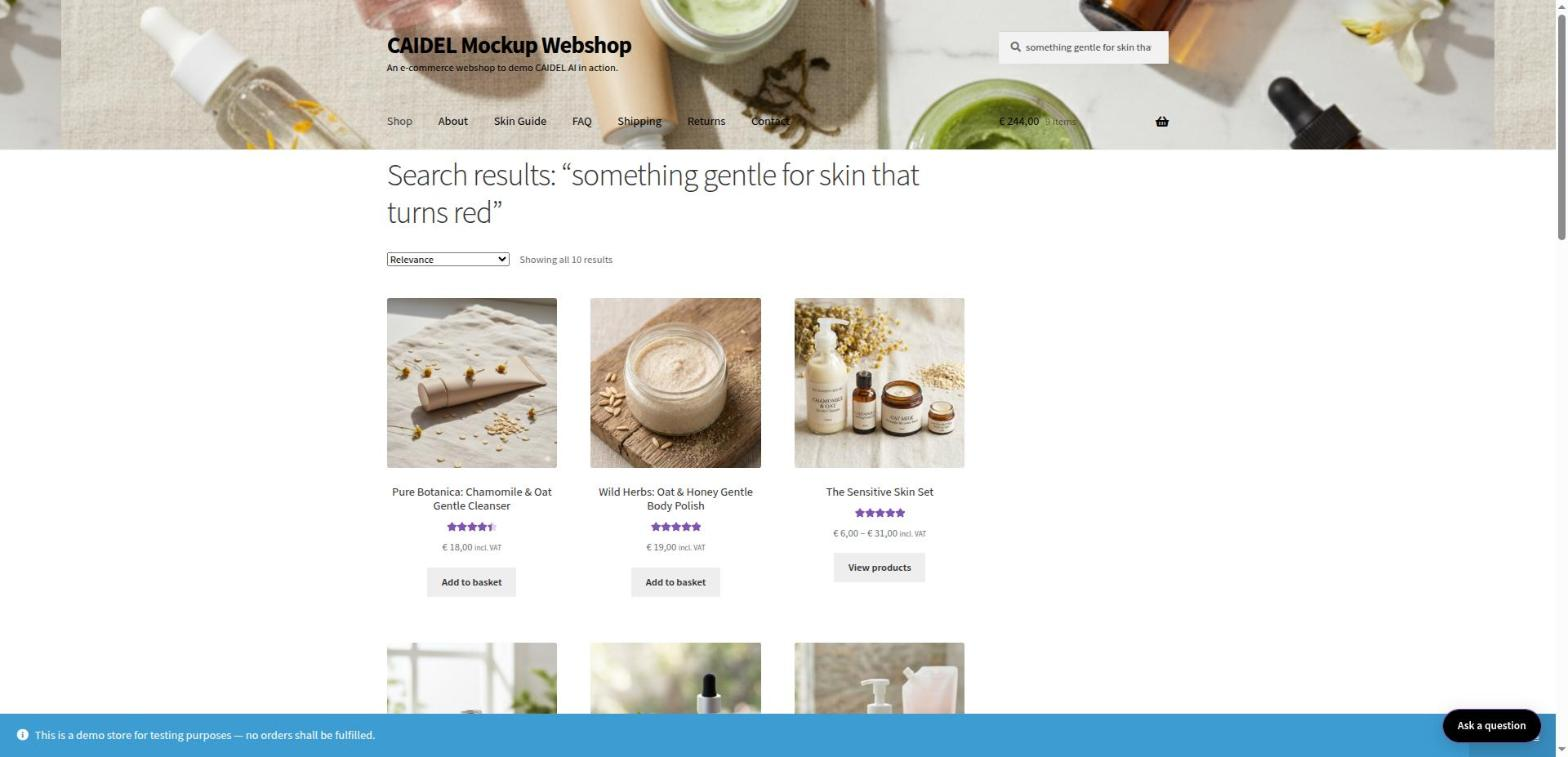
Customers on your own site get search that understands the question. “A gentle cleanser that won’t make my skin red” returns the products that fit, in your own theme, with your prices and add-to-cart buttons.
2. Chosen
Being found puts your products on the shortlist. Being chosen depends on how precisely they match everything the customer asked for, such as “fragrance-free, for sensitive skin, in stock”.
When an AI agent or a customer asks, CAIDEL answers from your own catalogue and pages with the products that fit and the reason each one fits. Agents also get the product text behind each reason, so every claim can be checked.
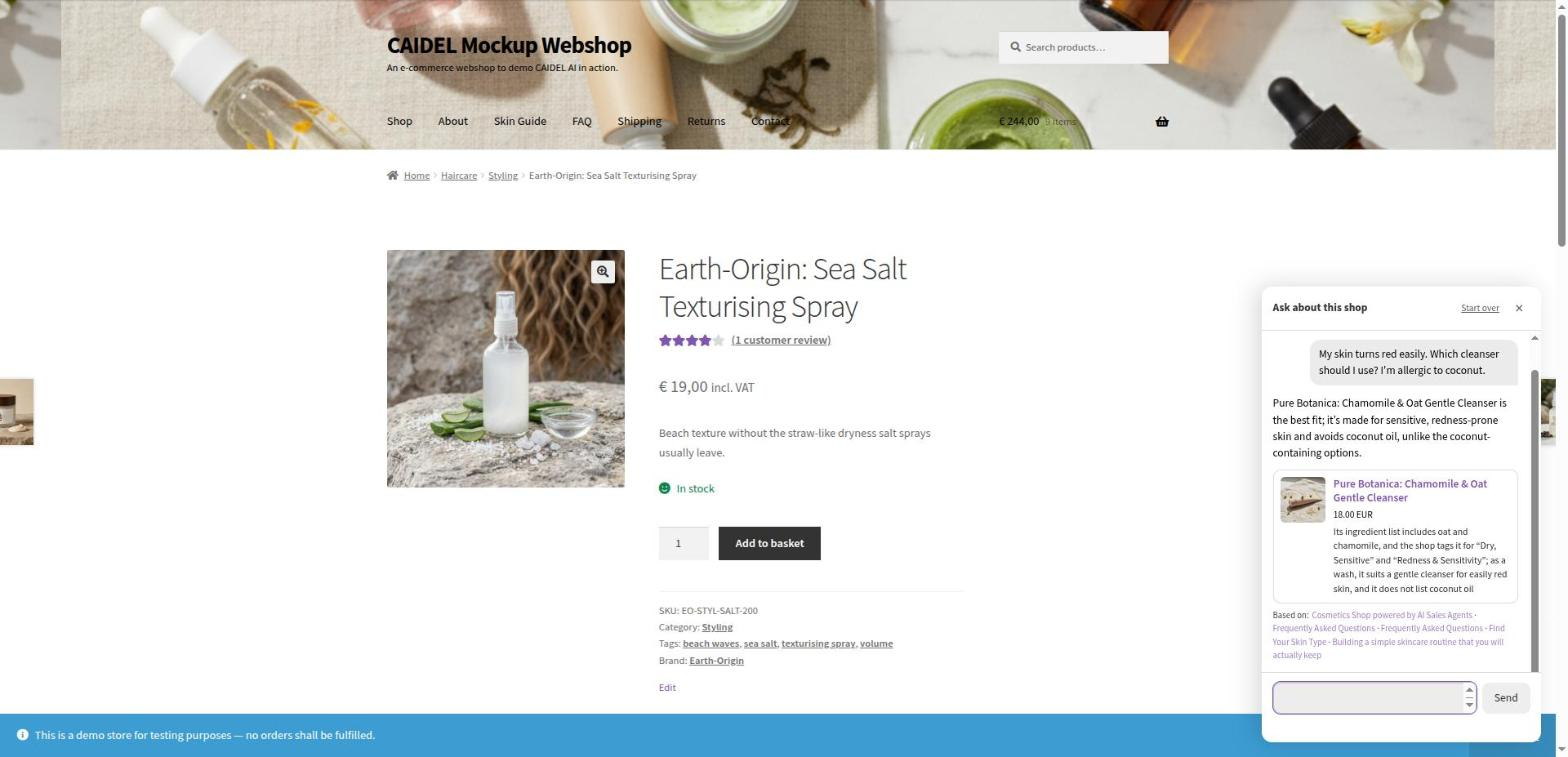
- A shop assistant, as a sidebar or popup. It answers from your catalogue and your own pages about delivery, returns and product care, and knows which product the shopper is looking at. If a shopper says an ingredient gives them a rash, it warns them before recommending anything that contains it.
- A Product Finder block for any page: shoppers describe what they need and get a short list, with one line on why each product suits them.
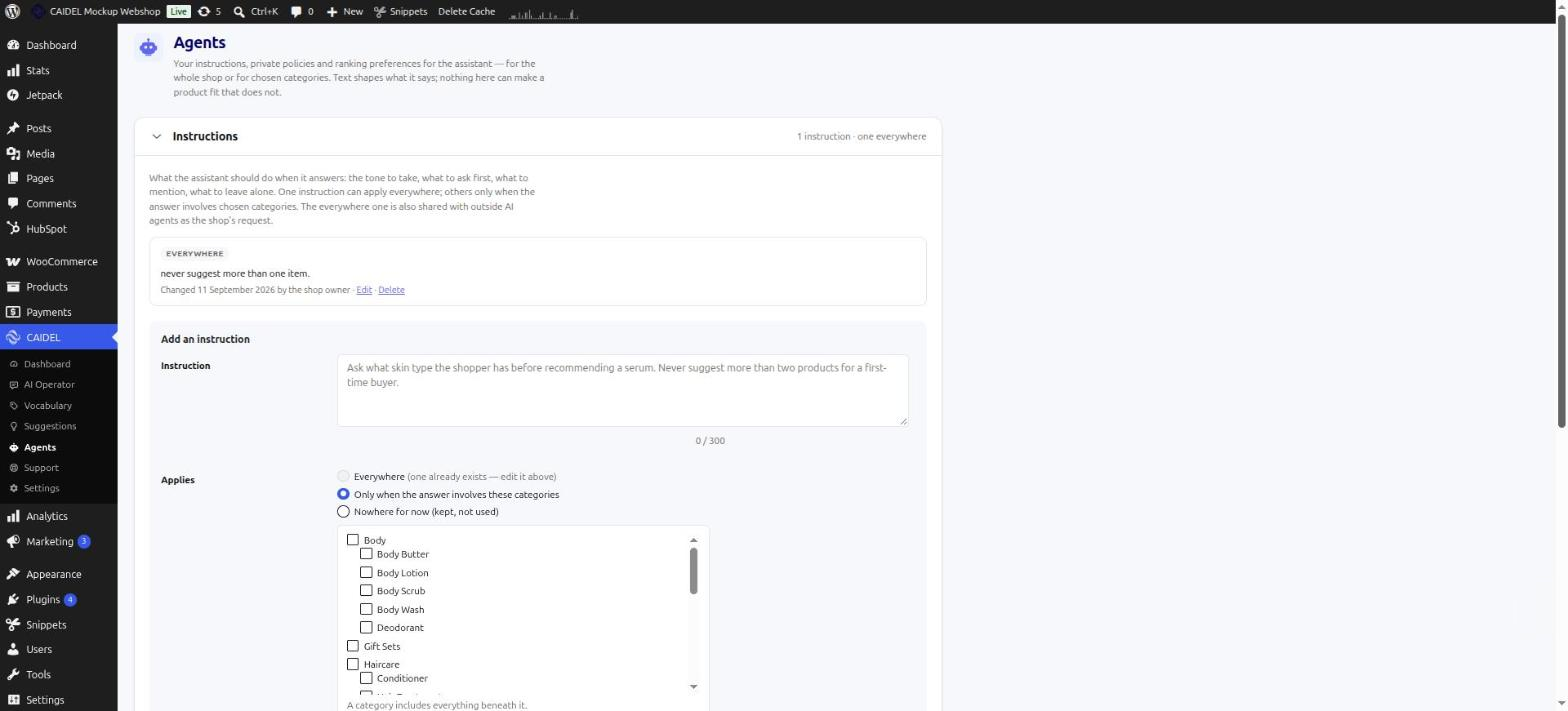
- Your terms, even with a machine. Instructions on how to talk about your products, policies the answers must follow, and preferences for what comes first, such as bundles or products in stock. Preferences only reorder products that genuinely fit, and agents are told when they were applied, so your answers stay worth trusting.
3. Learned
AI agents keep what your customers asked them. CAIDEL brings it back to you, so you can see why products were chosen and how to improve.
- A Dashboard of what people and AI agents asked for, what they were shown, and which answers led to a click, a basket or an order.
- Suggestions. Customers and agents often use words your product pages don’t. CAIDEL notices and drafts updated product copy. You accept it, edit it or turn it down.
- No cookies and no consent banner. CAIDEL counts answers, not people, and never recognises a shopper.
Running your shop
An AI Operator. Tell it what you want in plain words, such as “fix the spelling in my skincare descriptions”. It shows you every change before making it and waits for your approval. You can undo most changes later. It will never issue refunds, delete anything, or touch users or settings.
Automations. Let CAIDEL check new reviews and hold back spam, flag suspicious orders, or send you a daily report on products that are running out. You decide which of them act on their own and which wait for you.
Everything inside WordPress. Install the plugin, press “Connect this shop” and your free trial starts: no form, no setup call, no separate account. Ask for help under CAIDEL > Support and follow the conversation there.
Technical details
- Search replaces WooCommerce’s product search results inside your theme. If CAIDEL can’t be reached, WooCommerce’s own search answers instead.
- Agent access runs on your own site, through an MCP server and an API for searching the catalogue, reading products and asking for advice. It can be switched off under
CAIDEL > Settings. - Sync: products, pages and reviews are sent to CAIDEL when you connect and again whenever they change.
- Privacy: requests go from your server to CAIDEL, signed with a key unique to your shop. Shoppers’ browsers never contact CAIDEL, and no cookies are set.
- Hosting: the CAIDEL service and its AI models run on Microsoft Azure in Sweden, in the EU.
- Your data: “Disconnect and erase” removes your shop’s content from CAIDEL at any time.
- Requirements: WordPress 6.0 or later, WooCommerce, PHP 7.4 or later.
Free trial
Connect your shop and the trial starts straight away. It runs until 15 January 2027, and for at least 30 days from the day you connect. No setup fee and no credit card.
About CAIDEL
CAIDEL is the reasoning layer that lets WooCommerce merchants sell to AI shopping agents like ChatGPT, not just be found by them.
CAIDEL comes from the University of Groningen and is incubated at UtrechtInc, in the EU.
External services
This plugin connects to the CAIDEL service at https://woo.caidel.com for AI search, the shop assistant, recommendations, the AI Operator, automations, suggestions and support.
Service provider:
CAIDEL
CAIDEL Website
Nothing is sent until you press “Connect this shop” under CAIDEL > Settings. After that, the plugin sends data to CAIDEL when:
- You connect. It sends your shop’s address, the site name, the WordPress admin email, the name of the person connecting, and the plugin, WordPress, WooCommerce and PHP versions, so CAIDEL can identify your account and support it. The Connect button says so before you press it.
- You connect, and later whenever products, pages or reviews change. It sends your product catalogue and page text so answers can be built from it. Each sync also sends the site name and the same versions.
- A shopper or an AI agent searches or asks the assistant a question. It sends the question so it can be answered.
- You switch on “Send to CAIDEL” under Measurement. It sends what was asked, which products were shown, added to the basket and ordered, and the value of those order lines.
- You switch on the AI Operator. It sends a dedicated access key for your shop so the Operator can act once you approve.
- You send a support request or a reply under
CAIDEL > Support. It sends your message, your name and the email address you give, and, unless you untick it, diagnostics: the versions above, the active theme, the permalink setting, a summary of CAIDEL’s settings and the sync state. You see exactly what is included before sending. Keys and passwords are never included.
CAIDEL never receives shoppers’ names, email addresses, customer records or IP addresses. The plugin sets no cookies for shoppers. Requests go from your shop’s server to CAIDEL; shoppers’ browsers never contact CAIDEL.
The CAIDEL service and its database run on Microsoft Azure in Sweden (EU). AI answers are written by Microsoft Azure OpenAI models, also within the EU. The words shoppers use, grouped by meaning and with nothing that identifies your shop, are added to a shared vocabulary that helps CAIDEL understand shoppers in your product category.
“Disconnect and erase” under Settings, and deleting the plugin, delete your catalogue, the questions asked, your measurements, the AI Operator’s data and your vocabulary from CAIDEL. Kept: your account, subscription and usage; your shop’s web address and trial dates, so each address gets one free trial; your support conversations; and the shared vocabulary, which contains nothing about your shop.
Privacy Policy:
CAIDEL Privacy Policy
Terms and Conditions:
CAIDEL Terms and Conditions
Screenshots
Blocks
This plugin provides 1 block.
- CAIDEL Product Finder A search box that answers in plain language. Shoppers describe what they need and get products with a reason for each, on the same page.
Installation
- Make sure WooCommerce is installed and active.
- Install CAIDEL from the Plugins screen, or upload the plugin folder to
/wp-content/plugins/, then activate it. - Go to
CAIDEL > Settingsand press “Connect this shop”. Your free trial starts straight away. - Switch on AI search. If you want the shop assistant, choose sidebar or popup.
- If you like, add the “CAIDEL Product Finder” block to a page.
- Check
CAIDEL > Dashboardonce shoppers have started searching.
FAQ
-
How do AI agents like ChatGPT find my products?
-
CAIDEL adds signposts to your site in the places AI agents look for them. Shoppers don’t see them and your pages look the same. You can switch this off under
CAIDEL > Settings > AI Agent Discovery. -
Do AI agents buy from shops already?
-
Today they mostly research, compare and shortlist products, and your customer buys. That is the moment CAIDEL works on: making sure your products are on the shortlist and are the ones chosen. Everything CAIDEL does for the customers on your own site works today, whatever agents do next.
-
How do I get started?
-
Install the plugin, go to
CAIDEL > Settingsand press “Connect this shop”. That’s it. The trial starts right away. -
Do I need to go to a separate CAIDEL website to manage it?
-
No. Settings, reports, the AI Operator and everything else are in the CAIDEL menu in your WordPress admin.
-
Does it need WooCommerce?
-
Yes. CAIDEL works with your WooCommerce products and orders.
-
Are the answers generic?
-
No. Every answer comes from your own catalogue and your own pages, and follows the instructions and priorities you set. It never uses another shop’s content.
-
No. CAIDEL doesn’t set cookies or read anything from a shopper’s device. It records what was asked and what happened next, never who asked, so no consent banner is needed. The assistant keeps the conversation in the open browser tab only and forgets it when the tab closes.
-
Can the AI Operator break my shop?
-
It can’t do anything you haven’t approved. Each change is shown to you first, and it tells you when a change can’t be undone. Everything it did is listed under Activity, with an undo button where possible. It never refunds, deletes, or touches users or settings, and you can revoke its access at any time.
-
I used CAIDEL 1.0. What changes?
-
The old embedded assistant and its block are gone. Use the new shop assistant or the Product Finder block instead. You also no longer need a Project ID or Provider ID. Press “Connect this shop” and you’re set.
-
How long is the free trial?
-
Until 15 January 2027, and at least 30 days from the day you connect, whichever is later. It includes a generous number of AI answers; searches don’t use them up. Your remaining answers and days are shown under
CAIDEL > Settings. Each shop address gets one trial. -
What happens if I deactivate or delete the plugin?
-
Deactivating pauses CAIDEL: your shop uses WooCommerce’s own search, nothing is deleted, and reactivating picks up where you left off. Deleting the plugin removes its settings and data from WordPress and asks CAIDEL to erase its copy of your shop, as “Disconnect and erase” does. Your account, subscription and usage are kept, so if you install CAIDEL again and connect, you continue where you were, with the same trial or plan.
-
Is there a setup fee?
-
No.
-
Do I need a credit card to start?
-
No. The free trial doesn’t need one.
-
When do I pay?
-
Only if you decide to keep using CAIDEL after the trial. If you don’t, there is no charge. When the trial ends, your shop goes back to normal WooCommerce search.
-
Where is my data hosted?
-
On Microsoft Azure in Sweden, in the EU. The AI models that write answers also run on Azure within the EU. See our Privacy Policy for details.
-
Which countries can use CAIDEL?
-
All of them. CAIDEL is a European company serving shops worldwide.
-
Where can I get help?
-
Once your shop is connected, open
CAIDEL > Supportand press “New request”. You follow the conversation there, and a badge on the Support menu item shows when we have replied. It still works after your trial ends. Before you connect, visit the CAIDEL website or contact us.
Reviews
There are no reviews for this plugin.
Contributors & Developers
“CAIDEL: Agentic Commerce Intelligence for WooCommerce” is open source software. The following people have contributed to this plugin.
Contributors
Translate “CAIDEL: Agentic Commerce Intelligence for WooCommerce” into your language.
Interested in development?
Browse the code, check out the SVN repository, or subscribe to the development log by RSS.
Changelog
2.0.0
- New: everything is managed inside WordPress, from a CAIDEL menu with Dashboard, AI Operator, Vocabulary, Suggestions, Agents, Support and Settings. The Plugins screen links to the Dashboard rather than an external site.
- New: connect with one button and your free trial starts. Project and Provider IDs are no longer needed.
- New: the Connect button says what connecting sends to CAIDEL (site name, admin email and versions) and links the privacy policy and terms.
- New: Support screen. Send CAIDEL a question or a bug report from wp-admin, with optional diagnostics you can read before sending, and follow the replies there. The menu shows a badge when a reply is waiting. Works after the trial ends.
- Changed: the default CAIDEL server is now woo.caidel.com. Shops left on Auto move with it; a custom server address is kept.
- Removed: the separate Server port setting. A custom server address carries its own port; a port saved by an earlier version is moved into the address.
- New: AI search, shown in your own theme. Falls back to WooCommerce search if CAIDEL can’t be reached.
- New: shop assistant as a sidebar or popup. Answers from your products and pages and warns shoppers about ingredients they need to avoid.
- New: if CAIDEL can’t answer, the shop assistant shows matching products from your shop’s own search instead of an error.
- New: Product Finder block for any page.
- New: Dashboard showing what was asked, what was shown, and which answers led to clicks, baskets and orders.
- New: measurement without cookies. No consent banner needed.
- New: AI Operator that makes changes to your shop only after you approve them, with undo.
- New: automations for review moderation, order checks and daily stock reports.
- New: Suggestions for product copy based on the words shoppers actually use.
- New: Vocabulary, a place to link the words shoppers use to your own terms.
- New: instructions, private policies and ranking preferences for the assistant.
- New: AI shopping agents can find and read your live products, reviews and shop policies. Can be switched off.
- New: products, pages and reviews stay in sync with CAIDEL automatically.
- New: “Export knowledge” under Settings downloads everything public on your site as one ZIP.
- New: “Disconnect and erase” removes your shop’s data from CAIDEL. Your account, subscription, usage, trial dates and support conversations are kept. Deleting the plugin does the same.
- Removed: the hosted assistant embed and its block, and the AI Only, Hybrid and Rescue search modes.
1.0.1
- Minor admin and readme updates.
1.0.0
- Initial release.