

Description
Confirm Step for Contact Form 7 adds a review step between filling in a form and sending it. Visitors see a confirmation screen with their answers (using the same mail-tags as your emails), can go back to edit, or submit for real.
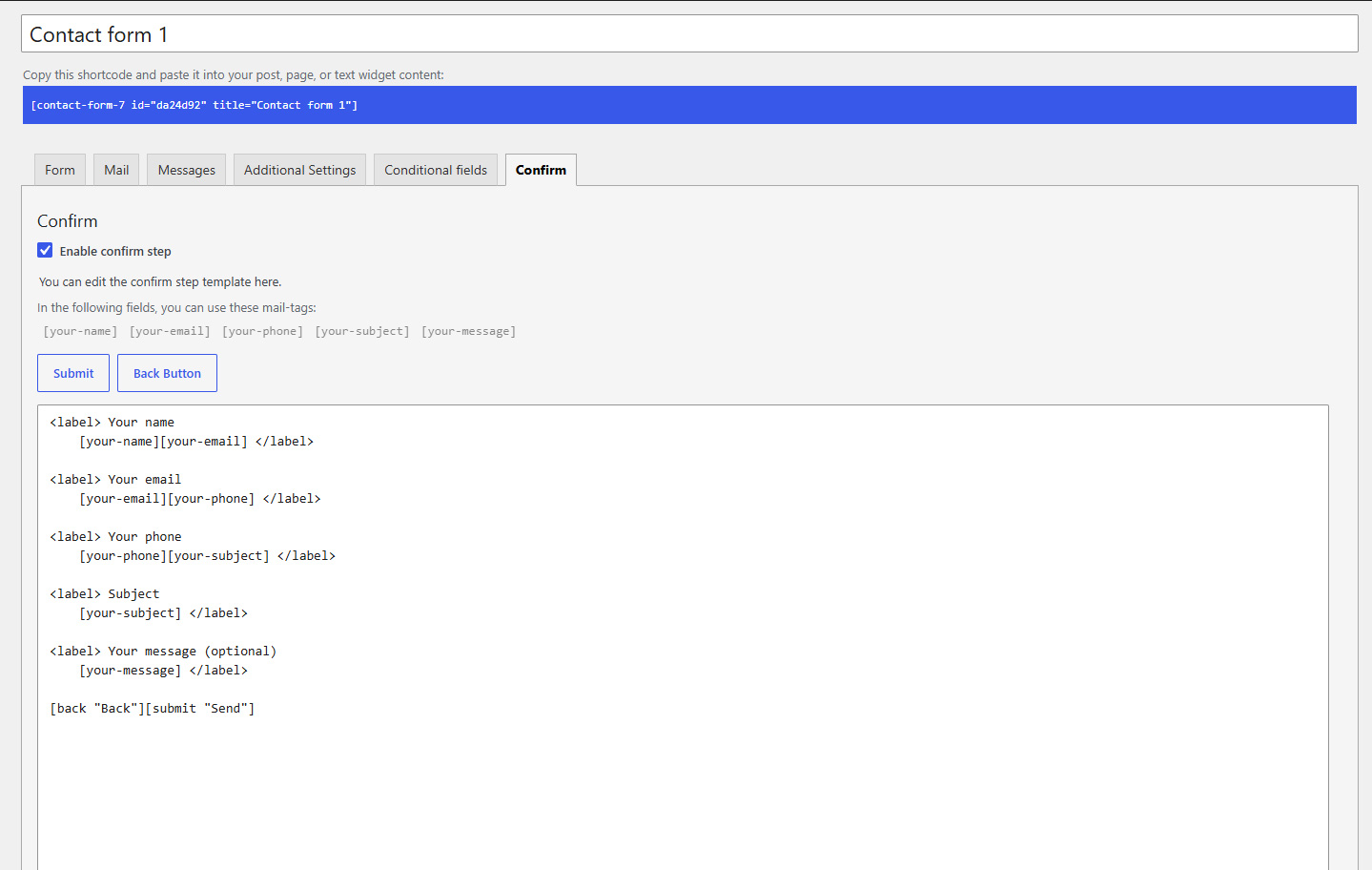
All options are managed inside each Contact Form 7 form (a Confirm tab in the form editor). There is no separate settings page in WordPress admin.
Requires Contact Form 7 to be installed and active. If CF7 is missing, this plugin deactivates itself and shows an admin notice.
How it works (front end)
- The visitor completes the input step (your normal Form tab template) and clicks the Confirm button (
[confirm]). - Contact Form 7 validates the input. The plugin does not send mail yet; the response switches to the confirm step.
- The confirm template (Confirm tab) is shown with values filled in via mail-tags.
- The visitor clicks Submit (
[submit]) to send, or Back ([back]) to return to the input step without reloading the page. - After a successful send, the form returns to the input step.
Features
- Per-form enable — Checkbox “Enable confirm step” on the Confirm tab; disabled forms behave like plain CF7 forms.
- Confirm tab — Dedicated template textarea, mail-tag helper, and tag generator buttons for Submit and Back.
- Form tags —
[confirm](step 1, Form tab generator),[submit](CF7 core, insert from Confirm tab),[back](step 2, Confirm tab generator). Labels and classes follow CF7 conventions. - Step status markers — Add
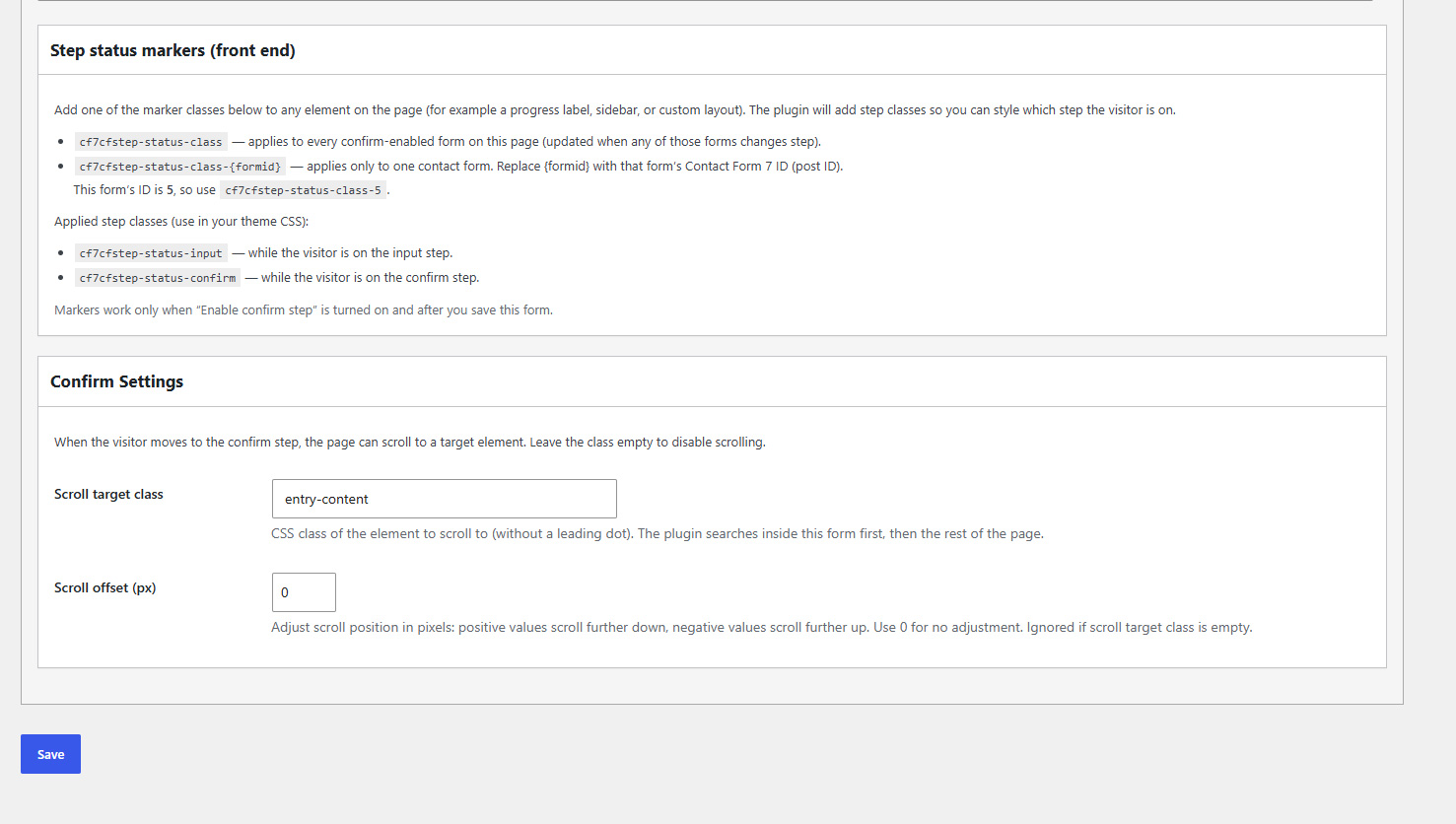
cf7cfstep-status-classorcf7cfstep-status-class-{formid}to any page element; the plugin togglescf7cfstep-status-input/cf7cfstep-status-confirmfor theme CSS (progress text, sidebars, etc.). - Confirm Settings — Optional scroll target class and offset (px) when entering the confirm step only (positive offset scrolls further down, negative scrolls further up; leave class empty to disable).
- Editor UX — Confirm tab panel hides when disabled; admin styles and collapsible help/settings boxes on the Confirm tab.
- Legacy-compatible storage — Confirm body and options use the same meta keys as the earlier function-based plugin where applicable.
For developers
- PHP 8.0+, namespaced class architecture (
CF7ConfirmStep\), no Composer dependency. - Front-end script is vanilla JavaScript (no jQuery on the public site).
- Form-specific scroll options are passed via
window.cf7csFormSettings[formId]when a scroll class is configured.
Usage
- Confirm tab — Enable confirm step, write the review template with mail-tags, add
[submit]and[back], save. - Form tab — Add your fields and a
[confirm]button (tag generator: Confirm Button). Use[submit]only on the confirm step if you want a single send action. - Confirm Settings (optional) — Scroll target class + offset when entering the confirm step; leave class empty to skip scrolling.
- Step status markers (optional) — Add
cf7cfstep-status-classorcf7cfstep-status-class-{formid}on page elements; style withcf7cfstep-status-input/cf7cfstep-status-confirm.
Screenshots

Installation
- Install and activate Contact Form 7.
- Upload the
bpotech-confirm-step-for-contact-form-7folder to/wp-content/plugins/(or install from the WordPress plugin directory when available). - Activate Confirm Step for Contact Form 7 under Plugins.
- Edit a contact form, open the Confirm tab, enable the confirm step, and configure the template and settings.
- On the Form tab, add a
[confirm]button (use the Confirm Button tag generator). Save the form.
FAQ
-
Does this work without Contact Form 7?
-
No. CF7 must be active. Otherwise the plugin will not run (and will deactivate on load if CF7 was removed).
-
Can I use it on only some forms?
-
Yes. Enable Enable confirm step only on the forms that need a review step.
-
When is email actually sent?
-
Only when the visitor submits from the confirm step with
[submit](step 2). The first[confirm]click only validates and shows the review screen. -
What happens if I disable “Enable confirm step”?
-
The form submits in one step like normal CF7.
-
Do I need to wrap fields manually?
-
No. The input wrapper is added when the form is rendered. The confirm wrapper is built from the Confirm tab template automatically.
-
Can I have multiple CF7 forms on one page?
-
Yes. Each form has its own step state. Global status markers (
cf7cfstep-status-class) reflect the last confirm-enabled form that changed step; usecf7cfstep-status-class-{formid}to scope styling per form. -
Does uninstalling remove form data?
-
Uninstall does not delete confirm templates or per-form meta stored on contact forms. Remove or disable confirm in each form before uninstall if you want a clean editor state.
Reviews
There are no reviews for this plugin.
Contributors & Developers
“BPOTech Confirm Step for Contact Form 7” is open source software. The following people have contributed to this plugin.
Contributors
Translate “BPOTech Confirm Step for Contact Form 7” into your language.
Interested in development?
Browse the code, check out the SVN repository, or subscribe to the development log by RSS.
Changelog
1.1.3
- Hot fix.
1.1.1
- i18n: use plugin text domain consistently in the CF7 editor.
- Front-end: scope mail error response handling to the submitting form only.
- Readme: PHP 8.0, WordPress 7.0 tested, tag limit compliance.
1.1.0
- First release on WordPress.org.
- Two-step confirm flow for Contact Form 7 (
[confirm], review template,[submit]/[back]). - Confirm tab settings: per-form enable, step status markers, optional scroll on confirm step.