

Description
The AgeWallet OIDC Client plugin adds age verification and content gating to your WordPress website, backed by the AgeWallet™ verification service over OpenID Connect (OIDC).
It is designed to be straightforward to set up, fully customizable, and compatible with all WordPress hosting environments — including sites behind aggressive page caches (Cloudflare, Varnish, WP Rocket, LiteSpeed, etc.).
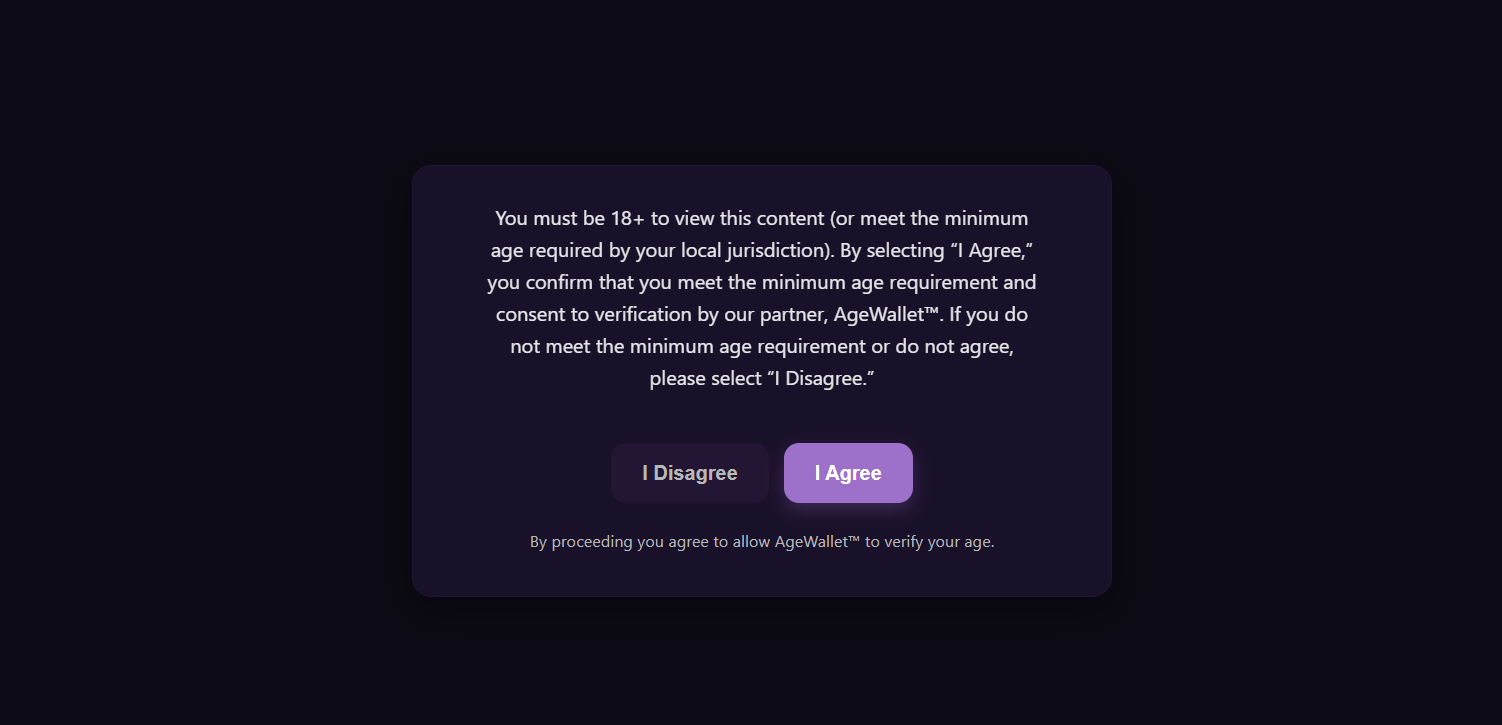
Two protection modes are available. Standard (Overlay) mode hides gated content via a client-side overlay; it is SEO-friendly and works on any cached page. High Security (Strict) mode short-circuits the page entirely until the visitor verifies, using a cookieless “skeleton” template that pairs with “Cache Everything” CDN rules.
Customize the gate’s appearance from the Gate Appearance tab (logo, copy, colours, button radii) and override anything else from Appearance Customize Additional CSS. Strict-mode analytics — Google Analytics 4, Google Tag Manager, and Facebook Pixel — are configurable from the Strict Mode Analytics tab.
Protection rules cover the whole site, individual URL paths, taxonomies (categories, tags, custom taxonomies), per-post overrides via the editor sidebar, and the [agewallet_protected] shortcode for inline content. WooCommerce is supported out of the box with three checkout-gate modes and per-product / per-category regulated flagging.
Every verification can carry an opaque metadata payload (≤4KB) that round-trips through the OIDC flow and surfaces on the /userinfo response, letting integrators correlate verifications with their own backend records.
For the full feature enumeration see Other Notes; for setup walkthroughs, the available CSS hooks, and the developer-hook list, see the Usage Guide, CSS Customization Guide, and Developer Hooks sections below.
External services
This plugin connects to one required third-party service and, optionally, to analytics services you choose to enable. Nothing is contacted until a visitor begins age verification (the AgeWallet service) or until you enter an analytics ID and use High Security (Strict) mode (the analytics services).
AgeWallet age-verification service (required)
The plugin’s core purpose is to verify a visitor’s age through the AgeWallet™ service using the OpenID Connect (OIDC) Authorization Code flow with PKCE. When a visitor starts verification, their browser is redirected to the AgeWallet authorization endpoint; the plugin’s server then exchanges the returned authorization code for the verification outcome and requests the result from the userinfo endpoint.
- Endpoints contacted:
https://app.agewallet.io/user/authorize,https://app.agewallet.io/user/token, andhttps://app.agewallet.io/user/userinfo. - Data sent: your site’s AgeWallet Client ID, a one-time authorization code, OIDC PKCE / state / nonce values, and an optional opaque metadata string that you configure (the plugin attaches no personal data of its own). The service returns only the pass / fail age-verification result.
- When: each time a visitor begins age verification on your site.
- This service is provided by AgeWallet LLC, which publishes separate Terms and Privacy policies for the two parties involved in a verification:
- Your visitors — the end users being verified: End-User Privacy Policy (https://agewallet.com/end-user-privacy-policy/) and End-User Terms & Conditions (https://agewallet.com/end-user-terms-conditions/).
- You — the site owner, an AgeWallet “Client”: Client Privacy Policy (https://agewallet.com/privacy-policy/) and Client Terms of Service (https://agewallet.com/terms-conditions/).
Google Analytics 4 and Google Tag Manager (optional)
Only if you enter a GA4 Measurement ID or a Google Tag Manager Container ID on the Strict Mode Analytics tab, and only while High Security (Strict) mode is active, the plugin outputs Google’s official analytics snippet into the strict-mode loading screen (where your theme’s own tags cannot run). The plugin sends no data itself; the snippet is Google’s standard tag, executed in the visitor’s browser using the ID you supply.
- Loaded from:
https://www.googletagmanager.com. - This service is provided by Google. Terms of Service: https://policies.google.com/terms — Privacy Policy: https://policies.google.com/privacy
Facebook (Meta) Pixel (optional)
Only if you enter a Facebook Pixel ID on the Strict Mode Analytics tab, and only while High Security (Strict) mode is active, the plugin outputs Meta’s official Pixel snippet into the strict-mode loading screen using the ID you supply. The plugin sends no data itself.
- Loaded from:
https://connect.facebook.net(with ahttps://www.facebook.comno-script fallback image). -
This service is provided by Meta Platforms, Inc. Terms of Service: https://www.facebook.com/legal/terms — Privacy Policy: https://www.facebook.com/privacy/policy/= Features =
-
Legal compliance: leverages the AgeWallet™ service, designed to comply with modern age-verification laws in major jurisdictions.
- Secure verification flow: OIDC Authorization Code Flow with PKCE.
- Cryptographic cookie integrity: HMAC-signed verification cookies, mathematically verified server-side.
- Two protection modes:
- Standard (Overlay): a lightweight, SEO-friendly overlay that hides content via CSS and JavaScript.
- High Security (Strict): prevents protected content from loading until verification is complete. Uses a cookieless skeleton page compatible with “Cache Everything” CDN rules.
- Smart caching architecture: Strict mode uses a split-cache system (singular vs. archives) for fast performance with immediate invalidation when content changes.
- Automated cache management: configurable garbage-collection schedule plus invalidation triggers for menu / theme / taxonomy changes.
- Fully customizable gate appearance: dedicated logo, WYSIWYG copy editor, colour pickers (overlay / card / text / buttons), card and button border-radius, plus Customizer Additional CSS for advanced overrides.
- Strict-mode analytics: structured Google Analytics 4, Google Tag Manager, and Facebook Pixel ID fields render the official snippets directly into the skeleton page (where the theme’s own analytics tags can’t fire).
- Flexible content protection rules:
- Full-site protection (with or without the homepage).
- Granular taxonomy control across Categories, Tags, and Custom Taxonomies (e.g. WooCommerce Product Categories).
- Path-based protection on specific URL paths (e.g.
/shop/,/videos/premium/). - Per-post overrides via the editor sidebar.
- Inline
[agewallet_protected]shortcode for specific page elements.
- WooCommerce integration:
- Three checkout-gate modes: Off, Force Always, Conditional on Cart.
- Per-product regulated controls: Not Regulated / Regulated / Override.
- Per-category and per-tag regulated flagging on the term-edit screens (products inherit from any of their categories or tags).
- Cart-context metadata (cart hash, total, currency, line-item count, billing country) automatically attached to verifications. In Conditional-on-Cart mode, a cart_triggers audit trail captures which products / categories / tags fired the gate.
- Metadata pass-through: attach an opaque per-verification string (up to 4 KB) — static text or auto-composed JSON of selected request-context fields — that round-trips through the OIDC flow and surfaces on the
/userinforesponse.
Usage Guide
This guide explains how to configure and use the plugin using the new setup wizard.
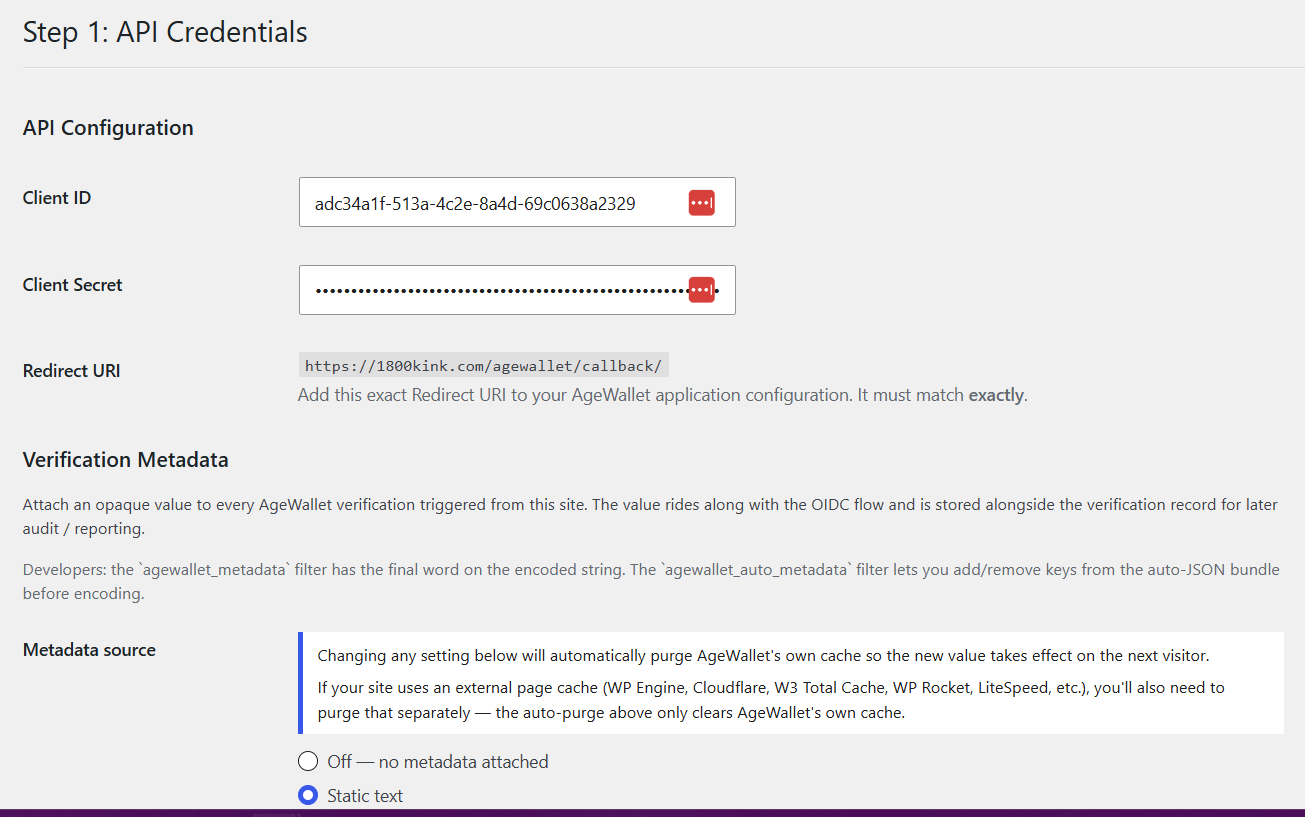
1. Initial Configuration (Step 1)
Before the plugin can work, you must connect it to your AgeWallet account. If you don’t have an account yet, register one at https://app.agewallet.io/register — new accounts receive $5 of free verification credit.
- Click AgeWallet in your WordPress admin menu to see the Welcome screen.
- Click on Step 1: API Credentials.
- In the “API Configuration” section, you will see a field labeled Redirect URI. Copy this URL.
- Log in to your AgeWallet business account dashboard at https://app.agewallet.io.
- Create a new application and paste the Redirect URI from the plugin settings into the corresponding field in your AgeWallet dashboard.
- AgeWallet will provide you with a Client ID and a Client Secret.
- Copy these keys and paste them into the “Client ID” and “Client Secret” fields in the plugin settings.
- Click “Save Changes”, then click “Next: Content Guarding”.
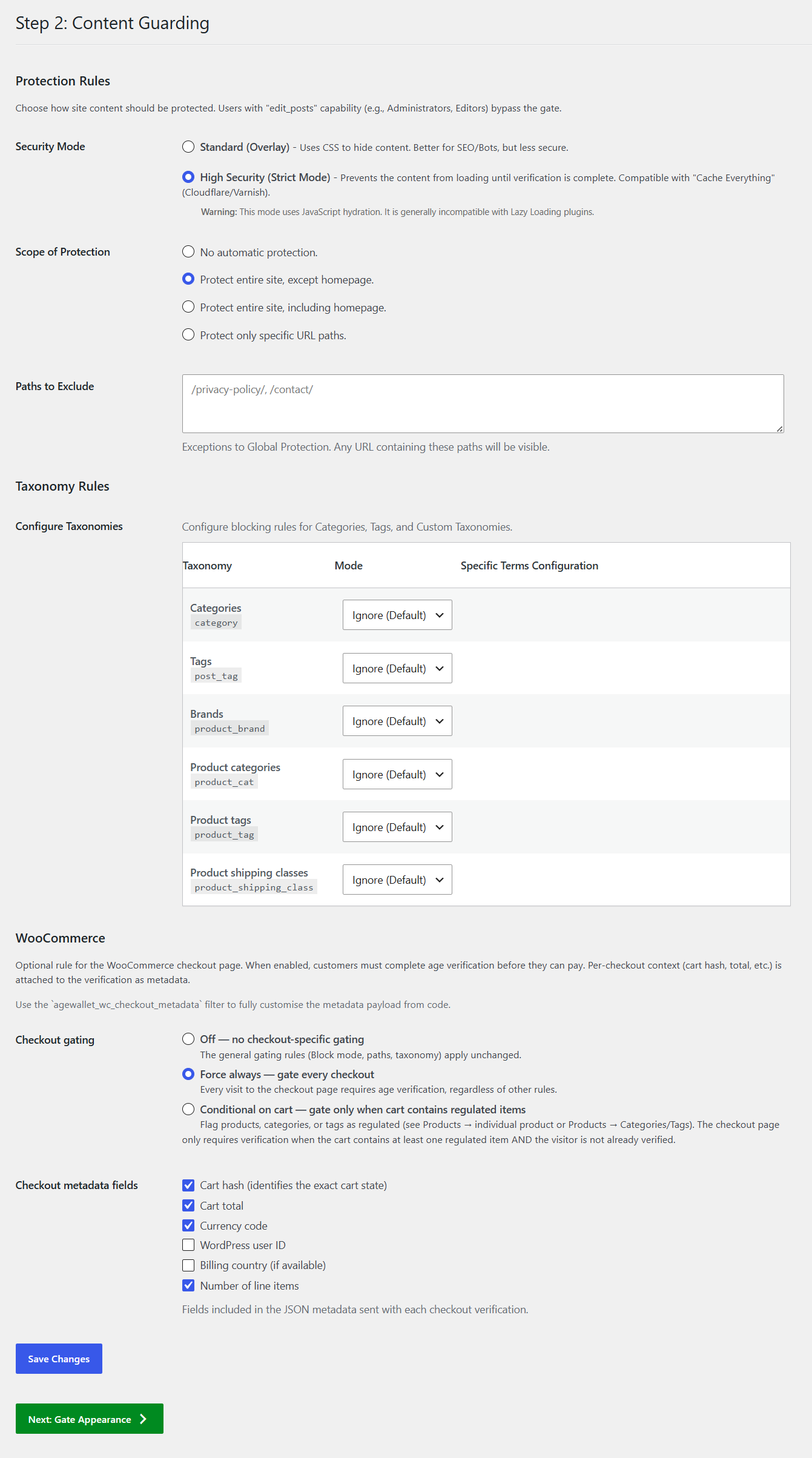
2. Setting up Protection Rules (Step 2)
You have several ways to protect content. You can mix and match these methods on the Step 2: Content Guarding page.
A. Security Mode
- Standard (Overlay): The page loads normally, but a CSS overlay covers the content. Verified users see the content revealed instantly. Best for SEO.
- High Security (Strict): The server sends a generic “Skeleton” page instead of your content. Secure content is fetched via an API call only after the user is verified. This prevents bypassing the gate by disabling JavaScript.
B. Global Scope
- No automatic protection: Only protects content you specify manually (via Paths, Per-Post settings, or Shortcodes).
- Protect entire site, except homepage: Gates every page and post except your front page.
- Protect entire site, including homepage: Gates every single page on your site.
C. Taxonomy Rules
You can define rules based on Categories, Tags, or Custom Taxonomies (like WooCommerce Product Categories).
* Gate All Terms: Gates every post belonging to that taxonomy.
* Exclude All Terms: Ensures posts in that taxonomy are always public.
* Specific Rules: Search for specific terms (e.g., “Premium Content” category) to Gate or Exclude individually. Note: Exclusion rules take priority over Gating rules.
D. Path-Based Rules
- Paths to Protect: (Only active if “Specific URL paths” is selected above). Enter comma-separated paths. Any URL containing these paths will be gated.
- Example:
/shop/, /videos/will protectexample.com/shop/,example.com/shop/product-1/, andexample.com/videos/my-video/.
- Example:
- Paths to Exclude: Enter paths that should always be public, even if ‘Protect entire site’ is on.
- Example:
/privacy-policy/, /terms/.
- Example:
E. WooCommerce (visible when WooCommerce is active)
The Content Guarding page shows a “WooCommerce” section below the Taxonomy Rules. The plugin also adds an “AgeWallet” tab to the Product Data metabox and a checkbox to the term-edit screens for Categories and Tags.
-
Checkout Gating: chooses how the checkout page itself is gated.
- Off: no checkout-specific rule; the Security Mode / Block / Path / Taxonomy rules apply unchanged.
- Force Always: every visit to the checkout page requires age verification, regardless of other rules.
- Conditional on Cart: the checkout requires verification only when the cart contains at least one product flagged as regulated AND the visitor isn’t already verified. Useful for mixed-catalog stores where only some products require age gating.
-
Checkout Metadata Fields: pick which cart-context values get attached to each verification as metadata that round-trips through the OIDC flow back to your backend. Available fields: cart hash, cart total, currency code, WordPress user ID, billing country, number of line items. Defaults: cart hash, cart total, currency. Use the
agewallet_wc_checkout_metadatafilter (see Developer Hooks) for fully custom payloads. -
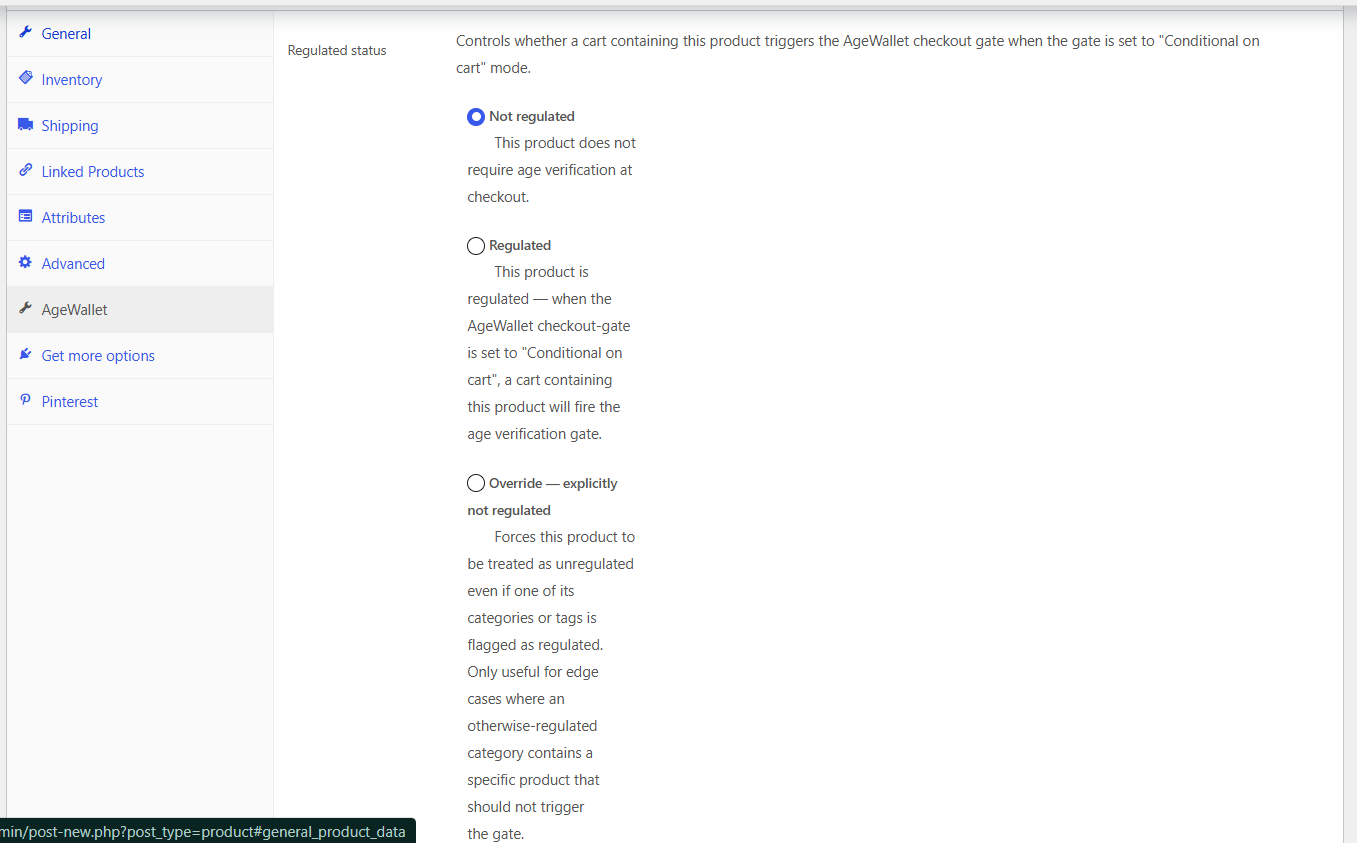
Per-Product Regulated Status: open any product in WooCommerce > Products > Edit Product > AgeWallet tab.
- Not regulated (default): does NOT trigger the Conditional-on-Cart gate.
- Regulated: cart containing this product fires the Conditional-on-Cart gate.
- Override — explicitly not regulated: forces this product to bypass the gate even when one of its categories or tags is flagged regulated. Useful for an edge product inside an otherwise-regulated category.
-
Per-Category / Per-Tag Regulated Flag: on the term-edit screens (Products > Categories or Products > Tags), check “Regulated for AgeWallet checkout gate”. Products inherit the regulated flag from any of their categories or tags (unless overridden per-product).
3. Customizing the Gate Appearance (Step 3)
You can customize the age gate to match your brand on the Step 3: Gate Appearance page.
- Gate Logo: Upload or select a logo from your Media Library.
- Logo Width (px): Set a specific width for your logo, or leave at 0 for natural size.
- Gate Copy: Use the text editor to change the main message your users see.
- Hide Default Heading: Check this box to remove the “You Must Verify Your Age” title (e.g., if your custom copy already includes a title).
- Colours: Pick the overlay backdrop, card background and border, body and disclaimer text colours, and the Agree / Disagree button colours from the dedicated colour pickers.
- Card / button border radius: Set how rounded the card and buttons appear.
- For anything beyond these structured controls (custom fonts, site-wide rules, advanced selectors, hover variants not in the form), use Appearance Customize Additional CSS. AgeWallet applies that CSS to the gate on both Standard and Strict modes — see the CSS Customization Guide below for the available class names.
4. Strict Mode Analytics (Step 4)
Note: These settings only apply if you are using High Security (Strict) Mode.
Because Strict Mode short-circuits the theme during verification, the analytics tags your theme normally renders do NOT fire on the “Verifying…” loading screen. Enter the IDs of the services you use and AgeWallet renders their official snippets directly. Leave any field blank to skip it.
- Google Analytics 4 — Measurement ID (
G-XXXXXXXXXX) - Google Tag Manager — Container ID (
GTM-XXXXXXX) - Facebook Pixel — numeric Pixel ID
For analytics providers we don’t ship a field for (Plausible, Fathom, Microsoft Clarity, Hotjar, etc.), add them via the agewallet_skeleton_head / agewallet_skeleton_footer action hooks in a small mu-plugin or your theme’s functions.php — see the Developer Hooks section.
5. Per-Post / Per-Page Control
On the Edit Post or Edit Page screen, you will see an “Age Restriction” box in the sidebar. These settings override all global rules.
- Require age verification: Check this to force the gate on this single post, even if your global setting is “No automatic protection.”
- Exclude from age verification: Check this to make a post public, even if it’s in a protected path (like
/shop/) or a protected Category.
6. Shortcode Protection
To protect just one part of a post (like a single video or paragraph), wrap it in the [agewallet_protected] shortcode.
[agewallet_protected]
This content, and only this content, will be hidden until the user verifies their age.
[/agewallet_protected]
Note: Shortcode protection only works in Standard Mode. In Strict Mode, the shortcode will NOT work.
7. Caching & Maintenance
If you use High Security Mode, the plugin generates static HTML caches of your protected pages to ensure speed.
- Automatic Management: The cache is automatically cleared when you update posts, switch themes, create/edit menus, or modify taxonomy terms.
- Scheduled Cleanup: You can configure an automatic cache purge schedule (default: every 4 hours) in the “Cache Control” settings tab.
- Manual Purge: If you change settings and don’t see them update immediately, click the “Purge Cache” button available in the sidebar of any AgeWallet settings page (or under Cache Control).
CSS Customization Guide
Use this guide to customize the appearance of the AgeWallet™ age gate and the Strict Mode loading screen.
For most customizations, the colour and radius controls in Step 3: Gate Appearance are sufficient — they map directly to the CSS custom properties listed in the next subsection.
For anything beyond that (custom fonts, site-wide rules, advanced selectors, hover states not exposed in the form), add your rules in Appearance Customize Additional CSS. AgeWallet applies that CSS to the gate on both Standard and Strict modes. The gate exposes a stable DOM with the .aw-gate__* and .agewallet-* class names below — write rules against them as you would for any theme component.
CSS custom properties (set by the Gate Appearance form)
The plugin’s gate stylesheet uses these CSS variables; the Gate Appearance pickers write to them. You can also override them yourself in Customizer Additional CSS:
--aw-bg— Overlay backdrop (Standard mode) and skeleton background (Strict mode).--aw-card— Card background.--aw-card-border— Card border colour.--aw-text— Card body text colour.--aw-muted— Disclaimer text colour.--aw-purple— “I Agree” button background.--aw-purple-700— “I Agree” hover state.--aw-no-btn-dark-bg— “I Disagree” button background.--aw-no-btn-dark-text— “I Disagree” …
Screenshots
Installation
- Upload the plugin files to the
/wp-content/plugins/agewalletdirectory, or install the plugin through the WordPress plugins screen directly by uploading the.zipfile. - Activate the plugin through the ‘Plugins’ screen in WordPress.
- Crucial Step: Go to Settings > Permalinks and simply click “Save Changes”. This ensures the custom AgeWallet verification URLs (e.g.,
/agewallet/callback/) are registered. - Look for the AgeWallet item in your main WordPress admin menu to launch the setup wizard.
- After configuring your potection settings be sure to clear any server, plugin or CloudFlare caches.
FAQ
-
Do I need an AgeWallet account to use this plugin?
-
Yes. The plugin is a client for the AgeWallet OIDC age-verification service. Register a business account at https://app.agewallet.io/register to obtain a Client ID and Client Secret, then enter them on the plugin’s Credentials screen. New accounts receive $5 of free verification credit to get you started.
-
Will the plugin work with my caching plugin or CDN (Cloudflare, Varnish, WP Rocket, etc.)?
-
Yes. Standard (Overlay) mode is fully cache-compatible — the page HTML is the same for every visitor and the gate is enforced client-side. High Security (Strict) mode uses a split-cache system that ships a cookieless “Skeleton” page from cache and fetches the real content via an authenticated API call once the visitor is verified, so it works with “Cache Everything” rules.
-
Does it work with WooCommerce?
-
Yes. The plugin integrates with WooCommerce checkout. You can gate every checkout, gate only when the cart contains regulated items, or leave checkout ungated. Regulated status can be set per-product, per-category, or per-tag.
-
How do I customize the look of the gate?
-
Upload your logo, customize the headline and body copy via the WYSIWYG editor, and override CSS through the Custom CSS field on the Gate Appearance settings tab. See the in-dashboard Plugin Guide page for the full list of CSS classes.
-
Does the plugin store any personal data about my visitors?
-
The plugin stores a signed HMAC verification cookie on the visitor’s browser indicating that they passed age verification. No personal identifying information is stored on your WordPress site — verification is handled by the AgeWallet service, and only the pass/fail outcome reaches your site. See AgeWallet’s End-User Privacy Policy (https://agewallet.com/end-user-privacy-policy/) for full details.
-
What happens to my data if I uninstall the plugin?
-
Deleting the plugin from the Plugins screen runs
uninstall.php, which removes allagewallet_*options, transients, scheduled cron events, and the strict-mode HTML cache directory. Verification cookies on visitor browsers expire on their own.
Reviews
There are no reviews for this plugin.
Contributors & Developers
“AgeWallet OIDC Client” is open source software. The following people have contributed to this plugin.
Contributors

Translate “AgeWallet OIDC Client” into your language.
Interested in development?
Browse the code, check out the SVN repository, or subscribe to the development log by RSS.
Changelog
1.5.6
- Security: Improved script and style handling on the age-gate loading screen and post-verification handoff page.
- Security: Hardened content escaping in the
[agewallet_protected]shortcode. - UX: The AgeWallet admin screens now show a prominent “Register at agewallet.io” prompt when the Client ID or Client Secret is missing. The prompt hides automatically once both are saved.
- Docs: Updated the Usage Guide and FAQ with the new https://app.agewallet.io/register signup URL.
1.5.5
- Docs: Added an “External services” section documenting the AgeWallet verification service and optional Strict-mode analytics integrations (Google Analytics 4, Google Tag Manager, Facebook Pixel), each with the provider’s Terms and Privacy links.
- Security: Improved script handling and output escaping across the admin and gate paths.
- Fix: The
[agewallet_protected]shortcode no longer triggers the full-page overlay on otherwise-ungated pages — it renders its inline placeholder only. - Fix: Gate Appearance colours and border-radii now apply consistently in both Standard and Strict modes; a blank radius field uses the rounded default instead of squared corners.
- Docs: Removed three readme references to action hooks the plugin does not actually fire.
1.5.4
- Structured Gate Appearance form: dedicated colour pickers (overlay backdrop, card background and border, body and disclaimer text, Agree / Disagree buttons) and card / button border-radius inputs replace the previous free-text “Custom CSS” field. Defaults match the previous look; saving without changes produces no visual diff.
- Strict Mode Analytics: dedicated Google Analytics 4 Measurement ID, Google Tag Manager Container ID, and Facebook Pixel ID fields replace the previous free-text Header / Footer Scripts inputs. AgeWallet now renders the canonical official snippets for each provider when the corresponding ID is set.
- Customizer-driven custom CSS: arbitrary CSS overrides should now live in Appearance Customize Additional CSS. AgeWallet automatically renders the Customizer’s saved CSS into the Strict-mode skeleton (it already applies on Standard mode via the normal WordPress lifecycle). For exotic per-site needs (custom fonts, non-standard analytics providers), use the
agewallet_skeleton_head/agewallet_skeleton_footeraction hooks listed in the Developer Hooks guide. - Text domain renamed to
agewallet-oidc-client. Plugin folder, main file, and Text Domain header aligned. - Security: Admin styles moved into an enqueued stylesheet; tightened debug-log input sanitisation and shortcode escape annotations.
- The previous
agewallet_custom_css,agewallet_head_scripts, andagewallet_footer_scriptsoptions are removed; their stored values (if any) are cleared byuninstall.phpon plugin deletion.
1.5.3
- Security: Comprehensive input-sanitisation, output-escaping, and internationalisation cleanup across the plugin.
- Compatibility: Minimum WordPress version raised from 5.8 to 6.0.
1.5.2
- Compatibility: Added
WC requires at least/WC tested up toplugin headers and declared WooCommerce High-Performance Order Storage (HPOS) compatibility.
1.5.1
- Maintenance: Housekeeping and licence declaration. Added
uninstall.phpfor clean removal of options, scheduled cron events, and the strict-mode cache directory.
1.4.0
- Feature: Metadata pass-through. An opaque per-verification string (up to 4096 bytes) can now be attached to every AgeWallet verification. The Credentials page exposes a “Metadata source” picker with three modes: Off, Static text (literal string), and Auto JSON (compose from selected fields across post, user, request, and archive context groups). Metadata is computed at gate-render time and HMAC-signed for transport via the launch URL. Two filter hooks let developers extend:
agewallet_auto_metadata(array, before encoding) andagewallet_metadata(final string, after encoding). Read back withagewallet_get_metadata(). - Feature: WooCommerce checkout gating. New three-state Checkout Gating control on the Content Guarding page (visible only when WooCommerce is active): Off (no checkout-specific rule), Force Always (every checkout gates), or Conditional on Cart (gate fires only when the cart contains items flagged as regulated). Regulated status is set per-product via a new “AgeWallet” tab in the product data metabox (Not Regulated / Regulated / Override) or per-category and per-tag via a Regulated checkbox on the term edit screens. Per-checkout cart context (cart hash, total, currency, line item count, billing country) is composed into the verification metadata and merged with any site-level metadata. When Conditional on Cart mode fires the gate, a cart_triggers audit field captures the product, category, and tag IDs that triggered. Filters:
agewallet_wc_checkout_metadata,agewallet_cart_has_regulated_items,agewallet_regulated_cart_triggers. - Safety: Strict-mode cache automatically skips WooCommerce checkout, cart, and my-account pages. Caching cart-bearing pages would either render an empty cart in the cookieless loopback or leak one customer’s HTML to another, so these pages always render live.
- Dev: New helper
agewallet_get_metadata()andAgeWallet_Helpers::get_verified_cookie_payload(). Cart-inspection methods exposed onAgeWallet_WooCommerce:checkout_gating_mode,cart_contains_regulated_items,get_regulated_triggers,product_is_regulated. Programmatic flagging via post meta (_agewallet_regulated_statuson products) and term meta (agewallet_regulatedonproduct_catandproduct_tag).
1.3.1
- Fix: On verification failure, redirect user back to originating page so the age gate re-triggers, rather than showing a misleading “cancelled or denied” message.
1.3.0
- Architecture: Implemented High Security (Strict) Mode with API-based content retrieval.
- Architecture: Added Split-Cache system (Singular/Archive) for intelligent invalidation.
- Compatibility: Switched verification triggers to POST requests to bypass aggressive host caching (WP Engine, etc).
- UX: Refactored Admin Settings into a multi-step Wizard.
- Feature: Added Manual Cache Purge tool.
- Security: Implemented HMAC cryptographic signing for verification cookies to prevent forgery.
- Feature: Added granular Taxonomy Gating (support for Categories, Tags, and Custom Taxonomies).
- Feature: Added “Cache Control” settings with configurable auto-purge schedule (WP-Cron).
- Feature: Extended automatic cache invalidation to include Menu, Theme, and Term updates.
- Dev: Added multiple new hooks for deep customization of cookies, caching, and taxonomy rules.
1.2.0
- Patched 2 bugs preventing shortcode from working properly in some environments.
1.0.1
- CSS and Documentation tweaks.
1.0.0
- Feature: Added an in-dashboard “Plugin Guide” page that displays the plugin’s readme file.
0.1.7
- Tweak: Standardized all front-end CSS class names for better consistency and to prevent theme conflicts.
- Tweak: Converted the “I Agree” link into a <button> element for better styling compatibility across themes.
- Feature: Added numerous developer hooks and filters for improved extensibility.
- Security: Hardened client-side script by adding click handlers dynamically instead of using inline attributes.