

Description
This plugin restricts AI agents; it is not an AI tool. It calls no external service, sends nothing off your site, and neither generates nor executes code. Every decision is made by deterministic PHP running locally against rules you write.
AI assistants can now manage WordPress sites through the Abilities API and the REST API. That’s powerful, and also risky: a confused or hijacked agent can rewrite content, change settings, or delete things faster than anyone notices. Agent Firewall puts an AI agent firewall — a deterministic policy engine — between every agent and your site.
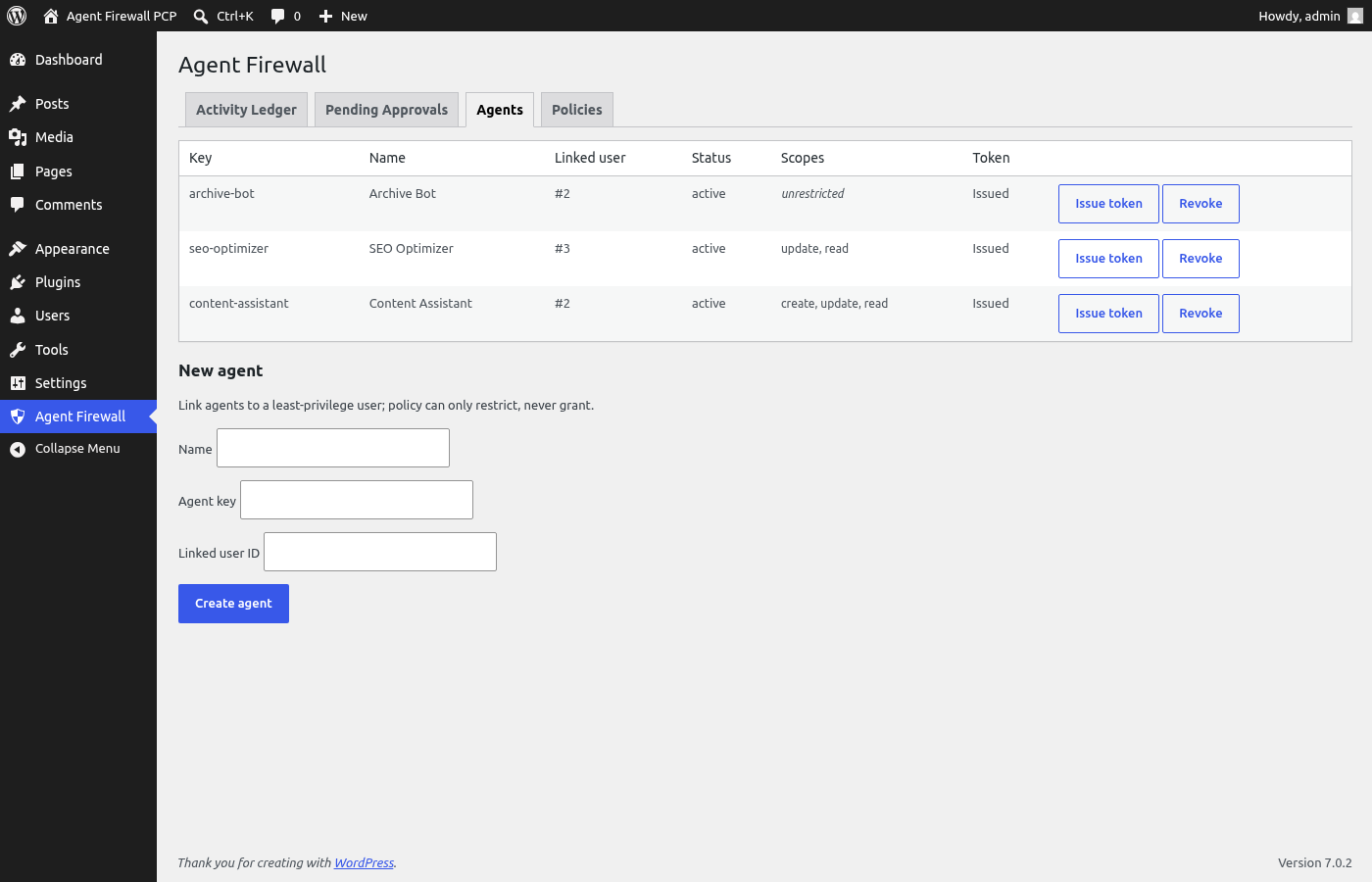
Each agent gets its own identity: a bearer token (ag_live_...) tied to a WordPress user of your choosing. Tokens are stored as SHA-256 hashes and displayed a single time at issuance. An agent can never exceed the capabilities of its linked user, and token scopes can pin it down further, to specific action categories or ability patterns.
Write actions are intercepted at both doors. Ability execution callbacks are wrapped at registration, and direct REST writes are caught at rest_pre_dispatch, so switching transports doesn’t dodge the rules. Policies match on ability name, action category, entity type or id, and source, in priority order. Each rule decides: allow, deny, log only, or require human approval. If nothing matches, destructive actions require approval and reads pass. A sliding-window rate limiter shuts down runaway loops, and the admin gets an email when it trips.
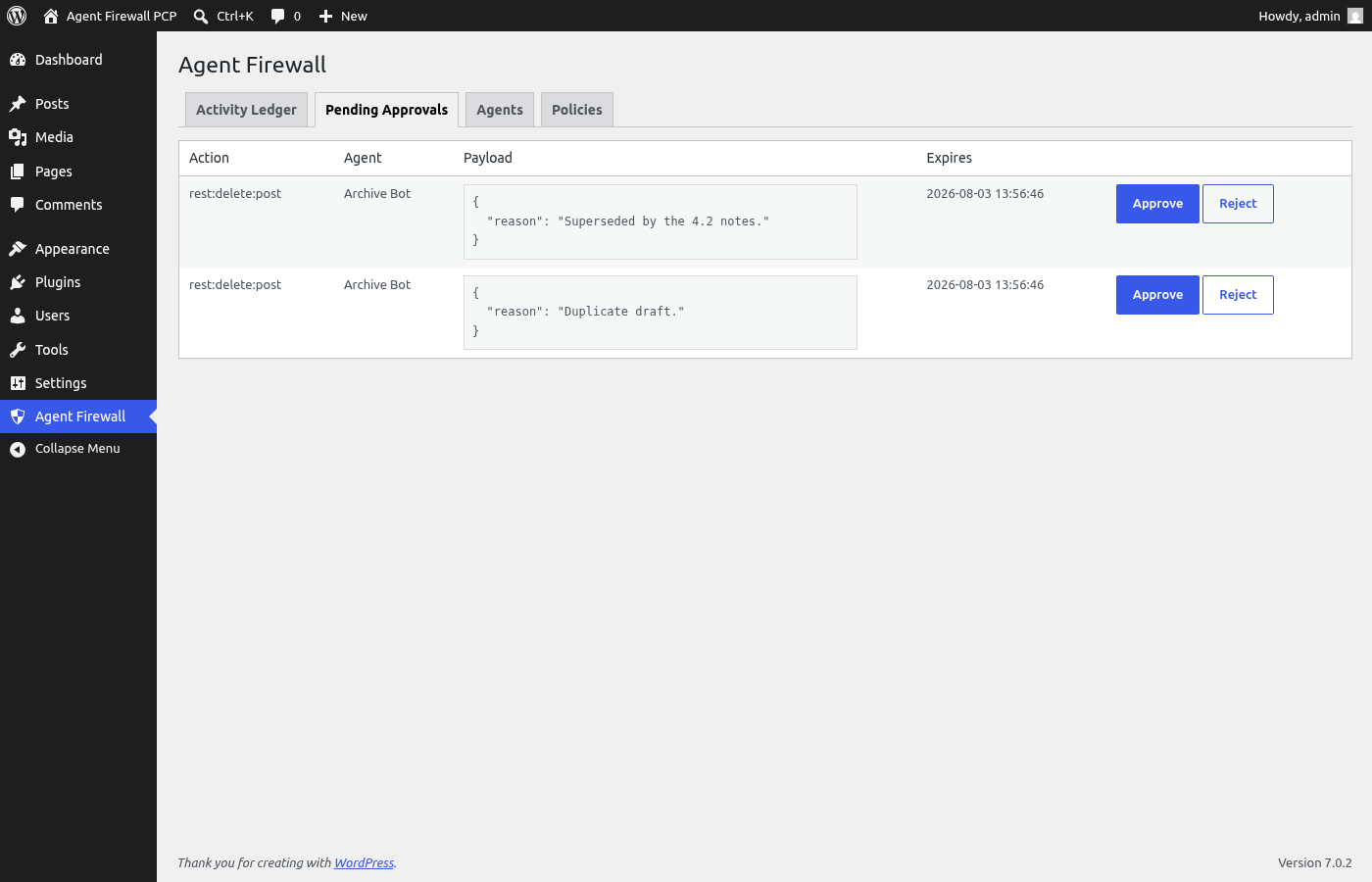
Held actions land in an approval queue along with the target’s modification timestamp. If a person edits that content before you approve, the stored action aborts with a conflict rather than overwriting the newer work.
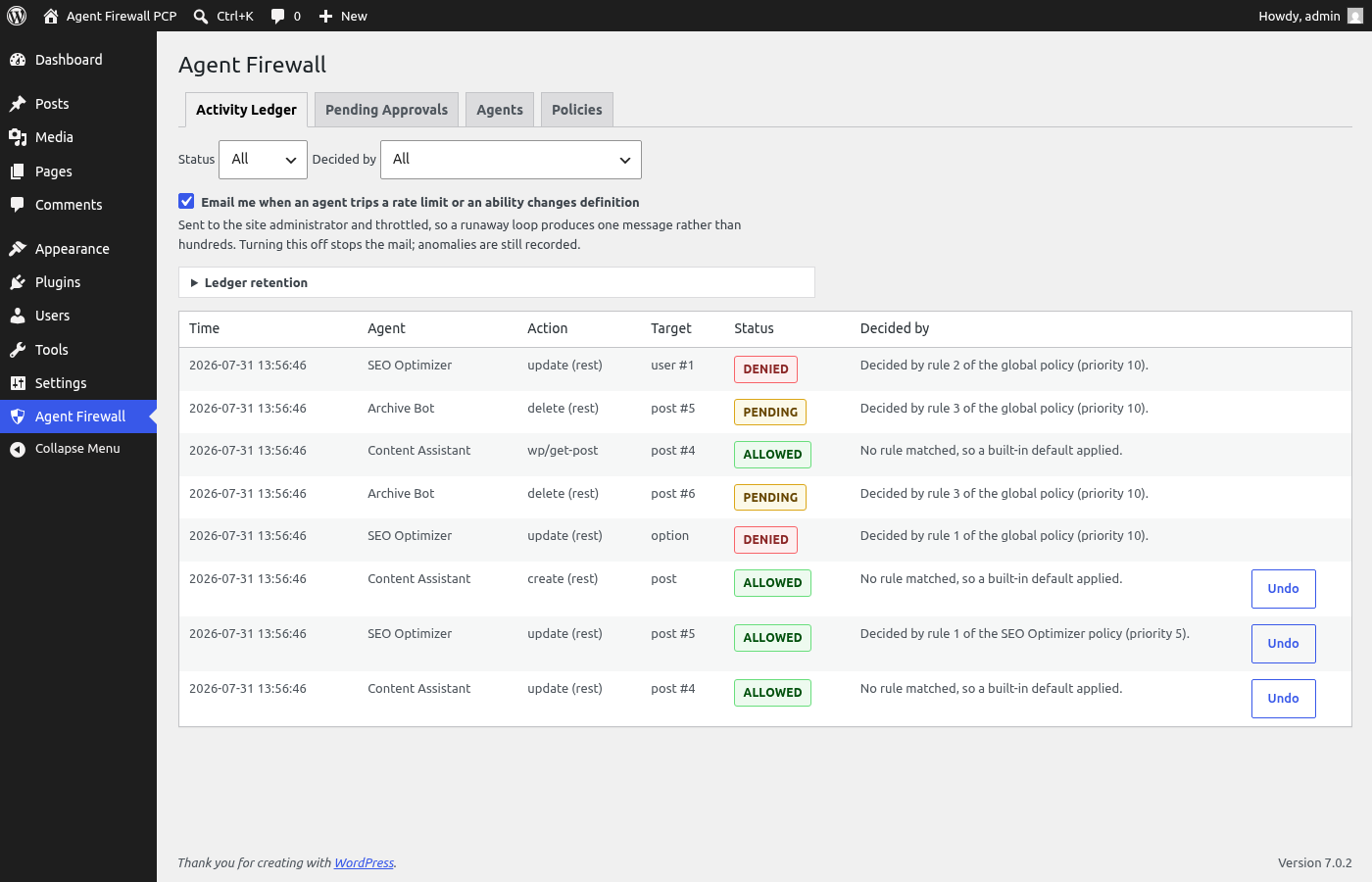
Every decision is written to an append-only audit ledger. Each entry carries a SHA-256 hash chained to the previous one, so any after-the-fact tampering breaks verification. Secrets in action payloads (passwords, API keys, tokens) are redacted before they reach the ledger.
Executed actions can be undone from the dashboard. Post edits restore through the normal revision history, deletions come back from trash, and settings changes restore from stored snapshots. Where a clean undo isn’t possible (say, user creation), the ledger says so instead of pretending.
The plugin also watches for two quieter risks: it fingerprints every registered ability and emails you when one appears or changes definition (a known tool-poisoning pattern), and it records REST writes made with application passwords – which carry no agent identity – in the audit ledger as “untracked”. A strict setting can block those outright.
All decisions are made by plain PHP on your server. The plugin makes no external service calls and collects no telemetry. The admin dashboard (Agent Firewall menu) runs on permission-checked REST endpoints. The Abilities API interception itself is what sets the WordPress 6.9 floor.
What this does and does not claim
Every agent write that reaches WordPress is evaluated, and every one that succeeds is recorded. That is the promise, and it is deliberately narrower than “blocks all AI attacks”.
What it cannot see, stated plainly so you can judge the fit:
- Writes that bypass WordPress. Anything with direct database access is invisible to any plugin, including this one.
- What an agent decided. Prompt injection happens in the model, before a request exists. This governs what an agent tries to do, not what it was talked into wanting.
- MCP servers that never touch your site. If a tool call is handled entirely elsewhere, there is nothing here to intercept.
- Attempts rejected by WordPress itself before the action runs, which currently leave no ledger entry.
Inside that boundary the guarantee is strict: no policy decision depends on a language model, nothing is sent anywhere, and the audit trail is tamper-evident rather than merely append-only. A security tool that overstates its reach is worse than one that draws the line clearly, so the line is drawn here.
Screenshots
Installation
- Upload the plugin ZIP via Plugins > Add New > Upload, or copy the folder to
wp-content/plugins/. - Activate the plugin. Database tables are created on activation.
- Open the Agent Firewall admin menu. Until your first agent exists, a getting-started panel walks you through the setup: create an agent linked to a least-privilege user and issue its token.
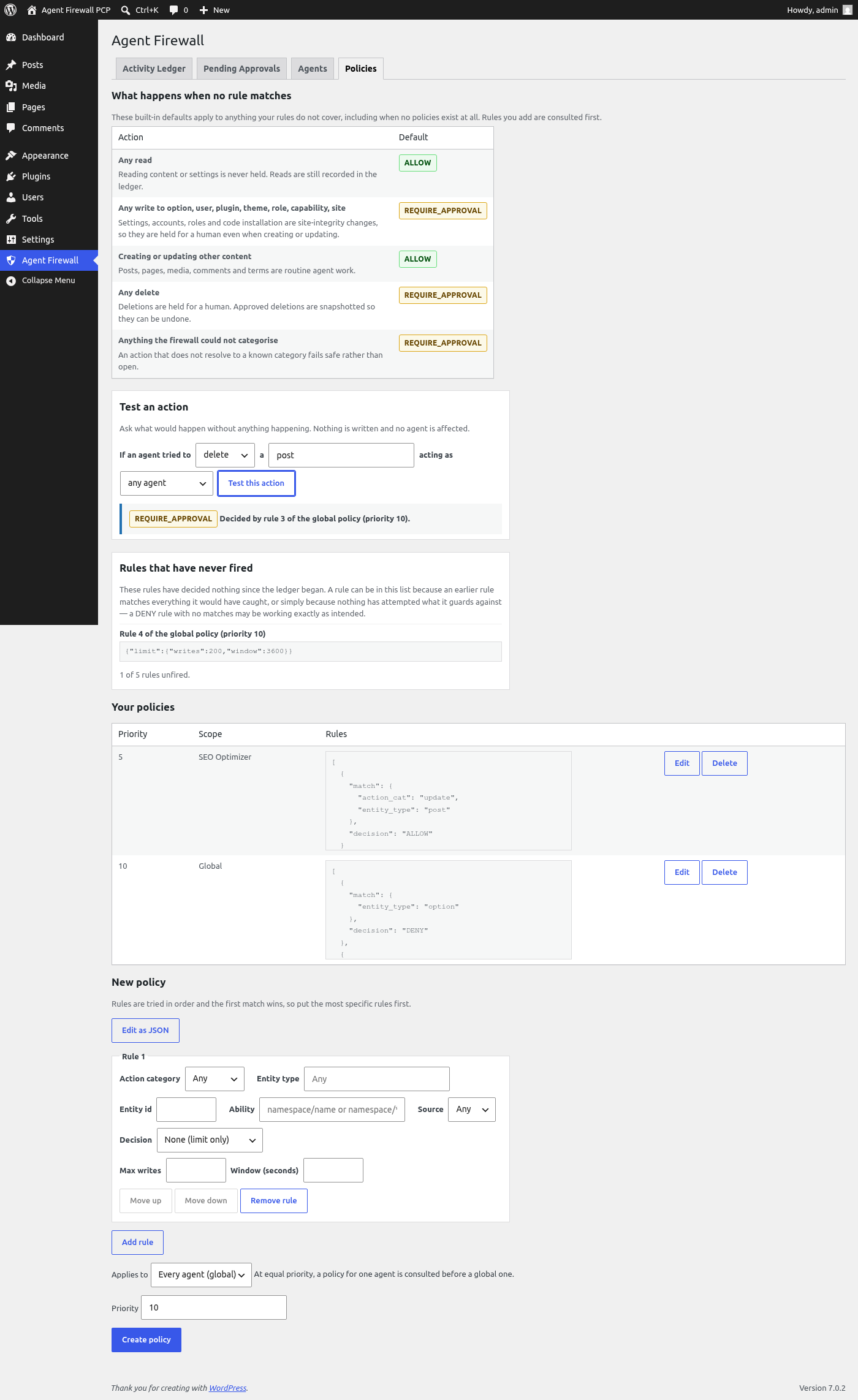
- Adjust policies if needed. The policy list starts empty, but the built-in defaults already require approval for deletions and for any change to settings, accounts, roles, plugins, themes, templates, global styles and widgets. The Policies screen shows exactly what those defaults do.
- Give the token to your AI agent as an
Authorization: Bearerheader.
FAQ
-
Does this plugin call any external services?
-
No. All policy decisions run as plain PHP on your server. Nothing leaves your site.
-
What happens to my data when I uninstall?
-
Nothing, by default. The audit ledger is evidence, so it stays. If you want uninstall to remove all Agent Firewall tables and options, opt in first:
wp option update adaf_delete_data_on_uninstall 1. -
Do agents need a special user account?
-
Each agent is linked to a WordPress user and can never exceed that user’s capabilities. Policies and scopes only restrict further, so link agents to least-privilege users.
-
Why does it require WordPress 6.9?
-
The Abilities API, the structured way AI agents act on WordPress, shipped in 6.9. Intercepting it is a core feature of this firewall.
-
How do I stop all agents immediately?
-
Use the kill switch: the “Emergency stop: pause all agents” button at the top of every Agent Firewall screen. While engaged, every agent action – reads included – is denied with a clear machine-readable reason, and every denial still lands in the audit ledger. Held approvals stay put; nothing is lost. Release it from the same place when the incident is over. It is a hard deny rather than hold-for-approval so a runaway agent cannot flood your approval queue while you investigate.
-
Can an agent approve its own held actions?
-
No. Approval endpoints require the
manage_optionscapability. The firewall’s own admin routes are exempt from agent gating precisely so a human can still step in when an agent is misbehaving. -
What do agents see when an action is blocked?
-
A structured error, not a bare refusal. Denials carry a
reason(policy,out_of_scope,rate_limited,untracked_automation,lockdown), aretryableflag, and a plain-language explanation of what would change the answer. Rate limits say that waiting clears them; scope and policy denials say that retrying will not help and a site administrator has to act. Held actions report that they have not executed and should not be resubmitted. Rate-limit denials also carry aretry_aftervalue and a standardRetry-Afterheader saying when a slot frees, and held actions can be polled at/pending/{id}/statuswith the agent’s own token. Well-behaved agents act on this instead of hammering the endpoint. -
Are there any policies out of the box?
-
The policy list starts empty, but the site is not unprotected. When no rule matches, the firewall falls back to built-in defaults: reads are allowed; creating or updating posts, pages and media is allowed; every deletion is held for approval; and any write to settings, user accounts, roles, plugins, themes, templates, global styles or widgets is held for approval even when it is a create or an update. Anything the firewall cannot categorise is held rather than allowed. The Policies screen lists these defaults so an empty policy list is not mistaken for no protection.
-
How do I write a policy rule?
-
Use the rule builder on the Policies screen, which offers only values that can actually occur, or switch it to JSON if you prefer. A rule matches on any combination of action category (create, update, delete, read), entity type, entity id, ability name, and source, and carries a decision: ALLOW, DENY, REQUIRE_APPROVAL, or LOG_ONLY. Rules are tried in order and the first match wins, so a rule with no match conditions must be last. A rule may also carry a sliding-window write limit instead of a decision.
Each policy is either global or scoped to a single agent, chosen with the “Applies to” control and changeable later. At equal priority an agent’s own policy is consulted before a global one.
The full grammar is available over the API at
/wp-json/agenticdaisy-firewall/v1/policies/schema, which returns the JSON Schema, the accepted values for each dimension, and the defaults. -
Can I copy my policies to another site?
-
Yes. The Policies screen has “Export policies (JSON)” and “Import policies” buttons. Importing only ever adds: existing policies are never edited or deleted, and an entry identical to one you already have is skipped. Policies scoped to a single agent attach to an agent with the same name on the destination site; if none exists, the entry is skipped and the import report says so, because silently applying an agent-specific rule to every agent would change what it protects.
-
How do I check what a rule will actually do?
-
Use “Test an action” on the Policies screen. Pick an action, an entity type and optionally an agent, and it reports what would happen and which rule decided it – or that no rule matched and a built-in default applied. It is a dry-run: nothing is written, no rate limit is consumed, and no agent is affected. This matters because rules are tried in order and the first match wins, so reading a list of policies does not always tell you which rule governs a given action.
After the fact, the Activity Ledger’s “Decided by” column reports the same thing for every action the firewall has already seen, so you can trace any verdict back to the rule that produced it. You can also filter the ledger by deciding policy, to see what one rule has actually been doing, or by “Built-in defaults” to see the actions no rule covered yet. The Policies screen lists any rule that has decided nothing at all, which catches a rule quietly shadowed by an earlier one – though a rule can also be unfired simply because nothing has attempted what it guards against, so it reports the fact rather than telling you to remove anything. If you have set a retention window, that list says so and names how far back the ledger still reaches, since a rule whose matches were pruned looks the same as one that never matched. That provenance is covered by the ledger’s hash chain, so it cannot be rewritten without detection.
-
What happens if I write an invalid rule?
-
It is rejected when you save it and nothing is stored. Structural problems, such as a decision that is not one of the recognised values, name the exact position of the error. Beyond that, the plugin rejects rules that would silently do nothing: a rule carrying neither a decision nor a limit, and any rule made unreachable by an earlier rule that already matches everything. If a stored rule is somehow unrecognisable at evaluation time, the action is held for approval; the engine never fails open.
-
Can I stop the audit ledger growing forever?
-
Yes, but it is off by default because deleting audit records is not something a plugin should do to you unasked. Set a retention window under “Ledger retention” on the Activity Ledger screen and a daily job trims entries older than that. Because the ledger is hash-chained, pruning re-anchors the chain rather than breaking it, and every prune writes its own entry recording how many entries were removed and when – retention that left no trace of itself would be a way to erase an audit trail. Actions still waiting for approval always keep their records. Snapshots are removed with their entries, so actions older than the window can no longer be undone.
Both jobs are also available to WP-CLI, along with a summary:
wp agent-firewall statusreports the ledger size, its oldest entry, whether the chain verifies and whether history has been trimmed;wp agent-firewall verifychecks the chain and exits non-zero if it has been tampered with, so you can run it from cron and be told rather than having to look;wp agent-firewall pruneapplies the window, with--dry-runto see what would go first. -
Can I turn the alert emails off?
-
Yes. The Activity Ledger screen has a checkbox: “Email me when an agent trips a rate limit or an ability changes definition”. It is on by default, sends only to the site administrator, and is throttled so a runaway loop produces one message rather than hundreds. Turning it off stops the mail; the anomalies are still recorded in the ledger either way. These are event alerts about your own site – the plugin sends no newsletters, digests or marketing of any kind.
-
What is the strict application-password setting?
-
Integrations that authenticate with application passwords carry no agent identity, so they bypass agent policy. By default each such write is recorded in the Activity Ledger with the “untracked” status – it names the route, the action, and the acting WordPress user, and it joins the tamper-evident hash chain like every other entry. Set
adaf_block_app_password_writesto1to reject such writes entirely and force automation onto agent tokens.
Reviews
There are no reviews for this plugin.
Contributors & Developers
“Agentic Daisy AI Agent Firewall” is open source software. The following people have contributed to this plugin.
Contributors
Translate “Agentic Daisy AI Agent Firewall” into your language.
Interested in development?
Browse the code, check out the SVN repository, or subscribe to the development log by RSS.
Changelog
1.0.0
- New: emergency kill switch. One control at the top of every screen denies all agent activity (reads included) until released; every denial is still ledgered, and agents receive a distinct non-retryable
lockdownreason. - New: policy export and import as portable JSON. Import is append-only, re-validates every rule, attaches agent-scoped policies by agent name, and reports anything it skipped.
- New: getting-started panel guides first-run setup until the first agent exists.
- Improved: ability-registry alerts now arrive as one digest email per scan instead of one email per ability, so a plugin update registering many abilities no longer floods the inbox.
- Improved: the Activity Ledger’s “Decided by” column now names the kill switch and the token scope gate instead of attributing those denials to the built-in defaults.
- Fixed: opt-in uninstall now removes every plugin option (alerting, fingerprints, retention, lockdown, strict app-password mode) and clears the retention cron job.
- Fixed: application-password writes are now actually recorded. The readme promised they were “flagged”, but in default mode they left no trace; each one now becomes an “untracked” entry in the audit ledger, naming the route, action and acting user, chained like every other entry.
- Fixed: a POST to the singleton /wp/v2/settings route now classifies as an update, so policy rules matching update on options fire for the transport most clients use. Item routes addressed by slug (plugins, themes, sidebars, templates) also classify correctly.
- Improved: site-editor and appearance routes (global styles, templates, navigation, menus, widgets, blocks, plugins, themes) now map to named entities policy rules can target, instead of falling into “unknown”. Templates, global styles and widgets join the held-for-approval defaults; menus and navigation are treated as routine content.
0.1.1
- Security hardening: option snapshot capture and rollback restore are now strictly whitelist-bound. Input keys outside the settings map are never read into snapshots, and restore re-validates every option name before writing.
0.1.0
- Initial release: agent identities with scoped tokens, Abilities API and REST interception, deterministic policy engine with rate limiting, approval queue with a state-drift guard, hash-chained audit ledger with secret redaction, revision/trash/snapshot rollback, tool-registry drift alerts, application-password write detection, React admin dashboard.