

Description
Hide Page And Post Title allows you to hide the title of individual pages, posts and public custom post types.
Simply enable the “Hide the title” option when editing the content. The setting is applied individually, so you can choose which pages, posts or custom post types should display their title.
Key Features
- Hide titles on individual pages.
- Hide titles on individual posts.
- Hide titles on public custom post types (CPT).
- Supports WordPress block themes and classic themes.
Screenshots
Installation
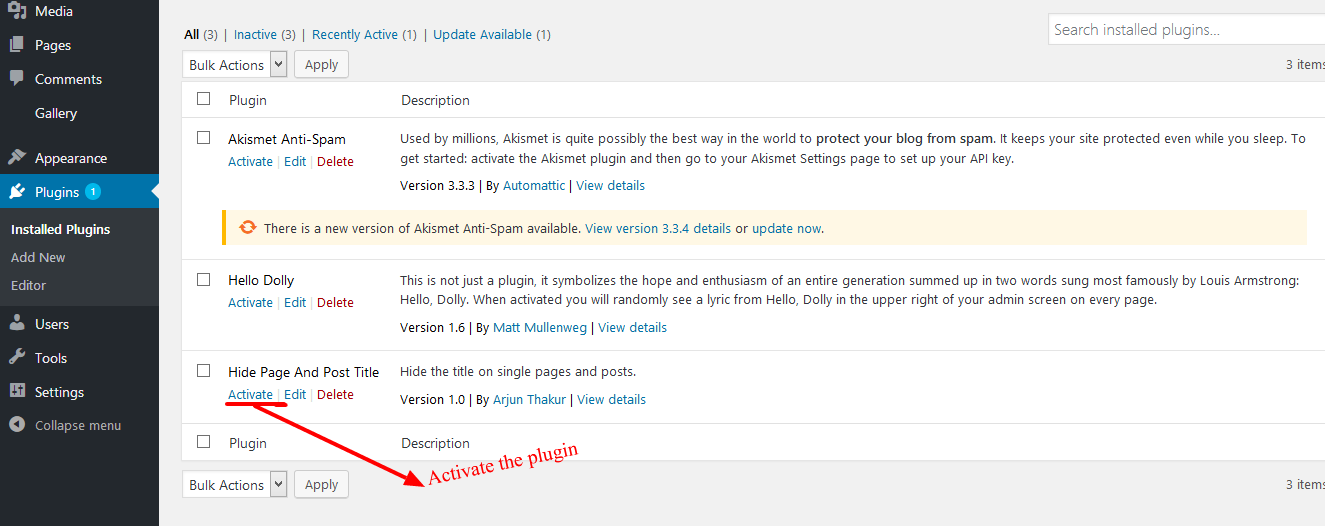
- Activate the plugin through the Plugins menu in WordPress.
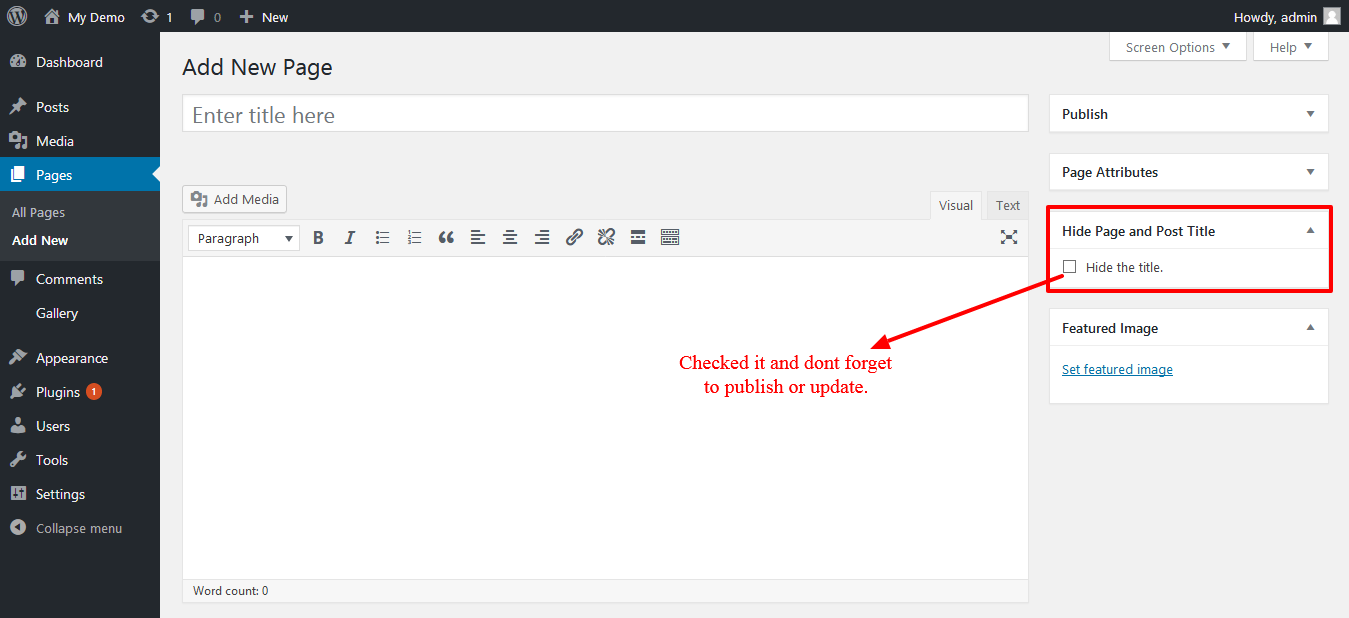
- Edit an existing or new page, post or supported custom post type.
- Enable “Hide the title”.
- Update or publish the content.
- View the page or post on the frontend.
To show the title again, edit the content, clear “Hide the title”, and update it.
FAQ
-
Does it work with block themes?
-
Yes. The plugin supports WordPress block themes as well as classic themes.
-
Will hiding the title affect SEO?
-
The plugin only hides the visible title on the page. It does not delete or change the title stored for the page or post, and it does not intentionally modify the document title or SEO metadata.
If the hidden title is the only H1 on your page, consider adding another appropriate heading to your content when needed.
-
How do I hide the title of a page or post?
-
- Edit the page or post.
- Enable “Hide the title”.
- Click Update or Publish.
- Visit the page or post to see the result.
-
Does it work with custom post types?
-
Yes. The plugin supports public custom post types (CPT).
-
How do I show the title again?
-
Edit the page, post or custom post type, uncheck “Hide the title”, and update the content.
-
The title is still showing. What should I do?
-
Go back to the specific page, post or custom post type where you want to hide the title and confirm that “Hide the title” is checked. Then click Update or Publish and check the page again.
The title-hiding option is set individually for each page, post or custom post type.
-
What happens when I deactivate the plugin?
-
Deactivating the plugin does not remove your saved title-hiding settings. If you activate the plugin again later, your previous settings will still be available.
-
What happens when I delete the plugin?
-
When the plugin is deleted from WordPress, its saved title-hiding settings are removed from the database. Your page, post, and custom post type titles themselves are not deleted.
Reviews


Contributors & Developers
“Hide Page And Post Title” is open source software. The following people have contributed to this plugin.
Contributors
Translate “Hide Page And Post Title” into your language.
Interested in development?
Browse the code, check out the SVN repository, or subscribe to the development log by RSS.
Changelog
1.6.2
- Updated plugin documentation and FAQs.
- Added screenshots to the plugin documentation.
- Improved plugin listing information and search relevance.
1.6.1
- Improved security and protection against direct access.
- Improved output escaping and validation.
- Raised the minimum supported WordPress version to 4.1 to support current WordPress functionality and security standards.
- Improved compatibility with current WordPress standards.
1.6.0
- Added support for WordPress block themes.
- Added support for the WordPress Post Title block.
- Improved compatibility with classic themes and different title structures.
- Improved title hiding without modifying secondary uses of the post title, such as breadcrumbs.
- Removed the plugin’s dependency on jQuery for its own title-hiding implementation.
- Improved security and validation when saving the title-hiding setting.
- Improved compatibility with newer PHP and WordPress versions.
- Preserved existing title-hiding settings when upgrading from earlier versions.
- Updated plugin documentation and FAQs.
1.5.8
- Previous release.