
Description
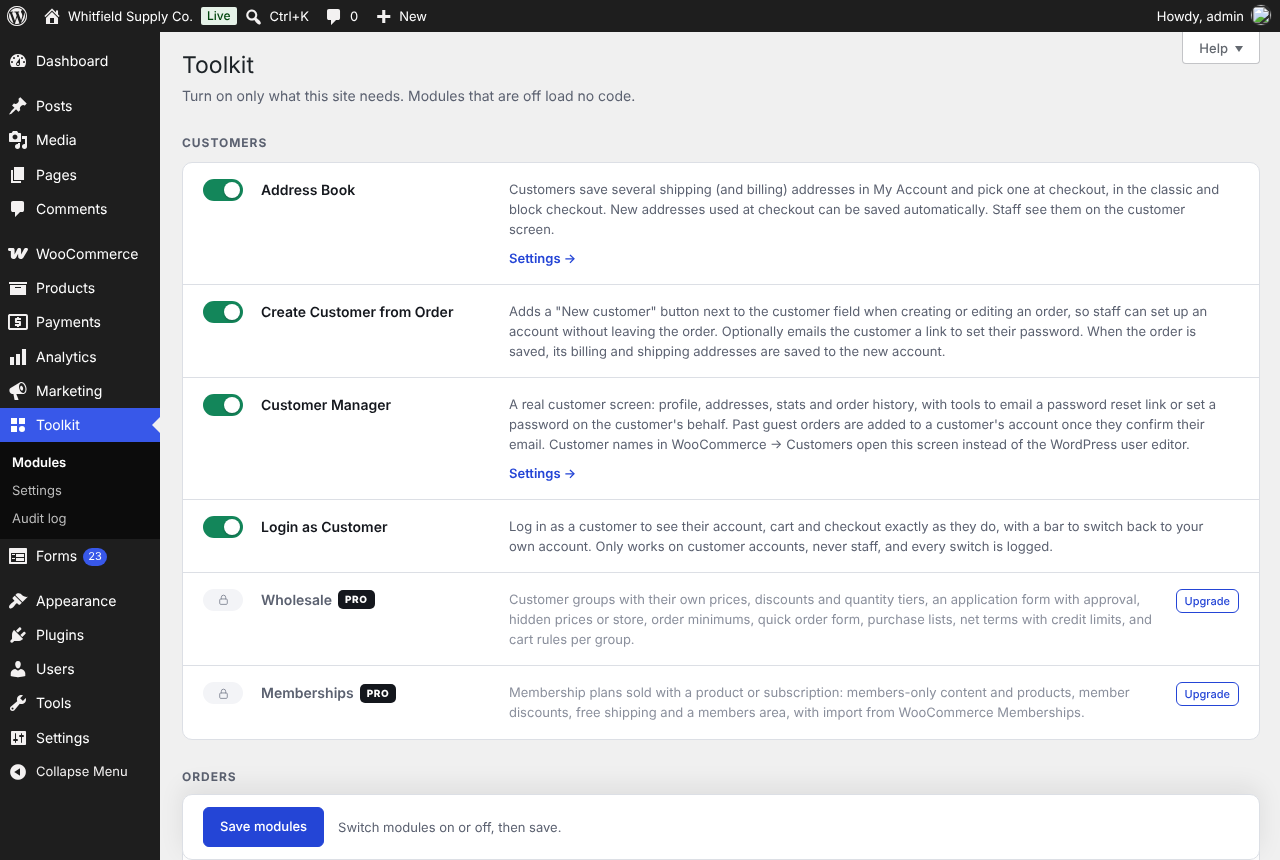
BYLTCommerce Toolkit replaces a pile of single-purpose plugins with one plugin made of modules. Switch on the modules a site needs under Toolkit Modules. A module that’s off loads no code at all: no hooks, scripts or database queries.
It works with or without WooCommerce. Store modules say “Requires WooCommerce” and switch on once it’s active.
Free modules
Customer Manager (WooCommerce)
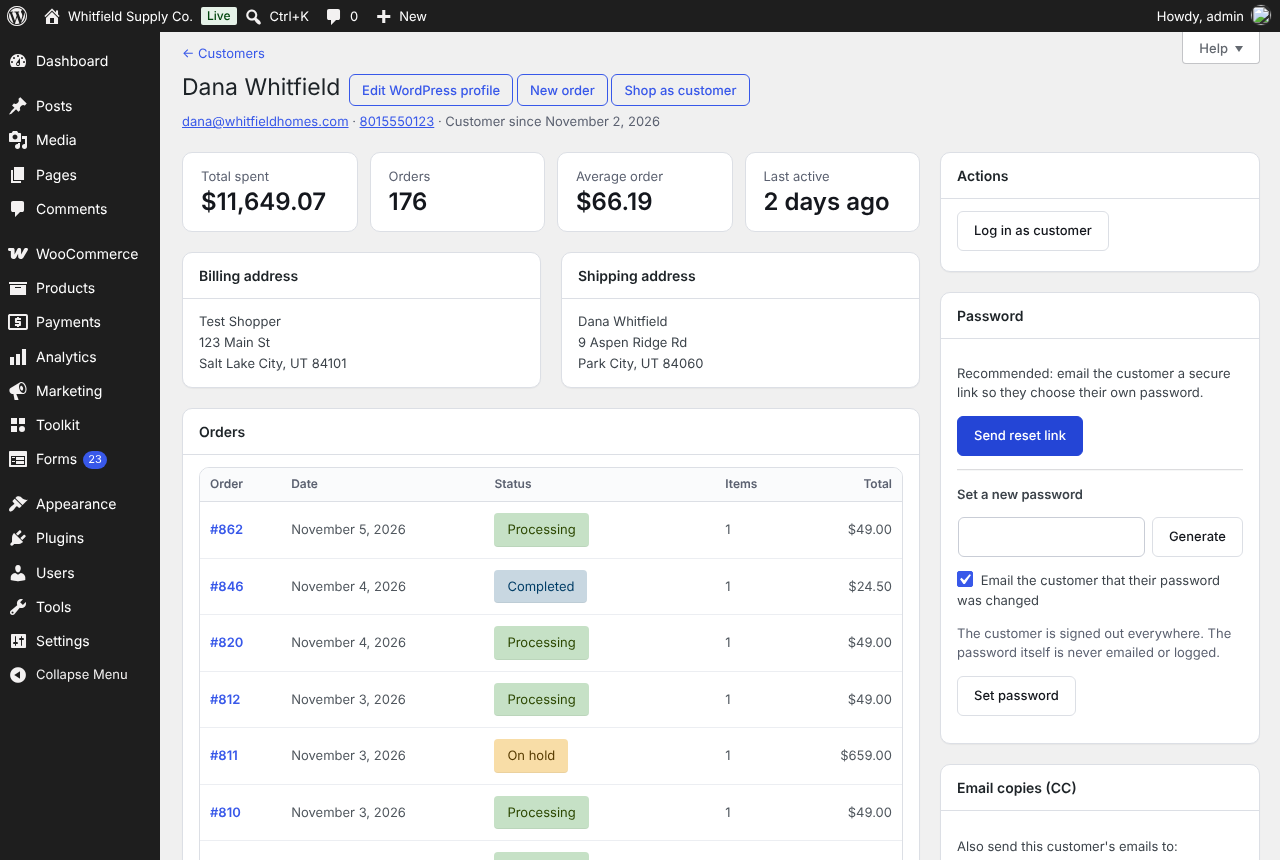
A real customer screen: profile, billing and shipping addresses, total spent, order count, average order, recent orders and an activity log. Customer names in WooCommerce Customers open it instead of the WordPress user editor.
- Email a password reset link, or set a password for the customer. The password is never emailed or logged.
- Guest customers: see their guest orders and create an account that keeps them.
Create Customer from Order (WooCommerce)
A “New customer” link under the Customer field on the order screen. It creates the account, selects it on the order, fills in the billing name, email and phone, and can email a link to set a password.
Login as Customer (WooCommerce)
See the store exactly as a customer does, then switch back. Only customer accounts can be switched to, never staff. The switch-back link is single-use, tied to your browser and expires after 12 hours. Every switch is recorded in the audit log.
Address Book (WooCommerce)
Customers save several shipping and billing addresses in My Account and pick one at checkout, in the classic and block checkout.
Checkout Protection (WooCommerce)
Stops card-testing bots with Cloudflare Turnstile or Google reCAPTCHA on checkout, login and registration, including the block checkout and direct Store API requests. IPs with repeated failed payments are locked out for a while. Staff are never asked to verify.
Form Protection
The same Turnstile or reCAPTCHA check for the WordPress login and registration forms, comments, and Contact Form 7, Gravity Forms and WPForms. No WooCommerce needed.
Forms
A simple form builder for contact and quote forms.
- 15 field types (including password and private file uploads), on/off fields, CSS classes, a full-width preview, required fields, email notifications and a thank-you message or redirect.
- Every entry is saved. Mark entries read or spam, and export them to CSV or JSON.
- Quote forms can add a “Request a quote” button to products, with the product filled in.
- Import and export forms and entries between sites.
- Add a form with the “Form” block or
[bylt_form id="12"].
Store Vacation (WooCommerce)
Close the store for a holiday or stock count. Set the dates, show a notice across the site, and either pause checkout or keep taking orders with a “ships after” message. It turns itself on and off on schedule and clears your page cache when it changes.
Site Tweaks
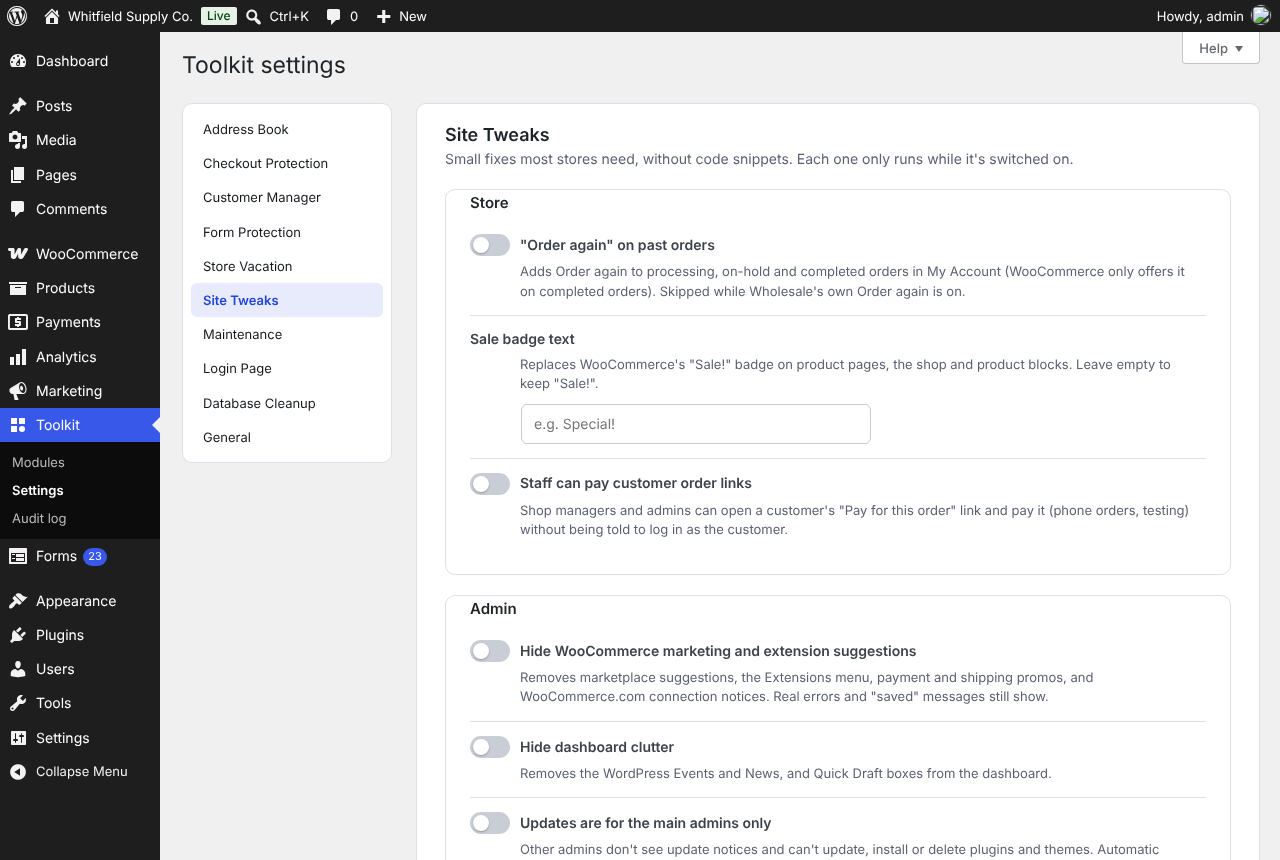
The small fixes most stores add as code snippets, as switches: “Order again” on past orders, your own sale badge text (“Special!”), staff paying customer order links, no WooCommerce marketing nags or dashboard clutter, updates and admin notices only for the main admins, safe SVG uploads (every file is cleaned), XML-RPC off, clean upload filenames, password rules, your own email sender name and address, and lighter cart fragments.
Maintenance & Coming Soon
Show visitors a branded “Coming soon” or “Down for maintenance” page while you keep working. Choose which roles still see the site, share a private preview link with clients, allow office IP addresses, and set an end time with a countdown. Maintenance mode tells search engines it’s temporary (503), and the REST API and payment webhooks keep working.
Login Page
Your logo, colours and background on the WordPress login screen. One vague error for a wrong username or password, and a lockout after repeated failed logins on wp-login.php and the My Account login.
Database Cleanup
See how many expired transients, old revisions, auto-drafts, trashed posts, spam comments, orphaned rows, expired WooCommerce sessions and old background-task logs you have, then clean them by hand or every week. Orders, customers and products are never touched.
Built to stay out of the way
- Menus only where you work. Settings share one page under Toolkit Settings. Work areas such as Forms get their own menu only while they’re switched on.
- Audit log. Password changes, account switches and settings changes are recorded under Toolkit Audit log.
- Plays well with caching. Toolkit doesn’t cache pages itself. It clears your cache when something visitors see changes: WP Rocket, LiteSpeed Cache, W3 Total Cache, WP Super Cache, WP Fastest Cache, SiteGround Optimizer and Nginx Helper.
- Off means off. A module that’s switched off loads nothing.
BYLTCommerce Pro
BYLTCommerce Pro adds more modules to the same plugin. Its code is not included in this free version; it’s installed when you activate a license, and there’s a 14-day free trial with no card needed. Pro modules include Wholesale, Subscriptions, Memberships, Gift Cards, Smart Coupons, Invoices & Packing Slips, Shipping Tools, Store Locator, Phone Payments and more. See byltcommerce.com.
Everything in the free version keeps working without a license.
External services
BYLTCommerce Toolkit only contacts outside services for the features listed here, and only when you turn them on.
Cloudflare Turnstile (Checkout Protection and Form Protection, when you choose Turnstile)
Visitors’ browsers load the Turnstile script from challenges.cloudflare.com on the protected forms. When a protected form is submitted, your site sends the visitor’s Turnstile token, your secret key and the visitor’s IP address to Cloudflare to confirm they’re human.
Terms of service, Privacy policy
Google reCAPTCHA (Checkout Protection and Form Protection, when you choose reCAPTCHA)
Visitors’ browsers load the reCAPTCHA script from www.google.com on the protected forms. When a protected form is submitted, your site sends the visitor’s reCAPTCHA token, your secret key and the visitor’s IP address to Google to confirm they’re human.
Terms of service, Privacy policy
Freemius (licensing, optional)
BYLTCommerce uses the Freemius SDK for Pro licenses and trials. After you activate the plugin, it asks whether you want to share basic site information (site URL, WordPress and PHP versions, plugins and your admin email) for updates and security notices. Nothing is sent unless you opt in or activate a license, and you can skip it.
Terms of service, Privacy policy
Screenshots




Blocks
This plugin provides 1 block.
- BYLTCommerce Form
Installation
- In WordPress, go to Plugins Add New, search for BYLTCommerce Toolkit, then click Install Now and Activate.
- Go to Toolkit Modules, tick the modules you want and click Save modules.
- Modules with options add a section to Toolkit Settings.
For Checkout Protection or Form Protection, create a free Cloudflare Turnstile or Google reCAPTCHA key and paste the site key and secret key into the module’s settings.
FAQ
-
Do I need WooCommerce?
-
No. Forms and Form Protection work on any WordPress site. Modules that need WooCommerce show “Requires WooCommerce” and switch on once it’s active.
-
Will it slow my site down?
-
Modules you haven’t switched on load nothing. The ones you use only load their scripts on the pages that need them.
-
What happens to my data if I delete the plugin?
-
Nothing is removed unless you ask. To remove everything BYLTCommerce stored, tick Delete all BYLTCommerce data under Toolkit Settings General before deleting the plugin.
-
Who can use the customer tools?
-
The customer screen needs the
manage_woocommercecapability (administrators and shop managers). Password tools and Login as Customer also require permission to edit that user, so shop managers can’t touch staff accounts. Only administrators can switch modules on or off. -
Where are the full docs?
Reviews
There are no reviews for this plugin.
Contributors & Developers
“BYLTCommerce Toolkit” is open source software. The following people have contributed to this plugin.
Contributors
Translate “BYLTCommerce Toolkit” into your language.
Interested in development?
Browse the code, check out the SVN repository, or subscribe to the development log by RSS.
Changelog
0.40.0
- Login as Customer: choose where staff land after switching (Home page, My account, Shop, Cart or any page) in Toolkit Settings Login as Customer. Every “Log in as customer” and “Shop as customer” link uses it. The default is My account.
0.39.2
- Licensing: the Pro version’s address now matches the store settings (byltcommerce-toolkit-pro).
0.39.1
- Licensing now uses the plugin’s WordPress.org address (byltcommerce-toolkit).
- Readme: new screenshots; older changelog entries moved to changelog.txt.
0.39.0
- Renamed to BYLTCommerce Toolkit. The text domain is now byltcommerce-toolkit. Settings, data and the Toolkit menu are unchanged.
0.38.0
- All styles and scripts now load through WordPress’s enqueue functions (no inline style or script tags).
- Forms: submissions from logged-in visitors are protected with a nonce, since they can update the visitor’s account.
- Forms: file uploads are saved with WordPress’s upload handler.
- Customer Manager: attaching guest orders also checks that you can edit that user.
0.37.0
- Store Locator import: upload Excel (.xlsx) files as well as CSV.
- Store Locator import: files with one yes/no column per category (as other store locators export) are recognised. Each column is matched to an existing category or creates a new one, or can be skipped.
- Store Locator import: addresses written on one line (“2005 E Main Rd, Portsmouth, RI 02871”) are split into street, city, state and ZIP, and rows with map coordinates no longer need a ZIP or city.
- Store Locator import: different stores at the same address are both kept and listed on the report; the same store listed twice is merged.
0.36.0
- Customer Manager: “Shop as customer” button beside “New order” on the customer screen. It logs you in as the customer (like Log in as customer) and opens the Shop.
- Customer Manager: email copies (CC). Add up to 5 extra addresses to a customer (a bookkeeper, a purchasing team) and pick which order emails they get copies of. Staff set them on the customer screen; customers can set their own in My Account Account details. Password and account emails are never copied, and changes are recorded in the activity log.
- Invoices & Packing Slips: a PDF column on the orders list with one-click invoice and packing slip icons (the old icons were in WooCommerce’s Actions column, which is hidden by default).
- Invoices & Packing Slips: “Email invoice to customer” bulk action on the orders list. It sends WooCommerce’s order details email (with the invoice PDF, if attached) for every selected order and adds an order note; more than 25 are sent in the background.
- Invoices & Packing Slips: the invoice PDF can now be attached to the store’s New order email too (Settings Invoices & Slips Attach invoice PDF to).
0.35.0
- Subscriptions: automatic renewals with WooCommerce PayPal Payments. Subscribers who pay with PayPal, Venmo or a card through PayPal have it saved by PayPal (with “Save PayPal and Venmo” / “Save card details” on in PayPal Payments), and each renewal is charged to it using PayPal Payments’ own renewal payment; cards are charged as merchant-initiated recurring payments. Declines, retries, “Pay now” emails and card updates work the same as for Stripe and Authorize.Net, and Subscriptions Settings shows whether PayPal is ready.
0.34.0
- Subscriptions: automatic renewals with Stripe and Authorize.Net. When a customer subscribes with the WooCommerce Stripe Gateway or Authorize.Net CIM, their card is saved by that plugin, and every renewal is charged to it automatically using the plugin’s own renewal payment (no card details pass through BYLT). If a card is declined, the subscription goes on hold, the customer is emailed a link to pay, and the card is tried again after the days you set (3 and 7 by default). Paying a renewal with a new card makes it the card for future renewals. Subscriptions Settings shows which payment methods renew automatically and what to switch on if one can’t (“Saved cards” in Stripe, “Tokenization” in Authorize.Net). Subscriptions imported from WooCommerce Subscriptions that renewed automatically can be turned back to automatic with one click. Other payment methods keep the “Pay now” email.
0.33.0
- New: Bookings (Pro). Sell appointment times: customers choose a date and an open time on the product page, check out, and the booking is confirmed when the order is paid. With Google Calendar connected (a service account, no extra plugins), open times leave out anything busy on the calendar and each booking becomes an event with the customer invited. Opening hours, closed dates, buffers, minimum notice, how far ahead, and a hold while the time is in the cart so nobody can double-book. Variations can have their own length. WooCommerce Bookings lists upcoming, past, cancelled and needs-attention bookings; staff can move or cancel a booking (the calendar event follows). Customers see their bookings in My Account and can move them up to a set time before; reminder emails go out beforehand. Works with the classic and block checkout. Switching over from the WC Google Calendar Booking plugin copies its settings, products and current bookings.
0.32.0
- Wholesale: sub-accounts. A wholesale customer adds the people who buy for their company in My Account Sub-accounts. Each buyer gets their own login (by an email with a set-password link) and shops with the company’s prices, offers, payment terms, shared credit limit, tax certificates and purchase lists. Per buyer: whether they can place orders, whether orders need approval (never, always, or over an amount) and whether they see all company orders. Orders that need approval are sent with “Send for approval”: the company account is emailed and approves (the buyer gets a link to pay; the company can pay it too) or declines with a note, right from the order in My Account. The company sees every buyer’s orders with a “Placed by” column, and can turn buyers off and on. New order status “Awaiting approval” (no stock taken, not counted as a sale). Staff see the company link on the customer screen and can unlink a buyer. The B2BKing importer now brings subaccounts and their permissions across.
Older versions: see changelog.txt in the plugin folder.