

Description
Manage Ukrainian deliveries and fiscal receipts in one WooCommerce workspace. Connect Nova Poshta, Ukrposhta, Meest and Rozetka Delivery for shipping, and Checkbox or Vchasno.Kasa for receipts.
Keep shipments from different carriers together, work with several sender profiles and warehouses, and choose the appropriate cash register for each manual sale. You can start with an existing tracking number instead of creating a new shipment.
Delivery tools in Free
- Delivery methods for classic WooCommerce checkout and Checkout Blocks. Available branch, parcel locker and address delivery options depend on the carrier.
- Carrier connections and sender profiles, with no plugin-imposed limit on the number of saved shipments or profiles.
- Create an individual waybill using a sender profile, with optional order data loading and a review before submission to the carrier.
- Add an existing tracking number without creating another shipment at the carrier.
- A shared shipment list with recipient information, profiles, statuses, filters and pagination.
- Manual status checks, tracking history and individual waybill printing in the formats available through each carrier.
- Preliminary delivery quotes where supported by the integration. These are estimates, not a guarantee of the final carrier charge.
- CSV export with a date range.
- Links between WooCommerce orders and shipments, with delivery actions in the order list and order details.
Receipt tools in Free
- Manual receipts through Checkbox and Vchasno.Kasa, using your own connected and configured cash registers.
- Prepare a receipt from a WooCommerce order, or enter a manual sale without an order, including an offline sale or a shipment added separately.
- Edit the draft’s products, services, quantities, prices, discounts, register tax codes and payment details before issuing.
- Choose a receipt service and cash register for a manual sale, including registers belonging to different businesses.
- A receipt journal, manual status checks and access to available receipt documents.
- Full fiscal returns and manual shift management, subject to the service and register requirements.
Saving a draft does not issue a receipt, create a WooCommerce order or change product stock. Issuing a receipt is a separate action. A fiscal return does not refund money through a payment gateway, change the WooCommerce order or restock products.
Optional Pro add-on
The separately installed Pro add-on provides scheduled tracking, bulk shipment actions, CSV import, supported carrier account imports and bulk waybill printing. Receipt features include automatic issuing, register routing rules, automatic shift management, mixed payments, advance payments, partial returns, bulk receipt actions and receipt-name templates for products and variations.
Pro is optional. Free manual features and previously saved records remain available without an active Pro license. Carrier and receipt-service accounts, their fees and their access requirements are separate from the plugin.
Supported delivery options
- Nova Poshta: one domestic parcel from a branch to a branch, parcel locker or recipient address, within the integration’s size and weight limits.
- Ukrposhta: Standard or Express to a branch or address. A saved eCom sender and address are required for creation. Parcel locker delivery is not offered by this integration.
- Meest: supported domestic branch, parcel locker and address delivery. Availability depends on the selected destination and your contract.
- Rozetka Delivery: supported branch delivery.
Not every service exposes the same tracking, quoting, import or print operations. For example, preliminary API quotes are available for supported Ukrposhta and regular Meest routes; Nova Poshta, Rozetka Delivery and Meest parcel locker quotes are not currently offered. The interface and built-in help explain these differences.
Try the demo and get help
Open the interactive demo to explore fictional orders, shipments and receipts. The demo uses an isolated temporary store. Real carrier calls, email sending and fiscal issuing are disabled there. Its initial browser loading is specific to the demo, not the normal installed plugin.
The Support section contains first steps and FAQs grouped into general questions, delivery and waybills, and receipts and cash registers. Contact support@limehippo.com for assistance.
This is an independent integration. The named carriers and fiscal services are third-party services and are not the publisher of this plugin.
External services
This plugin integrates with six independent delivery and fiscal-receipt services. It does not send telemetry to LimeHippo. Saving credentials configures an integration; requests occur when you check a connection, use a service action, or enable its checkout method. Checkout city, street, pickup-point and rate searches contact the selected carrier as a shopper uses checkout. Responses may be cached locally. Creating a waybill, issuing a receipt, making a fiscal return and opening or closing a shift require a separate operator action in Free. Merely installing the plugin does not perform these writes.
All API calls originate from your WordPress server over HTTPS. The provider therefore also receives the server’s IP address and normal HTTP metadata. Use accounts and register credentials you are authorized to use. Provider fees, contracts and access requirements are separate from this plugin.
The service terms and privacy policy links below are published by each provider, usually on its public website rather than on the API hostname. They apply to the named integration. These pages are primarily in Ukrainian; Rozetka’s policy requires JavaScript to display. No acceptance of provider terms is performed by this plugin.
Nova Poshta
Purpose: city, branch and street selection, sender/connection checks, single-waybill creation, manual tracking and document printing.
Data: the selected merchant API key and directory search text or location IDs; sender and contact references for account queries; a tracking number or document reference for tracking/printing. After explicit creation confirmation, the service receives sender and recipient names, phone numbers, destination references or address, parcel description, weight/dimensions, declared value, payer and cash-on-delivery details. Creation also includes a local operation reference used to reconcile uncertain responses without resubmitting the shipment. Directory searches do not create shipments.
Endpoint: https://api.novaposhta.ua/v2.0/json/ . Printing sends the document number and API key to https://my.novaposhta.ua/orders/ . Tracking links open https://tracking.novaposhta.ua/ in your browser.
* Nova Poshta service terms, public agreement and API license
* Nova Poshta privacy policy
* Nova Poshta API information
Ukrposhta
Purpose: address and post-office directories, connection/sender checks, preliminary delivery quotes, single-waybill creation, manual tracking and printing.
Data: the configured bearer token and eCom token as required, directory text/region/city IDs, shipment barcodes, and parcel measurements/destination for quotes. Confirmed creation sends sender reference, recipient name, phone and address, parcel measurements, declared value, delivery type, payment and inspection options. Address/client/shipment writes are journaled; an uncertain result is not automatically recreated.
Endpoints: https://www.ukrposhta.ua/address-classifier-ws/ , https://www.ukrposhta.ua/ecom/0.0.1/ and https://www.ukrposhta.ua/status-tracking/0.0.1/ . Tracking links open https://track.ukrposhta.ua/ .
* Ukrposhta terms of service and public offer
* Ukrposhta privacy policy
Meest
Service provider: Meest Poshta (Trade House Meest Express LLC). This integration uses the provider’s api.meest.com API; its public legal documents are hosted on meestposhta.com.ua.
Terms of service: https://meestposhta.com.ua/storage/pdf/standartni_umovi_servisu.pdf
This is the actual Standard Terms of Service document (PDF), linked from the provider’s standard-terms page. Sections 1.1-1.4 explain its scope and relationship to the customer’s service agreement; the document also describes the Meest API service. Your own Meest account and applicable service agreement are required.
Privacy policy: https://meestposhta.com.ua/privacy-policy
The policy identifies Trade House Meest Express LLC as the provider and explains data processing for its services and account.
Purpose: cities, branches and supported courier streets, account checks, preliminary quotes, single-waybill creation, manual tracking and printing.
Data: the configured token/session, or login/password and agent details when obtaining a session; contract ID where required. Directory requests send search text and location IDs. Quotes send destination and parcel parameters. Confirmed creation sends sender and recipient contacts, branch/address details, parcel contents/measurements, declared value and payment options. Tracking/printing sends the shipment reference. Read-only parcel-list queries reconcile uncertain creation results; the plugin does not automatically repeat creation after a timeout.
Endpoint: https://api.meest.com/v3.0/openAPI/ . Tracking links open https://t.meest-group.com/ .
* Meest terms of service – direct PDF
* Meest page linking to the terms document
* Meest privacy policy
* Meest API documentation
Rozetka Delivery
Service provider: Terminal Rozetka LLC (company number 33584049), operating ROZETKA Delivery. The integration uses rz-delivery.rozetka.ua/api, which is linked as the API documentation from the provider’s help centre. Public customer and privacy documents are hosted on rozetka.delivery and help.rozetka.delivery, not on the API hostname.
Terms of service and account agreement: https://help.rozetka.delivery/p28-registration-process.html
ROZETKA Delivery supplies its logistics-service terms through an individually signed agreement with each business customer. Step 2 of this official page requires that agreement; the page is an explanation of access requirements, not a publicly published copy of the agreement. Obtain and review your contract with Terminal Rozetka before configuring its account in this plugin. Installing this plugin does not create an account or accept that contract. The provider does not link a public specimen of the individual agreement from this onboarding page.
Privacy policy: https://rozetka.delivery/auth/registration/rules
This is the provider’s full “Regulation on the processing and protection of personal data of users of the online platform”, dated 16 July 2024. It is a JavaScript-rendered page. Sections 1.1 and 1.5 identify Terminal Rozetka LLC; section 1.1 covers the website, app and related services/tools; sections 2-6 describe the data, processing purposes, disclosure and protection. It is not merely a registration form.
Purpose: city and branch selection, connection/sender checks, single-waybill creation, manual tracking and printing.
Data: public directory requests send only city/branch search text, location IDs and pagination. Authenticated operations use the selected partner token or account session; phone/password authentication obtains or refreshes that session. Confirmed creation sends sender/recipient contacts, branch references, parcel contents, weight/dimensions, declared value, payer and cash-on-delivery amount. A local operation reference is sent in visible_id to reconcile interrupted results without repeating creation. Tracking/printing sends the shipment reference.
Endpoint: https://rz-delivery.rozetka.ua/api/ . Directory requests use /city and /department; confirmed creation uses POST /track. Tracking links open https://rozetka.delivery/ .
* Rozetka Delivery service access and contract requirements
* Rozetka Delivery packing rules
* Rozetka Delivery services and tariffs
* Rozetka Delivery privacy policy
* Rozetka Delivery API documentation
Rozetka’s public onboarding page requires a separate signed logistics-services agreement. Your individual agreement supplies the contractual terms for the API account; the packing-rules page is not a substitute for that agreement. The privacy policy is published by Terminal Rozetka for the Rozetka Delivery platform, while API requests use rz-delivery.rozetka.ua.
Checkbox
Purpose: register connection checks, manual shift operations, issuing fiscal receipts, checking existing receipts, obtaining receipt documents and full fiscal returns.
Data: the selected register license key and cashier PIN when signing in; the resulting session token for authorized actions. A connection check reads register status and does not open a shift or issue a receipt. Confirmed issuing sends item names/codes, quantities, prices, discounts, tax codes, payment amounts/types and supported terminal/payment details, plus a saved operation UUID. A return also references the original receipt. Shift actions send register/session identifiers and the requested operation. Status and document requests send existing receipt IDs. Fiscal issuing does not request a buyer notification or send the buyer’s email/phone to Checkbox.
Endpoint: https://api.checkbox.ua/api/v1/ . Operations include cash-registers/info, cashier/signinPinCode, shifts and receipts/sell. Uncertain fiscal operations are checked by their original IDs before further actions.
* Checkbox terms of service and public offer
* Checkbox privacy policy
* Checkbox API documentation
Vchasno.Kasa
Purpose: register checks, manual shift operations, issuing fiscal receipts, status/document access and full fiscal returns.
Data: the selected service token in the Authorization header, register and operation references, and, for confirmed fiscal operations, item names/codes, quantities, prices, discounts, tax groups, payment amounts/types and supported payment details. A return references the original fiscal receipt/register/date. A connection check sends fiscal task 18 (status); it does not issue a sale or change the shift. Confirmed issuing uses task 1 and a return uses task 2. A saved operation tag supports read-only reconciliation after an uncertain result. Fiscal issuing does not send buyer email/phone or request a customer notification.
Endpoint: https://kasa.vchasno.ua/api/v3/fiscal/execute and related status/document endpoints on https://kasa.vchasno.ua/ .
* Vchasno.Kasa terms of service and public offers
* Vchasno.Kasa privacy policy
* Vchasno.Kasa API documentation
Email, linked documents and the optional Pro add-on
Email is sent through your site’s WordPress mail service only after an authorized user explicitly submits the support form or confirms sending an issued receipt link to one email address. The support form sends the entered message, reply address and plugin version to support@limehippo.com. The receipt email sends the selected document link to the chosen recipient. Your site’s mail provider processes those messages; the plugin does not silently subscribe customers or send their email to the carriers or fiscal services.
Opening a carrier tracking link or a provider-hosted receipt/document sends a normal browser request to that provider. The URLs above identify the relevant services and their policies.
The Free package contains no Freemius SDK or licensing request. A separately installed Pro add-on uses Freemius for license activation, synchronization and updates, as disclosed by its activation screen and readme. Pro also adds configured scheduled/bulk operations and supported read-only carrier account imports using the same service endpoints and saved accounts. Those implementations are not included in this directory package.
Screenshots

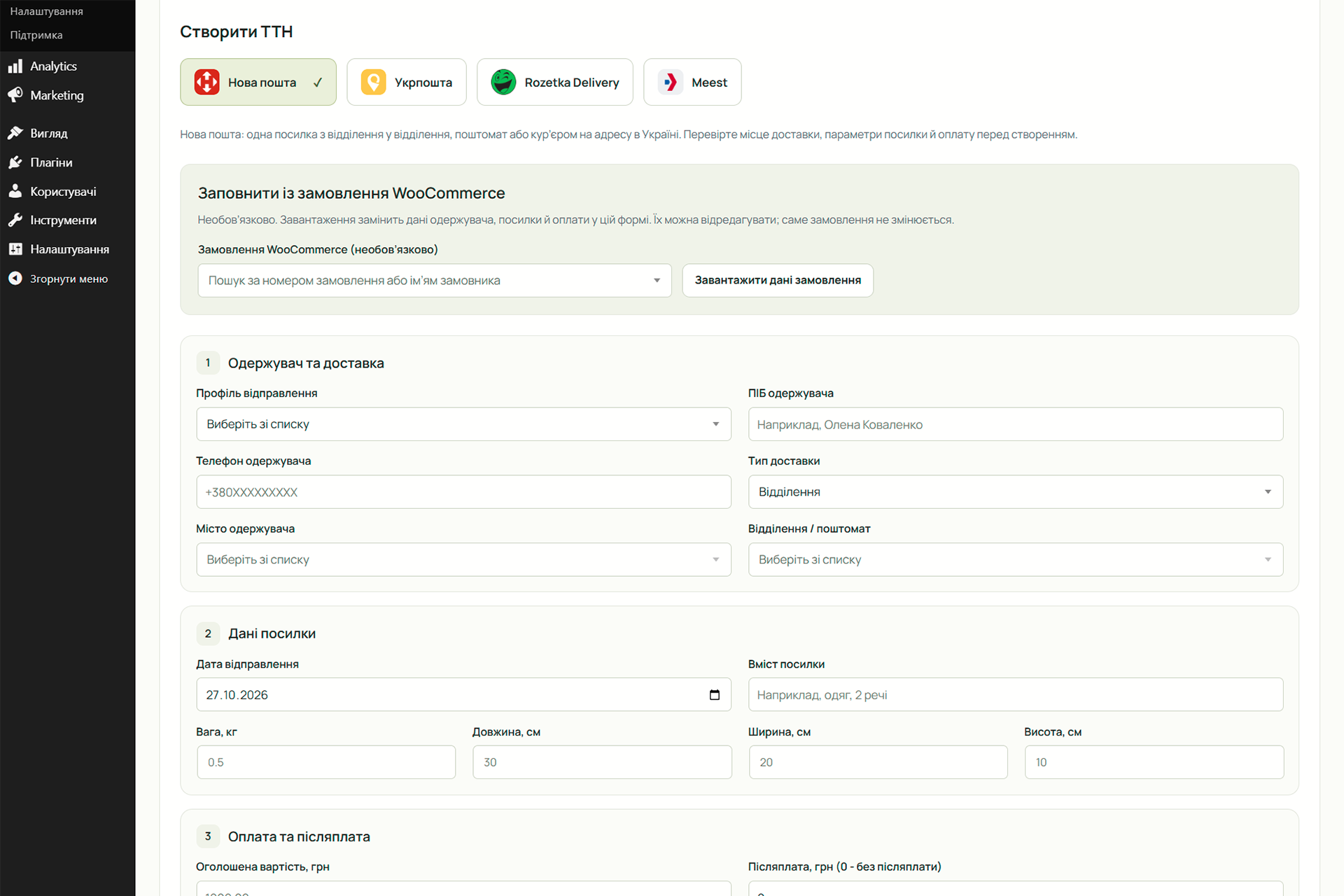


Installation
- Install and activate WooCommerce. Use WordPress 6.8 or later and PHP 8.1 or later.
- Install and activate LimeHippo Delivery and Receipts (UA).
- Open Connections, choose a service and save your account credentials. Check the connection and configure a sender profile where required.
- Add the required delivery methods to WooCommerce shipping zones and check the city and destination fields on your checkout.
- To try tracking first, add an existing tracking number and open its details. This does not create a shipment at the carrier.
- For receipts, connect Checkbox or Vchasno.Kasa, configure a register profile and its tax and payment mappings, then prepare and review a draft. Enable issuing only when your register is ready.
Do not enter real credentials or customer data into the public demo.
FAQ
-
Which services are supported?
-
Nova Poshta, Ukrposhta, Meest and Rozetka Delivery for Ukrainian deliveries; Checkbox and Vchasno.Kasa for fiscal receipts. Each integration has its own supported operations and account requirements.
-
Do I need my own service accounts?
-
Yes. Use your own carrier credentials and receipt-service accounts for the operations you need. For fiscal receipts, configure the appropriate register, tax codes and payment mappings. Installing the plugin does not register a fiscal cash register for you.
-
Does adding a tracking number create a new shipment?
-
No. Adding an existing number only saves it in this workspace for tracking and supported document access. Creating a new waybill is a separate action that sends the reviewed shipment data to the selected carrier.
-
Does deleting a shipment cancel it at the carrier?
-
No. Delete from the registry removes the local shipment record. It does not cancel or delete the carrier’s waybill.
-
Can one account have several profiles?
-
Yes. A connection stores access to one service account. Profiles let you distinguish senders, warehouses or registers as supported by the service. An internal business label does not change the legal identity registered with the carrier or fiscal service.
-
Are cities and pickup points updated?
-
The plugin uses carrier directories and caches responses to reduce repeated requests. Refresh behavior depends on the service and directory. The Settings section explains directory refresh and cron operation. Saved destination selections are checked as required by the operation.
-
How do automatic tracking updates work?
-
Automatic tracking is an optional Pro feature and uses WordPress cron. A busy queue, service errors or a delayed cron run can postpone an update. For a quiet store, configure a reliable hosting scheduler as described in Settings. Manual checks remain available in Free.
-
Can I issue a receipt without a WooCommerce order?
-
Yes. Create a manual receipt and enter products or services, quantities, prices, discounts and payment details. You can use this for an offline sale or a shipment that does not belong to a store order. A saved draft is not a fiscal receipt.
-
Can I edit the products before issuing?
-
Yes. Review and edit the receipt draft before issuing. Editing a draft does not modify the source WooCommerce order. After submission, the register and sale data are fixed; status checks do not issue a second sale.
-
What is the difference between Free and Pro receipt features?
-
Free includes basic manual issuing, status checks, document access, full fiscal returns and manual shift management. Pro adds automation, routing rules, mixed and advance payments, partial returns, bulk actions and product or variation receipt-name templates.
-
Does a fiscal return refund the customer’s bank payment?
-
No. It records a fiscal return through the original cash register. Refund the payment and handle the WooCommerce order and stock separately according to your workflow. Check for returns made outside this plugin before confirming one here.
-
What happens when Pro expires?
-
Pro functions stop being available without an active license. Existing records and documents are retained, and Free manual functions remain available. Your service-account subscriptions and fees are managed separately by the providers.
-
Where is data sent?
-
The plugin contacts the selected services for the requested operations. Carrier creation sends shipment details; receipt issuing sends fiscal sale details. See External services and Data handling below for endpoints and the data involved. The optional Pro add-on also uses Freemius for licensing.
-
How is local data stored?
-
Tracking records are stored in the site’s database. API credentials are encrypted using the WordPress authentication salt and are not autoloaded. Rotating that salt requires entering saved credentials again. The encryption is an extra storage safeguard, not protection against an administrator or a compromised WordPress installation.
The receipt journal stores an order snapshot, selected fiscal profile/register, UUID/tag, state, fiscal number, document link, last error, timestamps and initiating user ID. The plugin does not change WooCommerce order items or payment status. A single sale can have full returns in Free; the separate Pro add-on can create partial returns. Previously recorded partial returns remain part of the available balance. Return operations use an additional table without rewriting the original sale. Uncertain receipts and returns require reconciliation before further sales or shift operations on that connection. Deactivation does not delete shipments, receipts or settings. Export records from Deliveries.
-
What safeguards apply to fiscal returns?
-
Returns require an issued original sale, unchanged original business/register settings, an already open online shift and explicit operator confirmation. Original line identities, prices, taxes and payment method are preserved. Free returns the full remaining quantities. With the separate Pro add-on, the operator can select partial quantities; line discounts are allocated proportionally using integer cumulative rounding. Previously issued returns reduce available quantities, including when two original lines share a SKU. Splits that cannot preserve original gross rounding are refused before submission; the remaining quantity can be returned together. Checkbox receives goods with is_return=true and related_receipt_id at /api/v1/receipts/sell. Vchasno receives task 2 at /api/v3/fiscal/execute with the original fiscal receipt/register numbers and fiscal date. The original receipt is checked read-only before submission. A saved return UUID/tag is reconciled without another return POST after an unknown result. These fiscal operations do not refund money through a payment gateway, change the WooCommerce order or restock products. Returns made outside this plugin must be checked in the service cabinet before confirming. Unsubmitted drafts can be edited or cancelled locally. Only one unresolved return is allowed at a time. The order lock, revision checks, history fingerprint and durable operation UUID prevent repeated submission and returning more than the remaining quantity. Legacy full-return drafts remain supported. Automatic returns are not available.
-
How are checkout parcels estimated?
-
Checkout packing defaults to one physical unit. Each API-priced shipping method can opt into one parcel packed in layers: up to 50 integer physical units, each lying on its largest face in a separate layer. The footprint uses the maximum long and middle sides; layer heights are summed. There is no nesting or volume-only box guess. Dimensions are rounded up to whole centimetres before stacking. An optional outer packaging weight is added once, and a size allowance is added once to each outer dimension. The merchant must use this packing method and verify the actual packed parcel. Virtual products are excluded. Missing measurements, fractional quantities, invalid settings or exceeded parcel limits use the explicit fallback. Multiple parcels are not estimated. Classic and Blocks share the same calculation and cache; changing any product measurement invalidates the package hash.
Reviews
There are no reviews for this plugin.
Contributors & Developers
“LimeHippo Delivery and Receipts (UA)” is open source software. The following people have contributed to this plugin.
Contributors
“LimeHippo Delivery and Receipts (UA)” has been translated into 2 locales. Thank you to the translators for their contributions.
Translate “LimeHippo Delivery and Receipts (UA)” into your language.
Interested in development?
Browse the code, check out the SVN repository, or subscribe to the development log by RSS.
Changelog
0.5.111
- Validate and sanitize receipt-name template input in Core before invoking extensions, and validate extension output before saving product or variation metadata.
- Link directly to Meest’s terms PDF and identify the service providers, API domains and privacy documents. Explain where Rozetka Delivery supplies each customer’s individual logistics-service agreement.
0.5.110
- Require explicit permissions, request methods and verified nonces before processing declared input fields. Validate nested receipt data and uploaded CSV files before dispatch.
- Use distinct LimeHippo JavaScript globals, asset handles and admin menu names. Preserve existing bookmarks with a restricted redirect.
- Clarify external service documentation with labelled terms and privacy links, including Rozetka Delivery’s individual logistics agreement requirements.
0.5.109
- Complete the separation of optional Pro implementations and controls from the Free package, preserving manual actions and saved fiscal history.
- Harden request methods, nonce handling, scalar input validation and account-bound error responses.
- Use distinctive LimeHippo public prefixes, with a restartable migration that preserves settings, encrypted credentials, product fields and scheduled events; reuse existing fiscal tables without rewriting them.
- Document each external service, data transfer, trigger, terms and privacy policy.
- Remove explicit load_plugin_textdomain registration; prefer WordPress language packs and preserve the selected interface language fallback.
0.5.108
- Harden output escaping and database identifier handling; refresh translation catalogs and directory metadata.
- Align the shipment registry button with the WooCommerce orders heading, including screens without the Add order action.
0.5.107
- Show compact carrier logos next to delivery names in WooCommerce order lists and order details, including orders with existing waybills.
0.5.106
- Align the Pro product name and activation guidance with Delivery and Receipts for WooCommerce (UA). Translate the activation notice using the plugin interface language.
0.5.105
- Keep WordPress notices below the plugin header so the title and version stay aligned. Match the Pro activation notice to the plugin colors and keep its service label inside the notice.
0.5.104
- Move multi-waybill PDF transport and shipment selection controls into Pro. Single-waybill printing loads independently in Free, including after Pro deactivation.
- Keep receipt journal batch controls and scripts in Pro while preserving readable history in Free. Show a single tracking-number field in Free and a multi-number field in Pro.
See CHANGELOG.txt in the plugin package for earlier changes.