

Description
Sell simple WooCommerce products in the units customers actually need: kg or g by weight, m or cm by length, m² by area, m³ or liters by volume, and pieces. Set a minimum, optional maximum, and quantity step with up to four decimal places. Customers choose their quantity, while server-side validation and native WooCommerce handle prices, stock, taxes, shipping, coupons, refunds, and checkout.
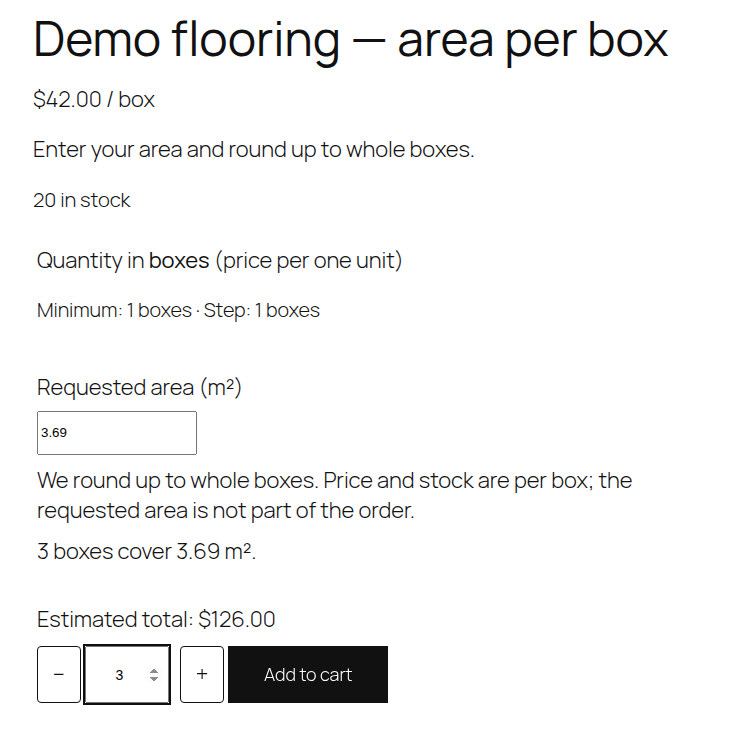
You can also sell flooring or similar goods in complete boxes. For a product sold by the piece (pcs), set coverage in m² per box. A buyer can enter the area they need; the quantity rounds UP to whole boxes. Prices and stock remain per physical box, not per m². The requested area is used for calculation only and is not stored as an exact order request.
Free features:
* Eight sales units: kg, g, m, cm, m², m³, l, pcs.
* Decimal quantity limits and server-side step validation (up to four decimal places).
* Accessible +/− controls, instant non-authoritative estimates and mobile cart display.
* Optional whole-box coverage calculation for simple products with step 1.
* Native WooCommerce Cart/Checkout Blocks and Store API, HPOS, taxes, coupons and order metadata.
* No license key, account, tracking or LIOSFERA-hosted external service required.
Requirements: WordPress 7.1 or newer, PHP 8.2 or newer, and WooCommerce 11.2 or newer. Enable the feature per simple product. Variable products and complex bundles are not supported. Known incompatibility: WP Desk Flexible Quantity with measured products; do not activate both for those sales. Other themes, payment gateways and inventory/shipping extensions should be tested on a staging shop.
Documentation and support
- Plugin overview and setup — developer information and guidance.
- WordPress.org support forum — public questions and troubleshooting.
- LIOSFERA documentation — documentation hub.
Screenshots


Installation
- Back up your store and test on a staging copy. Install and activate WooCommerce 11.2 or newer.
- Upload the LIOSFERA Product Units ZIP through Plugins > Add New > Upload Plugin and activate it.
- Edit a simple WooCommerce product. In Product data > General, enable LIOSFERA Product Units.
- Choose the unit, set minimum, optional maximum (0 = unlimited) and step; save the product.
- Enter the native WooCommerce price per selected unit, and stock in that same unit. Set shipping weight separately using WooCommerce’s standard shipping fields.
To sell complete boxes by area, choose unit pcs, minimum at least 1, and step 1; enter positive coverage per box in m² (up to four decimals). Set WooCommerce price and stock PER BOX. Example: a box covers 1.23 m². For 2.46 m² the customer needs 2 boxes; for 2.47 m², 3 boxes. Cart and order records include actual coverage but do not retain the originally requested area.
If you already use the legacy LIO Product Units plugin, do NOT activate both variants simultaneously. Back up first, deactivate the old plugin, install and activate LIOSFERA Product Units, then verify your products and carts. Existing _lio_pu_* product settings and stock remain unchanged. Do not enable the old plugin’s opt-in removal of data during migration. This is a changed plugin directory/slug, not an automatic in-place WordPress.org upgrade.
FAQ
-
No. The browser estimate is for convenience. WooCommerce recalculates and validates prices, quantities, discounts, tax, shipping and stock on the server.
-
Can I use variable products or bundles?
-
No. The Free 1.1.0 feature applies to simple products only. Existing variable products remain handled by WooCommerce.
-
Can I switch a product from kg to g without changing its price?
-
No. The plugin never automatically converts existing catalog prices, stock or shipping weights. Update these manually when changing units.
-
How does whole-box coverage work?
-
Only complete boxes are sold, with unit pcs, minimum whole quantity and step 1. A request of 2.47 m² for 1.23 m²/box yields 3 boxes, not a fractional quantity. Actual covered m² is shown on cart and saved as per-box order metadata for consistency during order edits and refunds.
-
What if the configured price, unit, step or coverage changes after a cart item is added?
-
Outdated cart entries are rejected and an explanation prompts the customer to add the product again using current catalog terms. The plugin does not silently reuse outdated prices or terms.
-
Does this plugin transfer customer information to LIOSFERA?
-
No. It does not contact a LIOSFERA cloud service or send tracking data. Quantity configurations and unit metadata are stored in the shop’s own WooCommerce/WordPress database.
-
Is it compatible with all quantity or inventory extensions?
-
No. WP Desk Flexible Quantity 2.3.24 is a known conflict with fractional Store API sales. Basic compatibility with ATUM Inventory Management and Weight Based Shipping was tested in isolation; advanced operations and other third-party configurations are not universally verified.
-
What happens to product data when I uninstall?
-
Product settings are kept by default. An explicit WooCommerce > Product Units preference can remove the plugin’s own product settings on uninstall; historical order data is retained. Do not choose this option when merely migrating from the legacy plugin name.
Reviews
There are no reviews for this plugin.
Contributors & Developers
“LIOSFERA Product Units” is open source software. The following people have contributed to this plugin.
Contributors
Translate “LIOSFERA Product Units” into your language.
Interested in development?
Browse the code, check out the SVN repository, or subscribe to the development log by RSS.
Changelog
1.1.0
- Optional whole-box square-meter coverage for simple products, with exact round-up to physical boxes and native WooCommerce stock and price.
- Accessible +/− quantity controls, clear minimum/step/maximum and instant client estimates with server-side validation.
- Cart/Checkout Blocks, Store API, HPOS, order editing, physical shipping and refunds tested in isolated WooCommerce QA.
- Retains existing
_lio_pu_*product data to support migration from the previous LIO Product Units name.
1.0.1
- Improved exact four-decimal quantity validation and cart behavior when catalog settings change.
- Regression testing for WooCommerce Cart/Checkout Blocks and fractional quantities.
1.0.0
- Initial standalone free plugin: eight sales units with decimal quantity validation, stock handling, and WooCommerce checkout integration.