

Description
Bookzenix Lite adds a modern booking form to any page and a fast admin app for your team.
- Step-by-step booking: service specialist date & time details
- As many services, categories and staff members as you need
- Smart availability: working hours, split shifts, breaks before/after, days off and company holidays
- Day and week calendar, appointment list with filters, customer list
- Approve bookings automatically or by hand
- Email confirmations with an .ics calendar file, fully editable email templates
- Several services in one booking request through the REST API (
itemslist), for developers building their own forms - Design options: layouts (steps, sidebar, compact, pop-up), colours, fonts, shapes, button and card styles, labels
- Works with any theme: shortcode
[bookzenix_booking]or the “Bookzenix Booking Form” block - Times stored in UTC, shown in your WordPress timezone – daylight saving handled
- Translation ready, personal data export/erase support
What your customers get
Customers pick a service, a specialist and a free time, enter their details and get a confirmation email with an .ics file they can add to their own calendar. Bookings are confirmed automatically or after you approve them, and customers are emailed when you approve, reschedule or cancel. To change or cancel a booking, customers contact you and you update it in the admin calendar. Lite does not include an online customer account area.
Everything here is free
Every feature in this plugin works without a key, a time limit or a usage limit. There are no locked settings in this plugin.
A separate commercial plugin, Bookzenix Pro, is sold on bookzenix.com for businesses that need online payments, a customer account area, calendar sync, events, packages and similar extras. Pro is a different plugin download – nothing in this plugin is unlocked by it. If you switch, install Pro and your services, staff and bookings stay where they are.
External services
Bookzenix Lite does not connect to any external service. It does not load fonts, scripts or styles from other servers and does not send data anywhere. The fonts offered under Settings Design (Manrope, Inter, Poppins, DM Sans, Lato, Open Sans, Roboto, Montserrat) are included in the plugin under the SIL Open Font License – see assets/fonts/*/OFL.txt.
Privacy
Bookzenix stores the name, email, phone and note customers enter when booking, in your own WordPress database. It supports the WordPress personal data export and erase tools and adds a suggested paragraph to your privacy policy page.
To delete every table, option and role the plugin created when you uninstall it, add define( 'BOOKZENIX_REMOVE_ALL_DATA', true ); to wp-config.php before deleting the plugin. Without it, your bookings are kept in case you reinstall.
Screenshots

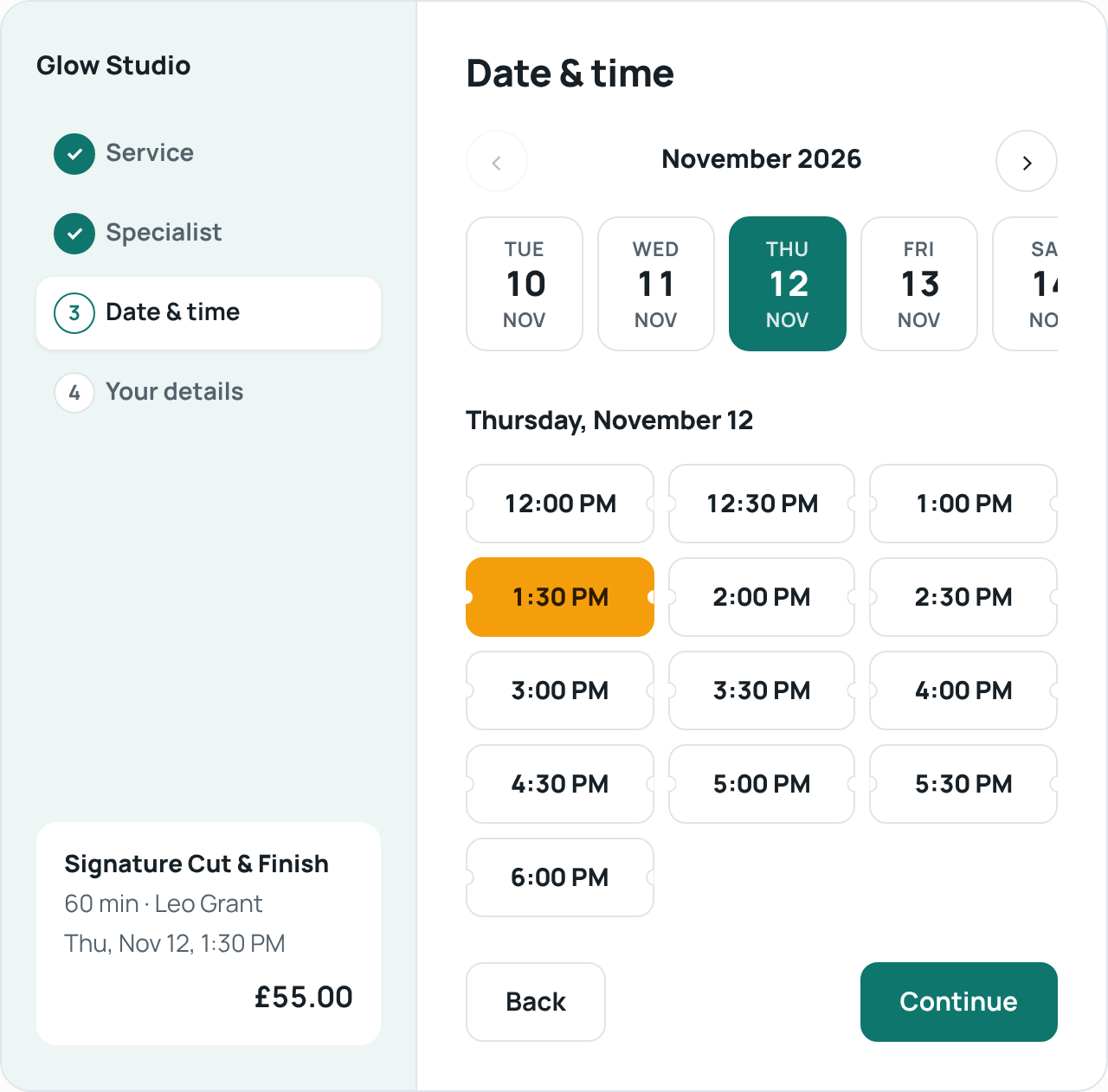


Blocks
This plugin provides 1 block.
- Bookzenix Booking Form
Installation
- Install and activate the plugin.
- Go to Bookzenix Employees and add yourself (and your team) with working hours.
- Go to Bookzenix Services and create your services.
- Add
[bookzenix_booking]to a page, or insert the “Bookzenix Booking Form” block.
Shortcode options: [bookzenix_booking service="3"] preselects a service, category="2" and employee="5" filter the form, and layout="sidebar" services="grid" slots="pills" change its look on one page.
FAQ
-
Which timezone is used?
-
Your WordPress timezone (Settings General). Times are stored in UTC, so daylight-saving changes are handled.
-
Can customers pay online?
-
No. Customers pay you on site. Online payments are part of the separate Bookzenix Pro plugin.
-
Can customers cancel or reschedule online?
-
Not in Lite. They contact you, and you move or cancel the booking in Bookzenix Calendar; the customer gets an email about the change.
-
Can several people book the same time slot (group classes)?
-
No. In Lite each time slot of a specialist can be booked once.
-
Is it translatable?
-
Yes. Every string – PHP, the booking form and the admin app – uses the
bookzenixtext domain (see languages/bookzenix.pot). -
Does it work with page builders?
-
Yes. Use the shortcode in any text or shortcode widget.
-
How do I get emails delivered reliably?
-
Use an SMTP plugin with a real mailbox (for example your business email provider). Many hosts block PHP mail.
-
Where is the source code of the admin app?
-
The admin screen is a React app. Its full, readable source is included in
assets/admin-src/together withpackage.jsonandvite.config.js. To rebuild it:cd assets/admin-src && npm install && npx vite build(output goes toassets/admin/).
Reviews
There are no reviews for this plugin.
Contributors & Developers
“Bookzenix Lite – Appointment Booking” is open source software. The following people have contributed to this plugin.
Contributors
Translate “Bookzenix Lite – Appointment Booking” into your language.
Interested in development?
Browse the code, check out the SVN repository, or subscribe to the development log by RSS.
Changelog
1.3.3
- Improved: the free plugin is simpler – code and settings for features it does not include were removed, so every screen shows only what works.
- Improved: a booking request with several services (REST
itemslist) works in the free plugin.
1.3.2
- Fixed: the booking summary shows the service price before a time is picked (it showed 0.00).
1.3.1
- Improved: maintenance and stability.
1.3.0
- New: Employees design options – cards, list or compact grid, cards per row, photo size and shape, show the services each person offers.
- Improved: booking summary and confirmation layout.
1.2.3
- Improved: the booking progress (top bar and sidebar) shows every step from the start; steps that a booking doesn’t need, like choosing a specialist when only one offers the service, stay visible and are marked “Not needed” instead of popping in or out.
1.2.2
- Improved: Settings Design works on phones and tablets (no sideways scrolling, two-column colours, floating Preview button).
1.2.1
- Free version: removed leftover paid-plan code paths (licence handling, group capacity, tax, refunds, resources) and the custom CSS box.
- Security: a booking made with an existing customer’s email no longer changes that customer’s saved name or phone.
- Readme explains exactly what the free version includes.
1.2.0
- First release on WordPress.org.