
Description
WordPress loads every option marked as “autoloaded” into memory on every single page request. Over the years, plugins leave large or forgotten options behind, and every page gets a little slower and uses more memory. Database Cleaner makes this visible and lets you do something about it, without guessing.
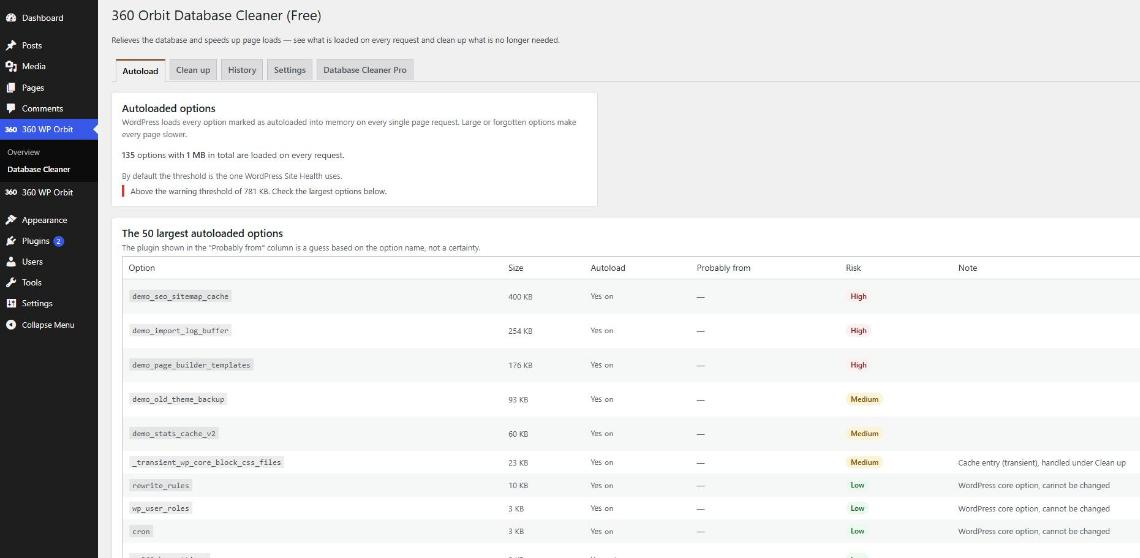
- Autoload analysis: the total size of everything that loads on every request, compared with the warning threshold of WordPress Site Health, and the 50 largest options with their size, the plugin they probably belong to and a risk level.
- Stop options from loading automatically: one option at a time, with a confirmation. Every change is saved first and can be undone.
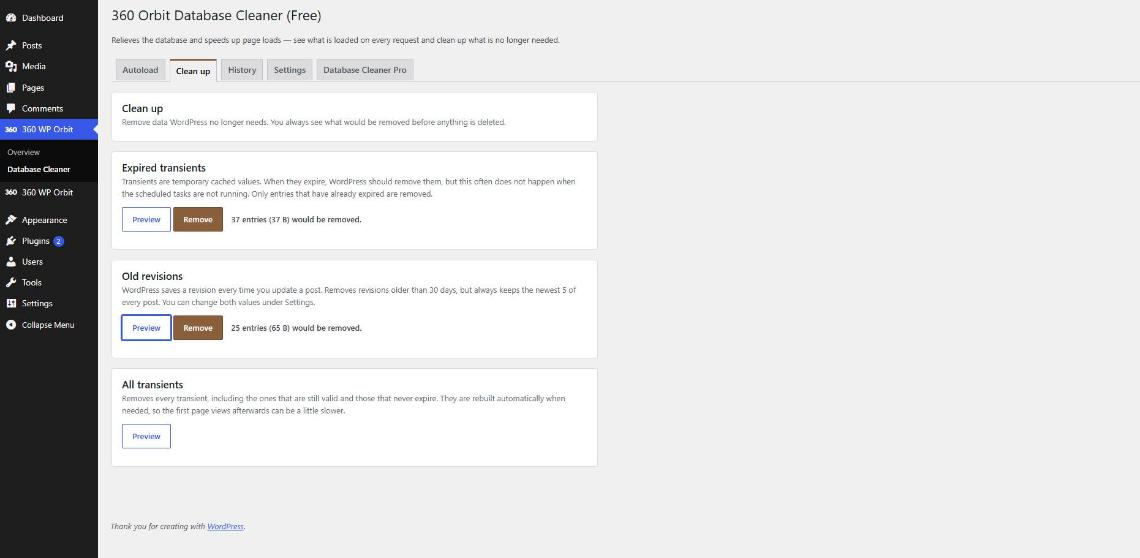
- Expired transients: temporary cached values that WordPress should have removed. Optionally all transients, including the ones that are still valid.
- Old revisions: removes revisions older than the number of days you choose, but always keeps the newest ones of every post.
- Preview first: every clean-up shows how many entries it would remove before anything is deleted, and the number is exactly what gets deleted.
- History of the last actions right in the admin area.
WordPress core options can never be changed. Transients are cleaned up, not switched.
Free vs. Pro
The free version fully covers the autoload analysis, changing single options with undo, and the clean-up of transients and revisions.
Database Cleaner Pro adds:
- Change the autoload of several options at once, with a full undo list.
- Autoload size history and a warning threshold of your own.
- Clean up orphaned post meta and term meta.
- Clean up Action Scheduler logs.
- Optimize database tables.
- Scheduled clean-ups.
- WP-CLI commands.
- Automatic update notifications directly in the WordPress admin area.
Screenshots
Installation
- Install the plugin under Plugins Add New (search for “360 Orbit Database Cleaner”), or upload the ZIP under Plugins Add New Upload Plugin.
- Activate the plugin.
- Open 360 WP Orbit Database Cleaner. The Autoload tab shows what is loaded on every request. The Clean up tab lists the clean-up actions; each one starts with “Preview”.
FAQ
-
What is autoload, and why does it matter?
-
Options are small settings stored in the database. Those marked as autoloaded are read on every single page request, whether the page needs them or not. A few hundred kilobytes is normal; several megabytes slow every page down and use memory on every request.
-
Can this break my site?
-
Nothing is removed without showing you first what would be removed. WordPress core options cannot be changed, and every change to an option can be undone. One thing to know: if you stop an option from loading automatically that a plugin reads on every page, WordPress then fetches it with an extra database query each time. That is why the plugin only does it when you click, with a confirmation, and why you can undo it at any time. Take a backup before cleaning up a live site if you are unsure.
-
Why can I not change some options?
-
WordPress core options, transients and the plugin’s own settings are locked. Transients are handled under Clean up, not here.
-
What does “Probably from” mean?
-
The plugin guesses which plugin an option belongs to from the beginning of its name. It is a guess, not a certainty, and nothing is done automatically based on it.
-
Why does the transients clean-up say there is nothing to remove?
-
If a persistent object cache is active, WordPress keeps transients in that cache and not in the database, so there is nothing to remove from the database.
-
What exactly does the revisions clean-up remove?
-
Revisions older than the number of days you set under Settings, except the newest ones of every post. By default it removes revisions older than 30 days and always keeps the newest 5 of every post.
-
Does the plugin send data to other servers?
-
No. The free version makes no requests to external services and sets no cookies. It does not create its own database tables either.
-
What happens when I deactivate or delete the plugin?
-
Deactivating keeps your settings and history. Deleting the plugin removes them. Changes you made to options and entries you removed stay as they are.
-
Does it work on multisite?
-
The plugin works per site. Open it in the dashboard of each site you want to analyze or clean up.
-
Liability?
-
This plugin is provided without any warranty (“as is”). The developer assumes no liability for data loss or damage arising from its use. Taking a full backup before use is strongly recommended.
Reviews
There are no reviews for this plugin.
Contributors & Developers
“360 Orbit Database Cleaner” is open source software. The following people have contributed to this plugin.
Contributors
Translate “360 Orbit Database Cleaner” into your language.
Interested in development?
Browse the code, check out the SVN repository, or subscribe to the development log by RSS.
Changelog
1.0.2
- New: the plugin list now shows a “Settings” link for this plugin, as it already does for the other plugins of the suite.