
Description
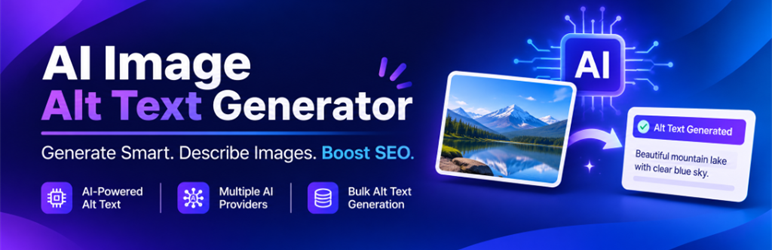
ZHS AI Alt Text Generator is a fast, lightweight, and privacy-respecting WordPress plugin engineered to automate image accessibility and SEO alt tags.
Missing alt tags hurt website accessibility (WCAG) and search engine rankings. This plugin connects with leading AI providers or works completely free with built-in categorized tag libraries to ensure every image in your WordPress media library has descriptive, context-aware alt text.
Key Highlights
- Multi-AI Provider Support: Connect your own API keys for OpenAI (ChatGPT), Google Gemini, Anthropic Claude, or Qwen (Alibaba).
- 100% Free Offline / Basic Mode: Generate context-relevant alt tags without any API key across 11 business and creative categories.
- Custom Tags Library: Paste your own custom alt tag keywords (one per line) for brand-specific tagging.
- Auto-Generate on Upload: Automatically analyzes and tags newly uploaded images without extra clicks.
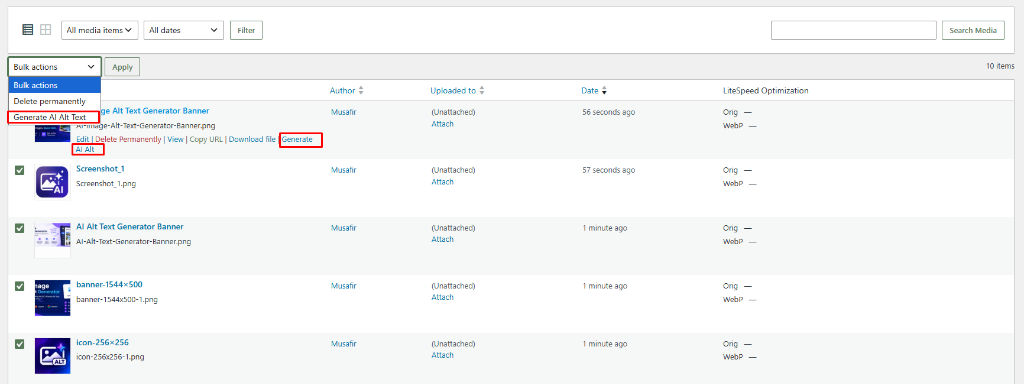
- Non-Blocking Bulk Generator: Process all existing images missing alt text with a smooth AJAX batch processor and real-time progress bar. Never times out your server.
- WordPress VIP & PCP Standards: Zero slow database queries, zero mixed line endings, full internationalization (i18n), and strict capability checks.
External services
This plugin can optionally connect to third-party artificial intelligence APIs to analyze images and generate descriptive, context-aware alt text. Connecting to these external services is entirely optional; the plugin includes a 100% free offline “Basic” mode that operates locally without external API communication.
If you configure an API key for any of the supported AI providers, the plugin connects to the corresponding third-party service:
-
OpenAI API (ChatGPT / GPT-4o-mini)
- Service URL: https://api.openai.com/v1/chat/completions
- Data Sent: Image URL or base64-encoded image binary data, prompt instructions requesting alt text, and your secret API key in the authorization header.
- When Data Is Sent: Only when OpenAI is selected as the active provider and you trigger single alt text generation, initiate the bulk generator, or upload a new image with auto-generation enabled.
- Terms of Use: https://openai.com/policies/terms-of-use/
- Privacy Policy: https://openai.com/policies/privacy-policy/
-
Google Gemini API (Gemini 1.5 Flash)
- Service URL: https://generativelanguage.googleapis.com/v1beta/models/
- Data Sent: Image URL or base64-encoded image binary data, prompt instructions requesting alt text, and your secret API key passed via query parameter.
- When Data Is Sent: Only when Google Gemini is selected as the active provider and you trigger single alt text generation, initiate the bulk generator, or upload a new image with auto-generation enabled.
- Terms of Service: https://ai.google.dev/terms
- Privacy Policy: https://policies.google.com/privacy
-
Anthropic Claude API (Claude 3.5 Sonnet)
- Service URL: https://api.anthropic.com/v1/messages
- Data Sent: Base64-encoded image binary data, prompt instructions requesting alt text, and your secret API key in the authorization header.
- When Data Is Sent: Only when Anthropic Claude is selected as the active provider and you trigger single alt text generation, initiate the bulk generator, or upload a new image with auto-generation enabled.
- Commercial Terms: https://www.anthropic.com/legal/commercial-terms
- Privacy Policy: https://www.anthropic.com/legal/privacy
-
Alibaba DashScope (Qwen VL Max)
- Service URL: https://dashscope.aliyuncs.com/compatible-mode/v1/chat/completions
- Data Sent: Image URL or base64-encoded image binary data, prompt instructions requesting alt text, and your secret API key in the authorization header.
- When Data Is Sent: Only when Qwen is selected as the active provider and you trigger single alt text generation, initiate the bulk generator, or upload a new image with auto-generation enabled.
- Terms of Service: https://help.aliyun.com/document_detail/458807.html
- Privacy Policy: https://help.aliyun.com/document_detail/458808.html
Screenshots


Installation
- Upload the
zhs-ai-alt-text-generatorfolder to the/wp-content/plugins/directory, or install directly through the WordPress Plugins dashboard (Plugins > Add New > Upload Plugin). - Activate the plugin through the Plugins screen in WordPress.
- Go to Settings > AI Alt Text in your WordPress admin menu.
- Select your preferred provider (Basic, OpenAI, Gemini, Claude, or Qwen).
- Click Test to verify your API connection, then save your settings.
- Use the Generate Alt Tag for All Images button to instantly tag existing library images missing alt text.
FAQ
-
Does this plugin require paid API keys?
-
No! You can use the Basic (No API – Free) mode completely free. If you want visual recognition AI, you can connect your own API keys for OpenAI, Google Gemini, Anthropic Claude, or Qwen.
-
Will bulk generation slow down my website or hit PHP timeouts?
-
No. The bulk generator runs sequentially via AJAX in your browser. It processes images one-by-one with live progress reporting, avoiding server memory limits or gateway timeouts.
-
Does this overwrite existing image alt text?
-
No. Both the automatic upload handler and the bulk generator only target images that do not currently have an alt tag (
_wp_attachment_image_alt). -
What happens if an API call fails?
-
The bulk generator logs the specific error for that image and continues processing the rest of your queue uninterrupted.
Reviews
There are no reviews for this plugin.
Contributors & Developers
“ZHS AI Alt Text Generator” is open source software. The following people have contributed to this plugin.
Contributors
Translate “ZHS AI Alt Text Generator” into your language.
Interested in development?
Browse the code, check out the SVN repository, or subscribe to the development log by RSS.
Changelog
1.0.0
- Initial public release on WordPress.org.
- Added multi-provider AI support (OpenAI, Gemini, Claude, Qwen).
- Added 11 built-in categories for offline Basic generation.
- Added custom tag list support.
- Added auto-generation on upload hook.
- Added AJAX batch bulk generator with live progress tracking and cancel option.
- Added Guideline 6 External Services documentation.
- 100% compliant with WordPress Plugin Check (PCP) guidelines.