

Description
Your store sold it. Did the money arrive?
Indian WooCommerce stores get paid through many hands. Prepaid orders are settled by Razorpay, Cashfree or PayU. Cash on delivery comes back through Shiprocket, Delhivery or another courier. Somewhere in between, money goes missing, and nobody has time to check every order.
Veritally checks every WooCommerce order against your gateway settlements, your COD remittances and your bank, and shows exactly what never arrived, with a claim message ready to send.
What Veritally finds
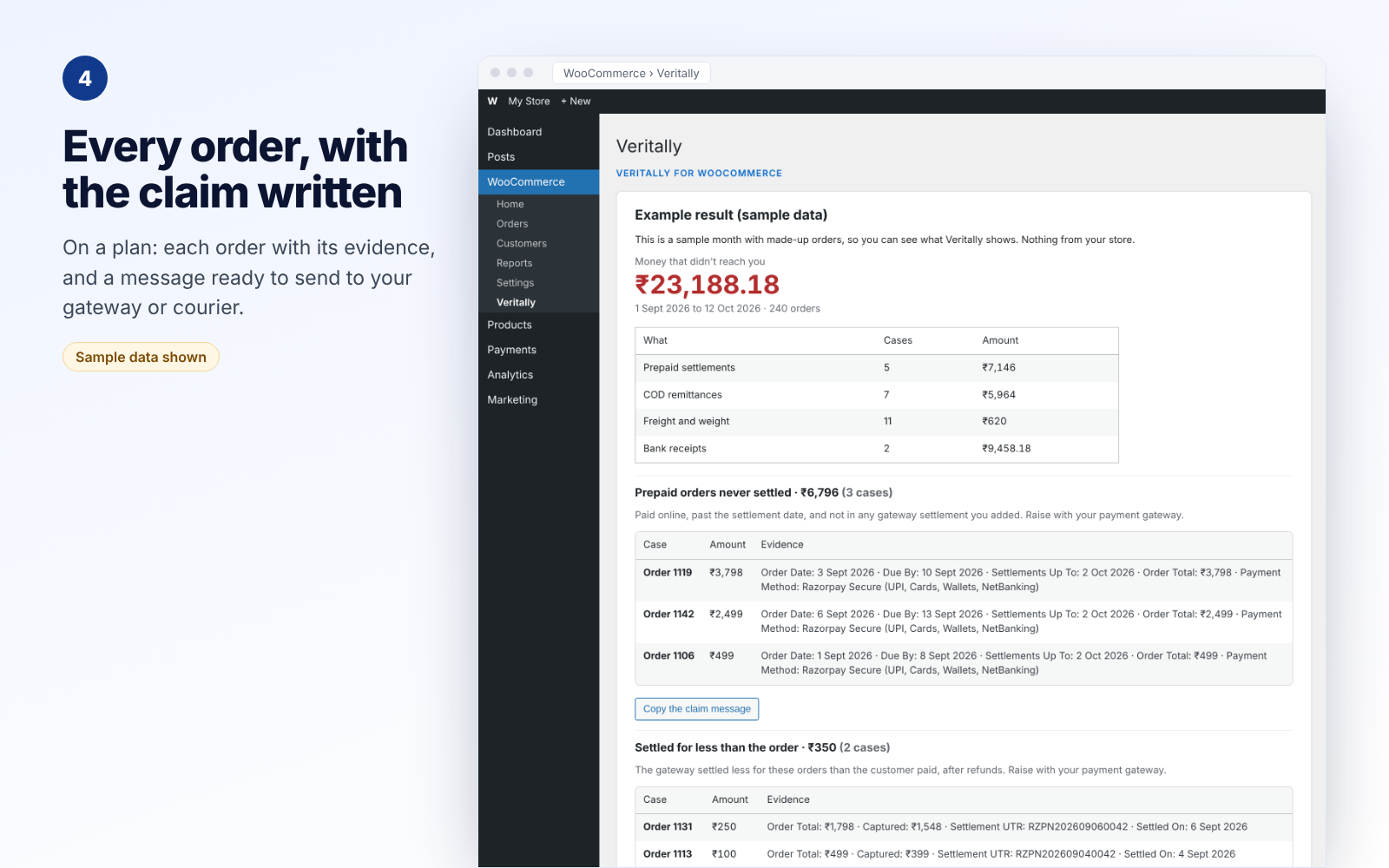
- Prepaid orders never settled: paid online, past the settlement date, and in no settlement.
- Settlements short of the order: the gateway paid less than the customer paid, after refunds.
- Delivered COD never remitted: the courier collected the cash and has not paid it on.
- COD remitted short, or collected below the order: less cash came back than the order was worth.
- Freight and weight overcharges: shipping billed at a heavier weight slab than the parcel.
- Payouts that never reached your bank: each settlement and remittance matched to your bank statement.
How it works
- Install the plugin and open WooCommerce > Veritally.
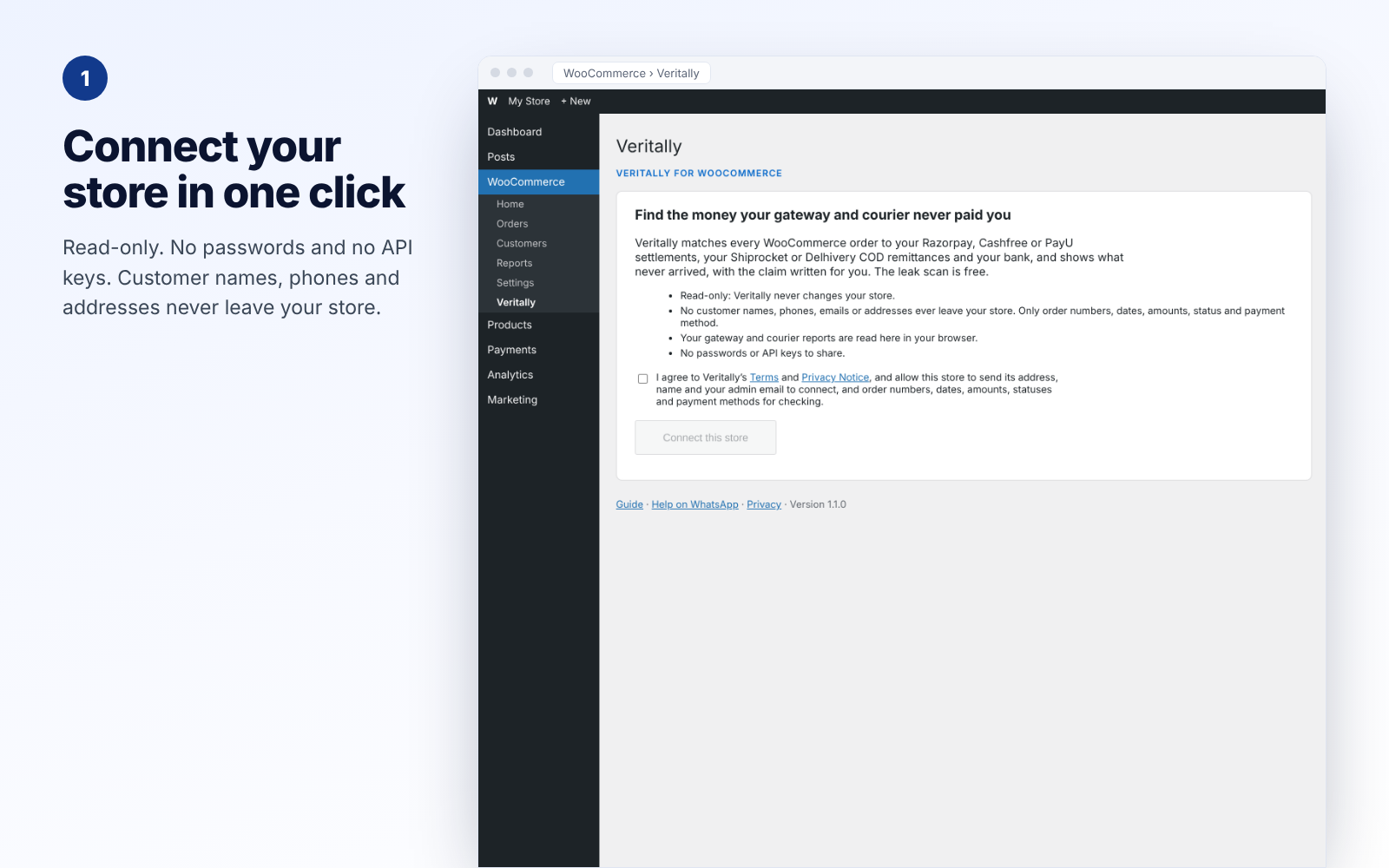
- Click Connect this store. No passwords or API keys.
- Read your orders, then add the gateway and courier reports you already download.
- See how much money is missing, and where, free. A plan shows every order and the claim to send.
Want to see it first? The page has See an example result, a sample month with made-up orders.
Free to check. Pay only for the detail
The leak scan, with totals by type, is free for every store. Paid plans are bought on veritally.in, paid in advance and never renewed automatically. They show every order, the evidence and the claim messages:
- Lite: Rs 499 a month or Rs 4,999 a year, up to 300 orders a month
- Starter: Rs 999 a month or Rs 9,999 a year, up to 1,500 orders a month
- Growth: Rs 2,499 a month or Rs 24,999 a year, up to 5,000 orders a month
A year costs the same as 10 months. If the first check on a store’s first plan finds no missing money, it is refunded in full on request within 7 days.
Your data stays with you
- Read-only: Veritally never changes your store, your orders or your settings.
- No customer details: only order number, date, amounts, refunds, status, payment method, the gateway’s payment id and whether it was cash on delivery are sent. Never customer names, phones, emails or addresses.
- Reports read in your browser: customer details in your gateway, courier and bank reports are removed before anything is sent.
- Signed requests: every request from your site to Veritally is signed with a secret only your site holds.
- Clean uninstall: uninstalling removes everything the plugin stored.
Works with
- Payment gateways: Razorpay, Cashfree and PayU settlement reports.
- Couriers: Shiprocket orders and charges reports, and Delhivery and other courier COD remittance reports.
- Banks: your bank statement, from any bank, as Excel or CSV.
- New layouts: a report the plugin doesn’t recognise can be read with AI help: only column names and the kind of data in each column are sent, never a value, and you confirm the reading first.
- WooCommerce High-Performance Order Storage (HPOS) is supported.
Help, in your language
Message us on WhatsApp at +91 91806 04521 or write to support@veritally.in. Step-by-step guide with pictures: https://veritally.in/guides/veritally-for-woocommerce-setup/
Source code
The plugin’s page script, assets/app.js, is not minified. It is built from human-readable TypeScript and React files that ship with the plugin in the source/ folder. source/README.md gives the build steps (npm install, then npm run build) and lists the bundled open-source libraries (React, React DOM, read-excel-file, Papa Parse and fflate, all MIT licensed) with their versions and repositories.
External services
This plugin connects to Veritally (https://veritally.in), operated by Veritally, Bengaluru, India, to check your store’s payments.
- When you click “Connect this store”, it sends your site’s address and name, your WooCommerce and plugin versions and your admin email, and receives a store id and secret.
- When you run a check, it sends your orders’ number, date, total, refunds, status, payment method, gateway payment id and cash-on-delivery flag, plus the rows of the reports you added (with customer details removed in your browser), and receives the result.
- When you open the Veritally page, it sends your store id, site name and versions to show your plan.
- When you click “I got this back”, it sends the kind of problem, the number of cases and the amount you enter.
- When you click “Resolve with AI” (paid plans), it sends only the kind of problem, who to raise it with and the names of the facts, never orders, amounts or store details. Veritally passes these to its AI provider and returns general causes and steps.
- If you turn on the monthly email, Veritally emails your admin address once a month; every email has a link to stop it.
Nothing is sent until you connect. Orders and reports are used for the check and are not stored by Veritally.
Terms of Service: https://veritally.in/terms/
Privacy Notice: https://veritally.in/privacy/
Screenshots


Installation
- Upload the plugin through Plugins > Add Plugin > Upload Plugin, or install it from the WordPress plugin directory.
- Activate it. WooCommerce must be active.
- Go to WooCommerce > Veritally and click “Connect this store”.
FAQ
-
Is it free?
-
Yes, the leak scan is free: you see how much money is missing and where. A paid plan shows every order, the evidence and the claim messages. Plans are paid in advance and never renew by themselves.
-
Does it change anything in my store?
-
No. Veritally is read-only. It never edits orders, products, prices or settings.
-
Does Veritally see my customers’ details?
-
No. The plugin sends only order numbers, dates, amounts, status and payment method. Reports you add are read in your browser and customer details are removed before anything is sent.
-
Which gateways and couriers are supported?
-
Razorpay, Cashfree and PayU settlement reports; Shiprocket orders and charges reports; Delhivery and other courier COD remittance reports; and your bank statement. Reports in other layouts can be read with AI help that you confirm.
-
Where do I download these reports?
-
Our step-by-step guide with pictures shows where each report lives: https://veritally.in/guides/veritally-for-woocommerce-setup/
-
Do I need an account?
-
Not to connect or run the free leak scan. To buy a plan, you sign in on veritally.in with your email.
-
Can I disconnect?
-
Yes, any time from the Veritally page. Uninstalling the plugin also removes the store id and secret from your site.
-
Who do I ask for help?
-
Message us on WhatsApp at +91 91806 04521 or write to support@veritally.in.
Reviews
There are no reviews for this plugin.
Contributors & Developers
“Veritally for WooCommerce” is open source software. The following people have contributed to this plugin.
Contributors
Translate “Veritally for WooCommerce” into your language.
Interested in development?
Browse the code, check out the SVN repository, or subscribe to the development log by RSS.
Changelog
1.1.1
- A clearer plugin page: what Veritally finds, how it works, plans and privacy, with new screenshots.
1.1.0
- A courier or payment gateway report the plugin doesn’t recognise can be read with AI help: only the column names and the kind of data in each column are sent, never a value, and you confirm the reading before it is used.
1.0.0
- First release: connect, read orders, add gateway and courier reports, free leak scan, paid detail and claims, “I got this back”, AI help on paid plans and an optional monthly email.