

Description
Tidelist lists your WooCommerce products on the OLX marketplace and keeps the adverts in step with your shop. When an item sells out, its advert comes down. When it is back in stock, you can list it again.
You stay in control. Dry-run is on from the start: Tidelist builds and logs every advert but sends nothing that changes OLX. You choose which products go online, check an exact preview of each advert, and publish in small batches that you confirm by typing PUBLISH.
What it does
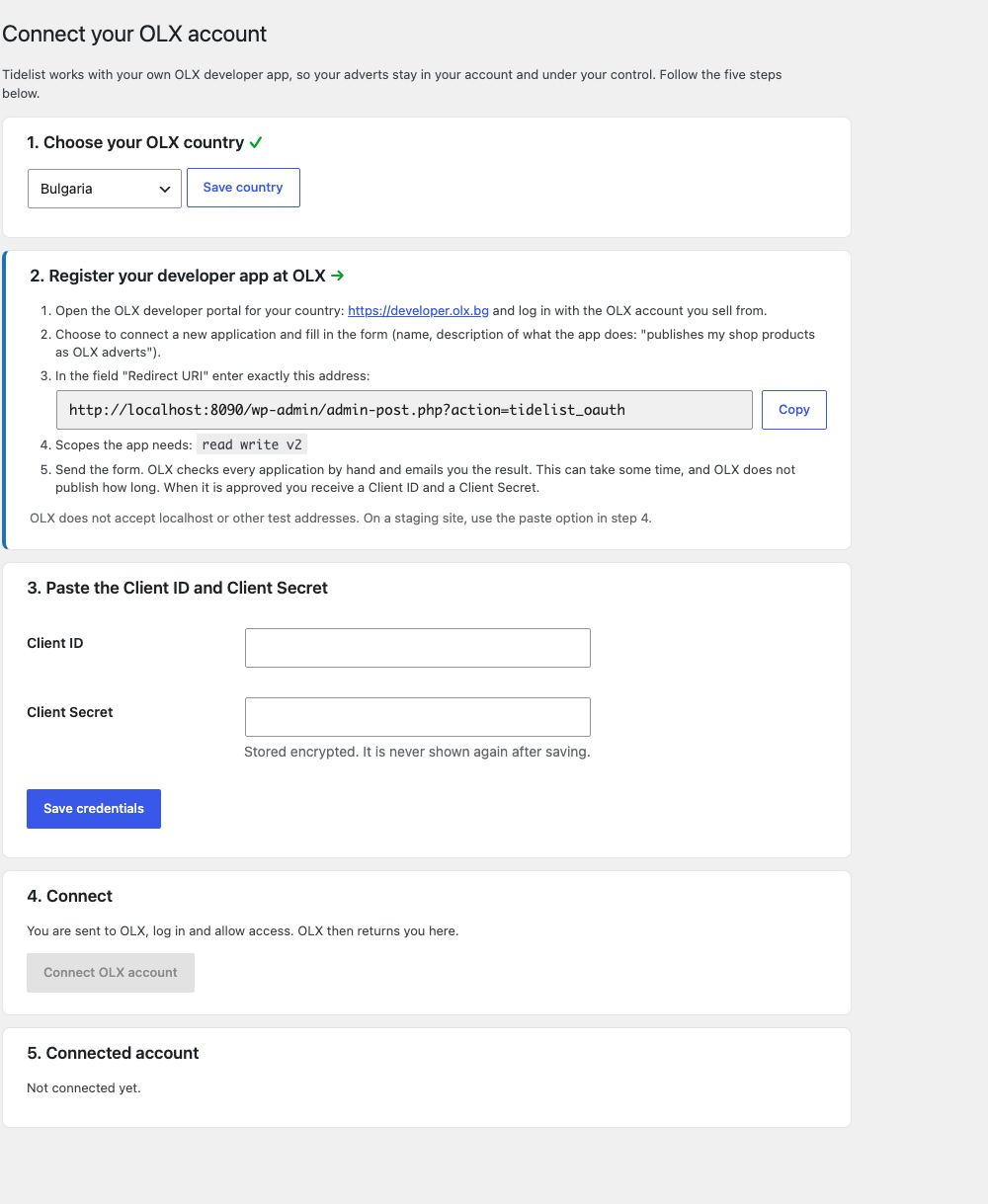
- Connects to your own OLX developer app, so the adverts stay in your account and under your control.
- Works with OLX in Bulgaria, Poland, Romania, Portugal, Ukraine and Kazakhstan. Bulgaria is tested with a real account; the other countries use the same OLX API and are marked beta.
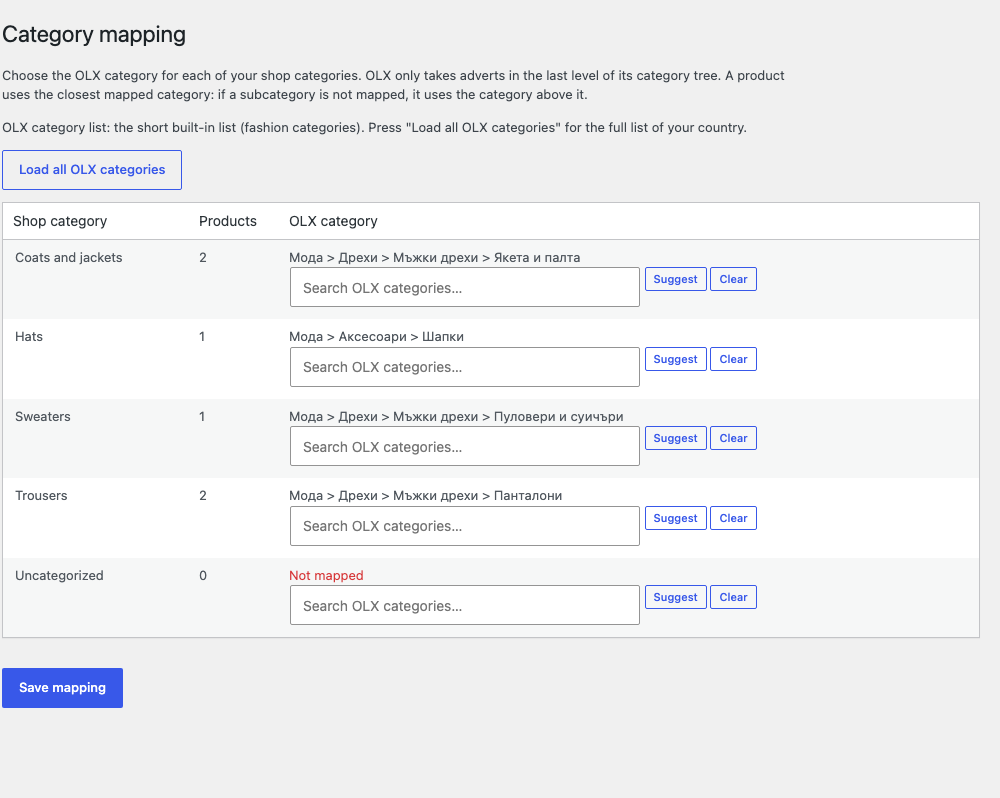
- Maps your shop categories to OLX categories and your product data to OLX fields such as condition, size and colour. Suggestions are offered; you decide.
- Builds titles and descriptions from templates you can edit. Web addresses, e-mail addresses and phone numbers are removed from the advert text because OLX does not allow them there.
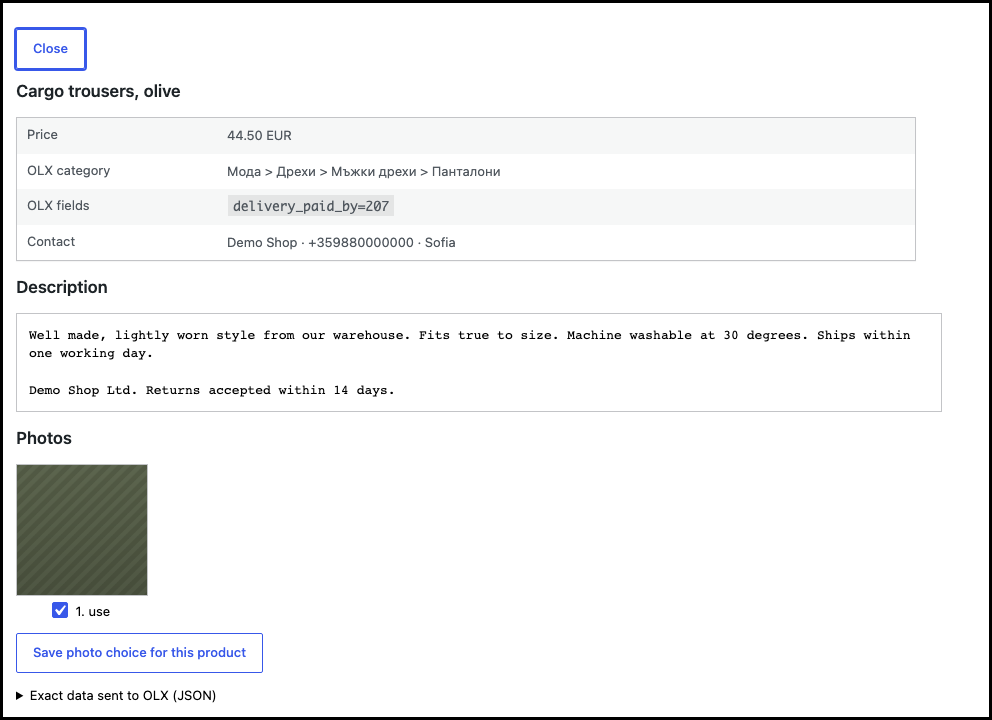
- Shows a preview of the exact data that would be sent, with a list of what is still missing.
- Publishes in batches of up to 30, one advert at a time, with a pause between adverts. You can cancel a running batch.
- Takes adverts down when the product is out of stock, unpublished, trashed or deleted, and lists them again when you ask.
- Updates the advert on OLX when the product changes (on request).
- Finds adverts that already exist on your OLX account and links them, so nothing is published twice.
- Reads the status of your adverts from OLX (live, being checked, waiting for payment, expired) and shows problems in one place.
- Pause switch that stops every call to OLX at once.
- Site Health checks, a log of every call (secrets are never logged), and a first-run guide.
What it never does
- It never buys anything on OLX. If OLX asks for a payment, the plugin stops and tells you.
- It never deletes adverts. Takedown only deactivates them.
- It never sends customer data. Tidelist does not read or store orders or customers.
Languages
English, Bulgarian, Polish, Romanian, Portuguese (Portugal), Ukrainian and Russian.
More marketplaces
Tidelist is built around a channel interface. OLX is the first channel; more marketplaces are planned. A paid add-on with extra features is planned and will be sold separately; everything described above works in the free plugin.
External services
This plugin connects to the OLX marketplace of the country you choose in the settings. It does this only for the shop owner’s own OLX account, and only after the shop owner has connected the account.
What is sent, and when
- When you connect your account: your OLX application Client ID and Client Secret and a one-time authorisation code are sent to your country’s OLX server to obtain access tokens. The tokens are refreshed automatically once a day.
- When you publish, update, take down or re-list an advert (or when the background job does so after you started it): the product data (title, description, photos as public image addresses, price, category, attributes) and the contact name, phone number and city that you entered in the settings.
- When you check status or search for existing adverts, or when the six-hourly status job runs: the plugin reads your own adverts from OLX. No product data is sent.
- When you save a city name in the settings: the name is sent to OLX to look up its city code.
- When you open the category or attribute mapping screens: the plugin reads OLX’s public category list and the attribute definitions of a category.
Nothing is sent while dry-run is on, except read-only requests (such as reading the category list). Nothing is sent while the plugin is paused.
Who receives it
OLX, in the country you choose. The servers are www.olx.bg, www.olx.pl, www.olx.ro, www.olx.pt, www.olx.ua or www.olx.kz. OLX handles the data under its own terms and privacy policy.
- Bulgaria: https://developer.olx.bg and https://www.olx.bg
- Poland: https://developer.olx.pl and https://www.olx.pl
- Romania: https://developer.olx.ro and https://www.olx.ro
- Portugal: https://developer.olx.pt and https://www.olx.pt
- Ukraine: https://developer.olx.ua and https://www.olx.ua
- Kazakhstan: https://developer.olx.kz and https://www.olx.kz
The API terms and the privacy policy of each country are linked from that country’s site and developer portal. You are responsible for accepting OLX’s terms when you register your OLX developer application.
The plugin does not contact any other service. It has no tracking and no telemetry.
Disclaimer
Tidelist is made by Hawk Minds and is not affiliated with, endorsed by or sponsored by OLX or OLX Group. OLX is a trademark of its owner. WooCommerce is a trademark of Automattic Inc. Other names are used only to say what the plugin works with.
Screenshots



Installation
- Make sure WooCommerce is installed and active.
- Upload the plugin through Plugins Add New Upload Plugin, or install it from the plugin directory, and activate it.
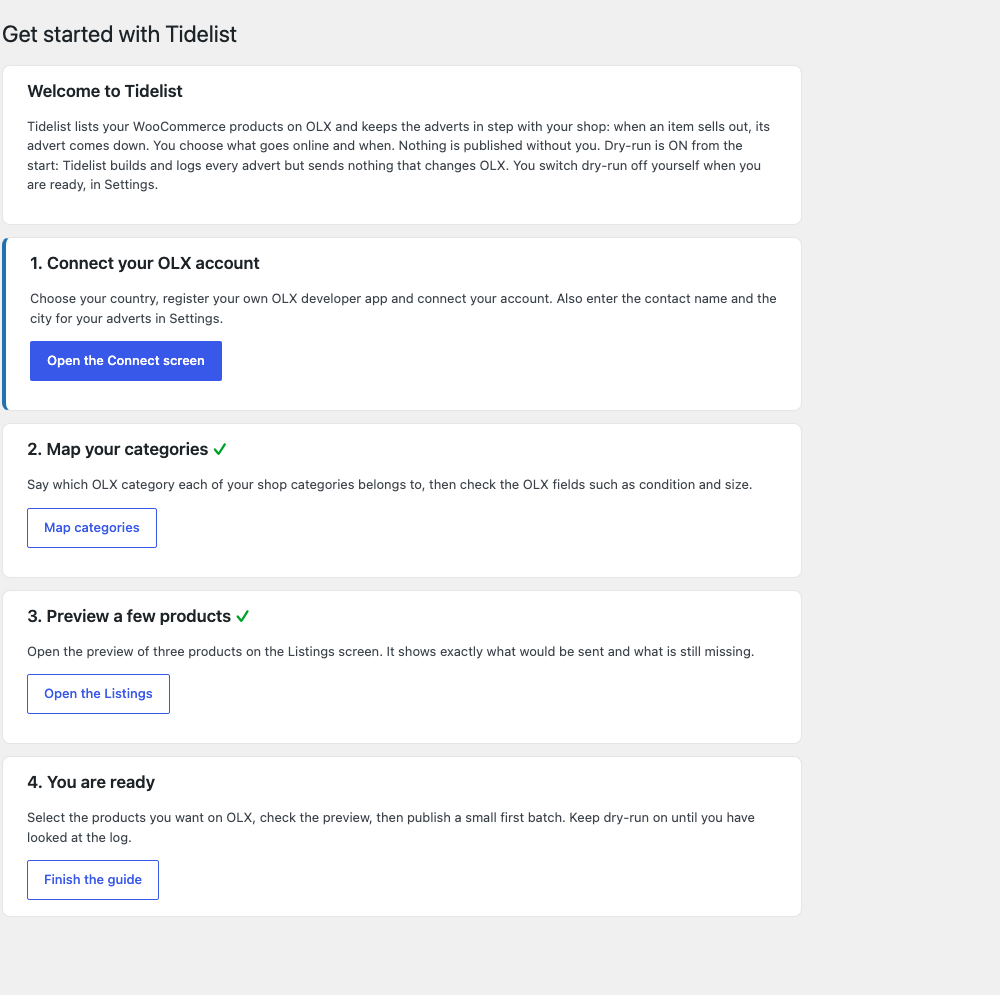
- Open Tidelist in the admin menu. The first-run guide leads you through the steps.
- Choose your OLX country, register your own OLX developer app (the Connect screen shows exactly what to enter) and connect your account. OLX approves each application by hand, so this step can take some time.
- Map your categories and OLX fields, preview a few products, then publish a small first batch.
FAQ
-
Will the plugin publish my whole catalogue by itself?
-
No. Nothing is published until you select products, confirm by typing PUBLISH, and (after the first install) switch dry-run off yourself in the settings.
-
What does dry-run do?
-
Dry-run builds every advert and writes what it would send to the log, but sends nothing that changes OLX. It is on by default. You can see in the log exactly what would have happened.
-
Do I need an OLX account?
-
Yes. You need your own OLX account and your own OLX developer application. Tidelist does not share one application between shops, so the adverts stay yours.
-
Why do I have to register my own OLX application?
-
OLX issues API access per application and approves each one by hand. It also means the adverts are published from your account, with your limits and packages, and you can revoke access at any time.
-
Does it work with business accounts and with private accounts?
-
It works with both, but shops normally sell with a business account, which has its own limits and packages on OLX. The Connect screen tells you which type your account is.
-
Can I choose the OLX category of one product?
-
Yes. Categories normally come from the category mapping: each shop category goes to one OLX category, and a product in several mapped shop categories takes the most specific one. To use another OLX category for a single product, open its preview on the Listings screen and search for the category there. The mapping is not changed for other products.
-
What happens when OLX wants a payment?
-
The plugin never buys anything. If OLX asks for payment (no free place left), the plugin stops the batch, marks the advert “waiting for payment” and tells you.
-
What happens to adverts when I uninstall the plugin?
-
Adverts that are already on OLX are never touched. By default the plugin keeps its settings and mapping when it is deleted, so reinstalling is painless. Tick “Delete all Tidelist data” in the settings if you want everything removed on deletion.
-
Can the plugin change my WooCommerce prices?
-
No. Prices in WooCommerce are never changed. An optional price rule can lower the price in the OLX advert only. It is off by default.
-
Does it support variable products?
-
Yes. Each variation becomes its own advert, with its own size and colour.
-
Does it send my customers’ data anywhere?
-
No. See the “External services” section for exactly what is sent.
-
Is it affiliated with OLX?
-
No. See the disclaimer below.
Reviews
There are no reviews for this plugin.
Contributors & Developers
“Tidelist – Marketplace Sync for WooCommerce” is open source software. The following people have contributed to this plugin.
Contributors
Translate “Tidelist – Marketplace Sync for WooCommerce” into your language.
Interested in development?
Browse the code, check out the SVN repository, or subscribe to the development log by RSS.
Changelog
0.1.0
- First public version: OLX channel (Bulgaria, Poland, Romania, Portugal, Ukraine, Kazakhstan), category and attribute mapping, preview, batch publishing, takedown and re-listing, status polling, dry-run and pause switch, Site Health checks, background-work panel, connection notices, plain-language errors, Export CSV, first-run guide.