

Description
A customer types the wrong house number, picks the wrong delivery address, or changes their mind a minute after paying. Normally that means a support email, a refund by hand and sometimes a parcel sent to the wrong place.
Bahader Edit Order After Checkout gives customers a short window after checkout to sort it out themselves. You choose how long the window is and what they can change. When it closes, the order carries on as normal.
How it works
- The customer places an order.
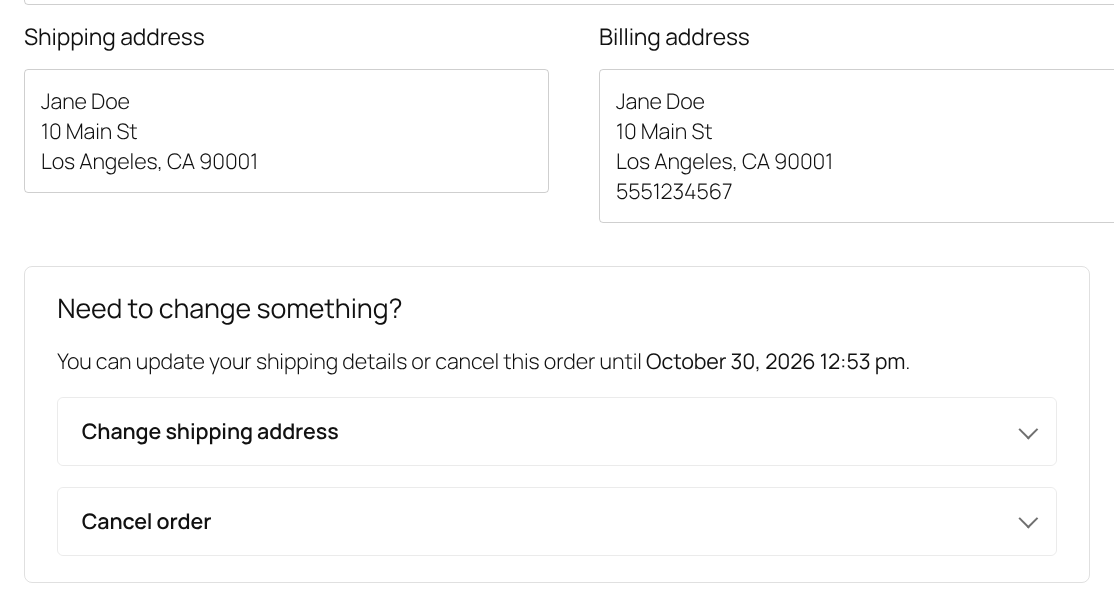
- On the order confirmation page, in My Account and through a link in the order email, they see “Need to change something?” with a countdown.
- They fix the address or cancel. Every change is saved as an order note, and you get an email when an order is cancelled or a change needs your approval.
- When the window closes, the options disappear and the order moves to Processing.
Everything in this plugin
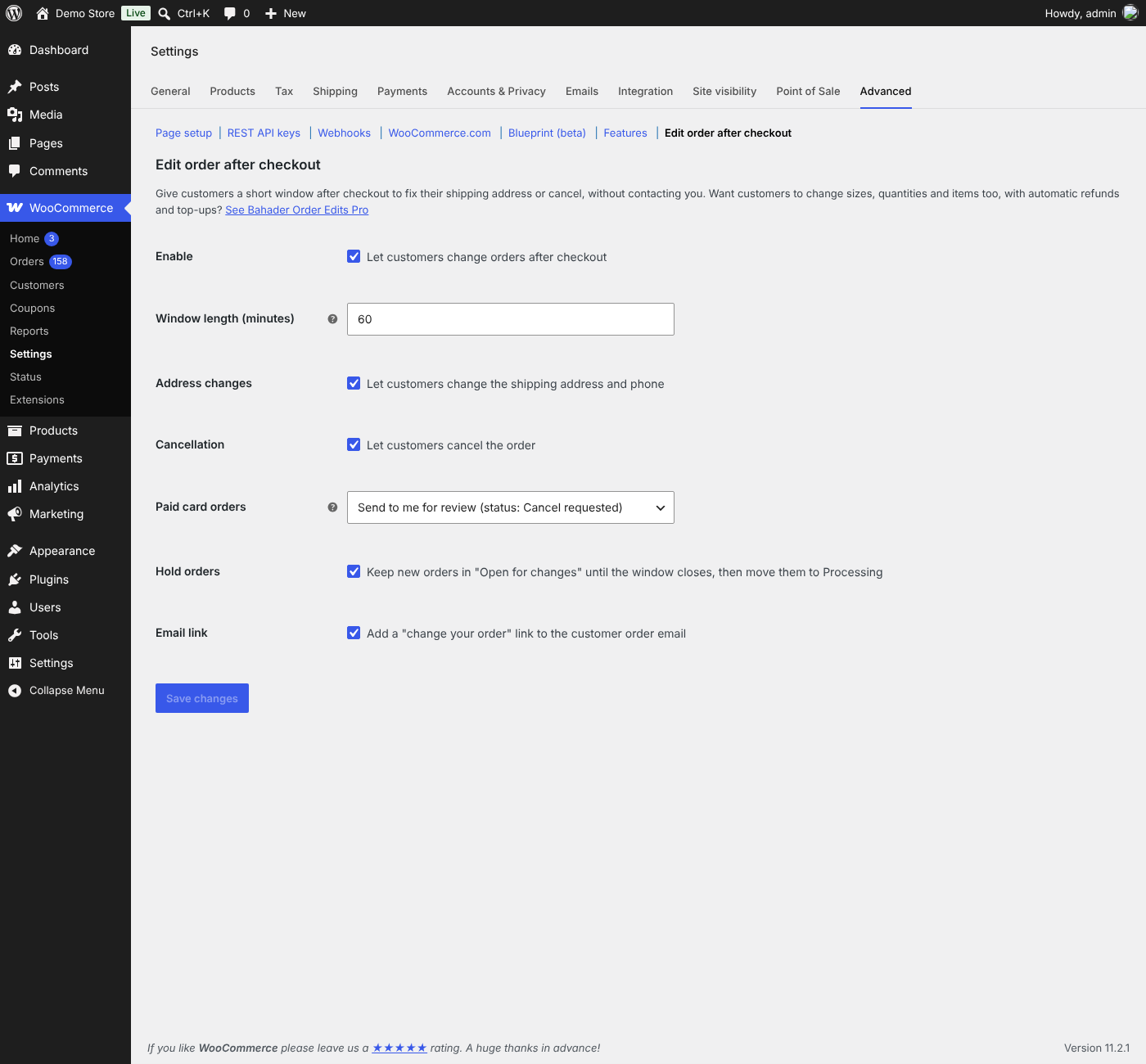
- A change window you control – from 5 minutes to 24 hours after the order is placed.
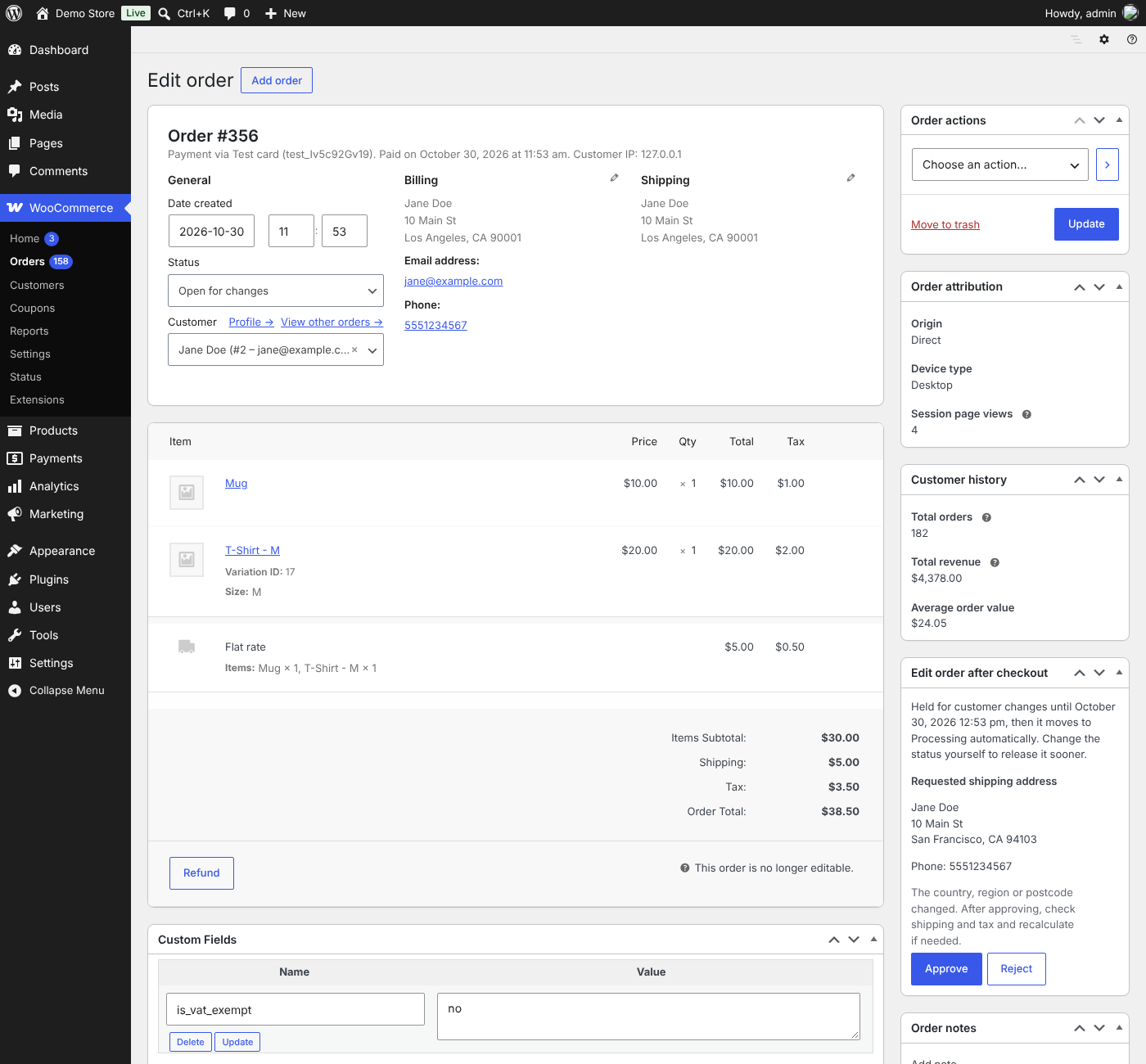
- Address changes – customers update their shipping address and phone number. If the country, state or postcode changes, the request comes to you first, because shipping or tax may change.
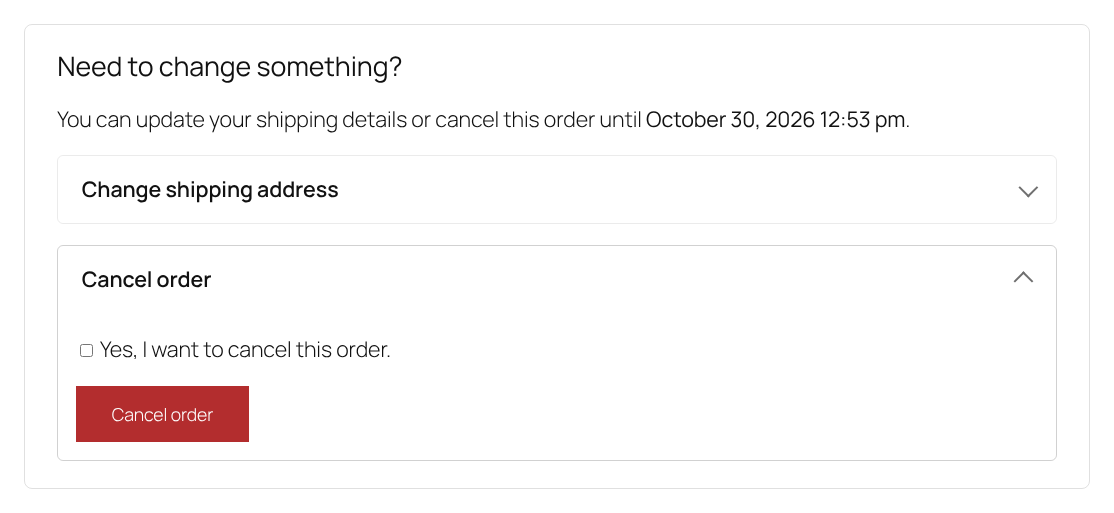
- Cancellation – cash on delivery and bank transfer orders are cancelled straight away and the stock is returned. Paid card orders are refunded automatically through the payment gateway, or sent to you to approve with one click. You choose which.
- Hold orders until the window closes – new orders wait in an “Open for changes” status, so nothing is packed before the customer is sure. They move to Processing on their own when the window closes.
- Email link – the order confirmation email includes a “Change your order” link, which also works for guests.
- Works with your store – classic checkout and the Checkout block, guests and logged-in customers, and High-Performance Order Storage (HPOS).
- Safe – changes are only allowed while the window is open, every form is protected against forgery, guests are checked with their order key, and two changes to the same order can’t run at the same time.
Bahader Edit Order After Checkout Pro
Pro is an optional add-on for stores that want customers to change what they ordered as well: swap size or colour, change quantities, remove items or add more. It handles the money too: the customer pays any difference through a linked top-up order, and lower totals are refunded automatically or sent to you to approve. It also works with cash on delivery, offers suggested products while customers change their order, and shows reports. Everything in this plugin stays free. Learn more about Pro.
Screenshots

Installation
- Install and activate WooCommerce.
- Go to Plugins > Add New, search for “Bahader Edit Order After Checkout”, then install and activate it.
- Go to WooCommerce > Settings > Advanced > Edit order after checkout to set the window length and choose what customers can change. The defaults work out of the box: a 60-minute window with address changes and cancellation turned on.
The options appear on the order confirmation page and on the order page in My Account. If your theme’s order confirmation page doesn’t show them, add the [bahader_edit_order] shortcode to that page.
FAQ
-
What happens when the window closes?
-
The options disappear for the customer. Orders held in “Open for changes” move to Processing automatically through WooCommerce’s scheduled actions.
-
Do held orders count as paid in reports, and is stock reduced?
-
Yes. “Open for changes” counts as a paid status in WooCommerce reports, and stock is reduced when the order is placed, just like Processing.
-
Can I stop orders being held?
-
Yes. Turn off “Hold orders” and orders go to Processing straight away. Customers can still make changes during the window.
-
How are paid card orders refunded when a customer cancels?
-
If you choose “Refund automatically”, the refund goes back through the payment gateway (for gateways that support refunds, such as Stripe and PayPal) and the stock is returned. If you choose review, the order moves to “Cancel requested”, you get an email, and you approve or reject it from the order screen.
-
Why do some address changes need my approval?
-
A different country, state or postcode can change the shipping cost or tax. Those changes are sent to you to approve, while changes to the street, house number or phone are saved straight away.
-
Do guests get the change options?
-
Yes. Guests see them on the order confirmation page and through the link in their order email, which carries their order key.
-
Can customers change products, sizes or quantities?
-
That’s part of Bahader Edit Order After Checkout Pro, along with paying the difference, automatic partial refunds and suggested products.
-
Does it work with the Checkout block?
-
Yes. It works with both the classic checkout and the Cart and Checkout blocks.
Reviews
There are no reviews for this plugin.
Contributors & Developers
“Bahader Edit Order After Checkout for WooCommerce” is open source software. The following people have contributed to this plugin.
Contributors
Translate “Bahader Edit Order After Checkout for WooCommerce” into your language.
Interested in development?
Browse the code, check out the SVN repository, or subscribe to the development log by RSS.
Changelog
1.0.0
- First release: change window, address changes with approval for country, state or postcode changes, cancellation with automatic refund or review, order hold and release, and the email link.