
Description
PesaPulse Billing turns WordPress into a billing desk for any business that collects recurring payments through M-Pesa. ISPs, water vendors, gyms, schools, landlords, SaaS and membership sites can all use it.
Each customer gets an account number. When they pay to your Paybill or Till with that account number, or tap Pay now on their account page, Safaricom notifies your site. PesaPulse credits the right customer and extends their subscription without anyone reconciling statements by hand.
What it does
- M-Pesa C2B and STK Push. Paybill or Buy Goods (Till), through your own Safaricom Daraja app.
- Strict matching. Account numbers carry a check digit that catches every single-digit typo and every swapped pair of digits. A mistyped payment goes to a suspense queue for review instead of being credited to the wrong customer.
- Never counted twice. Each M-Pesa receipt is stored under a unique constraint, so repeated or replayed callbacks can’t credit a payment twice.
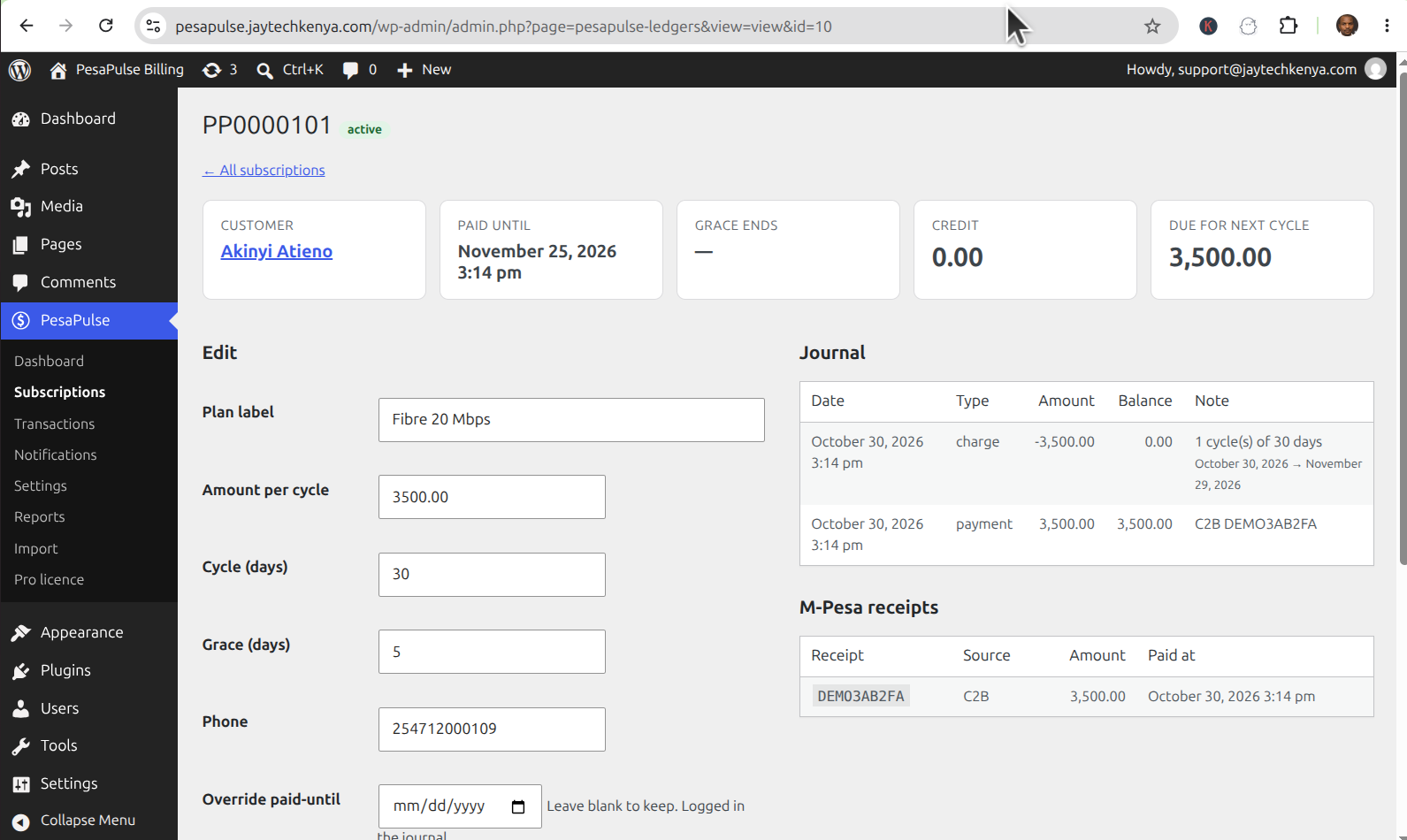
- Isolated ledger. Payments, balances and history live in dedicated database tables, not in user or post meta, with an append-only journal for every payment, charge and adjustment.
- Prepaid credit. Partial payments accumulate. Overpayments buy several billing cycles.
- Grace periods and suspension. A background job moves overdue accounts to grace, then to suspended. Paying restores access instantly.
- Access control without database writes. Suspended customers lose the capabilities or URL paths you choose. Nothing is written to their user record.
- Know who is overdue. The dashboard and subscription list show who is active, in grace or suspended, with their paid-until date and the amount due.
- Customer page. The
[pesapulse_account]shortcode shows each customer’s plan, account number, paid-until date and a Pay now (STK Push) button. - Admin screens for subscriptions, transactions, the suspense queue and the notification log, plus WP-CLI commands for operations and testing.
Plans and pricing
PesaPulse Billing is free, with no limits on customers, payments or sites. Everything listed above works without paying anything, and nothing stops working after a trial period.
PesaPulse shows you who is overdue. PesaPulse Pro, a separate paid add-on that is not hosted on WordPress.org, chases them for you:
- automatic SMS reminders (Africa’s Talking) and WhatsApp reminders (Meta WhatsApp Cloud API) before the due date, during grace and on suspension, plus payment receipts
- signed outbound webhooks to any SMS gateway, CRM or automation tool
- revenue and arrears reports, CSV export and bulk customer import
Pro is sold per website. Current pricing is on jaytechkenya.com/pesapulse. This plugin contains no Pro code, no locked features and no upgrade prompts outside its own Settings page and Plugins screen. The PesaPulse dashboard also shows a small note linking to two other products by the same author, ElimuSMS (school billing) and RetailPulse (retail and inventory). Click Hide to remove it for good. It loads nothing from outside your site and tracks nothing.
Your accounts, your money
PesaPulse doesn’t process payments itself and never routes money through a third party. You enter your own Safaricom Daraja credentials, which are stored encrypted in your database. Payments go straight from your customers to your Paybill or Till.
External services
This plugin connects to the services below, and only when you have configured them with your own credentials.
Safaricom Daraja API (M-Pesa)
Used to receive M-Pesa payments and to start STK Push payment prompts.
- When: whenever you test credentials or register callback URLs in the admin, when a customer clicks Pay now, and whenever Safaricom sends payment notifications to your site.
- Data sent: your Daraja consumer key and secret (to obtain an access token), your shortcode, your callback URLs, and for STK Push the customer’s phone number, the amount and their account reference.
- Endpoints:
https://sandbox.safaricom.co.ke(sandbox) andhttps://api.safaricom.co.ke(production). - Provided by Safaricom PLC: Daraja developer portal and terms of use, Data privacy statement.
No other services
This plugin makes no other remote requests. It has no tracking and no analytics, and it never contacts Jaydee Innovation Hub.
Screenshots



Installation
- Install and activate the plugin.
- Go to Settings Permalinks and choose any option except “Plain”. M-Pesa callbacks need clean URLs.
- Create an app at developer.safaricom.co.ke. Under PesaPulse Settings, enter its consumer key, consumer secret and passkey, and your Paybill or Till number.
- On PesaPulse Dashboard, click Test Daraja credentials, then Register C2B URLs. Your site must be reachable over public HTTPS.
- Create a page containing
[pesapulse_account]and enter its URL as the Renewal page URL in Settings. - Add customers under PesaPulse Subscriptions and give each one their account number.
- Recommended: disable WP-Cron’s traffic-based trigger (
define( 'DISABLE_WP_CRON', true );) and runwp cron event run --due-nowevery 5 minutes from a system cron, so expiry is enforced on time.
FAQ
-
Do I need a Safaricom Daraja account?
-
Yes. PesaPulse uses your own Daraja app and shortcode. Sandbox works for testing.
-
Does it work with a Till (Buy Goods) number?
-
Yes. Choose Buy Goods (Till) as the shortcode type and enter your store number for STK Push.
-
What happens if a customer types the wrong account number?
-
The check digit rejects it. If Safaricom has enabled External Validation on your shortcode, the payment is refused before any money moves. Otherwise it lands in Transactions Suspense, where you assign it to the right account in one click.
-
Can the same payment be counted twice?
-
No. Every M-Pesa receipt code is unique in the database, and every journal entry is unique per transaction. Replayed and concurrent callbacks are ignored.
-
Is my customers’ data sent anywhere?
-
Only to Safaricom, as described under “External services” below. PesaPulse has no tracking or analytics, and it doesn’t phone home.
-
Does the free plugin send reminders?
-
No. The free plugin tracks who is due, in grace or suspended, and pauses and restores access automatically. Automatic SMS and WhatsApp reminders are part of PesaPulse Pro (see “Plans and pricing”).
-
Does it work behind Cloudflare or a reverse proxy?
-
Yes. Set Trusted client-IP header in Settings so the optional Safaricom IP allowlist sees the real caller.
-
Where do I get support?
-
Free support is on the WordPress.org support forum for this plugin. Pro customers get priority email support.
Reviews
There are no reviews for this plugin.
Contributors & Developers
“PesaPulse Billing” is open source software. The following people have contributed to this plugin.
Contributors
Translate “PesaPulse Billing” into your language.
Interested in development?
Browse the code, check out the SVN repository, or subscribe to the development log by RSS.
Changelog
1.1.0
- Dashboard: a small, hideable note linking to ElimuSMS and RetailPulse.
- Reminder channels (SMS, WhatsApp and outbound webhooks) moved to the separate PesaPulse Pro add-on. Payments, matching, grace periods and access control remain free.
- Extension points for add-ons:
pesapulse_settings_fields,pesapulse_settings_sections,pesapulse_channels. - Text domain is now
pesapulse-billing. - Settings page lists the external accounts you need.
1.0.0
- First release.