
Description
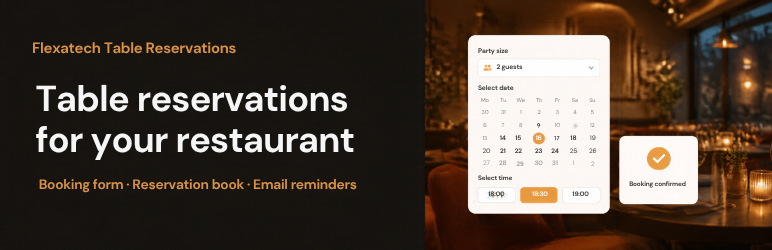
Flexatech Table Reservations takes table bookings on your own site. Guests pick a party size, a day and a free time, then leave their name and a way to reach them. The plugin finds a table that fits, and you see every booking in the admin, day by day.
- A reservation form, as a block or the
[fxtr_reservation_form]shortcode. - A page where guests change or cancel their booking from the link in their email, as a block or the
[fxtr_manage_reservation]shortcode. No account needed. - Tables, areas, shifts and closed dates, so only real free times are offered.
- The table is held for a few minutes while the guest fills in the form.
- Confirm every booking yourself, or let small parties through on their own.
- HTML emails for the guest and for you, with an editor in the admin, and a reminder before the booking.
- Optional: Google Calendar sync, Sign in with Google on the form, Cloudflare Turnstile against spam, a map of your address, and a webhook.
External services
The plugin works without any of the services below. Each one is off until you turn it on or fill in its keys.
Google Calendar API
Copies bookings to a Google calendar you choose, and can read a second calendar whose events block online booking at those times. It runs only after you connect a Google account in the Google Calendar tab, with an OAuth client you create in Google Cloud.
- When you connect or disconnect: your site talks to accounts.google.com and oauth2.googleapis.com to sign in, refresh and revoke the access token.
- When a booking is made, moved or cancelled: your site sends the event to www.googleapis.com. The event holds the guest’s name, party size, date and time, table names, phone, email, notes and a link to the booking in your admin.
- When the form shows free times: your site asks www.googleapis.com for the events on the blocking calendar for that day.
Google Terms of Service: https://policies.google.com/terms
Google Privacy Policy: https://policies.google.com/privacy
Google APIs Terms of Service: https://developers.google.com/terms
Sign in with Google (Google Identity Services)
When you tick “Sign in with Google on the booking form”, the guest’s browser loads https://accounts.google.com/gsi/client on the booking page. A guest who uses the button shares their name and email address from their Google account, which fill in the form. Nothing is sent to Google from your server.
Google Terms of Service: https://policies.google.com/terms
Google Privacy Policy: https://policies.google.com/privacy
Cloudflare Turnstile
When you fill in a Turnstile site key and secret key, the guest’s browser loads https://challenges.cloudflare.com/turnstile/v0/api.js on the booking page to check that the guest is a person. When the form is sent, your site sends the Turnstile answer, your secret key and the guest’s IP address to https://challenges.cloudflare.com/turnstile/v0/siteverify.
Cloudflare Website Terms of Use: https://www.cloudflare.com/website-terms/
Cloudflare Privacy Policy: https://www.cloudflare.com/privacypolicy/
Google Maps
When you tick “Show a map”, the booking page shows a Google Maps embed (https://maps.google.com/maps) of the restaurant address you entered. The guest’s browser loads it from Google. The directions link next to the address also opens Google Maps. Only the restaurant’s address is sent, never guest data.
Google Maps Terms of Service: https://maps.google.com/help/terms_maps/
Google Privacy Policy: https://policies.google.com/privacy
Webhook
When you fill in a webhook URL, your site sends a JSON POST to that URL when a booking is made, changes status or moves. The body holds the booking, including the guest’s name, phone, email, party size, date, time and notes. The URL is one you choose and control, so its terms and privacy policy are those of whoever runs it.
Source code
The admin screen is a React app compiled into assets/dist. Its source ships with the plugin in apps/admin/src, together with the build files: package.json, pnpm-lock.yaml, apps/admin/vite.config.ts and apps/admin/tsconfig.json.
To build it:
- Install Node.js 20 or later and pnpm 9 or later (
npm install -g pnpm). - Run
pnpm installin the plugin folder. - Run
pnpm build. The files are written toassets/dist.
The JavaScript and CSS in assets/js and assets/css are not compiled and can be read as they are.
Blocks
This plugin provides 2 blocks.
- Manage Table Reservation Where the link in a reservation email lands: the guest moves or cancels their table.
- Table Reservation Form Guests pick the party size, a date and a free time, then leave their details and book a table.
Installation
- Upload the
flexatech-table-reservationsfolder to/wp-content/plugins/, or install it from the Plugins screen. - Activate the plugin.
- Open Flexatech Table Reservations in the admin menu, add your tables and shifts, and place the reservation form on a page.
Reviews
There are no reviews for this plugin.
Contributors & Developers
“Flexatech Table Reservations” is open source software. The following people have contributed to this plugin.
Contributors
Translate “Flexatech Table Reservations” into your language.
Interested in development?
Browse the code, check out the SVN repository, or subscribe to the development log by RSS.
Changelog
1.0.0
- First release.