

Description
Hand over more than a website. Hand over a leads app.
Your clients judge a website by one thing: does it bring in work? Usually they can’t tell. Inquiries arrive as emails, some fail to send or land in spam, and nobody can say which page or campaign brought the customer in.
Comma5 Inquiries turns the Contact Form 7 forms you already build into a simple leads app inside the client’s own WordPress. Every inquiry is saved before the notification email goes out. If that email fails to send, the inquiry is flagged and can be resent with one click. There is no account to create and no subscription to pass on.
What your client gets
- Told when an email fails. A failed notification email is flagged on the inquiry and on the WordPress Dashboard, and can be resent with one click. The inquiry itself is already saved.
- Every inquiry in one list, sorted into Sales or Help, with real inquiries caught by the spam filter kept in a Spam tab so they can be restored.
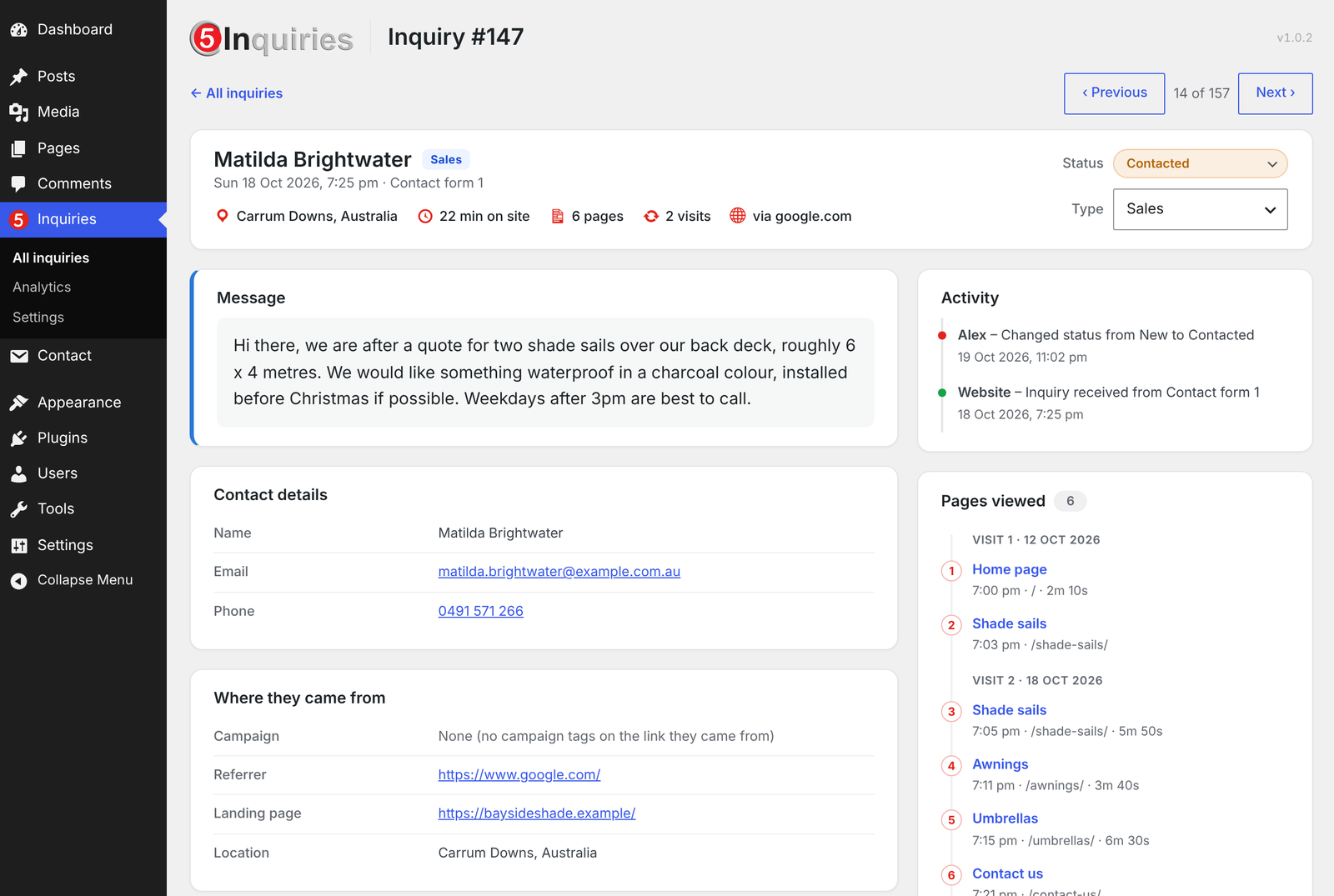
- The customer’s path through the site: how they found it (an ad, Google, social media, an email campaign or another website), the pages they viewed, such as the products or services they looked at, how long they spent and how many visits it took before they got in touch.
- A simple pipeline: sales leads move from New to Contacted, Quoted, Won or Lost, and help requests are tracked until they are resolved. Statuses can be renamed to fit the business.
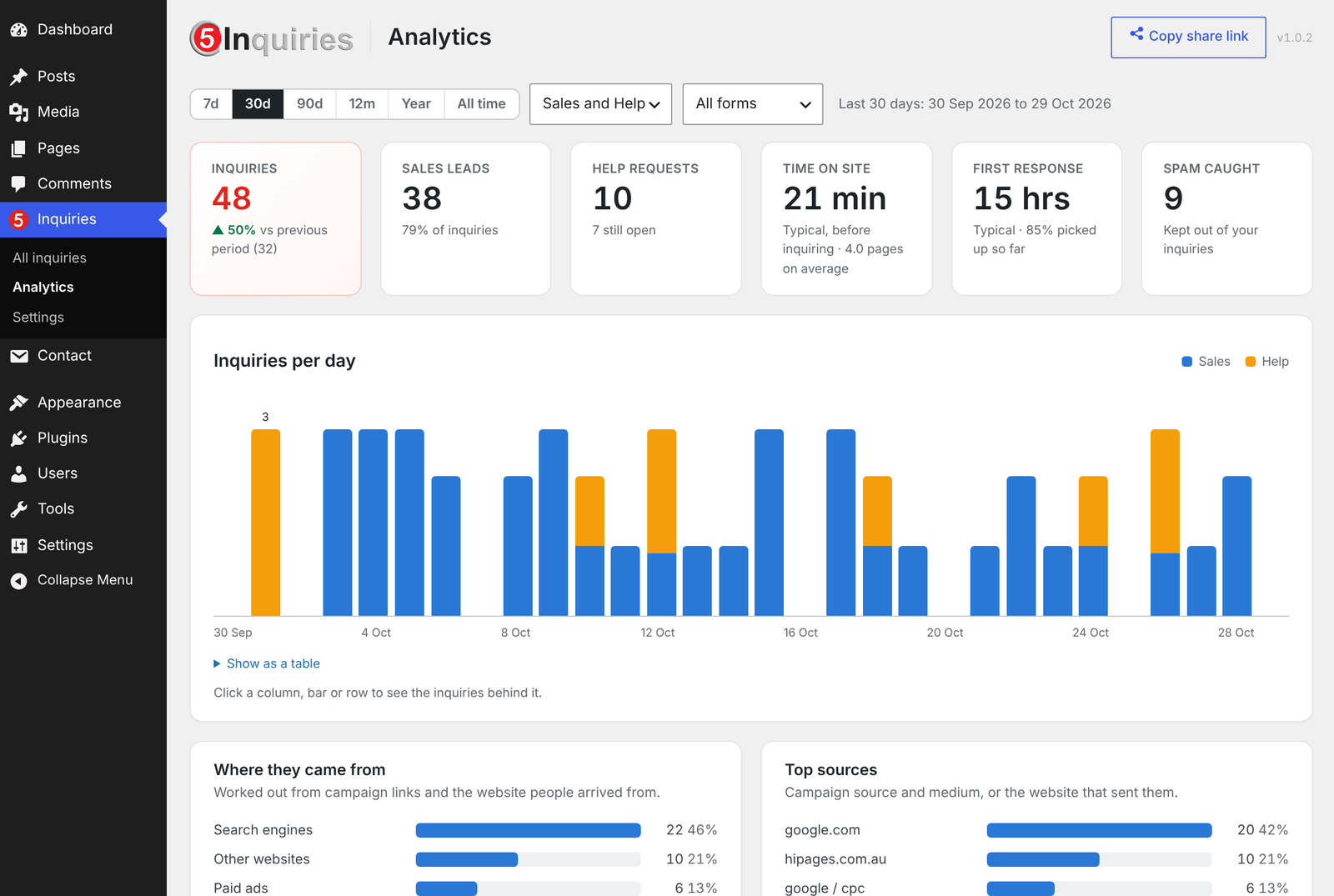
- Proof the website works: analytics show which marketing brings in inquiries and won jobs, and which pages people read first.
- A live report they open on their phone. Turn on the share link and send it to the business owner. It opens the site’s inquiry figures on any phone, under the site’s own name and icon, with no WordPress login and no report to prepare each month. It shows totals and charts only, never names or contact details. Make a new link at any time and the old one stops working.
Why web developers use it
- Works on the forms you already build. Activate it and the next submission is captured. No form changes are needed: name, email, phone and message are found automatically, and every other field is saved too.
- Nothing to host or bill. It is free, needs no outside service, and the data stays in the client’s own database.
- More value from every site. Send the owner the share link at launch, and they see every month what the website brings in.
Free. No account, no monthly fee. Made by Comma5, a software company in Melbourne, Australia.
How it works
Comma5 Inquiries keeps a copy of every inquiry sent through Contact Form 7 in your own WordPress database, so a lead is never lost to a failed email, a full inbox or a spam filter.
Each inquiry is sorted into Sales or Help. Sales leads move through New, Contacted, Quoted, Won and Lost. Help requests are tracked as cases until they are resolved, so every one gets an answer. One click changes a status, right from the list.
Everything stays on your own site. No account or outside service is needed.
Inquiries
- Every inquiry saved: name, company, email, phone, message and any extra form fields. Contact Form 7’s own email still goes out as normal.
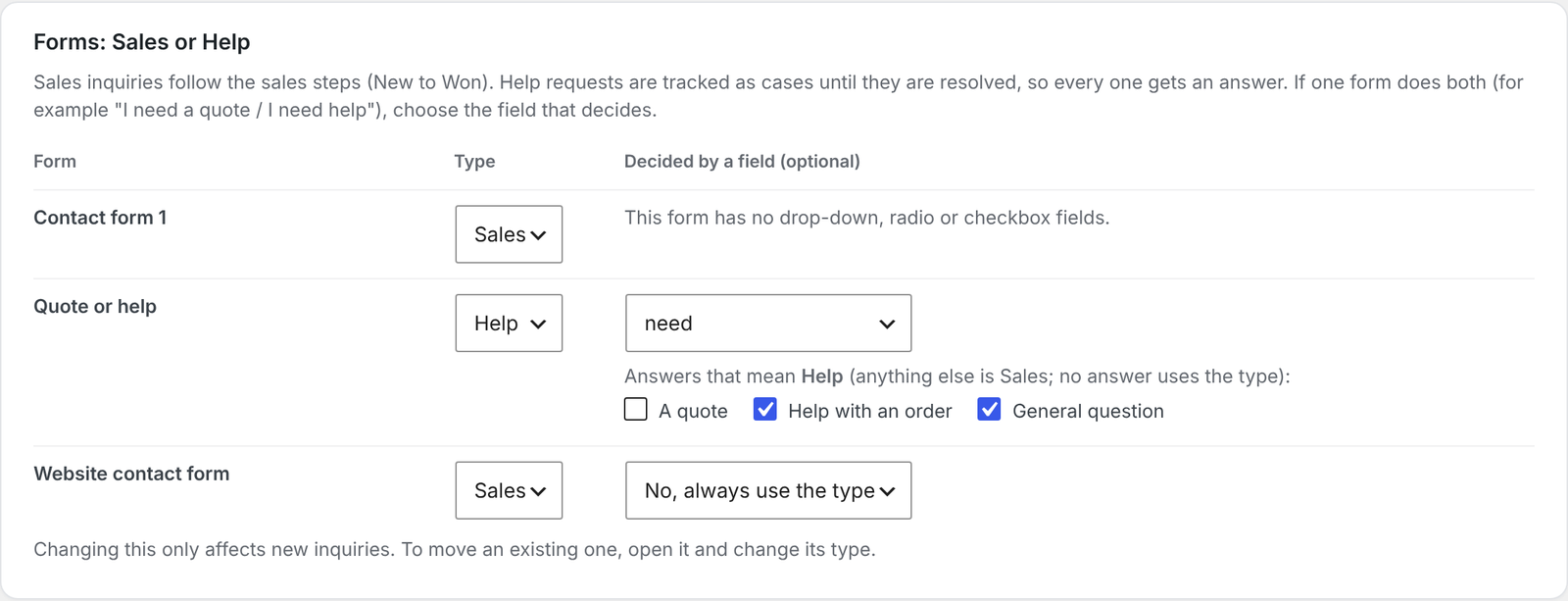
- Sales or Help: set each form to Sales or Help, or let a field on the form decide (for example “I need a quote / I need help”).
- Your own statuses: rename, recolour, add or remove statuses for Sales and Help separately.
- The visitor’s story: where they came from (campaign, search engine, social media or another site), the pages they read, how long they spent on the site, and how many visits it took before they asked.
- Previous and next: step through inquiries one by one without going back to the list.
- Attachments kept safely: uploaded files are checked, renamed and stored in a protected folder. Preview images and PDFs in place.
- Spam rescue: inquiries marked as spam are kept in a separate Spam view, so a real one caught by mistake can be restored.
- Failed email alerts: if a notification email fails to send, the inquiry is flagged and the email can be resent with one click.
- Activity history: every status change, with who made it and when.
- Export: download inquiries to Excel (.xlsx) or CSV.
Analytics
- Inquiries per day, week or month, split into Sales and Help, for the last 7, 30 or 90 days, 12 months, this year or all time.
- Where inquiries came from, top sources, landing pages, the pages people read before asking, busiest days and times.
- Time on site before inquiring, and how quickly your team responds.
- Win rate overall and by channel, once you keep statuses up to date.
- Click any chart to see the inquiries behind it.
- Share link: send a private link to live analytics that opens on any phone without logging in. It shows totals and charts only, no names or contact details, and can be switched off or replaced at any time.
External services
This plugin can look up the approximate location (country and city) of the person who sent an inquiry. This is off by default and only runs if you switch on location lookup in Inquiries > Settings.
When it is on, the visitor’s IP address is sent to the ipwho.is service (run by ipwhois.io) shortly after each inquiry is saved. Nothing else about the inquiry is sent. The IP address is not stored with the inquiry.
- Service: https://ipwho.is/
- Terms of service: https://ipwhois.io/terms
- Privacy policy: https://ipwhois.io/privacy
If your site is behind Cloudflare and you tell the plugin to trust proxy headers, the country is read from Cloudflare’s header instead, without contacting any outside service.
Screenshots


Installation
- Install the plugin from Plugins > Add New, or upload the
c5-inquiriesfolder to/wp-content/plugins/. - Activate it.
- Open Inquiries > Settings. Set each form to Sales or Help, and check the attachment limits.
- Send a test inquiry through your form, then open Inquiries.
Contact Form 7 must be active for inquiries to be captured.
FAQ
-
How is this different from Flamingo or CFDB7?
-
They keep a copy of each Contact Form 7 message. Comma5 Inquiries also tells you when the notification email failed and lets you resend it, shows how each customer found the site and which pages they viewed before asking, and tracks every inquiry until it is won or resolved.
-
Will it tell me if my website emails stop working?
-
Yes. If the notification email fails to send, the inquiry is flagged and can be resent with one click. The inquiry itself is already saved.
-
I already use WP Mail SMTP (or similar). Do I still need this?
-
They work well together. An SMTP plugin makes emails more likely to send. Comma5 Inquiries makes sure that when one doesn’t, you still have the inquiry and you know about it.
-
Is it really free?
-
Yes. There is no account or monthly fee, and it runs entirely on your own site. It is made by Comma5, an Australian software company that also offers paid products such as Comma5 Live. You never need them to use this plugin.
-
Can my client see inquiries without being an administrator?
-
Not yet by default: the Inquiries screens need the
manage_optionscapability, which administrators have. Developers can change this with thec5lb_capabilityfilter, for exampleadd_filter( 'c5lb_capability', function () { return 'edit_pages'; } );to let Editors in. Note that the same capability also opens the plugin’s Settings. -
Does it change how Contact Form 7 works?
-
No. Contact Form 7 still sends its email. The plugin only keeps a copy of each inquiry, and an error in this plugin never stops the visitor’s form from sending.
-
One form asks whether people want a quote or help. Can that decide the type?
-
Yes. In Settings, choose the field that decides and tick the answers that mean Help. Any other answer is Sales.
-
Where is my data stored?
-
In your own WordPress database, in the plugin’s tables, and attachments in a protected folder inside your uploads folder. Nothing is sent anywhere unless you switch on the optional location lookup (see External services).
-
Anyone you give the link to. It shows totals and charts only, never names, emails or messages. You can switch it off, or make a new link (which stops the old one working), in Settings. The page tells search engines not to index it.
-
How is “first response” measured?
-
It is the time until someone first changes an inquiry’s status or type, resends its email or opens its files in WordPress. Replies sent by email or phone are not seen by the plugin.
-
Yes, two first-party cookies on your site, kept for 30 days:
c5lb_srcremembers how a visitor first arrived (campaign, search engine or another website) andc5lb_pageslists the pages they viewed (only while page tracking is on in Settings). They are only read when a form is sent and are never sent anywhere else. Suggested wording for your privacy policy is added to Settings > Privacy > Policy Guide. -
What happens to my inquiries if I delete the plugin?
-
They are kept, unless you tick “Also delete all inquiries” in Settings before deleting the plugin.
Reviews
There are no reviews for this plugin.
Contributors & Developers
“Comma5 Inquiries” is open source software. The following people have contributed to this plugin.
Contributors
Translate “Comma5 Inquiries” into your language.
Interested in development?
Browse the code, check out the SVN repository, or subscribe to the development log by RSS.
Changelog
1.0.6
- Readme: clearer description, FAQ and tags.
1.0.5
- The shared analytics page shows your site’s icon instead of the plugin’s logo.
- Clicking a page in Analytics now finds its inquiries when the page address has special or non-English characters.
- Suggested privacy policy wording is added to Settings > Privacy > Policy Guide.
1.0.4
- The shared analytics page no longer shows a “Powered by” line.
- Other plugins’ notices are no longer hidden on the Inquiries screens.
- The menu icon style is loaded the standard WordPress way.
1.0.3
- Renamed from C5 Inquiries to Comma5 Inquiries. Nothing else changes: your inquiries and settings stay as they are.
1.0.2
- The message gets its own card at the top of each inquiry.
- Analytics hides First response until your team has picked up an inquiry.
1.0.1
- New C5 Inquiries logo.
- Inquiries list columns size to fit on laptop screens.
1.0.0
- First public release.