
Description
Friendly Skies puts Bluesky on your WordPress site as five native blocks. Place them
where you want them — in a post, a template part, a sidebar — and they render on your server as
ordinary HTML.
The five blocks
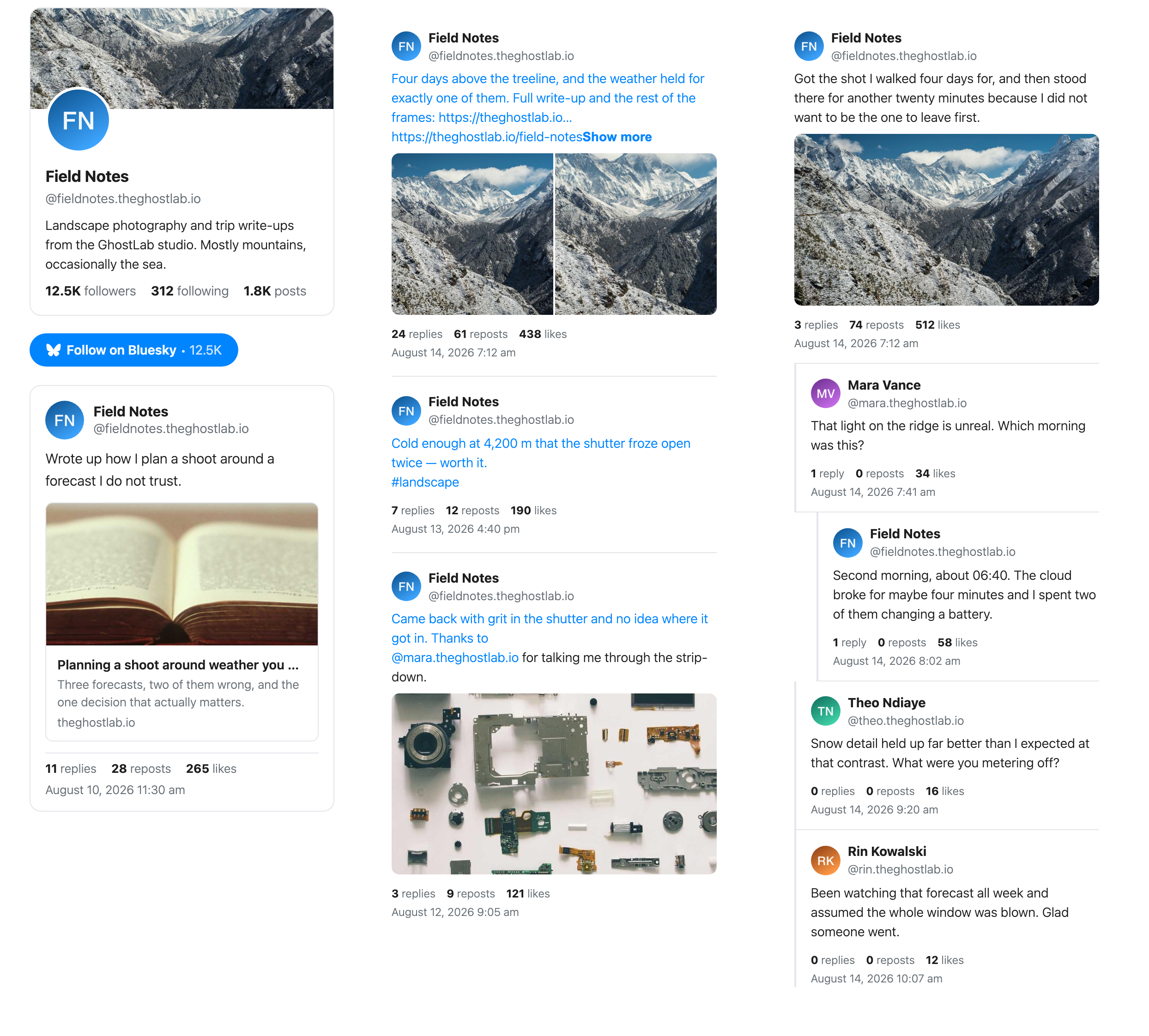
- Post — paste a Bluesky post URL. Author, text, images, video, quote posts, link cards and
engagement counts, rendered as HTML. - Feed — a stream of posts, in a List or Grid layout.
- Threaded — a whole conversation, with reply indentation, a depth limit and a collapse
threshold. - Profile Card — avatar, banner, bio and stats, in Full, Compact or Minimal styles.
- Follow Button — a styled link to a profile, with an optional live follower count.
No account, no app password
Everything above reads Bluesky’s public API. There is nothing to connect and no credentials to
store — no account, no app password, no key of any kind.
The settings screen has one option on it: how long a response from Bluesky is reused before it
is fetched again. Everything else a block does is configured on the block itself.
Rendered on your server, not in your visitor’s browser
Every block is server-rendered and cached. Your readers load your HTML from your host. When
Bluesky can’t be reached, a block shows the last copy it fetched rather than an empty space.
Built to be read
Contrast meets WCAG AA, every control is reachable from the keyboard, animation respects
prefers-reduced-motion, and all output is escaped. None of that is a paid feature.
Friendly Skies Pro
Everything above is free and stays free. Pro adds two things:
- More ways to show other people’s posts — Search, Custom Feed and Bluesky list sources, and
the Masonry, Carousel, Highlight and Ticker layouts. - Import from Bluesky — bring your Bluesky posts into WordPress as real posts or a custom
post type, on a schedule, with filters and two import styles. The Theme Native style (the
default) writes each post’s text into WordPress; the Bluesky Embed Block style stores a link to
the post and shows it from Bluesky. Photos from your own posts are copied into your Media
Library, and the first becomes the featured image; photos in reposts stay on Bluesky.
Pro is a separate plugin. You download it from your GhostLabs account, upload it, and activate
it; it then switches this plugin off. Nothing is copied or migrated, because both editions store
their settings in the same place. The FAQ below walks through it.
External services
Friendly Skies contacts one outside service, and never just because the plugin was installed or
activated.
Bluesky (bsky.app / public.api.bsky.app) — every block reads Bluesky’s public API to
render what you asked it to show. The request contains the handle, post URL, feed or list you
put in the block, and nothing about your site or your visitors. It is made by your server, not
by your reader’s browser, and the response is cached. This happens whenever a page containing a
block is rendered, and whenever a block is previewed in the block editor (your server renders
the preview the same way), if the cache has expired. The Follow button contacts Bluesky only when
it is set to show a follower count, and otherwise contacts nothing.
Images are fetched from Bluesky itself. Avatars, profile banners, post
photos, and link-card and video thumbnails are shown from Bluesky’s own image addresses, so when a
page with a block loads, your reader’s browser requests those images from Bluesky, which receives
the reader’s IP address, browser details and the site they are on, like any image request. The
same is true of your own browser while a block is previewed in the editor. No Bluesky script,
iframe or tracking code is added to the page or the editor.
Bluesky’s terms of service: https://bsky.social/about/support/tos
Bluesky’s privacy policy: https://bsky.social/about/support/privacy-policy
Links to GhostLabs — not a service. The plugin links to two GhostLabs sites from wp-admin and
the block editor. It never contacts either one: nothing is requested from them in the background,
and the plugin sends them nothing.
- https://theghostlab.io — GhostLabs’ site, including Friendly Skies Pro’s product page.
- https://enter.theghostlab.io/account — your GhostLabs account, where Friendly Skies Pro is
downloaded after you buy it. It is linked from Settings Friendly Skies Pro, under
Already own Friendly Skies Pro?, and opens in a new tab.
Following either link is an ordinary visit to that site in your browser.
GhostLabs terms of service: https://theghostlab.io/terms-of-service
GhostLabs privacy policy: https://theghostlab.io/privacy-policy
Source code
The complete source of this plugin, including the block sources its compiled assets are built
from, is published at:
https://github.com/theghostlab/wp-ghostlabs-friendly-skies
The compiled JavaScript and CSS in this release are readable, not minified. In that repository,
pnpm install –frozen-lockfile && pnpm run build rebuilds them. Later releases may ship the same
sources minified, which GHOSTLABS_MINIFY=1 pnpm run build produces.
Screenshots


Blocks
This plugin provides 5 blocks.
- Friendly Skies: Feed Display a Bluesky account’s posts as a list or a grid.
- Friendly Skies: Follow Button A styled button linking to a Bluesky profile with optional follower count.
- Friendly Skies: Bluesky Post Embed a Bluesky post.
- Friendly Skies: Profile Card Display a Bluesky profile card.
- Friendly Skies: Threaded Display a Bluesky conversation in threaded form.
Installation
- Install through Plugins Add Plugin, or upload the plugin folder to
/wp-content/plugins/. - Activate it through the Plugins screen.
- In a post, a page or a template, open the block inserter and search for “bluesky”. Choose one of the five Friendly Skies blocks.
- Give it what it asks for: a handle for the Feed, Profile Card and Follow Button blocks, or a post URL for the Post and Threaded blocks. There is nothing to connect and no account to sign in to.
- Optional: Settings Friendly Skies sets how long a response from Bluesky is reused before it is fetched again.
FAQ
-
Can Friendly Skies post my WordPress articles to Bluesky?
-
No. Friendly Skies reads from Bluesky and never writes to it — it has no permission to publish
on your behalf and no code that could. If you want to announce your posts on Bluesky, look at
Autoblue or ATmosphere, which are built for that direction. -
Do I need a Bluesky account?
-
No. The free blocks read public data, so you can display any public account, in threaded form or
as a post without connecting anything. -
Does this load anything from Bluesky in my visitor’s browser?
-
Images, yes. Scripts, no. Blocks are rendered on your server and cached, and no Bluesky script,
iframe or tracking code is added to the page. The images in a block — avatars, profile banners,
post photos, and link-card and video thumbnails — are shown from Bluesky’s own image addresses,
so your reader’s browser loads those from Bluesky. -
What happens when Bluesky is down?
-
A block shows the last copy it fetched from Bluesky, for up to a week, and stops asking Bluesky
for a couple of minutes at a time, so an outage doesn’t slow every page. If a block has no copy,
it shows a short message in its place rather than an empty space, and a Post or Profile Card
block adds a link to it on Bluesky. A Follow Button still shows, without its follower count. -
Is this an official Bluesky plugin?
-
No. Friendly Skies is an independent plugin that uses Bluesky’s public API. It is not
affiliated with or endorsed by Bluesky. -
Which layouts and sources are free?
-
The List and Grid layouts, showing any one Bluesky account’s posts. Search, Custom Feed and Bluesky list
sources, and the Masonry, Carousel, Highlight and Ticker layouts, are Pro. -
I bought Pro. How do I switch?
-
Friendly Skies Pro is a separate plugin. Once you have bought it:
- Download it from your GhostLabs account. Settings Friendly Skies Pro links there under
Already own Friendly Skies Pro? - Upload it to your site from the Plugins screen, with the Upload Plugin button.
- Activate it, then enter the license key from your receipt email on its Licenses tab.
When Friendly Skies Pro starts, it deactivates this plugin. Every block on every page keeps
working through the switch, because both plugins use the same stored settings and the same cached
responses. Pro sets its own cache timings, so the cache duration chosen in this plugin no longer
applies. This plugin is left installed but inactive, and you can delete it whenever you like.On a multisite network, a network administrator uploads the plugin.
- Download it from your GhostLabs account. Settings Friendly Skies Pro links there under
-
Does it work with my theme?
-
Yes. Blocks inherit your theme’s typography and colours where sensible, offer light, dark and
system schemes, and are styled with CSS custom properties you can override.
Reviews
There are no reviews for this plugin.
Contributors & Developers
“GhostLabs Friendly Skies – Feeds & Embeds for Bluesky” is open source software. The following people have contributed to this plugin.
Contributors
Translate “GhostLabs Friendly Skies – Feeds & Embeds for Bluesky” into your language.
Interested in development?
Browse the code, check out the SVN repository, or subscribe to the development log by RSS.
Changelog
1.0.1
- Fixed: a count of one reads in the singular (“1 reply”, “1 follower”, “Show 1 more reply”).
- Changed: the cache duration filters are now
ghostlabs_friendly_skies_cache_ttl_{$type}. The oldfriendly_skies_cache_ttl_{$type}names still work and are deprecated.
1.0.0
- First release.