

Description
Számláma for WooCommerce connects your shop to Számláma, the Hungarian online invoicing service. Documents are issued in Számláma — with the numbering, the NAV Online Számla data reporting and the archiving handled there — automatically from your orders or with one click.
Documents
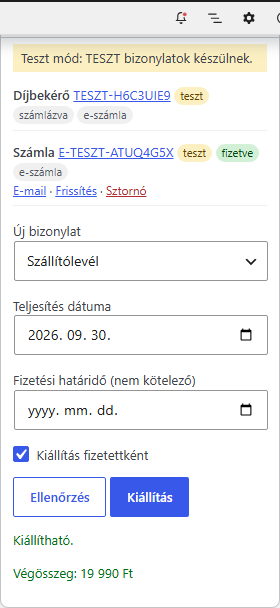
- Invoice (electronic or paper), pro forma invoice, receipt (e-receipt), delivery note, advance invoice
- Your own prefixes (numbering series) for each document type, chosen from your Számláma account
- Paid pro forma invoice paid invoice automatically, in one step
- Storno of the invoice / voiding of the receipt when the order is cancelled or refunded
- Hungarian, English or German documents (or by the billing country)
Automation with rules
- Event: order created, payment completed, any order status (custom statuses of other plugins too)
- Conditions: payment method, shipping method, company / private customer, country, currency, order total, product category, receipt requested — all or any of them
- Fulfillment date (order / payment / completion date ± days), payment deadline, mark as paid
- Runs in the background with automatic retries; failures are reported in the order notes, in the admin and by e-mail
- Never twice: one live document per type and order, guaranteed on the Számláma side too
Payment and shipping methods
- Payment method on the document, payment deadline, “mark as paid” and the “Pay now” (online card payment) link per WooCommerce payment method
- Line name and VAT per shipping method
VAT
- Automatic from the WooCommerce tax rates, or with VAT markings in the tax rate name (AAM, TAM, FAD, KBAET, EUFAD37, ÁKK, ÁTHK, HO … and the EU / EUT / EUK / EUKT / MAA / F.AFA names used by other plugins)
- Mapping per tax class, subject-exempt (AAM) shops, EU company buyers (KBAET / EUFAD37), sales outside the EU (EAM / ÁTHK)
Checkout
- Tax number field: when a company name is entered, always, with a “company purchase” checkbox, or with private / company radio buttons
- Formal check of the Hungarian tax number and the EU VAT number
- Company name and address filled in from the NAV database after the tax number is typed
- “I ask for a receipt” option with hidden billing fields and disallowed payment methods
- Classic and block checkout (Cart & Checkout blocks), HPOS compatible
Payment notifications (webhook)
Számláma notifies the shop when a document is paid — by bank statement matching, online card payment or manually —, cancelled, or its NAV status changes. The plugin updates the order (status, notes) and makes the invoice from a paid pro forma invoice. The notification endpoint is registered in Számláma with one click; every notification is signed (HMAC-SHA256) and verified.
Sharing
- Download links in the WooCommerce e-mails; the order e-mail waits for the automatic document and goes out with its link
- Documents on the My account Orders pages
- E-mail from Számláma, and forwarding of every new document to further addresses (e.g. your accountant)
Test mode
With a Számláma test API key every document is a TEST document: it gets a TESZT-… number, is not reported to NAV and does not use your numbering. You can try the whole flow — including the payment notifications — before going live.
External services
This plugin connects to the Számláma API (https://app.szamlama.hu/api/v1), operated by Software-Wolf Kft. (Hungary), to issue and manage invoicing documents. It is required for the plugin to work, and it is only contacted after you enter your own Számláma API key.
What is sent and when:
- When a document is issued (automatically by your rules or when you click “Issue” / use a bulk action): the order number, the billing (and, if different, the shipping) name, company name, tax number, address, e-mail address and phone number of the customer, the ordered items with quantities, prices and VAT, the shipping and fee lines, the currency, the payment method and the dates of the document.
- When you check a document, mark it paid, cancel it, send it or download its PDF: the Számláma id of the document.
- When a customer types a Hungarian tax number at checkout and the NAV lookup is enabled: the first 8 digits of the tax number, to fetch the company’s name and address from the NAV database through Számláma.
- On the settings screen: requests to read your account status, numbering series, bank accounts and selectable values, and to register the notification (webhook) endpoint of your shop.
Számláma may send signed notifications to your shop’s REST endpoint (/wp-json/szamlama/v1/webhook) about your documents.
- Terms of use: https://szamlama.hu/aszf/
- Privacy policy: https://szamlama.hu/jogi/adatkezeles/
Screenshots



Installation
- Install and activate the plugin (WooCommerce must be active).
- In Számláma, go to Settings API keys and create a key with the WooCommerce plugin scope — one live and one test key.
- In WooCommerce go to Settings Számláma, paste the keys, choose the mode (start with Test) and save.
- On the same page click Connect for the payment notifications (your shop must be on HTTPS).
- Set the document basics, the payment methods and the rules on the other tabs, then try a few test orders.
- Switch to Live mode.
FAQ
-
Do I need a Számláma account?
-
Yes. The documents are issued in Számláma; the plugin is the connection between the shop and your account.
-
Is it free?
-
The plugin is free. Using Számláma is subject to its own terms.
-
What happens if Számláma cannot be reached?
-
The checkout never waits for Számláma: documents are issued in the background. Temporary errors are retried automatically (after 5, 30, 120 and 360 minutes); if a document still cannot be issued, you see it in the order notes, in an admin notice and optionally by e-mail.
-
Can an order be invoiced twice?
-
No. An order gets at most one live document of each type. Each request carries a unique identifier, so Számláma returns the existing document even if the same request arrives twice. After a storno the order can be invoiced again.
-
Can the customer ask for a receipt instead of an invoice?
-
Yes, enable receipts on the Checkout & receipts tab. A receipt cannot be issued above 900,000 HUF or to a customer with a tax number — then an invoice is issued (or an error is reported, as you choose).
-
Does it work with the block checkout?
-
Yes. The tax number, the company purchase checkbox and the receipt request appear in the “Additional order information” section of the block checkout. Hiding billing fields for receipts and the NAV lookup work in the classic checkout.
-
The payment notifications do not arrive. My shop is behind Cloudflare.
-
Cloudflare’s bot protection may answer the notifications of Számláma with a challenge page (“Just a moment…”), which a server cannot pass. In Cloudflare, add a WAF custom rule with the action “Skip” for the path
/wp-json/szamlama/v1/webhook(or allow the IP addresses of Számláma: 2.28.99.30 and 2a01:4f8:c016:d944::1). The notifications are signed, so the plugin only accepts genuine ones. Failed notifications are retried by Számláma for about 8 hours. -
Where do I see what happened?
-
In the order notes, in the Számláma box of the order and — in developer mode — in WooCommerce Status Logs (source: szamlama). API keys are never written to the log.
Reviews
There are no reviews for this plugin.
Contributors & Developers
“Számláma for WooCommerce” is open source software. The following people have contributed to this plugin.
Contributors
Translate “Számláma for WooCommerce” into your language.
Interested in development?
Browse the code, check out the SVN repository, or subscribe to the development log by RSS.
Changelog
1.0.8
- Fix: a document issued automatically on a status change (e.g. the invoice made from the pro forma when the order is set to Completed) now reaches the customer. Automatic documents are issued in the background, after WooCommerce has sent the e-mail of the new status, so the e-mail went out without the new document. Now the On hold / Processing / Completed e-mail waits for the document (usually within a minute, at most 30 minutes) and goes out with its link; when no such e-mail is sent, the customer gets the “Order details” e-mail with the new document. New option on the Sharing tab, on by default.
- The documents are no longer attached to the e-mails as PDF: the customer gets the download link (the “PDF attachment” option was removed). Forwarding to further addresses (e.g. the accountant) still sends the PDF.
1.0.7
- Security hardening: the plugin itself also verifies the nonce of the settings, product and bulk order forms and of the checkout; the shop identifier is now random instead of being derived from the site salts.
- The failure notice is shown only on the WooCommerce order screens and on the Számláma settings tab.
- Translations are delivered by translate.wordpress.org.
1.0.6
- Fix: for a buyer outside the EU (e.g. Switzerland, USA, Serbia) the local tax ID given at checkout is now printed on the invoice and reported to NAV (third-country tax ID). Before, only the company name reached the invoice.
1.0.5
- Line note length: the WooCommerce data in the line note (variation attributes, item meta, e.g. long custom product options) is shortened with “…” above 200 characters by default. On the Line items tab it can be kept only when short, or left off entirely; the limit is adjustable (20–500 characters). The note of the product is always printed.
1.0.4
- Published on WordPress.org: updates now arrive through the WordPress updater.
- Tested with WordPress 7.1 and WooCommerce 11.2.
- FAQ: what to set in Cloudflare when the payment notifications do not arrive.
1.0.3
- OSS (EU One-Stop Shop): when WooCommerce charges the VAT rate of another EU country to a customer without an EU VAT number, an OSS invoice is issued with that rate (requires Számláma with the OSS registration date set in Company data). Számláma checks the rate for the destination country and the fulfilment date; an outdated rate (e.g. Romania 19%) is refused with the list of valid rates. OSS invoices are not reported to NAV. New option on the VAT tab (on by default).
- E-mails: download link of the storno invoice in the customer e-mails after the invoice of the order was cancelled (new option on the Sharing tab, on by default; own text in the “Own text and button” style).
1.0.2
- VAT: a tax rate that Számláma does not accept (e.g. the 19 % / 20 % / 23 % rate of an OSS sale to another EU country) is no longer rounded to the nearest Hungarian rate — the document is not issued, the order gets a note and the admin an e-mail, so no invoice is made with a wrong VAT rate.
- Buyer name: new option to print the company name even when no tax number was given (the buyer stays a private person for NAV).
- Notes: new condition “Customer note” (the customer wrote a note / no note), e.g. to print the note of the customer instead of the default text.
- E-mails: own text and button per document type (invoice, pro forma, receipt, advance invoice) instead of the “Documents” list, with {number} and {order_number}.
- Storno: new option to e-mail the storno invoice to the customer through Számláma (automatic and manual cancelling; never for test documents).
1.0.1
- HUF orders: line items are sent with whole-forint unit prices (a line is split when its total is not divisible by the quantity, e.g. 3 × 333.33 2 × 333 + 1 × 334), so the document total always equals the order total without fillér; discount, shipping and fee lines are whole forints; a rounding line is only sent for the cash 0/5 rounding.
1.0.0
- First release.