
Description
From 1 July 2026 the EU charges a flat customs duty of 3 EUR on low-value parcels (150 EUR or less) sold to consumers and sent into the EU from outside it. The duty is charged once for each distinct item in the parcel, where an item means goods with the same tariff classification: three copies of one book pay once, a book and a deck of cards pay twice.
Ni Customs Duty Fees for WooCommerce collects that charge at checkout, so your customers pay it up front instead of the carrier asking for it on delivery.
Who it is for
Stores outside the EU (UK, US, Asia, Middle East and elsewhere) and dropshippers who ship physical goods to customers in the EU.
How it works
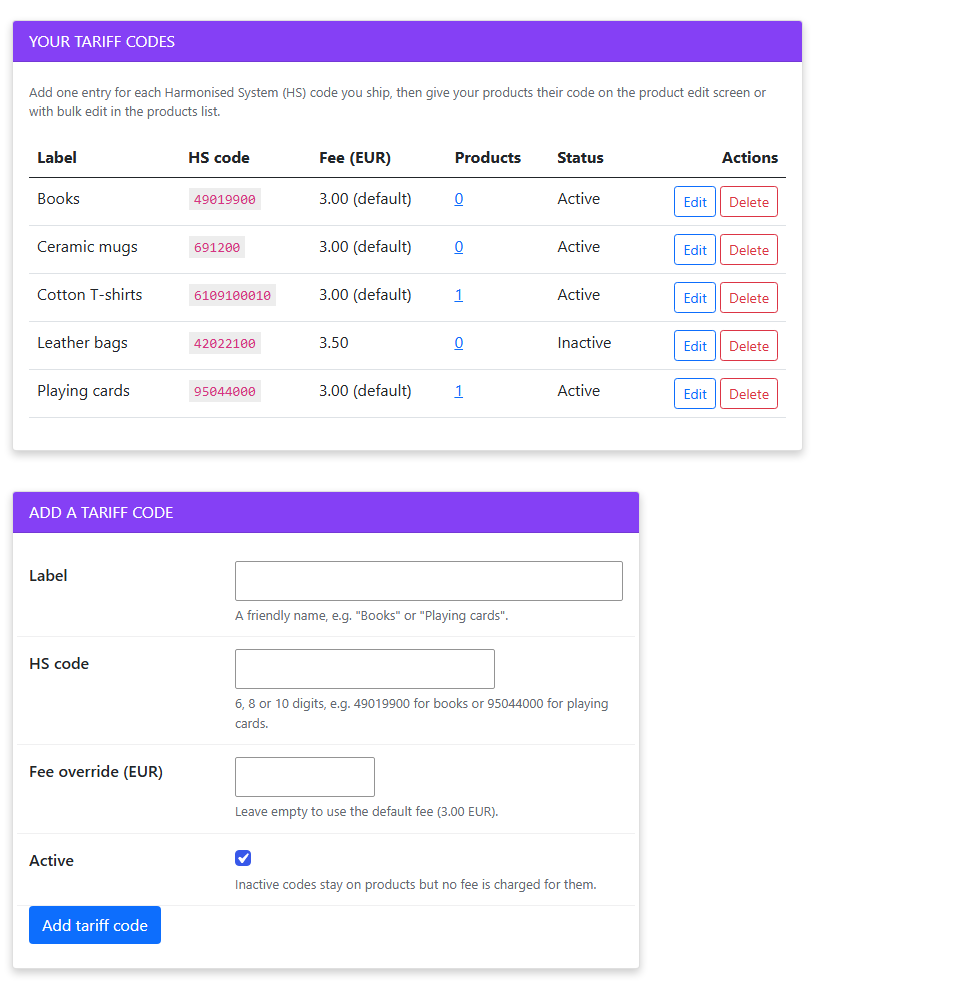
- Add a tariff code for each Harmonised System (HS) code you ship, for example Books = 49019900.
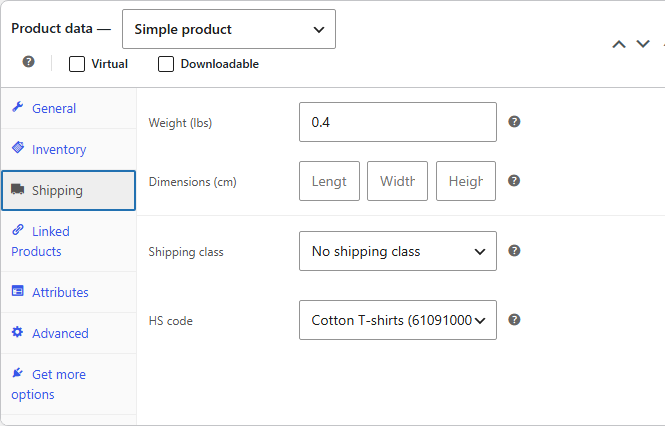
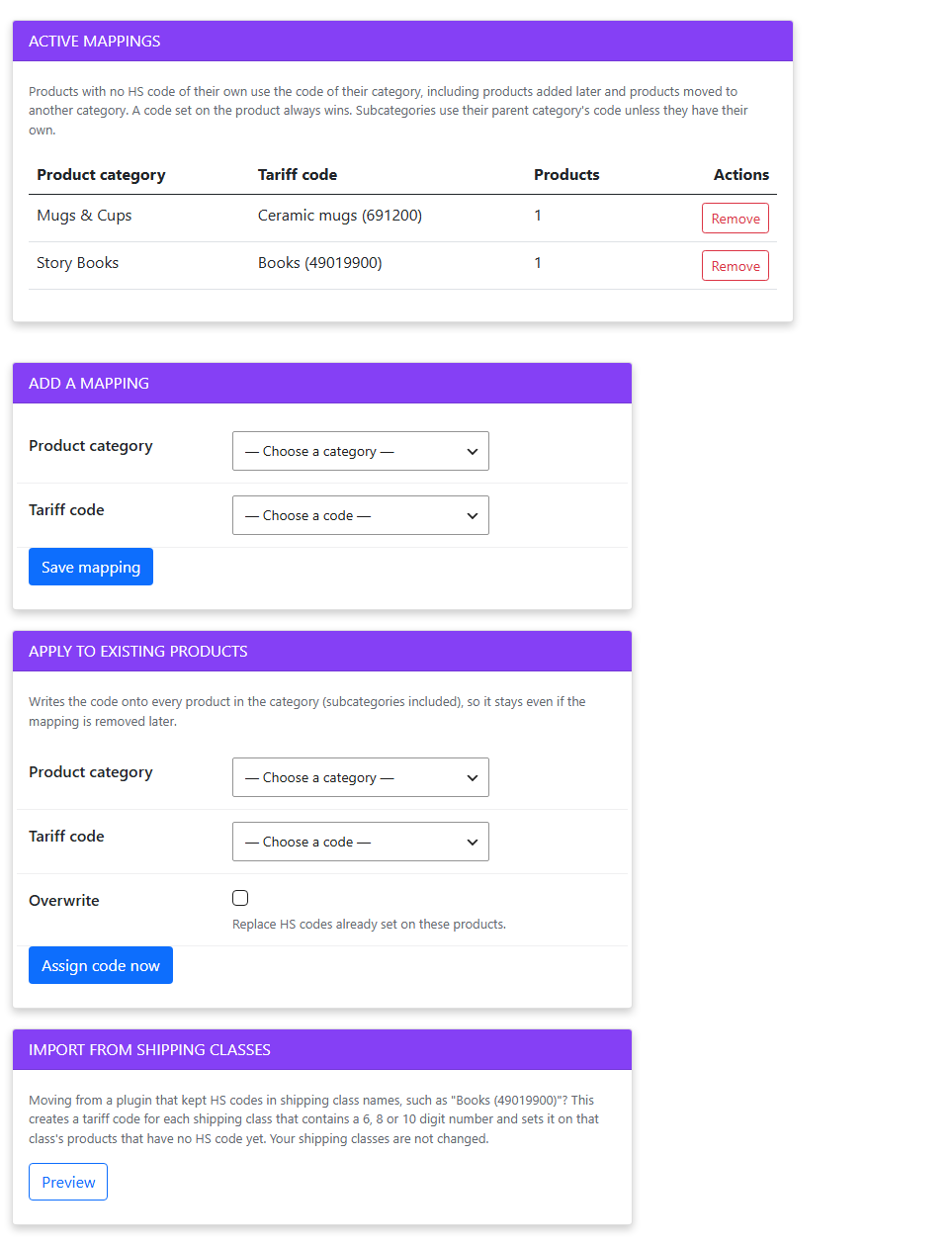
- Give your products their code: on the product (each variation can have its own), with bulk edit in the products list, or for a whole category at once.
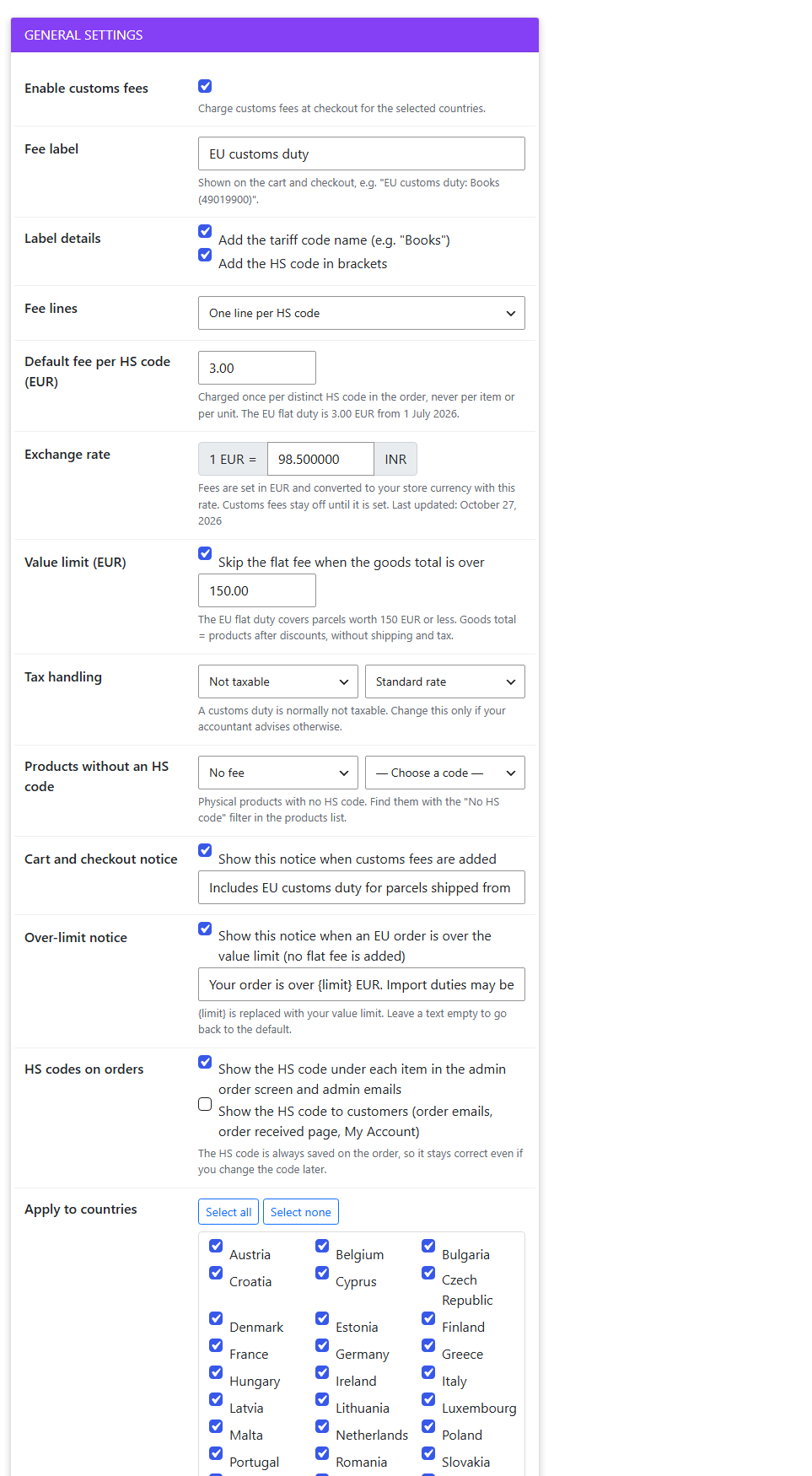
- Set the fee in EUR, your exchange rate and the EU countries to charge, then switch the fees on.
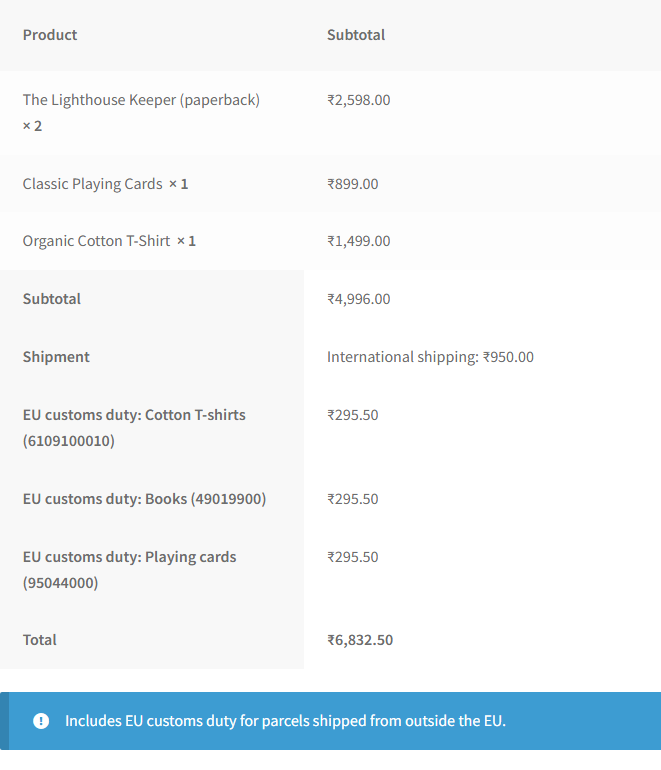
- At checkout one fee line is added for each distinct HS code in the order, for example “EU customs duty: Books (49019900)”.
Features
- One fee per distinct HS code, never per product or per unit.
- Fee set in EUR and converted to your store currency with your exchange rate, so the customer pays the right amount in pounds, dollars, rupees or any other currency.
- 150 EUR value limit: orders over the limit get no flat fee, and an optional notice tells the customer that import duties may be charged on delivery.
- Only the countries you choose: all 27 EU countries with Select all / Select none. Customers anywhere else see no change.
- Charged only when the country is known: the shipping country decides, or the billing country when nothing needs shipping. Virtual products are ignored.
- Your own HS code field: products and variations, products list column, quick edit, bulk edit and a “No HS code” filter. Your shipping classes are never touched.
- Category mapping: products without their own code use their category’s code, including products you add later. Apply a code to all products in a category in one click.
- Moving from a plugin that kept HS codes in shipping class names? Import them in one click; your shipping classes are not changed.
- Per-code fee override, inactive codes, an optional fallback code for products without one, one combined fee line if you prefer, taxable or not.
- Orders keep the record: the HS code on each item and how each fee was worked out (EUR amount, rate, country), shown in the admin order screen and admin emails, and optionally to customers.
- Customer notices in the cart and checkout, both editable.
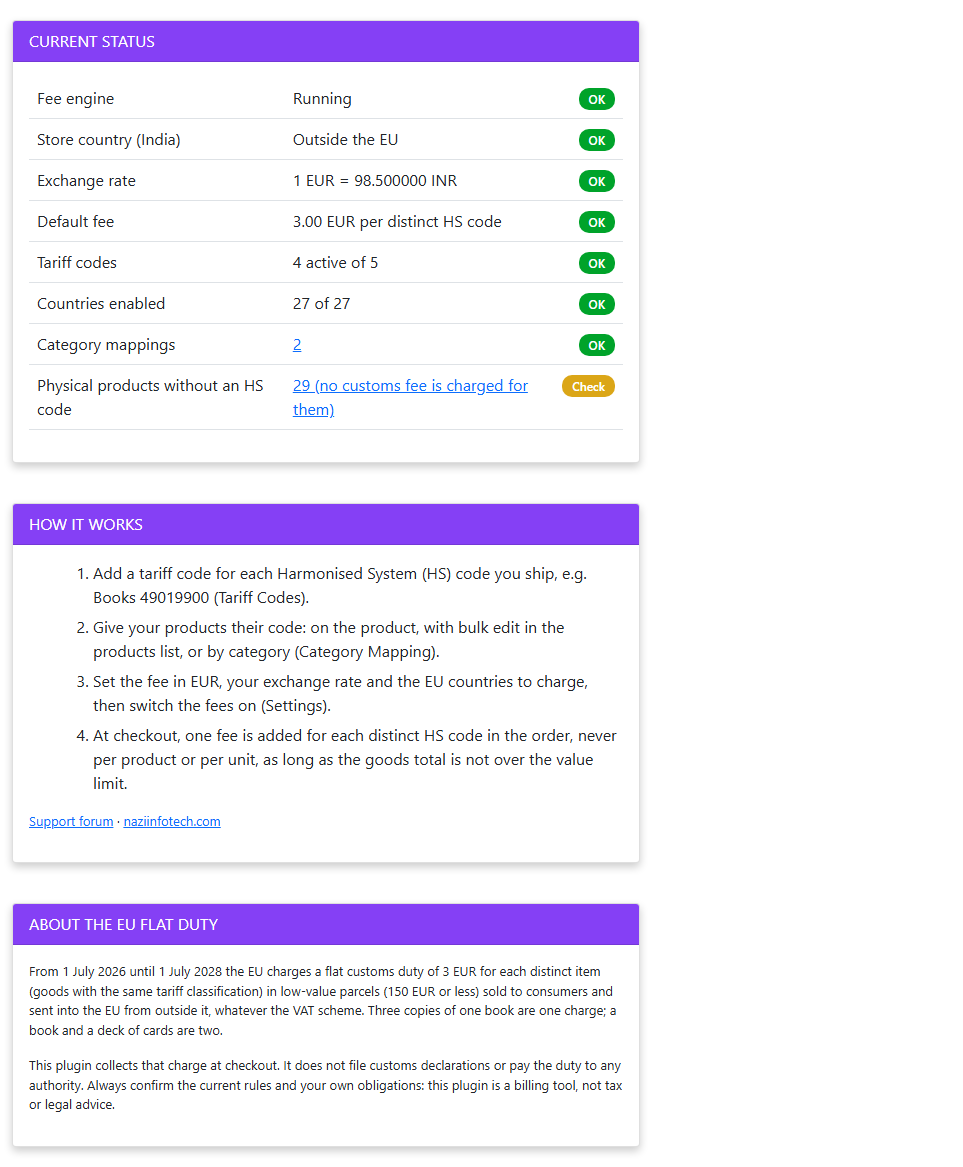
- Status & Help page that shows what is missing, and a warning if the fees are switched on but cannot be charged.
- Works with the classic and block cart and checkout, and with HPOS (High-Performance Order Storage).
- Addons page with the other Ni plugins for WooCommerce.
- Translation ready.
What it does not do
The plugin collects the charge at checkout. It does not file customs declarations, register you for IOSS or pay the duty to any authority: that stays with you, your customs agent or your carrier. Always check the current rules and your own obligations. This plugin is a billing tool, not tax or legal advice.
Screenshots
Installation
- Install and activate the plugin (WooCommerce must be active).
- Go to Customs Duty Fees > Tariff Codes and add your HS codes.
- Give your products their codes (product edit screen, bulk edit, or Customs Duty Fees > Category Mapping).
- Go to Customs Duty Fees > Settings: enter the exchange rate (not needed if your store currency is EUR), check the fee and the countries, and tick Enable customs fees.
- Open Customs Duty Fees > Status & Help to check that everything is in place.
FAQ
-
Does the plugin pay the duty for me?
-
No. It adds the duty to the customer’s order so you collect it. Declaring the goods and paying the duty is done by you, your customs agent or your carrier, as before.
-
Is the fee charged per product or per unit?
-
Neither. It is charged once for each distinct HS code in the order. Three copies of one book are one fee; a book and a deck of cards are two.
-
My codes have 6, 8 or 10 digits. Does that matter?
-
Customs groups goods by the classification used on the declaration, so two products may count as one item at 6 digits but as two at 10 digits. Use the code length your carrier or customs agent declares. The plugin charges one fee per distinct code you assign.
-
What about orders over 150 EUR?
-
The flat duty only covers parcels worth 150 EUR or less, so no flat fee is added above the limit. Normal import duty may then be charged on delivery; the optional over-limit notice tells the customer. The goods total is the products after discounts, without shipping and tax, converted to EUR.
-
My store currency is not EUR.
-
Enter your exchange rate in the settings (1 EUR = x of your currency). The fee is set in EUR and converted with this rate. The Status & Help page reminds you when the rate has not been updated for 30 days.
-
Does it change my shipping classes?
-
No. HS codes are stored in their own field. The shipping class import only reads class names.
-
My store is in the EU. Can I use it?
-
The flat duty applies to parcels sent into the EU from outside it. If your store address is in the EU, the plugin keeps the fees off until you confirm that you ship from outside the EU (for example from a warehouse abroad).
-
Does it work with the block checkout?
-
Yes. Fees and notices work in the classic and the block cart and checkout.
-
What happens to products without an HS code?
-
By default no fee is charged for them. You can choose a fallback code instead. The Status & Help page shows how many physical products have no code, with a link to them.
-
Is there a handling fee as well?
-
A separate EU handling fee for customs processing has been discussed but is not part of this duty. This plugin only charges the flat duty you set.
-
Is the duty permanent?
-
The EU set the flat duty as an interim measure from 1 July 2026 until 1 July 2028. Check the current rules before that date.
Reviews
There are no reviews for this plugin.
Contributors & Developers
“Ni Customs Duty Fees for WooCommerce” is open source software. The following people have contributed to this plugin.
Contributors
Translate “Ni Customs Duty Fees for WooCommerce” into your language.
Interested in development?
Browse the code, check out the SVN repository, or subscribe to the development log by RSS.
Changelog
1.0.2
- New: Addons page (Customs Duty Fees > Addons) with the other Ni plugins for WooCommerce, free plugins install in one click.
1.0.1
- Admin notices are shown only on the plugin’s own pages; the “WooCommerce is required” notice only on the Plugins screen.
- “Tested up to” is kept in the readme only.
1.0.0
- First release: tariff codes, HS code field for products and variations (list column, quick edit, bulk edit, filter), category mapping and shipping class import, fee engine for the classic and block checkout (EUR fee and exchange rate, 150 EUR limit, countries, fallback code, combined line, tax), HS codes and fee details on orders and emails, customer notices, Status & Help, uninstall clean-up (opt-in).