

Description
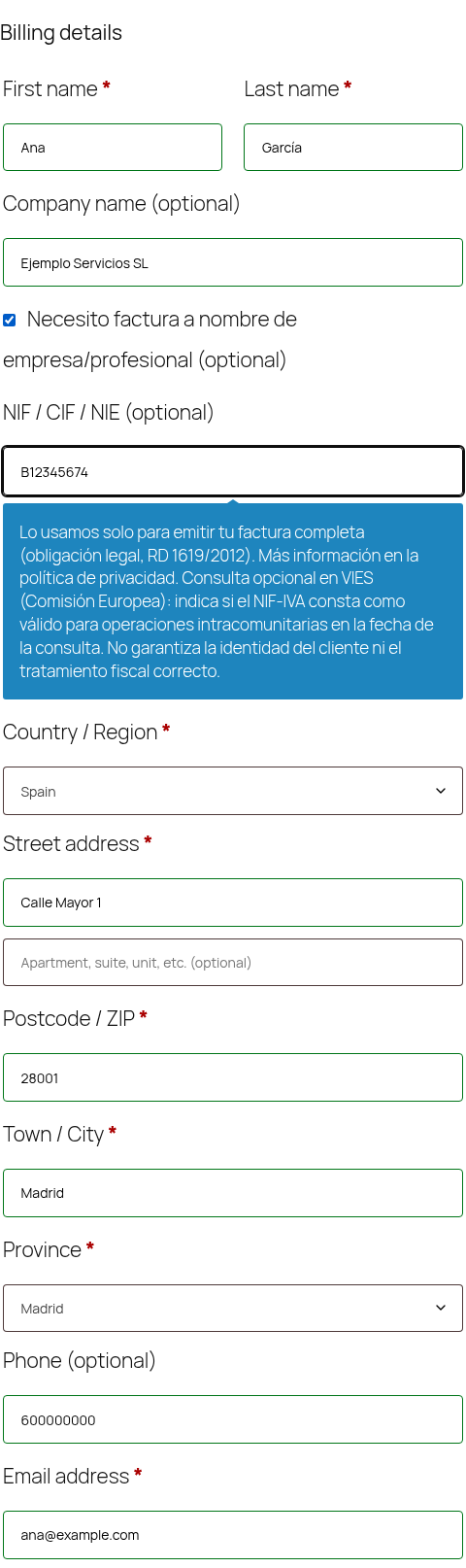
Ordifolio Tax ID Checkout for WooCommerce (Spanish UI: NIF/CIF en checkout para WooCommerce) adds a «NIF / CIF / NIE» field to the WooCommerce checkout so Spanish shops can collect the customer’s tax ID when a full invoice (factura completa) is needed.
- Works with the classic checkout (shortcode) and the Checkout block (Additional Checkout Fields API).
- Optional by default. The field becomes required only when the customer ticks «Necesito factura a nombre de empresa/profesional» (default mode). Other modes: always optional, required when the Company field is filled in (B2B), or always required for B2B-only shops. Asking every consumer for an ID is not needed for a simplified invoice and goes against data minimisation, so there is no “always required for everyone” option for B2C shops.
- Local format check of DNI/NIF, NIE and CIF, including the check digit/letter, on your own server. Input is normalised (spaces, dots, dashes, lowercase and an
ESprefix are removed:es b-1234567-4B12345674). A correct format does not prove that the ID exists or who it belongs to. - Optional VIES lookup (off by default) through the official REST API of the European Commission, only for company IDs (CIF) and only when you enable it. DNI and NIE numbers are never sent anywhere.
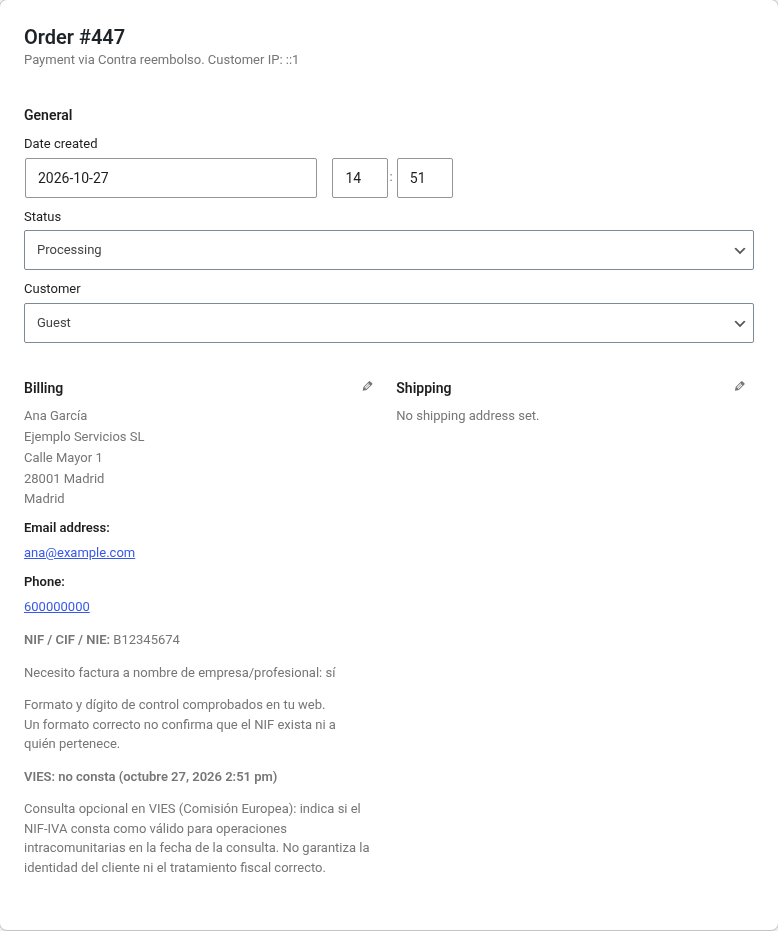
- The ID is saved on the order and shown on the order screen, in the orders list (optional column) and in WooCommerce emails. Compatible with HPOS.
- Legal text under the field (can be turned off): «Lo usamos solo para emitir tu factura completa (obligación legal, RD 1619/2012). Más información en la política de privacidad.»
Language: the plugin is meant for shops in Spain, so its interface strings are written in Spanish. They are translatable.
What this plugin is not: it does not issue invoices, does not create e-invoices or any tax records, and does not send anything to the Spanish Tax Agency (AEAT). It only collects and stores the tax ID your invoicing tool needs.
External services
This plugin can connect to one external service: the VIES VAT number validation service (REST API) of the European Commission. It is off by default. While the Consultar VIES setting is off, the plugin makes no external requests at all: not at checkout, not on activation and not in the admin.
- What it is used for: to look up whether a Spanish company tax ID (CIF), as an EU VAT number (NIF-IVA), is registered as valid for intra-EU operations on the date of the lookup. The answer does not confirm the customer’s identity or the correct tax treatment of the order.
- When data is sent: only if the shop owner enables Consultar VIES in WooCommerce Settings NIF/CIF checkout, and only when a customer submits the checkout with a CIF that passes the local format and check-digit check. The request has a 10-second timeout. Answers are cached on your site for 24 hours, so the same CIF is not sent again during that time.
- What data is sent: the country code
ESand the sanitised CIF, as part of the request URL (https://ec.europa.eu/taxation_customs/vies/rest-api/ms/ES/vat/{CIF}), from your server. As with any HTTP request, the service also receives your server’s IP address and a user-agent with the plugin and WordPress version numbers. DNI and NIE numbers (natural persons) are never sent. No customer name, address, email or other order data is sent. - What is stored: only the result flags (status, valid, available, date of the lookup) in a 24-hour transient, and the result and date on the order. No name or address from VIES is stored.
Service provider: European Commission (Directorate-General for Taxation and Customs Union).
- VIES service: https://ec.europa.eu/taxation_customs/vies/
- About VIES: https://taxation-customs.ec.europa.eu/vies-vat-information-exchange-system_en
- Terms of use (legal notice of the European Commission websites, linked from the VIES site): https://commission.europa.eu/legal-notice_en
- Privacy policy (European Commission websites, linked from the VIES site): https://commission.europa.eu/privacy-policy-websites-managed-european-commission_en
Privacy
This plugin collects the tax ID (NIF, CIF or NIE) the customer types at checkout and stores it on the order so the shop can issue a full invoice. Legal basis: compliance with a legal obligation (GDPR art. 6.1.c; Spanish invoicing rules, RD 1619/2012) when the customer is a business or professional or asks for a full invoice. For registered customers the tax ID is also saved in their account (user meta ordifolio_nif_tax_id) so it can be pre-filled next time, and it is shown in WooCommerce order emails. Uninstalling the plugin does not delete tax IDs from orders or customer accounts; use WordPress’s personal data erasure tools when you no longer need them.
The plugin does not send the tax ID to any third party, with one exception you control: if you enable Consultar VIES, company tax IDs (CIF) are sent to the European Commission’s VIES service (https://ec.europa.eu/taxation_customs/vies/) to look up whether they are registered for intra-EU operations. DNI and NIE numbers are never sent. The request goes to ec.europa.eu from your server at checkout, only for that purpose. See External services above for what is sent, when, and the European Commission’s terms and privacy policy.
If you enable VIES, add the recipient to your privacy policy (GDPR art. 13.1.e). Suggested text: «El NIF-IVA se comunica a la Comisión Europea (VIES) para consultar su validez a efectos intracomunitarios».
The plugin does not add cookies, tracking or any other external requests. Uninstalling it removes only its settings and cached VIES results; tax IDs saved on orders and in customer accounts are kept (your invoices may need them) until you erase them with WordPress’s personal data erasure tools.
Screenshots

Installation
- Install and activate WooCommerce (8.3 or later).
- Upload the
ordifolio-tax-id-checkoutfolder to/wp-content/plugins/, or install the plugin from Plugins Add New, and activate it. - Go to WooCommerce Settings NIF/CIF checkout and review the options:
- Cuándo es obligatorio (when the field is required). Default: only when the customer ticks «Necesito factura a nombre de empresa/profesional».
- Consultar VIES (off by default). If you enable it, update your privacy policy (see Privacy below).
- Place a test order with the classic checkout or the Checkout block.
The Checkout block integration needs WooCommerce 8.9 or later (Additional Checkout Fields API). With WooCommerce 8.3–8.8 the plugin works with the classic checkout only.
FAQ
-
¿Es software Verifactu?
-
No. No es software de facturación Verifactu, no genera registros de facturación ni envía nada a la AEAT, y no está certificado ni homologado por la AEAT.
-
Is the field required?
-
Not by default. In the default mode it is required only when the customer ticks «Necesito factura a nombre de empresa/profesional». A full invoice must include the recipient’s tax ID (RD 1619/2012, art. 6.1.d); a simplified invoice for a consumer does not.
-
What does the format check do?
-
It checks the structure and the check digit or letter of a Spanish DNI/NIF, NIE or CIF, locally, without any external request. A correct format does not mean that the ID exists, is active or belongs to the customer.
-
What does the VIES lookup tell me?
-
Consulta opcional en VIES (Comisión Europea): indica si el NIF-IVA consta como válido para operaciones intracomunitarias en la fecha de la consulta. No garantiza la identidad del cliente ni el tratamiento fiscal correcto.
Many Spanish companies and freelancers are not registered for intra-EU operations (ROI), so “no consta” in VIES is common and does not mean the ID is wrong. That is why the default failure mode is soft: the order goes through and the result is noted on the order. The hard mode blocks the order when VIES says the number is not registered or does not answer.
-
Which IDs are sent to VIES?
-
Only company IDs (CIF) with a correct check digit, and only when you enable the VIES lookup. DNI and NIE (natural persons) are never sent. Results are cached for 24 hours (only the result flags, no names or addresses) so the same CIF is not looked up again.
-
Where is the tax ID stored?
-
On the order (
_billing_ordifolio_nif_tax_id, with a copy in_ordifolio_nif_tax_idand its type in_ordifolio_nif_tax_id_type; Checkout block orders also keep WooCommerce’s own_wc_billing/ordifolio-tax-id-checkout/tax_id) and, for registered customers, in the user metaordifolio_nif_tax_id. Whether the customer asked for a full invoice is stored as_ordifolio_nif_invoice_request. The VIES result, when used, is stored as_ordifolio_nif_vies_statusand_ordifolio_nif_vies_checked_at. -
How do I erase a customer’s tax ID?
-
Use Tools Erase Personal Data. The plugin removes the tax ID saved in the customer’s account. To also anonymise it on their orders, enable WooCommerce Settings Accounts & Privacy Remove personal data from orders on request. Tools Export Personal Data includes it too. If the tax ID is on an invoice you already issued, Spanish tax retention rules may require you to keep it (typically four years); do not erase it from those orders while retention still applies.
-
Does it work with the Checkout block?
-
Yes, with WooCommerce 8.9 or later. The invoice checkbox appears in the contact section and the NIF/CIF/NIE field in the address form.
Reviews
There are no reviews for this plugin.
Contributors & Developers
“Ordifolio Tax ID Checkout for WooCommerce” is open source software. The following people have contributed to this plugin.
Contributors
Translate “Ordifolio Tax ID Checkout for WooCommerce” into your language.
Interested in development?
Browse the code, check out the SVN repository, or subscribe to the development log by RSS.
Changelog
0.1.0
- First version: NIF/CIF/NIE field for the classic checkout and the Checkout block, optional by default, local check-digit check, optional VIES lookup, order screen, orders list column and emails.