

Description
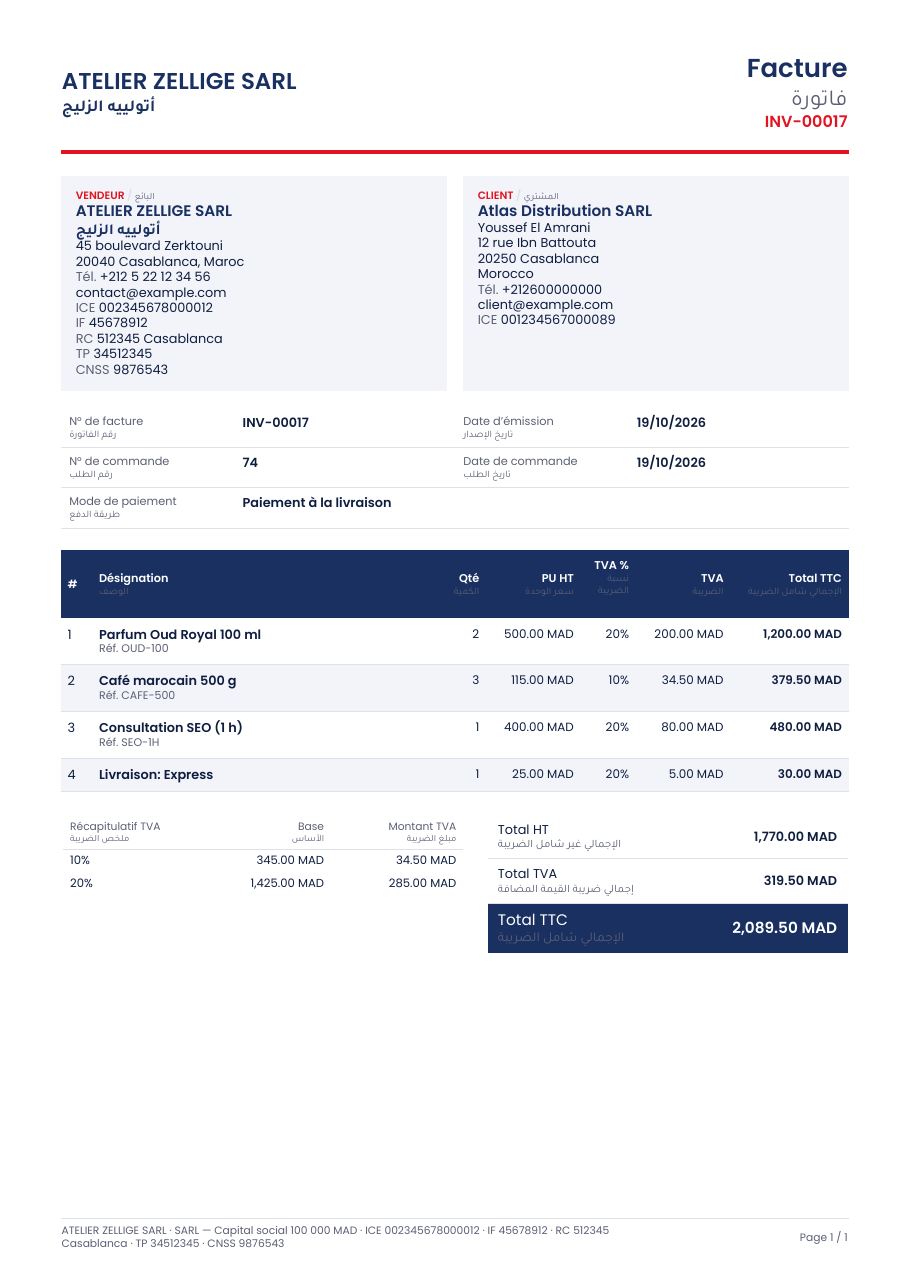
Taxvoice creates the PDF invoice your country asks for, automatically, for every WooCommerce order. Arabic is printed properly (joined letters, right-to-left layout) without any extra add-on, and an invoice can show two languages at once: Arabic and English for the Gulf, French and Arabic for Morocco.
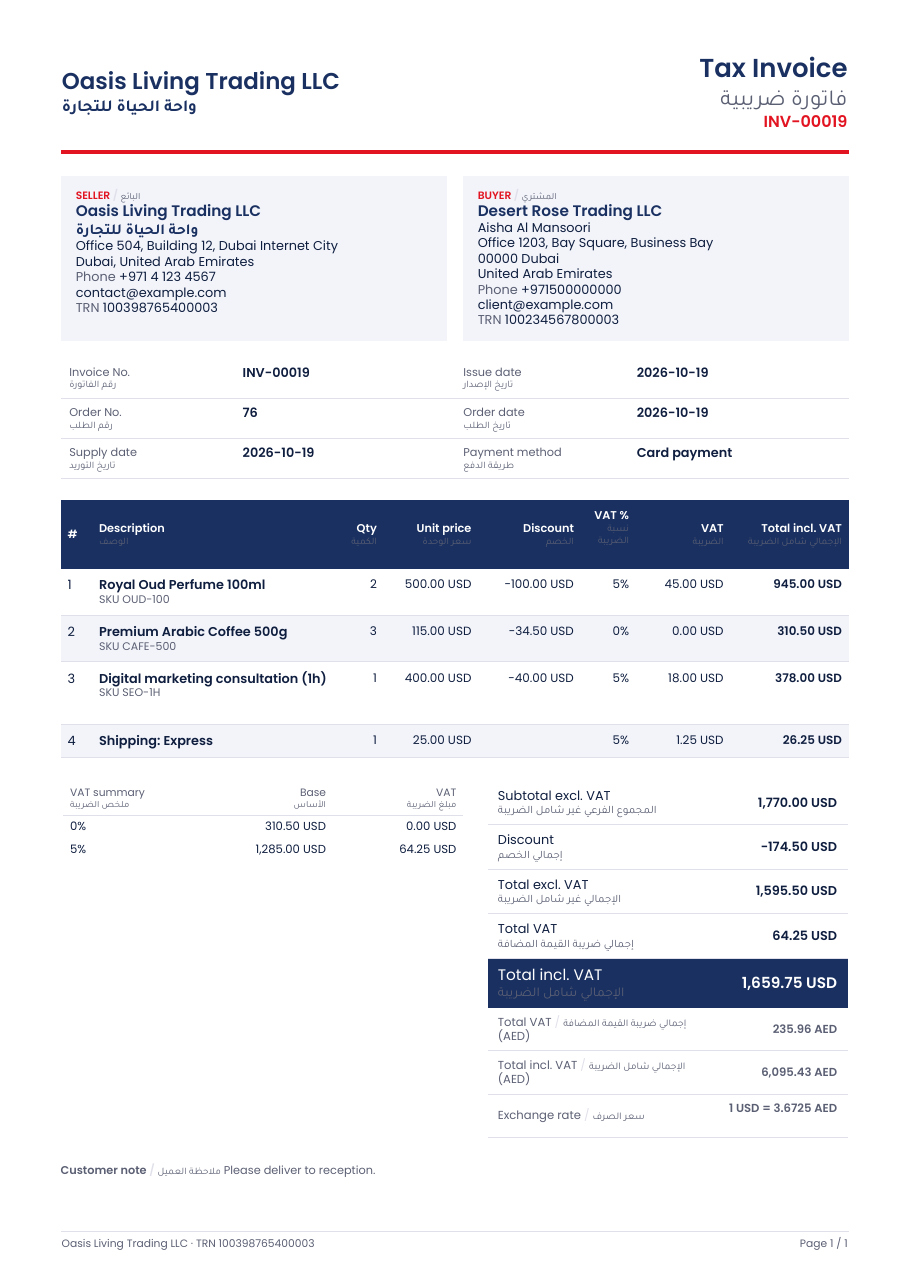
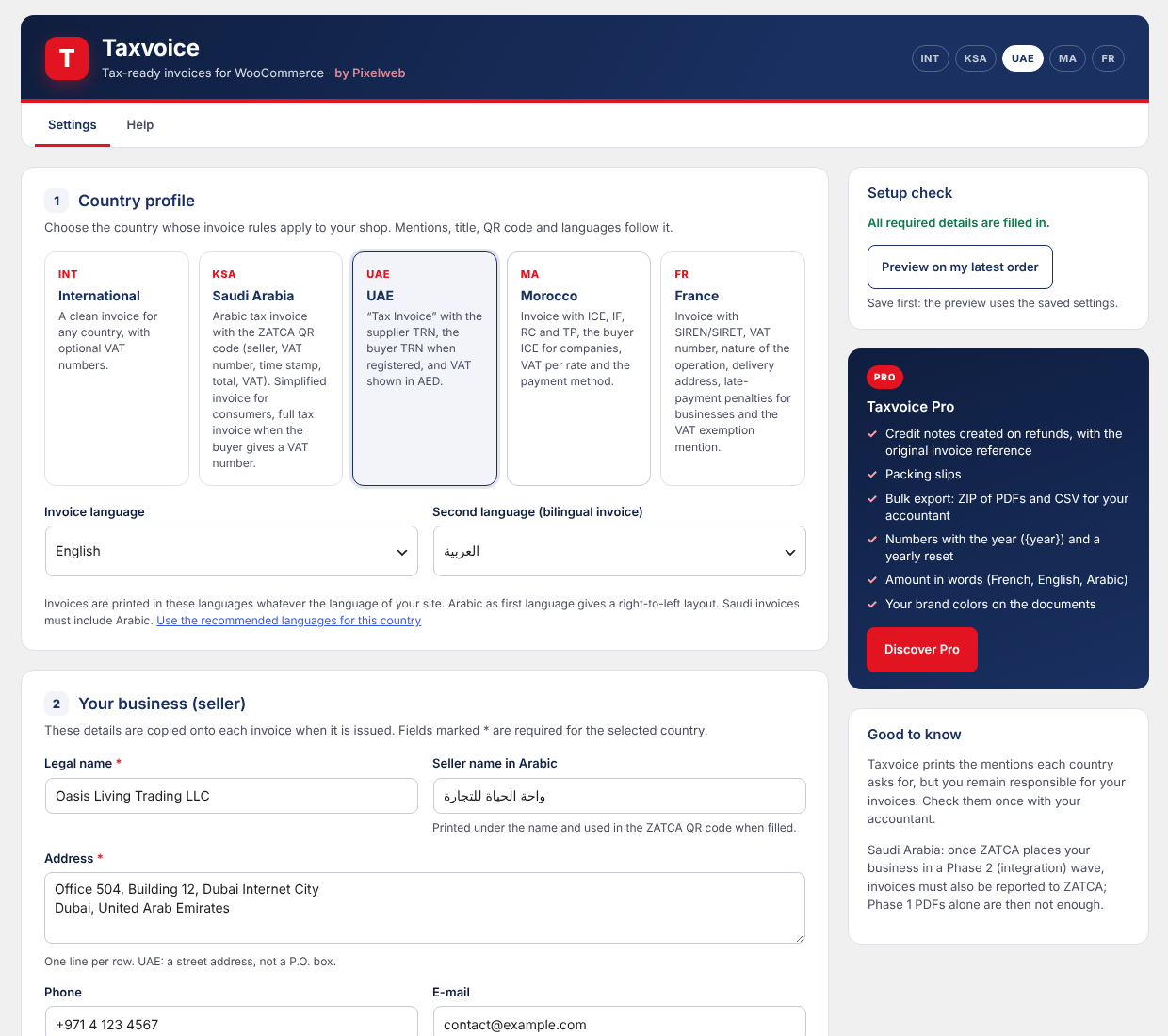
Pick a country profile, fill in your business details once, and Taxvoice prints the right title, identifiers and mentions.
Country profiles
- Saudi Arabia – ZATCA Phase 1: Arabic “Simplified Tax Invoice” for consumers, full “Tax Invoice” when the buyer gives a VAT number, seller VAT number and CR, supply date and time, and the ZATCA QR code (seller name, VAT number, time stamp, total with VAT, VAT total, TLV + Base64).
- United Arab Emirates – FTA: “Tax Invoice” with the supplier TRN, the buyer TRN when registered, VAT per line and VAT also shown in AED with the exchange rate when you sell in another currency.
- Morocco – article 145 of the tax code: ICE, IF, RC, TP and CNSS of the seller, ICE of business buyers, VAT broken down per rate, payment method; French and Arabic on the same document.
- France: SIRET, SIREN, RCS, VAT number, legal form and capital, nature of the operation (goods, services or both), delivery address when it differs, client SIREN, late-payment penalties and the 40 € recovery fee for business buyers, “TVA non applicable, art. 293 B du CGI” and the VAT-on-debits option (mentions required from September 2026).
- International: a clean invoice for any other country, with optional VAT numbers.
Features
- Sequential numbers without gaps or duplicates, even when two orders are paid at the same second.
- Invoices are frozen when issued: changing your settings later never alters an invoice already sent.
- Issue automatically when the order is paid or completed, or only by hand.
- PDF attached to the WooCommerce e-mails you choose.
- Download from the order screen, the orders list, My Account and the order page (guests use their private order link).
- Buyer VAT number / TRN / ICE / SIREN field in the classic checkout and the checkout block, checked against the country format.
- VAT summary per rate, discounts, shipping and fees.
- Logo, footer note, VAT exemption mention.
- Documents in English, Arabic and French whatever the language of your site.
- Compatible with High-Performance Order Storage (HPOS) and the checkout block.
- Layout can be changed by copying the template into your theme.
- No external service: invoices are created on your own server.
Taxvoice Pro
The optional Pro add-on adds credit notes on refunds (with the original invoice reference), packing slips, bulk export (ZIP of PDFs and CSV for your accountant), numbers with the year and a yearly reset, the amount in words (French, English and Arabic) and your brand colors. Everything described above is free and stays free.
Important
Taxvoice prints the mentions each country asks for, but you remain responsible for your invoices: check them once with your accountant.
In Saudi Arabia, businesses called by ZATCA to a Phase 2 (integration) wave must also report their invoices to ZATCA. In the UAE, B2B e-invoicing through an accredited service provider is being introduced. In France, business-to-business e-invoicing through an approved platform is being introduced from September 2026. Taxvoice 1.0 creates PDF invoices; it does not send invoices to these platforms.
Additional Information
Third-party code
Taxvoice bundles the following libraries in the lib folder. Their namespaces are prefixed (Taxvoice\Vendor\) so they never conflict with another plugin that ships the same libraries. composer.json in the plugin folder lists them.
- mPDF 8 – GPL-2.0 – https://github.com/mpdf/mpdf
- mPDF QR code – LGPL-2.1 – https://github.com/mpdf/qrcode
- FPDI – MIT – https://github.com/Setasign/FPDI
- DeepCopy – MIT – https://github.com/myclabs/DeepCopy
- PSR Log and PSR HTTP Message interfaces – MIT – https://github.com/php-fig
- random_compat – MIT – https://github.com/paragonie/random_compat
Fonts in assets/fonts, both under the SIL Open Font License 1.1 (license files included):
- Poppins – Indian Type Foundry – https://github.com/google/fonts/tree/main/ofl/poppins
- Tajawal – Boutros Fonts – https://github.com/google/fonts/tree/main/ofl/tajawal
External services
None. Taxvoice does not contact any external server.
Developer hooks
Filters: taxvoice_profiles, taxvoice_document_css, taxvoice_terms, taxvoice_document_types, taxvoice_numbered_types, taxvoice_document_data, taxvoice_format_number, taxvoice_counter_name, taxvoice_exchange_rate, taxvoice_colors, taxvoice_pdf_config, taxvoice_template, taxvoice_buyer_tax_id, taxvoice_valid_buyer_tax_id, taxvoice_issue_statuses, taxvoice_should_issue, taxvoice_email_documents, taxvoice_customer_links.
Actions: taxvoice_loaded, taxvoice_issued, taxvoice_order_box, taxvoice_settings_cards, taxvoice_template_after_totals.
Screenshots


Installation
- Install and activate WooCommerce, then Taxvoice.
- Go to WooCommerce Taxvoice.
- Choose your country profile and fill in your business details.
- Click Preview on my latest order to check the result.
FAQ
-
Does Arabic really display correctly?
-
Yes. Taxvoice ships with a PDF engine that joins Arabic letters and lays out right-to-left text, and with the Tajawal font. Choose Arabic as first language for a right-to-left invoice, or as second language for a bilingual one.
-
Is the ZATCA QR code valid?
-
It holds the five fields required for Phase 1 (seller name, VAT number, time stamp, invoice total with VAT and VAT total), encoded as Tag-Length-Value and Base64, as ZATCA specifies. It can be read with the ZATCA “VAT” mobile application.
-
My shop does not sell in SAR or AED.
-
Enter the exchange rate in the settings: the VAT and the total are also printed in the local currency, and the QR code uses the local amounts. Developers can supply a live rate with the
taxvoice_exchange_ratefilter. -
Can I change an invoice after it was issued?
-
No, and that is on purpose: tax rules require an issued invoice to stay as it is. Refund the order and issue a credit note (Pro), then a new invoice if needed.
-
Where are the PDF files stored?
-
Nowhere permanently. A PDF is built from the order each time it is opened. Copies attached to e-mails are written to
wp-content/uploads/taxvoice/mail/and deleted after one hour. -
What happens to my invoices if I delete the plugin?
-
Settings and temporary files are removed. Invoice numbers stay on the orders, because they are accounting records, and the number counters are kept so that reinstalling Taxvoice continues the sequence without duplicates.
-
Can I change the layout?
-
Copy
templates/document.phptoyourtheme/taxvoice/document.phpand edit the copy. Colors, styles, fonts and paper size can also be changed with filters (taxvoice_colors,taxvoice_document_css,taxvoice_pdf_config).
Reviews
There are no reviews for this plugin.
Contributors & Developers
“Taxvoice – Tax Invoices for WooCommerce” is open source software. The following people have contributed to this plugin.
Contributors
Translate “Taxvoice – Tax Invoices for WooCommerce” into your language.
Interested in development?
Browse the code, check out the SVN repository, or subscribe to the development log by RSS.
Changelog
1.0.3
- The bundled PDF library no longer contains code that prints to the browser: Taxvoice reads the PDF as a string and sends it itself.
1.0.2
- The document styles are passed to the PDF engine separately from the template (new filter
taxvoice_document_css). - Every value printed by the template is escaped with
wp_kses(). - The setup reminder only shows on the Plugins screen and can be dismissed.
1.0.1
- Fix: product names that contain HTML (for example “” added by a theme or a variation plugin) are now printed as plain text. Names, addresses, shipping methods and notes are cleaned the same way.
- Fix: when another plugin changes the order total without adding an order line (store credit, gift card, currency or rounding tools), an “Adjustment” line now makes the lines, the VAT summary and the totals agree with the amount charged.
- Fix: negative fees (discounts added as fees) keep their minus sign.
- New: the setup check warns when the seller VAT number, TRN, ICE or SIRET does not have the expected number of digits.
1.0.0
- First release.