
Description
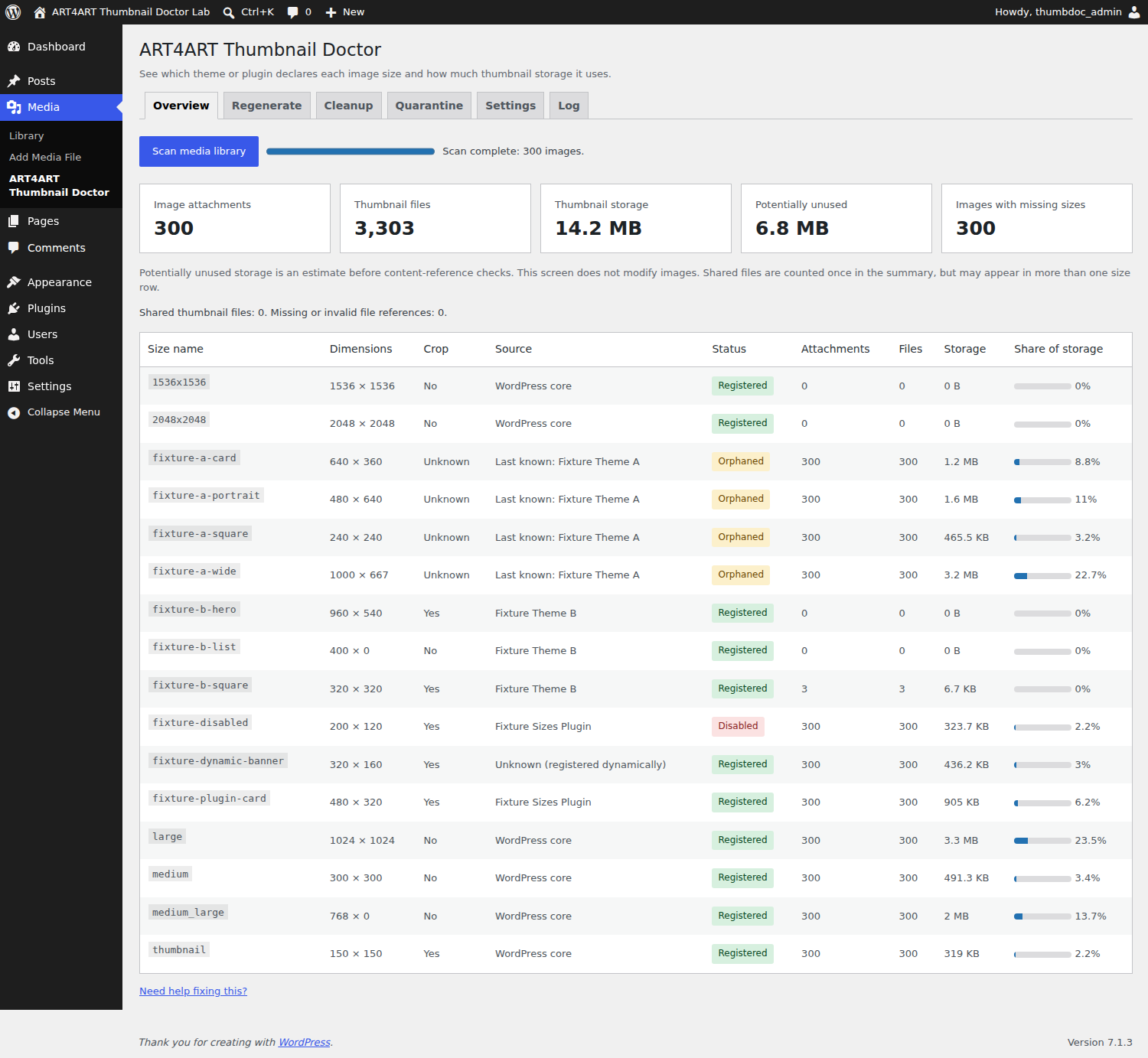
ART4ART Thumbnail Doctor shows your registered, orphaned and disabled image sizes under Media > ART4ART Thumbnail Doctor.
Inspect thumbnail storage after a theme change or migration, rebuild missing sizes, and review old derivatives before moving them to quarantine. All features are free, with no account, telemetry or external service.
- See literal image-size declarations in your active theme and plugins.
- Identify historical sizes from an earlier theme.
- Scan existing image files in resumable batches; pause, resume or cancel.
- Detect missing physical thumbnails even when their metadata still exists.
- Count a shared thumbnail once in overall storage totals.
- Regenerate missing sizes, all enabled sizes, or selected sizes.
- Limit regeneration by upload dates, attachment IDs or Media Library selections.
- Pause, continue or cancel durable tasks; no WP-Cron is required.
- Exclude sizes from future server and WordPress 7.1 client-side generation.
- Review unused sizes with mandatory dry-run, content-reference protection and quarantine.
- Restore exact metadata, or explicitly empty quarantine or permanently delete files.
- Optionally discover dimension-suffixed disk files absent from metadata.
- Use WP-CLI:
wp art4art-thumbnail-doctor sizes,scan,regenerate,cleanupandquarantine.
Scanning is read-only. Regeneration creates new uniquely named files and updates selected size entries in attachment metadata; existing files remain on disk. Potentially unused storage in Overview is provisional; Cleanup builds its own current content-reference index. Unknown, dynamic and incomplete source attribution is labeled explicitly. A source declaration does not prove that its conditional code ran.
Tested on WordPress 6.6.1 and 7.1.3, PHP 7.4, 8.3 and 8.5, and MySQL 8.0. Take a backup before regeneration or cleanup.
Why use this instead of a basic thumbnail regenerator?
ART4ART Thumbnail Doctor combines source attribution, storage counts per size, missing-file detection, selective regeneration and reversible cleanup. A registered size is not necessarily used, and an unregistered size is not necessarily safe to delete. Review the dry-run and its protection reasons before making changes.
More free tools by Eugene Do: https://art4art.site
Development: the JavaScript sources, package manifest and lockfile are included. To rebuild, run npm ci followed by npm run build in the plugin directory. Runtime assets use WordPress libraries; no development dependencies are loaded by the plugin.
External services
None. The plugin sends no telemetry and makes no external requests. Documentation, donation and help links open only when clicked.
Screenshots
Installation
- Upload the art4art-thumbnail-doctor directory or install the ZIP through Plugins > Add New.
- Activate ART4ART Thumbnail Doctor.
- Open Media > ART4ART Thumbnail Doctor.
- Select Scan media library. Return to the page to continue saved progress.
- Open the Docs link on the Plugins screen for the included user guide.
FAQ
-
How do I replace an earlier prerelease?
-
Deactivate the earlier plugin before activating this package. Settings and saved jobs use the same internal records. Signed quarantine batches from the earlier storage directory remain available for restoration; keep that directory protected too. The admin page, REST namespace and WP-CLI command now use art4art-thumbnail-doctor.
-
Which plugin created this image size?
-
Overview searches literal add_image_size and set_post_thumbnail_size declarations in active theme and plugin PHP source. Dynamic names may remain unknown. Source reads are bounded and cached. Historical attribution requires a prior scan.
-
Can I regenerate thumbnails after changing my theme?
-
Open Regenerate and choose Only missing sizes. It also repairs files missing from disk even if metadata still lists them. Rebuild all or selected sizes deliberately replaces those metadata entries with new files; older files remain until a separate cleanup review. Start from a backup.
-
How do I delete unused image sizes safely?
-
Run Cleanup, review the mandatory dry-run and confirm that you have a backup. Quarantine is the default; permanent deletion is an explicit advanced action. Scanning and dry-run do not change media files.
-
Why do size rows add up to more storage than the summary?
-
Several logical sizes can share a physical file. Each size row includes that file, while the overall summary counts it once.
-
Does scanning require WP-Cron?
-
No. Browser requests or WP-CLI process bounded batches. The last completed report stays available while another scan runs.
-
What happens when a theme changes during a scan?
-
The scan pauses when the registration fingerprint changes. Cancel it and start a fresh scan for the new configuration.
-
Does it work with WordPress 7.1 client-side media processing?
-
Disabled sizes are excluded from the registry and server filters used by WordPress 7.1 client processing. Existing images are regenerated on the server using public WordPress image-editor APIs.
-
What happens to original, scaled and edited images?
-
Original/scaled files and backup metadata are retained. A missing recorded original is logged. Edited attachments are skipped unless explicitly included; their current edited version is then used.
-
Can rebuilding break hardcoded thumbnail URLs?
-
Rebuilding does not overwrite or remove old files, so existing hardcoded URLs remain available. Cleanup protects uploads URLs found in post content and postmeta, including HTML, srcset and escaped JSON. Repeated rebuilding increases disk usage until those files are reviewed.
-
Why can a request exceed its configured budget?
-
A running image-editor operation cannot be interrupted. Progress is saved per size; an interrupted size is logged on resume. Large images may be skipped by the memory check. PHP memory counters do not include all native Imagick memory.
-
Why can removing unused thumbnails break images in content?
-
Posts and page builders may store hardcoded thumbnail URLs after a size becomes unregistered. Cleanup marks local uploads URLs found in post_content and postmeta Used in content and retains those files. Templates, CSS, options, CDN/external storage, custom tables and direct SQL changes are outside this check. Review paths and make a backup, especially for optional disk discovery.
-
How do I restore or empty quarantine?
-
Open Quarantine and choose Restore for the date/UUID batch. Different live files and later metadata edits cause a conflict; they are not overwritten. Metadata is restored byte-for-byte. Empty permanently removes quarantined media; signed audit manifests remain. Uninstall retains batches. Reinstall on the same site with unchanged authentication salts for recovery. Access-denial files are supplied for Apache/IIS; other web servers need appropriate directory rules.
-
What happens when I deactivate or delete the plugin?
-
Deactivation leaves settings, saved progress and media intact. Deleting the plugin removes its database tables, options, source cache and scheduled scan event for each site. It keeps quarantine files and signed recovery journals. Restore or empty quarantine before uninstalling when possible. Keep a backup of wp-config.php authentication salts: changing them prevents verification of earlier journals. There is no automatic expiry or background deletion of quarantined files.
-
Does it support multisite and offloaded media?
-
Operations are scoped to the current site. Network sites initialize their own tables when first used, and uninstall handles each site’s records. Files must be locally available inside that site’s uploads directory. CDN references, cloud-only files and custom storage adapters are outside the cleanup coverage.
-
How do I use cleanup through WP-CLI?
-
Run
wp art4art-thumbnail-doctor cleanup --dry-run --sizes=old-card. Apply that review withcleanup --resume --quarantine --yesafter making a backup, or discard it withcleanup --cancel. Usequarantine list,quarantine restore <date/UUID> --yesandquarantine empty <date/UUID> --yes. Only one maintenance task or review can be reserved per site.
Reviews
There are no reviews for this plugin.
Contributors & Developers
“ART4ART Thumbnail Doctor” is open source software. The following people have contributed to this plugin.
Contributors
Translate “ART4ART Thumbnail Doctor” into your language.
Interested in development?
Browse the code, check out the SVN repository, or subscribe to the development log by RSS.
Changelog
1.0.0
- Initial stable release with image-size inventory and source attribution.
- Add resumable missing, all-size and selective server regeneration.
- Include content-reference protection, reviewed cleanup, signed quarantine and exact metadata restoration.
- Provide administrator REST controls, Media Library actions, settings, logs and WP-CLI.
- Validate PHP 7.4/8.3/8.5, MySQL, multisite, browser workflows and mobile layouts.