
Description
Old content quietly goes stale: prices change, links break, screenshots age, advice becomes wrong. Ragodos Content Review Reminder shows you what has not been touched in a while so you can check it.
How it works
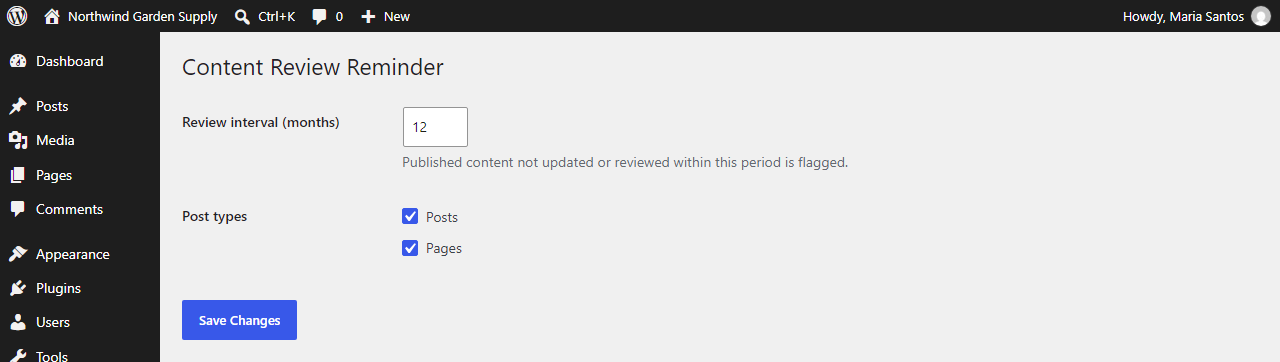
- Choose a review interval in months (default 12).
- Choose which post types to monitor: posts, pages, products, docs, or any custom post type.
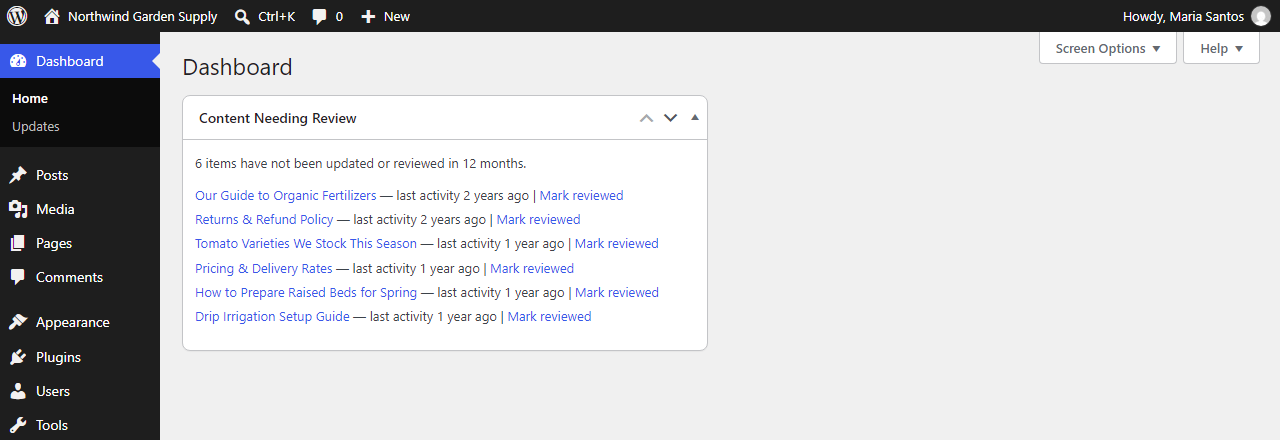
- A dashboard widget lists the oldest published content that has not been updated or reviewed within the interval.
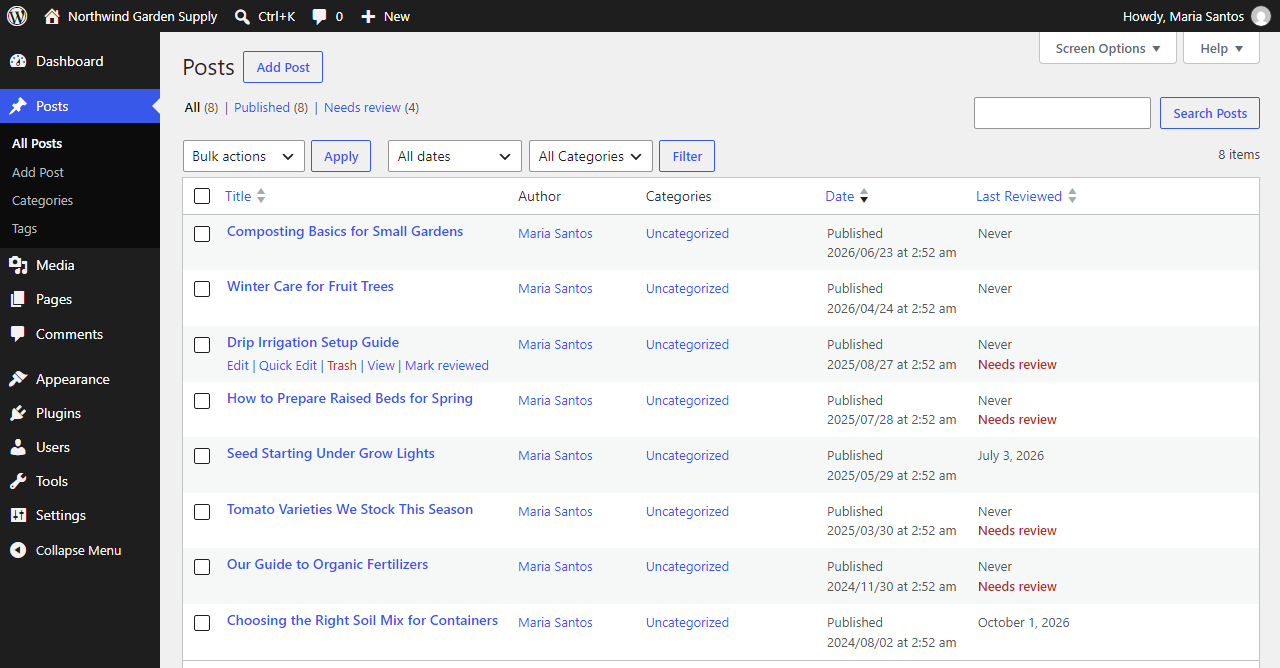
- A “Last Reviewed” column and a “Needs review” flag appear in the post list screens.
- A “Needs review” link above the post list shows only stale content, and the “Last Reviewed” column can be sorted (never-reviewed items first).
- One click on “Mark reviewed” records a review date without changing the post’s modified date, so content you have confirmed is still accurate does not appear freshly edited to readers or search engines.
Lightweight by design
- Admin-only. No front-end scripts, styles or queries.
- No external requests, no tracking, no ads.
- Uses core WordPress APIs and a single post meta key.
- Removes all of its data on uninstall.
For developers
Hooks are available to extend the plugin:
ragodos_content_review_reminder_default_settings(filter): default settings array.ragodos_content_review_reminder_sanitize_settings(filter): sanitized settings, with the raw input.ragodos_content_review_reminder_settings_rows(action): output extra rows in the settings table.ragodos_content_review_reminder_stale_query_args(filter): WP_Query arguments for stale content.ragodos_content_review_reminder_widget_limit(filter): number of items in the dashboard widget.ragodos_content_review_reminder_post_reviewed(action): fires after a post is marked reviewed, with post ID and user ID.
Screenshots
Installation
- Upload the
ragodos-content-review-reminderfolder to/wp-content/plugins/, or install it from Plugins > Add New. - Activate the plugin.
- Go to Settings > Content Review to set the interval and post types.
- View the “Content Needing Review” widget on the Dashboard.
FAQ
-
Does marking content reviewed change the “Last updated” date?
-
No. The review date is stored separately. The post’s modified date is not touched.
-
Which content is checked?
-
Only published content of the post types you enable in the settings.
-
Who can mark content reviewed?
-
Any user who can edit that specific post.
-
What happens when I delete the plugin?
-
The plugin’s settings and all stored review dates are removed.
Reviews
There are no reviews for this plugin.
Contributors & Developers
“Ragodos Content Review Reminder” is open source software. The following people have contributed to this plugin.
Contributors
Translate “Ragodos Content Review Reminder” into your language.
Interested in development?
Browse the code, check out the SVN repository, or subscribe to the development log by RSS.
Changelog
1.1.0
- New: “Needs review (N)” view in the post list to show only stale content.
- New: Sort the post list by the “Last Reviewed” column.
1.0.1
- Fix: “Last Reviewed” column and “Mark reviewed” link now stay visible after Quick Edit.
- Fix: Dashboard widget count now matches the items the current user can edit.
- Fix: Uninstall now removes plugin data from every site on a multisite network.
1.0.0
- Initial release.