

Description
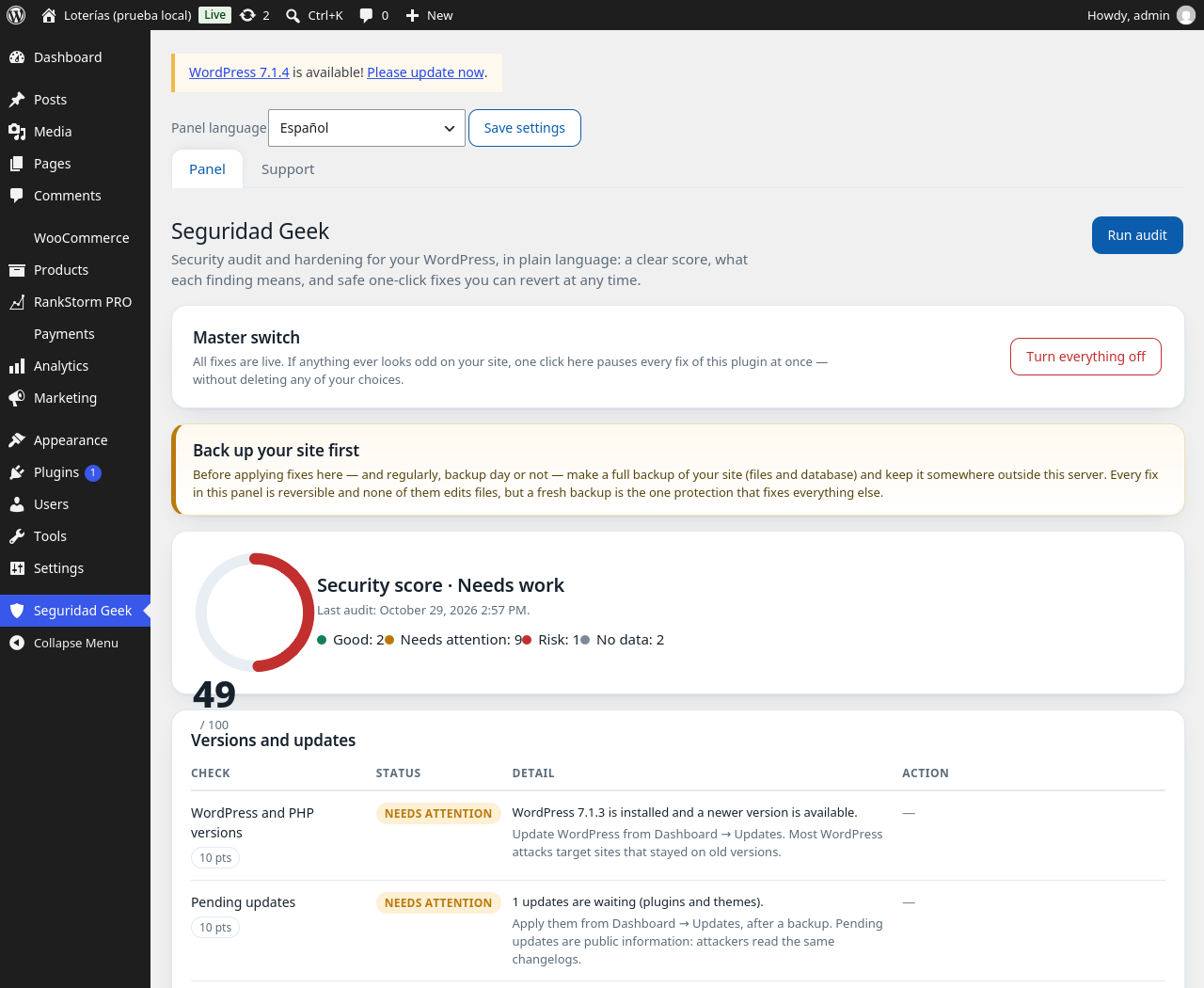
Tecnología Geek Seguridad Geek checks the security state of your WordPress site and explains it like a person, not a log file. Run the audit and you get a 0-100 security score, 16 checks grouped by area — versions and updates, access and accounts, what your site shows to the world, and hardening — and for every finding, what it means and why it matters, in plain language. Where a problem can be fixed safely, the panel offers a one-click fix — and every fix can be reverted just as easily.
Safety is the first design rule of this plugin. The audit only reads: it never changes anything. Every fix works through plain WordPress options, filters and hooks — no fix ever edits a file — and each one must pass a self-check right after being applied: if anything looks wrong, the fix turns itself off again and tells you. A master switch in the panel pauses every fix at once, without deleting any of your choices, in case anything ever looks odd. And the plugin is built to be light: it loads no CSS or JavaScript on the front end, its panel and audit load only inside wp-admin on its own screen, and the audit runs only when you press the button.
What is included:
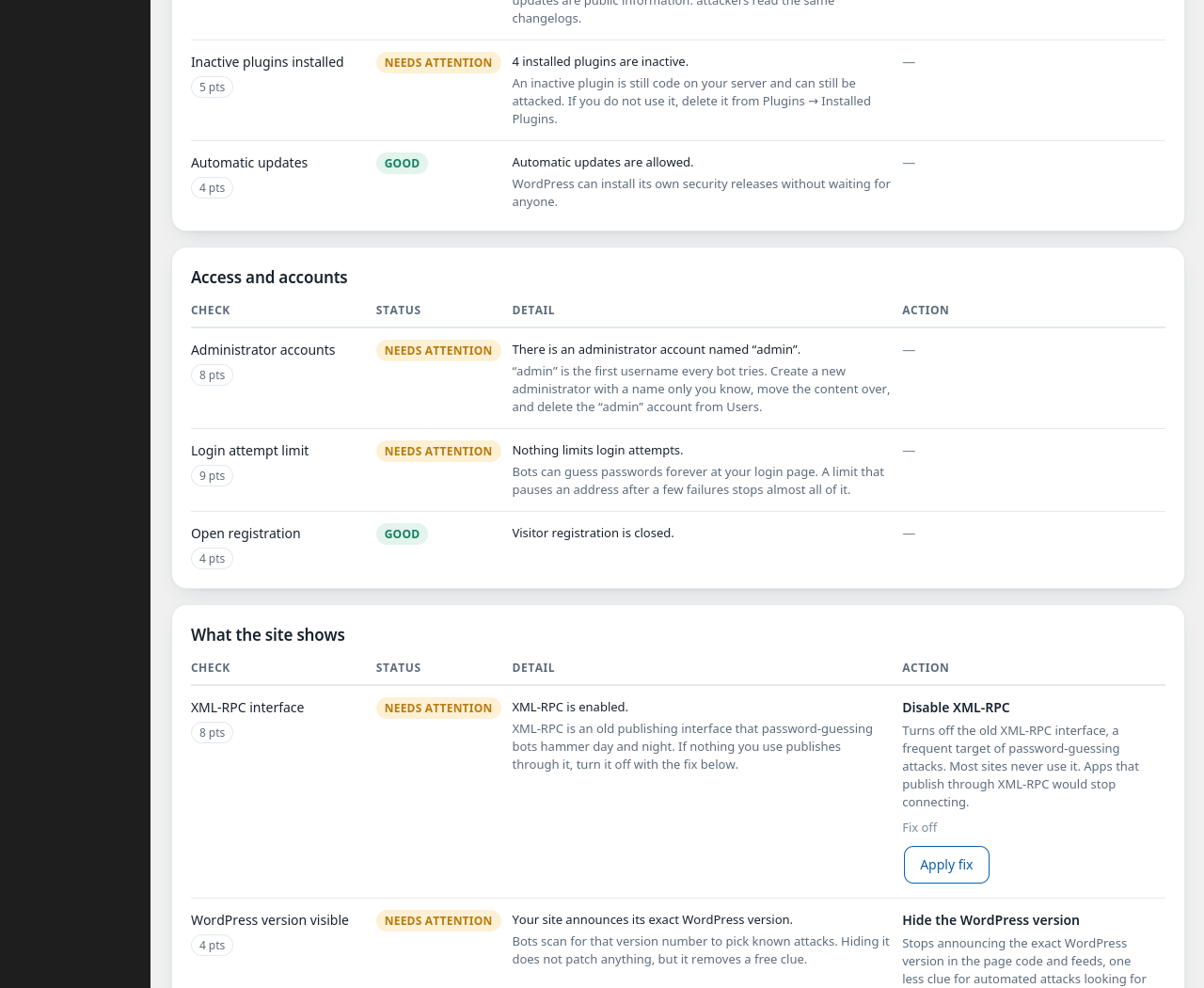
- Full audit with a 0-100 score: versions of WordPress and PHP, pending updates, inactive plugins, automatic updates, administrator accounts, login attempt limit detection, open registration, XML-RPC, the visible WordPress version, HTTPS, security headers, the REST user list, the uploads folder listing, the file editor, plus two informational checks (backup plugin and database prefix).
- Three one-click fixes, all reversible: disable XML-RPC, disable the file editor in wp-admin, and hide the WordPress version.
- Master switch: pause every fix at once, keep every choice.
- Backup reminder built into the panel — because the backup comes before everything.
- Panel in Spanish by default, with a language setting of its own (Spanish, English or automatic), whatever your site language is.
- “Optimized by” footer line: a small centered line — “This site is optimized by Seguridad Geek” — at the very end of your pages, in your site language, printed with a few inline styles and no extra files. It is on by default and has its own switch in the panel settings: turn it off and it disappears completely.
- Lightweight and clean: no ads, no tracking, no telemetry, and no CSS or JavaScript files loaded on the front end — the only public output is the small footer line above.
External services
This plugin connects to no external service at all.
- The audit makes at most two requests to your own site (its home page and its uploads folder address), from your own server, to see the headers and folder behavior exactly as a visitor would. The results stay in memory for that run; nothing is sent anywhere.
- No telemetry, no tracking, no usage statistics, no ads. Nothing about your site or your visitors ever leaves your server through this plugin.
Screenshots

Installation
- Upload the
tecnologia-geek-seguridad-geekfolder to/wp-content/plugins/or install the plugin from the WordPress panel. - Activate “Tecnología Geek Seguridad Geek” in the Plugins menu.
- Open the Seguridad Geek menu in wp-admin and press Run audit. Your score and findings appear, with the safe fixes one click away.
FAQ
-
Is this a firewall or an antivirus?
-
No, and it does not pretend to be. Tecnología Geek Seguridad Geek is an audit and hardening tool: it measures the security state of your site, explains it, and safely fixes the configuration problems that can be fixed with one click. It does not scan files for malware and it does not replace a firewall. Sites that need those should add them on top.
-
Can a fix break my site?
-
The fixes were designed so that they cannot: none of them edits files, all of them work through WordPress options and hooks, each one runs a self-check right after being applied and turns itself off automatically if the check fails, and the master switch in the panel pauses every fix at once without deleting your choices. Deactivating the plugin neutralizes every fix too.
-
Why does the panel insist on backups?
-
Because a current, tested backup is the one measure that recovers a site from almost anything — including mistakes that have nothing to do with this plugin. The reminder is permanent on purpose.
-
Does it slow my site down?
-
No. The front end loads no CSS or JavaScript files from this plugin; only the small gates of the fixes you turned on run there, plus the small footer line below. The audit runs only when you press its button, inside wp-admin.
-
Does the plugin put anything on my site?
-
One small line at the very end of your pages: “This site is optimized by Seguridad Geek”, with a link to the plugin page, in your site language. It loads no files — just the line with a few inline styles. It is on by default; the panel settings have a switch to turn it off, and the master switch pauses it too.
-
Which languages does it speak?
-
English is the source language and Spanish is fully translated. The panel has its own language setting: Spanish by default, English, or automatic (follow the site). Translations are delivered through the WordPress.org language packs.
Reviews
There are no reviews for this plugin.
Contributors & Developers
“Tecnología Geek Seguridad Geek” is open source software. The following people have contributed to this plugin.
Contributors
Translate “Tecnología Geek Seguridad Geek” into your language.
Interested in development?
Browse the code, check out the SVN repository, or subscribe to the development log by RSS.
Changelog
1.2.1
- Fix: the panel actions (run audit, master switch, language and the fix toggles) now reach their handlers correctly. No other changes.
1.2.0
- First release in the WordPress.org directory, as “Tecnología Geek Seguridad Geek”.
- Full 16-check audit with a weighted 0-100 score and plain-language findings, three reversible one-click fixes (XML-RPC, file editor, WordPress version), master switch, panel language setting (Spanish, English or automatic) and the “optimized by” footer line with its own on/off switch in the panel settings.
1.0.3
- New: the “optimized by” footer line — a small centered line at the very end of the site, in the site language, loading no files.
1.0.2
- The panel uses the full width of the admin area: score and summary on top, then a two-column layout — the findings as tables by area, and a sidebar with the per-area summary, the active fixes and shortcuts.
- New Support view in the panel: how to use the plugin, what each fix does and how to revert it, and the permanent backup reminder.
1.0.1
- The language selector sits at the very top of the panel, so the owner can switch the panel language the moment it opens.
- Brand standard: the panel footer shows the copyright line right under “Designed by Tecnología Geek”.
1.0.0
- First public release: 16-check audit with a weighted 0-100 score, plain-language findings, three reversible one-click fixes, master switch that pauses every fix at once, permanent backup reminder, zero front-end footprint, bilingual panel (Spanish by default).