

Description
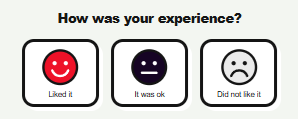
HappySmilePro adds a simple satisfaction meter to your website. Visitors click one of three smileys: liked it, it was ok or did not like it. After voting they see a thank-you message.
Features
- Three smiley buttons with a thank-you message
- Results in your dashboard: totals, percentage of happy visitors and results by page
- Show the meter at the bottom of every page, after page and post content, or only where you place the shortcode
- Shortcode
[happysmilepro]with an optional custom question:[happysmilepro question="Was this helpful?"] - Choose the colour of each smiley, the button shadow and the outlines
- Make the buttons smaller or larger (50–200%)
- English and Finnish interface (English by default, or follow the site language)
- Lightweight: no external services, no tracking, no cookies
Privacy
HappySmilePro does not store IP addresses or any other personal data. For each vote it stores only the page, the choice and the time. To limit spam, a one-way hash of the visitor’s IP address, the page and your site’s security keys is kept in a temporary WordPress transient for 24 hours. The visitor’s browser also stores a small local flag (localStorage) so the buttons are not shown again after voting. No data is sent to any third party.
Screenshots

Installation
- Upload the plugin through Plugins Add New Upload Plugin, or install it from the plugin directory.
- Activate HappySmilePro.
- The meter now appears at the bottom of every page. Open HappySmilePro in the admin menu to see results and change settings.
FAQ
-
How do I show the meter only on some pages?
-
Set Where to show to Shortcode only and add
[happysmilepro]to the pages where you want it. -
Does it work with caching plugins?
-
Yes. Voting does not depend on a nonce that could expire on a cached page.
-
How many times can a visitor vote?
-
One vote per page per IP address per day is accepted. The visitor’s browser also remembers that they have voted. On a shared network (for example an office) this can limit the votes of several people.
-
Can I change the language?
-
Yes. Go to HappySmilePro Settings Language and choose English, Finnish, or follow the site language.
-
Can I reset the results?
-
Yes. Use the Reset results button on the HappySmilePro page.
-
What happens to my data if I delete the plugin?
-
All votes and settings are removed when you delete the plugin from the Plugins page. Deactivating keeps the data.
Reviews
There are no reviews for this plugin.
Contributors & Developers
“HappySmilePro” is open source software. The following people have contributed to this plugin.
Contributors
Translate “HappySmilePro” into your language.
Interested in development?
Browse the code, check out the SVN repository, or subscribe to the development log by RSS.
Changelog
1.3.0
- First release in the plugin directory.
- English and Finnish interface.
- Colour and button size settings.
- Data from earlier test versions is migrated automatically.