
Description
Fstyle Static HTML Export crawls your own site and saves every page, together with the CSS, JavaScript, images and other files it uses, as plain HTML files. You can upload the result to any web server or open it locally.
Features
- Fast, concurrent fetching. Several pages are fetched at the same time (configurable). Static files under wp-content and wp-includes are copied straight from disk instead of over HTTP.
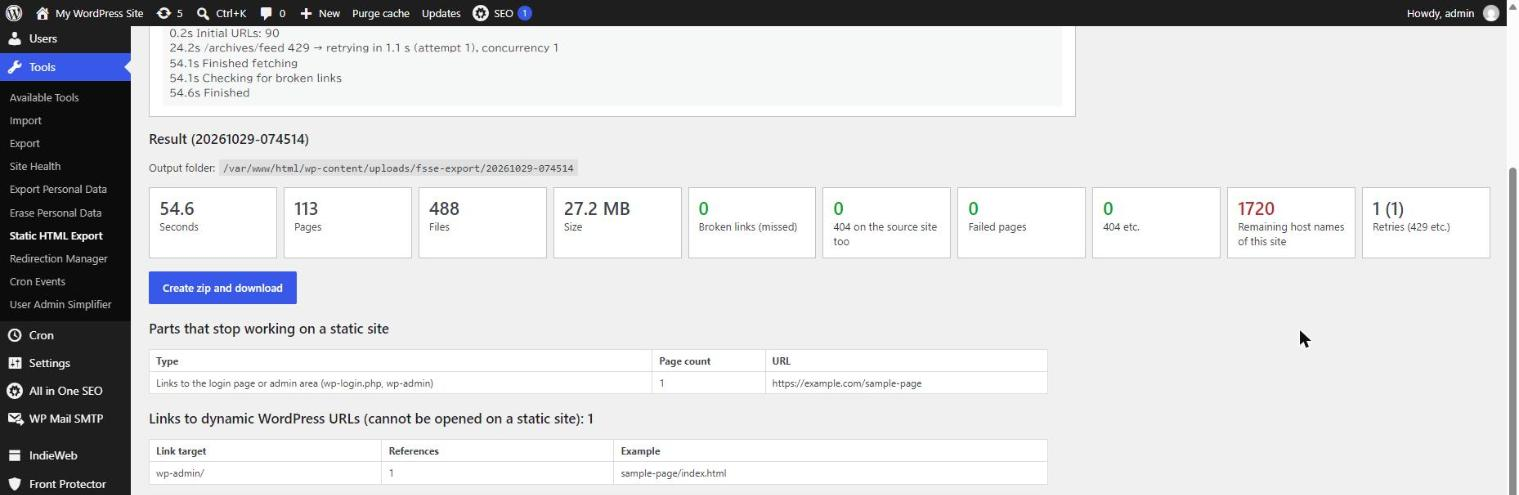
- Automatic retries on 429 and 503. When the server answers “Too Many Requests” or “Service Unavailable” (or a request times out), the page is not skipped. The plugin waits (it honors Retry-After), lowers the number of concurrent requests, and tries again. Once requests succeed again, the concurrency is raised step by step.
- Broken link report. After the export, every internal link and file reference in the exported HTML and CSS is checked. Missing files are listed, separately from links that are also broken on the original site, pages that could not be fetched, and links to dynamic WordPress URLs.
- Relative or absolute URLs. Export with relative URLs, so the folder works from any location, or rewrite all URLs to the domain where the static site will be published. Optionally add index.html to relative links, so the folder can be browsed directly from disk.
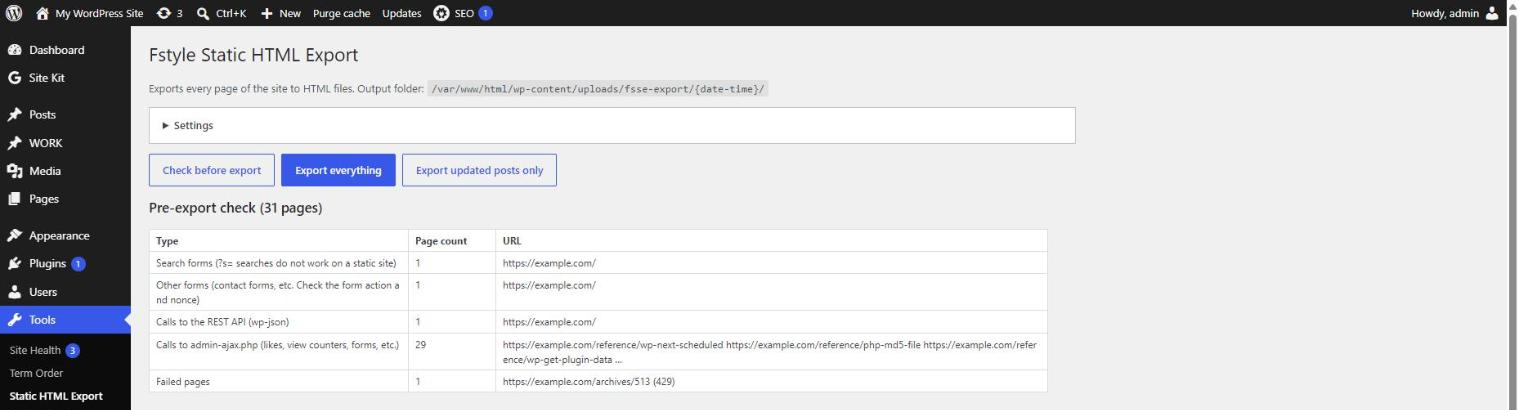
- Pre-export check. Finds parts that will stop working on a static site, such as comment forms, search forms, contact forms, admin-ajax.php and REST API calls, and nonces.
- Resumable. Progress is saved continuously. If the browser is closed or a request fails, the export can be resumed where it stopped.
- Updated posts only. Re-export only the posts that changed since the previous export, reusing the rest.
- Zip download of the finished export.
- WP-CLI support. Run
wp fsse exportto export without the time limits of a web request.
The exported files are saved in wp-content/uploads/fsse-export/{date-time}/. The plugin places .htaccess and an empty index.html in that folder so that the files cannot be accessed from outside. On nginx, .htaccess is not used: configure the server so that this folder cannot be accessed from outside.
WP-CLI
wp fsse export [--concurrency=<n>] [--url-mode=<relative|absolute>] [--target=<url>] [--alias=<hosts>] [--exclude=<prefixes>] [--changed] [--resume=<id>] [--dir-index] [--skip-ssl-verify] [--zip] [--json]

wp fsse report <id> prints the result of an export as JSON.
External services
This plugin does not connect to any third-party or external service. It only sends HTTP requests to your own site (the home URL and the domains you list as “Domains treated as this site”) to fetch the pages it exports. No data is sent to the plugin author or anyone else.
The plugin removes some WordPress head links from the exported HTML, such as <link rel="https://api.w.org/">. This only matches the text of that link in your own pages; the plugin never sends a request to api.w.org.
Screenshots


Installation
- Upload the
fstyle-static-exportfolder to/wp-content/plugins/, or install the plugin from the Plugins screen. - Activate the plugin.
- Go to Tools > Static HTML Export.
- Optionally click Check before export to see which parts of your site will not work as static HTML.
- Click Export everything. Keep the page open until the export has finished, then download the zip or copy the folder.
On shared hosting, start with 2 to 3 concurrent requests. On a local copy of the site you can use more (WP-CLI uses 12 by default).
FAQ
-
Does the plugin send any data to external services?
-
No. The plugin only sends HTTP requests to your own site (the home URL and the domains you list as “Domains treated as this site”). Nothing is sent to the plugin author or any third party, and no tracking is included.
-
What does not work on a static site?
-
Anything that needs PHP or the database when a visitor uses it: comment forms, the built-in search, contact forms, login, admin-ajax.php and REST API calls (likes, view counters, infinite scroll, etc.), and nonces (they keep the value from the export time and are rejected after a few days). The pre-export check and the result screen list the pages where these were found, so you can replace them (for example with an external form service) or exclude those URLs.
-
Where are the files saved? Are they deleted when I uninstall the plugin?
-
In
wp-content/uploads/fsse-export/. The plugin adds.htaccess(Apache) and an emptyindex.htmlto this folder so that the exported files and zip files cannot be opened directly from outside; download the zip from the plugin screen. On nginx, configure the server so that this folder cannot be accessed from outside. Uninstalling the plugin deletes only its settings. The exported files are kept; delete the folder yourself if you no longer need it. -
The export stopped in the middle.
-
Click Resume. Progress is saved after every step. If your server limits requests, lower the number of concurrent requests in the settings. With WP-CLI, use
wp fsse export --resume=<id>. -
My site uses a self-signed certificate in a local environment.
-
SSL certificates are verified by default. If your local copy of the site uses a self-signed certificate, the requests to your own site will fail. In that case, check Do not verify SSL certificates in the settings (it is off by default), use
wp fsse export --skip-ssl-verify, or add this filter:add_filter( 'fsse_verify_ssl', '__return_false' );. Do not turn verification off on a public site. -
Is the plugin translated?
-
The plugin is translation-ready (text domain
fstyle-static-export). Translations are provided through translate.wordpress.org.
Reviews
There are no reviews for this plugin.
Contributors & Developers
“Fstyle Static HTML Export” is open source software. The following people have contributed to this plugin.
Contributors
Translate “Fstyle Static HTML Export” into your language.
Interested in development?
Browse the code, check out the SVN repository, or subscribe to the development log by RSS.
Changelog
0.3.3
- The export folder (wp-content/uploads/fsse-export) is now protected from direct access:
.htaccessand an emptyindex.htmlare added if they do not exist yet (existing files are not overwritten), and an emptyindex.htmlis added to each export folder. A notice is shown when they cannot be written. On nginx, block access to the folder in the server settings. - The examples of “Remaining URLs of this site” in the result are shorter: about 40 characters around the match, at most 3 per row.
0.3.2
- Translation files are no longer bundled. Translations are provided through translate.wordpress.org.
- Removed an unnecessary include of wp-admin/includes/file.php.
- Added the “External services” section to the readme.
0.3.1
- Requests to your own site now use the Requests library bundled with WordPress instead of calling cURL directly.
- The URL entered for “Absolute URLs” is sanitized before it is saved.
0.3.0
- All text is now in English and translatable. A Japanese translation is included.
- SSL certificates are verified by default. For local environments with a self-signed certificate, verification can be turned off in the settings, with
--skip-ssl-verify, or with the newfsse_verify_sslfilter. - Files are written with WP_Filesystem.
- Settings are deleted when the plugin is uninstalled.
- Added readme.txt.
0.2.0
- Faster recovery after 429 responses: concurrency is lowered at most once per second and raised by 1.5 times after a series of successful requests.
- New option to add index.html to relative links (settings screen and
wp fsse export --dir-index).
0.1.0
- First prototype: export screen, WP-CLI command, retries on 429/503, broken link report.