

Description
Online Developer – Marketplace Connector for Skroutz connects your WooCommerce store to the Skroutz marketplace (Greece and Cyprus). Orders placed through Skroutz Smart Cart appear in WooCommerce automatically, in real time, and your product catalog is published to Skroutz through an always up-to-date XML feed.
No manual order entry and no copy-pasting between dashboards: Skroutz notifies your store through a webhook every time an order is placed or changes, and the plugin creates or updates the matching WooCommerce order.
Skroutz Smart Cart orders
- Receives Skroutz
new_orderandorder_updatedevents in real time through a secure webhook. - Creates the WooCommerce order on the first event and keeps it in sync on every following one: order status, courier, tracking codes, shipping voucher, fees and pickup details.
- Billing details come from the invoice information when the customer asks for an invoice, otherwise from the customer’s address.
- Detailed shipping data: street, number, floor, postcode, city, Greek region derived from the postcode, carrier collection-point pickup, courier, tracking codes, voucher link, pickup window and address, number of parcels.
- Detects the requested document type: receipt, invoice, Article 39a invoice or VIES invoice.
- Correct VAT: Skroutz sends prices with VAT included; the plugin stores the net price using the rate of the matching WooCommerce tax class, and WooCommerce calculates the tax as usual.
- Matches Skroutz line items to your products by SKU.
- Adds a “Dispatched” order status if your store doesn’t already have one.
- Duplicate deliveries are detected and ignored, so an order is never created twice.
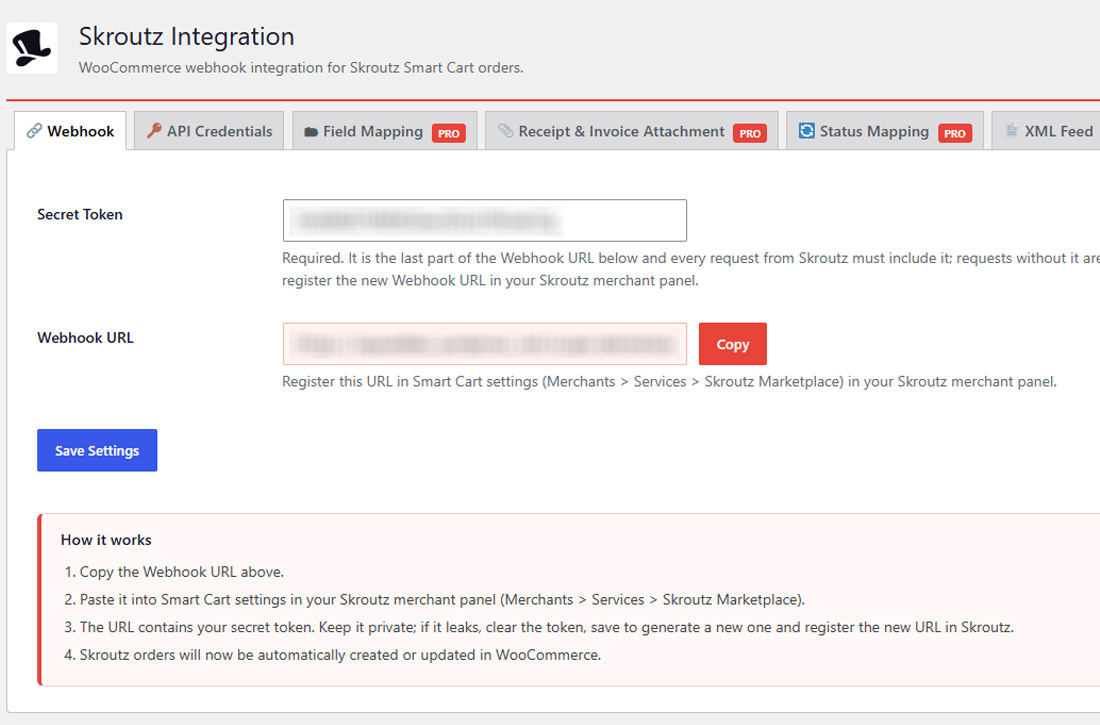
- The webhook URL is protected by a secret token, generated automatically; requests without it are rejected.
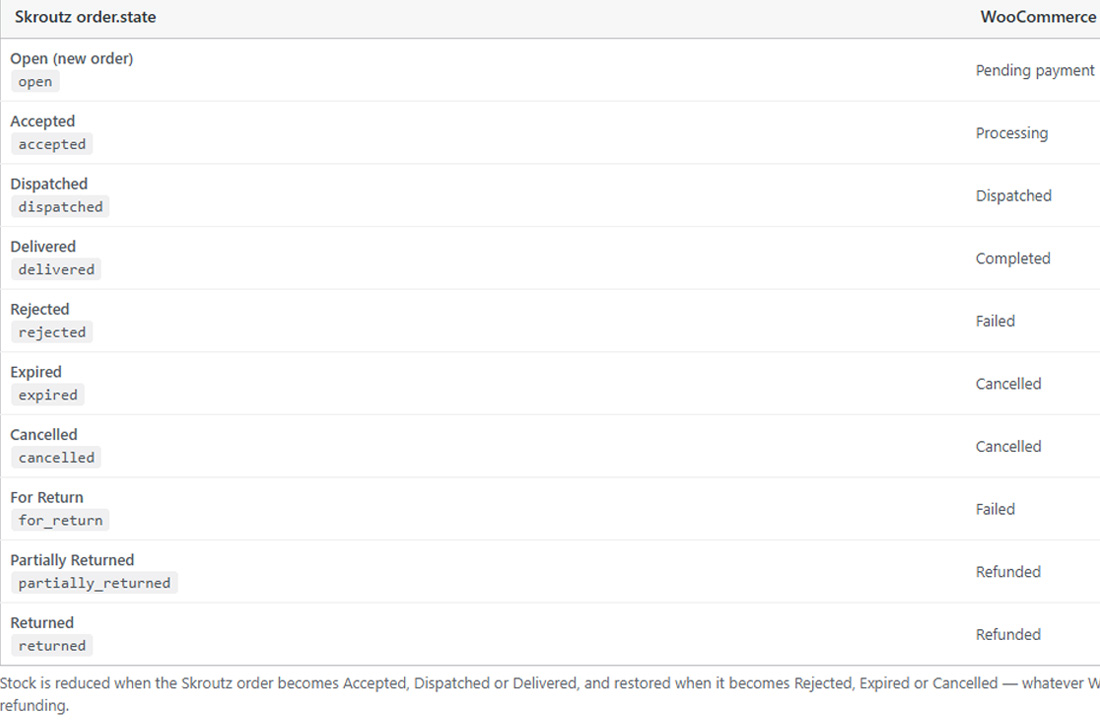
- Stock is reduced when a Skroutz order is accepted and restored when it is rejected, expired or cancelled.
Skroutz XML product feed
- Generates the Skroutz XML file of all your published products with one click, with a live progress bar.
- Built for large catalogs: the file is generated in small batches and the progress is saved after each one. If the connection drops or the server times out, generation retries automatically from the exact point where it stopped, and an interrupted run can be resumed at any time.
- Always current: whenever a product is edited or sold, its entry in the feed and the feed’s creation date are refreshed automatically within a minute.
- Includes ID, name, SKU (as EAN), MPN, image, product link, full category path, brand (WooCommerce Brands), description, availability, stock quantity, weight, and price with VAT.
- Adds “MPN (part number)” and “Skroutz availability” fields to every product, right under the SKU.
- Variable products are listed once, with their lowest price and total stock.
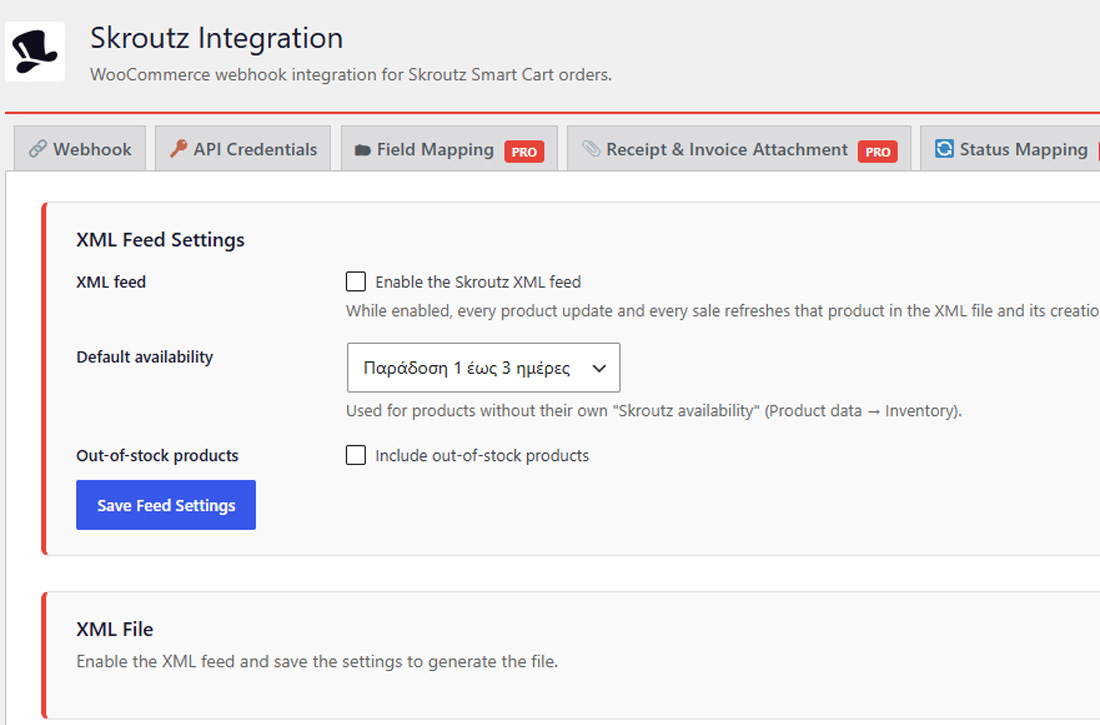
- Choose a default availability and whether out-of-stock products are included.
- Turn the feed on or off at any time; turning it off removes the XML file.
Order management tools
- “Skroutz ID” column and search by Skroutz order code on the WooCommerce orders screen.
- “View on Skroutz” button that opens the order in your Skroutz merchant panel.
- “Skroutz” box on the order screen with the Skroutz code, courier and tracking codes.
- Every webhook event and error is logged in WooCommerce Status Logs.
Compatibility
- WooCommerce High-Performance Order Storage (HPOS) and the classic orders screen.
- WordPress 6.5+, WooCommerce 7.0+, PHP 7.4+.
- Translation-ready.
Pro add-on
Everything above is free and fully functional. The optional Pro add-on adds:
- Editable field mapping: VAT tax classes, product matching by SKU or any meta key, document type values and unlimited custom fields.
- Editable order status mapping, including custom statuses.
- Receipt & credit invoice attachment: send receipts and credit invoices to Skroutz from the orders list or the order screen, from your computer or automatically from a folder on your server, one by one or in bulk.
- XML feed price rules: increase or decrease all prices by a percentage or a fixed amount.
- XML feed mapping: take any element’s value from any product field, attribute, taxonomy or meta key, and add your own elements.
- XML feed exceptions: leave out chosen categories and SKUs.
This plugin is developed by Online Developer and is not affiliated with or endorsed by Skroutz S.A.
External services
This plugin connects your store to services operated by Skroutz S.A. (“Skroutz”), the company behind the Skroutz marketplace. It does not contact any server when it is activated, and it sends nothing anywhere until you set up the features below.
Skroutz terms of use: https://www.skroutz.gr/terms
Skroutz merchant agreement (terms for sellers): https://merchants.skroutz.gr/merchants/terms
Skroutz privacy policy: https://www.skroutz.gr/privacy
1. Skroutz Smart Cart webhook (incoming requests from Skroutz)
What it is and why: Skroutz notifies your store when a Smart Cart order is placed or changes, so the plugin can create or update the matching WooCommerce order.
When: only after you register the Webhook URL (Skroutz Webhook) in your Skroutz merchant panel. Skroutz then sends a request every time one of your orders is created or updated.
What data: Skroutz sends the order data to your site’s REST endpoint /wp-json/skroutz/v1/webhook/<secret token>: order code and state, customer name, phone, shipping and billing addresses, invoice details, line items, prices, courier, tracking codes and pickup details. The plugin stores this data in the WooCommerce order. Your site answers with an HTTP status only; no store data is sent back.
2. Skroutz Orders API (outgoing requests to https://api.skroutz.gr)
What it is and why: the API lets a store send data about a Skroutz order back to Skroutz. This plugin contains the API client and the API token setting (Skroutz API Credentials); the free plugin itself makes no API request. The client is used by add-ons, such as the receipt / credit invoice upload of the Pro add-on.
When: only when you perform an action that needs it (for example, attaching a receipt to an order) and only if you have entered an API token. Never automatically, and never on activation.
What data: the API token you entered (as the authorization header), the Skroutz order code, and the data of that action (for example, the receipt or credit invoice file you attach).
3. Skroutz XML product feed (a file on your own site, read by Skroutz)
What it is and why: Skroutz lists your products on skroutz.gr from an XML file.
When: only when you enable the feed (Skroutz XML Feed). The plugin writes the file to your own site; Skroutz downloads it from there. The plugin itself sends nothing to Skroutz, and disabling the feed deletes the file.
What data: public catalog data of your published products: ID, name, SKU, MPN, image URL, product URL, category, brand, description, availability, stock quantity, weight and price.
4. Skroutz merchant panel links (https://merchants.skroutz.gr)
The “View on Skroutz” button on Skroutz orders is a plain link that opens the order in your Skroutz merchant panel in your browser. The plugin sends no data when it is shown.
Screenshots
Installation
Requirements
- WordPress 6.5 or newer
- WooCommerce 7.0 or newer
- PHP 7.4 or newer
- A Skroutz merchant account with Smart Cart enabled
- Pretty permalinks (Settings Permalinks: any structure other than “Plain”)
Install the plugin
- In your WordPress admin, go to Plugins Add New Plugin and search for “Online Developer – Marketplace Connector for Skroutz”.
- Click Install Now, then Activate. WooCommerce must already be installed and active.
- A new Skroutz menu appears in the admin sidebar.
To install manually, upload the online-developer-marketplace-connector-skroutz folder to /wp-content/plugins/ and activate it from the Plugins screen.
Receive Skroutz orders
- Go to Skroutz Webhook.
- A secret token is generated automatically and is already part of the Webhook URL. You can replace it with your own (at least 16 characters) and click Save Settings.
- Click Copy next to the Webhook URL.
- In your Skroutz merchant panel, open Merchants Services Skroutz Marketplace (Smart Cart settings) and paste the URL into the webhook setting.
- Make sure the SKU of each WooCommerce product matches the product code (
shop_uid) you send to Skroutz. - Check that the Standard, Reduced rate and Zero rate tax classes in WooCommerce Settings Tax have the correct rates.
New Skroutz orders now appear in WooCommerce Orders with a Skroutz icon and their Skroutz code.
Publish your products with the XML feed
- Go to Skroutz XML Feed.
- Tick Enable the Skroutz XML feed, choose a Default availability, decide whether to include out-of-stock products, and click Save Feed Settings.
- Click Generate XML and wait for the progress bar to reach 100%. If the connection drops, the plugin retries on its own; if you close the page, click Resume interrupted generation when you come back.
- Copy the XML file URL shown on the same screen and register it in your Skroutz merchant panel.
- Optional: on each product, fill in MPN (part number) and Skroutz availability under the SKU in Product data Inventory.
From then on the feed updates itself whenever a product changes or is sold.
API token (optional)
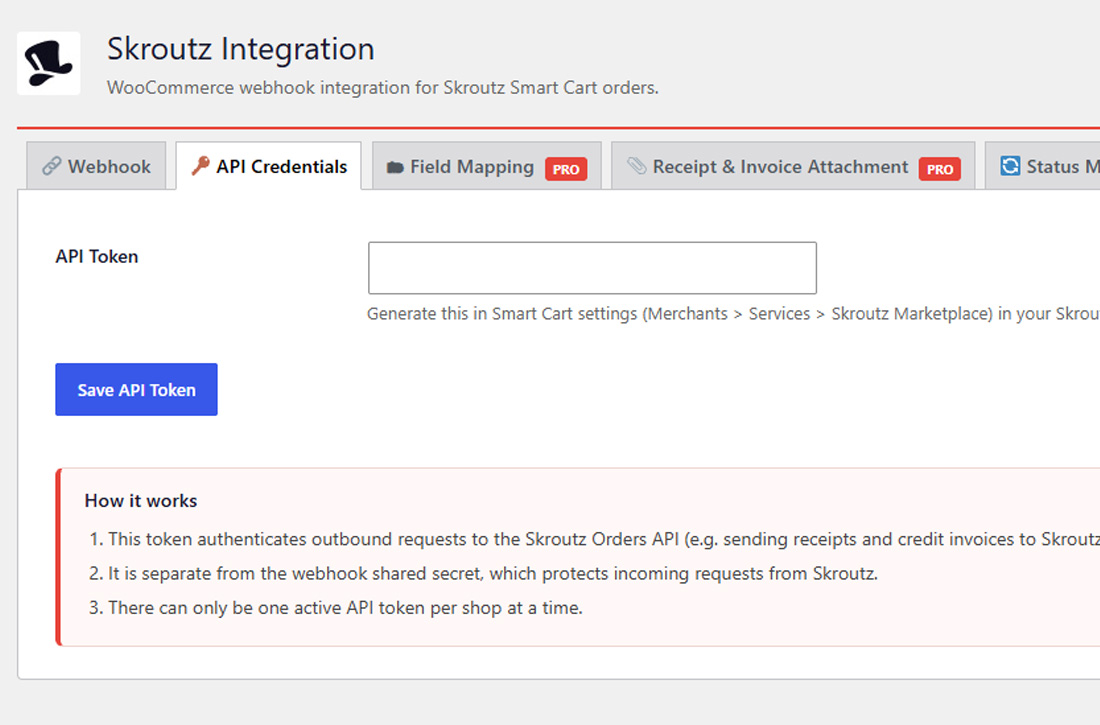
The Skroutz API Credentials tab stores your Skroutz Orders API token. It isn’t needed to receive orders or to publish the XML feed; it is used by features that send data to Skroutz, such as receipt upload in the Pro add-on.
FAQ
-
Which products are in the XML feed?
-
Published simple and variable products (variable products as one item, with the lowest variation price and the sum of the variations’ stock). Out-of-stock products are left out unless you enable “Include out-of-stock products”. Password-protected products are never included.
-
Where is the XML file?
-
In
wp-content/uploads/skroutz-feed/skroutz.xml. The exact URL, with a copy button, is on Skroutz XML Feed. -
Do I need a Skroutz merchant account?
-
Yes. The plugin receives orders from Skroutz Smart Cart, which is available to Skroutz merchants.
-
Is the API token required?
-
No. Receiving orders through the webhook doesn’t need it. The token is used only by features that call the Skroutz Orders API, such as the receipt / credit invoice upload in the Pro version.
-
Where can I see what happened with an order?
-
Every webhook event and error is logged in WooCommerce Status Logs, source
skroutz-woocommerce. -
The Webhook URL registered in Skroutz doesn’t contain the current secret token. Copy the URL again from Skroutz Webhook and update it in your Skroutz merchant panel. This also applies after upgrading from a version earlier than 3.0.0, where the token was optional.
-
I installed an earlier version (named “Integration for Skroutz”, or from the folder “integration-for-skroutz-and-woocommerce”). How do I switch?
-
Since 3.0.0 the plugin lives in the folder
online-developer-marketplace-connector-skroutz. Deactivate and delete the old copy, then install and activate the new one. All settings, the XML feed settings, order data and saved product fields are kept — they are stored in the database, not in the plugin folder. Generate the XML feed once more after switching. The new copy stays inactive, with a notice, while the old one is still active. -
I was using “Skroutz WooCommerce Integration” 1.x. How do I switch?
-
Deactivate and delete the old plugin, then install this one (and the Pro add-on if you had a license). All settings, saved mappings, order data and the license are kept — they are stored in the same options and order meta. This plugin stays inactive, with a notice, while the old one is still active.
Reviews
There are no reviews for this plugin.
Contributors & Developers
“Online Developer – Marketplace Connector for Skroutz” is open source software. The following people have contributed to this plugin.
Contributors
Translate “Online Developer – Marketplace Connector for Skroutz” into your language.
Interested in development?
Browse the code, check out the SVN repository, or subscribe to the development log by RSS.
Changelog
3.0.3
- Added
license.txt(GNU GPL v2 or later).
3.0.2
- PHP 7.4: replaced
str_starts_with()withstrpos()(the plugin supports PHP 7.4; WordPress 5.9+ polyfills the function, but the plugin no longer relies on the polyfill). - Readme: the External services section now explains each Skroutz service (webhook, Orders API, XML feed, merchant panel links): what it is, when it is used, what data is sent, with links to Skroutz’s terms of use, merchant agreement and privacy policy.
3.0.1
- Fixed: Skroutz webhook requests were rejected with 401 after 3.0.0. Skroutz drops the query string of the registered webhook URL, so
?skroutz_token=never reached the site. The token is now part of the URL path (/wp-json/skroutz/v1/webhook/<token>). Copy the Webhook URL again from Skroutz Webhook and update it in the Skroutz merchant panel. Requires pretty permalinks (any structure other than “Plain”).
3.0.0
- Renamed to “Online Developer – Marketplace Connector for Skroutz”; plugin folder and text domain
online-developer-marketplace-connector-skroutz. Settings and order data are kept. - Security: the webhook secret token is now mandatory. A token is generated automatically when none is set, and requests without the correct token are rejected (401). Sites that ran without a token must register the new Webhook URL in the Skroutz merchant panel; an admin notice reminds them.
- Translations are no longer bundled; they are provided by translate.wordpress.org.
2.2.5
- Fixed: stock was not reduced for Skroutz orders whose mapped WooCommerce status is not Processing, Completed or On hold (e.g. a custom “Ready to ship” status). WooCommerce only reduces stock on those three status changes, so the plugin now reduces stock itself when the Skroutz order becomes Accepted, Dispatched or Delivered, and restores it when the order becomes Rejected, Expired or Cancelled — regardless of the mapped status. Uses WooCommerce’s own stock functions, so stock is never reduced twice. Returned products are not restocked automatically.
- New filters:
skroutz_stock_reduce_states,skroutz_stock_restore_states.
2.2.4
- Plugin Check: annotated the
meta_keylabel array key in the read-only Field Mapping view (array key, not a query argument).
2.2.3
- Removed the
load_plugin_textdomain()call: WordPress loads the translations by itself (WordPress.org language packs, then the bundledlanguages/files through the plugin’s Domain Path). - Removed the
set_time_limit()call from XML feed generation; each request only processes a small batch of products, so it isn’t needed.
2.2.2
- Tested up to WordPress 7.1.
- Database queries on the plugin’s own XML feed table now pass the table name through
$wpdb->prepare()with the%iidentifier placeholder (WordPress 6.2+), as required by the WordPress.org plugin checks.
2.2.1
- Changed: plugin name shortened from “Integration for Skroutz and WooCommerce” to “Integration for Skroutz” (plugin header, admin notices, readme). No functional changes.
2.2.0
- Changed: plugin folder, main file and text domain renamed from
integration-for-skroutz-and-woocommercetointegration-for-skroutz, as required by the WordPress.org plugin directory (the slug may not contain “woocommerce”). The plugin name, settings, options, database table and order/product meta are unchanged. - Moving from 2.0.0–2.1.0: deactivate and delete the old copy, then install this one. The new copy stays inactive, with a notice, while the old one is active, instead of failing with a duplicate-class error.
- Translations renamed to
languages/integration-for-skroutz-*.po/.mo/.pot.
2.1.0
- Added: Skroutz XML product feed (Skroutz XML Feed): enable/disable, default availability, optional out-of-stock products, one-click generation with a progress bar.
- Generation is batched and resumable: progress is saved after every batch, network errors and timeouts are retried automatically from the last saved product, and an interrupted run can be resumed.
- Every product save, variation save, stock change (including sales), trash or delete refreshes that product in the file and its
created_atdate (background rebuild, debounced to one minute). - Added: “MPN (part number)” (
_part_number) and “Skroutz availability” (_skroutz_shipping_status) fields under the SKU in Product data Inventory. - Extension hooks:
skroutz_feed_include_product,skroutz_feed_item_data,skroutz_feed_category_separator,skroutz_feed_settings_sections.
2.0.0
- The plugin is now split into this free plugin and a separate Pro add-on. Free: webhook, API credentials, order creation and update with the default mappings, orders list column / search / “View on Skroutz”, order widget. Pro: editable field / status mapping, receipt and credit invoice attachment, license.
- Renamed to “Integration for Skroutz and WooCommerce” (folder and text domain
integration-for-skroutz-and-woocommerce) for the WordPress.org directory. Option names and order meta are unchanged, so existing settings and orders carry over. - The plugin stays inactive while the old “Skroutz WooCommerce Integration” 1.x is active, instead of failing with a duplicate-class error.
- Declares HPOS compatibility.
- PHP 7.4 compatibility: removed PHP 8-only
matchexpressions (the plugin already declared “Requires PHP: 7.4”). - The webhook shared secret is validated in the REST route’s permission callback.
- Extension hooks for the Pro add-on:
skroutz_settings_tabs,skroutz_settings_tab_renderer,skroutz_settings_notices,skroutz_order_actions,skroutz_field_map,skroutz_status_map,skroutz_product_lookup,skroutz_invoice_document_mapping,skroutz_tax_class_mapping,skroutz_loaded.
1.0.0 – 1.11.5
- Released as the single plugin “Skroutz WooCommerce Integration”.