

Description
Check content in the block editor, Classic Editor, and a dedicated dashboard. Review practical guidance for images, headings, links, tables, form fields, buttons, and media alternatives. Run individual checks without a license, account, trial limit, or Pro installation.
Free includes a saved-page inventory, HTML workspace, contrast calculator, JSON reports, Media Library description editing with conflict protection and Undo, and eight default-off theme improvements. Individual rendered-page checks use a locally bundled audit engine to inspect the current browser view, highlight nodes, and export findings.
Optional theme improvements cover skip links, visible keyboard focus, missing language/direction attributes, known WordPress search/comment labels, contextual read-more links, zoom, new-tab announcements, and link underlines. Disable and reload to reverse them.
This is an authoring and review assistant. Automated checks do not establish accessibility or legal compliance. Test keyboard access, screen-reader usability, image purpose, captions, interactive states, and other viewport sizes manually.
An optional, separately installed Pro add-on is planned for a later release through the developer website for managed scans, reviewed fixes, saved history, site-wide reports, team workflows, and weekly email summaries. The Free package does not contain paid implementations or a premium updater. Free remains usable independently. See README.md for scope and data details.
External services
Free performs no remote scan, licensing, AI, analytics, or premium update-service request. axe-core 4.14.0 runs locally, with its MPL-2.0 license and preferred source included under assets/vendor. W3C and rule-guidance links open only when clicked. Owner-configured merchant purchase links open an external HTTPS store only when clicked.
Credits
Developed by Viniideas Technologies (https://viniideas.com).
Copyright (c) 2026 Viniideas Technologies for original plugin code, licensed under GPLv2 or later.
axe-core is developed by Deque Systems, Inc.; its MPL-2.0 source, copyright, and third-party notices are included under assets/vendor.
Source code
The original JavaScript and CSS source is included directly in assets/ as readable,
unminified files. These are the same files loaded by WordPress; no compilation,
bundling, transpilation, or build command is required to edit or run them.
JavaScript: access.js, app.js, editor.js, pages.js, rendered.js, scanner.js,
theme.js, and toolkit.js. Stylesheets: assistant.css, rendered.css, and theme.css.
Paths above are relative to assets/.
The third-party axe-core 4.14.0 engine is distributed separately under
assets/vendor/: axe.min.js is loaded for authorized rendered audits; axe.js is
its bundled unminified distribution. Its license is AXE-LICENSE.txt and its
third-party notices are AXE-THIRD-PARTY.txt in that same directory.
Upstream development source and build instructions:
https://github.com/dequelabs/axe-core
Versioned source: https://github.com/dequelabs/axe-core/tree/v4.14.0
Published package: https://www.npmjs.com/package/axe-core/v/4.14.0
See assets/vendor/SOURCES.txt for version, source, and build details. The plugin
uses the upstream distribution unchanged and does not rebuild axe-core.
Screenshots

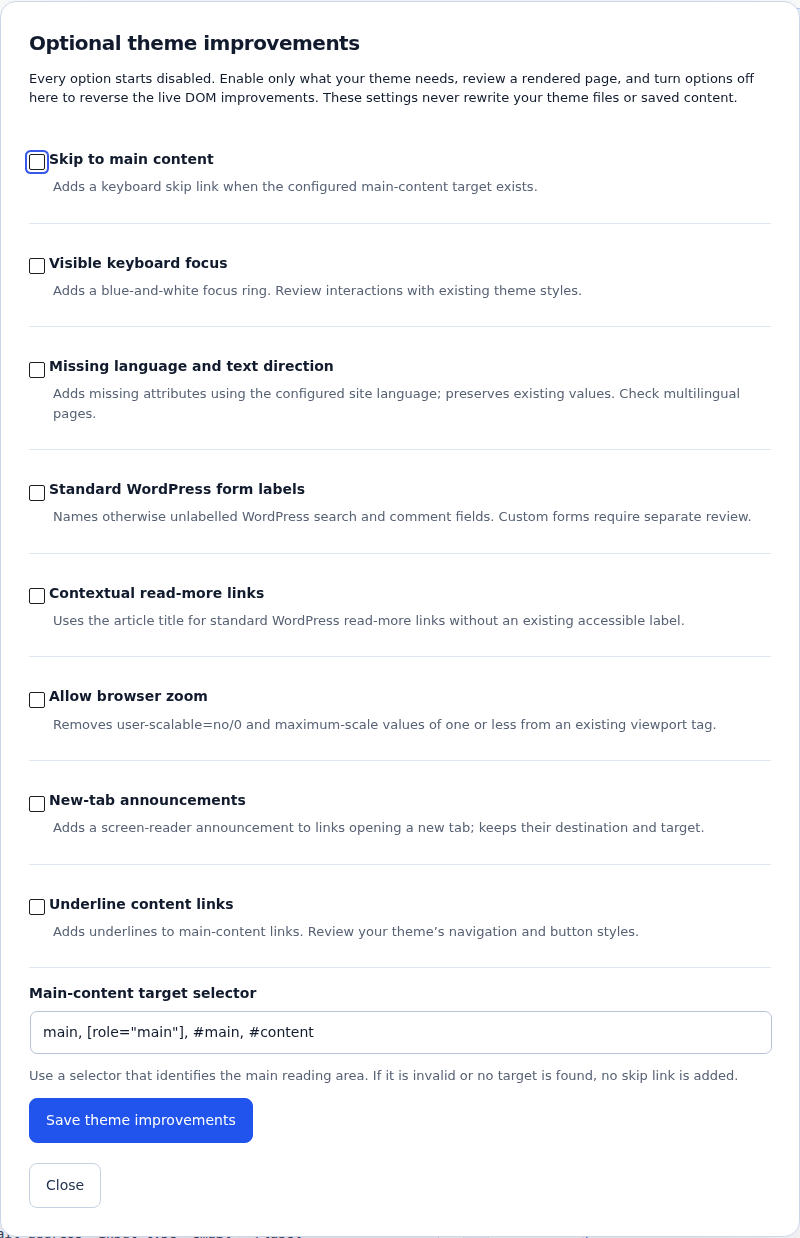
Installation
- Upload the Free ZIP through Plugins > Add New > Upload Plugin and activate.
- Open Accessibility or the Accessibility Assistant editor panel.
- Choose content, run a check, and review guidance before changing your page.
- Pro is coming soon. You do not need it to use any included Free feature.
FAQ
-
Does Free need a license or Pro?
-
No. Its included checks, Media Library tools, rendered checks, exports, and theme improvements work independently.
-
Can I enter a key to turn Free into Pro?
-
Install the separate Pro add-on first. Free includes no premium implementations. Both plugins then share the Accessibility dashboard.
-
Does it fix every accessibility problem?
-
No. Review the findings and optional theme changes in context. Automated checks cover only part of accessibility testing.
-
Does a Media Library edit change existing post images?
-
It changes attachment metadata. Descriptions embedded in existing post HTML require separate editorial review.
-
What does it save?
-
Theme settings, configured purchase URLs, standard WordPress image descriptions, and one attachment Undo snapshot. Existing paid data is preserved when Pro is absent. Deactivation preserves data; see README.md for removal.
Reviews
There are no reviews for this plugin.
Contributors & Developers
“Viniideas Accessibility Content Assistant” is open source software. The following people have contributed to this plugin.
Contributors
Translate “Viniideas Accessibility Content Assistant” into your language.
Interested in development?
Browse the code, check out the SVN repository, or subscribe to the development log by RSS.
Changelog
0.6.2
- Format all original JavaScript and CSS as directly editable, readable source.
- Document bundled source files and upstream audit-engine source/build locations.
- Preserve the audit-engine license under the conventional AXE-LICENSE.txt name.
0.6.1
- Align the plugin folder, main file, and translation domain with the WordPress.org assigned slug.
0.6.0
- Standalone Free distribution with complete free features and contextual Pro installation guidance.
- Paid modules, license verification, premium endpoints and update client moved into a separate add-on.
- Preserve existing keys, history, and settings across migration and add-on deactivation.
0.5.0
- Combined development build with site workspace, weekly reports, and optional owner-hosted licensing integration; superseded by the separated 0.6.1 packages.