Description
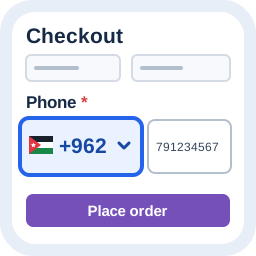
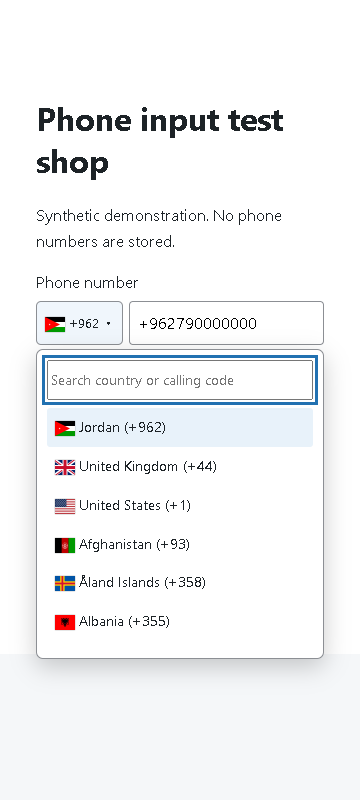
Alharthiweb Phone Country Code adds a searchable country selector beside ordinary telephone fields. Free automatically discovers type=”tel”, autocomplete=”tel”, and common phone names such as phone, mobile and customer_phone. WooCommerce Classic Checkout uses billing_phone; customer_phone is a general form convention, not a WooCommerce standard. Choose favorite countries, set a fallback, or paste an international number. Arabic and Persian digits and the 00 international prefix are accepted.
An international prefix takes priority over the billing address. Automatic suggestions never change the country after typing starts or after a manual choice. The plugin uses English by default, including on an Arabic site; the site translation is an explicit option. It does not change the site language or rewrite saved orders.
Free includes country names, flags, calling codes, search, favorites, safe input normalization, keyboard controls, and optional disclosed IP country suggestion. It does not perform detailed number validation.
Pro functionality is distributed separately from this Free package: local metadata validation with matching server checks for Classic Checkout billing_phone, optional mobile-only checks, additional field selectors, and custom plain-text messages. Other forms receive browser validation only. Pro availability and licensing are being prepared.
Checkout Blocks and Store API are not supported in this version. Format validity does not prove that a phone exists, belongs to a visitor, or can receive SMS. No OTP or SMS service is provided.
External services and privacy
No external service is required. Phone processing and country data are local. Automatic country suggestion stays off until an administrator explicitly chooses Enable with FreeIPAPI and saves. The free endpoint needs no account, API key or subscription and permits commercial use under its current terms. For an empty phone field without a known country, the browser makes at most one request per page to https://free.freeipapi.com/api/v1/json/ . The service receives the visitor IP address, website origin and normal connection metadata, never phone numbers, order details, names or emails. The plugin sends no credentials or referrer, uses only the countryCode mapped to local calling codes, and does not save the IP or response. FreeIPAPI may keep request logs. See https://freeipapi.com/privacy and https://freeipapi.com/terms .
The free service allows 10 requests per 10 seconds and 60 per minute, shared by domain and source IP, not per visitor; see https://freeipapi.com/rate-limit . Accuracy and availability are not guaranteed. After five seconds, an error or a rate limit, the current country stays usable; there is no retry or alternate provider. VPN results may reflect the network exit country. Add the service to your privacy notice and obtain visitor consent where required before enabling requests. A site integration can return false from the alhwpc_allow_country_suggestion filter to suppress requests for a visitor. The settings preview never contacts the provider.
The plugin stores configuration only. WooCommerce or the containing form controls phone storage. No external phone-validation request is included. Optional Freemius account and usage sharing is described separately below.
Source and licenses
First-party source is GPL-3.0-or-later. Country data derives from intl-tel-input 29.5.5 (MIT), https://github.com/jackocnr/intl-tel-input/tree/v29.5.5 . Its notice is included under licenses/. Editable frontend source, country data and readable classic bundles are included. The deterministic bundle recipe is described in SOURCE.txt.
Freemius Service
This distribution includes Freemius WordPress SDK 2.13.4 (GPLv3) for optional account connection, Pro license activation and Pro updates. Free phone controls work without an account: choose Skip. Optional usage sharing requires SDK consent. When you connect, the SDK explains the account and site information shared with Freemius; license activation sends the license and installation details needed for that service. Phone numbers and order data are not sent to Freemius by this plugin. The Free edition receives executable updates through WordPress.org. Install Pro using the normal WordPress plugin upload workflow.
Service: https://freemius.com/
Privacy: https://freemius.com/privacy/
Terms: https://freemius.com/terms/
SDK source and factory policy adaptations: vendor/freemius/POLICY-PATCH.txt and bundled human-readable PHP. No new product analytics or advertising tracking is added.
Screenshots
Installation
- Install and activate the ZIP through Plugins > Add New > Upload Plugin.
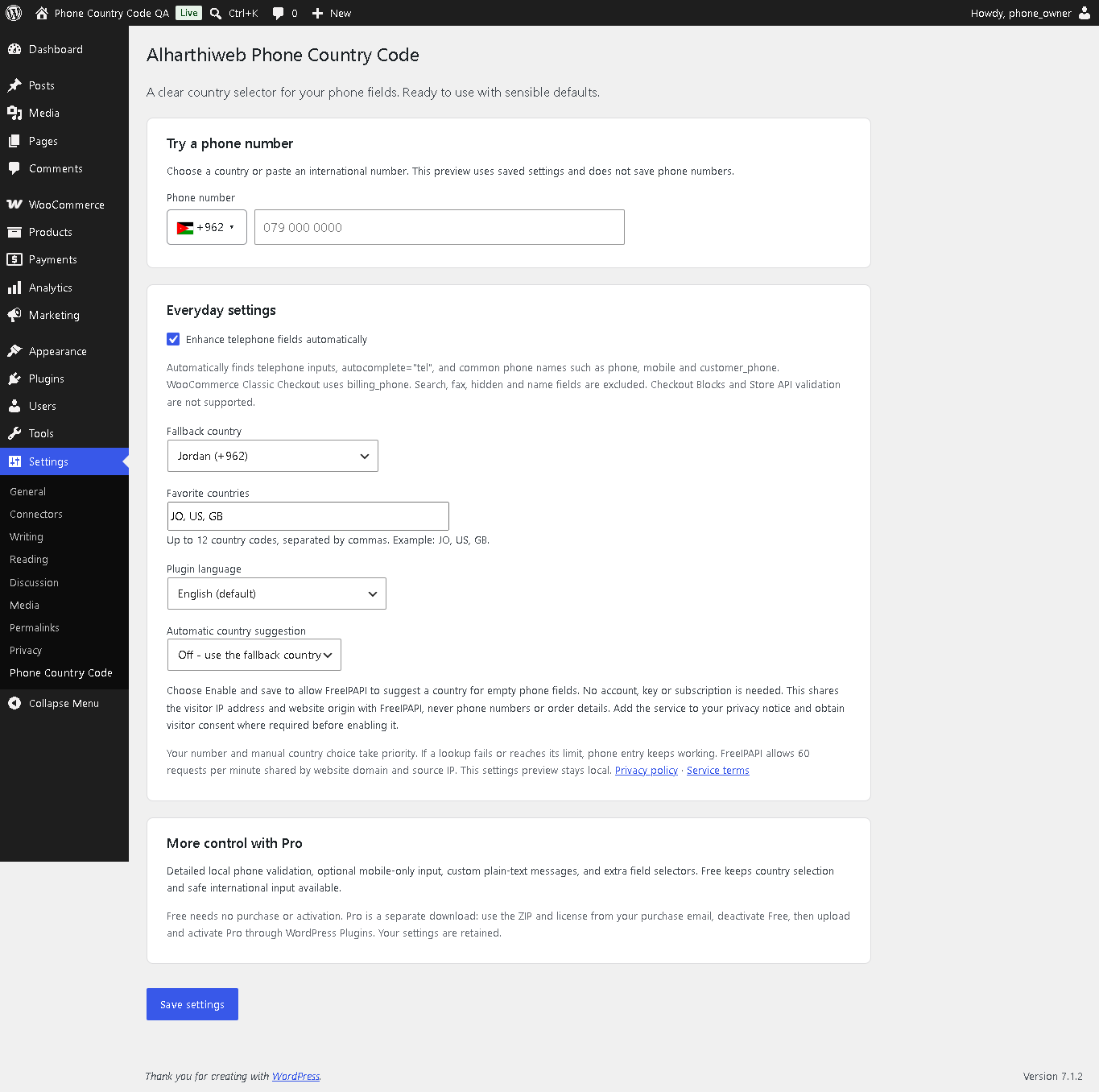
- Open Settings > Phone Country Code and try a number in the preview.
- Open a normal phone form or Classic Checkout. Defaults work immediately.
When replacing QBF Phone Country Selector, deactivate the old plugin first. Saved legacy settings are retained; historical order numbers are untouched. Do not activate two editions together.
FAQ
-
Does this require WooCommerce?
-
No. Ordinary telephone fields can use the country selector without WooCommerce. Server normalization is specifically integrated with WooCommerce Classic Checkout billing_phone.
-
How are custom fields discovered?
-
Free recognizes common phone/mobile field names, type=”tel”, autocomplete=”tel”, and clear phone labels. It excludes search, fax, hidden, disabled, readonly and name fields. Pro also accepts a plain field name, #id, .class or up to three simple selectors. Its settings preview counts eligible inputs on that settings page only, without reading values. Custom field enhancement does not add another form provider server validation or storage support.
Existing forms are observed in bounded form subtrees; startup rescans stop after 30 seconds. Forms inserted later can be discovered on focus, WooCommerce updated_checkout, or the existing QBFPhoneSelector.refresh() API. No document-wide DOM observer is used.
-
Does it validate Checkout Blocks?
-
No. Blocks and Store API validation are outside this version’s support. Additional CSS selectors do not add native Blocks support.
-
What happens to an international number?
-
A leading + or 00 is respected. A billing country or late IP response cannot replace it. A deliberate manual country change can replace its calling code.
-
Are mixed mobile and landline ranges rejected?
-
Pro accepts ranges that metadata cannot distinguish. Mobile-only does not promise SMS capability.
-
Does Free reformat every national phone pattern?
-
Free preserves some complex national formats in Argentina, Brazil, and Belarus, plus five-digit local forms in Norfolk Island, rather than guessing. Use an explicit international number for predictable formatting. Pro uses detailed local metadata for supported number patterns.
-
Does uninstall delete settings?
-
No. Configuration is retained so reinstalling or changing editions does not erase preferences. No historical order data is modified.
Reviews
There are no reviews for this plugin.
Contributors & Developers
“Alharthiweb Phone Country Code” is open source software. The following people have contributed to this plugin.
Contributors
Translate “Alharthiweb Phone Country Code” into your language.
Interested in development?
Browse the code, check out the SVN repository, or subscribe to the development log by RSS.
Changelog
1.8.7
- Exclude development build scripts from installable distributions; retain readable runtime asset sources.
1.8.6
- Make every pinned country name discoverable by WordPress translation tools using literal gettext strings.
- Preserve English defaults, explicit translation choice, country data and saved settings.
1.8.5
- Preserve native and shared SDK update callbacks using the product-scoped Free update boundary.
- Pin the Phone commerce adapter independently from other products.
1.8.4
- Add optional Freemius account consent and supported in-plugin Pro license navigation to the commercial distribution.
- Keep English plugin descriptions correctly directed on RTL sites while preserving custom Arabic text.
- Show a readable country code while local flags load or when the image is unavailable.
1.8.3
- Restore optional automatic country suggestion with FreeIPAPI’s commercial free endpoint and a concise provider approval choice.
- Preserve prior settings while requiring approval for the new provider; keep the admin preview local.
- Preserve provider approval and favorite countries when WordPress sanitizes a newly saved option twice.
- Bound each page to one lookup and a five-second deadline; preserve typed, prefilled and manual choices on late/error/rate-limited responses.
- Scope billing-country changes to the related billing phone instead of unrelated form fields.
1.8.2
- Restore decorated phone field names used by checkout and form builders.
- Load local country data and phone controls through conditional classic scripts, removing essential module-MIME and JSON-request dependencies.
- Keep local paid validation independent of module MIME support and recover bounded delayed configuration startup.
1.8.1
- Discover common phone/mobile names and telephone autocomplete safely; prioritize the actual billing_phone field.
- Handle delayed form inputs with bounded scans and form-only observation; keep helpers separate per field.
- Accept a plain custom field name, #id, .class or supported simple selector in Pro/Owner.
- Correct Tristan da Cunha area inference and use native TA metadata consistently.
- Preserve Norfolk Island five-digit local input in Free; detailed editions apply the metadata transform.
- Ignore IP-provider error payloads and disclose the current development-only keyless service limit.
1.8.0
- New English-first product identity and additive settings.
- Preserve explicit international prefixes and manual choices.
- Accept Arabic/Persian digits and 00 prefixes safely.
- Accessible local search and bounded dynamic field enhancement.
- Optional, disclosed IP country suggestion disabled by default.
- Separate Free, private Pro test and private Owner builds.